Here’s a stat that should make every ecommerce store owner pause: 73% of Australian online shoppers say they’re more likely to return to a brand that offers quick, helpful support. Not the brand with the cheapest prices. Not the one with the flashiest ads. The one that actually answers their question when something goes wrong.
What’s in This Article
And yet, most Shopify stores treat customer service as an afterthought. A shared inbox that someone checks between packing orders. A generic FAQ page that hasn’t been updated since launch. Maybe a chatbot that sends people in circles without ever solving anything.
The brands that are winning — the ones with repeat purchase rates north of 40% and customer lifetime values that keep climbing — have figured out that customer service isn’t a cost centre. It’s a growth engine. When you build support the right way, every ticket becomes an opportunity to create a customer who not only comes back, but brings their friends.
Why Customer Service Is Your Most Underrated Growth Channel
Most ecommerce founders obsess over acquisition. More ad spend, more traffic, more top-of-funnel. But here’s what the data actually shows: customers who receive excellent service have an 87% retention rate compared to just 41% for those who have a poor experience. That’s more than double.
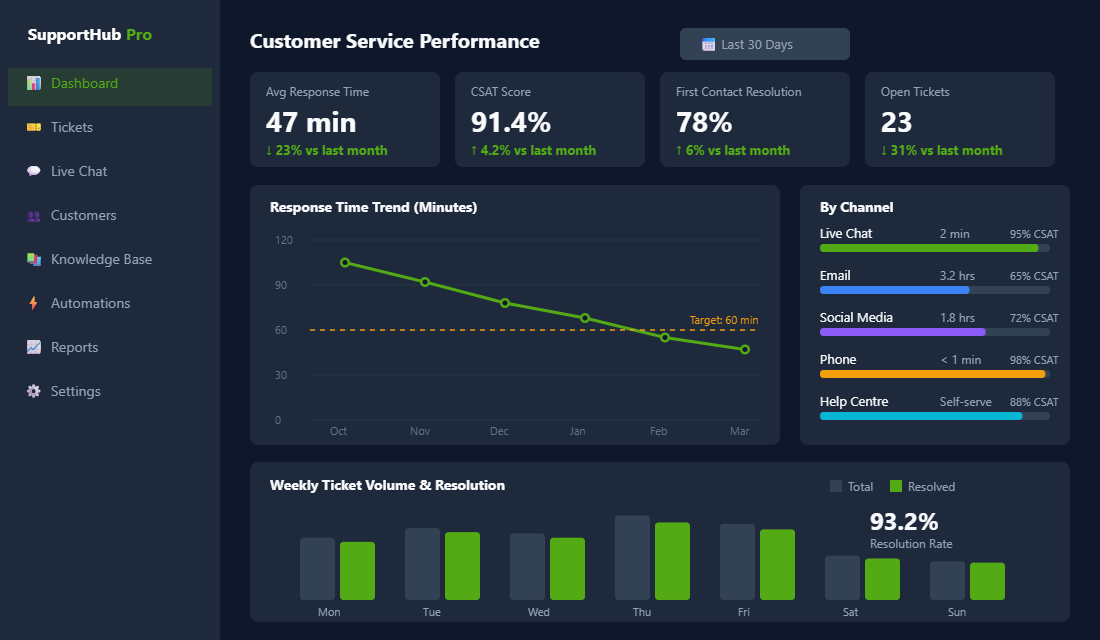
Think about what that means for your business. If you’re spending $50 to acquire a customer through Meta Ads and they churn after one purchase because of a bad support experience, you’ve effectively burned that $50. But if your support team turns that same customer into a repeat buyer who orders three or four times a year? Your effective acquisition cost drops to $12-15 per order.
According to research from Salesforce, 88% of customers say the experience a company provides is as important as its products or services. That’s not a soft metric — it directly impacts whether someone hits “buy” again or goes to your competitor.
The average ecommerce CSAT benchmark sits around 82%. Top-performing stores — the ones building real brands, not just pushing product — consistently hit 90% or above. The difference between those two numbers is the difference between a store that’s grinding and a store that’s compounding.
The Response Time Gap: Where Most Stores Lose Customers
Here’s the uncomfortable truth: 64% of online shoppers expect a response within one hour. The industry average first response time for ecommerce? Four to six hours. Some stores take 24 hours or more. Every hour you don’t respond, you’re haemorrhaging trust.
The data backs this up clearly. Stores that respond within one hour achieve 71% customer retention. Push that response time out to 24 hours and retention drops to 48%. That’s a 23-percentage-point gap — entirely driven by how quickly you show up when someone needs help.
This doesn’t mean you need a 24/7 call centre. It means you need systems. Here’s what a realistic response time framework looks like for a growing Shopify store:
- Live chat: under 2 minutes. This is the expectation. If you have live chat turned on, you need someone (or something) responding almost immediately. If you can’t staff it, turn it off during off-hours and let a bot collect details.
- Email: under 4 hours during business hours. Set an internal SLA and track it. Most helpdesks let you set up alerts when a ticket is approaching your time limit.
- Social media DMs: under 2 hours. People messaging you on Instagram or Facebook expect a faster response than email. If you’re not monitoring DMs, you’re leaving money on the table.
- Phone: answer within 3 rings or offer a callback. Nothing kills trust faster than hold music that goes nowhere. If phone isn’t your strength, use a callback widget instead.
The trick isn’t working harder — it’s setting up the right tools and automations so your team can hit these benchmarks without burning out.
Choosing the Right Helpdesk: Gorgias, Zendesk, and Beyond
If you’re still managing customer support from your Gmail inbox or Shopify’s built-in messaging, you’re making life unnecessarily hard for yourself. A proper helpdesk is the single most impactful investment you can make in your support operation.
For Shopify stores specifically, Gorgias is the standout choice. It was built from the ground up for ecommerce, which means it pulls in order data, shipping status, customer history, and lifetime value right into the ticket view. Your support agents don’t need to toggle between tabs — they can see exactly what someone ordered, when it shipped, and whether they’ve had issues before, all in one place.
Gorgias starts at around $10 USD per month for 10 tickets, scaling up based on volume. For most stores doing under 500 tickets a month, the Basic plan at $60/month covers what you need. The real value is in the Shopify integration — agents can process refunds, update orders, and apply discount codes without leaving the helpdesk.
Here’s how to set it up properly:
- Step 1: Connect your Shopify store. This takes about 2 minutes through the Shopify App Store. Once connected, Gorgias automatically pulls in customer and order data.
- Step 2: Set up your channels. Connect your support email, Facebook Messenger, Instagram DMs, and live chat widget. Centralising everything into one inbox is the whole point.
- Step 3: Create macros for your top 10 questions. Look at your last 100 support tickets. You’ll notice patterns — shipping ETA questions, return requests, sizing queries. Build templated responses (macros) for each one. A good macro still sounds human but saves your team 3-5 minutes per ticket.
- Step 4: Set up auto-responses for common triggers. “Where is my order?” tickets can be automatically answered with real-time tracking data pulled from Shopify. This alone can deflect 15-20% of your total ticket volume.
- Step 5: Configure SLA rules. Set response time targets by channel and priority level. Gorgias will flag tickets approaching their SLA deadline so nothing slips through the cracks.
If you’re scaling past 10 support agents or need enterprise features like custom reporting and role-based access, Zendesk is the next step up. It’s more expensive and takes longer to configure, but it handles complexity that Gorgias wasn’t designed for. For most Shopify stores doing under $5M in annual revenue, Gorgias is the better fit.
Help Scout is another solid option if email is your primary support channel. It has a cleaner interface than Zendesk and better collaboration features for small teams. It lacks the deep Shopify integration that Gorgias offers, but if you’re running a simpler operation, it gets the job done well.
Building Automations That Save Hours Without Losing the Human Touch
Automation in customer service gets a bad reputation because most stores do it badly. They set up a chatbot that can’t actually help anyone, or they send canned responses that feel robotic and dismissive. But done well, automation handles the routine stuff so your team can focus on the interactions that actually need a human.
According to Salesforce, about 30% of customer service cases are now resolved by AI, and that number is expected to hit 50% by 2027. The sweet spot for ecommerce stores right now is using AI to deflect 30-40% of routine enquiries while routing everything else to human agents. Go above that threshold and customer satisfaction starts dropping.
Here are the automations every Shopify store should have running:
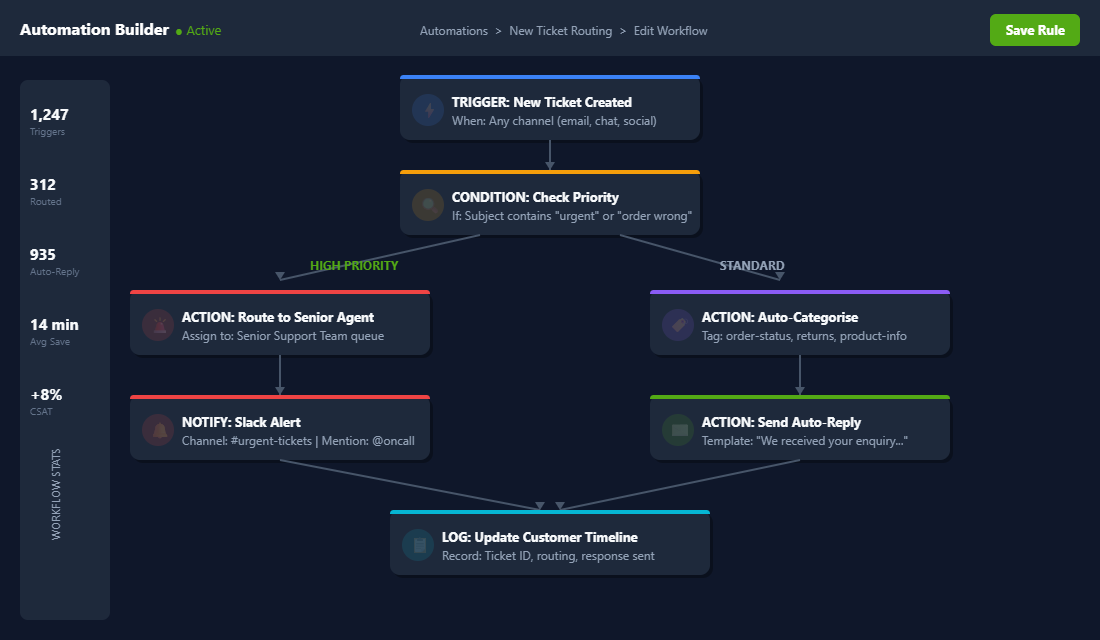
Order status auto-replies. “Where is my order?” is the number one support ticket for most ecommerce stores. In Gorgias, you can set up a rule that detects these tickets and automatically replies with the customer’s real tracking information pulled from Shopify. No human intervention needed.
Ticket tagging and routing. Use keyword detection to automatically tag incoming tickets as “returns,” “shipping,” “product question,” or “payment issue.” Then route them to the right person. Your returns specialist shouldn’t be answering product questions, and your product expert shouldn’t be processing refunds.
Priority escalation. Set up rules that flag tickets containing words like “urgent,” “legal,” “broken,” or “never buying again.” These should jump to the front of the queue and notify a senior team member. Catching an angry customer early is the difference between a one-star review and a save.
Post-resolution follow-ups. After closing a ticket, automatically send a brief CSAT survey 24 hours later. Keep it simple — one question, one click. “How would you rate your support experience?” This gives you the data you need to improve without annoying the customer.
After-hours acknowledgement. If someone emails at 11pm, don’t let their message sit in silence until morning. Set up an auto-reply that acknowledges receipt, sets expectations (“We’ll get back to you by 10am AEST”), and offers self-service links to your FAQ or help centre. This alone can reduce follow-up “did you get my email?” tickets by 40%.
The Self-Service Layer: How a Knowledge Base Deflects Tickets Before They’re Created
The best customer service interaction is the one that never needs to happen. Not because you’re ignoring customers, but because they found the answer themselves in 30 seconds.
A well-built knowledge base or help centre can deflect 20-30% of your total ticket volume. That’s not a guess — it’s a consistent benchmark across ecommerce brands that invest in self-service content.
Here’s what your help centre needs to cover at minimum:
- Shipping and delivery. Processing times, carrier options, tracking instructions, international shipping policies, and what to do if a package is lost or delayed. This is your highest-volume topic — make it thorough.
- Returns and exchanges. Your full policy written in plain English (not legal jargon), step-by-step instructions for initiating a return, timelines for refund processing, and any exceptions. Link directly to your returns portal if you have one.
- Sizing and product guides. Detailed size charts with measurements (not just S/M/L), care instructions, material information, and comparison guides if you sell similar products. Include customer photos where possible.
- Order management. How to track an order, change a shipping address, cancel or modify an order, and what happens if an item is out of stock.
- Payment and billing. Accepted payment methods, payment plan options (Afterpay, Zip), how to apply a discount code, and what to do about failed payments.
For Shopify stores, Gorgias Help Center (included with Gorgias plans) or HelpCenter by Taste (free Shopify app) are solid starting points. If you want something more solid, Zendesk Guide offers advanced analytics on which articles are being viewed and which searches are returning no results — gold for identifying content gaps.
Pro tip: review your help centre analytics monthly. Look at the articles with high view counts but low “was this helpful?” ratings. Those are the ones that need rewriting — they’re attracting traffic but not actually solving problems.
Training Your Team: Scripts, Tone, and the Art of Service Recovery
Tools only get you halfway. The other half is your people — and most ecommerce stores dramatically underinvest in training their support team.
Your support agents need three things to be effective: product knowledge (so they can answer questions confidently), process knowledge (so they know what they’re authorised to do), and tone training (so every interaction feels on-brand).
Here’s a tone framework that works well for Australian ecommerce brands:
- Warm but professional. “Hey Sarah, thanks for reaching out!” works. “Dear Valued Customer” doesn’t. Match the energy of your brand — if your marketing is casual and fun, your support should be too.
- Solution-first. Lead with what you can do, not what you can’t. “I’ve organised a replacement to ship out today” hits differently to “Unfortunately, our policy states…”
- Own the mistake. When something goes wrong (and it will), acknowledge it clearly. “That’s on us, and I’m sorry” followed by a concrete fix builds more trust than a perfect track record.
- Surprise with generosity. Empower your team to throw in a small discount code, free express shipping upgrade, or bonus sample when someone’s had a rough experience. The cost is tiny; the goodwill is massive.
Service recovery — turning a negative experience into a positive one — is where real brand loyalty gets built. Research shows that customers who have a problem resolved effectively are actually more loyal than customers who never had a problem at all. This is called the service recovery paradox, and it’s one of the most powerful dynamics in ecommerce.
Create a “recovery toolkit” for your team: a pre-approved list of actions they can take without needing manager approval. Things like issuing a $10 store credit, upgrading shipping, or sending a handwritten apology note. The faster an agent can resolve something, the less damage the experience does to the relationship. If you’re building out your support team for the first time, our guide to ecommerce team building and hiring covers the full roadmap from solo founder to scaling machine.
Measuring What Matters: The Customer Service Metrics That Drive Growth
You can’t improve what you don’t measure. But most stores either track nothing or track the wrong things. Here are the five metrics that actually matter for ecommerce customer service:
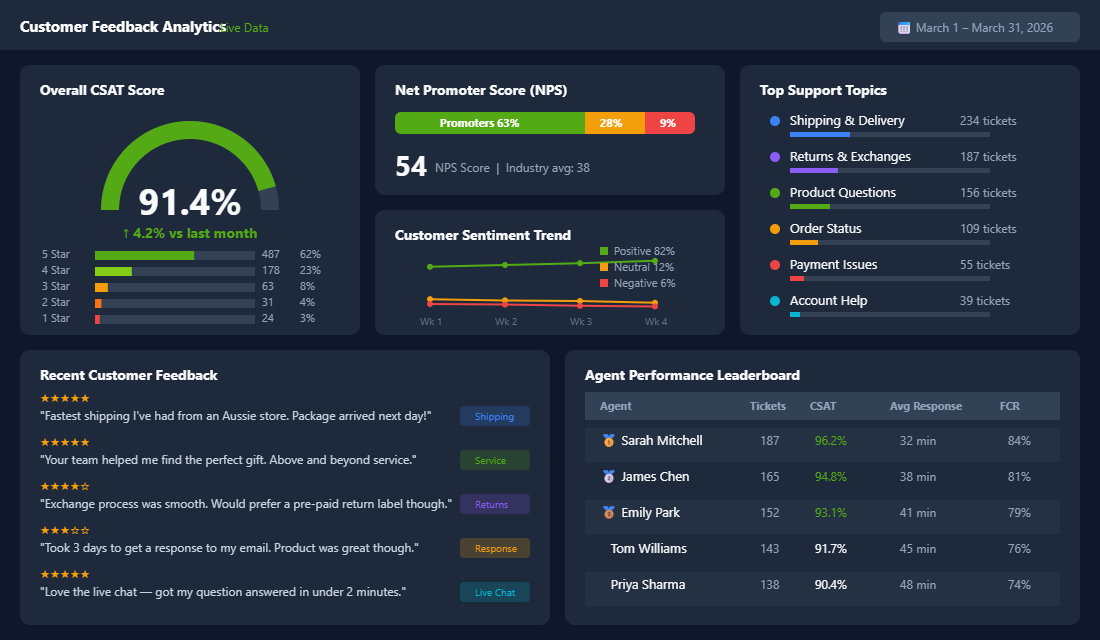
1. First Response Time (FRT). How quickly you reply to a customer’s initial message. Target: under 1 hour for email, under 2 minutes for chat. This is your most visible metric — the one customers feel most acutely.
2. First Contact Resolution (FCR). The percentage of tickets resolved in a single interaction, without the customer needing to follow up. Target: 75-80%. Low FCR means your agents are either giving incomplete answers or don’t have the authority to resolve issues on the spot.
3. Customer Satisfaction Score (CSAT). Measured through post-interaction surveys. Target: 90% or above. The industry average is 82% — beating that by even a few points puts you ahead of most competitors.
4. Ticket Volume Trends. Track total tickets per week alongside revenue. If tickets are growing faster than revenue, something’s broken — maybe product descriptions are unclear, or your shipping partner is dropping the ball. If tickets are flat while revenue grows, your self-service content is working.
5. Net Promoter Score (NPS). Measures how likely customers are to recommend your brand. Target: 50+ (the ecommerce industry average is around 38). NPS is a lagging indicator, but it’s the best single number for gauging overall customer sentiment. Understanding who your customers are starts with building solid buyer personas that inform how your team communicates.
Set up a weekly support dashboard that tracks these five metrics. Review it every Monday morning. Look for trends, not just snapshots — a CSAT score that’s drifting down over three weeks is a much bigger alarm bell than a single bad week.
Real Brands Doing Customer Service Right
Koala (koala.com) has built one of Australia’s most-loved ecommerce brands, and customer service is a massive part of why. Their 120-night trial on mattresses sounds risky, but it’s actually a customer service play — it removes purchase anxiety completely. Their support team is empowered to handle returns and exchanges without friction, and they use that confidence to drive word-of-mouth. The result? Koala consistently maintains some of the highest NPS scores in Australian ecommerce.
Culture Kings (culturekings.com.au) takes a different approach. They’ve gamified the customer experience with a loyalty program that rewards engagement, and their support team mirrors the brand’s high-energy streetwear personality. When a customer has an issue, the response doesn’t sound like it came from a corporate playbook — it sounds like it came from someone who genuinely cares about sneaker culture. They actively reshare customer content and turn support interactions into community-building moments.
What both brands share is a commitment to making customer service feel like an extension of the brand, not a separate department operating behind a wall. When your support interactions match the energy of your marketing, customers notice — and remember.
The Compound Effect: How Great Support Multiplies Every Other Investment
Here’s where it all comes together. Customer service doesn’t operate in a vacuum — it amplifies everything else you’re doing.
Your Meta Ads become more profitable because customers stick around longer. Your email marketing converts better because recipients actually trust the brand in their inbox. Your win-back campaigns work better because the original experience was good enough to warrant a second chance. Your product reviews skew positive because when something did go wrong, you fixed it fast and with grace.
Think of it as a flywheel. Great support leads to higher CSAT, which drives repeat purchases, which increases lifetime value, which gives you more budget to invest in acquisition, which brings in new customers who also get great support. Each revolution of the wheel builds momentum.
The stores that crack this flywheel are the ones that stop thinking about customer service as a reactive function — something you do after a problem occurs — and start treating it as a proactive growth strategy. That means investing in tools, training your team, building self-service content, measuring what matters, and continuously iterating based on what the data tells you.
Start with one thing this week. If you don’t have a helpdesk, install Gorgias and connect your channels. If you do, audit your response times and set SLA targets. If your response times are solid, build out your knowledge base. If that’s covered, start tracking NPS. Each step compounds on the last.
Your Customer Service Action Checklist
Here’s the framework you can use to audit and improve your ecommerce customer service operation, step by step:
- Audit your current state. Pull your average response time, ticket volume, and any CSAT data you have. If you have none, that’s your first problem to solve.
- Install a proper helpdesk. Gorgias for Shopify-native integration, Help Scout for email-first operations, or Zendesk for enterprise scale. Centralise all channels into one inbox.
- Set response time SLAs. Live chat: 2 minutes. Email: 4 hours. Social: 2 hours. Post these internally and hold your team accountable.
- Build macros for your top 10 tickets. Review your last 100 support interactions, identify patterns, and create templated responses that still sound human.
- Automate order status enquiries. Connect your helpdesk to Shopify tracking data and set up auto-replies for “where is my order?” tickets.
- Create a knowledge base. Cover shipping, returns, sizing, orders, and payments. Review analytics monthly and fill content gaps.
- Train on tone and recovery. Document your brand voice for support. Create a recovery toolkit with pre-approved actions agents can take without escalating.
- Track the five key metrics weekly. FRT, FCR, CSAT, ticket volume trends, and NPS. Review every Monday and act on trends.
- Collect and act on feedback. Send post-resolution CSAT surveys. Review negative feedback weekly and look for systemic issues, not just individual complaints.
- Iterate and improve quarterly. Every quarter, review your metrics trends, refresh your knowledge base, update your macros, and assess whether your tools still fit your volume.
The Support Benchmarks Worth Holding Your Team To
Support teams drift towards whatever is measurable, so choose the measures carefully. Track too many and nobody moves. These are the numbers worth putting on the wall.
- First response time. Under 4 hours during business hours is the modern expectation. Under 1 hour puts you ahead of most Aussie DTC brands your size.
- Full resolution time. Aim for 90% of tickets closed inside 24 hours. The tail matters more than the average, because the slow 10% are the ones who write the reviews.
- One-touch resolution rate. 60% to 75% is healthy. A low number usually means your macros are answering the wrong question and forcing a second round trip.
- Ticket-to-order ratio. Divide monthly tickets by monthly orders. Most stores sit between 8% and 15%. If yours is climbing, the problem is upstream in shipping, sizing, or product copy, not in support.
- Contact deflection from your knowledge base. A decent help centre should take 20% to 30% of your repeat questions off the queue within a quarter.
Gorgias reports most of this natively and ties tickets to Shopify order value, which is what lets you argue for headcount. Zendesk and Re:amaze do the same job. Whatever you use, tag every ticket by reason so you can see the top three drivers each month rather than guessing.
Imagine you run an apparel store doing 1,200 orders a month with a 14% ticket-to-order ratio, so about 170 tickets. Tagging reveals 40% of them are “where is my order”. Adding a tracking page and a proactive dispatch email can take that to under 15%, freeing roughly 40 tickets a month. That is a full working day back for your support person, spent on the conversations that actually rescue an order.
Customer service is one of the core pillars we work on inside the eCommerce Circle. It’s part of the “People” framework in our More Orders Operating System — because the right people, processes, and tools are what separate stores that grind from stores that grow. If you want help building a support system that actually drives revenue, let’s talk.