You open Shopify on a Tuesday morning and the orders tab looks wrong. Forty-something checkouts overnight, almost all of them declined, every name some variation of “John Doe”, every order between one and five dollars, every shipping address a suburb you have never shipped to. Your conversion rate has cratered. Your abandoned checkout list has three hundred new entries. Nothing has actually sold.
What’s in This Article
Most founders react the same way. They delete the fake orders, mutter something about scammers, and move on. That is the wrong call, and it is the reason a card testing attack that should have cost you forty dollars in processing fees ends up costing you your payout schedule six weeks later.
Card testing attacks climbed 65% between Q2 2024 and Q2 2025, and roughly 85% of merchants have now been hit by one at some point. Your store is not being targeted because you are big. It is being targeted because your checkout is a free, fast, anonymous way to find out which stolen card numbers still work. This is the playbook we run with Aussie Shopify founders inside eCommerce Circle when an attack lands, and the six layers that stop the next one being worse.
What a Card Testing Attack Actually Is (and Why Your Store Is the Target)
Criminals buy stolen card numbers in bulk. A dump of ten thousand numbers is close to worthless until someone works out which ones are still live, which ones have available balance, and which ones will clear a card-not-present transaction. Testing them by hand is impossible. Testing them through a merchant checkout with a script is trivial.
That is what your store is being used for. A bot loads your cheapest product, hits checkout, and fires card numbers in a tight loop. Approved means the card is live and gets sold on or spent at a real merchant later. Declined means the number goes in the bin. Either way the attacker gets what they came for, and you get charged for the privilege.
The stores that get hit hardest share a profile we see again and again:
- A cheap product in the catalogue. Anything under about ten dollars is perfect. Sample sizes, stickers, gift wrap, a spare part, a low-price digital item.
- No customer accounts required. Guest checkout with no friction is exactly what a script needs.
- Shopify Payments switched on with express wallets. Fast tokenised checkout is great for real shoppers and equally great for automation.
- A store that has recently run paid traffic. Attackers scrape ad libraries and Shopify app listings to find live, transacting stores.
Australia matters here more than most founders realise. Card-not-present fraud on Australian-issued cards reached $816 million in calendar 2024, which was 90% of all card payment fraud in the country that year, and total card fraud jumped 20% to $913 million. Those numbers are not built from one big heist. They are built from millions of tiny transactions, and a decent share of them are validated on Shopify checkouts belonging to founders who never knew it happened.
The Five Signals That Tell You It Is Happening Right Now
You do not need a security tool to spot this. You need to know what to look at. Open Shopify admin and check these five things in order. If three or more light up, you are mid-attack.
- A spike in declined or failed payments. Go to Orders, then Abandoned checkouts. A normal store might see a handful a day. An attack produces dozens per hour, clustered in minutes.
- Order values that cluster at the bottom. Everything is your cheapest SKU, quantity one, no shipping upgrade, no discount code.
- Names and emails that do not behave like people. Random letter strings, sequential Gmail addresses, the same surname across twenty different first names, or the classic “John Doe” pattern reported repeatedly in the Shopify community.
- Traffic that does not match the checkouts. Your analytics show sessions flat but checkout initiations through the roof. Real demand does not behave that way.
- Geography that makes no sense for your brand. An Aussie homewares brand suddenly taking checkout attempts from a dozen countries in one hour is not going international overnight.
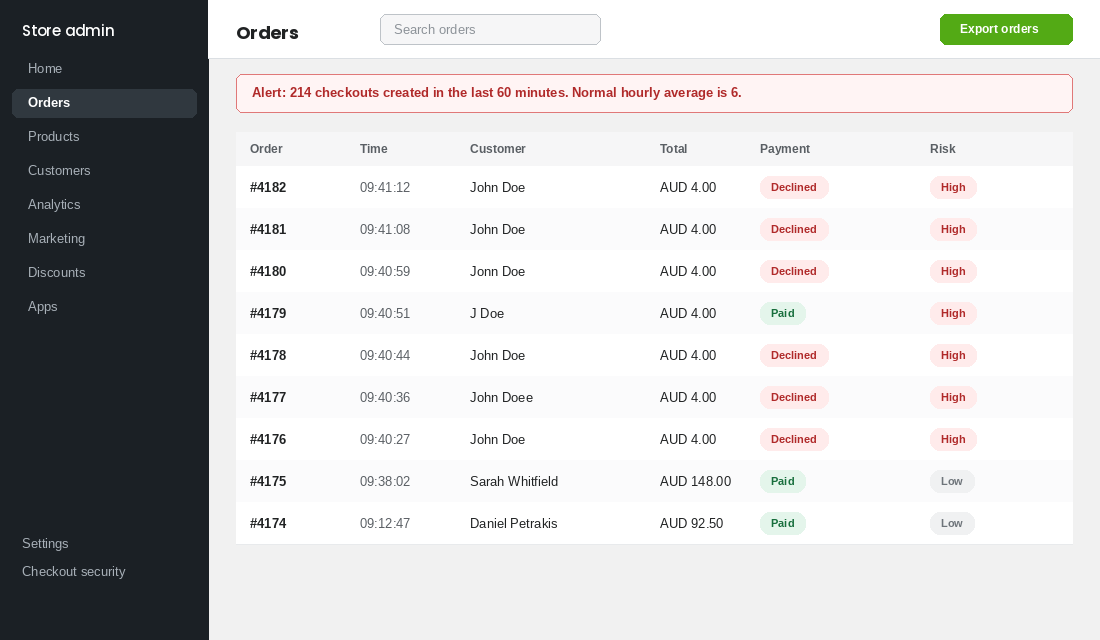
Write down the time the first suspicious checkout landed. You will need it in an hour when you clean up your analytics and your email flows, and again if you end up talking to Shopify support about fee reversals.
The Real Cost Is Never the Fake Orders
Founders anchor on the wrong number. Fifty declined attempts at a couple of dollars each feels like nothing, so the attack gets filed under annoying rather than dangerous. Here is where the money actually goes.
Processing fees on attempts, not just sales. Shopify Payments in Australia runs at roughly 1.75% plus 30 cents per domestic transaction on the Basic plan. The fixed component is what hurts. Two thousand attempts is six hundred dollars in fixed fees before you have banked a single real sale.
Chargebacks that arrive weeks later, all at once. The cards that cleared belong to real people who eventually read their statement and call their bank. Each dispute costs you the transaction plus a fee in the range of fifteen to twenty-five dollars, and they land in a cluster because the attack happened in a cluster.
Your authorisation rate falls, which means real customers get declined. Issuers score merchants. A checkout throwing thousands of failed authorisations starts looking like a compromised merchant, and legitimate cards get refused at the exact moment your ads are working.
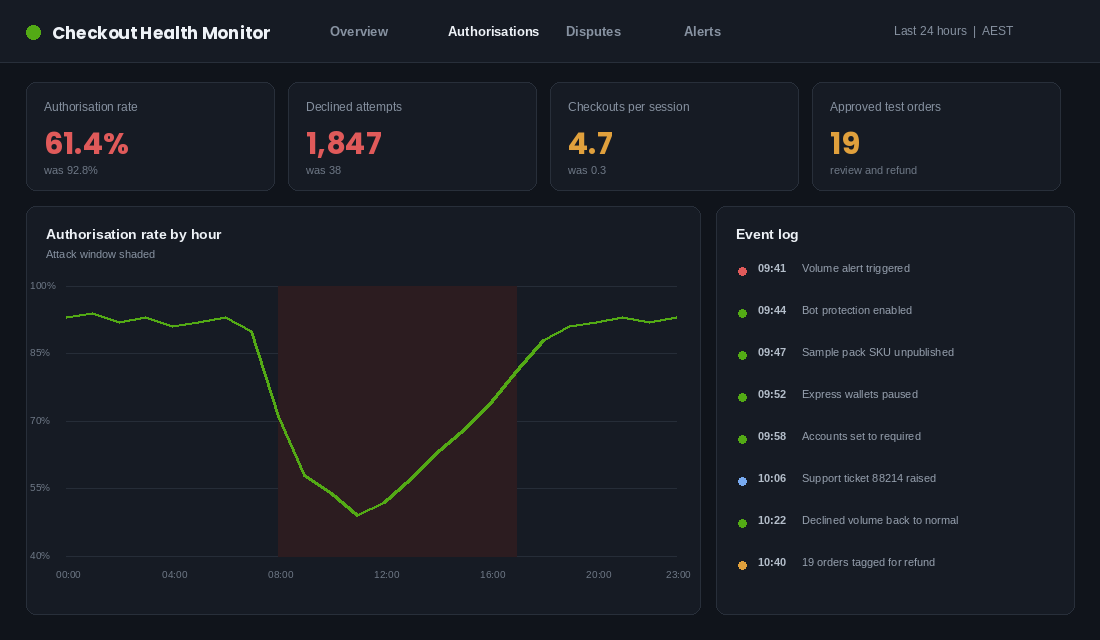
You get pulled into card scheme monitoring. This is the one that ends businesses. Under Visa’s Acquirer Monitoring Program, the excessive dispute threshold sat at 2.2% from June 2025 and tightened to 1.5% for Asia Pacific, including Australia, from 1 April 2026, with a fee of around eight dollars applied per dispute. Visa also tracks enumeration separately, with a ratio threshold of 20%, and both approved and declined attempts count toward it. A single sustained attack can move both numbers.
Your data gets poisoned. Conversion rate, add-to-cart rate, checkout completion, and channel attribution all break for the period of the attack. If you make a budget decision off that week, you make it off fiction. Worse, if those fake emails hit your Klaviyo abandoned cart flow, you are sending mail to addresses that will never open, and your sender reputation takes the hit.
None of this is theoretical. Once a processor decides your risk profile has changed, the response is usually a reserve, a hold, or a review of your account. We wrote about what that looks like from the inside in the payout freeze playbook, and card testing is one of the most common triggers behind it.
Layer 1: The First Sixty Minutes (Stop the Bleeding)
Speed beats elegance. The goal in the first hour is to make your checkout unprofitable for the script, not to build a permanent security architecture. Do these in order.
- Turn on Shopify’s checkout bot protection. In Shopify admin go to Settings, then Checkout, and enable the bot protection option. It puts a challenge in front of suspicious checkout traffic, which is exactly the friction an automated loop cannot absorb at scale.
- Unpublish or hide your cheapest product. Find the SKU the bot is hammering and set it to draft, or restrict it to a hidden collection for twenty-four hours. Attacks are cost-sensitive. Take away the cheap test item and the economics break.
- Temporarily switch off express wallet buttons. In Settings, then Payments, pause Shop Pay, Apple Pay, and Google Pay accelerated checkout for the duration. You will lose a little conversion for a day. You will lose far more if the attack keeps running.
- Require customer accounts at checkout. Settings, then Checkout, then customer accounts. Setting this to required for the length of the attack forces an email verification step most scripts will not clear.
- Contact Shopify support with your timestamps. Open a ticket, state clearly that you are experiencing a card testing attack, and give the start time and a sample of the fraudulent order numbers. Shopify has published that its machine learning blocks roughly 90% of card testing attacks and delivers around a 13% lift in authorisation rates, so flagging it early gets your store into that detection loop properly and creates a record if you later dispute fees.
Do not spend the first hour deleting fake orders. Cancel them, do not archive them, and leave the record intact. You want the audit trail.
Layer 2: Close the Back Door Most Founders Never Check
Here is the detail that catches out even technical operators. Every Shopify store keeps a live myshopify.com address alongside your custom domain. Attack scripts frequently hit checkout through that path rather than through yourstore.com.au, which means any protection you have layered onto your custom domain at the DNS or CDN level may not be in the way at all.
The asymmetry is brutal. Your real customers arrive on your custom domain, hit whatever challenge you have set up, and get slowed down. The bot arrives on the myshopify address and sails past. You end up taxing the wrong traffic.
Two things to do about it:
- Force a redirect from the myshopify domain to your primary domain. In Settings, then Domains, confirm your custom domain is set as primary and that redirect is enabled. This does not eliminate the path but it removes the easy version of it.
- Rely on Shopify-level controls, not just edge controls, for checkout. Cloudflare Turnstile and similar edge tools are genuinely useful in front of your storefront and your forms, but checkout itself is hosted by Shopify. Protection that has to sit at checkout needs to be configured inside Shopify, not only at your DNS provider.
If you take one technical fact from this article, make it this one. We have watched founders spend a fortnight and several hundred dollars on edge bot management, then get hit again through the path they never closed.
Layer 3: Turn On the Controls You Are Already Paying For
Most Shopify stores run with a meaningful chunk of their fraud tooling switched off, because it was never switched on in the first place. Work through this list once and it stays working.
- Card testing prevention and proxy detection. Both live in Shopify’s fraud prevention settings. Proxy detection in particular flags checkout attempts routed through anonymising infrastructure, which is how most of these scripts run.
- Address verification and CVV checks. Confirm that AVS and CVV mismatches are being surfaced on the order risk panel rather than silently accepted. A bot that has a card number but not a billing address fails here.
- hCaptcha on your storefront forms. Shopify runs hCaptcha on contact, comment, and account creation forms. It starts invisible and escalates to an interactive challenge when behaviour looks automated. Verify it is active rather than assuming.
- Shopify Protect where you are eligible. It does not stop the attack, but it changes who wears the chargeback on qualifying orders. Check your eligibility in the admin instead of guessing.
One thing has changed that trips people up. Shopify retired the standalone Fraud Filter app on 31 January 2025. If your fraud rules were built in that app, they are gone, and you need to rebuild them in Shopify Flow. A surprising number of stores are running with rules they believe are still live.
Layer 4: Build the Flow Rules That Catch What Slips Through
Shopify Flow is free on every plan and it is the closest thing you have to an automated fraud analyst. Install it, then build these three workflows. Each takes about ten minutes.
Workflow one: hold high-risk orders before they ship.
- Trigger: Order created.
- Condition: Order risk level is high, or risk recommendation is cancel.
- Action: Hold fulfilment, add an “review manually” tag, and send yourself an internal email.
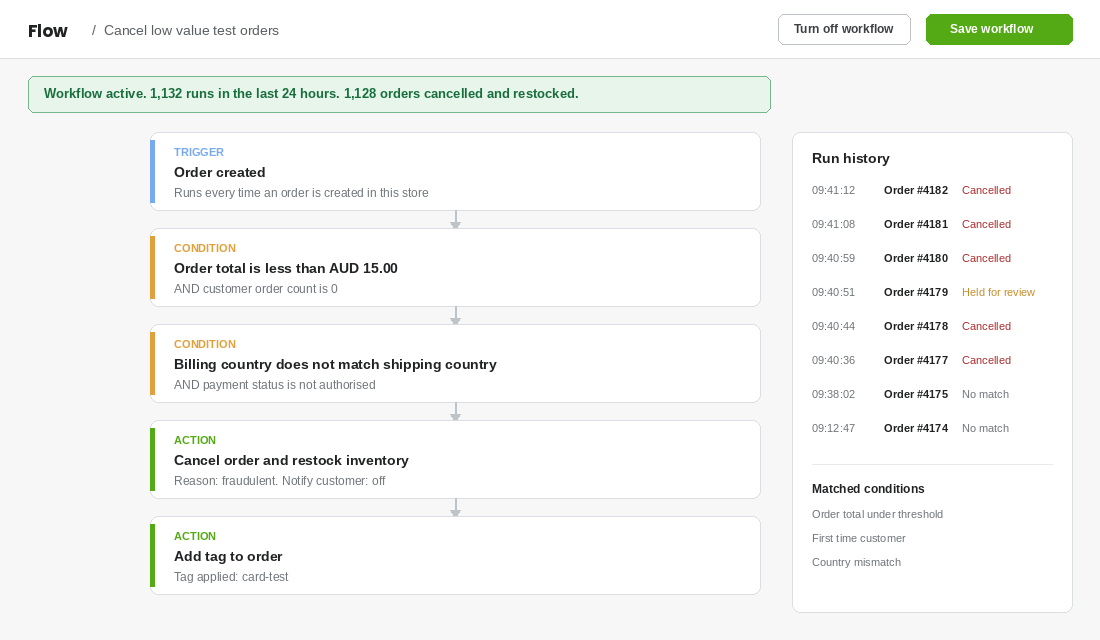
Workflow two: catch the low-value burst pattern.
- Trigger: Order created.
- Condition: Order total is less than your realistic minimum basket, and the customer has zero prior orders, and billing country does not match shipping country.
- Action: Cancel the order, restock, and tag it “card-test” so you can count them later.
Workflow three: rebuild your blocklist.
- Trigger: Order created.
- Condition: Customer email, phone, or shipping address matches an entry on your known-bad list.
- Action: Cancel the order and hold fulfilment.
Keep the blocklist itself in a simple spreadsheet with four columns: value blocked, type, date added, reason. Review it quarterly and remove anything older than twelve months, because addresses get recycled and you do not want to be blocking a real customer in 2027 for something a bot did in 2026.
If your order volume has outgrown manual review, this is the point where a dedicated fraud tool earns its keep. Signifyd, NoFraud, and Chargeflow all sit in front of the order and make an accept or decline call with a financial guarantee attached. The trigger for buying one is not revenue, it is when your manual review queue costs you more in time and delayed shipping than the tool costs in fees.
Layer 5: Clean Up the Damage the Attack Left Behind
The attack stopping is not the same as the attack being over. There are four messes left and each one costs you money quietly if you skip it.
Your email platform. Every fake checkout created a profile. If those profiles entered your abandoned cart or welcome flows, you have been sending campaigns to addresses that do not exist. In Klaviyo, build a segment for profiles created between your attack start and end times with zero opens and zero clicks, then suppress the lot. Do it inside a week. Bounce rates above about 2% start affecting deliverability for your real list.
Your analytics baselines. Annotate the attack window in Google Analytics and note it in whatever weekly reporting you keep. When you look back at that week in three months you will otherwise see a conversion rate collapse and go hunting for a site problem that never existed.
Your chargeback exposure. Any attempt that succeeded is a chargeback waiting to happen, usually four to eight weeks out. Pull the list of approved orders in the attack window, refund proactively where the order clearly matches the pattern, and keep the evidence. A voluntary refund does not count against your dispute ratio. A chargeback does. That single move is often the difference between staying under a monitoring threshold and going over it, and we go deeper on evidence packs and representment in the chargeback defence playbook.
Your admin access. Card testing is opportunistic and usually external. But if the attacker had a foothold inside your store, the pattern looks similar from the outside. Rotate staff passwords, review every active app and its permissions, and confirm two-step verification is enforced on all accounts. The admin lockdown playbook covers the full seven-layer version of that check.
Layer 6: The Monthly Watch That Keeps You Off the Monitoring Programs
Prevention is a fifteen-minute monthly habit, not a project. Put it in your calendar on the first business day of the month and track four numbers in a simple sheet.
- Authorisation rate. The share of payment attempts that succeed. Healthy Aussie DTC stores usually sit above 85%. A drift downward is the earliest warning you get.
- Dispute ratio. Disputes divided by transactions. Visa’s excessive threshold is 1.5% for Asia Pacific from April 2026, and formal monitoring generally applies once a merchant passes 1,500 combined fraud reports and disputes in a month. Your own internal alarm should ring far earlier, around 0.5%.
- Declined transaction count. Establish your normal. When the number doubles in a week, look at why before you look at anything else.
- Abandoned checkouts per session. A ratio, not a raw count. It exposes bot activity that raw traffic numbers hide.
Set one alert as well. Shopify Flow can email you when more than a chosen number of orders are created in a fifteen-minute window. Pick a threshold that is roughly triple your best genuine hour. That single alert has caught attacks for our members inside ten minutes rather than the following morning, and ten minutes versus twelve hours is the entire difference in what this costs.
Why These Six Layers Compound
Any one of these layers on its own is a speed bump. An attacker who hits friction at checkout moves to the myshopify path. One who gets past that runs into proxy detection. One who clears proxy detection gets cancelled by a Flow rule before fulfilment. One who somehow reaches an approved order gets caught in your monthly review and refunded before it becomes a dispute.
That is the actual point. Card testing is a volume business run on thin margins by people optimising for the cheapest checkout they can find. You are not trying to build an impenetrable store. You are trying to be more expensive to attack than the next Shopify store on their list, and six modest layers achieve that far more reliably than one expensive tool.
The stores that get destroyed by this are never the ones that got attacked. They are the ones that got attacked, deleted the fake orders, and did nothing else. Six weeks later the chargebacks land, the dispute ratio crosses a threshold, the acquirer puts a reserve on the account, and suddenly a business doing solid revenue cannot access its own cash going into peak trading.
Your Sixty-Minute Card Testing Response Checklist
Save this somewhere your whole team can reach it. When an attack lands you want a checklist, not a research project.
- Minutes 0 to 5. Confirm the pattern against the five signals. Record the timestamp of the first suspicious checkout.
- Minutes 5 to 15. Enable checkout bot protection. Unpublish the cheapest product. Pause express wallet buttons.
- Minutes 15 to 25. Set customer accounts to required. Confirm card testing prevention and proxy detection are on.
- Minutes 25 to 35. Open a Shopify support ticket with your timestamps and sample order numbers.
- Minutes 35 to 45. Cancel and restock the fraudulent orders, tagging rather than deleting them.
- Minutes 45 to 60. Suppress the fake profiles in your email platform and annotate your analytics.
- Day 2. Build the three Shopify Flow workflows and set your volume-spike alert.
- Day 7. Review approved transactions from the attack window and refund the obvious ones before they become disputes.
- Day 30. Check authorisation rate, dispute ratio, and declined counts against your pre-attack baseline. Re-enable anything you paused.
Run it once and it takes an hour. Skip it and it takes a quarter, plus whatever your processor decides your risk is worth.
Inside eCommerce Circle, protecting the payment rails is one of the core pillars we work on with every member, because it is the one area where a quiet problem becomes an existential one without ever showing up in a revenue report. If you want a second opinion on how exposed your checkout is, let’s talk.