You’ve done everything right. Revenue is climbing, orders are up, your ad ROAS looks healthy. But you check your bank account and wonder where the money went.
What’s in This Article
This is the growth trap that catches hundreds of Aussie Shopify founders every year. The store is profitable on paper, but cash is constantly tight. Suppliers want payment before the next Shopify payout arrives. New inventory needs to go in just as last month’s marketing invoices hit. And BFCM is coming, which means you need to fund a stock order three months before the revenue lands.
The fix is not a bigger credit card limit. It is a cash flow forecast. Specifically, an 8-week rolling forecast that shows you, every single week, exactly where your cash is going and when it is arriving. Stores that run this system stay in control of their growth. Stores that don’t keep hitting the same wall.
Why Ecommerce Cash Flow Is Different From Every Other Business
Most small business cash flow advice was written for service businesses or retail stores. The rules are different when you are running a Shopify brand.
In a typical service business, you do the work and invoice the client. Cash arrives before you have spent much on delivery. In ecommerce, you spend first and earn later. You purchase inventory weeks or months before it sells. You pay for ads today and hope the ROAS justifies it over the next 30 days. You fund shipping and fulfilment the moment an order is placed, not when the money hits your account.
Add seasonal swings into the mix and the problem compounds. Q4 can represent 40 to 50% of annual revenue for many Shopify brands, which means you are placing your largest inventory order in August or September, three months before the sales arrive. That gap between your biggest cash outflow and your biggest cash inflow is where most founders get into trouble.
Research consistently shows that around 30% of small business failures are caused by running out of cash, even when the underlying business is profitable. This is not a revenue problem. It is a timing problem.
The Shopify Cash Cycle (Where Your Money Actually Goes)
Before you can forecast cash flow, you need to understand how money actually moves through your business. Most Shopify founders have a rough sense of this, but the detail matters.
The cycle looks like this. You run ads and spend cash today. Customers purchase and Shopify Payments processes the transaction. Shopify then batches your payout on either a daily, weekly, or monthly schedule, and your bank receives the funds 1 to 3 business days after the payout is issued. Meanwhile, your supplier expects payment within 30 to 60 days of shipping your stock, and that stock may have taken 4 to 8 weeks to arrive from overseas.
So the full loop, from paying for inventory to having that cash back in your bank, can easily take 90 to 120 days for a brand ordering from overseas manufacturers. That is three to four months of capital tied up in product that has not yet sold. Run that cycle across five or six SKUs simultaneously, and you can see how a brand turning over $500k a year still finds itself scrambling for cash.
Understanding your cash conversion cycle, the number of days from cash out to cash in, is the first step. Most Shopify brands should target a cycle of 60 days or fewer. If yours is stretching past 90 days, the forecasting steps below will show you exactly where to tighten it.
Building Your 8-Week Rolling Cash Flow Forecast
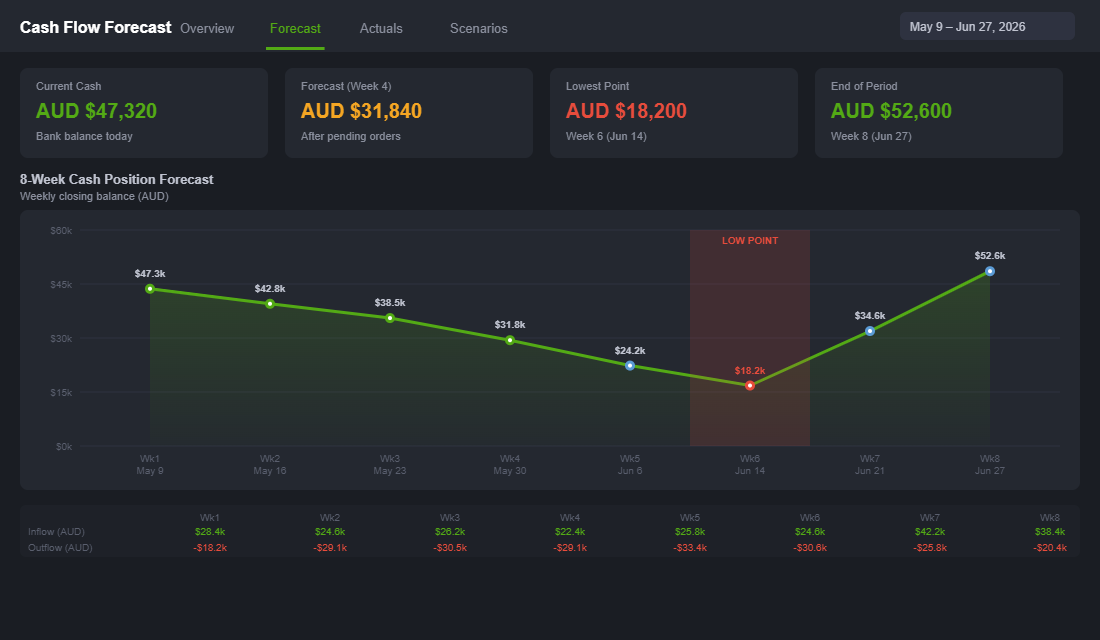
A rolling forecast updates every week. You always have 8 weeks of visibility ahead of you, which is enough to spot a cash crunch before it arrives and take action rather than reacting to it.
Here is how to build it.
Step 1: Map your cash inflows by week. Pull your Shopify Payments payout history for the last 12 weeks and calculate your average weekly payout. Then layer in any other inflows: wholesale orders, affiliate income, financing drawdowns. For the forecast weeks, use your revenue projections divided by seven and adjusted for your payout delay (typically 2 to 4 days from sale to bank).
Step 2: Map your fixed cash outflows by week. These are the costs that hit regardless of sales volume: Shopify subscription, app stack, warehouse or 3PL monthly fee, software, team wages or VA retainers. Pull your last three bank statements and list every recurring charge with its payment date.
Step 3: Map your variable cash outflows by week. This is where ecommerce gets complex. Ad spend, supplier invoices, shipping costs, and fulfilment fees all vary with your sales volume and your purchase schedule. For ad spend, use your current daily budget multiplied by 7. For supplier invoices, check your purchase orders and map each invoice to its due date, not the delivery date.
Step 4: Calculate your opening and closing cash position each week. Opening cash plus inflows minus outflows equals your closing cash. That closing number becomes next week’s opening number. If any week shows a negative closing balance, you have found your cash crunch before it hits you.
Step 5: Update it every Monday. Drop off the week that just passed, add a new week 8 to the end, and update your actuals against the prior week’s forecast. Over time you will get better at projecting your inflows and catching timing mismatches early.
You do not need specialist software to start. A Google Sheet or Excel file works perfectly. The discipline of updating it weekly is worth far more than any fancy tool.
Shopify Payments and Your Cash Flow Timeline
If you are using Shopify Payments as your primary gateway, your payout schedule is one of the most important settings in your entire store. Yet most founders set it up once during onboarding and never revisit it.
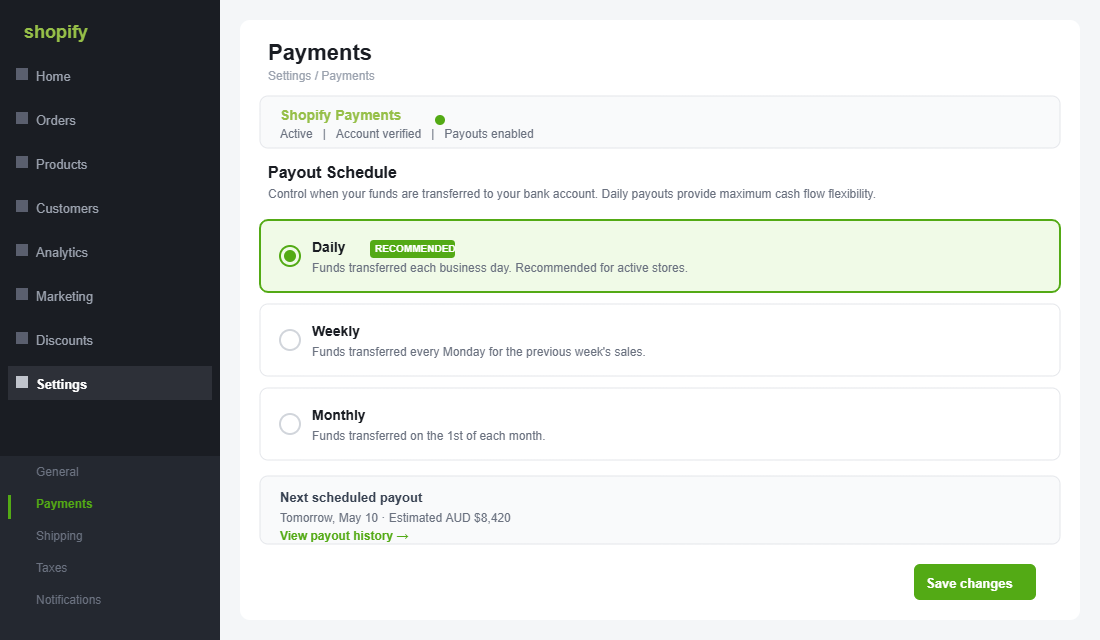
Here is what you need to know. When a customer pays, Shopify processes the transaction immediately but holds the funds until your next scheduled payout. With daily payouts, today’s sales typically land in your bank account 1 to 3 business days from the transaction date. With weekly payouts, you could be waiting 5 to 10 days. With monthly payouts, you might be waiting up to 35 days for revenue from the start of the month.
If you are on Shopify Plus or have been with Shopify Payments for more than 90 days with a clean account history, you may also be eligible for Shopify Balance, which offers same-day payout access and can further reduce your cash conversion time. Worth checking in your Payments dashboard if you have not already.
One practical tip: if you know a large supplier invoice is due on a Thursday, try to schedule your weekly payout to land on Wednesday. You can set your payout day in Settings > Payments > Shopify Payments > Manage. It takes about 30 seconds to change and can save you a lot of bridging stress.
The 5 Cash Flow Levers Every Shopify Founder Should Pull
Once you can see your cash flow position clearly, you can start pulling the levers that improve it. These are listed roughly in order of impact and ease.
- Switch to daily Shopify Payments payouts. Shopify lets you choose your payout schedule in Settings > Payments. Daily payouts mean cash arrives in your bank account every business day rather than sitting in a weekly or monthly batch. For a store doing $50k/month, switching from weekly to daily payouts can improve your available cash position by $10,000 to $15,000 at any given time.
- Negotiate supplier payment terms. Many suppliers, particularly those you have been working with for 12 months or more, will extend 30-day or 60-day net payment terms if you ask. This is one of the most powerful cash flow levers available to a growing brand because it directly extends the gap between when you receive inventory and when you have to pay for it. Even moving from payment-on-order to payment-on-dispatch can free up three to four weeks of working capital.
- Tighten your inventory ordering cycle. More frequent, smaller purchase orders reduce the cash tied up in stock at any one time. Yes, you may lose some per-unit pricing from lower MOQs. But the working capital benefit often outweighs the margin difference, particularly for brands doing under $200k/month. Calculate the true cost of each approach before defaulting to bulk orders.
- Move slow inventory fast. Dead stock is frozen cash. A promotion or bundle that clears slow-moving inventory at cost, or even slightly below, is almost always better than holding it. The cash returned from a clearance sale can fund your next order of your best-selling SKU. Run a quick analysis: which products have been sitting in your warehouse for more than 90 days? That is your clearance list.
- Use revenue-based financing for inventory peaks. Traditional bank loans are nearly impossible for Shopify brands to access, since most lenders require physical assets as collateral. But revenue-based financing products, offered by providers like Wayflyer, Clearco, and Airwallex Capital, lend against your Shopify revenue history and are repaid as a percentage of daily sales. For funding a large BFCM inventory order, this can be a clean alternative to draining your cash reserves. Just model the repayment carefully before committing.
Using TrueProfit to Connect Cash Flow and Profitability
Cash flow and profitability are related but distinct. Your cash flow forecast tells you when money moves. Your profit dashboard tells you how much of that money you actually keep. You need both.
TrueProfit is currently the most widely used profit tracking app in the Shopify ecosystem, with over 70,000 installs and more than $98 billion in tracked revenue. It connects directly to your Shopify store, your ad accounts (Meta, Google, TikTok), and your COGS data, then produces a real-time net profit dashboard without you having to manually reconcile anything.
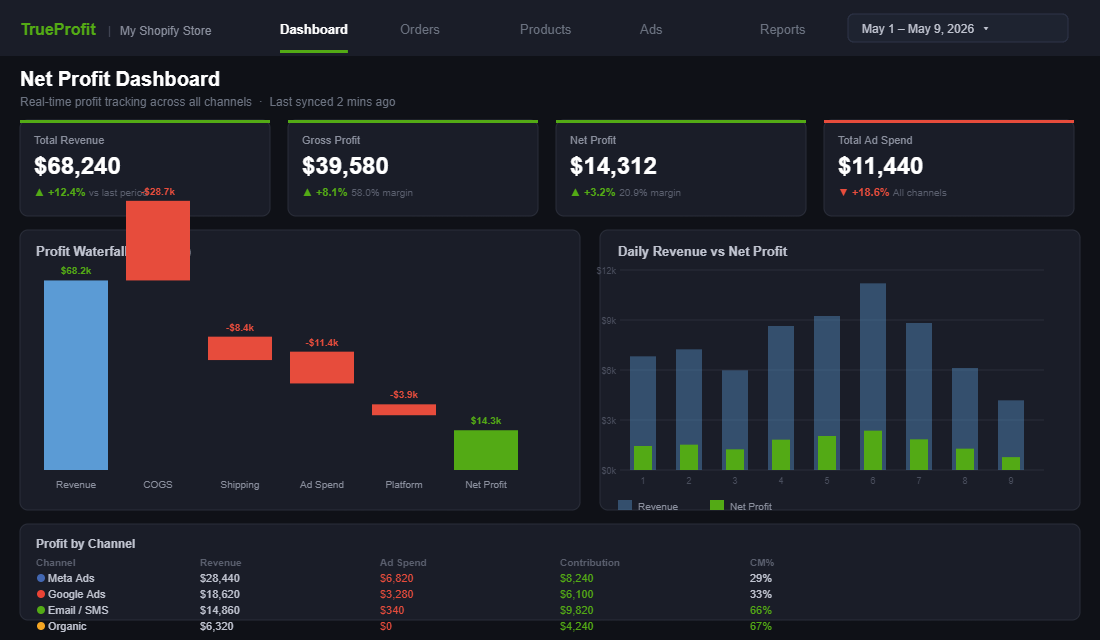
To set it up properly:
- Install TrueProfit from the Shopify App Store and connect your store.
- Import your product COGS under Products > Cost. If you have lots of SKUs, you can bulk-upload via CSV.
- Connect your ad accounts under Integrations. TrueProfit will pull your ad spend daily and attribute it against orders.
- Set your shipping cost rules and fulfilment fees under Expenses > Shipping.
- Add any fixed monthly costs (apps, subscriptions, salaries) under Expenses > Custom Expenses.
Once live, TrueProfit gives you a real-time view of contribution margin by product, by order, and across your whole store. Used alongside your 8-week rolling cash flow forecast, you have a complete picture of both your profitability and your liquidity. That combination is what separates operators who scale confidently from those who scale anxiously.
For a deeper understanding of how contribution margin connects to your ability to scale, see our guide on contribution margin for Shopify stores. And if you want to understand how your cash flow connects to your advertising payback window, our CAC Payback Period guide explains the relationship in detail.
The Monthly Cash Flow Review: Your 10-Point Checklist
Run this review on the first business day of every month. It takes about 30 minutes and will catch 90% of the cash flow problems before they become cash flow crises.
- Cash position check. What is your current bank balance? Is it higher or lower than this time last month?
- Receivables check. Are there any outstanding invoices or Shopify payouts delayed or on hold?
- Supplier invoices due this month. List every supplier invoice due in the next 30 days with the exact amount and due date.
- Inventory order timing. Do you have any stock orders that need to be placed this month? What is the expected delivery date and payment terms?
- Ad spend review. Is your current ad spend sustainable given your projected revenue? If you are scaling spend, does your cash flow forecast show enough runway to absorb the lag?
- Slow stock alert. Which SKUs have been in stock for more than 90 days? Do you need to run a clearance or bundle campaign to free up cash?
- Gross margin check. Has your gross margin moved more than 2% in either direction compared to last month? If so, why?
- Financing review. If you have any revenue-based financing or credit lines, what are the current repayment amounts and remaining balance?
- 8-week forecast update. Update the forecast with last month’s actuals. How accurate were your projections? What will you adjust for next month?
- Next quarter preparation. Is there a seasonal peak coming in the next 90 days that will require an inventory order? Block the date in your calendar and start modelling the cash requirement now.
Cash Flow Is a Skill, Not a Spreadsheet
The founders who manage cash flow well are not necessarily better at spreadsheets. They are better at looking forward. They see the crunch coming three weeks out and adjust before it arrives: delaying a stock order by a week, pulling forward a flash sale, drawing on a credit line for a fortnight rather than draining their reserves.
The 8-week rolling forecast is the tool that gives you that forward visibility. But the real skill is committing to update it weekly, acting on what it tells you, and resisting the temptation to fly by revenue alone.
Revenue is what the scoreboard shows. Cash is what keeps the lights on. Both matter, but only one of them can shut your business down overnight.
Inside eCommerce Circle, cash flow and profit management are among the core pillars we work on with every member, because they are the foundation that every other growth strategy has to sit on. If you want a second opinion on your current cash position and how to structure your forecast, let’s talk.