The most expensive thing you will do this November is ship a change you did not test.
What’s in This Article
Not a bad ad. Not a soft offer. A one-line tweak to a cart drawer on the Tuesday before Black Friday, pushed live at 9pm because someone spotted a spacing issue on mobile, that quietly breaks the express checkout button on iOS. You will not find out from a bug report. You will find out three days later when you compare your conversion rate to last year and it is down 18% for reasons nobody can explain.
The brands that trade cleanly through peak are not the ones with the best theme. They are the ones who stopped touching it. Shopify merchants did a record USD 14.6 billion over Black Friday to Cyber Monday 2025, up 27% year on year, and sales peaked at USD 5.1 million per minute. More than 94,900 merchants had their single highest-selling day ever in that window. That is not a weekend to be debugging Liquid.
Today is 1 August. Black Friday 2026 lands on 27 November, which puts you 17 weeks out. That is exactly the right amount of time to do this properly, and exactly the amount of time most Aussie founders will burn before panicking in week 15. Here is the six-phase freeze system we run with brands inside eCommerce Circle.
Why a Freeze Beats a Bigger Dev Budget
A code freeze is a written agreement that after a fixed date, nobody changes the storefront, the theme, the app stack, the shipping rules or the checkout, except through a defined emergency process. It sounds like the opposite of growth. It is actually the cheapest risk control available to a store doing between $40k and $500k a month.
The maths is brutal once you look at it. Downtime now costs an average of USD 14,056 per minute across organisations, up from the USD 5,600 per minute figure Gartner popularised in 2014. That average is skewed by enterprise, but the mechanism scales down perfectly: your cost per minute during peak is your peak-hour revenue divided by 60, and for a store doing $80k on Black Friday alone, that is roughly $55 a minute of pure lost sales before you count anything else.
The second-order damage is worse than the first. Research on outage impact suggests competitors typically see a 30% to 50% traffic increase while you are down, and 15% to 25% of the customers who switch away never come back. You are not losing a session. You are gifting a cohort.
Australia has watched this play out in public. Harvey Norman was reported to have potentially lost as much as 60% of online sales during Black Friday 2023 after online infrastructure issues. Click Frenzy, the local sales event built entirely around a single traffic spike, crashed within moments of launching one of its early events. Neither of those is a small operator with no budget. Both are proof that scale does not protect you. Process does.
Phase 1: Set the Freeze Date and Work Backwards
Most retailers freeze somewhere between Halloween and Thanksgiving. That is too late for a small team, because it assumes you have a QA function that can validate a store in three days. You do not. You have you, a developer on retainer, and a customer service person who is already stretched.
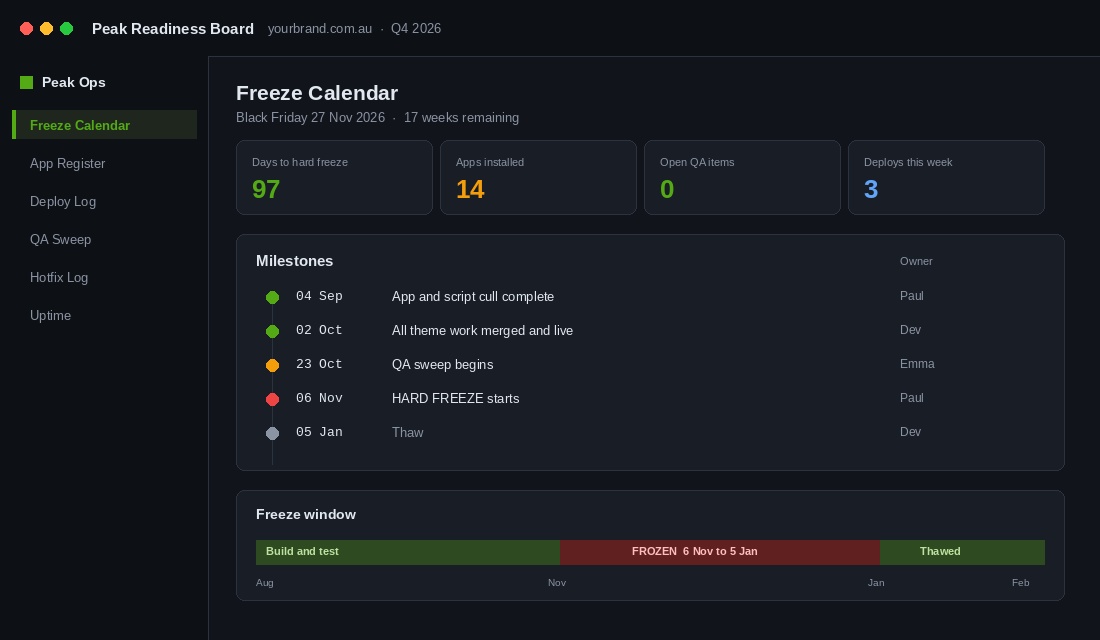
Set your hard freeze for Friday 6 November 2026, three weeks before Black Friday. Then work backwards and put these five dates in a shared calendar today, not in your head:
- Friday 4 September. App and script cull complete. Nothing new gets installed after this without a written case.
- Friday 2 October. All major theme work merged and live. Anything not shipped by this date gets pushed to January.
- Friday 23 October. Full QA sweep begins. Two weeks of testing, not two days.
- Friday 6 November. Hard freeze. Storefront, theme, apps, shipping rules and checkout are locked.
- Monday 5 January 2027. Thaw. Freeze holds through Boxing Day and the January sales, because your return and exchange volume peaks there.
The thaw date matters more than founders expect. Plenty of stores freeze for BFCM, unfreeze on 2 December, then break their own returns flow in the exact week Australian customers are trying to exchange Christmas gifts. Hold the line to January.
Write these dates into a one-page Freeze Charter and get everyone who has admin access to acknowledge it in writing. Agency, freelancer, VA, your marketing hire, you. The charter is not bureaucracy. It is the thing you point at in week 20 when someone very reasonably asks to “just quickly add” a countdown timer app.
Phase 2: The September App and Script Cull
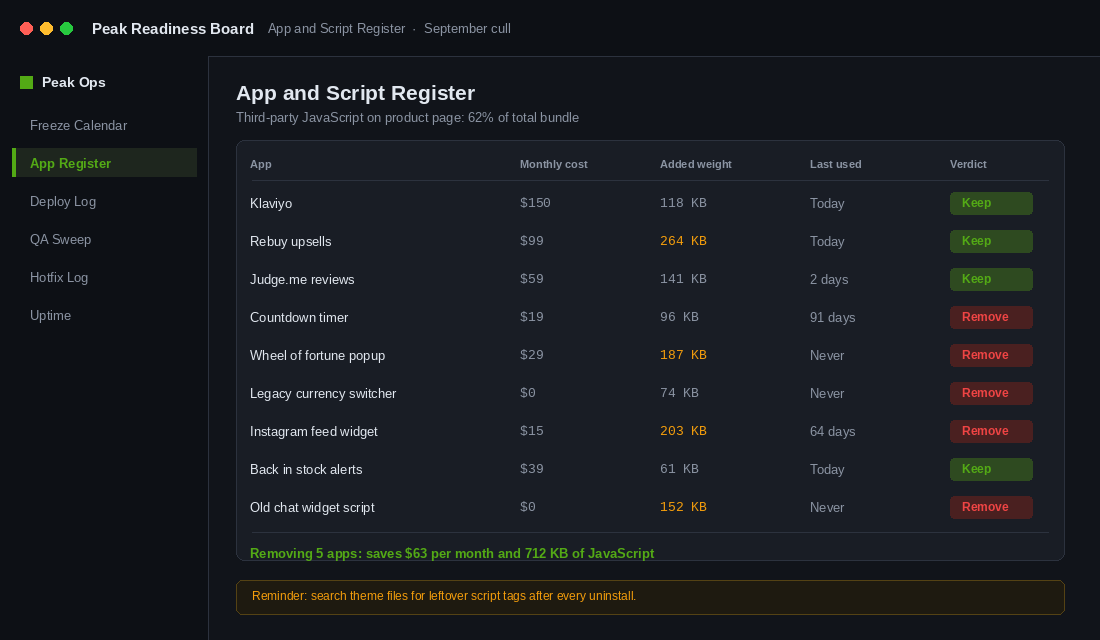
Every app you install is a third party writing JavaScript into your storefront that you do not control and cannot patch. On the average Shopify store, third-party scripts account for around 62% of total JavaScript. A single poorly built app can add 500ms or more to load time on its own.
That matters because Google’s own research found the probability of a bounce rises 32% as load time goes from one second to three seconds. On Black Friday your traffic is colder, more mobile, more impatient and more likely to be comparison shopping in a second tab. Speed is not a nice-to-have that week. It is the offer.
Run the cull in four passes across the first week of September:
- Pass 1: The billing audit. Open Settings, then Billing, then Subscriptions in Shopify admin. List every app and what you pay monthly. Most stores find two or three they forgot they were paying for.
- Pass 2: The last-login test. For each app, when did anyone on the team last open its dashboard? If the answer is “never” or “at install”, it is a candidate for removal.
- Pass 3: The revenue attribution test. Can you name the specific dollars this app generated in the last 90 days? Upsell apps, review apps and bundle apps should all be able to answer this. If it cannot, it is decoration.
- Pass 4: The theme residue check. Uninstalling an app does not always remove its code. Search your theme files for the app’s handle after removal. Leftover script tags and orphaned snippets are one of the most common causes of mystery slowdowns.
Aim to finish September with fewer apps than you started with. Not the same number. Fewer. If you want the longer version of this process, we walk through it properly in the Shopify App Stack Audit.
One more rule for this phase: no new app installs after 4 September. Not a review widget. Not an AI chat bot someone demoed to you on LinkedIn. If a new app is genuinely worth the risk, it gets a written case covering what it does, what it replaces, who tested it, and what the rollback is. Nine times out of ten, writing that case is enough to kill the idea.
Phase 3: Build a Real Deploy Path Before You Need One
Here is the pattern we see in almost every store under $1m a year: changes get made by duplicating the live theme, editing the duplicate, previewing it on desktop, and publishing. There is no history, no review, and no way to answer “what changed on Tuesday?” when something breaks on Thursday.
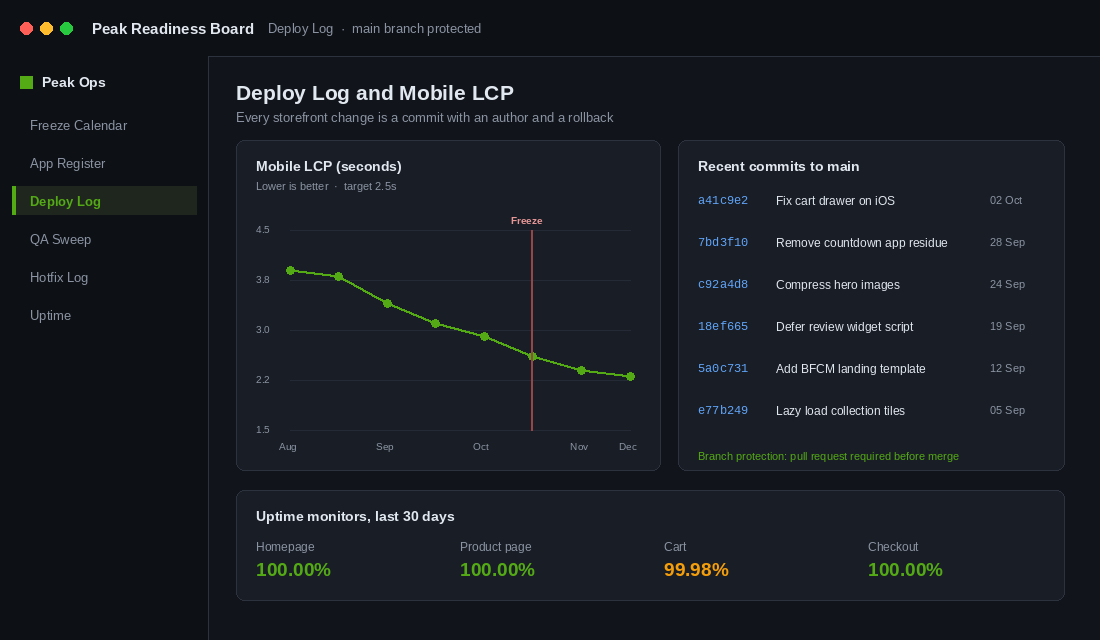
You cannot enforce a freeze on a system that has no record of changes. So before you can freeze, you need a deploy path. Shopify’s native GitHub integration gives you one for free, and setting it up takes about an hour.
Setting up the Shopify GitHub integration:
- Create a private GitHub repository for your theme. Name it after your store, for example
yourbrand-shopify-theme. - In Shopify admin, go to Online Store, then Themes. On your live theme, open the three-dot menu and choose Add from GitHub. Authorise the Shopify GitHub app and select your repository.
- Create two permanent branches:
mainconnected to the live theme, anddevelopconnected to a separate unpublished staging theme. - In GitHub, go to Settings, then Branches, and add a branch protection rule on
mainrequiring a pull request before merging. This is the actual lock. Without it, the freeze is a suggestion. - Install Shopify CLI locally so your developer can run
shopify theme devagainst a development theme rather than editing production.
Once that is live, every change to your storefront becomes a commit with an author, a timestamp and a diff. When something breaks at 11pm on Black Friday, you can look at the last five commits and know within ninety seconds whether the problem is yours or Shopify’s. Without it you are guessing, and guessing at 11pm on Black Friday is how a twenty-minute problem becomes a four-hour one.
If you are on a themed build with an agency, ask them one question this week: “show me the repository.” If there isn’t one, that is the first project on your October list.
Phase 4: The Pre-Freeze QA Sweep
From 23 October you have two weeks to break your own store on purpose. The goal is not to check that it looks fine. It is to walk the exact paths a customer will walk under load, on the devices they actually use, with the discounts you actually plan to run.
Run every one of these as a real transaction, not a visual check. Use a test order or a $1 product and a real card.
- Checkout on iOS Safari and Android Chrome. Not desktop. Australian ecommerce traffic skews heavily mobile, and mobile is where express wallet buttons break most often.
- Shop Pay, Apple Pay, Google Pay and PayPal. Each one separately. Each one all the way to a confirmation screen.
- Afterpay, Zip and any BNPL you offer. Check the minimum and maximum order thresholds still match your BFCM price points. A $180 minimum on a promotion that drops your hero product to $149 will quietly kill conversions.
- Every discount code you plan to run. Including stacking behaviour. Test what happens when someone applies a code on top of an already-discounted item, because someone will.
- Free shipping threshold logic. Test at one dollar under, exactly on, and one dollar over the threshold. Test it with a discount applied, since most stores calculate the threshold post-discount and forget to tell customers.
- Out of stock and back in stock paths. Sell out a test variant and confirm the page behaves, the notify form works, and the collection page does not show a dead tile.
- Every automated email and SMS. Order confirmation, shipping confirmation, abandoned cart, back in stock. Check them in Gmail, Outlook and on a phone. Broken merge tags in an order confirmation generate support tickets at exactly the moment your team has no capacity.
- The 404 and search-with-no-results pages. High traffic events surface these constantly and most stores have never looked at them.
Log every result in a shared sheet with a pass, fail or fix column and a named owner. This becomes a permanent asset. Next year the sweep takes four hours instead of two weeks, because the checklist already exists. If you are building out documentation like this across the business, the Shopify SOP Library covers the format we use.
Phase 5: What the Freeze Actually Bans
A vague freeze gets ignored. Write the list down. From 6 November, these are banned outright:
- Publishing a new theme or a theme update from your theme vendor.
- Installing, uninstalling or upgrading any app.
- Changing shipping rates, zones, thresholds or carrier settings.
- Changing checkout configuration, payment providers or currency settings.
- Editing product variants, SKUs or option structures on bestsellers.
- Changing URL structures, collection handles or navigation.
- Adding new tracking pixels or tag manager containers.
- Any A/B test that modifies the cart or checkout experience.
And here is what stays fully open, because a freeze that stops you trading is a bad freeze:
- Content: product copy, images, banners, homepage sections that already exist in the theme.
- Pricing and discount codes, as long as the mechanism was tested in October.
- Email and SMS campaigns using existing, tested templates.
- Ad creative, budgets, audiences and bids. Nothing in your ad account touches your storefront code.
- Inventory levels, restocks and product publishing to existing collections.
Name one person as the freeze owner with authority to say no. If that person is you, say it out loud to the team so nobody thinks a Slack message at 10pm counts as approval. The freeze owner is also the only person who can trigger the hotfix protocol.
Phase 6: The Hotfix Protocol
Something will break. The freeze is not there to prevent that. It is there so that when it happens you fix one thing carefully instead of five things frantically.
A change qualifies as a hotfix only if it meets all three tests: it is blocking revenue right now, it cannot wait until 5 January, and it is the smallest possible change that resolves the issue. A broken add-to-cart button qualifies. A misaligned badge on the collection page does not, no matter how much it bothers you at 2am.
The protocol itself, in order:
- Reproduce it. On two devices, by two people. A surprising share of reported “bugs” during peak are cached pages or one person’s browser extension.
- Duplicate the live theme before touching anything. Name it with the date and time. This is your rollback and it takes thirty seconds.
- Fix it on the duplicate, not on live. Preview, test the full path to a completed order, then publish the duplicate.
- Log it. One line in the freeze log: what broke, what changed, who approved it, what time it went live.
- Watch for twenty minutes. Sit on real-time analytics and watch sessions convert before you walk away.
Set up basic uptime monitoring before November so you find out about problems from an alert rather than from a customer email. A free uptime monitor pinging your homepage, a product page and your cart URL every minute is enough. Point the alerts at a phone number, not an inbox nobody checks after 6pm.
Where the Freeze Compounds
Each phase on its own looks like admin. Together they change what November feels like.
The September cull makes the site faster, which lifts conversion on every session for the rest of the year, not just peak. The deploy path in October means you finally have change history, which turns future problems from mysteries into diffs. The QA sweep produces a checklist that gets reused every year and shrinks from two weeks to an afternoon. The freeze itself buys back the thing you actually need in peak week, which is attention.
That last part is the real return. Australians are forecast to spend a record $6.8 billion across the Black Friday to Cyber Monday weekend, up 4% year on year, with around 6 million Australians taking part and average planned spend of $804 per person. Your job that weekend is to watch stock levels, react to what is selling, and keep your customer service response times under control. It is not to be reading Liquid.
Founders who freeze properly report the same thing every year: peak week is boring. That is the goal. Boring means the system is working and you are free to run the business instead of the website. Pair this with your BFCM inventory plan and you have removed the two failure modes that actually cost brands money in November: running out of stock, and breaking the store.
Your Freeze Charter, in One Page
Copy this into a doc today, fill in the names, and send it to everyone with admin access. It takes ten minutes and it is the whole system in one place.
- Freeze owner: [name]. Only this person can approve a hotfix.
- App cull deadline: 4 September 2026. No new installs after this date without a written case.
- Feature deadline: 2 October 2026. Anything not merged and live by this date moves to January.
- QA window: 23 October to 6 November 2026. Owner: [name]. Results logged in [link].
- Hard freeze: 6 November 2026 to 5 January 2027.
- Banned during freeze: theme publishes, app changes, shipping and checkout settings, URL and navigation changes, new pixels, cart and checkout tests.
- Allowed during freeze: content, pricing, discount codes, campaigns using tested templates, ads, inventory.
- Hotfix test: blocking revenue now, cannot wait to January, smallest possible change. All three, or it waits.
- Rollback: duplicate the live theme before every hotfix. Keep the last five duplicates.
- Monitoring: uptime checks on homepage, a product page and cart. Alerts to [phone number].
Seventeen weeks is plenty. Seventeen weeks spent hoping is not. Put the five dates in the calendar before you close this tab, because the version of this you write in October is always worse than the version you write in August.
Inside eCommerce Circle, peak readiness is one of the core pillars we work on with every member ahead of Q4. If you want a second opinion on your freeze plan before November, let’s talk.