Your customer list says 41,000. Your Klaviyo account says 38,400. Your accountant’s LTV model uses a third number nobody can trace. None of them are right, and every retention decision you make this quarter is being made on top of that mess.
What’s in This Article
Most Aussie founders treat the customer list as a thing that just accumulates. Orders come in, profiles get created, tags get added by whoever was doing the campaign that month, and nobody ever goes back through it. The list grows, so it feels like progress. Then repeat purchase rate flatlines, deliverability slips, and the win-back campaign that should have printed money lands in spam.
The brands that get retention right do something boring first. They clean the data. Gartner puts the average annual cost of poor data quality at 12.9 million US dollars across the organisations it studied, and MIT Sloan research pegs revenue lost to bad data at 15 to 25 percent. You are not running a Fortune 500, but the proportion holds. If a quarter of your customer records are wrong, a quarter of your retention spend is going somewhere useless.
This is the six-check audit I run with members before we touch a single flow. It takes about 90 minutes the first time. Do it once a quarter after that.
Check 1: Find the Duplicate Profiles Splitting Your Best Customers in Half
This is the single biggest source of bad retention data on Shopify, and almost nobody looks for it.
Here is how it happens. A customer buys as a guest with sarah.chen@gmail.com. Six months later she buys again but types sarah.chen+shop@gmail.com, or she uses her work address, or she creates an account with a slightly different email. Shopify now has two customer records. Each one shows a single order. Your dashboard counts her as two one-time buyers instead of one repeat customer with two orders.
Multiply that across a few thousand orders and your repeat purchase rate is understated, your customer lifetime value is understated, and your win-back flow is emailing your best customer as though she has never come back.
How to find them. Export your Shopify customer list to CSV (Customers, then Export, then All customers). Open it in Google Sheets and run three passes:
- Phone number matches. Sort by the phone column. Any two records sharing a mobile number with different emails are almost certainly the same person.
- Address matches. Concatenate address 1 plus postcode into a helper column and look for repeats across different emails. Households share addresses, so check the surname too before merging.
- Normalised email matches. Strip everything between the plus sign and the @ symbol, then lowercase the whole string. Gmail treats sarah.chen+shop@gmail.com and sarah.chen@gmail.com as the same inbox. Your database does not.
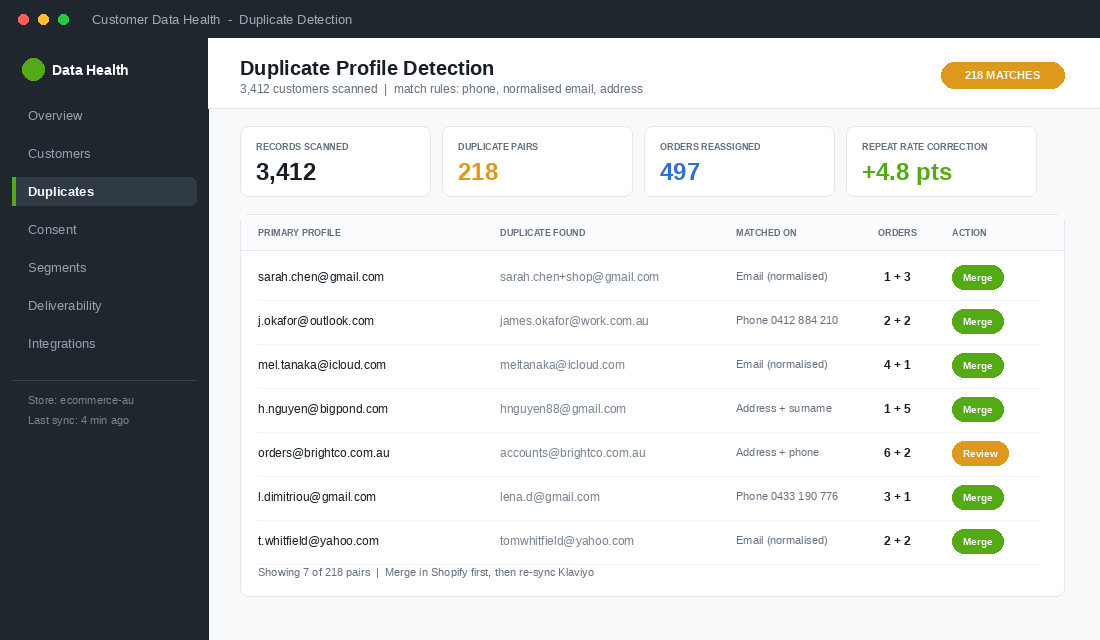
Shopify added a native merge function in the customer admin. Open the profile you want to keep, click the three-dot menu, choose Merge customers, and select the duplicate. Order history, spend totals, and tags carry across. Do the merges in Shopify first, then re-sync Klaviyo, not the other way around.
Set the expectation now: on a store doing 300 to 800 orders a month, finding 3 to 8 percent of records duplicated is normal. On stores that have run a platform migration, I have seen 15 percent.
Check 2: Audit Consent State, Not Just List Size
Ask most founders how big their email list is and they give you one number. Ask them how many of those people actually consented and the answer gets vague fast.
Every profile sits in one of four states, and they are not interchangeable:
- Subscribed. Explicitly opted in. You have a timestamp and a source. You can market to them.
- Never subscribed. They bought from you but never ticked the box. You can send transactional messages. Under the Spam Act 2003 you may have inferred consent for related marketing, but it is thin ground and it expires.
- Unsubscribed. Suppressed. Do not touch, ever, including in a “we miss you” campaign.
- Suppressed for deliverability. Hard bounced or marked you as spam. Different from unsubscribed and needs different handling.
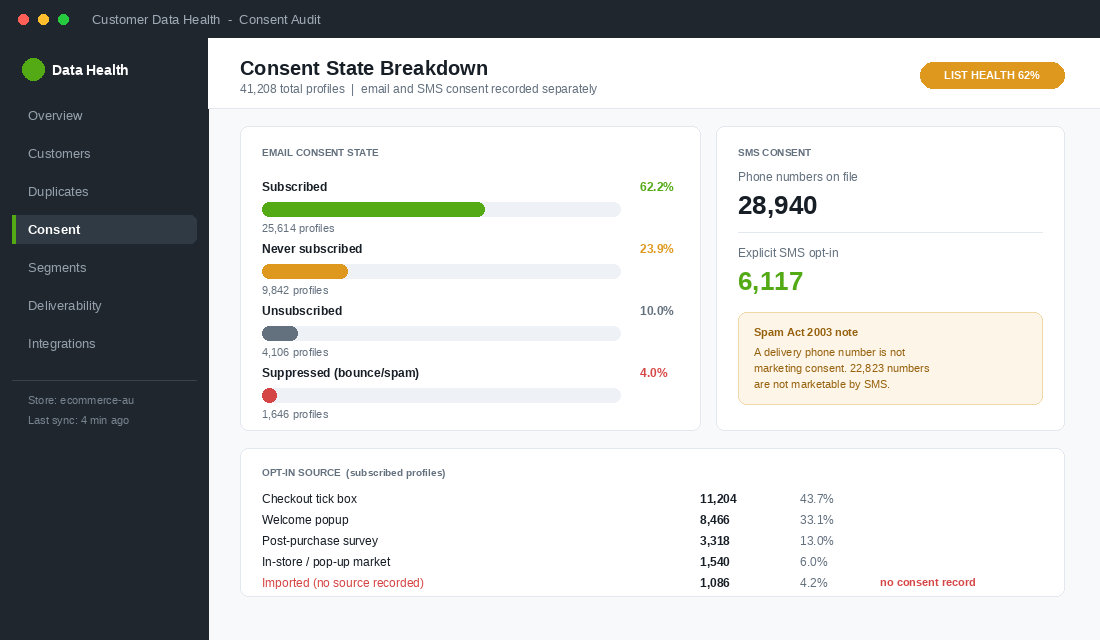
In Klaviyo, build a segment for each state and write the four numbers down. That is your real marketable list. If subscribed is under 60 percent of total profiles, your opt-in capture is broken somewhere upstream and no amount of flow optimisation will fix it.
SMS is a separate consent record. This trips up more Aussie stores than anything else. Email consent does not grant SMS consent, and the Spam Act treats each channel independently. If your checkout collects a mobile number for delivery updates, that is not marketing consent. Check that your SMS subscriber count matches the count of people who actively opted into SMS, not the count of people with a phone number on file.
While you are in there, confirm you can produce a consent record for any given subscriber: the date, the source, and the wording they agreed to. If you cannot, you have a compliance gap, not just a data gap. We cover the full regulatory picture in the Spam Act playbook.
Check 3: Run a Sunset Policy Before the Inbox Providers Run One for You
Email lists decay at roughly 2.1 percent per month, which compounds to about 22.5 percent a year. People change jobs, abandon addresses, and switch providers. A list you built in early 2025 is meaningfully broken by now whether you like it or not.
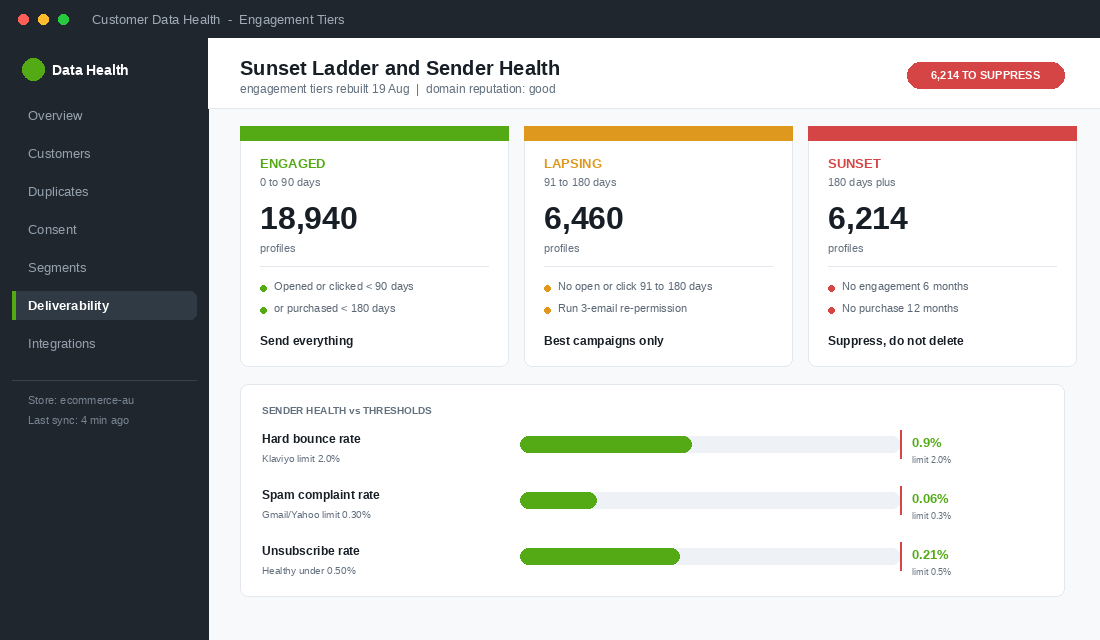
The instinct is to keep emailing everyone because a bigger send feels like a bigger opportunity. That instinct is expensive. Since February 2024, Gmail and Yahoo have required bulk senders to keep user-reported spam complaints below 0.3 percent and recommend staying under 0.1 percent. Klaviyo’s own guidance is to hold bounce rate under 2 percent. Blast a list full of dead addresses and you blow through both, and the damage lands on your entire sending domain, including the flows that were working.
The sunset ladder I use. Build these three segments in Klaviyo and treat them differently:
- Engaged (0 to 90 days). Opened or clicked in the last 90 days, or purchased in the last 180. Send everything to these people.
- Lapsing (91 to 180 days). No open or click in 91 to 180 days. Reduce frequency to your best campaigns only. Run a three-email re-permission sequence: one useful email with no offer, one with your strongest offer, one that says plainly “we will stop emailing unless you click here”.
- Sunset (180 days plus). No engagement in six months and no purchase in twelve. Suppress them. Not delete, suppress. They stay in your database for LTV maths and they stop poisoning your sender reputation.
Founders hate this step because the list number goes down. Watch what happens to open rate, click rate, and revenue per recipient over the following four weeks instead. On a 40,000 profile list, suppressing 6,000 dead addresses typically lifts inbox placement enough that total revenue goes up, not down. There is more on the technical side in the deliverability playbook.
Check 4: Clear the Tag Sprawl That Makes Segmentation Guesswork
Open your Shopify customer tag list. If you have more than 40 tags and you cannot explain what each one does in a sentence, you have sprawl.
What sprawl looks like in practice: VIP, vip, VIP-2024, vip customer, High Value, and Gold all sitting in the same account, applied at different times by different people, each covering a slightly different group. Now build a segment for your top customers. Which tag do you use? You cannot answer, so you guess, and the campaign goes to the wrong people.
Fix it with a naming convention. Every tag gets a prefix that says what kind of tag it is:
- src- for acquisition source. src-meta, src-google, src-popup, src-instore.
- seg- for behavioural segment. seg-vip, seg-lapsed, seg-subscriber, seg-wholesale.
- pref- for stated preference. pref-mens, pref-womens, pref-no-sms.
- ops- for operational flags. ops-chargeback, ops-refund-risk, ops-manual-review.
Then do the cleanup in three moves. First, list every existing tag and how many customers carry it. Second, map each old tag to a new one, or mark it for deletion if fewer than 20 people have it and nobody remembers why. Third, apply the new tags in bulk using a saved customer segment plus the bulk edit action, then delete the old tags.
Write the convention down in a one-page doc and put it wherever your team looks. Tag sprawl is not a one-off problem, it is a discipline problem, and it comes straight back if the rule lives only in your head.
Check 5: Reconcile Shopify Against Klaviyo, Line by Line
Nearly every store I audit has a gap between the two systems, and nearly every founder assumes the sync “just works”.
Pull four numbers and put them side by side in a sheet:
- Total customers in Shopify.
- Total profiles in Klaviyo.
- Customers in Shopify with email marketing accepted.
- Klaviyo profiles with email consent set to subscribed.
Lines 1 and 2 will never match exactly, because Klaviyo also holds popup signups who never bought. That is fine and expected. Lines 3 and 4 should match within about 2 percent. If the gap is wider, something is broken.
The usual culprits, in the order I check them:
- Checkout consent not mapped. The Shopify checkout marketing tick is not flowing through, usually because the integration was reconnected at some point and the setting reverted.
- Historical orders never backfilled. Common after a migration. Klaviyo has the profile but no Placed Order events before the connection date, so every LTV segment and every replenishment flow is calculating off partial history.
- Custom properties missing. Profiles exist but have no first order date, total spend, or preferred category, so your segments silently exclude them.
- Suppression state out of sync. Someone unsubscribed in Shopify but stayed subscribed in Klaviyo, or the reverse. This one is a compliance risk, not just a reporting annoyance.
Fix the mapping first, then trigger a full historical sync from the Klaviyo integration settings, then re-pull the four numbers. Do not build a single new segment until those numbers reconcile. Everything downstream inherits the error.
Check 6: Fill the Fields That Actually Drive Segments
Clean data is not the same as complete data. Once the duplicates are gone and the sync is honest, ask a harder question: what do I know about these people that I could act on?
Most Shopify stores hold name, email, shipping address, and order history. That is the bare minimum and it only supports crude segmentation. The fields that actually move retention numbers are the ones you have to ask for.
- Preferred category or use case. Lets you send product-relevant campaigns instead of one generic newsletter. Ask in the welcome flow, question two.
- Birthday or anniversary month. Powers a flow that runs itself all year. Ask month and day only, never the year, so you are not holding data you do not need.
- Replenishment context. How often do they go through the product, and who else in the household uses it. Turns a guessed reorder window into a calculated one.
- Purchase driver. Gift, self-purchase, or replacement. Completely changes the follow-up sequence and takes one question to capture.
Collect these through a two-question welcome email, a post-purchase survey on the thank you page, and a preference centre linked from your email footer. Do not try to gather all four at once. One question per touchpoint, then write the answer back to a Klaviyo profile property. There is a fuller version of this approach in the zero-party data playbook.
Set a target of 40 percent coverage on your top two fields within 90 days. Below that, the segments are too small to matter. Above 60 percent and you can start running genuinely personalised campaigns rather than personalised-looking ones.
What Changes When the Six Checks Compound
Run these in isolation and each one gives you a modest lift. Run them together and the effect is different in kind, because they feed each other.
Merging duplicates corrects your repeat purchase rate. The average Shopify store sits at about 28.2 percent, and repeat buyers generate roughly 44 percent of revenue while making up only 21 percent of customers. If duplicates were hiding 5 percent of your repeat buyers, you were not just under-reporting, you were under-investing in the segment that pays for everything else.
Sunsetting dead addresses lifts inbox placement, which lifts open rates on every flow you already built, which means your welcome sequence and your replenishment flow both start earning more without a single edit to the copy.
Clean tags plus reconciled sync plus filled fields means the segment you build actually contains the people you intended. That sounds obvious. It is also the difference between a win-back campaign at 2 percent conversion and the same campaign at 6 percent, because the second one only went to people who had genuinely lapsed.
And the reporting finally tells the truth. When your cohort curves are built on merged profiles and complete order history, you can see which acquisition month actually produced good customers. Most founders are optimising against numbers that are wrong by 10 to 20 percent and cannot work out why the decisions are not landing. The cohort retention report only works once this audit is done.
The 90-Minute Quarterly Routine
Here is the checklist. Block it in the diary for the first week of each quarter and work straight down the list.
- Duplicates (20 minutes). Export customers, sort by phone and normalised email, merge everything obvious in the Shopify admin. Record how many you merged.
- Consent states (10 minutes). Pull the four segment counts. Confirm subscribed is above 60 percent of profiles and that SMS consent is a separate, evidenced record.
- Sunset ladder (15 minutes). Refresh the engaged, lapsing, and sunset segments. Move the 180-day-plus group to suppressed. Check bounce rate is under 2 percent and spam complaints are under 0.1 percent.
- Tags (15 minutes). List all tags with counts. Map to the src, seg, pref, ops convention. Delete anything with under 20 customers that nobody can explain.
- Sync reconciliation (20 minutes). Pull the four Shopify and Klaviyo numbers into a sheet. Investigate any gap over 2 percent on the consent lines. Trigger a historical sync if order events are missing.
- Field coverage (10 minutes). Check the percentage of profiles with your two priority custom properties filled. If it is under 40 percent, add one question to the welcome flow this quarter.
Keep the numbers in the same sheet each quarter. Four quarters in, you will have a trend line showing whether your data is getting cleaner or dirtier, and that trend predicts your retention performance better than almost anything else on your dashboard.
None of this is glamorous work. It is also the reason two stores with identical products and identical ad spend end up with completely different repeat purchase rates. One of them knows who its customers are. The other has a spreadsheet full of ghosts. For the segmentation layer that sits on top of clean data, start with the customer segmentation playbook.
Inside eCommerce Circle, customer data health is one of the first things we look at with every member, because it changes the answer to almost every other question. If you want a second opinion on yours, let’s talk.