Most Shopify brands don’t have an inventory problem. They have a forecasting problem. Their hero SKU sells out two weeks before the restock lands, while three slow movers sit in a Sydney 3PL eating storage fees and tying up cash that should be in the ad account.
What’s in This Article
You don’t need a supply chain degree to fix this. You need a repeatable system that tells you, every Monday morning, exactly what to reorder, how much, and when. That’s it. The brands doing $5m+ on Shopify aren’t guessing. They’re running a weekly forecasting rhythm that takes under 30 minutes and saves them six figures a year in lost sales and dead stock.
This is the exact 7-step system we walk Connect members through. It works whether you’re doing $50k a month or $500k, whether you’re selling skincare out of Brisbane or home goods out of Melbourne. By the end of this article, you’ll have a weekly inventory rhythm that stops you burning cash on the wrong stock and losing sales on the right stock.
Why most Shopify brands get inventory forecasting wrong
Here’s the pattern we see across hundreds of stores: the founder checks Shopify inventory once a week, notices a few SKUs are “getting low,” and shoots an email to their supplier. Three weeks later the stock lands, either too much of the slow-movers or not enough of the bestsellers. Rinse and repeat.
This approach has three fatal flaws. First, it’s reactive, you’re reordering based on what the warehouse looks like, not what demand is actually doing. Second, it ignores lead times. If your supplier needs 45 days and you wait until you have 30 days of cover, you’re already behind. Third, it treats every SKU the same. Your #1 bestseller needs a different forecasting approach than the tail SKU you sell twice a month.
The data backs this up. A 2023 IHL Group study found retailers globally lose $1.77 trillion a year to overstocks, out-of-stocks, and preventable returns, the equivalent of 10.3% of revenue left on the table. A NRF Consumer View report found that 70% of shoppers will go elsewhere when they hit an out-of-stock. And Shopify’s own data shows that carrying costs typically run 20-30% of the inventory’s annual value once you factor in storage, insurance, shrinkage, and obsolescence.
Translation: if you’re carrying $200k of stock, you’re quietly bleeding $40k-$60k a year just holding it. Overstock isn’t free. It’s one of the most expensive mistakes a Shopify brand can make.
Step 1: Classify your SKUs with ABC analysis
Before you forecast anything, you need to know which SKUs actually matter. The 80/20 rule applies brutally in ecommerce, typically 20% of your SKUs drive 80% of your revenue. Treat them all the same and you’ll waste hours forecasting the tail while your hero SKUs run dry.
Run an ABC analysis every quarter. Export your Shopify sales by product for the last 90 days, sort by revenue descending, and cumulative-sum the revenue column. Then tag each SKU:
- A-class (top 70% of revenue). These are your bread and butter. Forecast them weekly. Never run out. Worth investing time into tight accuracy.
- B-class (next 20% of revenue). Forecast fortnightly. Safety stock is fine. Some variance tolerable.
- C-class (bottom 10% of revenue). Forecast monthly. These are candidates for discontinuation or build-to-order if lead times allow.
For most Shopify brands, A-class is 5-15 SKUs. That’s the list you pin to the wall. Everything else is secondary.
Step 2: Calculate your true lead time (not the one your supplier quotes)
Your supplier tells you lead time is 30 days. Your actual lead time, from the moment you hit “send” on the PO to the moment the stock is live on Shopify and sellable, is almost always longer. The hidden steps add up fast.
The real lead time equation looks like this:
- Order approval & PO processing. 1-3 days. The time between deciding to reorder and the supplier actually accepting the PO.
- Production. Whatever your supplier quotes. Add a 15% buffer for delays, because delays happen.
- Shipping. Sea freight from China to Australia is typically 30-45 days. Air freight 5-10 days but 5-8x the cost.
- Customs & clearance. 2-7 days depending on shipment size and whether Australian Border Force decides to inspect.
- 3PL receiving & put-away. 2-5 business days at most Aussie 3PLs. Some are faster, some are embarrassingly slow.
- QC & Shopify sync. 1 day to check quantities, photograph issues, and make stock live.
Add it all up. For a brand importing from China to Sydney via sea freight, the realistic door-to-shelf lead time is typically 60-80 days, not the 30 days your supplier quoted. This is the number you forecast against. Anything less and you’ll be firefighting stockouts every six weeks.
Step 3: Forecast demand using a weighted rolling average
Don’t overthink the forecasting method. Fancy machine learning models sound great on a podcast, but for most Shopify brands a weighted rolling average gets you 90% of the way there. Here’s how it works.
Take your sell-through for each SKU over the last 28 days, 56 days, and 84 days. Weight them 50/30/20 respectively. This gives you a daily demand number that prioritises recent momentum but doesn’t get spooked by a single big week.
Worked example: Your hero SKU sold 420 units in the last 28 days, 760 units in the 28-56 day window, and 620 units in the 56-84 day window.
- Last 28 days: 420 ÷ 28 = 15 units/day × 50% weight = 7.5
- Prior 28: 760 ÷ 28 = 27.1 units/day × 30% weight = 8.13
- Prior 28: 620 ÷ 28 = 22.1 units/day × 20% weight = 4.42
- Weighted daily demand: 20.05 units/day
Now layer in a seasonality factor. If you’re heading into BFCM and your SKU typically lifts 2.5x in November, your forward-looking demand is 20 × 2.5 = 50 units/day for that window. Most Shopify brands skip the seasonality adjustment and get crushed every November. Don’t be most brands.
Step 4: Calculate your reorder point
The reorder point is the stock level that triggers your next PO. It’s the single most important number in inventory forecasting, and it’s embarrassingly simple to calculate.
Reorder point = (Daily demand × Lead time) + Safety stock
Using the example above: if you sell 20 units/day and your real lead time is 70 days, you need 1,400 units of cover just to survive the restock window. Then add safety stock, typically 2-3 weeks worth of demand (280-420 units) to absorb supplier delays, demand spikes, and Chinese New Year shutdowns. So your reorder point is 1,680-1,820 units.
The moment your on-hand stock hits that number, you place the next order. Not a week later. Not when you “get around to it.” That day. This is the discipline that separates brands that scale cleanly from brands that constantly firefight stockouts.
Step 5: Calculate your order quantity
How much do you order? The naive answer is “enough to last until the next order.” The smarter answer considers three things: how much cash you want tied up, how much your 3PL can store without rate-jumping you into the next storage tier, and how much MOQ your supplier enforces.
For most Shopify brands in the $1m-$10m range, the sweet spot is ordering 90-120 days of cover at a time. Less than 90 and you’re placing orders constantly, paying freight over and over. More than 120 and you’re tying up cash and risking obsolescence if demand shifts.
Using our example: 20 units/day × 100 days = 2,000 units per PO. Combined with a 1,700-unit reorder point, you’ll place a fresh PO every ~100 days and always have stock on hand. Smooth, predictable, cash-efficient.
Step 6: Build your weekly inventory dashboard
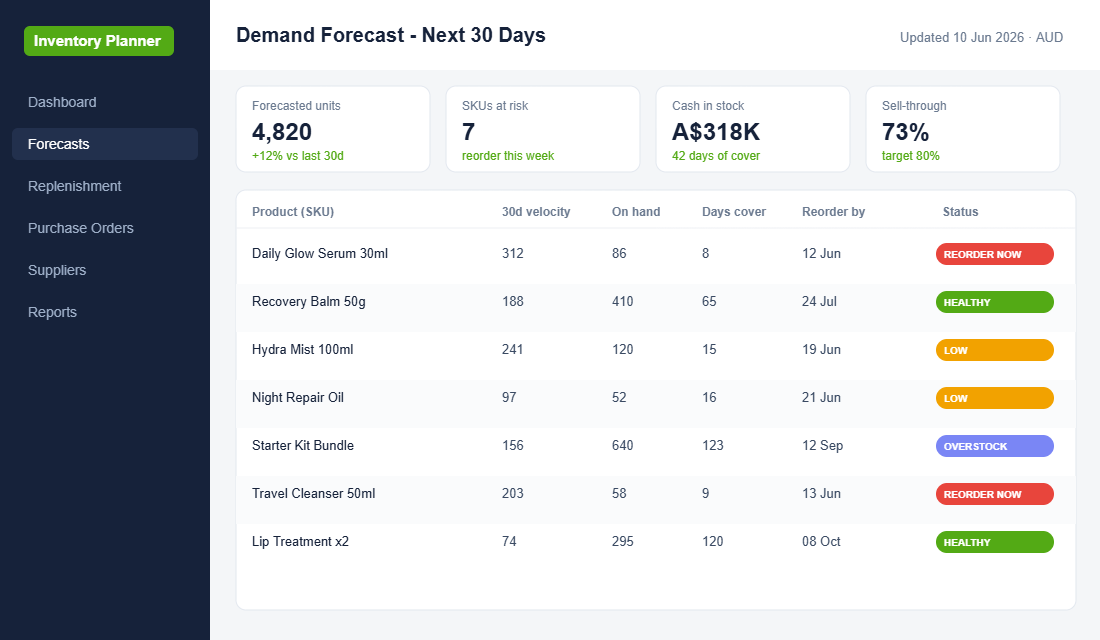
None of this works unless you can see it at a glance. Every Monday morning, you should be looking at one sheet that tells you the story of your inventory in under five minutes. Here’s what goes on it for every A-class SKU:
- On-hand units. Pulled from Shopify or your 3PL.
- On-order units. What you’ve already got in production or on the water.
- Weighted daily demand. The number from Step 3.
- Days of cover. (On-hand + On-order) ÷ Daily demand.
- Reorder point. The number from Step 4.
- Status. Green (safe), amber (watch), red (reorder now).
- Next PO date. Calculated based on current burn rate.
This dashboard lives in Google Sheets or Airtable. You don’t need fancy software to start. Tools like Inventory Planner, Cogsy, or Stocky (Shopify’s own tool, free with Shopify Plus) will automate this once you’re ready, but until you’re north of $2m/year, a spreadsheet is perfectly fine and arguably better because you’re forced to understand the numbers yourself.
Step 7: Run the Monday forecast rhythm
Systems only work if they’re run. The single highest-return habit you can install in your Shopify business is a 30-minute Monday morning forecast rhythm. Here’s the exact cadence:
- Minutes 0-5. Pull last week’s sales from Shopify for all A-class SKUs.
- Minutes 5-10. Update the dashboard’s “on-hand” and “sold this week” columns.
- Minutes 10-15. Recalculate weighted daily demand and days of cover for every A-class SKU.
- Minutes 15-20. Flag any SKU that’s hit its reorder point. These become POs today.
- Minutes 20-25. Review any amber SKUs, project whether they’ll hit reorder in the next two weeks.
- Minutes 25-30. Send POs to suppliers. Update the “next expected delivery” column with ETAs.
Half an hour. Every Monday. This is the rhythm that kills stockouts dead. We’ve had Connect members save $200k+ in annual lost sales just from installing this 30-minute habit. No software upgrade. No fancy system. Just discipline.
The inventory forecasting checklist
Here’s your action list to install this system in the next 14 days:
- Export last 90 days of Shopify sales and run an ABC analysis
- Identify your 5-15 A-class SKUs
- Map true lead time for each A-class SKU (not supplier-quoted)
- Calculate weighted daily demand using 50/30/20 method
- Layer in seasonality factors for the next 90 days
- Calculate reorder points and order quantities for every A-class SKU
- Build the Monday dashboard in Google Sheets or Airtable
- Book a recurring 30-minute Monday meeting to run the forecast
- Document your supplier lead times and Chinese New Year shutdown dates
- Set calendar alerts 14 days before each projected reorder point
- Review and refresh the ABC analysis every quarter
When to Upgrade From Spreadsheets to Dedicated Software
The spreadsheet approach works brilliantly up to about $2M in annual revenue or 50-80 active SKUs. Beyond that, the manual overhead starts eating into the time you save. Here are the signals that you have outgrown a spreadsheet:
You are spending more than 45 minutes on your Monday rhythm. If data entry and formula updates are taking longer than the actual decision-making, it is time to automate. Inventory Planner ($199/month for Shopify) connects directly to your store and calculates reorder points, lead times, and purchase orders automatically. For Australian brands, StockTrim (from $49 NZD/month) is built specifically for the ANZ market and handles multi-warehouse and 3PL scenarios cleanly.
You are managing more than one sales channel. If you sell on Shopify, Amazon, and wholesale, your spreadsheet needs data from three separate sources. Tools like Cin7 or TradeGecko (now QuickBooks Commerce) centralise inventory across all channels and prevent overselling. The cost of a stockout on Amazon, where your listing gets suppressed, is far higher than the monthly software fee.
Your supplier network is growing. Once you are working with five or more suppliers across different countries and lead times, tracking POs and ETAs manually becomes a full-time job. Dedicated tools automate PO generation when stock hits reorder points and track shipments from factory to warehouse. Cogsy ($69/month) is particularly strong here, it integrates with Shopify and your 3PL to give you real-time visibility on what is on the water and when it will arrive.
You need to forecast for promotions. Spreadsheets struggle with promotional demand spikes. If you are planning a BFCM campaign or a major sale event, dedicated tools let you model scenarios like “what if demand triples for two weeks?” and adjust your POs accordingly. This kind of scenario planning is the difference between nailing BFCM and running out of your hero SKU on Black Friday morning.
The transition does not need to be all-or-nothing. Start by moving your A-class SKUs into software while keeping B and C-class in the spreadsheet. Once you trust the automated recommendations (usually after 4-6 weeks), migrate everything across. The investment typically pays for itself within a single reorder cycle through reduced stockouts and smarter purchasing.
The compound effect: how forecasting lifts everything else
Here’s what most founders miss: inventory forecasting isn’t just about stock. It’s the foundation that every other lever in your business sits on. When you know exactly when you’re going to run out, you can plan ad budgets around stock levels. When you know your true lead time, you can launch new products without cannibalising your heroes. When you know your reorder points, you stop making panic decisions that cost you margin.
This is why we treat Practice, the discipline of execution rhythms, as one of the 10 P’s in the More Orders Operating System. It’s not sexy. It doesn’t get talked about on ecommerce podcasts. But it’s the difference between a brand that scales to $10m and one that plateaus at $1m, constantly putting out fires.
Inventory feeds into everything: your contribution margin, your shipping cost structure, and your ability to run campaigns without worrying about stockouts mid-BFCM. Get the forecasting right and the other dominoes fall in line. Get it wrong and nothing else matters.
Inside the eCommerce Circle
Inventory forecasting is one of the core Practice rhythms we install with every Connect member. We’ve seen brands free up six-figure cash balances and wipe out stockouts within a single quarter just by running this weekly cadence. It’s unglamorous work. It’s also the most profitable 30 minutes you’ll spend all week.
How to Forecast a Product With No Sales History
Every method above needs sales history. So what do you do with the product launching in six weeks that has never sold a single unit?
Most founders solve this by guessing, then over-ordering to feel safe. That is how you end up with dead stock. New products are where inventory money goes to die, and it is almost always a forecasting problem rather than a product problem.
Use an analogue instead of a guess. Pick the closest existing SKU you already sell, then adjust it. Here is the process:
- Choose your analogue. Same category, similar price point, similar buyer. Not your hero product. Pick something mid-range that launched in the last 18 months so you have clean first-90-day data.
- Pull its first 90 days of units. Shopify Analytics, Sales by product, set the range to that product’s launch window. Write down the total.
- Apply a confidence multiplier. A line extension of a proven product gets 0.7 to 1.0 of the analogue. A new category with no audience proof gets 0.3 to 0.5. If you have a waitlist, use the waitlist size and assume 5 to 10% convert in week one.
- Order the first 8 to 10 weeks only. Not six months. Your first order exists to generate data, not to cover the year.
- Set a reforecast date at day 21. By three weeks you have enough real sell-through to replace the whole estimate with actual numbers.
That day 21 checkpoint is the part almost nobody builds in. Calculate weekly sell-through rate: units sold divided by units received. If you are tracking above 12% a week, place the reorder immediately, because you will stock out before the next container lands. Below 4% a week, stop the second order entirely and start planning the markdown while the product is still fresh enough to move at a small discount instead of a brutal one.
The uncomfortable truth is that roughly a third of new SKUs underperform their launch forecast. That is normal. The brands that stay healthy are not the ones that forecast new products accurately. They are the ones that commit small, read the signal fast, and cut the losers before the cash is locked up in a warehouse. If you already have units sitting still, our dead stock playbook covers how to clear them without wrecking your margin.
One more thing worth saying plainly. A good forecast that you cannot fund is still a stockout. If your reorder points are telling you to buy more than your cash flow allows, the constraint is capital, not planning, and that is a different problem with different solutions. We work through the options in the inventory funding playbook.
If you want help installing this in your business, and mapping the rest of the 10 P’s into a rhythm that actually scales, let’s talk. We’ll walk through your current inventory position, identify the two or three SKUs quietly bleeding cash, and build a forecast sheet together on the call.