Right now, someone is sitting on your product page with their thumb hovering over Add to Cart. They have one question. Maybe it is about sizing. Maybe it is whether the order will arrive before Friday. If they cannot get an answer in the next sixty seconds, they will do what most shoppers do: close the tab and buy from whoever answers first.
What’s in This Article
Most Aussie Shopify founders treat chat as a support cost. A box in the corner that collects complaints, staffed reluctantly, switched off after 5pm. So they bury the widget, let messages sit for hours, and wonder why conversion is stuck at 2%.
The brands winning right now treat chat as a sales channel. The data backs them. Shoppers who use live chat are 2.8 times more likely to convert and spend up to 60% more per order. Shopify’s own numbers show 70% of Inbox conversations happen while the customer is actively making a purchase decision. That is not a support queue. That is a sales floor.
This playbook gives you the 5-layer system we work through with members: where the widget goes, how to run pre-sale chats that close, what to hand to AI (and what to keep human), the speed standard that wins the sale, and how to measure chat like the revenue channel it is.
Why Chat Is the Highest-Intent Traffic You Are Ignoring
Think about who opens a chat window. Not a casual scroller. A casual scroller bounces. The person who types a question has a specific objection standing between them and the buy button. Answer it and the sale is usually yours.
The numbers across 2025 and 2026 industry studies are remarkably consistent:
- 2.8x conversion. Visitors who engage in chat convert at 2.8 times the rate of those who do not, and spend roughly 60% more per purchase.
- 63% prefer chat-equipped stores. Nearly two thirds of shoppers say they are more likely to buy from a site with live chat available, even if they never use it. The widget itself is a trust signal.
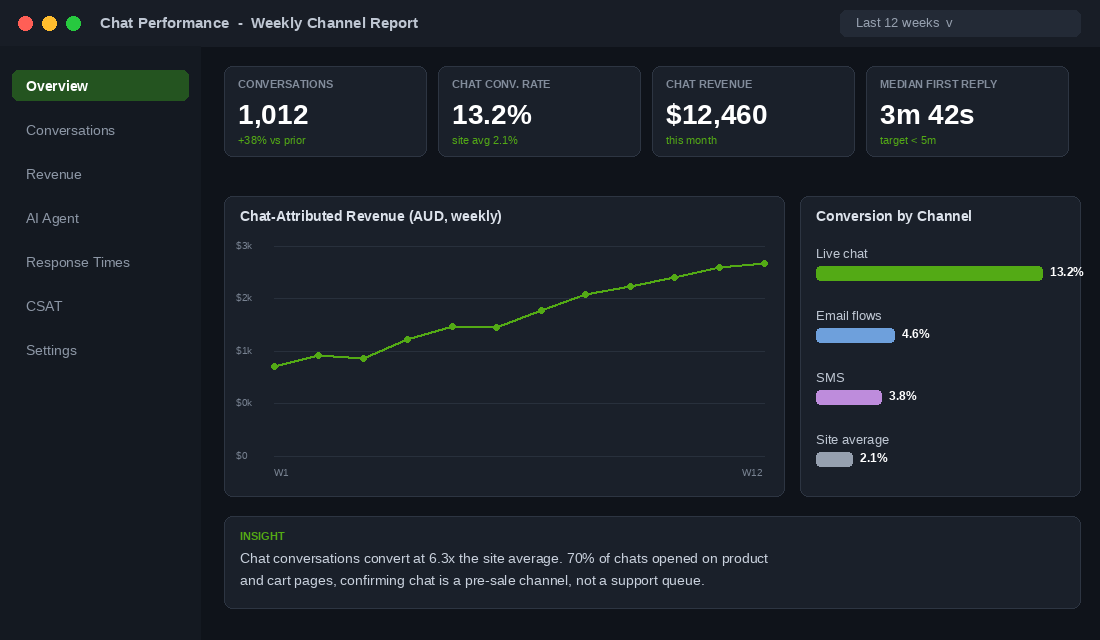
- Chat-to-conversion runs 10 to 20%. Compare that with the 2 to 4% most Aussie Shopify stores convert at sitewide. A chat conversation is worth five times an ordinary session.
- 70% of chats are purchase decisions. Shopify’s Inbox data shows the bulk of conversations come from shoppers deciding whether to buy, not customers chasing refunds.
- The 5-minute rule. Merchants who respond within 5 minutes are 69% more likely to win the sale, per Shopify.
Here is the founder maths. A store doing 40,000 sessions a month at a $95 AOV will see roughly 1.5 to 3% of visitors open chat when the widget is set up well. Call it 800 conversations. At a conservative 12% chat conversion, that is 96 orders and around $9,100 a month in revenue flowing through a channel most stores leave understaffed or switched off. Before AI enters the picture at all.
Layer 1: Placement and Proactive Triggers (Where the Widget Earns Its Keep)
A chat widget sitting passively in the corner captures a fraction of its potential. The difference between 0.5% of visitors chatting and 3% chatting is almost entirely placement and triggers.
Get these five placement decisions right:
- Bottom-right, always visible, never blocking. On mobile, the launcher must sit clear of your sticky Add to Cart bar. A widget covering the buy button is a conversion tax. Test on a real phone, not just desktop preview.
- Proactive trigger on high-intent pages. Fire a contextual opener after 30 to 45 seconds on PDPs: “Got a question about sizing or delivery? Ask away.” Generic sitewide pop-ups get ignored; page-specific openers get answered.
- Cart and checkout rescue. Trigger on exit intent or 60 seconds idle in the cart: “Anything holding you back? We are online now.” This is where shipping-cost and delivery-time objections surface, and they are the top two abandonment drivers in nearly every study.
- Set expectations in the widget header. If you reply within minutes, say so (“We typically reply in under 5 minutes”). If you are offline, show it honestly and promise an email reply window. Fake “online” status that leads to silence burns trust.
- Pre-chat quick replies. Buttons for “Where is my order?”, “Sizing help” and “Delivery times” route a third of conversations before a human ever types. They also feed your AI layer clean intent data later.
Layer 2: The Pre-Sale Chat Playbook (Run It Like Your Best Floor Salesperson)
Once a shopper opens chat, the conversation should follow a deliberate structure, the way a great retail assistant works a shop floor. Answer, recommend, close. Not just answer.
The four moves that separate sales chats from support chats:
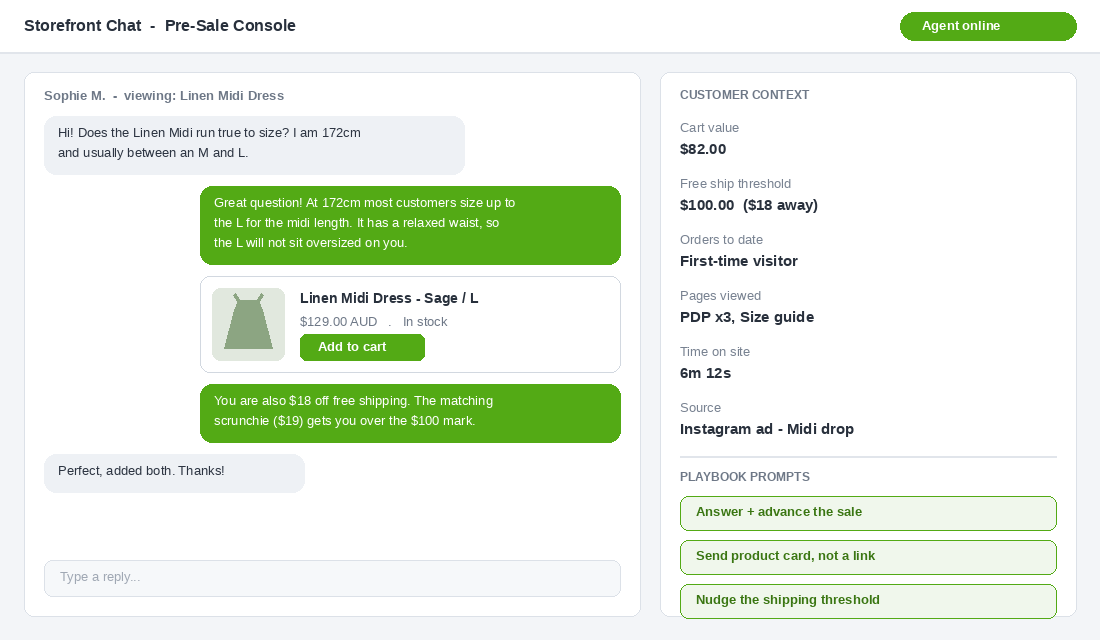
- Answer the question, then advance the sale. “Yes, the Midi fits true to size. Most customers your height take the M. Want me to drop it in your cart?” Every answer ends with a next step.
- Send product cards, not links. Shopify Inbox lets you share a product card with image, price and an Add to Cart button inside the chat. When Shopify rolled out product cards, chat conversion lifted from 21% to 23.5%. Pasting bare URLs leaves that on the table.
- Use cart visibility. Inbox and Gorgias both show you what is in the shopper’s cart while you chat. If they are $18 short of your free shipping threshold, say so: “Add the mini and you will clear our $100 free shipping mark.”
- Hold the discount code for save situations. A code dropped into every chat trains customers to ask. Reserve a 10% code for genuine hesitation on a first order, delivered as “let me sort that for you”, not as policy.
Write these four moves into your team’s macros. If you already run a reply template library, fold them into it (our 25-template customer service macro library is the starting point most members use), and tag pre-sale chats separately from support chats from day one.
Layer 3: The AI Layer (Automate the 3am Messages, Keep the Judgement Calls Human)
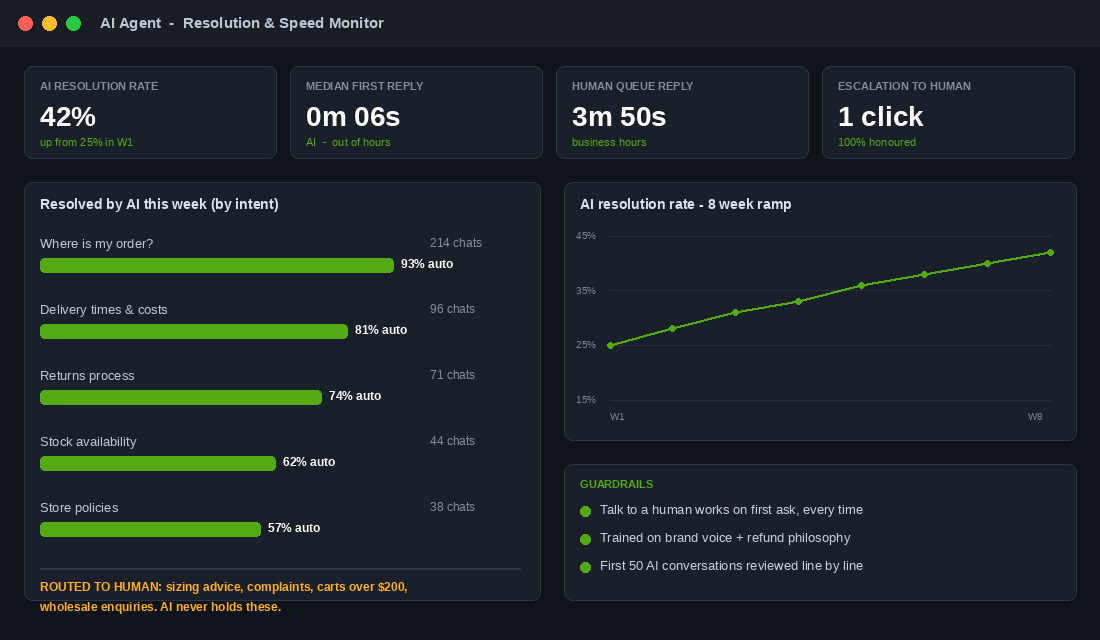
This is where 2026 has changed the game. Two years ago, ecommerce chatbots were decision trees that infuriated everyone. Today’s AI agents read your help docs, check the order status in Shopify, and reply in your brand voice. The honest benchmark from Gorgias data: brands typically automate 26 to 56% of tickets, and “where is my order?” questions can hit up to 93% automated resolution because the answer lives in Shopify already.
The Aussie proof point is LSKD. The Queensland sportswear brand turned on Gorgias AI Agent and cut response times to under a minute while tripling their automation rate, with email automation up 20% within the first month. Their community members regularly mistake the AI replies for a human, which tells you how far the tone training has come. During their mid-year sale spike, the AI absorbed the volume surge without extra headcount.
The dividing line that keeps AI helpful instead of harmful:
- Hand to AI: order status and tracking, shipping costs and delivery windows, returns process questions, store policies, stock availability, basic product facts already on your site.
- Keep human: sizing judgement calls, complaints and damaged orders, anything involving an unhappy tone, bulk or wholesale enquiries, and every conversation where the shopper has more than $200 in the cart.
- Always provide an exit. “Talk to a human” must work on the first ask, every time. The fastest way to torch trust is an AI that holds customers hostage.
- Train it on your voice. Feed it your tone rules, your slang threshold, your refund philosophy. Review the first 50 AI conversations line by line before you relax.
Princess Polly, the Gold Coast fashion juggernaut handling around 50,000 tickets a month across phone, email, chat and social, shows what the system looks like at scale: since moving their stack to Gorgias they cut first response time by 95%, resolution time by 80%, and lifted team efficiency 40%. The play is identical at one-hundredth the volume. Automate the repetitive, route the valuable.
Layer 4: The Speed Standard (Five Minutes or You Are Donating Sales)
Speed is the whole ballgame in chat. A shopper who asks a pre-sale question is in the buying moment right now. Shopify’s data says answering within 5 minutes makes you 69% more likely to win the sale. An hour later, they have bought elsewhere or the moment has passed.
How lean Aussie teams hit the standard without hiring:
- Put the app on your phone. Shopify Inbox and Gorgias both have solid mobile apps. A founder answering a sizing question from the school pickup queue beats a perfect reply tomorrow morning.
- Let AI take first touch out of hours. Your AU customers shop at 9pm. Your AI answers instantly at 9pm. Anything it cannot resolve becomes a tagged email for the morning, with the shopper told exactly when to expect a reply.
- Set honest hours. If humans cover 9am to 6pm AEST, display it. An honest “back at 9am” with instant AI cover converts better than a fake green dot.
- Macro the first 80%. Your top 10 questions cover most volume. Macros with the customer’s name and order details pre-filled get response times under a minute without sounding canned.
Layer 5: Measure Chat Like a Channel (Five Numbers, Every Monday)
You run a weekly number on Meta ads and email. Chat earns the same treatment, because it is quietly producing revenue per conversation that embarrasses both. Five numbers on a Monday:
- Chat engagement rate. Conversations divided by sessions. Healthy is 1.5 to 3%. Below 1% means your triggers are too shy.
- Chat conversion rate. Orders from chatters divided by conversations. Target 10 to 20%. Shopify Inbox reports this natively; Gorgias tracks revenue per conversation.
- Chat-attributed revenue. The headline number that justifies the channel. Watch it monthly against your email flow revenue and prepare to be surprised.
- First response time. Median, not average. Under 5 minutes in business hours, instant with AI cover after hours.
- AI resolution rate. The share of conversations resolved without a human. Climbing from 25% toward 50% over a quarter is the realistic curve, and it tells you what to add to your help docs next.
If a stage of your funnel is leaking before shoppers even reach the chat moment, fix that first. Run the numbers through the 5-stage conversion funnel audit so you know whether chat is your bottleneck or your amplifier.
The Tool Stack: Start Free, Scale Deliberately
Under roughly $80k a month, Shopify Inbox is the answer and it is free. It lives inside your Shopify admin, shows the shopper’s cart while you chat, sends product cards, and reports which chats turned into orders. Setup takes fifteen minutes:
- Install Shopify Inbox from the Shopify App Store (free, by Shopify) and enable chat in Online Store, then Preferences.
- Style the launcher to your brand colours and position it bottom-right, checking it clears your mobile sticky cart bar.
- Set up instant answers for your top 5 questions (delivery times, returns, sizing, order tracking, stock) under Inbox, then Saved responses and automations.
- Switch on order status automation so “where is my order?” resolves itself from Shopify data.
- Download the Inbox mobile app, set your availability hours honestly, and turn on notifications for business hours.
Past $80 to 100k a month, graduate to Gorgias. You get every channel (email, chat, Instagram and TikTok DMs, phone) in one queue, deep Shopify actions like refunds and order edits inside the ticket, and the AI Agent that LSKD and Princess Polly run. Pricing is ticket-based with AI resolutions around USD$0.90 each, which sounds steep until you price a part-time CS hire at $35 an hour.
The trap to avoid is buying an enterprise helpdesk at $40k a month revenue because a podcast bro recommended it. Match the tool to your ticket volume, not your ambition.
The Four Mistakes That Turn Chat Into a Liability
- The ghost widget. Chat installed, nobody answering, messages sitting for two days. Worse than no chat at all, because you made a promise and broke it. If you cannot cover it, set AI plus honest email handoff before you launch.
- The hostage bot. An AI that loops shoppers through canned answers and hides the human exit. One bad loop on a $300 cart costs more than a month of staffing.
- Support-only thinking. If your team treats every chat as a ticket to close rather than a sale to win, you get fast replies and flat revenue. Tag pre-sale conversations and coach the close.
- No measurement. Most founders cannot name their chat-attributed revenue. What does not get measured gets staffed last and cut first, which is exactly backwards for a channel converting at 5x sitewide.
The Compound Effect: What the Five Layers Add Up To
Take that $2m-a-year store: 40,000 sessions, $95 AOV, 2.1% sitewide conversion. Wire the five layers together and the maths stacks like this:
- Placement and triggers lift chat engagement from 0.8% to 2.5% of sessions: 1,000 conversations a month.
- The pre-sale playbook and product cards hold chat conversion at 13%: 130 orders, roughly $12,350 a month in chat-assisted revenue.
- AI resolves 40% of conversations instantly, which keeps the human queue inside the 5-minute standard without new hires and covers the 9pm browsing window your competitors sleep through.
- The widget’s presence alone nudges sitewide trust; even a 0.05 point conversion lift across the other 39,000 sessions adds another $1,800 a month.
Call it $14,000 a month in influenced revenue, around $168,000 a year, from a free app, a playbook, and an AI layer costing a few hundred dollars a month. That is the compound effect: each layer multiplies the others. Triggers without the sales playbook waste conversations. Speed without measurement never gets resourced. Together they turn a neglected corner widget into your highest-converting channel, and they make every dollar of traffic you already pay for work harder (pair it with the cart drawer framework and the whole bottom of your funnel compounds).
Your 30-Day Live Chat Rollout Checklist
Print this. Tape it above your desk. Work it top to bottom.
- Week 1: Install Shopify Inbox (or audit your current widget). Fix mobile placement. Write your widget header with an honest response-time promise. Set business hours.
- Week 1: Build instant answers for your top 5 questions and switch on order status automation.
- Week 2: Add proactive triggers on PDPs (30 to 45 seconds) and cart (exit intent). Write the openers in your brand voice.
- Week 2: Write the four-move pre-sale macro set: answer plus advance, product card, threshold nudge, save-the-sale code rules.
- Week 3: Train the team (or yourself) on the 5-minute standard. Install the mobile app. Tag pre-sale vs support conversations.
- Week 3: If volume justifies it, trial an AI agent on order status and policy questions only. Review every AI conversation this week.
- Week 4: Build the Monday scorecard: engagement rate, chat conversion, chat revenue, median first response, AI resolution rate.
- Week 4: Expand AI scope based on what it handled cleanly. Set the quarterly review in your calendar.
Inside eCommerce Circle, the chat and customer experience layer is one of the levers we work on with every member running past $40k a month, because it touches conversion, retention and team workload at the same time. If you want a second opinion on how your store handles the buying moment, let’s talk.