Your customer service inbox is the slowest, most expensive part of your business right now. Most Aussie Shopify founders do not realise that until they look at the numbers. Average handle time of 14 minutes. First reply time of 9 hours. CSAT scores quietly slipping from 4.7 to 4.2. And the founder still typing the same reply about “where is my order” 30 times a week.
What’s in This Article
The fix is not hiring another VA. It is not buying a fancier helpdesk. It is building a proper macro library: a tightly written set of pre-built reply templates that your team can deploy in seconds, personalise in another five, and send with confidence. Done right, a 25-macro library cuts your team’s response time by 60 to 80% and lifts CSAT instead of dropping it.
This playbook walks through the exact 25 macros every Aussie Shopify brand should be running, the tone guardrails that keep them from feeling robotic, the Gorgias setup steps that make them automatic, and the monthly maintenance routine that stops the library from rotting. You can build this in a weekend. You should have built it last quarter.
Why Customer Service Is the Hidden CRO Lever in 2026
Customer service stopped being a back-office function the moment “where is my order” became the most-asked Google query about your brand. It is now a direct conversion lever, a retention lever, and the loudest signal of brand quality your customers experience. The numbers behind that shift are blunt.
- 88% of customers say they expect faster responses now than a year ago. What was acceptable in 2024 is now a one-star review.
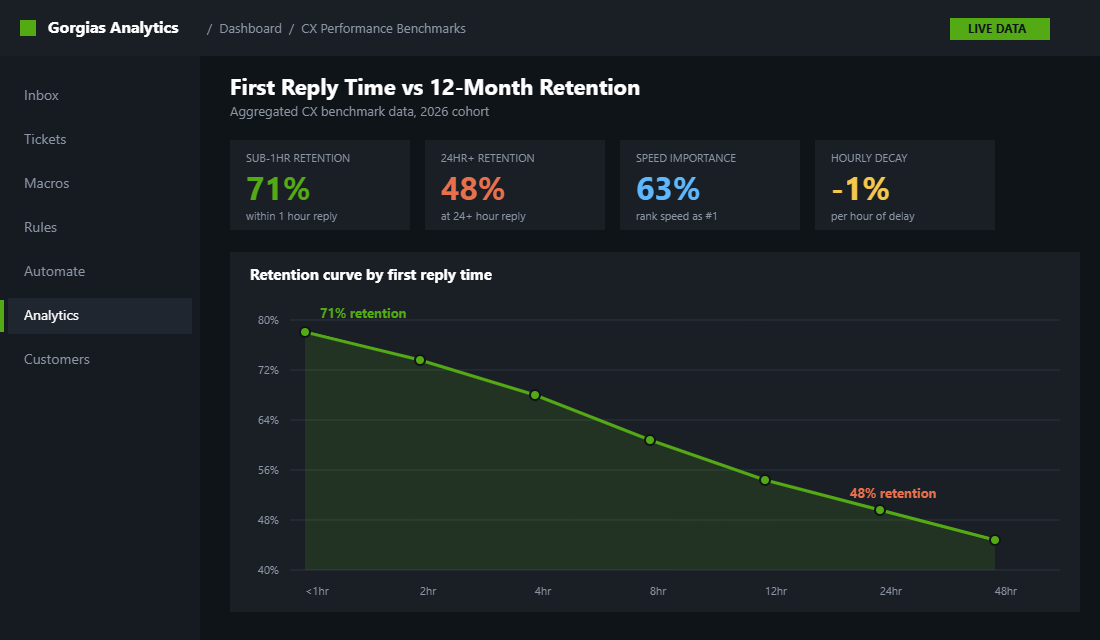
- 63% of customers rank speed of response as the number one factor in their support experience, ahead of speed of resolution and channel availability.
- Customers who get a reply within one hour are 40% more likely to rate the experience positively, and 7x more likely to convert than customers who wait two hours.
- Sub-1-hour email responses drive 71% customer retention. 24-hour-plus responses retain just 48%. That gap is your second-purchase rate.
- Every additional hour of first-response delay correlates with a 1% drop in 12-month retention. A four-hour reply costs you 4% of your repeat revenue.
Now look at where your team actually is. The Zendesk benchmark for email is “good” at 12 hours, “better” at 4 hours, “best” at 1 hour or less. Top ecommerce brands respond to live chat in 12 to 30 seconds. If your team is not in that “best” zone, you are leaking conversions before the customer has even decided whether to keep their order.
Macros are the single biggest lever that gets you there. Companies using a proper reply-template library see up to a 40% reduction in average handle time per case. That is not a hiring story. It is a systems story. And it is the cheapest CX upgrade you will run all year.
Why One-Off Replies Are the Trap That Kills Scaling Brands
Here is what most founders do at the $40k to $200k per month range. They handle CX themselves. Or they hire a VA who answers each ticket as a fresh blank canvas. Every reply is typed from scratch, with whatever tone the agent woke up with that morning. The result is predictable.
- Inconsistent tone across the team. The morning VA sounds chipper. The afternoon VA sounds clinical. The founder dropping in at 9pm sounds curt. Your brand voice melts away one ticket at a time.
- Repeated mistakes. Last month a VA quoted the old returns window. This month another quotes the wrong AusPost cutoff. The macro you never wrote is the policy you never enforced.
- Massive time leak. Reading the ticket, looking up the order, typing the reply, double-checking the policy, hitting send. Even a fast agent takes 8 to 12 minutes per ticket. Multiply that by 60 tickets a day and you are losing two full FTEs a week to typing.
- Stalled scaling. The 2,000-ticket-per-month threshold is where manual processes break. Most Aussie founders hit it on the runway to their second BFCM and never come back from it without macros.
A macro library solves all four. It locks tone, locks policy, locks speed, and unlocks scale. The point is not to remove the human. It is to give the human a runway so they can land 80% of replies in 30 seconds and spend their judgement on the 20% that actually need it.
The 5 Macro Categories Every Shopify Brand Needs
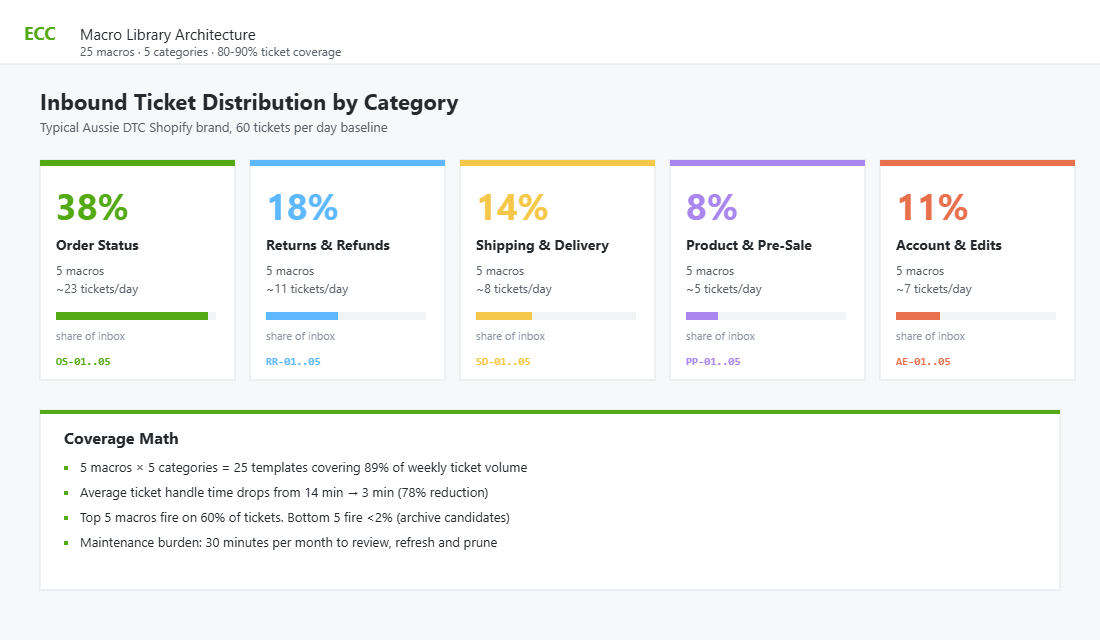
If you pull a week of your tickets and tag them, you will find 80 to 90% fall into five buckets. That is the entire architecture. Build your library around these five and you will cover the bulk of your inbox without writing 80 templates you never need.
- Category 1: Order Status. Where is my order, when will it ship, can you track it, did it dispatch yet. Roughly 35 to 45% of tickets for most Aussie DTC brands.
- Category 2: Returns and Refunds. How do I return this, what is your policy, where is my refund, can I exchange it. Around 15 to 20% of tickets, spikes hard post-BFCM and around January.
- Category 3: Shipping and Delivery. AusPost delays, missing parcels, address changes, redirect requests, international shipping windows. Often 10 to 15% of tickets, much higher during AusPost industrial action or Christmas peak.
- Category 4: Product and Pre-Sale Questions. Sizing, ingredients, compatibility, availability, comparison to another SKU. The smallest category for established brands but the highest-converting one. These tickets pay for the rest of the inbox.
- Category 5: Account and Order Edits. Change my address, cancel my order, swap a size, apply a discount code that did not work, billing edits, password resets. The fiddly admin bucket. About 10% of volume.
Five categories. 25 macros. Five per category. That is the library. If you are running fewer than 25, you have gaps. If you are running more than 40, you have bloat. The 25-macro number is the sweet spot for brands doing $40k to $500k per month.
The 25 Macros Every Aussie Shopify Brand Should Run
Here is the exact library. Copy it into a Google Doc, edit the brand voice, and you have a weekend’s work to translate it into Gorgias or your helpdesk of choice. Each macro name uses a verb plus object, so an agent searching “refund” or “tracking” lands instantly on the right template.
Order Status (5 macros)
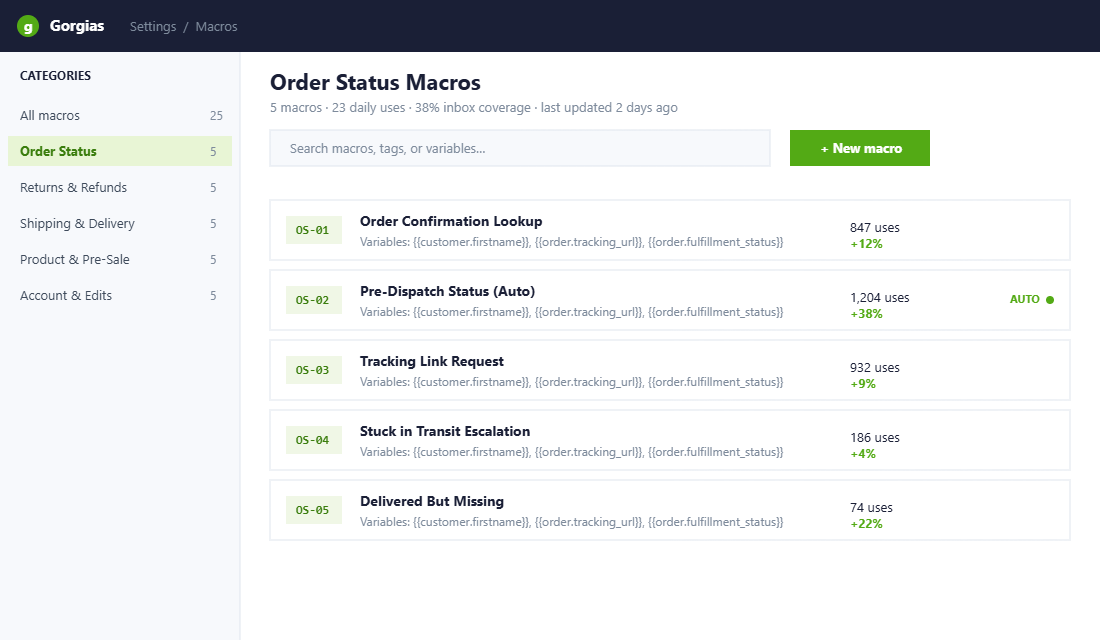
- OS-01 Order Confirmation Lookup. Customer cannot find their confirmation email. Macro confirms order placed, restates the email it was sent to, attaches tracking link if dispatched.
- OS-02 Pre-Dispatch Status. Order placed, not yet dispatched. Macro restates SLA, gives expected dispatch window, sets expectation for tracking notification.
- OS-03 Tracking Link Request. Order dispatched. Macro pulls tracking number from Shopify, links to AusPost or carrier portal, sets delivery window expectation.
- OS-04 Stuck in Transit. Tracking has not updated in 48+ hours. Macro acknowledges, links to carrier delay, sets escalation timeline, offers proactive resolution at day 7.
- OS-05 Delivered But Missing. Tracking shows delivered, customer cannot find. Macro walks safe-drop checks, neighbours, carrier card, then escalates to investigation if still missing after 48 hours.
Returns and Refunds (5 macros)
- RR-01 Return Policy Explainer. Customer asking how returns work. Macro states window (30 days), condition requirements, who pays shipping, refund timeframe.
- RR-02 Initiate Return Request. Customer wants to return. Macro confirms eligibility, sends Loop or Returnly link, explains next steps, references inclusion of returns label.
- RR-03 Exchange Request. Customer wants to swap, not return. Macro offers exchange flow, locks in the new size or variant, restates timing.
- RR-04 Refund Confirmation. Return received and processed. Macro confirms refund issued, states 3 to 5 business day visibility in bank, thanks the customer.
- RR-05 Outside Window Decline. Customer requesting return past 30 days. Macro politely declines, references policy, offers a goodwill alternative if eligible (store credit, exchange).
Shipping and Delivery (5 macros)
- SD-01 Australia Domestic Timing. Standard shipping window by state. Express timing. Cut-off times. AusPost or Sendle reference.
- SD-02 International Shipping Timing. By region (NZ, US, UK, EU, Asia). Duties and taxes disclaimer. Tracking carrier reference.
- SD-03 AusPost Delay Response. Industrial action, weather, or peak-season delays. Acknowledges, references current carrier status, sets revised expectation, offers escalation path.
- SD-04 Address Change Request. Pre-dispatch only. Macro confirms change is possible, asks for full new address, confirms back when updated.
- SD-05 Failed Delivery Reattempt. Card left, parcel returned to depot. Macro instructs collection or reschedule, references carrier reattempt rules.
Product and Pre-Sale (5 macros)
- PP-01 Sizing Guidance. Pull from the brand’s size chart. Reference fit notes for the specific SKU. Offer a “size up” or “size down” rule of thumb based on the style.
- PP-02 Ingredients or Materials. Pull from the PDP. Reference allergens, country of origin, certifications.
- PP-03 Back-in-Stock Request. SKU out of stock. Macro adds customer to BIS waitlist (Klaviyo or Back in Stock app), states expected restock window if known.
- PP-04 Bundle and Discount Eligibility. Customer asking if X discount stacks with Y bundle. Macro states the rules clearly. Avoids the “well it depends” trap.
- PP-05 Compare Two Products. Common for skincare, supplements, electronics. Side-by-side comparison drawn from a stored doc, plus a recommended pick based on use case.
Account and Order Edits (5 macros)
- AE-01 Cancel Order. Pre-dispatch only. Macro confirms cancellation, refunds, sets refund visibility window.
- AE-02 Edit Item or Size. Pre-dispatch only. Macro confirms swap, recalculates price difference, processes top-up or refund.
- AE-03 Apply Missed Discount. Customer forgot to apply a code. Macro applies retroactively (if policy allows), explains “code at checkout only” rule politely if not.
- AE-04 Password Reset Walkthrough. Step-by-step instructions to reset via Shopify customer accounts. Plus a fallback contact if the reset email never lands.
- AE-05 Subscription Skip or Pause. If running Recharge or Shopify Subscriptions. Macro instructs the self-serve flow, then offers to action manually if the customer prefers.
Build these 25 once. Test them in real tickets for two weeks. Then you have a library that will run your support inbox for the next 12 months with quarterly tweaks.
The Tone Guardrails: Where Macros Go Wrong
Most brands try macros, hate the result, and abandon them. The reason is always the same. The macros were written like form letters. They sound like a bot. Customers can smell a copy-paste reply at 50 paces and it tanks CSAT harder than a slow response. The fix is in the tone rules you bake into every macro before you save it.
- Open with the customer’s first name, always. Use Gorgias merge fields (the customer firstname variable) so it pulls dynamically. Generic openers like “Hi there” feel transactional.
- Acknowledge the specific issue in your first sentence. “Thanks for reaching out about the delayed delivery to your Brisbane address.” Not “Thank you for contacting us.” Specificity proves you read the ticket.
- Use brand voice, not corporate voice. If your brand is warm and irreverent (think Frank Body), your refund macro can still be warm and irreverent. The information is templated. The personality is not.
- Always end with a real question or offer. “Anything else I can help with?” beats “Have a great day” by a wide margin in CSAT studies. It invites the next reply and signals you are still here.
- Strip every “as per our policy” phrase. Replace with the policy itself, in plain English. “Returns within 30 days, in original condition” lands better than “as per our return policy”.
One more discipline. Every macro must allow a 5 to 10 second personalisation pass before send. The agent reads the ticket, picks the macro, scans it, edits one line to acknowledge the specific situation, then sends. Macros that cannot be personalised in under 10 seconds are too rigid. Rewrite them.
The Gorgias Setup: Templates, Rules, and Automate
For Aussie Shopify brands, Gorgias is the default helpdesk for a reason. It is built for Shopify, the data sync is native, and macros sit at the centre of the workflow. Here is the setup that turns your 25-macro library into a self-driving support engine.
- Step 1: Install the Gorgias app from the Shopify App Store. Authorise it to access orders, customers, and fulfilment data. The sync runs automatically and pulls historical order data into every ticket view.
- Step 2: Build the 25 macros in Settings, then Macros. Use the variable picker to insert customer firstname, order number, tracking URL, and fulfilment status where they belong. Variables are the difference between a robotic macro and a personalised one.
- Step 3: Create Rules to auto-tag every inbound ticket. Rules use simple “if this, then that” logic. If body contains “where is my order” or “tracking” or “shipped yet”, tag with OrderStatus. Repeat for each of the five categories.
- Step 4: Build Auto-Reply Rules for the easy wins. A pre-dispatch order status ticket can fire an automatic acknowledgement using the OS-02 macro, with no agent involvement. Around 30 to 40% of order-status tickets can be fully handled this way.
- Step 5: Turn on Gorgias Automate for Tier 1. The Automate feature can resolve up to 60% of Tier 1 tickets autonomously by using your macro library as its knowledge base. Start narrow (order status only), measure CSAT for 30 days, then expand.
Expect to spend a full week getting Gorgias to a point where it saves time instead of creating setup work. Day one is the integration. Days two and three are macro writing. Days four and five are rules and auto-reply testing. Day six is Automate configuration. Day seven is your team training, walking through 20 historical tickets together to confirm the right macro lands every time.
The Macro Maintenance Routine: Stop Your Library From Rotting
The single biggest mistake is treating the macro library as a one-time build. Policies shift. Carriers change SLAs. New SKUs launch. Old promo codes get retired. Six months in, half your macros are slightly wrong and your CSAT starts sliding without anyone knowing why. The fix is a 30-minute monthly routine.
- Pull the macro usage report. Gorgias shows you exactly which macros fire most. The top five are doing 60% of the work. The bottom five are probably dead weight.
- Read the last 10 uses of each macro and the customer’s reply. If the customer responded with “but that does not apply to me” or asked a follow-up question, your macro has a gap. Fix the copy.
- Confirm policy alignment. Did your returns window change? Has your AusPost SLA shifted? Did you launch Sendle as an alternative carrier? Every macro touching policy gets a sanity check.
- Archive macros used fewer than 5 times in 30 days. Bloat kills agent speed. If a macro is barely used, it is either a fringe edge case (handle manually) or it is poorly named so agents cannot find it (rename it).
- Add one new macro per month, max. Discipline matters. If you keep adding macros without retiring others, the library balloons and your agents spend more time searching than typing.
This routine pairs nicely with the broader SOP discipline we cover in The Shopify SOP Library. A macro library is just an SOP for customer service: documented, repeatable, owned. Treat it that way and it stays sharp.
Brands Doing This Properly: Two Aussie Benchmarks
The brands that have made CX a competitive moat all run mature macro libraries, even if they call them something else. Two examples worth studying.
- Mecca. The Australian beauty retailer has been in the top 10 customer experience rankings consistently since 2021. The visible piece is in-store theatre. The invisible piece is a deep, personalised CX layer where every digital touchpoint feels like the in-store experience. Their templated communications still read like a beauty advisor, not a chatbot.
- Who Gives A Crap. The Aussie toilet paper brand built into a global force partly on the strength of its CX voice. Even their order confirmation emails are written like the brand. The macros their team uses are templated, but they sound like the founders wrote each one.
The lesson from both is the same. Macros do not have to feel templated. They have to feel like your brand, on repeat. If you cannot tell the difference between a macro reply and a custom one, you have built the library properly.
The Compound Effect: From 14-Minute AHT to 3 Minutes
Here is what happens when the system clicks into place. Take a brand doing 60 tickets a day with one full-time CX agent. Pre-library numbers usually look like this:
- Average Handle Time: 14 minutes per ticket
- First Reply Time: 9 hours
- CSAT: 4.2 out of 5
- Daily capacity: 30 tickets per agent (overflow into next day)
- Backlog: building, with founder pulled in at 9pm to clear it
Post-library, with the Gorgias setup running, the same agent looks like this:
- Average Handle Time: 3 minutes per ticket (78% reduction)
- First Reply Time: 22 minutes
- CSAT: 4.7 out of 5
- Daily capacity: 100+ tickets per agent
- Backlog: cleared by 4pm, no after-hours work for the founder
That is not a hypothetical. That is the curve every brand we work with sees within 60 days of building the library properly. And the second-order effects compound. Faster replies improve retention (every hour of delay costs 1% of 12-month retention). Higher CSAT lifts repeat purchase rates. And the founder gets their evenings back, which means more time on the leverage work that actually grows the brand.
This is the same compound logic we apply to building a complete support system. Macros are the unit. The system is what stitches them together with rules, automation, and a maintenance routine. Run the system and your CX stops being the bottleneck and starts being the moat.
Build It This Weekend
Most founders we coach have never sat down and audited their CX inbox properly. They know it eats time. They do not know it eats retention, conversion, and team morale at the same compound rate. The 25-macro library is the lowest-friction CX upgrade in your business. It costs you a weekend. It pays you back every week for the next two years.
Block out two days this weekend. Pull your last 200 tickets. Tag them into the five categories. Write the 25 macros. Install Gorgias if you have not. Set up the rules. Go to bed on Sunday night knowing your CX is now a system, not a sacrifice.
Inside eCommerce Circle, the customer service macro library is one of the core pillars we work through with every member building their second-purchase engine. If you want a second opinion on yours, let’s talk.