A fake Shopify email is any message claiming to be from Shopify that pushes you to log in, pay or “verify” something through a link. The safe rule is simple: never log in from an email link, open your admin by typing the address yourself, and forward the message to phishing@shopify.com.
Most Aussie store owners lose money to this stuff for a boring reason. They are tired, it is 11pm, the email says “payout on hold”, and the link looks close enough. Black Friday is 27 November, which means more orders, more payout activity and more scammers pretending to be the platforms you depend on.
This guide shows you the 7 fake messages we see most, the five checks that catch almost all of them, and a one-page Pause, Verify, Report routine you can hand to your team today.
Why Shopify phishing emails work on smart owners
Phishing works because it borrows your fear, not your ignorance. Your payouts, your ad accounts and your domain are the three things that stop the business if they go away, and scammers write subject lines about exactly those three.
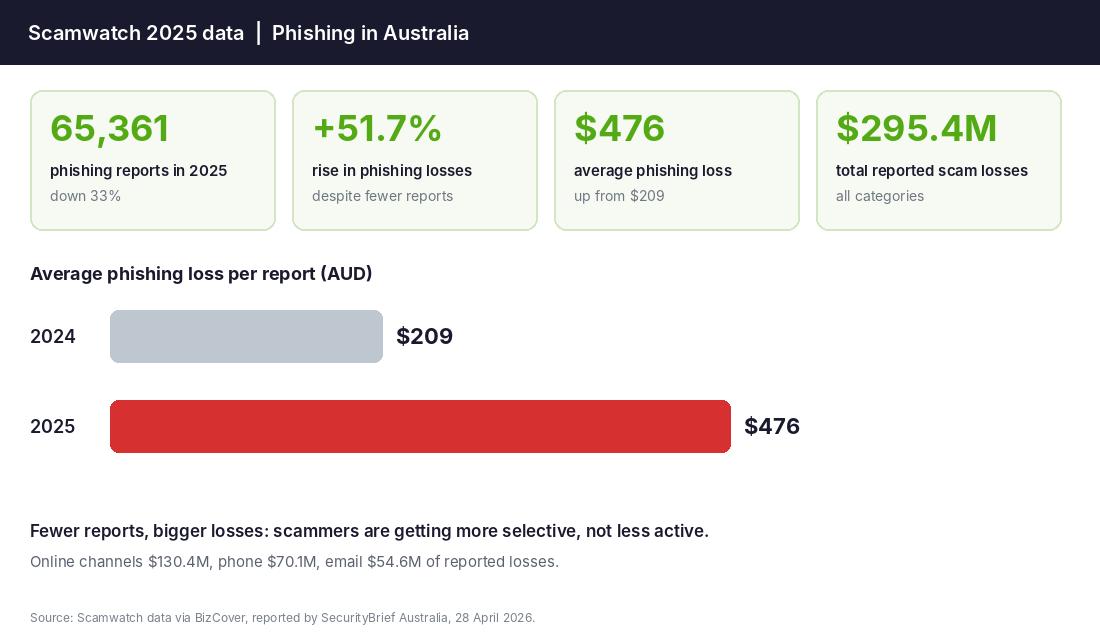
The numbers back this up. Scamwatch data analysed by BizCover and reported by SecurityBrief Australia on 28 April 2026 shows Australians filed 65,361 phishing reports in 2025, down 33%. Sounds like good news. It is not. Phishing losses rose 51.7%, and the average loss per phishing report jumped from $209 to $476. Fewer attempts landed, but the ones that did hurt more.
Small stores are not too small to bother with. In the ACCC’s 2018 business scam data (published by Scamwatch in May 2019), businesses with fewer than 20 staff made up more than 75% of scam reports, and false billing was the most reported scam type with 1,819 reports. That data is old, but the pattern has not changed: small teams with no formal checks are the easiest target.
And the target is not just you. Australia Post told media in May 2025 that a Pollfish survey of 1,000 Australians found 90% had received a scam text or call, and nearly three-quarters had been targeted by scams impersonating parcel delivery services. Your customers are already primed to click “delivery fee” links, so fake delivery messages that appear to come from your store are a real risk to your brand too.
The 7 fake Shopify messages to delete
These are the patterns that keep turning up in Shopify Community threads and security write-ups. The wording changes weekly, but the pressure move underneath stays the same.
| Fake message | What it wants | The tell |
|---|---|---|
| “Your payout is on hold, verify now” | Your admin login or bank details | Real payout or reserve notices come to your account email and are visible in your admin. Never fix it from the link. |
| “Your account has been suspended” | Login credentials | Deadline of 24 to 48 hours and a generic “Dear Shopify Merchant” greeting. |
| “Trademark complaint against your store” | A click to a fake legal form | Sender on a lookalike domain, or a free address like Gmail. |
| “Your domain is expiring” | Card payment for a fake renewal | Check the registrar you actually use. Renew from there, not from the email. |
| “New order” with an attachment or link | Malware or a login | Your real orders show in your admin and Shopify mobile app. Open them there. |
| “Security update required” | Admin password | Shopify prompts you inside the admin, not through a surprise email link. |
| Phone, DM or WhatsApp from “Shopify support” | One-time codes or remote access (AnyDesk, TeamViewer) | Unsolicited contact asking for a code or remote access is a scam. Hang up. |
Two of these deserve extra attention because they cost real money.
The “payout on hold” email
This one hits hardest because payout holds are real. Shopify’s help centre describes a reserve as a temporary hold on a portion, or sometimes all, of your Shopify Payments transactions, and says reserve terms are sent by email. That is exactly why scammers copy it. If you get a payout or reserve email, do not click it. Log in by typing your admin address and check for the same notice there. If you want to know what a genuine hold looks like and how to keep trading through one, read our guide on the 5-layer payout freeze plan.
Subscription bombing
This one is newer. OneCart’s write-up of Shopify scams describes attackers signing a merchant’s inbox up to 8,000 to 15,000 newsletters in an hour, then slipping a real-looking “your bank account has been updated” or password email into the flood. It cites a vintage boutique that lost more than US$33,000 in a single weekend in late 2025. The tell is a sudden wave of newsletter confirmations. If that happens, stop. Do not skim the pile for the one that matters. Check your admin directly for changed payout details, new staff accounts and new apps.
The 5 checks that catch almost every fake
You do not need a security degree. You need five habits, applied in this order.
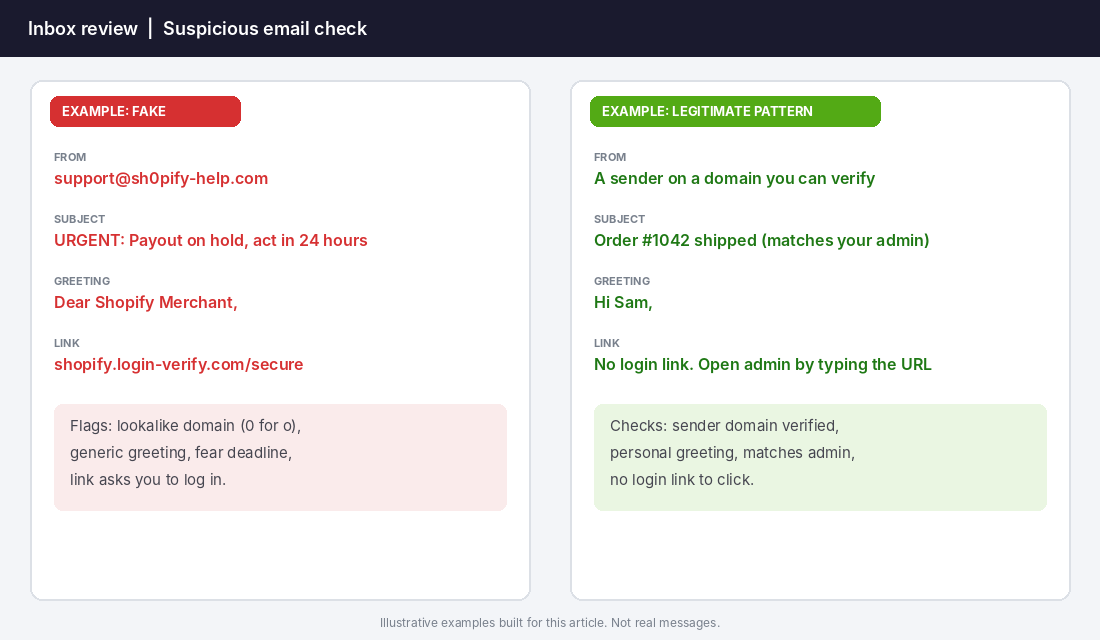
- Read the domain after the @. Not the display name. “Shopify Support” can be typed by anyone. Lookalikes swap letters for numbers (sh0pify), add words (shopify-support-team) or use a subdomain trick (shopify.login-verify.com is a login-verify.com site, not Shopify).
- Check the greeting. “Dear Shopify Merchant” or “Dear Customer” is a template. Real account notices usually use your name or store name.
- Look for the clock. “Act within 24 hours” is written to make you skip checks 1, 2 and 4. Treat urgency as a red flag, not a reason to hurry.
- Never use the link. Type your store admin address into the browser, or open the Shopify mobile app, and look for the same notice there. If it is not there, it is not real.
- Check how it reached you. A Shopify Community notice on phishing states Shopify does not send email from public services such as Gmail, Yahoo or Hotmail. A message claiming to be Shopify from one of those is fake on sight.
If all five pass and you are still unsure, forward the email to phishing@shopify.com, the reporting address given in that same Community notice, and wait for a response before acting.
Lock the doors: 2-step authentication and staff access
Phishing only works if a stolen password is enough. Make it not enough.
Shopify’s help centre says two-step authentication needs your email and password plus a second step from a mobile device or security key. It lists authenticator apps, security keys and built-in authenticators as methods, and passkeys as a secure sign-in option. It also states that SMS text messages can no longer be set up as a new method, though accounts already using SMS can keep it. And Shopify Payments requires two-step authentication, so without it your payouts might be placed on hold.
Here is the setup routine I would do this afternoon:
- Turn on an authenticator app or passkey for every login. Do it for yourself, your VA, your agency and your bookkeeper. Shopify notes that staff set this up on their own accounts and the owner cannot switch it on for them, so make it a written onboarding step.
- Move off SMS codes if you can. A phone number can be hijacked. An authenticator app or security key is harder to steal.
- Use a password manager such as 1Password or Bitwarden. A password manager will not autofill on a fake login page, which is a free phishing alarm.
- Give each person the least access they need. Your VA does not need access to payout settings. A compromised low-permission account is a bad day. A compromised owner account is a bad month.
- Review apps and staff monthly. New staff you did not add, or apps with broad permissions, are classic signs of a breach. Our app permission audit walks through exactly what to look for.
For the wider picture, including cyber insurance and the Privacy Act, see our guide to ecommerce cybersecurity for Shopify stores.
Protect your customers from fake “you” messages
Scammers also impersonate your store. A fake “your parcel is held, pay a $2.95 fee” text sent to a customer who really did just order from you looks plausible. Scamwatch reported that delivery phishing scam reports to the National Anti-Scam Centre quadrupled in 2023, with more than 11,000 parcel delivery scams reported to Scamwatch and over $720,000 lost between 1 January and 31 October 2023, compared with 2,931 reports and $56,000 in all of 2022.
You cannot stop the scammers, but you can make the real thing easy to recognise:
- Say it in your order confirmation: “We will never ask you to pay a delivery fee by text or email. Track your order using the link in your account or the carrier’s official app.”
- Use one consistent sender name and address for order and shipping emails so customers learn what normal looks like.
- Publish a short “Is this message really from us?” note in your help centre and link it in the footer. Mention the real sender address and the fact you never ask for card details by email.
- Set up SPF, DKIM and DMARC on your sending domain so fakes pretending to be your domain are more likely to be rejected. SecureCommerce’s guide notes Shopify adds DKIM automatically for its own mail, while other senders need their own keys in DNS. Start DMARC at monitoring (p=none), then move to enforcement once your real mail passes. If this is new to you, our email deliverability guide covers the basics.
Tool setup: a password manager in 10 minutes
If you only add one tool this week, make it a password manager. It protects you from phishing in a way willpower never will, because it only fills your Shopify password on the real Shopify login page.
- Pick one: 1Password or Bitwarden both work well for small teams. Choose a team or family plan so you can share logins without pasting passwords into chat.
- Install the browser extension and the phone app for you and every team member who touches the store.
- Import your existing logins from the browser, then delete the saved passwords from the browser itself.
- Replace your weakest passwords first: email, Shopify, your domain registrar, your ad accounts and your bank. Let the tool generate long random ones.
- Add the authenticator code or passkey for Shopify inside the same tool, or in a separate authenticator app if you prefer to keep the two apart.
- Test it once: open a login page you know is real and watch it autofill. Then remember the feeling when it refuses to fill on a page that looks identical. That refusal is the alarm.
Team plans are priced per person per month, so check current pricing. Whatever it costs, compare it with the $476 average phishing loss from the Scamwatch data and the maths is not close.
Fake suppliers, fake invoices and fake chargebacks
Phishing is the front door. The same scammers also use the back door of your finance process. False billing, where someone invoices you for a service you never ordered, was the top business scam type in the ACCC data above. Change-of-bank-detail requests are the other big one. Scamwatch’s advice for businesses is to have a procedure that verifies requests to change bank account details using more than one mode of communication.
Turn that into a rule your team can follow:
- No bank detail changes by email alone. Call the supplier on a number you already had before the email arrived.
- Two sets of eyes on any new payee. Even if the second set is your bookkeeper replying “approved”.
- Match every invoice to a purchase order. If you did not order it, do not pay it.
- Check chargeback and fraud notices inside your admin. Fake dispute emails try to get you to “upload evidence” on a lookalike site. Our guide to Shopify chargebacks and payment fraud shows where real disputes appear.
The Pause, Verify, Report routine (copy this)
Put this on one page, pin it in Slack and add it to every new hire’s first-day checklist. It takes 30 seconds to run and it is the cheapest insurance you will ever buy.
| Step | What to do | Time |
|---|---|---|
| Pause | Do not click, reply, call the number or download anything. Ask: did I expect this? | 5 seconds |
| Verify | Check the sender domain, greeting and deadline. Open the admin by typing the address. Confirm any money request on a known phone number. | 20 seconds |
| Report | Forward to phishing@shopify.com (Shopify) or report to Scamwatch. Tell the team so nobody else clicks it. | 5 seconds |
| Record | Add the sender and subject to a shared “known fakes” note so patterns are easy to spot. | Optional |
The record step matters more than it looks. Scam waves repeat. A shared note turns one person’s near miss into the whole team’s defence.
If you already clicked: the 60-minute response plan
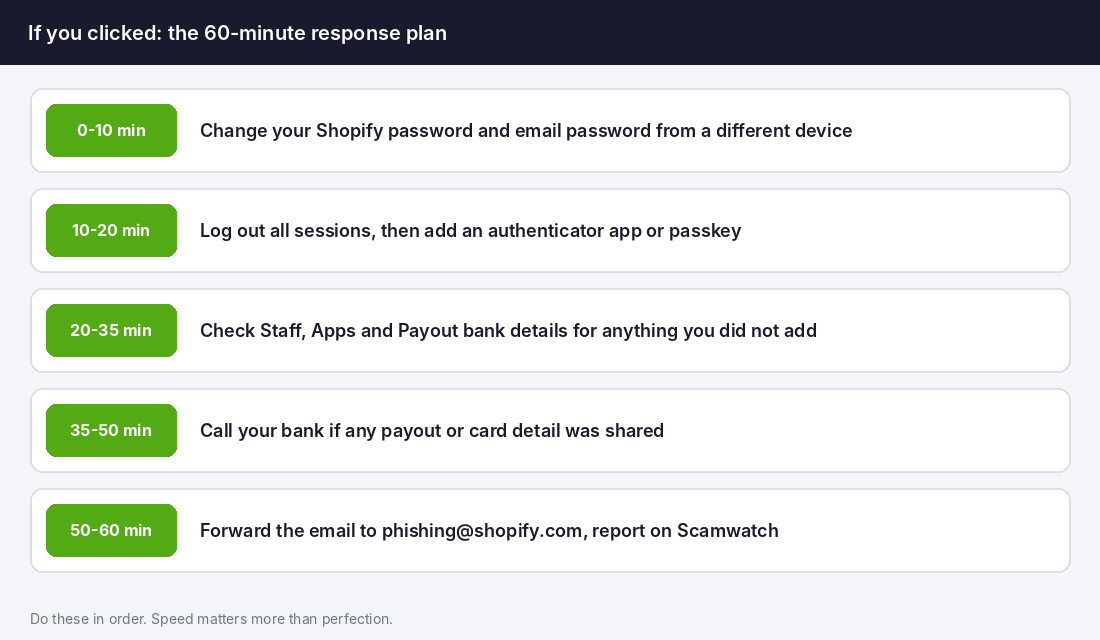
It will happen to someone on your team eventually. What matters is what you do in the next hour. Do these in order and do not try to be perfect.
- 0 to 10 minutes: change your Shopify and email passwords from a different, clean device.
- 10 to 20 minutes: sign out all sessions, then add an authenticator app or passkey if you have not already.
- 20 to 35 minutes: check your staff list, installed apps and payout bank details for anything you did not add or change.
- 35 to 50 minutes: if card or bank details were shared, call your bank now. The speed of that call is what decides how much, if anything, can be stopped.
- 50 to 60 minutes: forward the email to phishing@shopify.com, report it on Scamwatch and tell your team and your agency.
If you took a payment hit, check whether your policy covers it. Some cyber and crime cover will, and some will not. Our ecommerce insurance guide explains the difference.
How it all compounds
Each of these steps is small. Together they change the odds completely. Authenticator-based 2-step authentication means a stolen password does not open your store. Least-privilege staff access means one compromised account cannot touch your payouts. The five checks stop most fakes before anyone clicks. The Pause, Verify, Report routine catches the ones that slip past. And the 60-minute plan limits the damage when something does.
None of this takes a developer. It takes one afternoon, a written routine and the habit of typing your admin address instead of clicking a link. With Black Friday and Cyber Monday bringing the highest payout volumes of your year, that afternoon is worth more than most marketing tasks on your list.
Inside eCommerce Circle, protecting the business is one of the core pillars we work on with every member, because growth means little if one email can empty your account. If you want to see exactly where your store is being capped, take the free More Orders Scorecard. It takes two minutes and shows you which of the 10 P’s to fix first.