You spent three grand on a studio shoot. Clean lighting, a stylist, the works. Then your best-performing ad this month turned out to be a shaky 20-second phone video a customer sent you for free. That is not a fluke, and it is not bad luck for your studio budget. It is how buying works now.
What’s in This Article
Around 80% of consumers trust user-generated content more than traditional advertising, and product pages that show real customer content convert up to 161% higher than pages without it. Meanwhile 40% of shoppers say they will not buy at all if there is no customer content on the page. Your polished brand photography is not the problem. The absence of real people using your product is.
User-generated content (UGC) is the photos, videos and reviews your customers create. Done properly it becomes your cheapest, highest-converting content across your product pages, your ads and your emails. This playbook is the system Aussie DTC founders use to collect it, publish it and turn it into paid ads that actually work.
Why UGC beats your studio shoot
Two things make UGC win: trust and maths. On trust, 81% of ecommerce marketers say UGC has a bigger impact than professional product photography, and shoppers are 9 times more likely to buy a product with photo and video reviews than one with text-only reviews. Real beats polished because polished looks like an ad, and shoppers have learned to skip ads.
On maths, UGC is usually 50 to 80% cheaper to produce than a studio commercial. A single studio ad that flops costs the same as 10 to 20 UGC videos you can test at once. When creator-led ads run against brand creative in paid media, UGC tends to cut cost per acquisition by 25 to 50% and lift click-through by up to 38%. On TikTok, creator content has pushed some Aussie brands to a 26% higher return on ad spend.
With Australians spending 82.6 billion dollars online in 2025 and more than 60% of that browsing happening on mobile, the content that wins is the content that looks native to a phone feed. That is UGC, not a billboard shrunk down to fit a product page.
Part 1: Build a collection engine, not a one-off ask
Most founders collect UGC by remembering to ask, which means they mostly forget. The fix is to make collection automatic and tied to the moment a customer is happiest: just after the product arrives and does its job.
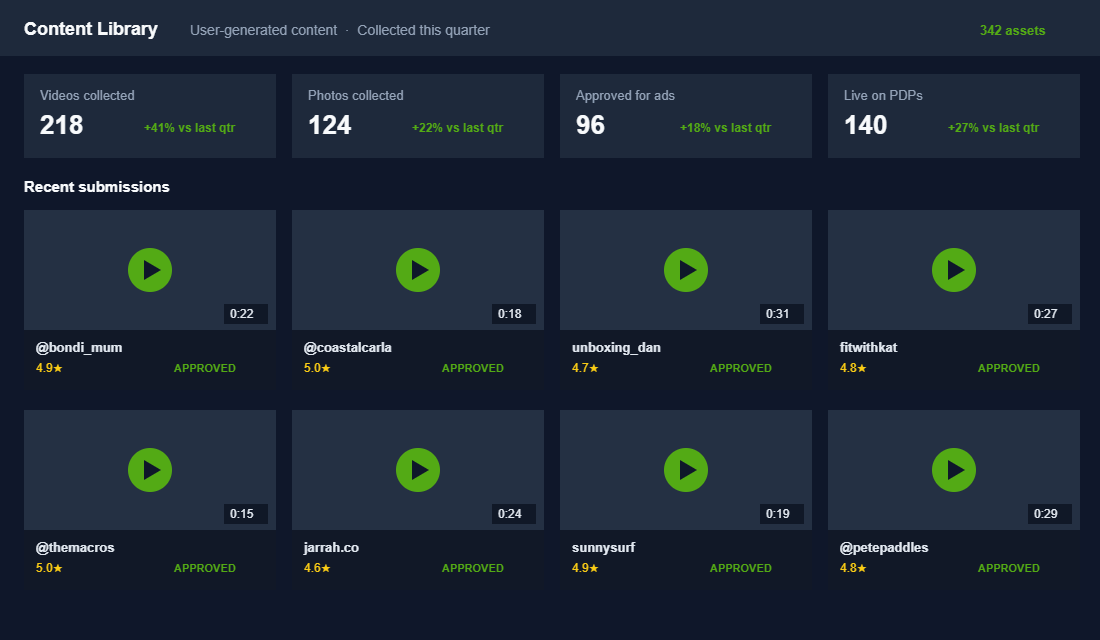
Set up a post-purchase flow that requests a photo or short video 7 to 14 days after delivery, timed to when the product has actually been used. Sweeten it with a small incentive, a discount code or entry into a monthly draw, and make submitting take under a minute. A store doing a few hundred orders a month can build a library of dozens of usable assets a quarter this way.
- Automate the ask. A delivery-triggered email or SMS beats a manual reminder you will forget.
- Lower the effort. One tap to upload, no account, no long form.
- Incentivise honestly. A code or a draw entry, not payment for a five-star review.
- Tag everything. Product, format and rating, so you can find the right asset in seconds.
Part 2: Put UGC where the buying decision happens
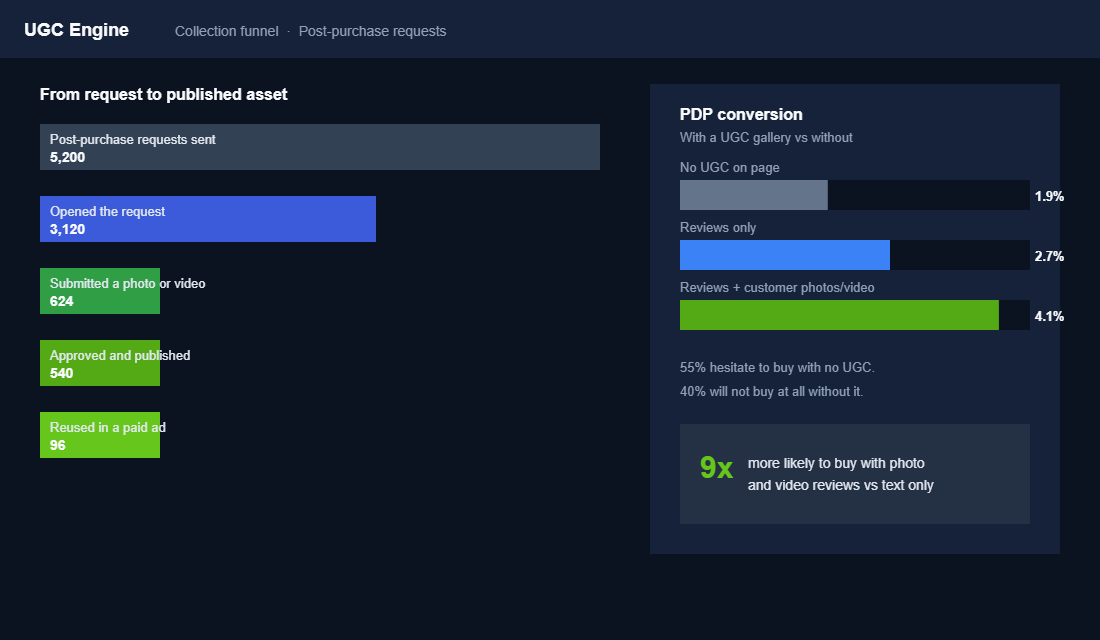
The single highest-return place for UGC is the product page. Reviews with customer photos and video lift PDP conversion by around 74%, and 67% of shoppers say ratings, reviews and customer-submitted photos have talked them into a purchase they were not planning to make.
Do not hide it in a tab at the bottom. Put a gallery of real customer photos and videos close to the buy box, next to your studio shots, so the shopper sees the product in a real Aussie home, on a real body, in real light. That contrast between your clean hero image and a customer’s messy real one is exactly what closes the doubt.
The cost of skipping this is not neutral. 55% of shoppers hesitate to buy when there is no customer content on the page, and 40% will abandon entirely. Empty product pages read as untested. For a deeper look at every element on the page, our Shopify product page playbook breaks down the full layout.
Part 3: Turn your best UGC into paid ads
On-site UGC lifts conversion. UGC in your ad account lifts everything upstream of it. Once you have a library, the highest performers become your ad creative, and this is usually where the biggest revenue swing happens.
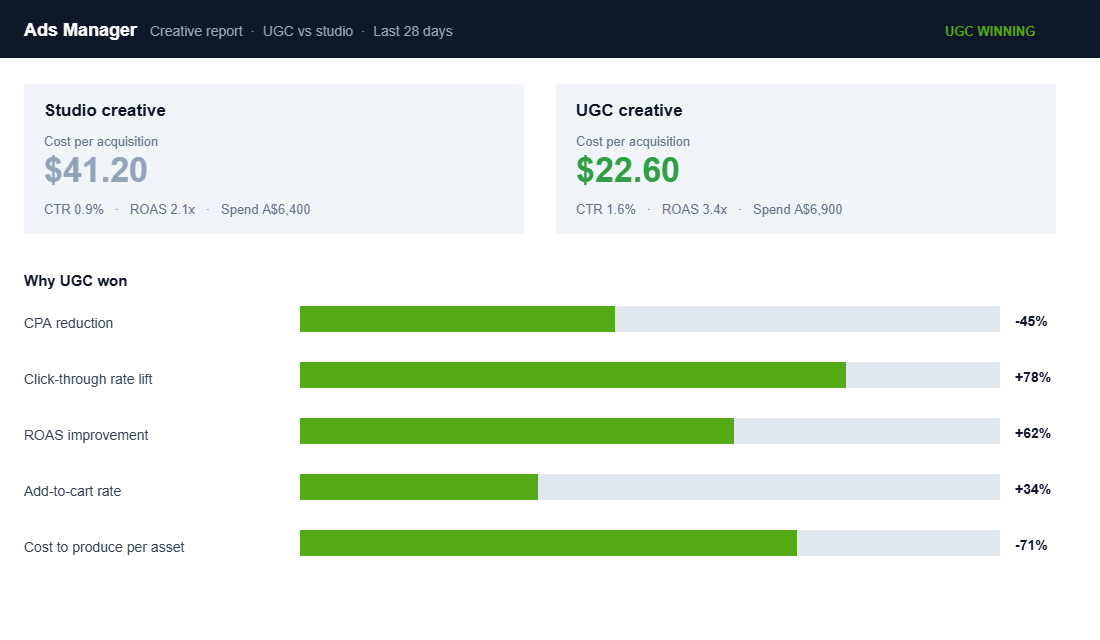
Take your top few customer videos and cut them into ad variations: a hook-led version, a problem-then-product version, a straight testimonial. Run them against your studio creative and let the numbers decide. Expect UGC to bring CPA down 25 to 50% and to hold attention longer in the feed. Feed the winners into your TikTok ads and Meta campaigns and keep only what converts.
The workflow is simple: collect, approve, test three cuts, kill the losers, scale the winner, then brief a creator to make more like it. Creative is the biggest lever in paid media now, and UGC lets you produce enough of it to actually find winners instead of betting everything on one shoot.
Part 4: Get the rights before you post
This is the part founders skip and later regret. You do not automatically own a customer or creator’s content just because they tagged you or sent it in. Using it in a paid ad without permission is a fast way to a complaint or a takedown.
Build permission into the process. Your submission form should include a clear licence that lets you use the content across your store, ads and email. When you repost from social, ask for explicit rights in writing, a simple reply confirming you can use it commercially is enough. Keep a record. It takes thirty seconds and protects a campaign you might spend thousands scaling.
Part 5: Add a paid creator layer once organic works
Customer UGC is free but unpredictable. Once your collection engine is running, add paid UGC creators to fill the gaps and produce content on demand for specific products or angles.
The good news is the maths still works. The average UGC creator now charges around 198 dollars a deliverable, with most sitting between 150 and 300 dollars for a short-form video. For the price of one studio day you can commission ten creators and test ten angles. Start with a handful, brief them tightly on the one objection you want the video to answer, and only re-book the creators whose content actually converts. Getting product into the right hands is its own skill, and our creator gifting playbook covers how to run that at scale.
The compound effect: one library, three channels
UGC pays you three times from a single collection effort. The same customer video raises conversion on the product page, lowers cost per acquisition as an ad, and lifts click-through when you drop it into an email. You did the work once and it earns across your whole funnel.
That is what makes UGC different from a studio shoot with a shelf life. Every happy customer becomes a content source, every quarter your library gets deeper, and your cost to produce winning creative keeps falling while your competitors keep booking expensive shoots that look like ads. The brand with the biggest, best-tagged library of real customer content wins the feed and the product page at the same time.
Your UGC system on one page
Run this as a monthly loop. If any step stalls, that is where your content pipeline is leaking.
- Collect. Automated post-purchase request for a photo or video, 7 to 14 days after delivery.
- Approve and tag. Sort by product, format and rating into a searchable library.
- Licence. Capture usage rights at submission, in writing, every time.
- Publish on-site. Customer gallery near the buy box on every key product page.
- Test as ads. Three cuts of your best assets against studio creative, kill the losers.
- Scale with creators. Brief paid creators to make more of what already converts.
- Repeat. Feed winners back in and let the library compound.
The one tool to set up this week
To get UGC onto your product pages fast, a photo-review app does most of the work for you. Loox is popular with Aussie Shopify stores because it collects photo and video reviews automatically and displays them in a clean gallery. Here is the setup:
- Install Loox from the Shopify App Store and connect it to your store.
- Turn on automatic review-request emails timed 10 to 14 days after delivery.
- Enable photo and video uploads and offer a small discount for submissions with an image.
- Add the review gallery to your product template near the buy box, not the footer.
- Switch on the star rating beside the product title and on collection cards.
- Each week, pull your highest-rated photo and video reviews into a shared folder as ad-ready UGC.
That last step is the one most stores miss. Your reviews app is not just social proof, it is a content pipeline feeding your ad account.
Inside eCommerce Circle, building a UGC engine is one of the core moves we make with members who want cheaper creative and higher-converting product pages at the same time. If you want a second opinion on your content setup, let’s talk.