Open Meta Ads Manager. It tells you the ad account returned 184,200 dollars last month. Open GA4. It says Meta drove 121,450. Open Shopify Analytics and you get a third number that matches neither. Same month, same store, same orders.
What’s in This Article
Most founders handle this the same way. They pick the number that makes the decision easier, argue with their media buyer about it once a quarter, and quietly stop trusting reporting altogether. Then they scale a channel on a feeling instead of a figure.
Here is the uncomfortable part. The gap is almost never a platform problem. It is a link problem. Research from SparkToro and Datos found that 100% of visits from TikTok, Slack, Discord and WhatsApp arrive with no referrer information at all, and 75% of Facebook Messenger visits land the same way. Your analytics tool is not lying to you. It is guessing, because nobody told it where the click came from.
The fix is unglamorous, and it is one of the best afternoons a growing Shopify store can spend. Below is the six layer system we run with brands doing anywhere from 40k to 500k a month, and the exact reports you use to prove it worked.
Where Your Orders Actually Go Missing
Revenue does not vanish from your reports randomly. It leaks in three specific places, and each one has a different fix.
- The referrer leak. A customer taps your link inside an app. The in-app browser opens, strips the origin data, and GA4 has nothing to work with. It files the session under Direct. This is the dark social problem and no amount of tagging discipline fixes the ones you did not tag.
- The tagging leak. Somebody on your team invented a value. They tagged the newsletter with
utm_medium=newsletterbecause it felt accurate. GA4 has a fixed rule for what counts as Email, and “newsletter” is not on the list, so the session lands in Unassigned along with the revenue attached to it. - The redirect leak. Link shorteners, vanity domains, Shopify URL redirects and some app based bounce pages drop the query string on the way through. The tag was correct when you built it and gone by the time the customer hit the product page.
A useful rule of thumb from the analytics world: once Direct traffic climbs past roughly 25% of sessions, you are no longer looking at people typing your URL. You are looking at a measurement fault. For most Aussie stores running Meta, TikTok, email and a couple of partnerships, Direct sitting at 30 to 40% is common and it is entirely fixable.
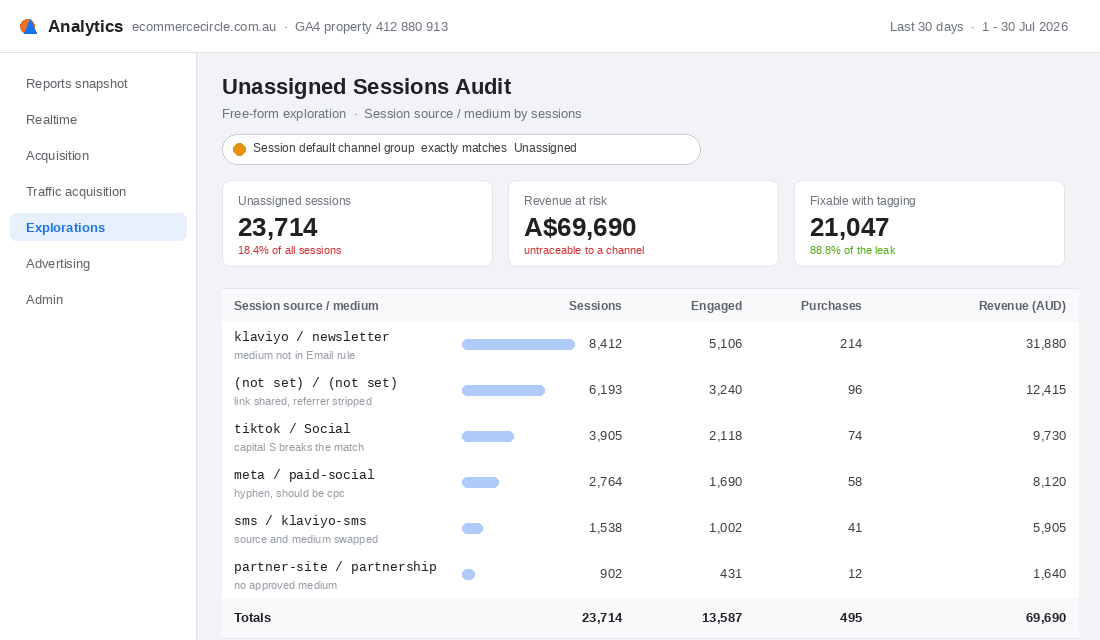
Start by measuring the size of the hole before you patch it. In GA4, open Explorations, build a free form report, set the row dimension to Session source / medium, and apply one filter: Session default channel group exactly matches Unassigned. Sort by sessions descending. That single view usually explains more than an hour of dashboard arguing.
Layer 1: Freeze the Five Parameters
There are five standard parameters. Not six, not nine, and not whatever your last agency bolted on. Before you write a single link, get everyone agreeing on what each one means.
- utm_source. The specific platform sending the click.
facebook,klaviyo,tiktok,broadsheet. Answers “who sent them”. - utm_medium. The type of traffic.
cpc,email,sms,referral,affiliate. Answers “what kind of marketing was it”. This is the one that decides your channel bucket. - utm_campaign. The specific initiative. This is where dates, offers and audiences live.
- utm_content. The individual creative, ad or link position. Use it to compare two hooks inside one campaign.
- utm_term. Keyword. On Shopify stores this one is mostly idle unless you are hand tagging search, so leave it out rather than filling it with junk.
The single most common mistake we see in audits is source and medium swapped. Someone tags utm_source=sms&utm_medium=klaviyo-sms. Both fields contain true information and the session still lands in Unassigned, because medium is the field GA4 reads to assign a channel.
Three formatting rules that save you a rebuild later. Everything lowercase, because Facebook and facebook become two separate rows in every report you ever run. Hyphens as word separators, never spaces, because a space encodes to %20 and looks broken in your table. And never put a currency figure, a comma or an ampersand inside a value, because the ampersand terminates the parameter and silently truncates everything after it.
Layer 2: Build the Approved Value List
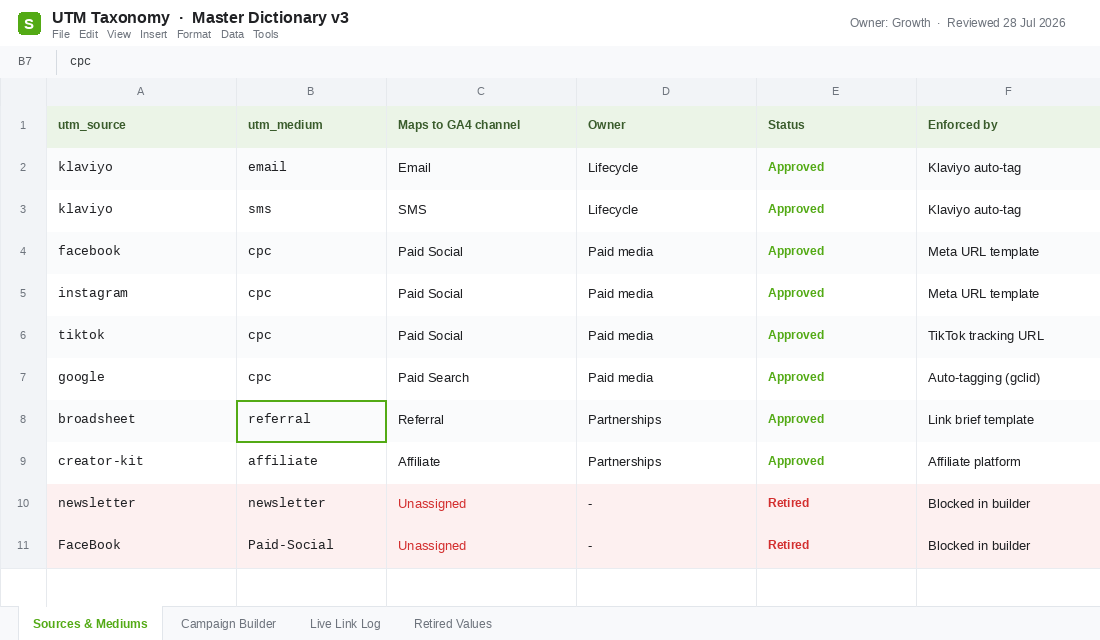
This is the layer that actually moves the needle, and it takes about twenty minutes. You are building a short dictionary of the only source and medium values anyone in your business is allowed to use, and each one has to map to a real GA4 channel.
GA4 assigns channels by pattern matching your medium against a fixed set of rules. Stick to the documented values and traffic resolves cleanly. Invent your own and it falls through to Unassigned. The approved medium list for a typical Shopify store is short:
cpcfor any paid click, whether Meta, TikTok, Pinterest or Google.emailfor every email, including newsletters, flows and one off broadcasts.smsfor text messages.referralfor partner sites, press mentions and directory listings.affiliatefor commission based partners and creator codes.organic_socialfor unpaid posts, bios and stories.displayfor banner and programmatic placements.
If a value is not on that list, it does not get used. When someone insists they need to separate the weekly newsletter from the abandoned cart flow, the answer is that the distinction belongs in utm_campaign, not utm_medium. Medium is a bucket. Campaign is a label.
Put the dictionary in one shared sheet with an owner against every row, and keep a Retired tab for values you have killed off. That retired list is what stops the same mistake reappearing in six months when you hire a new media buyer.
Layer 3: Design a Campaign Name That Still Reads in Six Months
Campaign names are where taxonomies usually collapse. Someone types eofy, someone else types EOFY-Sale-2026, and by August nobody can tell which row is which promotion.
Use a positional string. Every campaign name has the same number of segments in the same order, separated by underscores, with hyphens inside each segment:
YYYY-MM_channel_offer_audience

2026-08_meta_eofy-restock_broad-prospecting
2026-08_meta_eofy-restock_cart-abandoners
2026-08_klaviyo_eofy-restock_vip-tier
2026-09_tiktok_fathers-day_new-customer
Three things this buys you. Names sort chronologically by default in every report. You can read the whole strategy from the campaign column without opening another tab. And because the separators are consistent, you can split the string in Google Sheets and pivot on any segment: =INDEX(SPLIT(A2,"_"),1,2) pulls the channel out of every row so you can group by it.
Keep it to four segments. Five if you genuinely need a region for a Markets setup. Past that, people stop following the convention because typing it is annoying, and a convention nobody follows is worse than none at all.
One more decision to make up front: what goes in utm_content. Use it for the thing you want to compare inside a campaign, and be strict about it. On Meta that is the ad name, so you can see which hook carried the campaign. In email it is the link position, something like hero-cta, product-block-2 or footer, which tells you whether people are buying off the headline or scrolling to the bottom for the discount code.
That last one is worth doing even if you do nothing else in this layer. Most Aussie brands running a weekly send have no idea which part of the email actually drives the order, and the fix is one extra parameter on three links.
Layer 4: Automate the Tagging So Nobody Types a URL
Every hand built link is a future data error. The goal for this layer is that the number of URLs a human types per month drops to roughly zero. Each platform has a set-and-forget field.
Klaviyo. This is the fastest win and most stores have it half configured. Click your account name in the bottom left, go to Settings, then Other, then UTM tracking. Toggle on “Automatically add UTM parameters to links”. Set source to klaviyo, medium to email, and set the Campaign Value and Flow Value for utm_campaign to pull the campaign or flow name. Save. Then repeat the exercise for SMS with medium set to sms. One caveat worth knowing: global settings do not overwrite messages where someone has already customised the parameters at message level, so audit a handful of your older flows after you switch it on.
Meta. Use the URL parameters field rather than appending tags to the destination URL by hand. Dynamic parameters let the ad name carry through automatically, which means your ad account naming discipline becomes your tagging discipline. Set utm_source and utm_medium as fixed values, and let campaign and content populate from the campaign and ad names.
Google Ads. Leave auto tagging on and do not hand tag on top of it. The gclid does a better job than manual parameters, and adding both creates conflicts. This is the one channel where doing less is the correct answer.
Partnerships, creators and press. Never send a partner your homepage URL and hope. Build the finished, tagged link yourself and paste it into the brief as the only link they are given. Creators will copy exactly what you send them and nothing else.
If you also want the events themselves to survive browser restrictions and ad blockers, tagging pairs with a proper collection setup. Our server side tracking playbook covers that side of the stack.
Layer 5: Run the Monthly Leak Audit
Taxonomies decay. Someone launches a campaign in a hurry, an app update changes a redirect, a new hire does it their own way. Fifteen minutes on the first Monday of the month keeps it honest.
- Pull the Unassigned report. Same exploration from earlier. Anything with more than 200 sessions gets traced back to whoever built the link. You are looking for new offenders, not old ones.
- Check your Direct share. Shopify Analytics, sessions by referrer. If Direct is climbing month on month while your paid spend is flat, something upstream stopped passing parameters.
- Look for self referrals. Your own domain showing up as a source almost always means a redirect or a payment gateway is bouncing customers and dropping the query string on the way back.
- Click your own links. Once a month, open the last email you sent on your phone, tap through, and check the parameters are still on the URL when you land. This catches more problems than any dashboard.
Log what you find in a single tab with a date. After three months you will see whether the failures are people, tools or redirects, and you fix the category rather than the individual link.
Layer 6: Reconcile Against a Second Source of Truth
Perfect tagging still will not give you one true number, because no single system can see everything. Stop chasing that. Instead, read three sources and understand the bias in each.
- Platform reported. Meta and TikTok count view through conversions and claim credit generously. Biased high, but it is the number the algorithm optimises against, so it still matters.
- GA4 last click. Conservative, credits the final touch, and structurally blind to dark social. Biased against anything that drives discovery rather than the last click.
- Post purchase survey. Self reported by the customer on the order status page. Recall is imperfect, but it is the only source that can see a TikTok video someone watched three weeks ago. Our three question post purchase survey system walks through the setup.
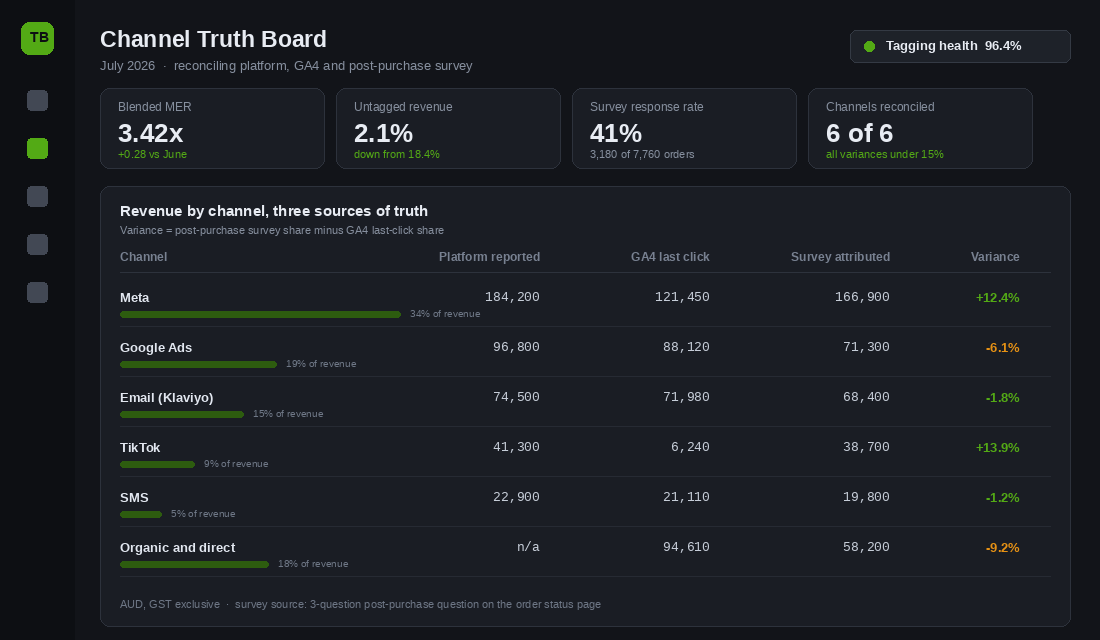
Put all three on one board and set a variance tolerance. We use 15%. If survey share and GA4 share for a channel sit within 15 points of each other, the channel is measured well enough to make budget decisions on. Outside that, investigate before you move money.
The pattern you will almost always see: TikTok and organic social read far higher in the survey than in GA4, while Google reads higher in GA4 than in the survey. That is not an error. That is the difference between a channel that creates demand and a channel that harvests it. Sitting above all of it, marketing efficiency ratio is the number that does not care about attribution at all, and it is the sanity check when the channel views disagree.
What Changes When Your Reports Finally Agree
Each layer on its own is a tidy up. Stacked, they change how the business makes decisions.
Clean mediums pull revenue out of the Unassigned bucket and put it against the channel that earned it. A consistent campaign string means you can compare this year’s EOFY against last year’s without rebuilding a report. Automated tagging removes the human error that was creating half the mess. The monthly audit stops decay. And reconciliation against a survey tells you which of your three numbers to trust for which decision.
The money case is straightforward. Gartner has put the cost of poor data quality at an average of 12.9 million dollars a year per organisation, and MIT Sloan research with Cork University Business School puts annual revenue lost to bad data at 15 to 25%. Those figures come from large enterprises, but the mechanism scales down perfectly. If 18% of your sessions are unattributed, you are allocating budget across your channels with roughly a fifth of the evidence missing.
That matters more every year. Australians spent 82.6 billion dollars online in 2025 according to the Australia Post eCommerce Report, up 14% year on year, with 9.8 million households shopping online. More channels, more touchpoints, more places for a click to lose its label on the way to your cart.
Your First Sixty Minutes
Do not try to build the whole system this week. Run this sequence instead and you will have the leak measured and the biggest source of it closed before lunch.
- Minutes 0 to 10. Build the Unassigned exploration in GA4. Screenshot it. That is your baseline and you will want it in three months.
- Minutes 10 to 20. Open Shopify Analytics and note what percentage of sessions are Direct. Write the number down next to the date.
- Minutes 20 to 35. Open Klaviyo, go to Settings, Other, UTM tracking, and configure email and SMS properly. This alone usually recovers the single largest Unassigned row.
- Minutes 35 to 45. Create the dictionary sheet. Two columns of approved values, one owner column, one retired tab. Share it with everyone who can publish a link.
- Minutes 45 to 55. Set your campaign naming string and rename the campaigns currently live so the new convention starts from a clean line.
- Minutes 55 to 60. Put a recurring fifteen minute calendar block on the first Monday of every month called “tagging audit” and attach the exploration link to it.
Come back in thirty days and pull the same two reports. On most stores we run this with, Unassigned sessions drop by more than half in the first month, and the majority of that recovery comes from email and SMS alone.
Measurement is not the exciting part of growing a store. It is the part that decides whether every other decision you make is based on something real. Get the labels right and the arguments stop.
Inside eCommerce Circle, measurement hygiene is one of the core pillars we work on with every member, because you cannot optimise a channel you cannot see. If you want a second opinion on yours, let’s talk.