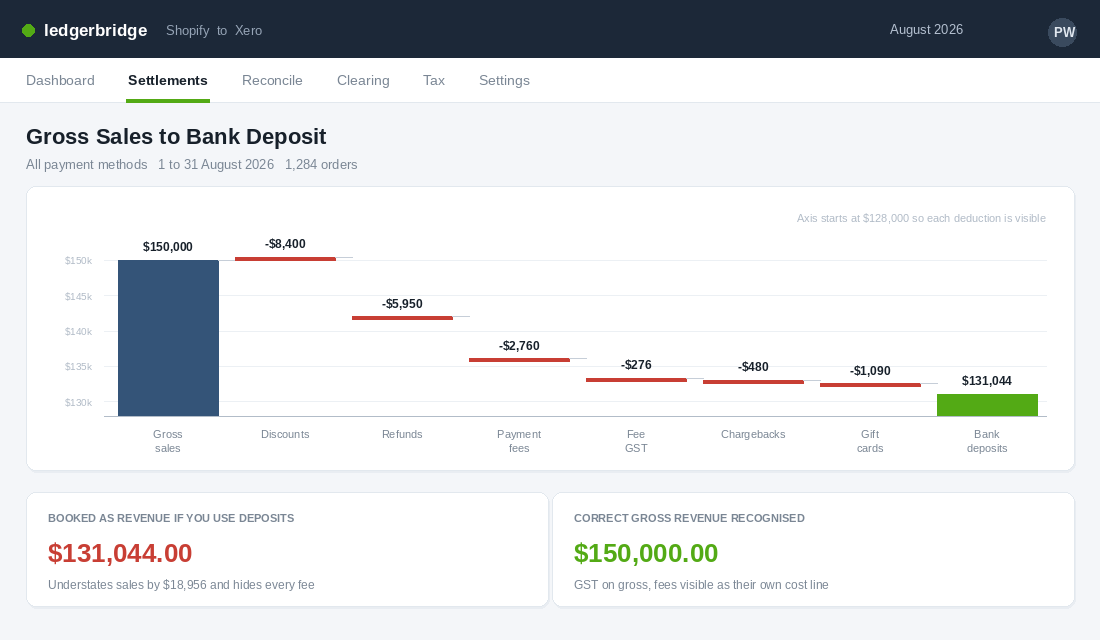
Your Shopify dashboard says you did $150,000 last month. Your bank account received about $131,000. Your bookkeeper has entered $131,000 as revenue, because that is the number that showed up, and now every figure that flows out of your accounts is quietly wrong.
What’s in This Article
Sales are understated by nineteen grand. Your fastest-growing cost category, payment and platform fees, is invisible because it was never booked as a cost. Your gross margin looks better than it is. And your GST is short, because GST is owed on the gross taxable sale, not on what the gateway decided to deposit after it took its cut.
This is the single most common bookkeeping failure in Australian ecommerce, and it is not a maths problem. It is a plumbing problem. Shopify and your accounting file are two systems that count different things on different days, and nobody built the bridge between them. Below is the five-layer system we walk through with founders who want their numbers to agree, every month, in about ten minutes instead of two days.
Layer 1: Understand Why Shopify and Your Bank Will Never Match
Start here, because most founders think the gap is an error to be hunted down. It is not. The gap is structural, and once you can name every component of it, reconciliation stops being detective work.
A Shopify payout is the net residue of a batch of orders. The equation looks like this:
- Gross sales. The full order value your customer agreed to pay, including GST and shipping.
- Less discounts and gift card redemptions. A gift card redemption is not revenue in the payout period. The revenue happened when the card was sold.
- Less refunds and returns processed in that window. These often relate to orders from a completely different month.
- Less Shopify Payments processing fees. Roughly 1.75% plus 30 cents per domestic card transaction on the Basic plan, with GST charged on top of the fee.
- Less chargebacks, disputes and any rolling reserve. Small, irregular, and the reason a payout sometimes looks inexplicably light.
- Equals the deposit that hits your bank two business days later.
Two business days is the standard Shopify Payments settlement window in Australia. That lag alone guarantees that your Shopify sales for a calendar month will never equal your bank deposits for that same month. The last two days of sales land in the next month’s deposits. If you close your books on gross deposits, you have a permanent two-day rolling error that gets worse the faster you grow.
Now add the gateways that sit outside Shopify Payments. PayPal, Afterpay, Zip and Klarna each settle on their own cycle, with their own fee structure, into your bank as separate lumps. A store running four payment methods is reconciling four different settlement rhythms against one Shopify sales figure.
The rule that fixes everything downstream: revenue is recognised at the order, not at the deposit. The deposit is a bank movement. They are two separate events, and your accounting file needs to record both.
Layer 2: Build a Chart of Accounts That Matches How You Actually Sell
Most Shopify stores are running a chart of accounts that a generic accountant set up for a business that invoices clients. One revenue line. One vague “bank fees” expense. It cannot answer a single useful question.
Xero holds more than 60% of the Australian accounting software market, with MYOB on roughly 20 to 25% and QuickBooks around 10 to 15%, so most of you are working in Xero. Whichever file you are in, restructure it like this before you connect anything.
Revenue accounts. Split product sales from shipping income from gift card sales. Shipping income is not product revenue and treating it as such inflates your product margin. Gift card sales are a liability until redeemed, so they belong in a liability account, not revenue.
Contra-revenue accounts. Discounts and refunds get their own lines directly under revenue. When your discount line is visible every month, discount creep becomes a conversation instead of a surprise. Most founders discover they are giving away 8 to 14% of gross revenue and had no idea.
Cost of goods sold. Landed product cost, inbound freight and duty. If you are still booking stock purchases straight to an expense account in the month you pay the supplier, your monthly profit is fiction. Work through our landed cost playbook before you touch this section.
Selling costs, kept separate from overhead. Payment processing fees, Shopify subscription and app fees, outbound shipping cost, and pick and pack. These scale with orders. Overhead does not. Keeping them apart is what makes a real contribution margin calculation possible.
Clearing accounts. One current asset account per payment method. Shopify Payments Clearing, PayPal Clearing, Afterpay Clearing, and so on. These are the accounts that make the whole system work, and Layer 4 explains why.
That is roughly fifteen accounts. It takes an afternoon to set up and it is the difference between a file that reports and a file that just records.
Layer 3: Install a Settlement Bridge Instead of Syncing Every Order
Here is where most stores go wrong a second time. They install a connector that pushes every single Shopify order into Xero as an individual invoice. At 800 orders a month that is 800 invoices, 800 payments to match, and a file so bloated it takes thirty seconds to load a report.
You do not want order-level sync. You want settlement-level summarisation. The tool reads each payout, breaks it into its components, and posts one summary entry to your accounting file that reconciles exactly against the bank deposit.
The two tools worth looking at are A2X and Link My Books. A2X starts around $29 a month on its Shopify plan and scales with order volume. Link My Books takes the same summarisation approach and reports cutting a two-day monthly process down to roughly ten minutes. Both integrate with Xero, MYOB and QuickBooks.
The setup sequence, in order, because doing it out of order creates a mess you will spend a weekend unpicking:
- Create the accounts first. Build every revenue, contra-revenue, expense and clearing account from Layer 2 in Xero before you connect anything. The bridge tool will ask you to map to them.
- Connect Shopify, then connect Xero. Authorise both sides. The tool will pull your recent payout history.
- Pick a start date and stick to it. Choose the first day of a completed BAS quarter. Do not start mid-quarter, because you will end up with two accounting methods inside one lodgement period.
- Map every transaction type. Sales, shipping, discounts, refunds, gift cards, fees, tips and adjustments each get pointed at a specific account and a specific tax rate. This is the step people rush. Do not rush it.
- Set the tax rates deliberately. GST on Income for domestic taxable sales. GST Free Exports for overseas orders. GST on Expenses for Shopify fees, since GST is charged on top of those fees for Australian merchants.
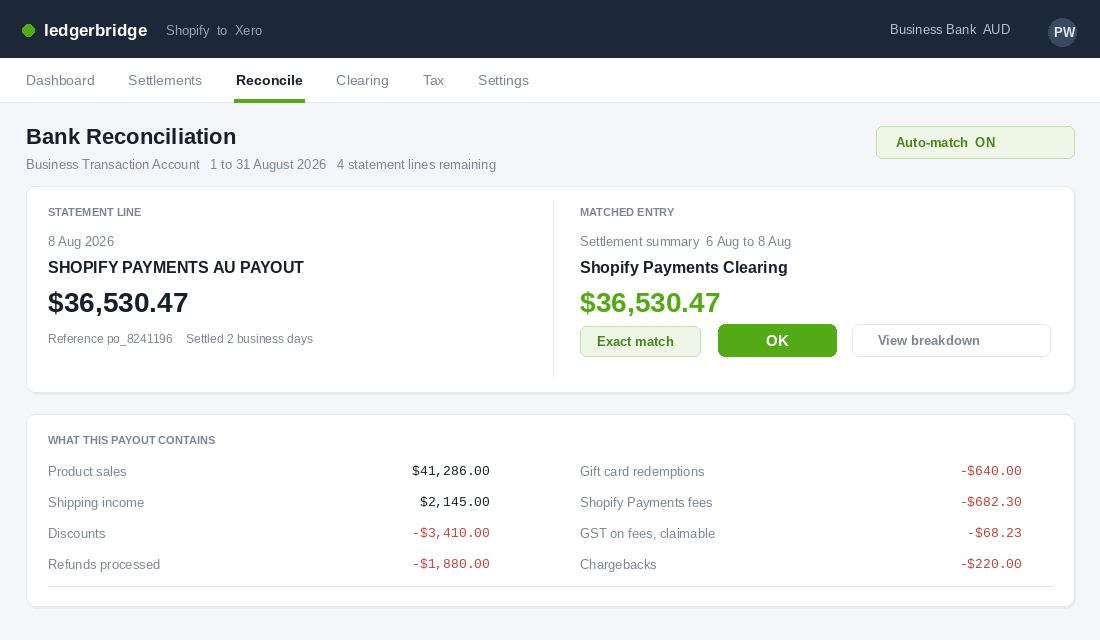
- Post one payout manually and check it. Take a single settlement, let the tool generate the entry, then compare the total against the actual bank deposit. If it matches to the cent, turn on auto-posting. If it does not, your mapping is wrong, not the tool.
One payout, checked properly, saves you three months of compounding errors.
Layer 4: Run a Clearing Account for Every Payment Method
This is the concept that makes experienced bookkeepers relax and makes founders go quiet, because it is the piece almost nobody has in place.
A clearing account is a holding pen. When a sale happens, the money is owed to you but has not arrived. It sits in the clearing account. When the gateway deposits, the clearing account empties into the bank. The balance left behind is money in transit, and it should be a small, explainable number at any point in time.
The flow for a single Afterpay sale:
- At the order. Revenue is credited, GST is credited to the GST liability account, and Afterpay Clearing is debited with the full order value.
- At settlement. Afterpay deposits the order value less its merchant fee. Bank is debited with the deposit, the fee is debited to your payment processing expense account, and Afterpay Clearing is credited with the full original amount.
- Clearing returns to near zero. Whatever remains is genuinely in transit.
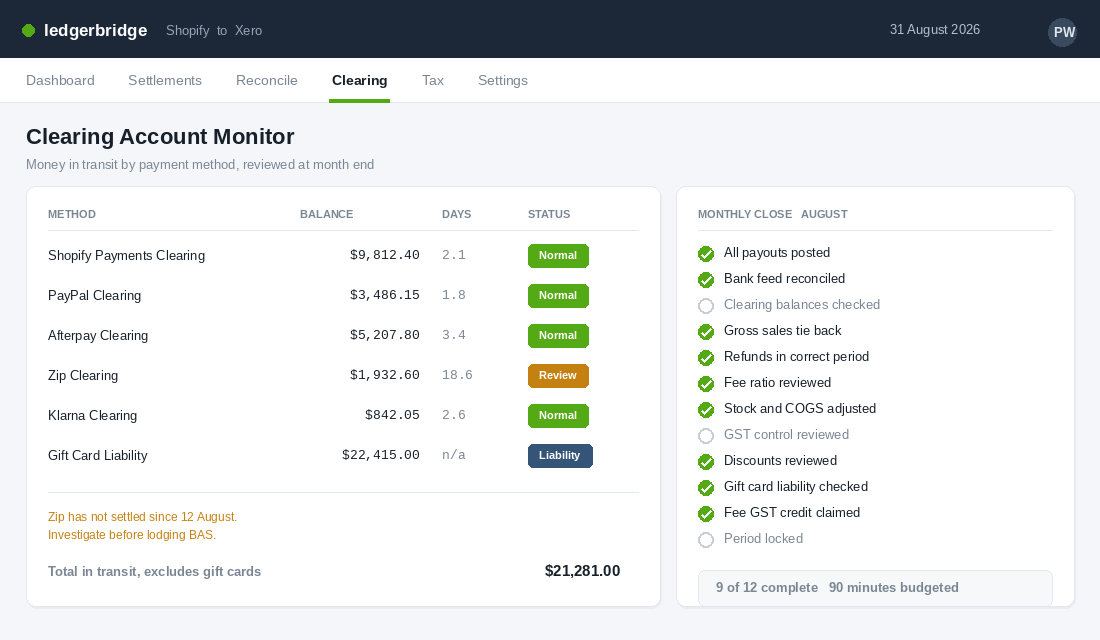
Now your clearing balances become a diagnostic instrument. A Shopify Payments Clearing balance that should sit around two days of sales but has crept to eleven days means a payout has not been posted, or a deposit was coded straight to revenue and bypassed the system. You have found the error before your accountant does, which is the entire point.
Gift cards deserve their own treatment. Selling a gift card is not revenue. It is a liability, cash received against a future obligation. Revenue is recognised on redemption. Stores that book gift card sales as revenue overstate a strong December and understate the January and February that follow, then wonder why the new year looks so flat.
Layer 5: The Ten-Minute Monthly Close
With Layers 1 to 4 in place, the monthly close stops being a hunt and becomes a checklist. Book the same ninety minutes on the first Monday of every month and work through this. Most of it is confirmation, not correction.
- Every payout is posted. Count the settlements in Shopify for the month and count the entries in your accounting file. The numbers match or you find out why.
- Every bank line is reconciled. No unreconciled items sitting in the bank feed.
- Clearing balances are sane. Each one sits within its expected settlement window. Anything older than fifteen days gets investigated now, not at year end.
- Gross sales tie back. Your Shopify total sales report for the month agrees with revenue plus contra-revenue in your file, allowing for the two-day settlement lag.
- Refunds are in the right period. Large refunds relating to prior months are visible rather than buried.
- Fees look proportional. Processing fees as a percentage of gross sales should be stable month to month. A jump usually means a pricing change or a shift in payment method mix.
- Stock is adjusted. COGS reflects what actually shipped, not what you paid suppliers.
- GST control account is reviewed. Collected less paid should be close to what you expect to remit.
- Discounts and shipping income are reviewed. Two lines, thirty seconds, and they tell you whether your promotional discipline held.
- Gift card liability is checked. Rising is healthy. Falling fast means redemption without new sales.
- Payment fee GST is captured. GST paid on Shopify fees is a credit you are entitled to claim.
- The file is locked. Lock the period so nobody, including you, edits a closed month.
Save that as a recurring task. It is the most valuable ninety minutes in your finance calendar, and it feeds directly into the rolling cash flow forecast that tells you whether you can afford your next stock order.
The GST Traps That Attract the Wrong Kind of Attention
Reconciliation is not just a management reporting exercise. It is a compliance one, and the ATO has become considerably better at spotting the gaps.
Businesses under $2 million in turnover account for around 62% of GST audit cases, frequently because of incomplete BAS lodgements tied to digital transactions. In FY2023-24, ATO data-matching identified more than 1.2 million income reporting discrepancies and led to over 15,000 GST compliance interventions. Online payment data is matched. Assume they can see the gross.
The four errors that cause the most trouble for Aussie Shopify stores:
- Reporting GST on net deposits. GST is owed on the gross taxable sale. Reporting on the deposit short-pays every quarter and compounds until someone notices.
- Charging GST on exports. Overseas orders are GST free exports. Coding them as taxable means you are remitting GST you never should have collected.
- Missing the GST credit on platform fees. GST applies on top of Shopify subscription and transaction fees for Australian merchants. That is a claimable credit, and stores that never book fees properly never claim it.
- Double counting marketplace-collected GST. If a marketplace remits GST on your behalf and you include it again in your BAS, you pay twice on the same sale.
The ATO expects most business records to be kept for five years. A summarised, auto-posted settlement history with clean clearing accounts is exactly the audit trail that makes a review boring. Our Australian ecommerce tax guide covers the BAS and deductions side in more depth.
What to Do When the Last Two Years Are Already a Mess
Almost nobody reads this and thinks “great, my history is clean”. The usual situation is eighteen months of deposits coded to a single revenue account and a growing suspicion that the numbers were never right. Here is how to deal with that without burning a month of your life.
Do not restate everything. Fixing two years of history line by line is expensive and rarely changes a decision you are going to make now. Draw a line at the start of the current financial year or the start of the next BAS quarter, whichever is closer, and run the new system cleanly from there.
Backfill only what you need for comparison. Most settlement bridges can post historical payouts. Twelve months of backfill gives you year-on-year comparatives, which is usually the only reason to reach backwards at all. Run it into a draft state first and have your accountant review a sample before you commit it to the ledger.
Have the GST conversation early. If prior BAS lodgements were built on net deposits, you have likely under-reported. Raise it with your accountant rather than waiting to be found. The ATO treats a voluntary disclosure very differently to a discrepancy it surfaces through data-matching, and the penalty position is materially better.
Write down what you decided. One page in your operations folder recording your start date, your account mapping, your tax rate decisions and who reviews the monthly close. When you hire a bookkeeper or change accountants in eighteen months, that page saves you re-litigating every choice from scratch.
If you also sell through a marketplace or a retail point of sale, add each channel one at a time, with its own clearing account, and reconcile a full month before you connect the next one. Founders who connect three channels in one weekend spend the following weekend working out which one broke.
The Three Numbers a Good Reconciliation Hands You Every Month
Founders treat reconciliation as compliance admin. It is actually the only process in your business that produces trustworthy numbers, and once the five layers are running, three of them should fall out automatically every month.
The first is your true payment cost as a percentage of revenue. Add Shopify Payments fees, PayPal, Afterpay or Zip, and any chargeback and dispute fees, then divide by gross sales. Most Aussie DTC stores land between 2.2% and 3.4%. If yours is above 3.4%, your buy-now-pay-later mix is doing more damage to margin than your discounting is, and that is worth knowing before you renegotiate anything else.
The second is your refund and chargeback rate against the same revenue base, measured in the month the refund was issued rather than the month of the original sale. Anything above 4-5% for a typical apparel or homewares brand is a product or expectation problem showing up in the ledger before it shows up in your reviews. Chargebacks specifically should stay under 0.5% of transactions, because processors start asking questions at around 1%.
The third is the gap between recognised revenue and cash received, which is really your payout lag in dollars. If Shopify settled $150,000 and $18,000 was still in transit at month end, that $18,000 is a permanent working capital float you never get back while you are growing. Feed it straight into your 8-week rolling cash forecast rather than discovering it the week a supplier deposit is due.
Those three numbers belong on one page alongside your other operating metrics, reviewed the same day every month. The structure we use with members is in the monthly business review playbook. A reconciliation that produces no decisions is just data entry.
Who Does What: The Reconciliation Calendar
The most common failure here is not technical. It is that nobody owns the process, so it happens when someone remembers, usually four days before the BAS is due. Put it on a calendar with names against it and the whole thing stops being stressful.
- Daily, automated: your settlement bridge posts payouts and fees to the clearing accounts. Nobody touches this. If it breaks, you want an alert, not a discovery three weeks later.
- Weekly, 10 minutes, bookkeeper or you: check every clearing account balance. A clearing account that is not near zero after the payout has landed is the earliest warning you get that something is misposted.
- Monthly, 30-45 minutes, you and your bookkeeper together: the close. Match gross sales to the Shopify report, confirm the three numbers above, and sign off. Do it in the first week of the following month while the detail is still recoverable.
- Quarterly, before BAS: reconcile GST collected against GST reported, and check that shipping, gift cards, and any overseas sales have been treated correctly. Our GST and BAS guide covers the treatments that catch Shopify sellers out.
- Annually, before 30 June: stocktake, write off dead inventory, and true up your cost of goods. This is where most of the tax value actually sits.
Two escalation rules are worth writing down now, while nothing is on fire. First, if a clearing account is out by more than $500 or more than 1% of the payout, stop and investigate that week rather than carrying it. Small variances compound into the two-year mess described above. Second, if a payout does not arrive on schedule, treat it as a risk event immediately rather than a banking delay. Payment processors do freeze Shopify accounts, usually with almost no notice, and the founders who cope are the ones who already knew what a frozen week would cost them — the payout freeze playbook sets out what to have ready.
Budget realistically for the help. A bookkeeper who genuinely understands Shopify settlements runs roughly $250-$600 AUD a month at typical DTC volumes, and is comfortably cheaper than the accountant hours it takes to unpick a year of guesswork. Ask any candidate one question before you hire them: how do you handle the gap between Shopify gross sales and the bank deposit? If the answer is anything other than a clearing account, keep looking.
Why Clean Books Make You More Money, Not Just More Compliant
Founders put this work off because it feels like admin. It is not admin. It is the instrument panel, and every decision you make above it inherits its accuracy.
Consider what the five layers give you together. Layer 1 gives you a true gross revenue figure, so you finally know what the business actually sold. Layer 2 separates the costs that scale with orders from the ones that do not, so contribution margin becomes calculable instead of theoretical. Layer 3 removes the manual handling that made monthly reporting land three weeks late, which meant you were always steering with last quarter’s map.
Layer 4 turns your clearing balances into an early warning system for money that has gone missing between gateway and bank. Layer 5 makes the whole thing repeatable by someone other than you.
The practical consequences show up fast. You can see, per month, exactly what payment processing is costing you as a percentage of revenue, which is the number you need before you negotiate rates or change your payment mix. You can see whether your discounting is drifting. You can answer the question every lender and every investor asks first, which is what your real gross margin is, without a week of preparation.
And you stop making the most expensive mistake in ecommerce, which is scaling ad spend against a margin figure that was never real. If your true contribution margin is six points thinner than your books suggest, every additional dollar of paid media is accelerating a loss. That is not a bookkeeping problem anymore. That is the business.
Set aside one afternoon for Layer 2, one afternoon for Layer 3, and then ninety minutes a month forever. Founders who do this describe the same thing afterwards, which is that they stopped guessing.
Inside eCommerce Circle, getting the numbers trustworthy is one of the first things we work on with every member, because nothing else we do matters if the data underneath it is wrong. If you want a second opinion on yours, let’s talk.