You’re spending thousands on ads. You’ve built a decent-looking Shopify store. Products are solid. But your conversion rate sits stubbornly below 2%, and you can’t work out why visitors land on your product pages and leave without buying.
What’s in This Article
Here’s the problem most store owners miss: your product pages have zero social proof. No reviews. No star ratings. No photos from real customers using your product. You’re essentially asking strangers to hand over their credit card based on nothing but your own marketing claims.
The data backs this up. Products displaying five or more reviews convert at 270% higher rates than products with no reviews. For higher-priced items, that number jumps to 380%. And nearly all online shoppers — over 99% — read reviews before making a purchase decision. If your product pages are empty of customer feedback, you’re leaving serious money on the table.
The brands that consistently win on Shopify aren’t just collecting reviews passively. They’ve built automated review engines that generate a steady stream of fresh, authentic customer feedback — with photos, with verified purchase badges, with specific product attributes that help the next buyer feel confident. That’s what we’re building today.
Why Reviews Are Your Highest-ROI Marketing Asset
Most Shopify store owners think of reviews as a nice-to-have. Something that accumulates over time. A cosmetic addition to the product page. That thinking is costing you conversions every single day.
Reviews are the single most influential trust signal on your product page — more powerful than professional photography, more persuasive than your carefully crafted product descriptions, and more effective than any discount badge you can slap on the page.
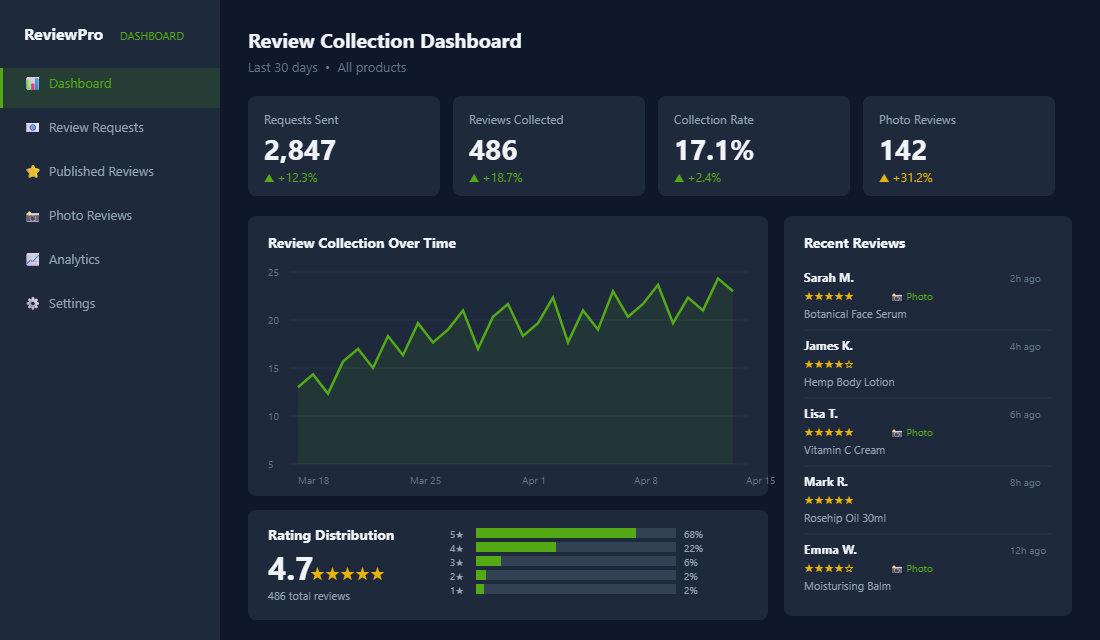
Consider what happens when a new visitor lands on your product page. They don’t know your brand. They’ve never felt your fabric, smelled your candle, or tasted your protein powder. All they have is what you’ve told them — and 84% of shoppers trust online reviews as much as personal recommendations from friends. Your existing customers are your most powerful salespeople, but only if you give them a platform to speak.
The impact goes beyond conversion rates. Reviews reduce return rates by setting accurate expectations. They increase time on page (shoppers reading reviews spend nearly three times longer on product pages). They improve your average order value because confident buyers add more to cart. And they generate free, authentic content that feeds your SEO and your ad creative.
Think of reviews as a compounding asset. Every review you collect today makes it easier to convert tomorrow’s visitors. The first five reviews on a product page create the biggest conversion lift. After that, every additional review adds incremental trust. By the time you hit 50+ reviews on a product, you’ve built a moat that competitors without reviews simply can’t match.
Choosing the Right Review App for Your Shopify Store
The Shopify app ecosystem has dozens of review tools, but only a handful are worth your time. The right choice depends on your budget, your product type, and whether visual content (photos and videos) is central to your selling strategy.
Judge.me is the go-to for most Shopify stores, and for good reason. It’s the most popular review app on the platform with over 25,000 active stores. The free plan is genuinely usable — unlimited review requests, review display widgets, and basic customisation. The Awesome plan at $15/month adds Google Shopping integration, review carousels, and white-labelling. For stores doing under $50K per month in revenue, Judge.me delivers everything you need at a price that makes sense.
Loox is the specialist for visual-first brands. If you sell fashion, homewares, food, or anything where customer photos drive purchasing decisions, Loox makes photo and video reviews the centrepiece. It’s pricier — starting at $9.99/month with the Scale plan at $34.99 — but the visual review galleries are best-in-class. Australian brands like Frank Body have built entire marketing strategies around customer-generated visuals, and Loox is built for exactly that approach.
Okendo stands out with review attributes — custom fields where customers rate specific qualities like fit, scent intensity, or durability. This is powerful for products where subjective fit matters. If you sell clothing and your returns are driven by sizing issues, Okendo’s attribute data helps future buyers pick the right size. It’s a premium tool (no free plan), but for mid-market brands doing $100K+ monthly, the reduction in returns alone can justify the cost.
Whichever app you choose, the critical features to look for are: automated post-purchase review requests, photo and video upload capability, Google Shopping/rich snippet integration, and the ability to display reviews on collection pages (not just product pages). Star ratings on your collection grid help shoppers filter by quality before they even click through — and that pre-qualification improves your on-page conversion.
Building Your Automated Review Request Sequence
Here’s where most stores fall short. They install a review app, turn on the default settings, and wonder why they’re only getting a handful of reviews per month. The default review request email from most apps is generic, poorly timed, and easy to ignore.
A well-built review request sequence should convert 15-20% of customers into reviewers. If you’re below 10%, your sequence needs work.
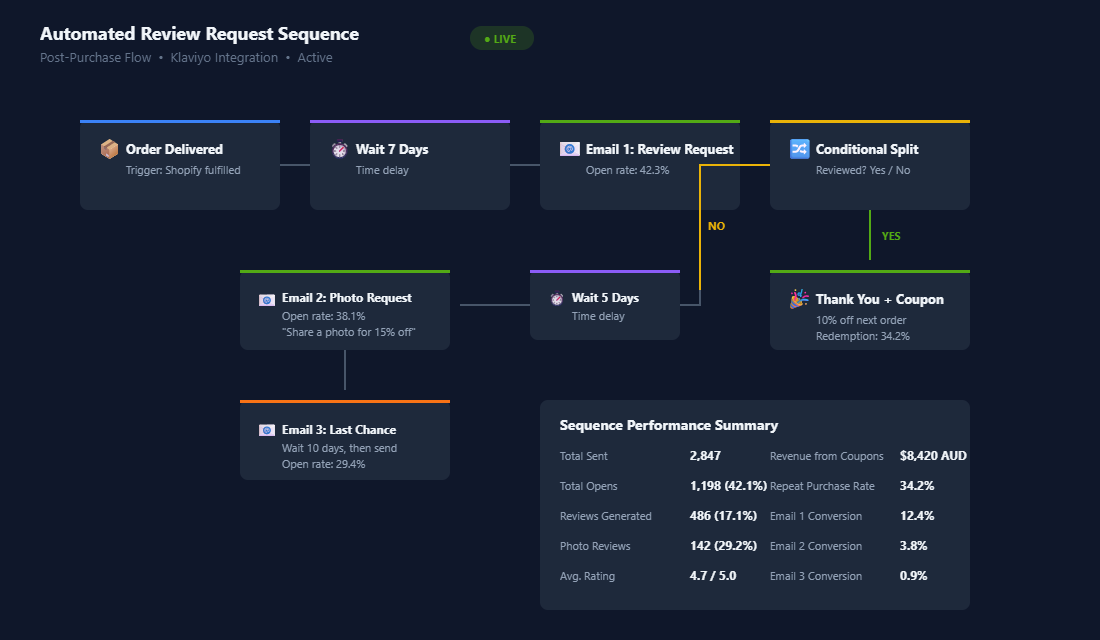
Email 1: The Initial Review Request (7-14 days after delivery). Timing is everything. Send too early and the customer hasn’t used the product yet. Send too late and the excitement has faded. For most physical products, 7-14 days post-delivery is the sweet spot. For skincare or supplements that take time to show results, push this out to 21-30 days.
Your subject line matters more than you think. Skip the generic “How did we do?” and make it personal. Something like “How’s your [Product Name] working out, [First Name]?” gets significantly higher open rates. Inside the email, keep it short. One sentence acknowledging their purchase, a clear ask for a review, and a prominent one-click star rating. Don’t bury the call-to-action below paragraphs of text.
Email 2: The Photo Request (5 days after Email 1, only if no review submitted). This is your second chance — and the angle shifts. Instead of asking for a written review, ask specifically for a photo. Offer a slightly larger incentive: “Share a photo of your [product] in action and get 15% off your next order.” Photo reviews are 5x more effective than text-only reviews at influencing purchase decisions, so it’s worth the extra incentive cost.
Email 3: The Last Gentle Nudge (10 days after Email 2, only if still no review). This is your final ask. Keep the tone light and grateful: “We’d love to hear what you think — your feedback helps other Aussie shoppers make confident decisions.” Don’t be pushy. Some customers simply won’t review, and that’s fine. Your goal with this three-email sequence is to capture everyone who’s willing — not to annoy those who aren’t.
For the customers who do leave a review, trigger a thank-you email immediately with a small reward — a 10% discount code or loyalty points. This achieves two things: it encourages them to buy again (driving that critical second purchase), and it reinforces the positive behaviour of leaving reviews.
Displaying Reviews for Maximum Conversion Impact
Collecting reviews is only half the equation. How you display them on your store determines whether they actually move the needle on conversions.
Star ratings on collection pages. This is the single highest-impact change you can make. When shoppers see star ratings on your collection grid — before they even click into a product — they pre-qualify themselves. They click on 4.5-star products with confidence. They skip products with no ratings. If your review app supports collection page ratings (most do), turn this on immediately.
Review filtering and sorting. Give shoppers control. Let them filter by star rating, by “with photos only,” by verified purchase, and by product attributes (if your app supports them). The ability to filter reviews by specific concerns — like “Does this run small?” — reduces purchase anxiety and directly addresses the objections that cause cart abandonment.
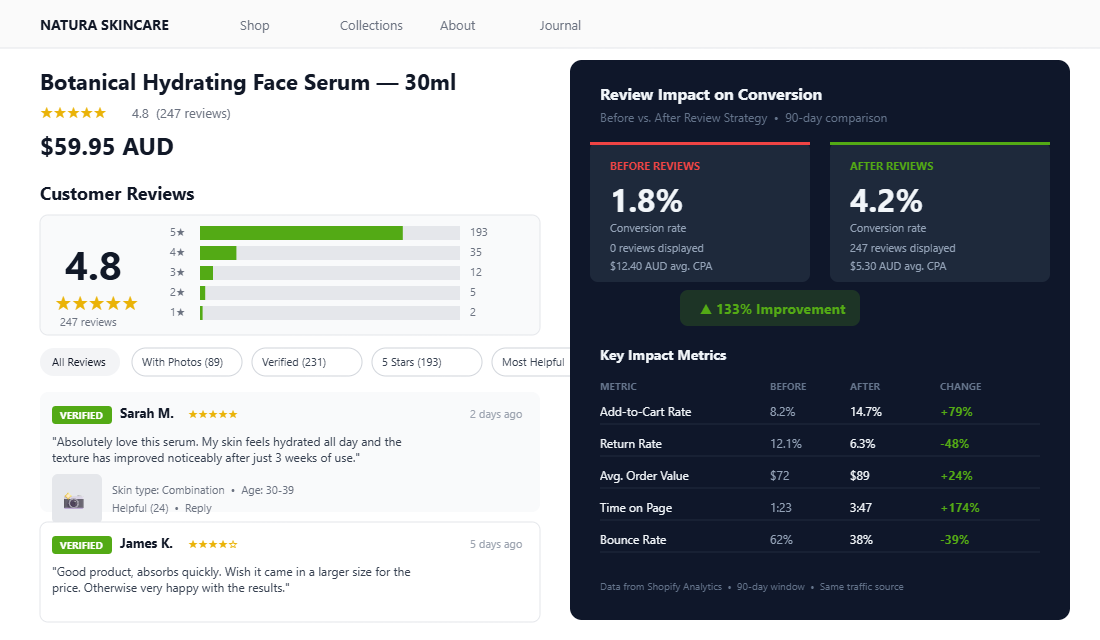
Highlight recent reviews prominently. Recency matters. A product with 200 reviews that are all 6+ months old feels stale. Display your most recent reviews alongside the most helpful ones. This signals to shoppers that people are actively buying and enjoying this product right now — not just in some distant past.
Verified purchase badges. Every legitimate review app offers verified purchase indicators. Make sure these are visible. In a world where fake reviews are a known problem, the green “Verified Purchase” badge next to a reviewer’s name adds meaningful credibility. Verified buyer reviews increase conversion by approximately 15% compared to unverified reviews.
Photo and video galleries. Create a dedicated visual gallery section within your reviews — not just tiny thumbnails buried in individual reviews. A scrollable gallery of customer photos showing your product in real-life contexts is incredibly persuasive. User-generated content is 5x more effective than professional photography at influencing purchase decisions because it feels authentic and relatable in a way brand imagery can’t replicate.
Handling Negative Reviews (Without Panicking)
Every store owner dreads that first one-star review. But here’s the counterintuitive truth: a handful of negative reviews actually increase trust. A product with nothing but five-star ratings looks suspicious. Shoppers know no product is perfect, and when they see exclusively perfect scores, they assume the reviews are fake or curated.
The ideal average rating sits between 4.2 and 4.7. Products in this range convert higher than products with a perfect 5.0 because the rating feels authentic and believable.
Respond to every negative review publicly. This is non-negotiable. When a potential customer sees a one-star review followed by a thoughtful, helpful brand response, it builds more trust than another five-star review would. Your response should acknowledge the issue, apologise for the experience, and offer a clear resolution. Keep it professional, empathetic, and solution-focused.
Use negative feedback as product intelligence. If multiple reviewers mention the same issue — sizing runs small, packaging arrived damaged, scent is stronger than expected — that’s free product development data. Address the root cause. Update your product description to set better expectations. Add a sizing guide. Fix the packaging. The brands that treat negative reviews as actionable data improve faster than brands that just try to bury them.
Never delete legitimate negative reviews. It’s tempting, but it destroys trust if customers notice their review disappeared. The only reviews worth removing are those that contain spam, offensive language, or are clearly from someone who never purchased the product.
Using Reviews Beyond the Product Page
Your review engine doesn’t stop at product pages. The content your customers generate is marketing gold — and most brands barely tap into it.
In your email marketing. Pull your best customer quotes into your post-purchase sequences, abandoned cart emails, and promotional campaigns. A subject line like “See why Sarah gave us 5 stars” outperforms generic promotional copy. Inside the email, feature 2-3 reviews with star ratings and customer photos. This is social proof delivered directly to the inbox.
In your paid advertising. Customer reviews and UGC photos make exceptional ad creative. Australian brands like Budgy Smuggler have built significant social media followings by resharing customer content — turning buyers into brand ambassadors. Screenshot your best reviews for Meta ad creative. Use customer photos in carousel ads. Quote specific results customers have mentioned. Ad creative featuring real customer testimonials consistently outperforms brand-produced creative on cost per acquisition.
On your homepage. Add a “What Our Customers Say” section with a rotating carousel of your highest-rated reviews. This builds trust immediately for first-time visitors who haven’t yet navigated to a specific product page. Feature reviews that mention specific results or outcomes — “My skin cleared up in two weeks” is more persuasive than “Great product.”
In Google Shopping. If your review app integrates with Google Merchant Centre (Judge.me and Okendo both do), your star ratings appear directly in Google Shopping ads and organic product listings. Those gold stars in search results dramatically improve click-through rates — shoppers are far more likely to click on a product showing 4.7 stars than one with no rating at all.
Setting Up Your Review Engine: The Step-by-Step Checklist
Here’s a practical implementation checklist you can work through this week. No excuses — this is a one-time setup that compounds forever.
Week 1: Foundation.
- Install your review app. Judge.me free plan if you’re starting out, Loox if visual content is critical, Okendo if product attributes matter for your category.
- Configure your review display widget. Star ratings on collection pages. Photo gallery on product pages. Filtering by rating and purchase verification.
- Set up your first review request email. Trigger: order fulfilled. Delay: 10 days. Subject line: “How’s your [Product Name], [First Name]?” One-click star rating in the email body.
- Enable Google Shopping integration. Connect your review app to Google Merchant Centre so star ratings appear in Shopping ads.
Week 2: Optimisation.
- Build your full three-email sequence. Add Email 2 (photo request with 15% incentive, 5-day delay) and Email 3 (gentle last nudge, 10-day delay).
- Create your thank-you reward flow. Automatic 10% discount code sent to customers who leave a review.
- Add reviews to your homepage. Install a testimonial carousel featuring your top-rated reviews with customer photos.
- Import existing reviews. If you’ve been collecting reviews via email or social media informally, import them into your app so your product pages don’t start from zero.
Week 3: Amplification.
- Pull your best reviews into email campaigns. Feature 2-3 five-star quotes with photos in your next promotional email.
- Create ad creative from UGC. Screenshot your top customer photos and reviews for Meta and Google ad campaigns.
- Set up negative review alerts. Get notified immediately when a review below 3 stars is submitted so you can respond within 24 hours.
- Track your baseline metrics. Note your current collection rate, average rating, photo review percentage, and product page conversion rate. You’ll measure against these in 90 days.
The Compound Effect: How Reviews Build a Self-Reinforcing Sales Machine
Here’s where the magic happens. Each piece of this system feeds the next.
You collect reviews automatically after every purchase. Those reviews improve your product page conversion rate. Higher conversion means more sales. More sales means more review requests sent. More review requests means more reviews collected. More reviews means even higher conversion rates. And the cycle accelerates.
Meanwhile, the photo reviews you’re collecting become UGC for your ads. Better ad creative lowers your cost per acquisition. Lower CPA means more profitable scaling. More customers means more reviews. The flywheel spins faster.
And those Google Shopping star ratings? They improve your click-through rate from search results, driving more qualified traffic to product pages that now convert better because they’re loaded with social proof.
This is the difference between a store that fights for every conversion and a store where the marketing machine runs itself. Reviews are not a feature — they’re infrastructure. They’re the foundation that makes every other marketing channel work harder.
A technically flawless Shopify store with zero reviews will underperform a slower, rougher store with 500 verified reviews. That’s how powerful social proof is. Don’t let it be the missing piece in your store.
Reviews and SEO: The Search Traffic Benefit Most Shopify Stores Miss
Reviews do not just convert shoppers — they compound your organic search traffic over time. Here is how, and what you need to set up to capture this benefit.
Rich snippets in Google Search. When your review app is properly integrated with Google via the Product Review schema, Google displays star ratings directly in organic search results — those gold stars under the page title. Products with star ratings in search results get 15–20% higher click-through rates than results without. More clicks from the same position means more free traffic. This integration is built into Judge.me’s Awesome plan, Okendo, and Loox — but it requires you to verify your Google Merchant Centre account and enable the integration. Most stores install a review app and never complete this step.
Long-tail keyword coverage from review text. Customer reviews contain the exact words and phrases your target customers use when searching. A skincare customer writing “this helped with my dry patches in just two weeks” is creating SEO content that exactly mirrors how another dry-skin sufferer might search. Over time, a product page with 200 reviews accumulates thousands of words of naturally keyword-rich content that a manually written product description never could. Google indexes review text. It compounds.
Google Shopping star ratings. Connecting your review feed to Google Merchant Centre means your Shopping ads and free Shopping listings display star ratings. Products with 4.5+ stars in Shopping results get significantly higher click-through rates — and lower CPCs in competitive Shopping auctions because quality score factors in user signals. For stores spending $10K+ monthly on Google Shopping, this single integration can reduce effective CPC by 8–15% while simultaneously increasing traffic volume.
Brand search volume growth. Shoppers who see high review counts for your brand on third-party platforms (Google, Facebook, Trustpilot) often search for your brand by name before purchasing. Branded search traffic converts at 4–6x higher rates than non-branded. Growing your review count grows your branded search volume as a natural side effect — it is one of the few marketing activities that improves multiple channels simultaneously.
Video Reviews: The Next Level of Social Proof
If photo reviews are 5x more effective than text-only reviews, video reviews are in a category of their own. A 30-second customer video showing your product in real use is the closest thing ecommerce has to word-of-mouth recommendation. It removes every remaining doubt: the product is real, the results are real, the person is real.
Getting video reviews requires a slightly different incentive strategy than photo reviews. The ask is bigger — recording a video takes more effort than snapping a photo. Consider offering a more meaningful reward: $15–$20 store credit, early access to new products, or entry into a quarterly prize draw. Loox supports video review collection natively, and Okendo has added video collection to their premium plans. Aim to collect at least 3–5 video reviews on your top 3 products before featuring them prominently — a single video on a product page creates authentic social proof; three or more creates a community feeling.
Once you have video reviews, repurpose them aggressively. A customer video review edited to 15 seconds becomes an Instagram Reel and a Meta ad creative. Placed on your product page, it can lift conversion rates by 25–35% compared to a page with only text and photo reviews. This is UGC at its most powerful — and it costs you nothing except the small incentive you offered to collect it. For a broader look at how social proof ties into customer retention and lifetime value, see our guide to loyalty programs for Shopify — because a reviewed, loyal customer is your most valuable marketing asset.
Inside the eCommerce Circle, building your review engine is one of the core retention systems we set up with every member — because it touches everything from conversion to repeat purchase rates to loyalty program engagement. If you want help getting yours running, let’s talk.
The Benchmarks That Tell You Your Review Engine Is Healthy
Most Shopify founders cannot tell you whether their review program is working because they have no benchmark to measure against. Here are the numbers Aussie brands should be tracking, and what “good” actually looks like.
Review submission rate (reviews / orders eligible to review): 8-15% is the realistic range for a tuned system. Under 5% means your post-purchase email timing or incentive is broken. Above 15% suggests you are sampling unhappy customers harder than happy ones — check for incentive abuse.
Average star rating: healthy stores sit at 4.5-4.8 on aggregate. Above 4.9 with hundreds of reviews tells search engines and buyers that something is filtered — and shoppers are smarter about this than founders think. A handful of 3-star reviews actually lift conversion by 5-10% because they make the average rating credible.
Photo/video review rate: 12-25% of reviews should include user-generated media. Below 12% means your incentive structure is not weighted toward visuals. UGC-rich reviews convert PDP visitors at roughly 2x the rate of text-only reviews — they are worth the extra effort to collect.
Review-display PDP conversion lift: when you A/B test PDPs with and without prominent review blocks (you can do this with Intelligems or Shoplift), the variant with reviews should win by 8-22%. If it does not, your review widget design is the bottleneck — usually too small, buried below the fold, or showing the wrong reviews first. For the testing approach, see our A/B testing guide.
The Review Apps That Actually Earn Their Keep on Shopify
The review app market is crowded and most of it is forgettable. The shortlist of tools Aussie merchants we coach actually keep installed after six months:
Judge.me ($15-$75/mo) — the workhorse. Photo and video reviews, Q&A, in-email review forms (so customers do not have to click through to your store), and clean Shopify Online Store 2.0 widgets. Best fit for stores doing $50K-$500K/month who want everything in one place without paying enterprise rates.
Yotpo (custom pricing, typically $349+/mo) — the premium option. Stronger UGC galleries, smart loyalty integration, and SMS review requests baked in. Worth it once you are above $1M/year and reviews are a primary acquisition lever.
Stamped ($23-$249/mo) — the underrated middle option. Solid feature set, very Shopify-native, and the reporting layer is genuinely useful for tracking review health over time.
Okendo ($29-$299/mo) — strongest UGC capture flow in the category. The custom review attributes (fit, scent, durability, etc.) are excellent for fashion, beauty, and homewares. Best fit for brands where buyers want to filter reviews by “people like me”.
Whichever you choose, the bigger lift comes from how you wire it up, not which logo is on the dashboard. The most common mistake is installing the app, accepting the default email timing (often 14 days after purchase, which is too late for most categories), and never tuning it.
The Three Places Your Reviews Should Be Working Harder
Most stores show reviews in exactly one place: a star rating at the top of the PDP and a wall of reviews at the bottom. That leaves 80% of the value on the table. Reviews should be carrying weight in three more places.
1. Cart and checkout. Add a rotating review widget to your cart drawer (“Sarah from Brisbane: this exfoliating cleanser changed my routine”). It cuts cart abandonment by 4-8% on most stores because it reinforces the decision at the moment of doubt.
2. Email and SMS flows. Your abandoned-cart series, welcome flow, and back-in-stock emails should all include 1-2 product-specific reviews. Klaviyo + Judge.me integration makes this near-trivial to set up. Most stores never do it.
3. Paid ads. Take your top 10 reviews and turn them into ad creative — straight text-on-image, screenshot-style, or read aloud by a UGC creator. Review-led ads consistently outperform brand-led ads by 30-60% on cold traffic. For the creative system that turns reviews into ad volume, see our Voice of Customer playbook.