You set up a Performance Max campaign because Google told you it was the easy button. One campaign, all the channels, the algorithm does the work. Six weeks later your spend is up, your reported ROAS looks healthy, and your bank balance somehow does not agree. Sound familiar?
What’s in This Article
Here is the uncomfortable truth most Aussie operators learn the hard way. Performance Max is not an easy button. It is a powerful engine that will happily burn budget on branded searches you already owned, junk placements, and customers who were going to buy anyway. Left on autopilot, it inflates the numbers in your dashboard while quietly eating your margin.
Across 18,000 ecommerce brands, Triple Whale’s 2025 benchmark put average Performance Max ROAS at 2.57 to 1, well below Search at 5.17 to 1. Yet Google’s own data shows advertisers who adopt PMax see roughly 18% more conversions at a similar cost per action. Both numbers are true. The difference between them is operator skill. This playbook is how you land on the right side of that gap.
Why Most Shopify Stores Hand Google a Blank Cheque
The default PMax setup is built for Google’s goals, not yours. It opts you into every channel, lets the campaign claim credit for branded and remarketing traffic, and hides almost all the reporting that would let you argue back. You are effectively signing a blank cheque and trusting the payee.
Most operators make the same three mistakes. They launch on a weak product feed and expect the AI to compensate. They leave brand traffic inside the campaign so PMax looks like a hero for sales it never created. And they panic in week two, change the budget and target, and reset the learning phase before it ever stabilised.
The fix is not to avoid Performance Max. With Australians spending $82.6 billion online in 2025, up 14% year on year per Australia Post, the demand is there and Shopping is where a huge slice of it converts. The fix is to control the three levers Google would rather you ignore: the feed, the inputs, and the targets.
Your Product Feed Is the Campaign (Most of the Work Lives Here)
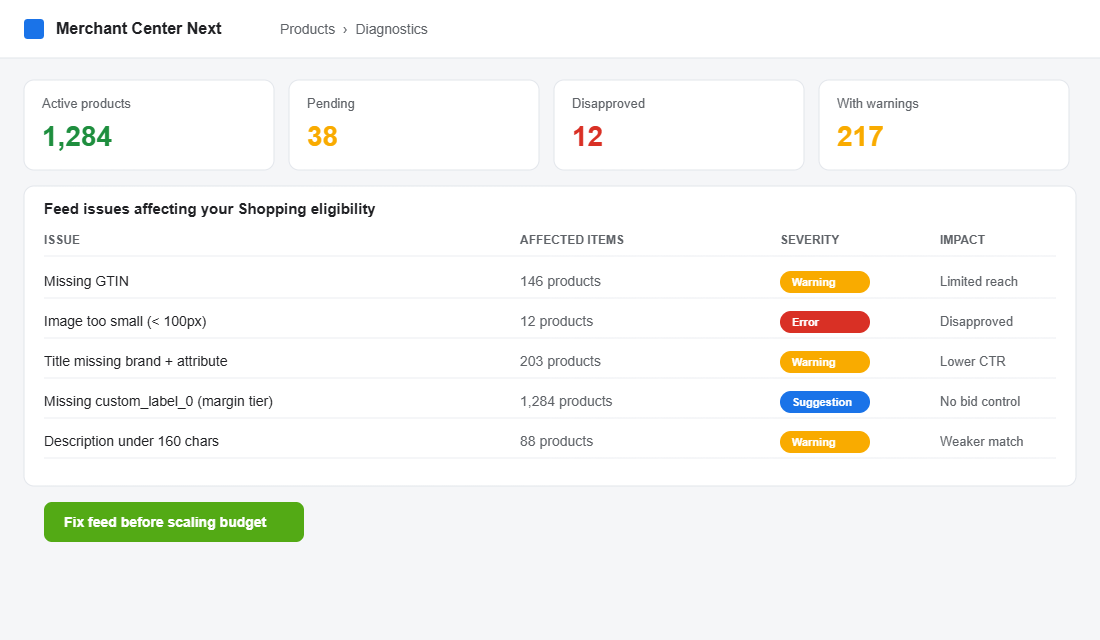
Performance Max does not look at your beautiful homepage. For Shopping inventory, which typically soaks up 60% or more of PMax spend, it reads your product feed. Titles, images, GTINs, descriptions, and custom labels are the raw material the algorithm bids on. A weak feed is a weak campaign, full stop.
The payoff for fixing it is real. Optimised titles, high-resolution lifestyle images, populated custom labels and accurate GTINs typically lift PMax ROAS by 15 to 30% before you touch a single bid. That is the highest-leverage hour you will spend all quarter.
Work through your feed in this order:
- Titles: brand + product + key attribute + generic keyword. “Bondi Active Womens Seamless Leggings High Waist Black” beats “Seamless Leggings” every time. The first 70 characters do the heavy lifting on mobile.
- GTINs on everything you can. Missing GTINs limit reach and eligibility. Chase them from suppliers now, not during BFCM.
- Custom labels as your control panel. Tag every product with a margin tier (custom_label_0) and a seasonality flag. This is how you later steer budget toward profit, not just revenue.
- Images that match real search intent. Clean primary shot for Shopping, lifestyle variants for Display and Discover. Anything under 100 pixels gets disapproved.
- Descriptions over 160 characters with the attributes a buyer would type. Google reads them for query matching.
Run Merchant Center diagnostics weekly and treat disapprovals like a leaking tap. One disapproved hero product can quietly cost you thousands in a month.
Asset Groups: Stop Feeding Google One Boring Square
An asset group is the creative ammunition PMax uses across YouTube, Display, Discover and Gmail. Most stores upload one logo, one square image, and a single headline, then wonder why the non-Shopping channels perform like a wet match.
Structure asset groups the way you structure collections, not as one catch-all. A leggings brand might run separate asset groups for “performance training”, “everyday athleisure” and “gift sets”, each with its own feed segment (using those custom labels), its own copy angle, and its own imagery. The algorithm gets clearer signals and the reporting becomes readable.
For each asset group, give Google enough to work with: five headlines, five long headlines, five descriptions, plus a spread of landscape, square and portrait images and at least one video. No video? Google auto-generates an ugly one from your assets. A simple 15-second clip stitched from your existing product footage will outperform it. The same creative discipline that wins on paid social applies here, which is why your Meta ads creative testing process should feed straight into PMax.
Search Themes and Audience Signals: Steer, Do Not Surrender
Performance Max will find audiences on its own, but you are not obliged to stay silent. Search themes let you tell Google which queries this campaign should chase, which matters enormously for niche or long-tail products your feed text might never surface. In 2025 Google added a usefulness indicator so you can see which themes are actually pulling weight.
Audience signals are suggestions, not hard targeting. Feed the campaign your best first-party data: your customer list, past purchasers, high-intent site visitors, and a tight in-market segment. This is where knowing your buyer pays off. The same avatar and zero-party data work that sharpens your email also sharpens your audience signals, so the two compound.
Add new search themes in small batches and watch the usefulness indicator. Prune themes that drift off-intent. You are steering the engine, not driving it manually, and that distinction keeps you sane.
Brand Exclusions: Stop Paying for Customers Who Already Know You
This is the single biggest ROAS illusion in Performance Max. By default, PMax can serve on searches for your own brand name and claim those conversions as its own. Someone who already typed your store name was going to buy. Paying to “acquire” them and counting it as new revenue is how a 2 to 1 campaign masquerades as a 6 to 1 one.
As of January 2025 you can apply brand exclusions to Search text ads while keeping branded Shopping impressions live, which is the balance most stores want. Apply your brand exclusion list, then watch your reported ROAS drop and your real, incremental ROAS become visible. That drop is not a loss. It is the truth arriving.
Once branded traffic is carved out, you finally see what PMax is doing for genuinely new customers. That is the number worth scaling against, and it ties directly to knowing your real contribution margin on every order.
Set Your Target ROAS Off Real Margin, Not Vanity Numbers
A target ROAS of 4.0 means nothing until you know your margin. If you sell a $100 product at 30% contribution margin after cost of goods, shipping and transaction fees, a 4 to 1 ROAS means you spent $25 to make $100, leaving $5 before overheads. Scale that and you scale a loss.
Work it backwards. Calculate your break-even ROAS as 1 divided by your contribution margin. At 30% margin, break-even is roughly 3.3 to 1. Your target needs to sit comfortably above that to fund the rest of the business. This is why operators who know their numbers win the PMax game and the ones chasing top-line revenue lose it.
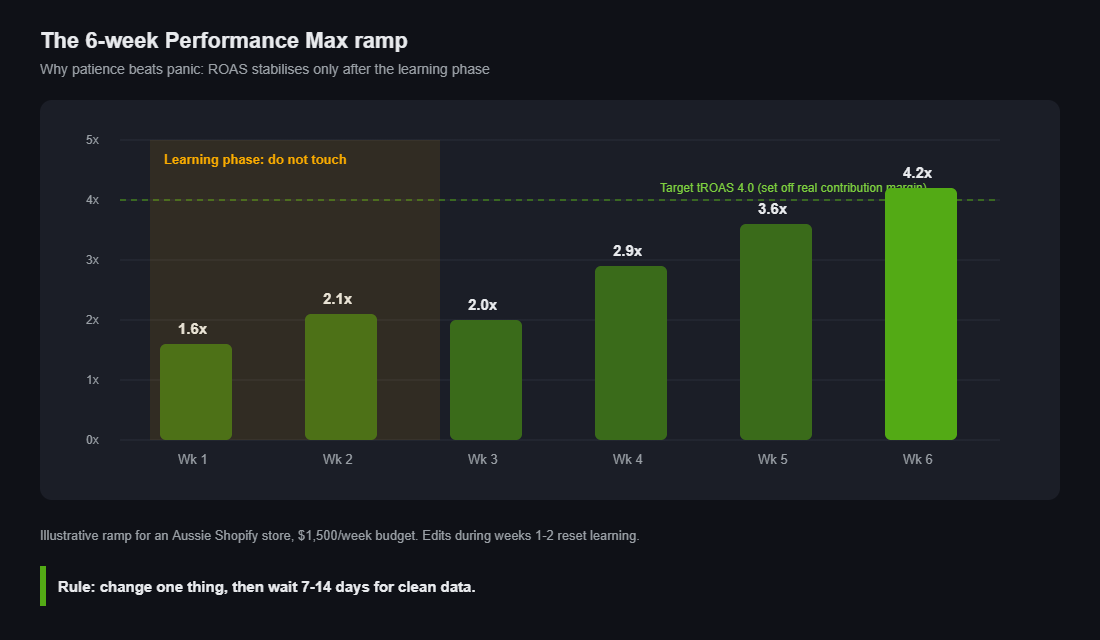
Set the target, then leave it alone through the learning phase. Performance Max needs around six weeks to optimise effectively, as Google’s own guidance confirms. The brands that let it ramp see the payoff: one B2B ecommerce case delivered 21% higher ROAS and a 55% lift in conversion value worth more than $13,000 in incremental revenue, and camera retailer KEH reported a 76.3% boost in sales with a 10x return after committing to the format.
Reading the Black Box: What PMax Hides and How to See In
Performance Max is deliberately opaque, but you are not blind. Three reports give you most of the visibility you need.
- The Insights tab. Search categories, audience insights and “what’s changed” tell you which themes and segments are driving spend. Check it weekly.
- Listing groups in the asset group. This shows product-level performance so you can see which SKUs PMax actually pushes. Often it is your bestsellers, which is fine, but you want to know.
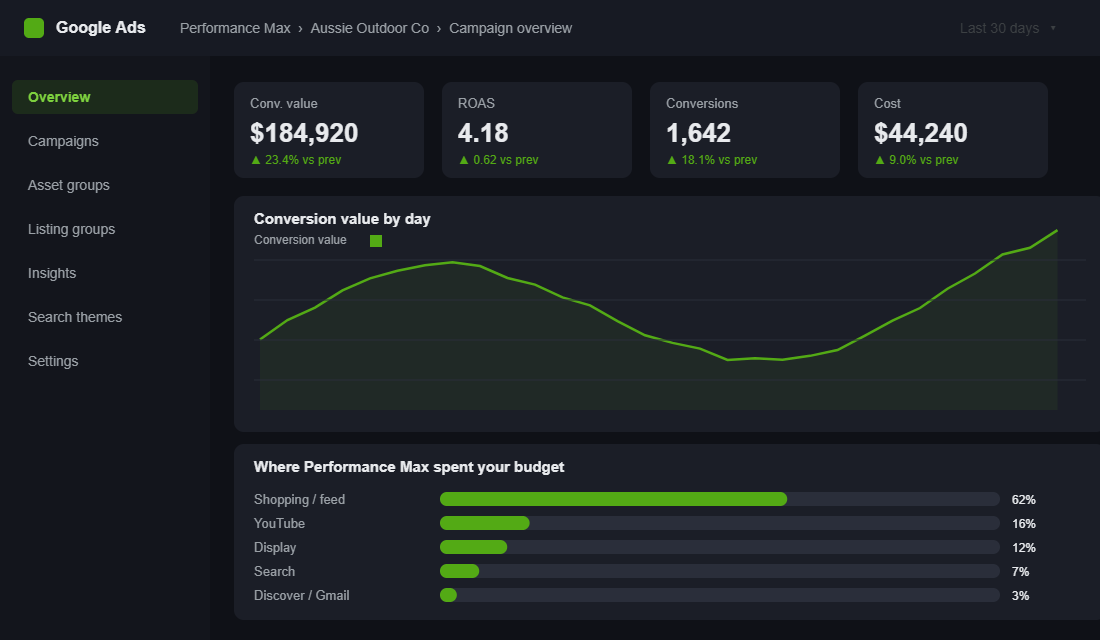
- A simple Google Ads script or third-party tool to pull the channel and placement breakdown Google hides. Knowing 62% went to Shopping and 16% to YouTube changes how you judge the result.
If you cannot answer “where did my money go and what did genuinely new customers cost me”, you do not have a campaign, you have a donation. The reporting work is not optional.
The Compound Effect: Why These Levers Work as a System
Each lever helps a little on its own. Together they change the entire economics of the campaign. A clean feed gives the algorithm better raw material. Strong asset groups give it sharper creative across every channel. Search themes and first-party audience signals point it at the right people. Brand exclusions strip out the fake wins so you can see the truth. And a margin-based target makes sure every dollar of scale is a dollar of profit.
Pull one lever and you get a modest bump. Pull all five and you flip PMax from a budget that leaks into a system that compounds. That is the difference between the 2.57 to 1 average and the operators quietly running 4 and 5 to 1 on incremental revenue. None of it is luck. It is setup discipline most stores never bother with.
If you are spending serious money here, this is also the point where a specialist media buyer earns their keep, because maintaining this system week to week is a real job, not a set-and-forget.
Your Performance Max Profit Checklist
Run this before you launch, and again every fortnight. If you cannot tick every box, fix it before you add budget.
- Feed: titles follow brand + product + attribute + keyword, GTINs populated, images over 100px, custom labels tagging margin tiers. Zero disapprovals.
- Asset groups: segmented by collection or margin tier, each with 5 headlines, 5 descriptions, all image ratios, and at least one video.
- Search themes: added in small batches, usefulness indicator checked, off-intent themes pruned.
- Audience signals: customer list, past purchasers, high-intent visitors and a tight in-market segment all loaded.
- Brand exclusions: applied to search text ads so reported ROAS reflects incremental, not branded, sales.
- Target ROAS: set above your break-even (1 divided by contribution margin), then left untouched for the full six-week learning phase.
- Reporting: Insights tab, listing groups and channel split reviewed weekly. You can always answer where the money went.
Where This Leaves You
Performance Max rewards operators who treat it like an engine to be tuned, not a button to be pressed. The feed, the creative, the signals, the exclusions and the margin-based target are the five tuning points. Get them right and PMax becomes one of the most profitable channels on your store. Ignore them and it becomes the most expensive lesson you will pay for twice.
Inside eCommerce Circle, getting Promotion channels like Performance Max to actually pay is one of the core pillars we work on with every member. If you want a second opinion on yours, let’s talk.