Most Aussie Shopify stores have a “You may also like” row on the product page, filled with whatever the app decided to show, and it sells almost nothing. The founder ticks the box, assumes cross-selling is handled, and moves on. Meanwhile the single cheapest lever they own for lifting average order value sits there doing nothing.
What’s in This Article
Done properly, cross-selling is not a widget. It is a system for showing the right complementary product, in the right place, at the right moment. Forrester puts cross-selling at 10 to 30% of ecommerce sales when it is done well. McKinsey estimated that around 35% of what people buy on Amazon comes from algorithm-driven recommendations. That is the ceiling, and most stores are nowhere near it.
The gap between a dead “related items” row and a real cross-sell engine is relevance. Random recommendations get ignored. Smart ones, built off what customers actually buy together, lift AOV without touching your ad spend or your prices. This is the five-part system we use with eCommerce Circle members to turn recommendations into real order value.
Part 1: Know the Difference Between Cross-Sell, Upsell and Bundle
These three get blurred together, and that is why most stores run them badly. They are different moves with different jobs, and the customer feels the difference even if you do not name it.
- Cross-sell. An additional, complementary product. Buying a pour-over coffee maker, get shown the filters and the beans. You are adding to the basket, not changing the main item.
- Upsell. A better or larger version of the same product. The 1kg bag instead of the 250g. This is the job of your post-purchase upsell and your product page tiers.
- Bundle. A pre-packaged set sold as one unit, usually at a small saving. The Shopify Bundle Playbook covers this lever in full.
Cross-sell is the one most stores leave on the table because it feels like the theme handles it. It does not. The default related-products block shows items from the same collection, which is often the opposite of a cross-sell. Showing someone a second pour-over when they are buying the first one is not helping them, it is clutter. The whole play hinges on complementary, not similar.
Part 2: Map What Actually Goes Together
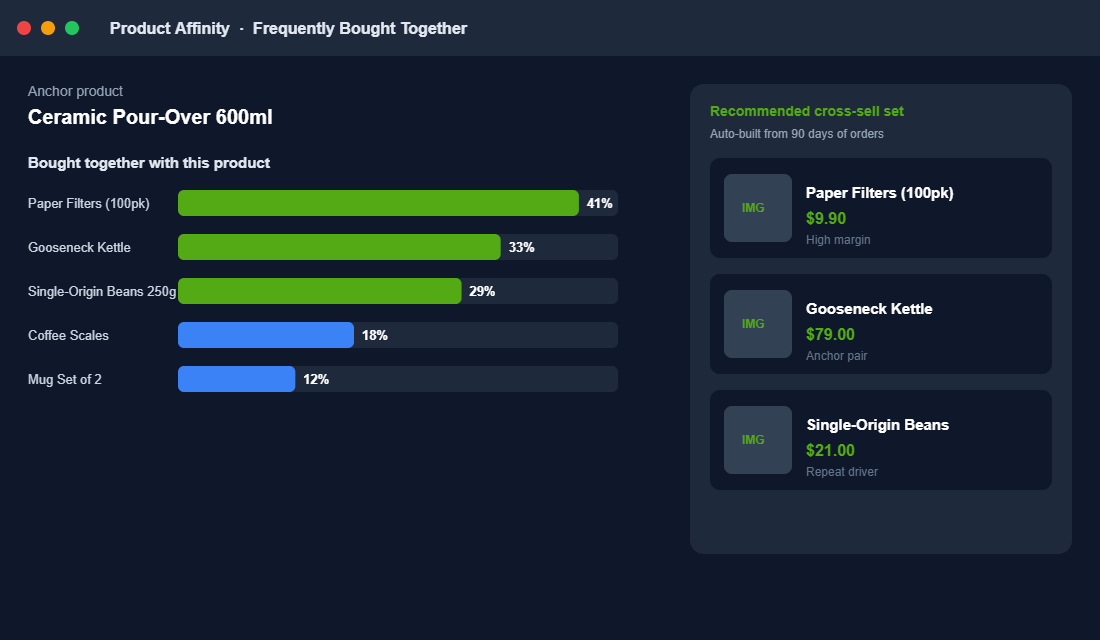
The best cross-sell recommendations are not guessed, they are pulled from your own order history. Your customers have already told you what belongs together every time they checked out with two items. That data is your affinity map.
Export your last 90 days of orders and look at which products appear in the same basket. For each hero product, rank the items most often bought alongside it. This is the same logic behind Amazon’s “Frequently bought together”, and you can build a rough version in a spreadsheet before you ever install an app.
- Start with your top 20 products. They drive most of your traffic and orders, so their pairings matter most.
- Find the natural companions. Consumables, accessories, and care items that genuinely extend the main purchase.
- Weight by margin. A companion product with a big co-purchase rate and a healthy margin is your first choice. Cross-selling a low-margin item just adds packing work.
- Note the repeat drivers. If a companion is a consumable people reorder, that cross-sell is also seeding future revenue.
Do this once and you have a defensible reason behind every recommendation on your store. When a shopper adds the pour-over and sees filters and beans, it lands because it is true. That is what a generic algorithm row can never fake.
Part 3: Place Cross-Sells Where They Actually Convert
The same recommendation performs completely differently depending on where it sits. Placement is not a detail, it is half the result. There are four spots that matter, and each has a job.
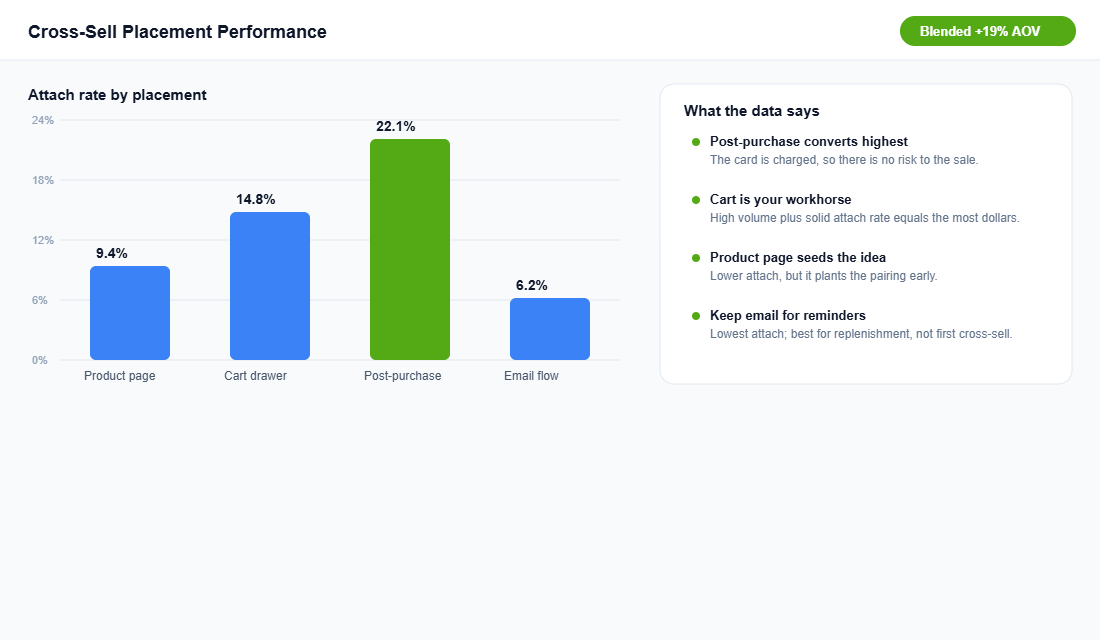
- Product page. Seeds the pairing early. Attach rates here are lower, but it plants the idea before the shopper reaches the cart.
- Cart drawer. Your workhorse. High volume plus a solid attach rate makes this the placement that usually earns the most real dollars. A cart-stage cross-sell on an apparel store lifted AOV by 22% and items per order to 1.4 in one documented case.
- Post-purchase. The highest attach rate of all, because the card is already charged and there is zero risk to the original order. The customer adds without re-entering payment.
- Email and flows. Lowest attach rate, best kept for replenishment reminders rather than the first cross-sell attempt.
The mistake is picking one and ignoring the rest. Run the cart cross-sell and the post-purchase offer together and they compound: the cart catches the impulse add, and the post-purchase catches the shopper who said no the first time but will say yes now that the risk is gone.
Part 4: Make It Relevant, Not Random
This is where the money is won or lost. A relevant recommendation feels like help. A random one feels like noise, and shoppers have been trained to ignore noise. The difference is worth the entire lift.
You do not need an expensive tool to start. Shopify’s own Search & Discovery app is free and lets you set complementary products by hand. Here is the setup.
- Install Shopify Search & Discovery. It is free and built by Shopify, so there is no app-bloat penalty on your store speed.
- Set complementary products per hero item. You can pick up to 10 complementary and 10 related products for each product. Use your affinity map from Part 2 to choose them.
- Add the complementary block to your theme. Place it on the product page and, where your theme allows, in the cart.
- Choose custom plus automatic. You can show only your hand-picked recommendations, or blend them with Shopify’s automatic ones to cover the long tail of products you have not mapped.
When you outgrow manual mapping, a personalisation engine like Rebuy or LimeSpot uses live behaviour to tailor recommendations to each shopper and to power smart-cart cross-sells. That is the step up from “the same three items for everyone” to “the right item for this basket”, and it is usually where the attach rate jumps again.
Part 5: Measure the Attach Rate and Protect the Margin
Cross-sell is a numbers game, so you need the numbers. The metric that matters most is attach rate: the percentage of orders that include a cross-sold item. Track it alongside items per order and AOV, and you can see exactly what each placement and each pairing is doing.
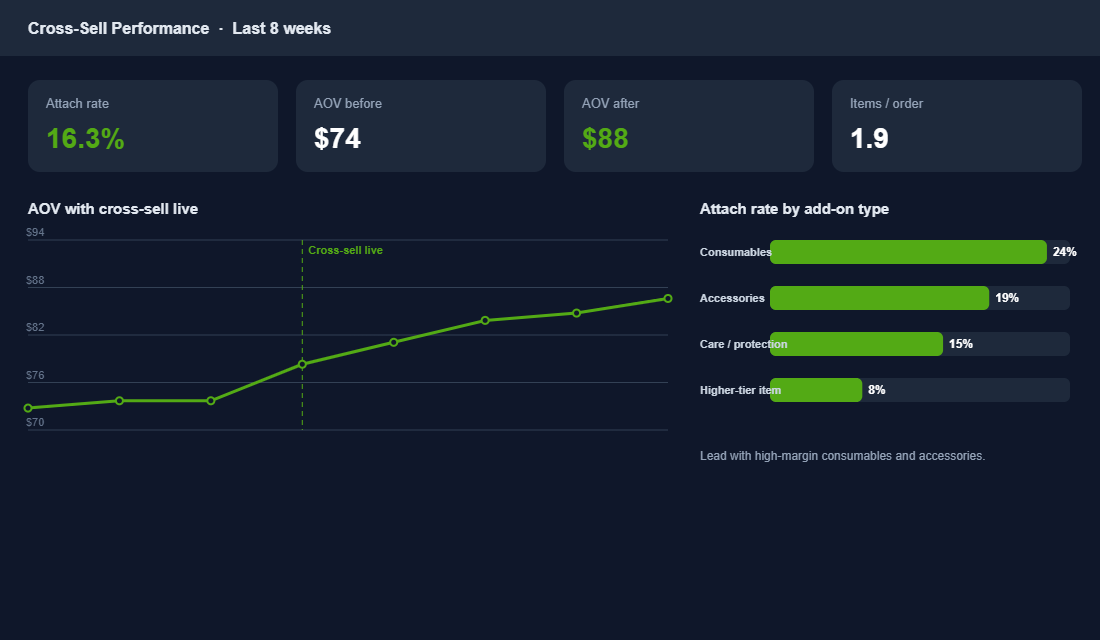
- Lead with high-margin add-ons. Consumables and accessories carry the best margins and the highest attach rates, so they do double duty.
- Cap the number of offers. Two or three relevant recommendations beat a wall of ten. Too many choices kills the add, it does not help it.
- Watch the return rate. A cross-sell that lifts AOV but comes back at double the return rate is a false win. Net it out.
- Kill the dead pairings. If a recommendation is not attaching after a fair run, swap it. The affinity map gives you the next candidate.
The point of measuring is restraint. Cross-selling works because it helps the customer complete a purchase, not because it crams the cart. The moment it starts to feel like being sold to, your conversion rate tells on you. Where cross-sells live on the page also matters, so keep them consistent with the layout logic in the Shopify Product Page Playbook.
How the Five Parts Compound
Each part on its own is a small gain. Together they are an engine. Knowing the difference stops you showing a near-duplicate instead of a companion. The affinity map gives every recommendation a real reason. Placement puts it where the shopper is ready to act. Relevance makes it feel like help. And measurement keeps you honest about what is actually working.
Stack all five and the same traffic you already have starts checking out with more in the basket. No extra ad spend, no discount, no price rise. Just the right second product in front of a customer who was always going to want it. That is why cross-selling can quietly account for 10 to 30% of revenue in the stores that treat it as a system rather than a widget.
Your Cross-Sell Setup Checklist
Work top to bottom. If you can tick all of these, your store is cross-selling like the brands recovering the biggest AOV lifts.
- Cross-sell, upsell and bundle roles clear. You know which move you are making and why.
- Affinity map built from 90 days of orders. Real co-purchase data, not guesses.
- Top 20 products mapped to companions. Weighted by co-purchase rate and margin.
- Cart cross-sell live. Your highest-dollar placement is working.
- Post-purchase cross-sell live. Catching the shopper after the card is charged.
- Recommendations relevant, not random. Shopify Search & Discovery or a personalisation engine.
- Offers capped at two or three. Curated, not a wall.
- Attach rate tracked weekly. Alongside items per order and AOV.
- High-margin add-ons leading. Consumables and accessories first.
- Return rate netted out. No false wins.
Inside eCommerce Circle, AOV levers like cross-selling are one of the core pillars we work on with every member. If you want a second opinion on where your store is leaving basket size behind, let’s talk.