Shopify switched on Shop Pay Installments for Australian shoppers on 27 August 2026, and within days your inbox probably filled with “turn it on, it lifts conversion” advice from app vendors and agencies. Most of it skips the part that decides whether you make money: it is not free, it is not available to every store, and it does not replace Afterpay or Zip.
What’s in This Article
Plenty of founders will flip the switch because Shopify made it a three-click job, then discover three months later that a chunk of their orders now carry a fee roughly double what a card payment costs. The brands that win with it treat it as a margin experiment with a stop-loss, not a feature launch.
This guide gives you the plain answer on whether Shop Pay Installments is live for your store, what the shopper sees, what it likely costs, and a four-week pilot you can run so the numbers decide, not the hype.
Is Shop Pay Installments Live in Australia? The Short Answer
Yes, with a catch. Affirm and Shopify announced the Australian launch from Sydney on 27 August 2026, and it marks Affirm’s return to the Australian market. Shop Pay Installments is powered exclusively by Affirm, so it sits inside the existing Shop Pay button rather than as a separate checkout app.
The catch is the phrase on Shop’s own help page: it is available “only in some stores”. Shopify’s shopper help page lists Australia alongside Canada, the UK and the US. But the merchant activation page I checked at the time of writing still named business entities in the US, Canada and the UK, and made no mention of Australia. That gap is exactly why you should never assume. Check your own admin before you plan around it.
Here is how to check in under two minutes:
- Open Settings > Payments in your Shopify admin.
- Under Shopify Payments, click Manage.
- In the Shop Pay section, look for Shop Pay Installments. If it appears, tick it and save. If it does not, your store is not eligible yet.
Two prerequisites sit underneath that. You need Shopify Payments and Shop Pay both active, which rules out stores running on a third-party gateway only. If you are still on Stripe or PayPal as your main processor, switching processors is a separate decision with its own cost, and we walk through the maths in our Shopify plan break-even playbook.
AUD is the only currency that counts. The shopper’s transaction must be in Australian dollars, so a multi-currency store selling to Australians in USD will not trigger the option.
What Your Customer Actually Sees at Checkout
Understanding the shopper side matters because it decides how many of your visitors can even use it. According to the Shop Help Center, an Australian customer needs to meet all of these conditions:
- Age and location: at least 18, living in Australia, with a card billing address in Australia.
- Order size: between $50 and $2,000 AUD, including shipping and tax.
- Account: a Shop Pay account.
- Single store: every item in the cart must come from one store.
- Delivery: physical products must ship to an Australian street address. PO boxes are not accepted.
- Payment method: the help page lists debit cards only, with prepaid cards and digital wallets such as Apple Pay not compatible.
- Approval: Affirm makes a real-time decision on every purchase, so approval is never guaranteed.
That payment method line is the one to watch. A large share of Australian mobile shoppers pay with Apple Pay or Google Pay by default. If they cannot use a wallet with Installments, some will drop out at the point of choice. Test it yourself on a real order and note what happens, because this is the sort of rule Shopify can change without much notice.
On the plan itself, the Shop help page describes Australian purchases as four interest-free payments due every two weeks. Affirm’s press release is broader, saying shoppers can split purchases into fortnightly or monthly instalments and may see interest-bearing plans, with options varying by merchant and purchase amount. Treat the four-payment fortnightly plan as the baseline and ask Shopify what else applies to your store.
Affirm also states it charges no late fees, account fees or compounding interest. That is a genuine point of difference in a market where shoppers have been burned by fees, and it is why the shopper-facing story is easy to sell. It is not your cost story, though. For that, you need to look at your side of the ledger.
What It Costs You (And What Nobody Has Published Yet)
This is where most articles go quiet, so let me be direct. I could not find a published Australian merchant fee for Shop Pay Installments. Neither Shopify’s pages nor the launch coverage state one.
What we do know from other markets is useful as a warning. Reporting on the US product puts the merchant fee at around 5.9% plus 30 cents per transaction, and that the fee is not returned to you if the order is refunded. Affirm pays you the order total minus the fee, usually within one to three business days, and you always get paid in full up front. The shopper carries the repayment risk, not you.
Whether Australia lands at the same number is unknown, so build your model on a range. For context, the Reserve Bank of Australia puts the average merchant cost of buy now pay later at about 3.5%, which it describes as well above card costs, with merchants typically paying somewhere between 2% and 4%. Afterpay does not publish a rate card on its merchant fees page and directs merchants to their own agreement, which tells you something about how negotiable and variable these numbers are.
Here is what the three options cost on a $200 order if you take 1.75% plus 30 cents for card payments (a common Shopify Payments rate, so check yours), 3.5% for the BNPL average and 5.9% plus 30 cents for the US Installments rate:
| Payment option | Fee on a $200 order | Extra cost vs card | You keep (of $62 contribution) |
|---|---|---|---|
| Card (1.75% + 30c, assumed) | $3.80 | – | $58.20 |
| BNPL average (RBA 3.5%) | $7.00 | +$3.20 | $55.00 |
| Installments (5.9% + 30c, US rate) | $12.10 | +$8.30 | $49.90 |
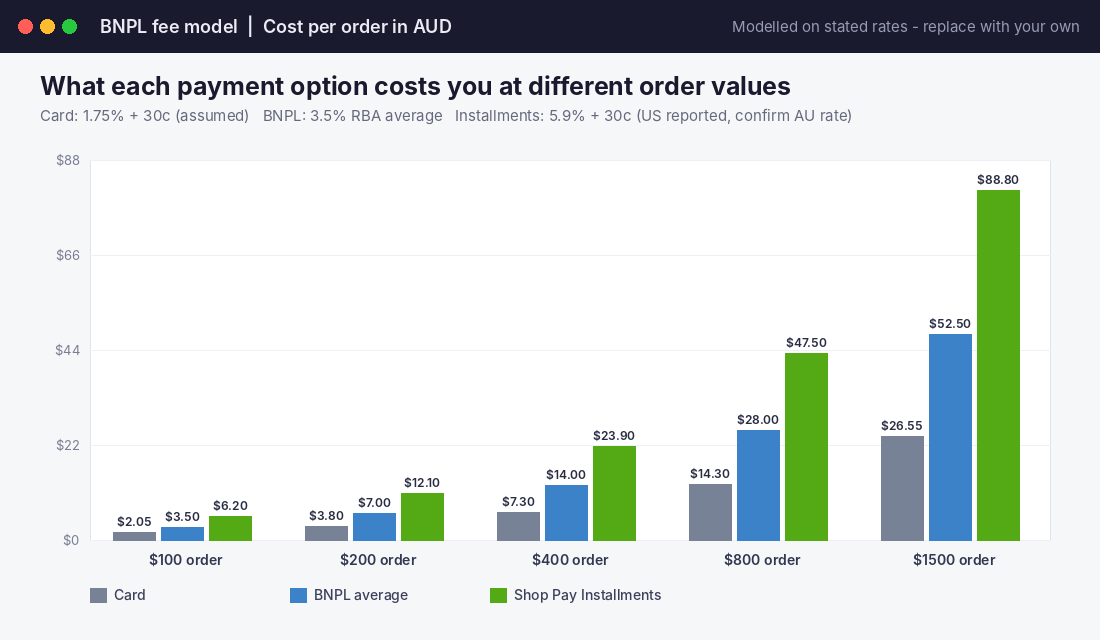
The question this raises is simple: how many Installments orders must be truly new sales for the fee to pay for itself?
Use a $200 order with $62 of contribution before payment fees (that is 31%, a normal figure for an apparel or homewares brand). On a card, you keep $58.20. On Installments at 5.9% plus 30 cents, you keep $49.90. For the Installments orders to earn you the same total profit as those customers paying by card, a share of them must be sales that would never have happened otherwise.
The formula is one line: break-even incremental share = 1 minus (profit with Installments divided by profit on card). With the numbers above, that is 1 minus (49.90 divided by 58.20), which is about 14%. Roughly one in seven Installments orders must be a sale you would not have made. At the 3.5% BNPL average the bar drops to about 5.5%.
If that sounds high, remember most shoppers who choose Installments could have paid by card. They simply prefer to spread the cost. This is the central tension, and our BNPL margin test shows how to run the same arithmetic across Afterpay and Zip so you can compare every option on one page.
Why Australian Shoppers Make This Worth Testing
Despite the fee, there is a real reason to test rather than ignore. Australians are comfortable splitting payments, and the market is large enough that a missing option costs you sales.
The numbers back that up:
- More than 50% of Australians used BNPL in the past 12 months, according to Afterpay data reported by Money Magazine.
- The Assistant Treasurer cited around 7 million active BNPL accounts in 2023.
- The average BNPL customer makes 18.2 transactions a year at about $136 each, which means this is a habit for everyday purchases rather than a big-ticket crutch.
- Total BNPL spend sits near $20 billion a year, about 2% of Australian card purchases.
Shopify’s own US claims on Installments are bolder. On its US page, Shopify says one in four merchants saw a 50% increase in average order value, and that merchants who switched from a third-party installments solution saw 28% fewer abandoned carts. Take those with a grain of salt. They are Shopify’s numbers from a different market and a different product mix, and the “one in four merchants” wording tells you three in four did not see that lift.
Afterpay’s own Australian figures tell a similar story. A June 2022 Afterpay study found its customers had an average order value 28% higher than non-Afterpay customers and spent 21% more often. It is a self-reported statistic from the provider, and the comparison is between two different groups of people, not between the same shoppers with and without the option. So read it as “BNPL users are bigger spenders”, not “BNPL makes people spend 28% more”.
This is why the pilot below matters. Neither Shopify nor Afterpay can tell you what happens at your store. Only a controlled test can.
How Real Australian Retailers Handled the Fee Question
You are not the first Australian business to weigh this. The decisions larger retailers made around fee absorption are worth borrowing.
eBay Australia added Afterpay at checkout in April 2020. Its Australian leadership said sales improved significantly, basket sizes rose and conversion improved a bit, though it did not share exact figures. The detail worth noting: eBay chose to absorb Afterpay’s fees rather than pass them to sellers, a deliberate choice to fund a conversion experiment from its own margin. In that same coverage, the average price at which Australians made instant purchases rose from $190 to $230 after COVID-19.
Amazon Australia partnered with Zip in November 2019, and Kogan offers Afterpay. Neither shared figures, which is itself informative. When even large retailers keep the results private, assume the economics are tight enough to be a competitive advantage.
The lesson for your store is not to copy their choices. It is to notice that all of them made the call on purpose. They decided which options to offer, who pays the fee and what they expected in return. Shop Pay Installments deserves the same decision, not a default-on setting.
Shop Pay Installments vs Afterpay and Zip: Do You Need All Three?
The question I hear most from Aussie founders is whether Shop Pay Installments replaces Afterpay or Zip. It does not, and stacking all three has a cost most stores miss.
The shopper-side differences are real. Afterpay is the market leader, with four payments over six weeks. Zip suits both small baskets and bigger purchases through its two products. Shop Pay Installments runs through the Shop Pay button, with fortnightly payments and Affirm’s approval decision. Our complete BNPL guide compares fees, terms and checkout placement in detail.
Rather than offer everything, use this decision rule:
- Already running Afterpay profitably? Keep it, and treat Installments as a test against it, not an addition. Same shopper, two fees.
- Selling above $400 regularly? Test Installments or Zip first. Four payments over six weeks work best on smaller baskets.
- Mostly $50 to $150 orders? The fixed 30 cents and a high percentage hurt most here. Test carefully.
- Heavy Apple Pay traffic? Check how Installments behaves with wallets on your own store before you commit.
The mistake to avoid is layering options until checkout looks like a payment menu. Every extra choice adds a decision, and each fee eats margin. For most stores, two BNPL options is plenty.
Also, regulation is now part of the picture. Since 10 June 2025, BNPL providers in Australia need an ASIC credit licence and membership of the Australian Financial Complaints Authority. Credit for Shop Pay Installments is provided by Affirm Australia Pty Ltd under Australian Credit Licence 569362. That is reassuring for shoppers and means complaints have a proper home. It does not change your obligation to describe offers honestly, so keep any “pay in four” messaging factual and avoid implying approval is guaranteed.
The 4-Week Shop Pay Installments Pilot (Your Stop-Loss Plan)
This is the framework to run. It treats the feature as a test with a clear verdict at the end, so you never drift into permanent use because nobody checked.
Week 0: set the baseline
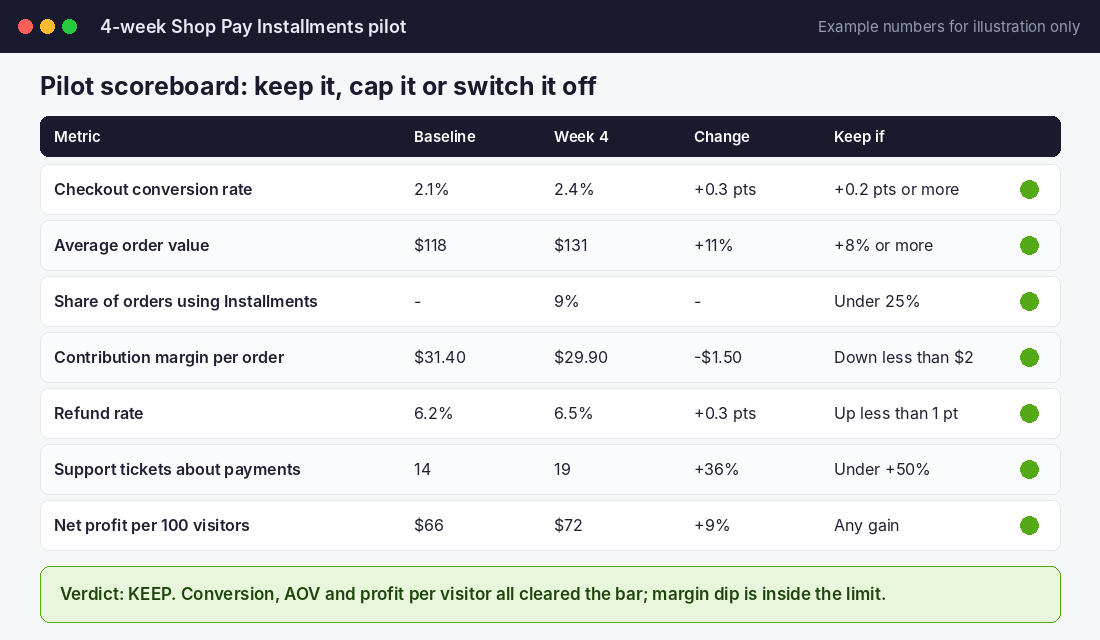
Before you switch it on, record the last 28 days of: checkout conversion rate, average order value, contribution margin per order, refund rate, payment-related support tickets and net profit per 100 visitors. That last number is your referee, because it captures conversion, order value and fees together.
Write your keep thresholds now, not after you see results. The scoreboard below shows example thresholds you can adapt.
Weeks 1 to 4: run it clean
- Switch it on at a fixed date and time and write it down.
- Change nothing else on the checkout during the pilot. No new theme, no new discount strategy.
- Avoid running it through your biggest sale of the year. A Black Friday spike will drown out the signal. Run it in a normal period, or at least compare like with like.
- Log any support tickets mentioning payment, declines or Affirm.
One practical wrinkle: Shopify’s order export shows the payment method as Shopify Payments rather than Shop Pay Installments, so you cannot filter orders neatly in a spreadsheet. That is why the before-and-after window matters, and why you should check what fee and sales reporting Shopify shows in your admin once it is live.
Week 4: make the call
Compare against your thresholds, then pick one of three outcomes:
- Keep: the thresholds are met. Leave it on and review quarterly.
- Cap: conversion improved but margin slipped. Consider keeping it on products above a margin line, or discuss pricing with Shopify.
- Switch off: profit per 100 visitors fell or stayed flat. Turn it off and save yourself the fee.
If you also sell seasonal gifting lines, remember that instalment options interact with return rates. A buyer who spreads payment over four fortnights and then returns the item creates admin work and, on Installments, a fee you do not get back. Our lay-by playbook covers how the same cash flow logic applies when customers pay over time.
Your Copy-and-Paste Pre-Launch Checklist
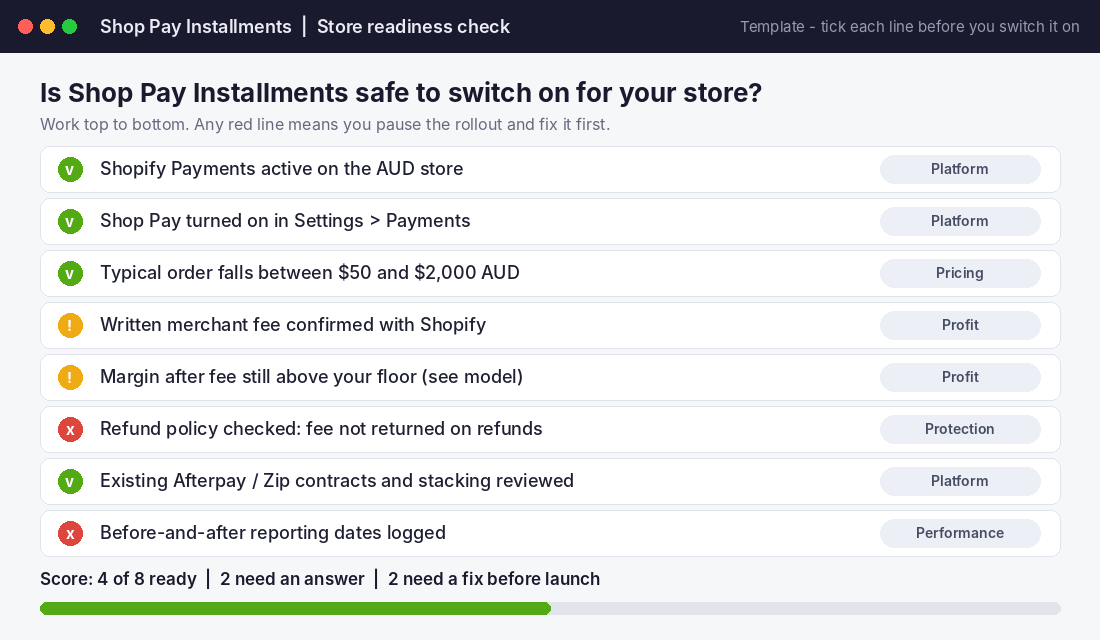
Run through this before you tick the box. It is the same list as the readiness screenshot, in text form so you can paste it into your task manager:
- ☐ Shopify Payments active on the AUD store
- ☐ Shop Pay turned on in Settings > Payments
- ☐ Typical order sits between $50 and $2,000 AUD
- ☐ Written merchant fee confirmed with Shopify, in AUD
- ☐ Margin after the fee modelled at 5.9% plus 30 cents (the cautious case)
- ☐ Refund policy reviewed, knowing the fee is not returned on refunds
- ☐ Afterpay and Zip contracts checked so you are not paying two fees for one shopper
- ☐ Baseline numbers recorded and pilot start date logged
- ☐ Keep, cap and switch-off thresholds written down before launch
- ☐ Checkout tested on mobile with a real order, including Apple Pay behaviour
Anything unticked on the margin and fee lines is a reason to pause. The setup takes minutes. Reversing a poor decision takes months of squeezed margin.
The Compound Effect: Payment Options Are a Pricing Decision
Look at how the pieces fit. Eligibility decides who can use it. The fee decides what each order is worth. The shopper rules decide how many people actually see it work. The pilot decides whether the extra sales cover the extra cost.
Remove any one of those and you are guessing. Together they turn a feature announcement into a decision you can defend. That is the real shift: payment options are not a checkout nicety, they are part of your pricing and margin structure, and every extra percentage point comes straight out of what you keep.
The founders who get this right do two things. They never leave a payment option on by default, and they always measure profit per visitor rather than conversion alone. Conversion can climb while profit falls, and that is the trap of any fee-bearing feature.
Inside eCommerce Circle, payment and checkout economics are one of the core pillars we work on with every member. If you want to see exactly where your store is being capped, take the free More Orders Scorecard. It takes two minutes and shows you which of the 10 P’s to fix first.
Sources: Affirm investor release, 27 August 2026; Shop Help Center (Shop Pay Installments overview and eligibility); Shopify Help Center and Shopify Shop Pay Installments page; PYMNTS, 2026; Money Magazine on BNPL regulation and usage; Afterpay merchant fees page; SmartCompany partner content on Afterpay merchant data; ChannelNews, December 2020; First Pier fee summary for the US product. Details can change, so check Shopify’s current pages before you act.