Every month you hand Meta and Google another invoice for the privilege of renting their audience. And every quarter the rent goes up.
What’s in This Article
Meanwhile, there is a shopping app installed on more than 100 million phones that already knows your store, already holds your customers’ payment details, and costs you nothing to appear in. Most Aussie founders have never once opened its channel settings.
That app is Shop, Shopify’s own consumer app. Your customers are already in it tracking their parcels. This playbook walks through the 5-part system that turns Shop from a tracking widget your brand ignores into a genuine repeat-order channel, using the same tools you already pay for in your Shopify subscription.
Why the Shop App Is the Channel Aussie Founders Keep Ignoring
Quick refresher on what Shop actually is. It started life as Arrive, a parcel-tracking app. Shopify rebuilt it into a full shopping destination: a personalised discovery feed, one-tap checkout through Shop Pay, order tracking, and a wallet of Shop Cash rewards. Every time someone buys from a Shopify store and tracks the order, the app quietly recruits them.
The scale is real. Shopify puts the Shop app audience at over 100 million users, and more than 44% of orders placed inside Shop come from repeat purchases. That second number is the one that should make you sit up. Shop is not a discovery casino like TikTok. It is where existing customers go to buy again.
Now put that against the local backdrop. The Australia Post 2026 eCommerce Report clocked Aussie online spend at $82.6 billion, up 14% year on year, across 9.8 million shopping households, and 41% of those households buy online at least fortnightly. NAB’s index has online sitting near 14.9% of all Australian retail trade, and roughly 77% of store sessions and 68% of orders now happen on a phone. Your customers live in apps. You just do not have one.
Except you do. Here is what most founders miss: your store already has a listing inside Shop. If you have never touched it, that listing is a bare, unbranded default. Generic banner, no featured collections, no reviews. A ghost town with your logo missing. The 5 parts below fix that in order.
A note on expectations before we start. Shop will not replace Meta as your growth engine, and anyone selling it that way is overreaching. What it will do is quietly add a second stream of orders at near-zero marginal cost, and for a store doing $100k a month, even a 3 to 5% contribution from a free channel is real money that drops mostly to the bottom line.
Part 1: Claim Your Shop Store and Make It Look Like Your Brand
The Shop channel is a free sales channel that lives inside your existing admin. Setting it up properly takes under an hour, and it is the single tool this playbook is built on. Here is the exact sequence:
- Install the channel. In Shopify admin, go to Sales channels, click the plus, and add Shop. It is free on every plan.
- Switch on your Shop Store. This is your branded storefront inside the app. Upload your logo, a proper banner (not a cropped Instagram tile), and set your brand colour.
- Feature your best collections. Curate 3 to 5 collections the same way you would your homepage. Bestsellers first, new arrivals second.
- Sync your reviews. Shop pulls product ratings from supported review apps like Judge.me and Okendo. Social proof inside the feed is what separates a store people tap from one they scroll past.
- Audit your product feed. Shop displays your product titles and first images raw. Cut the SKU codes from titles and lead with lifestyle-plus-product imagery that survives a small tile.
None of this is glamorous. It is the app equivalent of sweeping the shopfront before you pay for foot traffic, and it compounds through every part that follows.
Part 2: Switch On the Conversion Layer With Shop Pay and Sign in with Shop
The Shop app and Shop Pay are two halves of the same machine. The app is the audience. Shop Pay is the accelerated checkout that turns that audience into orders, on your website as well as inside the app.
The numbers here are hard to argue with. Checkouts that run through Shop Pay complete at around 72.5%, against an industry average closer to 62.6%. On mobile, Shopify’s own data has Shop Pay converting at up to 1.91x the rate of a standard guest checkout. When 68% of Aussie orders are on a phone, that multiplier is not a rounding error. It is the difference between a profitable month and a flat one.
Three switches to check this week:
- Shop Pay enabled in Payments. Under Settings then Payments, confirm Shop Pay is active alongside your card gateway. Some stores turned it off years ago during a checkout redesign and forgot.
- Sign in with Shop. This lets any of those 100 million Shop users log in to your store with one tap and check out with saved details. Fewer forms, fewer abandoned carts.
- Shop Pay Instalments visibility. If you offer instalments, show it on the product page, not just at checkout. We covered where pay-later placement lifts conversion in our buy now pay later guide.
Instalments deserve one extra sentence. Afterpay trained a generation of Aussie shoppers to expect a pay-later option, and Shop Pay Instalments keeps that behaviour inside the Shopify ecosystem instead of handing the customer relationship to a third party’s app. Same conversion lift, more of the data staying attached to your store.
The quiet benefit: every Shop Pay checkout enrols that customer deeper into the Shop ecosystem, which makes every retention lever in Part 4 hit harder. You are not just closing this order. You are wiring up the next one.
Part 3: Run Shop Campaigns and Pay for Customers, Not Clicks
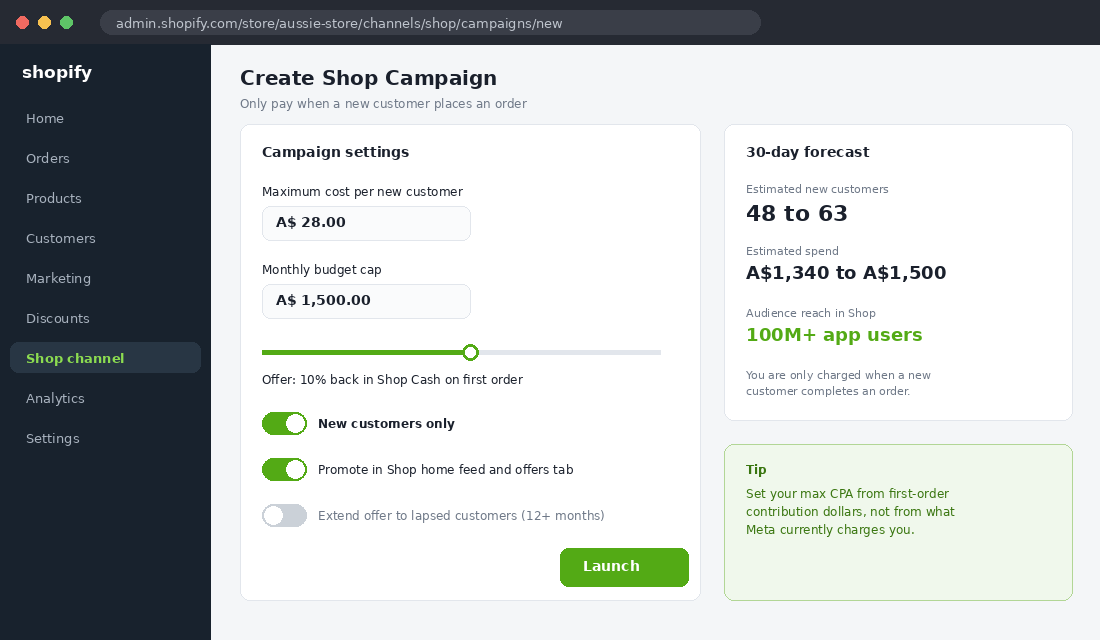
Here is where Shop stops being a free hygiene exercise and becomes an acquisition channel. Shop Campaigns let you offer new customers a cash-back incentive (funded partly by you, promoted by Shopify) and you set a maximum cost per new customer up front. No conversion, no charge.
Read that again slowly, because it inverts the Meta deal. On Meta you pay for the auction and wear the risk of the click going nowhere. In Shop Campaigns you name your price for an acquired customer and only pay when one lands. Shopify then promotes your offer across the app’s home feed, its offers tab, push notifications and email.
It works at serious scale. Footwear brand OluKai used Shop Campaigns to bring in more than 1,400 new customers in four weeks while lifting average order value 12%, at a lower CPA than their paid social baseline. The mechanics that made that work are copyable:
- Set your max CPA from contribution margin, not vibes. Take your average first-order contribution dollars, decide how much you will spend to buy a customer, and cap the campaign there. If you have not done that maths, start with our contribution margin work inside the Circle.
- Target new customers only. The toggle exists so you are not paying acquisition rates for people who would have bought anyway.
- Run it for a full cycle before judging. Give the algorithm 3 to 4 weeks. Judging a campaign on week one is how founders talk themselves out of working channels.
One honesty note: eligibility has been rolling out progressively by region and store profile, so check the Shop channel in your own admin. If Campaigns are not available to you yet, Parts 1, 2, 4 and 5 still carry their full weight.
Part 4: Build the Retention Loop With Push, Tracking and Shop Cash
Remember the stat from the top: over 44% of Shop orders are repeat purchases. This part is about engineering your slice of that number instead of hoping for it.
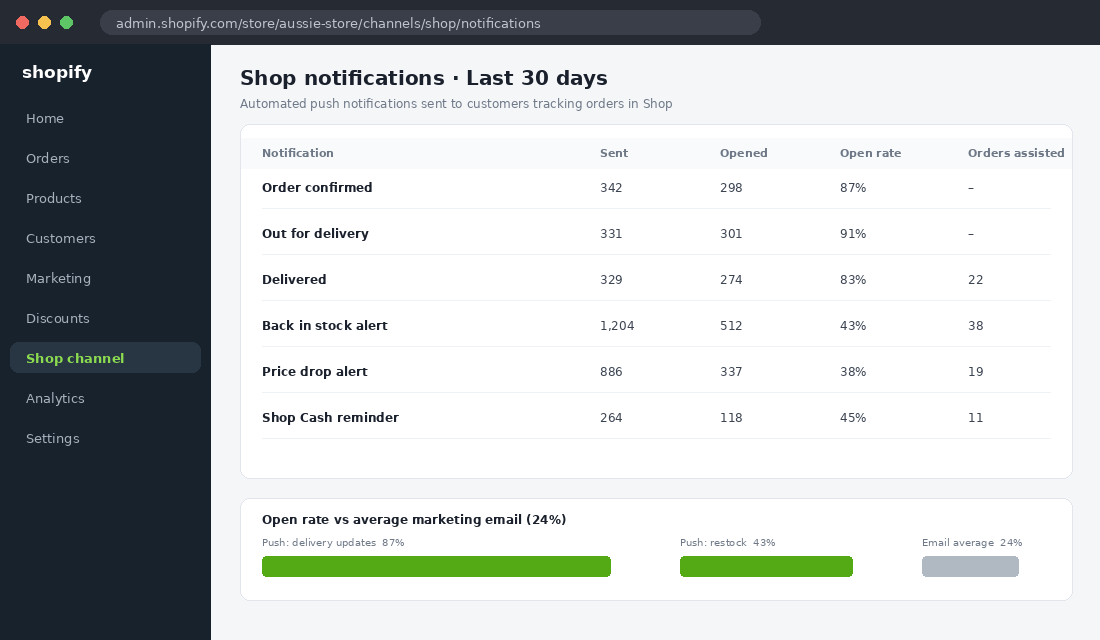
The engine is push notifications you do not have to build. When a customer tracks an order in Shop, the app sends the delivery updates people actually open: order confirmed, out for delivery, delivered. Each one is a branded touchpoint that costs you nothing and lands on the lock screen, a piece of real estate your emails will never see. Push notifications routinely pull open rates several times higher than the 20 to 30% a healthy email list manages.
Stack these levers on top:
- Promote tracking in Shop, deliberately. Your order confirmation page and email should push customers to track their parcel in the app. Every install is a future lock-screen touchpoint you own by proxy.
- Let Shop Cash work for you. Shoppers earn Shop Cash on eligible Shop Pay orders and come back to spend it. Customers who redeem Shop Cash show higher repeat purchase rates than web-checkout-only buyers, which makes them exactly the cohort you want more of.
- Turn on back-in-stock and price-drop alerts. Shoppers can follow your store in the app. Restocks and new drops then reach followers without you lifting a finger.
- Keep your owned flows running underneath. Shop complements your email and SMS engine, it does not replace it. Your welcome flow and abandoned cart recovery still do the heavy lifting for first purchases.
The result is a loop: purchase, track, notification, follow, restock alert, repeat order. Each pass through the loop costs you nothing at the margin. That is what an owned-adjacent channel looks like.
Part 5: Measure Shop Like a Channel, Not a Checkbox
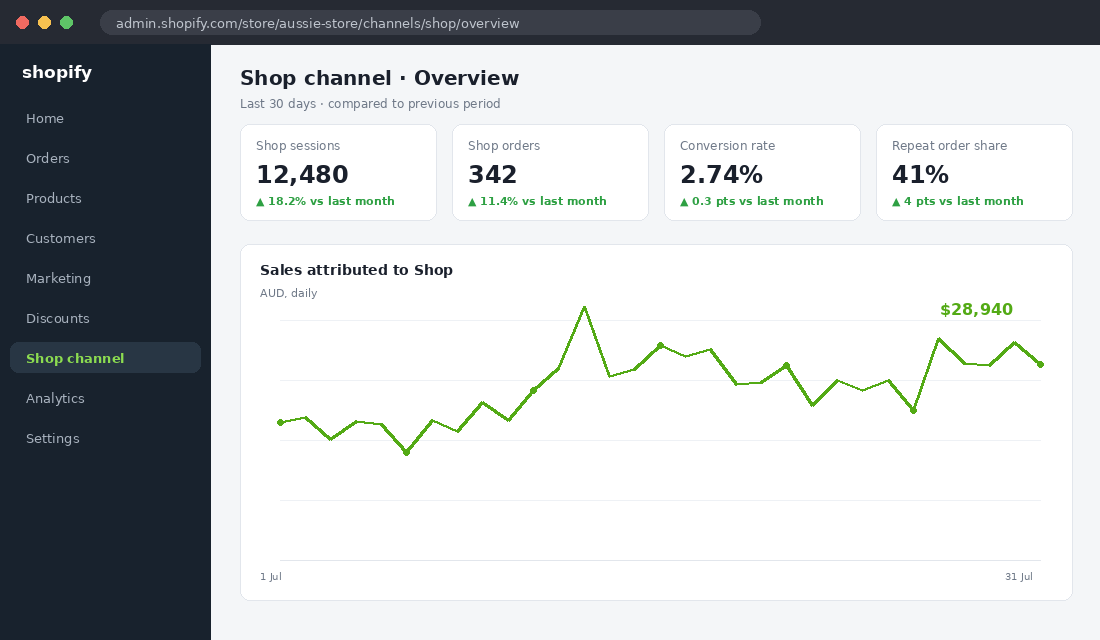
If you cannot see Shop’s numbers separately, you will never invest in it seriously. Fortunately the Shop channel ships with its own analytics inside admin: sessions, orders, conversion rate and sales attributed to the app, plus campaign performance if you are running one.
Review four numbers monthly, the same way you would for Meta or Google:
- Shop sessions and conversion rate. A branded Shop Store converting below your website’s mobile rate usually means weak collection curation or missing reviews.
- Repeat order share from Shop. Benchmark against the network’s 44%. If yours is well under, your retention loop from Part 4 has a broken link.
- Campaign CPA versus blended CAC. OluKai’s win was not the volume, it was acquiring under their paid social CPA. Compare like for like.
- AOV in Shop versus web. App shoppers with saved payment details often spend more per order. If Shop AOV lags, check whether your featured collections are leading with low-ticket items.
Fifteen minutes a month. That is the entire reporting overhead for a channel most of your competitors have not even switched on. Put a recurring block in your calendar for the first Monday of the month, right next to your ad account review, and treat a missed month the same way you would treat not checking your ROAS.
Shop App or Your Own App? The Question Behind the Question
At some point a founder in every mastermind asks whether they should build their own app instead. Aussie activewear brand LSKD famously did, launching with Tapcart and watching mobile-driven sales surge on the back of a rusted-on community and a big, hot email list.
Here is the honest framing. Your own app makes sense when you have the audience to justify it: a large engaged list, strong repeat purchase behaviour, and drops or restocks that people genuinely queue for. That is a real bar, and most stores between $40k and $500k a month are not there yet.
The Shop app is the version of that strategy you get for free. No app store submissions, no monthly platform fee, no begging customers to install yet another brand app. LSKD-style results come later. Shop is the move you make now, and nothing about it stops you graduating.
The Five Mistakes That Kill Shop Channel Results
We have watched enough Circle members switch this channel on to know exactly where it goes wrong. Save yourself the scar tissue:
- Leaving the default Shop Store live. An unbranded listing next to a polished competitor actively costs you trust. If a shopper finds you in the feed and sees a bare page, that first impression is done. Brand it before you drive a single session there.
- Treating Shop traffic as free Meta traffic. The intent profile is different. Shop leans repeat and high-intent, so merchandise for people who already half-know you: bestsellers and restocks up front, not broad top-of-funnel hero products.
- Setting campaign CPA from what Meta charges. Your Meta CPA includes the cost of educating cold strangers. A Shop Campaign lands on warm, payment-details-saved shoppers, so anchor your max CPA to contribution margin and let the channels compete for your budget on results.
- Ignoring the feed data hygiene. Shop renders titles, images and prices straight from your catalogue. A stale compare-at price or a SKU-stuffed title that looks fine buried on your site looks broken in an app tile.
- Judging the channel in a fortnight. The retention loop needs at least one full purchase-and-delivery cycle to start feeding itself. Give it a quarter, measure monthly, then decide with numbers.
Every one of these is avoidable in an afternoon. The founders who win on emerging channels are rarely the cleverest. They are the ones who do the boring setup properly and then leave the machine alone long enough to work.
How the Five Parts Compound
Run the parts in isolation and each is mildly useful. Run them together and they feed each other. A branded Shop Store (Part 1) makes the campaign traffic (Part 3) actually convert. Shop Pay (Part 2) closes those orders at 1.91x mobile rates, then enrols every buyer into the tracking and push loop (Part 4). The monthly numbers (Part 5) tell you which part to tighten next.
That is the difference between a channel and a checkbox. Checkboxes get ticked once. Channels compound while you sleep, which in a market where 41% of online households are buying at least fortnightly is exactly what you want happening without ad spend attached.
Your 30-Day Shop Channel Sprint
Steal this four-week sprint and run it as written:
- Week 1: Foundation. Install the Shop channel, brand your Shop Store, feature 3 to 5 collections, sync reviews, clean product titles and first images.
- Week 2: Conversion. Confirm Shop Pay is live, enable Sign in with Shop, surface instalments on product pages. Screenshot your baseline mobile conversion rate.
- Week 3: Acquisition. If eligible, launch a Shop Campaign with a max CPA set from contribution margin and the new-customers-only toggle on. If not eligible, spend the week pushing order tracking in Shop from your confirmation page and emails.
- Week 4: Measurement. Pull the four monthly numbers: Shop conversion rate, repeat order share, campaign CPA versus blended CAC, and Shop AOV versus web. Decide one fix for next month.
Four weeks, no new subscriptions, one hour a week. Very few line items in your business have that risk-to-upside ratio.
Inside eCommerce Circle, Platform is one of the 10 P’s we pressure-test with every member, and the Shop channel audit is one of the fastest wins on the list. If you want a second opinion on yours, let’s talk.