Your reorder email goes out on day 30. Not because day 30 is when your customer actually runs out, but because 30 is a round number and it felt about right when you built the flow eighteen months ago.
What’s in This Article
That one assumption is quietly costing you the cheapest order in your business. The average ecommerce store turns roughly 28% of its customers into repeat buyers, and those repeat buyers spend around 22% more per order than first-timers. But here is the part most Aussie founders miss: about half of all second orders happen inside the first 30 days, and three quarters happen inside 90. A day-30 reminder lands after half your repeat buyers have already decided, and well before the other half are ready.
The brands that consistently win the second order are not writing better reorder emails. They are sending the same email at a different time. This playbook walks through the five steps we use to find a store’s real replenishment window, split it by category, and build a reminder ladder around it.
Why the Day-30 Reorder Email Misses
There are two separate mistakes buried inside a fixed 30-day reminder, and they compound.
The first is using the mean instead of the median. Days-between-orders data is heavily right-skewed. A handful of customers who reorder after 400 days will drag your average out to 50 or 60 days, when the typical customer is back in 26. If your flow timing came from an average, it is almost certainly too late.
The second mistake is treating your whole catalogue as one product. Cross-vertical data puts the median time to a second purchase somewhere between 15 and 35 days, but the spread underneath that is enormous. Apparel sits around 15 to 27 days. Supplements stretch out to 27 to 68 days. Consumables like food, pet and personal care run repeat rates of 30% to 45%, while home and durable goods struggle to clear 18%. Averaging a coffee subscriber and a candle buyer gives you a number that describes neither of them.
The fix is not complicated. It is just specific. You need to know the actual gap, per category, and then send before the gap closes rather than after.
Step 1. Measure the Gap You Actually Have
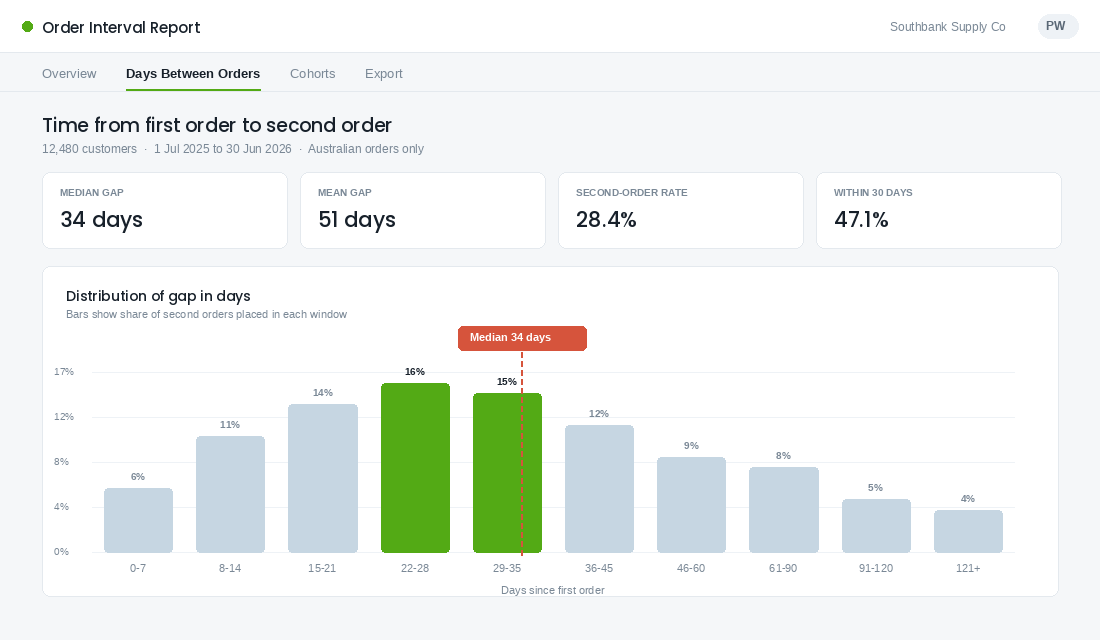
Start with one number: the median number of days between a customer’s first order and their second order. Not the third. Not the tenth. The first-to-second gap is the one that predicts whether a customer ever becomes a patron at all.
You can pull this out of Shopify without a developer. Here is the fastest route:
- Export your orders. In Shopify admin go to Orders, filter to the last 12 to 24 months, and export as CSV with the customer email, created date and line items included.
- Sort by customer, then by date. In your spreadsheet, group by email and calculate the day difference between order one and order two for every customer who has at least two orders.
- Take the median, not the mean. Use the MEDIAN function. Then also grab the 25th percentile with PERCENTILE, because that is the number your first reminder should be built around.
- Count the tail. Work out what share of second orders land inside 30 days, 60 days and 90 days. If more than half land inside 30 days, your current flow is almost certainly firing too late.
- Exclude the noise. Strip out wholesale accounts, staff orders, and anything with a 100% discount code. They will skew the distribution badly on a smaller store.
Do not stop at a single headline figure. Plot the distribution. When you see the histogram, the shape tells you more than the summary statistic does. A tight cluster around days 22 to 35 means you have a genuine replenishment product and a clear window to aim at. A flat spread across 120 days means the purchase is occasion-driven, and no reminder cadence will fix that. Those customers need a cross-sell, not a refill.
Step 2. Split the Window by Category, Not by Store
One store-wide send day is the second cheapest mistake to fix. Run the same median calculation again, but this time group by product type or collection rather than by store.
What you will usually find on an Aussie store carrying a mixed range is three tiers:
- Fast cycle, 20 to 35 days. Coffee, supplements, pet food, skincare refills, cleaning concentrate. These carry the flow. Build your reminder ladder here first.
- Slow cycle, 45 to 90 days. Larger format products, seasonal consumables, candles. Worth a reminder, but expect roughly half the reorder rate and be careful about frequency fatigue.
- No usable cycle, 100 days or more. Homewares, single-purchase durables, gifts. Exclude these from the replenishment flow entirely and route those customers into a cross-sell or category-expansion sequence instead.
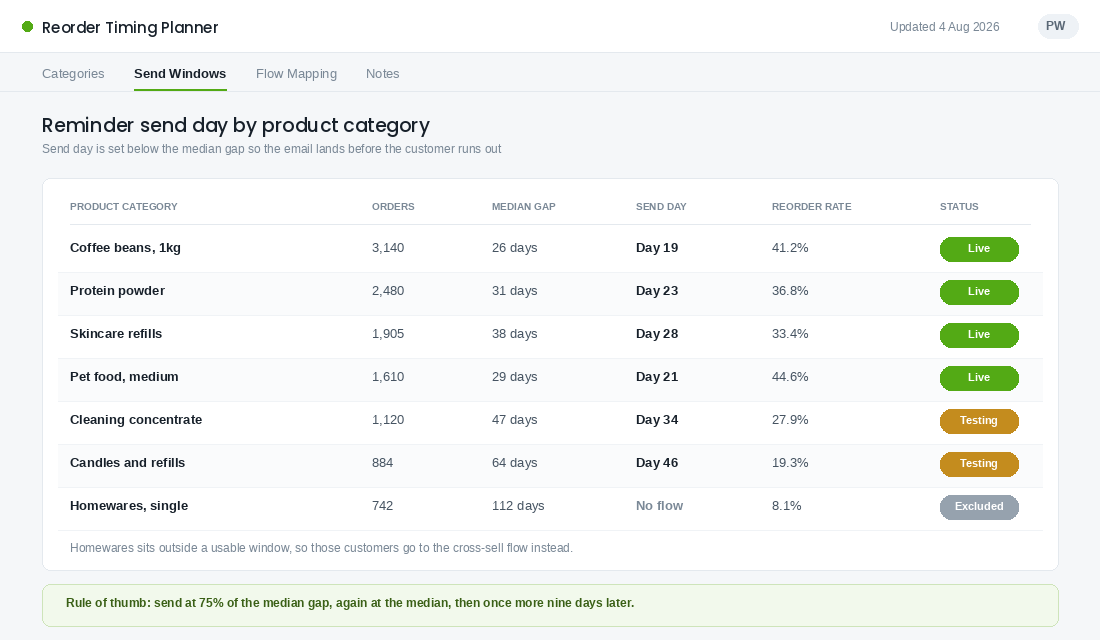
The rule we give members is simple. Send the first reminder at roughly 75% of the category median. If coffee beans come back at 26 days, the first email goes on day 19. If skincare refills come back at 38 days, the first email goes on day 28. You want to arrive while the customer still has a little product left, because that is when reordering feels like planning ahead rather than admitting they ran out.
If you have not yet built out proper customer groups to run this against, start there. Our Shopify customer segmentation playbook covers how to structure the segments that make this kind of timing work.
Step 3. Build a Three-Touch Ladder Instead of One Email
A single reorder email assumes you know exactly when your customer runs out. You do not. You know the shape of a distribution, which means the right answer is a short ladder that covers the window rather than one shot at the middle of it.
Three touches is the number. Fewer and you miss the spread. More and you train people to ignore you.
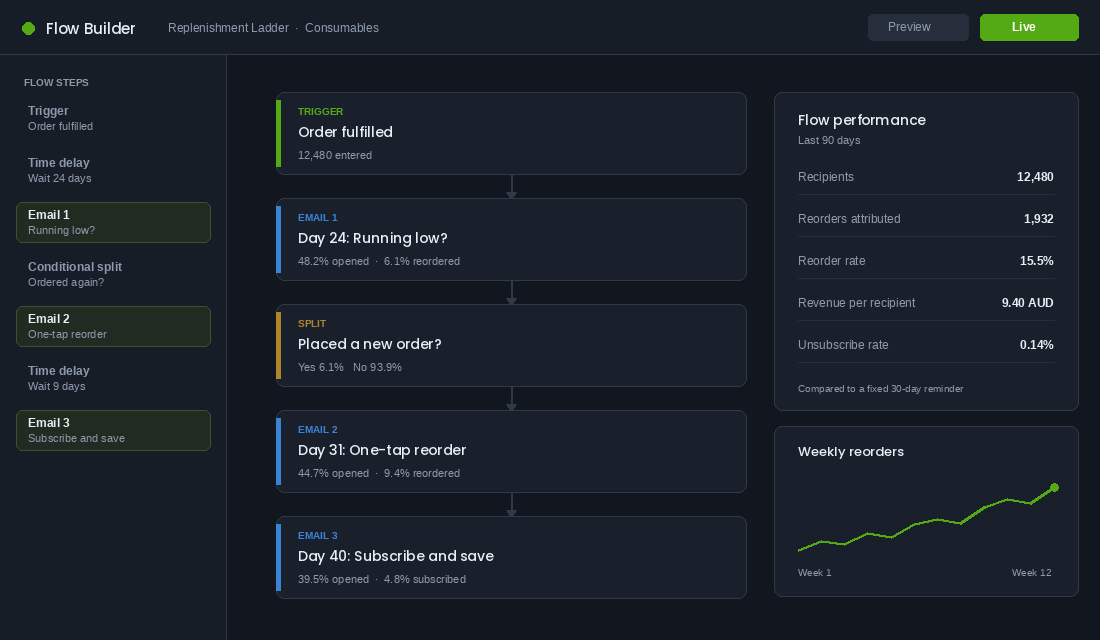
- Touch one, at 75% of the median gap. The heads-up. No discount. Subject line built around the product, not the offer. Something like “Running low on your Ethiopian?” The job of this email is to plant the thought while they still have product. Expect this one to carry the highest open rate and a modest conversion.
- Touch two, at the median gap. The one-tap reorder. This is the workhorse. Pre-filled cart, exact product they bought last time, correct grind or size or variant. Still no discount if you can avoid it. Discounting a customer who was going to buy anyway is the fastest way to train margin erosion into your repeat base.
- Touch three, nine days after the median. The recovery. Now you can add a reason to act. Free shipping, a bundle, or the subscription offer. This touch is catching the long tail of the distribution and anyone who meant to reorder and forgot.
Put a conditional split after touch one and touch two that checks whether the customer has placed a new order. If they have, they exit the flow. Nothing burns goodwill faster than a “running low?” email arriving the day after someone has already reordered and the parcel is in transit.
Setting This Up in Klaviyo, Step by Step
Klaviyo is the tool most Aussie Shopify brands already have, and it does this well if you configure it properly. There are two builds available and the difference matters.
Build A: fixed offset by category. This is the one we recommend for most stores, because it uses the real gap you just measured.
- Create a new flow and set the trigger to Fulfilled Order rather than Placed Order, so the clock starts when the product actually reaches the customer rather than when they paid.
- Add a trigger filter on the item category so only your fast-cycle products enter. Repeat the flow per category tier rather than trying to handle everything in one.
- Add a time delay equal to 75% of that category’s median gap, then your first email.
- Add a conditional split on “has Placed Order since starting this flow is at least once”, routing yes to exit.
- Add the second delay to bring you to the median, then the one-tap reorder email.
- Add a nine-day delay and the recovery email with the subscription or bundle offer.
- Set smart sending on, and set the flow to skip anyone who received another flow email in the last 24 hours.
Build B: predicted date of next order. Klaviyo can calculate an expected next order date per profile and trigger a date-based flow off it. It is genuinely useful, but only under specific conditions. The predictive model needs at least 500 customers who have placed an order, 180 days of order history, orders inside the last 30 days, and some customers with three or more orders. Accuracy sits around 75% to 85% for profiles with two or more previous orders and improves as history builds.
The catch is that the prediction is profile-level, not product-level. It does not know whether the customer’s last order was coffee or a candle. If your catalogue has clearly different replenishment cycles, Build A beats Build B. Use the predictive date for stores with a single dominant consumable, or for nurturing one-time buyers where you have no interval data yet.
Step 4. Make Reordering a One-Tap Job
Timing gets the email opened. Friction decides whether it converts. Most reorder emails send the customer to a collection page and ask them to remember what they bought, find it, choose the right variant and add to cart. That is four decisions where there should be zero.
Shopify has a native cart permalink that removes all of it. The format is yourstore.com.au/cart/VARIANT_ID:QUANTITY. Send that link and the customer lands on a cart already loaded with exactly what they bought last time. Chain multiple variants with commas, and append ?discount=CODE if you are running an offer on the third touch.
A few things to get right when you build it:
- Pull the variant dynamically. In Klaviyo, reference the line items from the triggering Fulfilled Order event so the link rebuilds itself per customer. Hardcoding one product defeats the purpose.
- Show the product image and the exact variant name. “Your usual: Ethiopian Yirgacheffe, 1kg, whole bean” removes the doubt that stops a tap.
- Handle sold-out gracefully. If the variant is unavailable the permalink fails silently and dumps the customer on an empty cart. Add a fallback link to the collection and suppress the email for out-of-stock variants.
- Make the button the only real action. One primary button above the fold. Strip the nav down. This is not a browsing email.
- Test on mobile first. The overwhelming majority of these opens happen on a phone, usually in the kitchen, usually while the customer is looking at the near-empty packet.
Step 5. Convert the Reliable Repeaters to Subscription
Once a customer has reordered the same product two or three times at a predictable interval, they have already told you they want a subscription. They are just paying full attention to do manually what could happen automatically.
The mistake is pitching subscription on the first order. At that point the customer has not yet decided they like the product. The offer reads as a commitment trap and it suppresses the first purchase. Pitch it on the third touch of the second replenishment cycle instead, when the behaviour is proven.
Set the default subscription interval to the median gap you measured, not to a tidy monthly cycle. If your customers come back every 26 days, a monthly subscription leaves them short for four days every cycle, and after three cycles they cancel because it “never arrives when I need it”. Match the biology of the product, not the calendar.
Melbourne’s Who Gives A Crap is the clearest local example of this done properly. The brand built its model around a genuinely predictable consumable, ran subscription messaging tailored to each market rather than one global template, and leaned on community mechanics to grow it. Their refer-a-friend program alone drove around 25% of new signups in 2025. Frank Body, also out of Melbourne, works from the same underlying logic: a coffee scrub gets used up on a knowable schedule, which makes the reorder moment predictable enough to build a calendar around.
If subscription is where you are heading, our Shopify subscription playbook covers the offer construction and churn mechanics in detail.
What to Do With the Customers Who Miss the Window
Some percentage of your customers will sail past all three touches. Do not keep sending replenishment reminders to them. The message is wrong now, because the product ran out weeks ago and the reason they did not reorder has nothing to do with timing.
Set a hard exit at roughly double the median gap. Past that point the customer moves from the replenishment flow into a proper win-back sequence with different messaging, a different offer structure and a longer cadence. Trying to solve lapsed customers with a reorder reminder is why so many flows show good open rates and terrible revenue per recipient. Our win-back flow guide covers what should happen next.
The clean handoff matters more than either flow does on its own. A customer should be in exactly one lifecycle sequence at a time, and the boundary between them should be a measured number, not a guess.
The Compound Effect of Getting the Timing Right
None of the five steps above is dramatic on its own. Moving a send from day 30 to day 19 is not a rebrand. But watch what stacks up.
Correct timing lifts the reorder rate on the first touch. The one-tap cart link lifts conversion on every touch. Category-specific windows stop you burning the slow-cycle customers with irrelevant frequency. The clean exit into win-back stops you wasting sends on people who were never going to reorder. And the subscription pitch at the right moment converts your most predictable customers into revenue you do not have to earn again next month.
Now put that against the economics. Repeat buyers spend roughly 22% more per order than first-timers, and they cost you almost nothing to reach. Consumable categories can support repeat rates of 30% to 45% when the timing is right, against a typical store average closer to 28%. Closing even part of that gap is the difference between a store that has to buy every order and one that owns a base.
This is also the single cheapest growth lever available to most Aussie founders right now. It requires no new traffic, no new creative, no new agency. It is a spreadsheet, a measurement, and three emails moved to different days.
Your Replenishment Window Checklist
Work through this in order. Most stores can complete the whole thing inside a week.
- Export 12 to 24 months of orders from Shopify with email, date and line items.
- Calculate the first-to-second order gap for every repeat customer. Use MEDIAN, not AVERAGE.
- Record the 25th percentile as well. That is your first send day.
- Repeat the calculation per product category and sort into fast, slow and no-cycle tiers.
- Exclude anything over 100 days from the replenishment flow and route it to cross-sell.
- Build the three-touch ladder at 75% of median, at median, and at median plus nine days.
- Trigger on Fulfilled Order, not Placed Order.
- Add conditional splits after touches one and two so buyers exit immediately.
- Build dynamic cart permalinks from the triggering order’s line items.
- Add the subscription offer to touch three only, with the interval set to your measured median.
- Set a hard exit at double the median gap, handing off to win-back.
- Re-measure the gap every quarter. Product mix changes, and so does the window.
Track one number to know whether it worked: revenue per recipient on the replenishment flow, measured before and after. Open rate will move around. Revenue per recipient tells you whether you actually changed behaviour or just changed a subject line.
Start With One Category This Week
Do not try to rebuild every flow at once. Pick your single highest-volume consumable, measure its median gap, and move the existing reminder to 75% of that number. That is a one-hour job and it will tell you inside a fortnight whether the rest is worth building.
The founders who get this right are not smarter marketers. They just stopped guessing at a number they could have measured.
Inside eCommerce Circle, retention timing is one of the core pillars we work on with every member, because it is usually the fastest profit lift available without touching ad spend. If you want a second opinion on your replenishment window, let’s talk.