An agency sends you a deck. Slide four says your Liquid theme is holding the brand back. Slide seven shows a competitor with a Lighthouse score of 96. Slide eleven quotes a rebuild that costs more than your entire marketing budget for the quarter, and somewhere in the small print sits the word headless.
What’s in This Article
Here is the number that should stop you before you sign anything. Roughly 60% of Shopify Liquid storefronts pass all three Core Web Vitals, which puts Shopify near the top of the CrUX Technology Report for any major platform. Your theme is almost certainly not the problem. What you have bolted onto it probably is.
I am not anti-headless. Hydrogen in 2026 is a serious framework, shipping on a quarterly calendar release cycle with React Router underneath it, and brands like Allbirds and Gymshark run it in production. The problem is that most Aussie founders get sold the architecture before anyone defines the problem. Six questions, answered honestly, will tell you whether a rebuild is the right call or an expensive detour.
Question 1: Can You Name the Number Headless Is Supposed to Move?
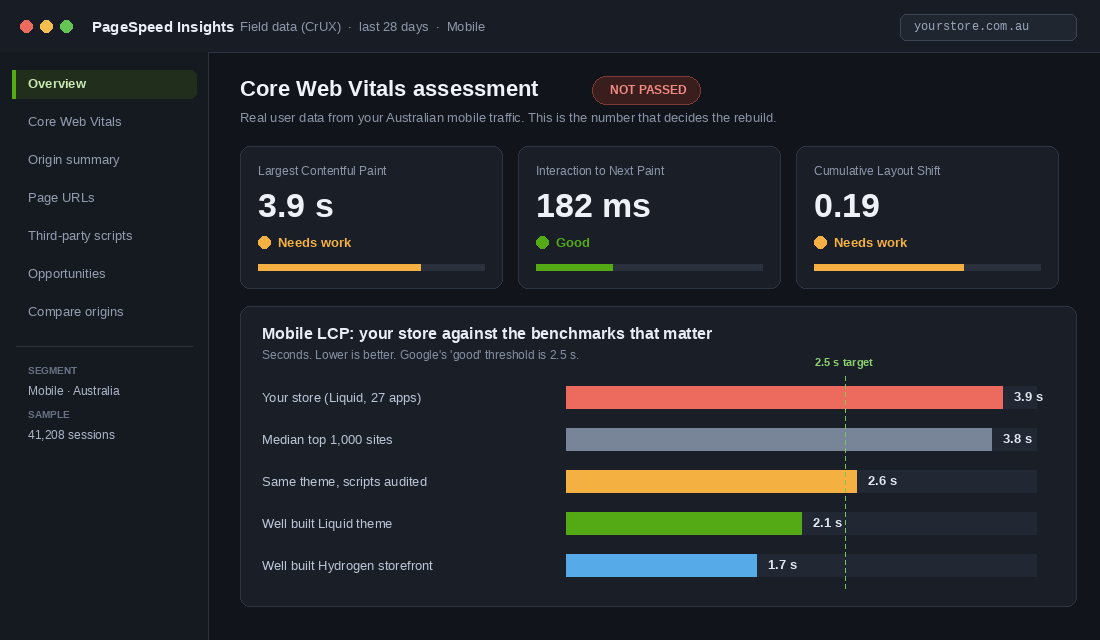
If the answer is “the site feels slow”, you do not have a business case. You have a vibe. Before anyone quotes you, write down one metric, its current value, and the value that would make the spend worthwhile.
For most stores that metric is mobile Largest Contentful Paint, because mobile is where the money leaks. Australian DTC traffic runs 70% to 80% mobile, and the conversion gap is brutal: mobile converts around 1.8% against 3.9% on desktop, and slow load times are the single biggest contributor. The median LCP across the top 1,000 sites sits at 3.8 seconds, well past Google’s 2.5 second threshold.
The upside is measurable. Deloitte’s conversion elasticity work found that a 0.1 second improvement in mobile LCP correlates with an 8.4% conversion lift in retail. Run that against your own numbers. If you do 400,000 sessions a year at 2.1% conversion and an AOV of 120 AUD, shaving 0.4 seconds off LCP is worth roughly 340,000 AUD in annual revenue. That is a business case. “It feels slow” is not.
Write it as one sentence and put it at the top of the brief: we will move mobile LCP from 3.9 seconds to under 2.5 seconds, and we expect a 6% to 12% lift in mobile conversion within 90 days of launch. Now the rebuild has a scoreboard. So does the agency.
Question 2: Is the Problem Your Theme, or the 27 Scripts Bolted Onto It?
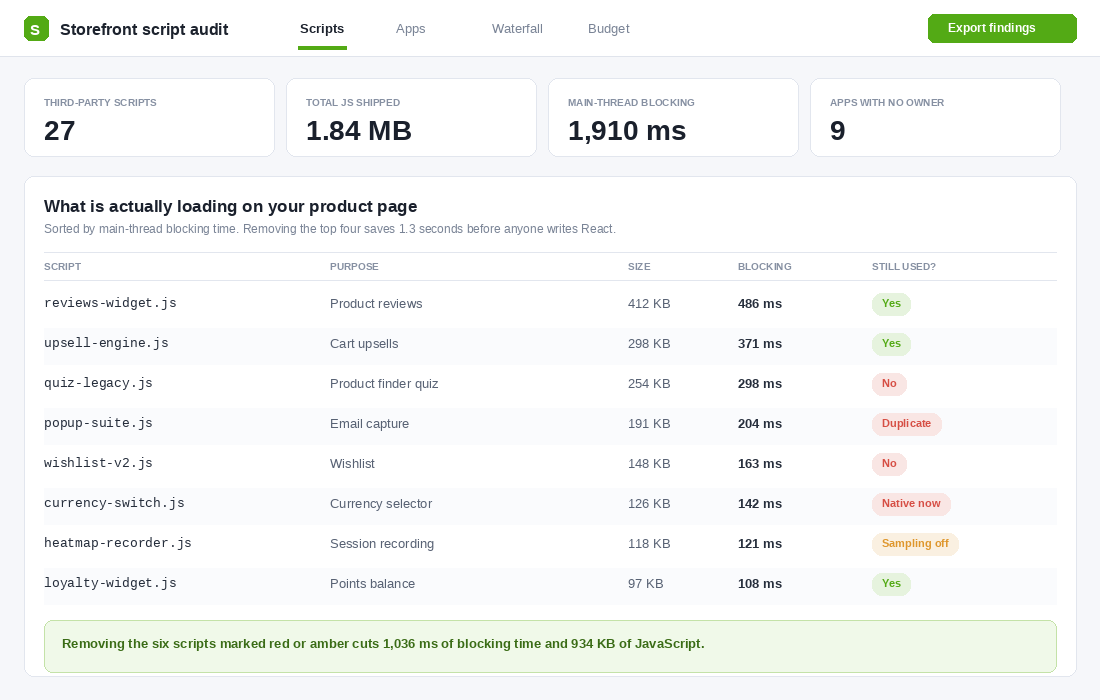
The typical Shopify merchant runs somewhere between 10 and 30 apps. Every one of them that renders on the storefront ships JavaScript to the customer’s phone. Reviews widget, upsell engine, wishlist, currency switcher, three popup tools because nobody uninstalled the first two, a session recorder that has been running at 100% sampling since 2023.
Going headless does not delete those scripts. It just makes you rebuild the ones you actually need, from scratch, in React. The brands that get a real speed win from a rebuild almost always get it because the rebuild forced an app cull, not because the framework changed.
So do the cull first. It costs you a week and nothing else.
- List every storefront-rendering app. Open your theme’s layout and section files and search for external script tags. Anything loading from a domain that is not your store or Shopify’s CDN goes on the list.
- Sort by blocking time, not file size. A 400 KB script that loads after interaction is less damaging than a 90 KB script blocking the main thread before your hero image paints.
- Tag each one: keep, kill, or replace with native. Currency switching, back-in-stock, gift cards, wishlists and bundles all have native or near-native Shopify equivalents now. Every app you retire is a line item off the P&L and milliseconds off LCP.
- Defer everything that survives. Reviews, loyalty balances and chat widgets almost never need to load before first paint.
We have covered the full process in the Shopify app stack audit, and the technical levers in the speed optimisation playbook. Run both before you entertain a rebuild quote. Conversion loss averages 4.42% for every additional second of load time, and a script audit usually returns one to one and a half seconds for the cost of a fortnight of a developer’s time.
If your LCP lands under 2.5 seconds after the cull, you have your answer. You did not need headless. You needed a clean-out.
Question 3: Does Your Integration Landscape Live Outside Shopify?
This is where headless earns its keep, and it has nothing to do with speed.
On Liquid, anything that needs data from a system outside Shopify usually gets fetched client-side. The page loads, then JavaScript calls out to your search provider, your recommendation engine or your ERP, and injects the result. For content sitting above the fold, that costs you both perceived performance and SEO, because the crawler and the customer both see an empty box first.
Headless flips that. You control the server, so a call to Algolia, a CDP, a proprietary pricing engine or a real-time inventory feed runs server-side and ships inside the initial HTML. That is a structural advantage, not a tuning trick.
So be honest about your stack. Score this question high if you run:
- An ERP or PIM as the source of truth for pricing, stock or product data, where Shopify is downstream rather than authoritative.
- A proprietary pricing or configuration engine that has to resolve before the customer sees a price. Made-to-measure, trade pricing tiers, freight-inclusive quoting.
- Business-critical API-driven merchandising where search results or recommendations are the page, not a widget on the page.
Score it low if your integrations are Xero, a 3PL and Klaviyo. Those are webhook and admin-level integrations. They do not render on the storefront, so the architecture of your storefront is irrelevant to them. Hismile is a good local example of this: the throughput and stability problem they solved was a checkout problem, handled with Shopify’s checkout extensibility, not a storefront rebuild.
Question 4: Are You Running One Storefront, or Five?
Shopify’s native multi-market tooling is genuinely strong now. Markets, localised pricing, geolocation and Translate and Adapt handle a single store selling into New Zealand, the UK and the US without any custom architecture. Culture Kings runs localised checkouts across multiple global stores on Plus. Who Gives A Crap credits its expansion store setup with doubling revenue year on year.
If that is you, one store with several markets, this question scores zero. Liquid plus Shopify Markets is not a compromise. It is the better editorial experience, and it is genuinely hard to replicate in a headless CMS.
The pain arrives at multi-store. Three, five or eight separate Shopify stores for different regions, sub-brands or a wholesale arm running alongside DTC. Now every homepage update, every campaign banner, every policy page change has to be made five times. Brands hit a point where they spend more hours keeping content in sync than creating it.
A headless build with a centralised content layer solves that properly. One source of truth, many storefronts. If you are running four or more stores and a person on your team spends real hours copying content between admins, that is a genuine structural argument for a rebuild, and it is one of the few that survives scrutiny.
Question 5: Is SEO a Growth Lever or a Hygiene Checklist?
Liquid hands you good SEO defaults. Canonical tags, structured data, meta handling, all managed by the theme, all understood by every SEO consultant in the country. The trade-off is rigidity. You are locked into /collections, /products and /pages, with no custom URL structures.
For 90% of Aussie DTC brands that is completely fine. Fix your collection page copy, get your metafields and metaobjects working, and Liquid will carry you to seven figures of organic revenue without complaint.
It stops being fine when programmatic pages are the strategy. If your growth plan depends on generating hundreds or thousands of pages from a data source, think location pages crossed with product availability, or fitment pages for automotive parts, or size and application matrices, headless gives you the control to build those at scale with custom URLs and per-template structured data.
Two warnings before you score this high. First, on headless you own every technical SEO detail yourself. Canonicals, hreflang, robots directives, sitemaps, none of it is handled for you, and getting it wrong actively costs you rankings. Second, thin programmatic pages get treated as spam. If you cannot make each generated page genuinely useful, the whole argument collapses.
Question 6: Who Maintains This in Eighteen Months?
This is the question that sinks most headless projects, and almost nobody asks it during the sales process.
A Liquid theme sits still. You can leave it for six months, come back, and it still works. A headless storefront is a software product. Framework upgrades, dependency patches, CMS updates, hosting configuration, custom integrations that break when an API version sunsets. Hydrogen shipped 2026.4.0 in April 2026 on a quarterly release cadence, with breaking changes. Someone has to absorb that, every quarter, forever.
Then there is the wider ecosystem. It is straightforward to find a good Liquid agency in Melbourne or Sydney. It is much harder to find a CRO consultant, a performance marketing agency and an SEO specialist who are all comfortable working inside a React codebase. Every one of your existing partners gets slower and more expensive overnight.
The honest cost picture: initial build gaps between Liquid and headless are narrower than the horror stories suggest, around 20% on comparable storefront scope according to agencies doing both. But year one all-in for a mid-range Hydrogen build, counting the build, the SaaS stack and the ongoing engineering, commonly lands between US 300,000 and US 600,000, or roughly 460,000 to 920,000 AUD. Add Shopify Plus at around US 2,300 a month, close to 3,500 AUD, which most production headless builds require for API limits and Functions access.
Ongoing maintenance is where it really bites. On Liquid, Shopify absorbs most of it. On headless, you do. Budget one to three full-time equivalents of engineering attention, permanently, or an agency retainer that reflects it.
Score It: The Headless Decision Card
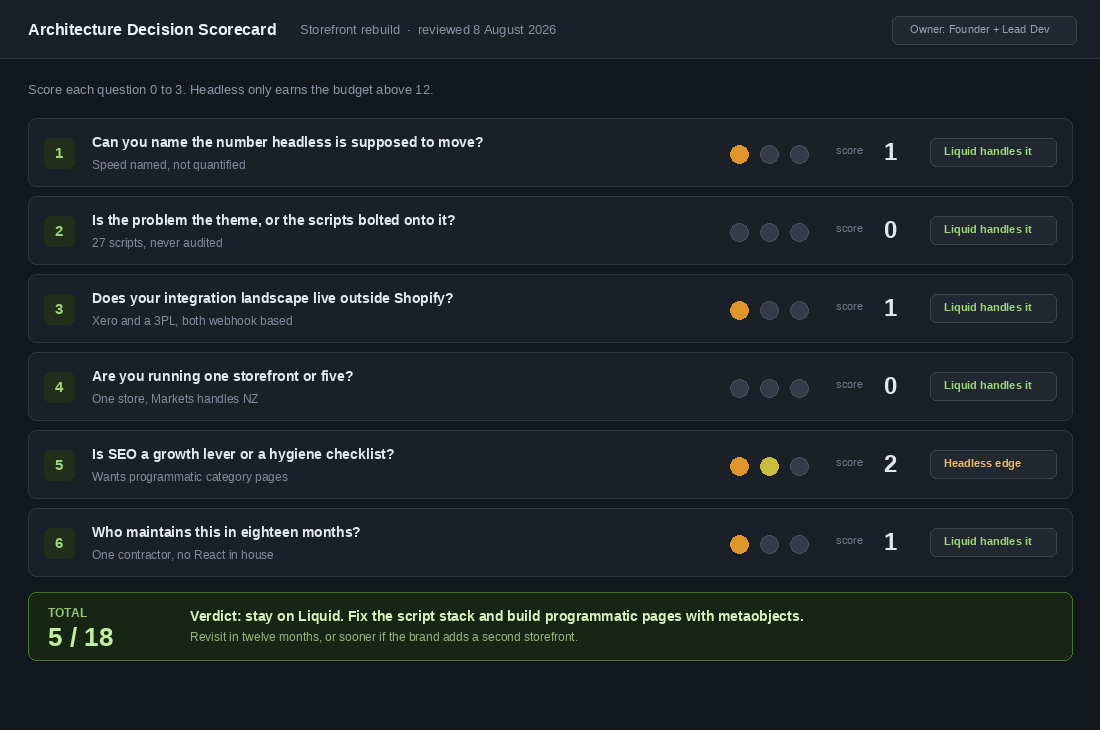
Score each question 0 to 3, where 0 means Liquid handles this comfortably and 3 means it is a structural problem you cannot solve on Liquid. Eighteen points available.
- 0 to 6 points. Stay on Liquid. Spend the money on the app cull, a theme upgrade and conversion work. You will get a better return and you will get it this quarter.
- 7 to 11 points. Stay on Liquid, but fix the specific constraints. Usually this means server-side tracking, metaobject-driven templates and killing app bloat. Re-score in twelve months.
- 12 to 18 points. Headless is a legitimate option. Now do the two to three year total cost of ownership work properly before you commit, and hire for maintenance before you hire for the build.
The scoring matters less than the discipline of doing it with your lead developer or agency in the room, writing down the evidence for each score, and dating it. Most rebuild decisions get made on a feeling in a meeting. This turns it into a document you can be held to.
How to Run This Test in a Week
You do not need a consultant for the diagnostic half of this. Two free tools and about four hours of focused work will tell you most of what you need.
Step 1: Pull your real field data
- Open Google PageSpeed Insights and enter your highest-traffic product page URL, not your homepage. Product pages are where the money is decided.
- Ignore the lab score at the top. Scroll to Discover what your real users are experiencing. That is Chrome User Experience Report field data from actual visitors over the last 28 days.
- Toggle to Mobile and record three numbers: LCP, INP and CLS. Then switch from the URL view to the origin view to get your site-wide picture.
- Repeat for your two closest competitors. This is the comparison your agency will not show you, and it is usually the one that ends the conversation.
Step 2: Benchmark against the platform, not the pitch
- Open Shopify’s public theme performance data table at performance.shopify.com and find your theme.
- Compare your field LCP against the median for merchants running the same theme. If you are materially slower than other stores on identical code, the theme is not your problem.
- If you are in line with the median and still failing, note it. That is one of the few honest arguments for a more capable front end.
Step 3: Audit what is loading
- In Chrome, open your product page, then DevTools, then the Performance panel. Record a page load with mobile throttling set to Slow 4G and 4x CPU slowdown.
- Open the Bottom-Up tab and sort by self time. Every third-party domain in that list is a candidate for removal.
- Build the table from screenshot two: script, purpose, size, blocking time, still used. Take it to your next team meeting and get an owner assigned to every row.
Give yourself two weeks after the cull, then re-run step one. The delta is your evidence. If it closed the gap, you have saved yourself a six-figure rebuild and a permanent engineering commitment.
What Headless Actually Costs an Aussie DTC Brand
The build quote is the smallest number in this decision, and it is the only one most founders look at.
Here is the real cost stack for an Australian brand going headless on Shopify, based on what these projects actually run to rather than what the pitch deck says.
- Initial build: $80,000 to $250,000 AUD. A Hydrogen or Next.js storefront with your full catalogue, search, filtering, and checkout handoff. The low end assumes a simple catalogue and no unusual integrations.
- Ongoing engineering: $3,000 to $15,000 AUD a month. This is the line that kills brands. A headless storefront is a software product now. Someone maintains it, patches it, and ships to it, forever. A Liquid theme can sit untouched for six months. A React storefront cannot.
- Infrastructure: $200 to $2,000 AUD a month. Hosting, CDN, image optimisation, preview environments, error monitoring. Modest, but it never existed before.
- App re-implementation: $15,000 to $60,000 AUD. Most Shopify apps inject into Liquid via the theme. On headless, roughly half your app stack stops working and has to be rebuilt against the API or replaced. Run an app stack audit before you commit, because this line item is almost always underestimated.
- The 6 to 12 month opportunity cost. The real number. During a headless build your team ships nothing else. Twelve months of not testing product pages, not building flows, and not improving merchandising is easily worth more than the build fee.
Add it up over three years and a headless project for a brand doing $400k AUD a month typically lands between $300,000 and $700,000 AUD all in. For that to make sense, headless has to return more than the alternative use of the same money, which for most brands at that size is inventory, media, and a better team.
The honest benchmark: brands that see a clear return from headless are almost always above $2M AUD a month, running multiple storefronts or regions, or carrying a genuine content or configuration problem the platform cannot solve. Below that, the money buys more growth somewhere else.
The Three Middle Paths Most Brands Should Take Instead
Headless is presented as a binary. It is not. There are three intermediate moves that capture most of the upside for a fraction of the cost and risk, and they are what we point members toward nine times out of ten.
Path one: a clean theme rebuild on Online Store 2.0. If your speed problem is 27 apps injecting scripts into a five-year-old theme, headless will not fix that. A disciplined rebuild on a modern theme, with a hard cull of the app stack, routinely takes mobile LCP from 4.2 seconds to under 2.0 and costs $15,000 to $40,000 AUD instead of six figures. Most of the performance gain people attribute to headless comes from this, not from the architecture. Start with a structured speed pass and see how far it gets you.
Path two: Shopify Functions and checkout extensibility. If the reason you are looking at headless is custom discount logic, bundling rules, delivery customisation, or checkout fields, Shopify Functions now handles most of it natively. This did not exist when the headless case was first made, and a lot of the advice still circulating predates it. Functions work costs a fraction of a rebuild and does not remove you from the platform’s upgrade path.
Path three: hybrid, with content headless and commerce native. Run your editorial, campaign pages, and content in a headless CMS while leaving product, cart, and checkout on Shopify. You get the content flexibility teams actually want without rebuilding the commerce layer that already works. This is the right answer for a surprising number of brands whose real complaint is that publishing a landing page requires a developer.
Before you spend anything, run the cheapest test available: take your three worst-performing pages, rebuild them properly on your current theme, and measure. If a $6,000 AUD fix moves conversion rate from 1.7% to 2.1%, you have learned that your problem was execution, not architecture. That is a $300,000 AUD lesson for the price of a fortnight’s work.
What the Six Questions Do Together
Look at how the questions stack. One and two force you to prove the problem exists and that it is not self-inflicted. Three, four and five test whether the constraint is structural, something about your data, your store count or your SEO strategy that Liquid genuinely cannot do. Six tests whether you can carry the thing you are about to build.
Almost every founder who asks me about headless has a question two problem wearing a question one costume. The site is slow, so the platform must be wrong. Then we count the scripts and find 27 of them, nine with no owner, four doing something the platform now does natively for free.
The brands that go headless well are the ones scoring high on three, four and five at the same time. Carhartt WIP’s North American storefront runs Hydrogen with a headless CMS because the merchandising precision and the editorial workflow genuinely required it. Veloretti runs a configurator with over 100 bike combinations across four languages. Those are structural problems. “Our Lighthouse score is 61” is not.
The best possible outcome of this test is that you score a 5, close the laptop, and spend the next quarter deleting apps, rewriting your product page copy and fixing your mobile cart. That work is unglamorous, it does not make a good agency deck, and it will out-earn a rebuild almost every time.
And if you score 14, you will walk into that project with a defined metric, a costed maintenance plan and a scoreboard. Which is the only way these builds ever pay for themselves.
Inside eCommerce Circle, storefront architecture is one of the calls we work through with members before the money gets spent, not after. If you want a second opinion on yours, let’s talk.