Your Shopify store is leaking conversion you cannot see. Not because the product is wrong. Not because the offer is weak. Because the page is slow. And on mobile, where seventy percent of your Aussie traffic lives, every extra second is a tax on every campaign you run.
What’s in This Article
Most founders we work with already know this, in theory. They have read the Google blog posts. They know about Core Web Vitals. They have looked at their PageSpeed score once, decided the numbers were embarrassing, and quietly closed the tab. Twelve months later the store has more apps, more popups, more pixels, and a worse load time than the day they launched.
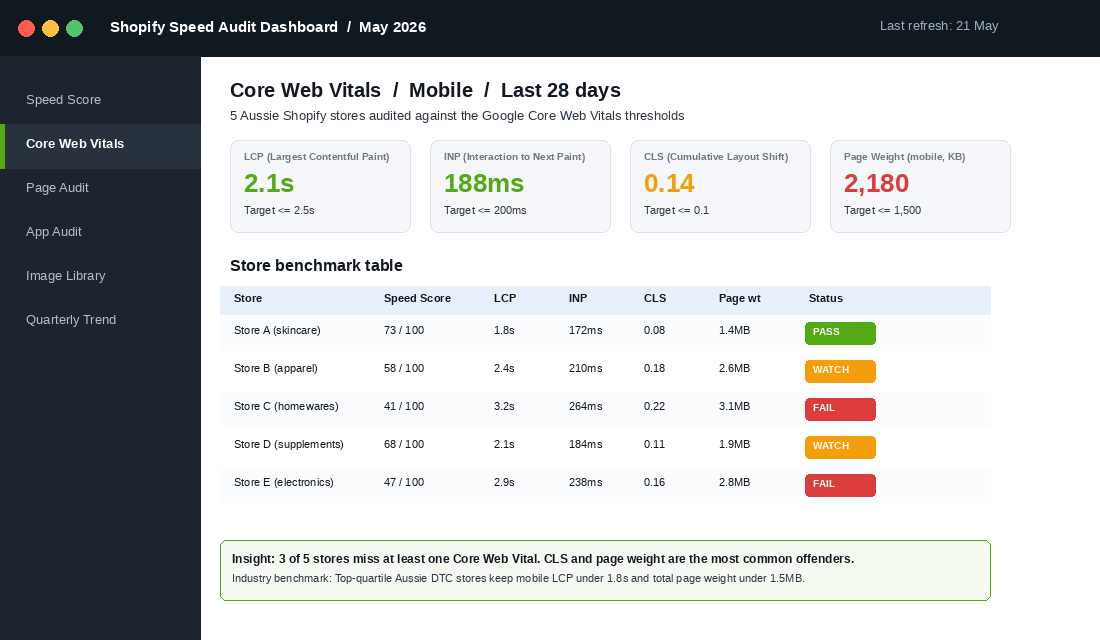
This playbook is the audit we run with every member who hits a conversion plateau. Seven levers. A repeatable quarterly cadence. And a real number to aim at: a Largest Contentful Paint under two seconds on a mid-range mobile, on a 4G connection, in an Australian capital city. Hit that target and conversion typically lifts eight to twelve percent in the next ninety days, without you touching the ad account.
Why Speed Is the Quiet Profit Lever in Aussie Ecommerce
The data on speed and conversion is unambiguous, and it has been for years. Google’s 2017 research with SOASTA found that as mobile page load time goes from one second to three seconds, the probability of bounce increases by thirty two percent. Push that to five seconds and bounce probability jumps ninety percent. At ten seconds, you are at one hundred and twenty three percent.
Portent’s 2022 analysis of twenty seven million sessions across hundreds of B2C sites confirmed it. Pages loading in zero to two seconds had conversion rates roughly three times higher than pages loading in five seconds. The relationship is not linear, it is a cliff. The first two seconds are where the money lives.
Deloitte’s Milliseconds Make Millions study (commissioned by Google in 2020) put a number on the lift. A 0.1 second improvement in mobile site speed produced an 8.4 percent lift in conversion for retail brands and a 9.2 percent lift in average order value. Not over a year. Over the test period.
For Aussie founders, the maths is even more brutal. Our market is heavily mobile (mobile typically drives sixty five to seventy five percent of session volume on Shopify stores in Australia), our customers are concentrated in metro 4G corridors, and our biggest competitors (Cotton On, The Iconic, Bondi Sands, MCoBeauty) all have engineering teams obsessing over Lighthouse scores. If your store loads in three seconds and theirs loads in 1.6, the customer never tells you they bounced. They just bounce.
The good news: most Shopify stores have between 500ms and 1,500ms of “free” speed sitting in their app stack, image library, and theme code. The seven levers below are the order we attack them in.
Lever 1: Audit the App Stack (The Silent Killer)
Almost every speed problem we diagnose starts and ends with apps. Shopify makes installing apps frictionless. Removing them is harder, because most founders forget which ones they trialled, which ones their old developer added, and which ones now share overlapping functionality.
The first audit is brutal and ten minutes long. Open Shopify Admin, go to Apps, and list every installed app in a spreadsheet. Next to each one, write three columns:
- What does it do? One sentence.
- Does it inject code into the storefront? Check the theme’s
theme.liquidfile or run the app through PageSpeed Insights to see if it loads JS on the page. - If I uninstalled it tomorrow, what breaks? Be honest.
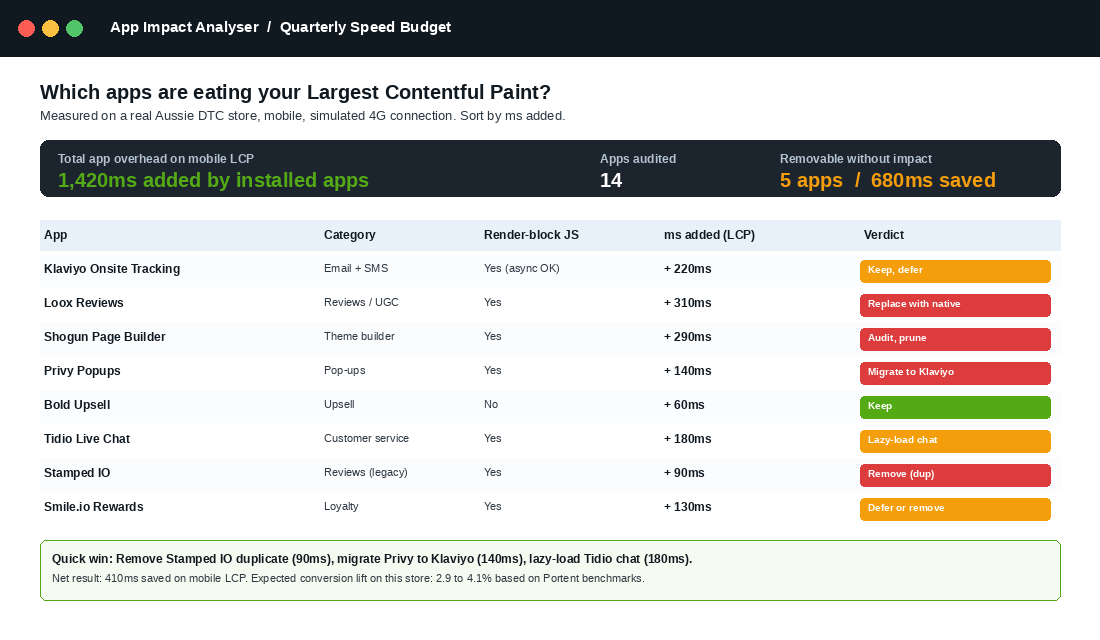
You will find three categories of fat. The first is duplicate apps. Two reviews apps, two upsell apps, two analytics layers. The second is zombie apps. Trial installs from six months ago that you forgot, still injecting scripts. The third is legitimate apps that have grown too heavy for the value they deliver. A reviews app that adds 300ms to your PDP is not worth keeping if the reviews could live in a native section.
Use the free Shopify Online Store Speed Report in Admin under Online Store, Themes, then Speed Score. It tells you exactly which apps are dragging the score down. Pair it with PageSpeed Insights and you can pin every render-blocking JS file to a specific app.
Rule of thumb: aim for under fifteen apps installed, under eight injecting frontend code. Every member we have moved from twenty five plus apps to twelve has seen LCP drop by 200 to 600ms.
Lever 2: Crush the Images (Where Most Brands Bleed)
Images are usually the single biggest contributor to a slow LCP. The Largest Contentful Paint is, by definition, the largest visible element above the fold. On a Shopify PDP, that is almost always the hero product image.
Three rules cover ninety percent of image performance:
- Serve next-gen formats. WebP for everything, AVIF where the theme supports it. Shopify auto-converts in most cases, but if you imported images years ago or use a page builder, you may still be serving 600KB JPEGs. Bulk re-compress with Tinify (the API or the bulk tool), or use a Shopify app like Crush.pics.
- Size them for the slot. A 3000px wide hero image being rendered into a 750px container is the most common waste in retail. Use Shopify’s responsive image_url filter with the right
widthparam, and let Shopify do the resizing. - Lazy-load everything below the fold. Add
loading="lazy"to every image that is not in the initial viewport. Shopify themes built on Dawn handle this by default. Custom and older themes often do not.
The single highest-impact image change you can make: preload the hero product image. Add a <link rel="preload" as="image"> tag in the head for the LCP image. This typically shaves 100 to 300ms off mobile LCP. Most theme developers miss it. Most page builders make it impossible.
Benchmark to chase: total page weight under 1.5MB on mobile, hero image under 200KB after compression.
Lever 3: Audit the Theme Code
Themes accumulate code the way garages accumulate boxes. Three years in, your theme is carrying the weight of a Black Friday countdown timer from 2023, a custom popup that was replaced with Klaviyo eighteen months ago, and a Facebook pixel that was duplicated when you migrated to a new theme.
Open theme.liquid and read it top to bottom. Every <script> tag, every inline style block, every conditional. Ask: is this still needed? Is this app still installed? Is this comment from a developer who left?
The big offenders to hunt for:
- Duplicate analytics scripts. GA4 loaded twice (once via theme, once via app). Facebook pixel firing in three places. Each duplicate is a render-blocking call.
- jQuery loaded multiple times. Once by the theme, once by an app, once by a custom script. Each version costs 80 to 120ms.
- Inline CSS that should live in the stylesheet. Inline styles bloat the HTML payload and prevent caching.
- Unused page builder sections. If you migrated from Shogun, GemPages or PageFly to native sections, the old scripts may still be loading globally even though no page uses them.
If the theme is more than three years old or has been heavily modified, consider a rebuild on the latest Dawn or a clean modern theme like Impulse, Prestige, or Broadcast. The migration cost (typically $8K to $20K with a good agency) usually pays back in conversion lift within ninety days for stores doing over $40K a month.
Lever 4: Fix the Font Loading Strategy
Fonts are an underrated speed killer. A custom Google Font, loaded synchronously, with three weights and italics, will cost you 200 to 500ms on first paint. Multiply that by two fonts (a heading and a body) and you have shipped a full second of fat into the load before the visitor has seen a single product.
The three fixes:
- Self-host the fonts. Pulling fonts from
fonts.googleapis.comadds a DNS lookup, a TLS handshake, and a request to a third-party domain. Self-hosting (Shopify supports custom font uploads in themes) eliminates that overhead. - Preload the critical font weights. Add
<link rel="preload" as="font" type="font/woff2" crossorigin>for the headline and body weights. Drops first contentful paint noticeably. - Use font-display: swap. This tells the browser to show fallback text immediately while the custom font loads, rather than holding the page blank. Critical for perceived speed.
Strip to one heading weight and one body weight where possible. Most Aussie DTC sites are using four to six weights when they need two. Each unused weight is dead bytes shipped on every page.
Lever 5: Defer Third-Party Scripts
Every pixel, every chat widget, every analytics tool is a third-party script. None of them need to load before the page is visible. All of them, in default configurations, do.
The audit: open Chrome DevTools, switch to the Network tab, filter by “JS” and reload the page. Sort by size, descending. The top ten requests are usually:
- Klaviyo onsite (220 to 280KB)
- Google Tag Manager bundle (often 150 to 300KB depending on tags)
- Meta pixel + Conversions API helper
- TikTok pixel
- Live chat widget (Tidio, Gorgias, Intercom)
- Reviews widget (Loox, Judge.me, Yotpo)
- Heatmap tool (Hotjar, Microsoft Clarity)
- Subscription tool (ReCharge, Recharm)
The fix is rarely “remove”. The fix is “defer”. Add async or defer attributes to scripts that do not need to block rendering. Move chat widgets to lazy-load on user intent (after first click or scroll). Migrate as many third-party calls as possible to server-side tracking via the Conversions API, which moves the work off the browser entirely.
If you are running a heavy GTM container, audit the tags. We routinely find five to ten tags that have not fired in twelve months but are still loading on every page. Delete them.
Lever 6: Optimise the CDN and Caching Layer
Shopify ships with a global CDN built in, which is one of the platform’s biggest hidden advantages. But two things still go wrong.
First, third-party assets bypass the CDN. If you load fonts from a personal Dropbox link, or your old developer hardcoded an image URL pointing at WordPress, that asset is served from a slower origin and isn’t cached at the edge. Audit every img src, link href, and script src in the theme. Anything not pointing at cdn.shopify.com or your own configured CDN is suspect.
Second, the resource-hint headers in the theme head can be tuned for speed. Add <link rel="preconnect"> for your most critical third-party domains (Klaviyo, your reviews provider, your analytics). This tells the browser to start the TCP and TLS handshake before the script is actually requested, shaving 100 to 200ms off the request chain.
For Aussie stores selling internationally, this lever matters even more. A US shopper hitting your store at 3am Sydney time is served from a Sydney origin by default. Make sure your apps and third-party services have edge presence in the US, EU, and UK if you ship there. Cloudflare-fronted apps win here.
Lever 7: Set a Quarterly Speed Budget (And Defend It)
The single biggest mistake we see operators make: they treat speed optimisation as a one-off project. They audit once, fix the obvious wins, see the LCP drop, then move on. Twelve months later the same audit reveals the same problems. Different apps, different scripts, same bloat.
The fix is governance. Set a written speed budget. Two numbers, one rule:
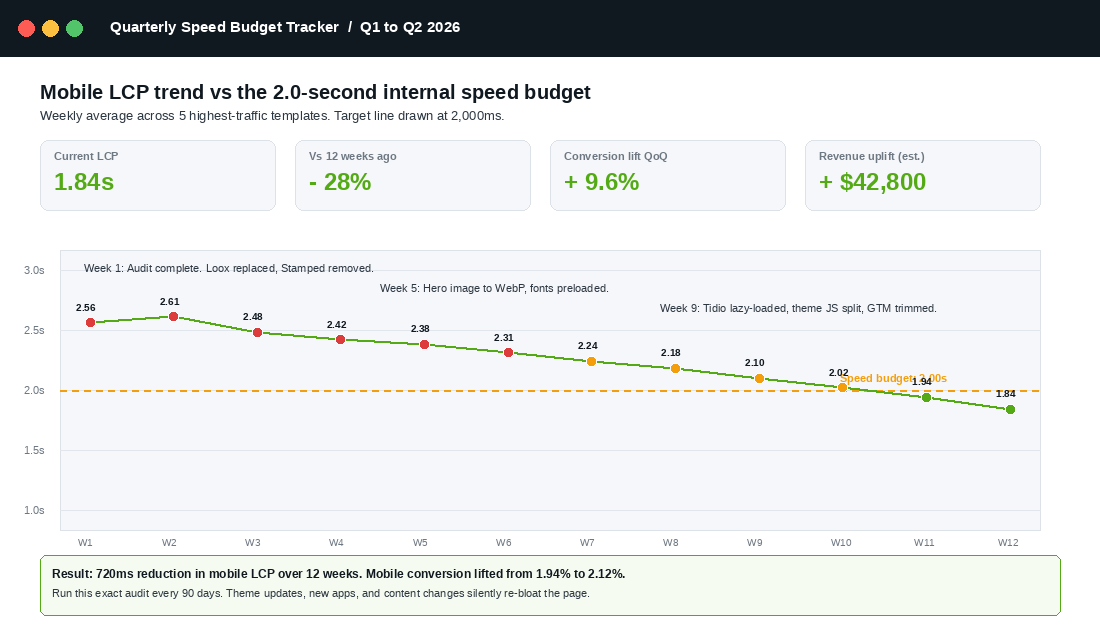
- Mobile LCP: under 2.0 seconds. Measured weekly via PageSpeed Insights on three template types (home, collection, PDP).
- Total page weight: under 1.5MB on mobile. Measured via WebPageTest.
- The rule: No new app, no new pixel, no new theme section ships if it pushes either number over budget. The team has to find offsetting savings first.
Run a full speed audit once per quarter as a non-negotiable calendar item. Two hours. One person. Same checklist every time. If you are running on the Connect program or with a coach, build it into the quarterly planning cadence.
The brands that win on speed do not do anything magical. They run the same audit four times a year while everyone else runs it once every two years.
The Compound Effect: Where the Real Lift Lives
Each lever in isolation looks small. Lever 1 saves 200ms. Lever 2 saves 300ms. Lever 4 saves 100ms. Big deal, right?
The compound effect is what changes the conversation. Move LCP from 3.2 seconds to 1.8 seconds and you cross the Portent threshold where conversion roughly triples. You also cross the Google Core Web Vitals threshold which feeds into organic search rankings. You also reduce abandonment on slow regional mobile connections, which is where your Tier-2 city customers live.
Stack the levers and the numbers compound. A real example from a member store we audited in February:
- Lever 1 (apps): Removed five duplicate or zombie apps. Saved 420ms.
- Lever 2 (images): Bulk recompressed product imagery, added preload for hero. Saved 280ms.
- Lever 3 (theme): Removed three orphaned script blocks. Saved 110ms.
- Lever 4 (fonts): Self-hosted, preloaded, dropped two weights. Saved 180ms.
- Lever 5 (scripts): Deferred Tidio, moved Loox to native section. Saved 290ms.
- Lever 6 (CDN): Repointed two WordPress-hosted images, added preconnect for Klaviyo and Loox. Saved 70ms.
- Lever 7 (budget): Documented, scheduled quarterly, owner assigned.
Total LCP improvement: 1,350ms (from 3.05s to 1.70s). Mobile conversion went from 1.84 percent to 2.07 percent over the next sixty days. On $180K monthly mobile revenue, that is roughly $22,500 a month in incremental revenue, every month, from one quarterly audit. No new ad spend. No new product.
Your Quarterly Speed Audit Checklist (Copy This)
Run this every ninety days. Two hours, one person, same order.
- Pull the baseline. PageSpeed Insights on home, top collection, top PDP, mobile. Record LCP, INP, CLS, page weight. Note the Shopify Speed Score.
- App audit. List every installed app. Categorise each as Keep, Defer, Replace, Remove. Action the Remove and Replace columns this week.
- Image audit. Top ten heaviest images via WebPageTest. Compress, resize, preload hero. Switch to WebP where missing.
- Theme audit. Read
theme.liquidtop to bottom. Strip dead scripts, duplicates, inline blocks that should live in the stylesheet. - Font audit. Confirm self-hosted, preloaded, font-display swap, two weights max.
- Script audit. DevTools Network tab. Defer or async every non-critical script. Trim the GTM container.
- CDN audit. Find every non-Shopify-CDN asset. Repoint. Add preconnect for the four heaviest third parties.
- Re-measure. PageSpeed Insights again, same templates. Document the delta. Update the speed budget if needed.
- Schedule the next audit. Ninety days out. Same person, same checklist.
Save this checklist as a Notion page, a Google Doc, or a section of your operating manual. The discipline of running the same audit every quarter is what separates the stores that compound speed gains from the ones that audit once and slide back.
Where Speed Connects to Everything Else
Speed is not a standalone topic. It sits underneath every other conversion lever you work on. The reviews engine you just installed only works if it does not blow out LCP. The cart drawer optimisation you spent three weeks on only converts if the page renders fast enough for the customer to see it. The Meta ads you are scaling only have ROAS to chase if the landing experience does not bleed forty percent of the traffic before they reach the PDP.
If you have not run a conversion funnel audit recently, the speed audit is the first stage. If you have not touched your checkout optimisation, the speed audit is what tells you whether the checkout itself is the bottleneck or the page leading to it. And if you are running the site search playbook, every millisecond shaved off the results page lifts the search-to-purchase rate.
Speed is the silent multiplier. Fix it once and every other conversion lever you pull works harder.
The Real Aussie Stores Already Winning at This
The brands that obsess over speed are usually the ones you do not think about as “tech-led”. Showpo runs sub-two-second mobile LCP on most PDPs because their performance team treats Lighthouse scores as a KPI. MCoBeauty, scaling fast across Coles, Priceline and DTC, optimised aggressively after their 2024 PDP redesign and saw mobile conversion lift in the double digits. Bondi Sands ships across 30,000+ retailers and a heavy DTC stack, and they treat third-party script discipline as religion.
These are not unicorn engineering shops. They are Aussie DTC brands that built the audit cadence into the operating system. You can too. The seven levers are the same, whether you are doing $40K a month or $4M.
Start Here This Week
Three things to do in the next seven days:
- Today: Run PageSpeed Insights on your home page, top collection page, and top PDP on mobile. Write the four numbers down. That is your baseline.
- This week: Do the app audit. List every installed app, identify the three you can remove or replace today.
- Next week: Block two hours on the calendar for the full seven-lever audit. Set the next quarterly date in the calendar before you finish.
Inside eCommerce Circle, the quarterly speed audit is one of the recurring operating rituals every member runs. If you want a second opinion on yours, or want a coach in the room while you run the first one, let’s talk.