There is a way a Shopify store loses money that never shows up as an error. No 500 page. No broken checkout. No angry email from a customer. Your Google Shopping ads simply stop serving on part of your catalogue, and the first sign you get is a revenue number that is 18% softer than last week for no reason you can name.
What’s in This Article
That failure mode gets a lot more likely on 18 August 2026. That is the day Google turns off the Content API for Shopping and replaces it with the Merchant API. If any part of your product data still travels to Google over the old pipe, it stops arriving. Not gradually. On the day.
Most Aussie founders reading this will be fine, because the Google & YouTube app on Shopify handles the plumbing. The ones who get burned are the stores with a second integration nobody remembers approving: an old feed app, an agency push, a developer script from a 2023 project. I have sat in enough post-mortems to know how this goes. The store owner had no idea a second data source existed until the SKUs went dark.
Australians spent 82.6 billion dollars online in 2025, up 14% year on year, and online now makes up 24% of total retail spend. Google Shopping is where a huge slice of that demand gets brokered. This is not the quarter to let your feed quietly break. Here are the seven checks to run this week.
What Actually Switches Off on 18 August
Be clear on the scope, because the panic online is broader than the reality. The sunset affects API-based integrations only. Manual file uploads, scheduled fetches from a URL, and Google Sheets feeds all keep working exactly as they do today.
What stops is any system pushing product data into Merchant Center using the Content API for Shopping. From 18 August 2026, those calls fail. Your existing products do not vanish overnight, but they stop being updated, which is arguably worse. Prices drift out of date. Sold-out items keep advertising as in stock. Google eventually flags the mismatch between your feed and your live product page, and disapprovals start stacking up.
There was an earlier checkpoint too: anyone on Merchant API v1beta had to be on v1 by 28 February 2026. If a developer set something up for you in 2025 and you have not heard from them since, that is a second thing worth confirming.
The practical version of all this: you need to know every system that writes product data to Google, and you need to know it before peak trading, not during it.
Check 1: Find Out What Is Actually Feeding Google
Almost nobody can answer this from memory, and guessing is how stores get caught. Go and look.
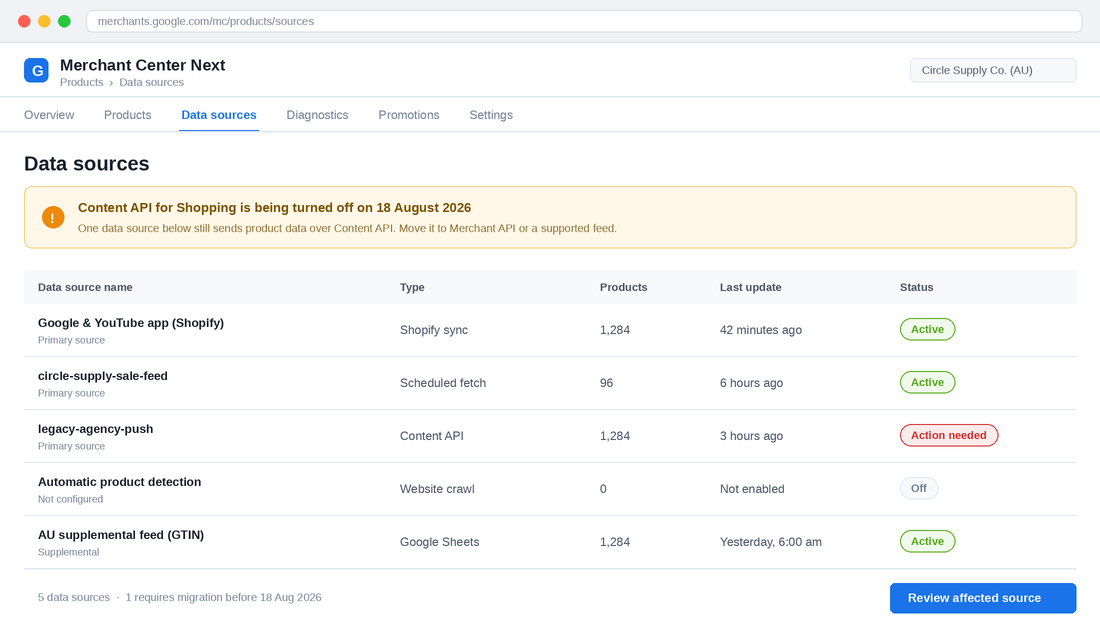
- Open Merchant Center Next. Go to Products, then Data sources.
- Read the Type column on every row. You are looking for the word “Content API”. Anything labelled Shopify sync, Scheduled fetch, Google Sheets, or Website crawl is safe.
- Note which sources are primary and which are supplemental. A supplemental feed on Content API is just as fatal as a primary one if it is the thing supplying your GTINs.
- Check the Last update column. Anything that has not refreshed in more than 48 hours is already half broken, cutoff or no cutoff.
- Write the list down. Source name, type, who owns it, what it supplies. Four columns in a Google Sheet. This becomes your feed register.
Most stores find two or three sources. Stores that have been through an agency change or a replatform often find five or six, and two of them are pushing conflicting data. That conflict is usually the real reason a catalogue has been underperforming for months.
Check 2: Confirm Your Shopify Connection Is the Google and YouTube App
For the vast majority of Aussie Shopify stores doing between 40k and 500k a month, the right answer is boring: let the official Google & YouTube app own the connection. Shopify maintains it, Shopify migrates it, and you do not carry the engineering risk of an API sunset.
The app syncs product and store data into Merchant Center roughly every 24 to 48 hours. That cadence matters for a reason most founders miss: if you change a price at 9am on a Friday flash sale, Google may not have it until Saturday. Your feed and your landing page disagree for a day, and disagreement is exactly what triggers a price mismatch disapproval.
- In Shopify admin, open Sales channels and confirm Google & YouTube is installed and connected to the same Merchant Center ID you audited in Check 1. Multiple Merchant Center accounts on one store is a surprisingly common mess.
- Check your product sync status inside the app. It will show a count of synced, pending, and not-approved products. That count should be close to your total published SKUs.
- Set your target market to Australia explicitly and confirm your shipping settings and GST treatment are configured in Merchant Center, not just in Shopify. Missing shipping configuration is a top-five disapproval reason.
- If you run flash sales or frequent price changes, build the sale into a scheduled campaign with lead time rather than changing prices at 9am and hoping Google keeps up.
Check 3: Audit Every Third Party That Touches Your Product Data
This is where the actual risk lives. The Google & YouTube app is safe. The thing your last agency installed is the question mark.
Work through your installed apps and your agency relationships and answer one question for each: does this write product data to Google? Feed management tools, multichannel listing apps, custom middleware, and any bespoke script a developer wrote all qualify. If you are not sure, email the vendor and ask them directly whether they have completed their Merchant API migration. A vendor who cannot answer that in August 2026 is telling you something.
- Feed apps. Ask for written confirmation of Merchant API v1 support and the date they completed it.
- Agencies. Ask which data source name in your Merchant Center belongs to them, and whether it is Content API or a scheduled fetch.
- Old developers. If a contractor built a custom push in 2023 or 2024 and is no longer engaged, assume it is on Content API until proven otherwise.
- Dormant integrations. If a source is still active but nobody owns it, disconnect it. A feed with no owner is a feed with no monitoring.
This exercise pairs naturally with a broader Shopify app stack audit. In practice, most stores that do this find at least one app they are paying for that nothing depends on any more.
Check 4: Clear the Disapproval Backlog Before It Becomes a Suspension
Disapprovals are the tax nobody budgets for. Audit data from feed platform GoDataFeed across 2024 and 2025 found that in a typical apparel catalogue, roughly one in five Shopping listings carries at least one active disapproval. Twenty per cent of your range, invisible, and you would never know from the Google Ads interface because disapproved products do not show up in your ad data at all.
Here is the part that turns an annoyance into an emergency. A backlog of item-level disapprovals is how account-level suspensions start. And a Merchant Center account review typically takes up to seven business days, which is a fine wait in March and a catastrophe in the third week of November.
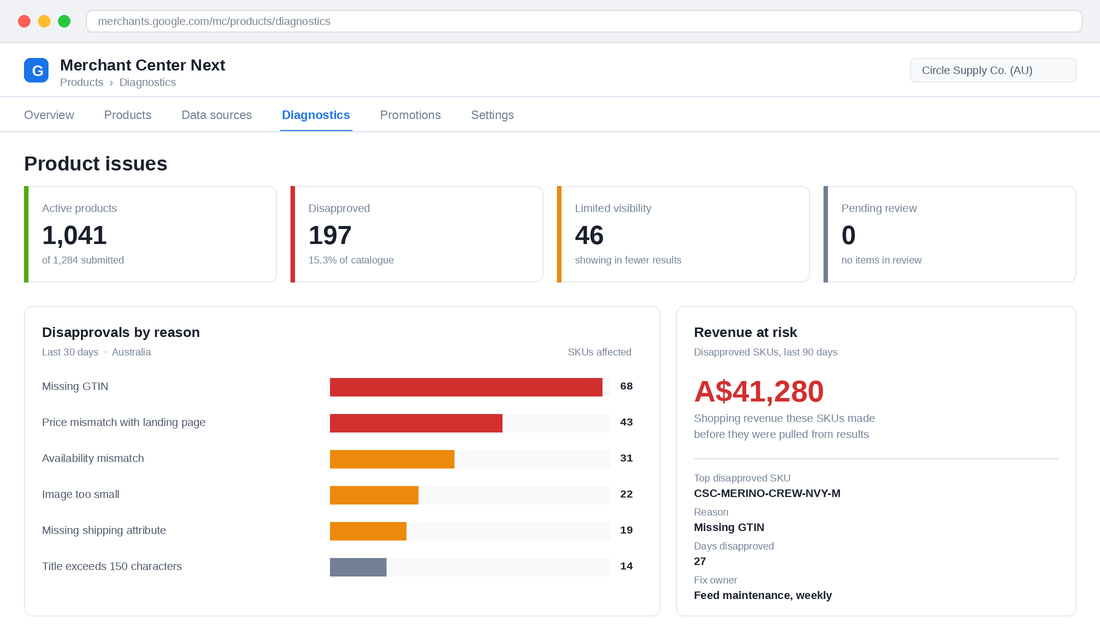
- Go to Products, then Diagnostics. Sort issues by number of items affected, not by severity. The long tail is noise. The top three reasons are your project.
- Fix the reason, not the SKU. If 68 products are missing GTINs, the fix is a barcode field process in your PIM or Shopify admin, not 68 manual edits.
- Attach a revenue number. Pull the last 90 days of Shopping revenue for the disapproved SKUs before they went dark. A dollar figure gets the work prioritised in a way a warning icon never will.
- Recheck weekly, not quarterly. New products enter the catalogue with the same gaps that caused the last batch.
Check 5: Lock Down the Five Attributes That Decide Whether You Show
Once the pipe is safe and the backlog is clear, attribute quality is what decides whether Google shows you against a competitor. Five attributes do most of the work.
- GTIN. The barcode. Google matches it to the manufacturer record in the Shopping Graph, which gives you better categorisation and access to review data. Google has reported retailers who added correct GTINs saw around a 20% lift in clicks on average. If you make your own product, you will not have one, and that is fine as long as you set the identifier exists field correctly rather than leaving it blank.
- Title. The spec allows up to 150 characters, but around 70 is the practical sweet spot because that is what fits on a phone. Structure beats cleverness: brand, product type, key attribute, size or colour. “Circle Supply Merino Crew Neck Jumper, Navy, Mens M” outperforms “The Everyday Jumper” every single time.
- Price. It must match the price a shopper sees on the landing page, including any currency and GST treatment. Mismatches are the second most common disapproval reason and they multiply during sale periods.
- Availability. If your feed says in stock and your product page says sold out, Google treats that as a trust problem, not a data lag.
- Shipping. Configure real Australian shipping rates in Merchant Center. Vague or missing shipping data suppresses your listings in a market where delivery cost is often the deciding factor.
If you want the deeper version of this work, we have a full breakdown in the Google Shopping product feed guide, and the campaign-side companion in the Performance Max playbook.
The proof this matters is not theoretical. Australian plant retailer The Plant Broker ran a Google Ads program from April to December 2025 that produced 28x ROAS, cut acquisition cost by 51%, and drove 129,000 dollars in ad-attributed revenue against 262,000 dollars in total ecommerce sales. The stated foundation was clean feed data, correct conversion tracking, and cost of goods pulled through from the product feed so campaigns could be segmented by margin. Separately, a Melbourne fashion retailer scaled to 150,000 dollars a month in Google Ads spend at 3x ROAS without touching product titles in the Shopify backend. They fixed the feed layer instead.
Check 6: Build a Feed Monitor So Silent Failures Surface in Hours
Every check above is a point-in-time fix. Without monitoring, you will do this work in August and be back in the same position by October, because feeds do not break loudly.
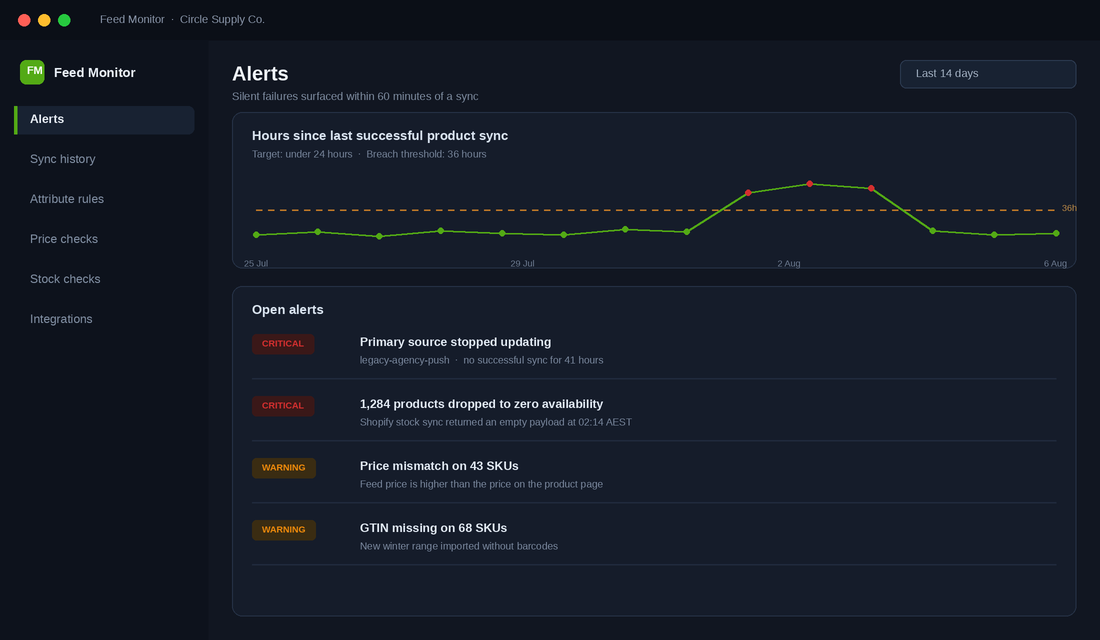
You do not need an expensive platform for this. You need four alerts and somebody whose job it is to look at them.
- Sync freshness. Alert if any primary data source has not updated successfully in 36 hours. This is the single most valuable alert you will build, and it is the one that would catch an API sunset the morning after it happened.
- Product count variance. Alert if the number of active products moves more than 10% in a day. A sudden drop means a sync returned an empty or partial payload.
- Availability collapse. Alert if more than 5% of the catalogue flips to out of stock at once. This catches a broken inventory sync before it eats a week of spend.
- Price mismatch count. Alert on any increase in the price mismatch issue count. This is your early warning during sale periods.
The cheapest build: use Shopify Flow to write daily product and inventory counts into a Google Sheet, pull Merchant Center issue counts into the same sheet, and set conditional formatting plus a scheduled email. That is an afternoon of work. Assign it to one person, put it on a Monday checklist, and make the check part of your weekly trading rhythm rather than a task that only exists when something has already gone wrong.
Check 7: Freeze the Feed Before Peak, Not During It
You already know the argument for a code freeze on your theme in November. The same logic applies to your feed infrastructure, and almost nobody extends it there.
Set a date, ideally mid to late October, after which nobody installs a new feed app, changes a data source, restructures product types, or rewrites title templates. If a change is worth making, make it in September so you have four to six weeks of clean data to judge it against and time for a Merchant Center review if something trips.
- September: make structural changes. Title templates, product types, supplemental feeds, new integrations.
- Early October: clear the disapproval backlog to as close to zero as your catalogue allows. Leave room for a seven business day review if one is needed.
- Mid October: feed freeze begins. Prices, stock, and new products continue to flow. Structure does not change.
- Peak: monitor only. Fix data, not architecture.
- Mid January: freeze lifts. Run the disapproval audit again with fresh eyes.
If you want the full version of this discipline applied across your whole store, the code freeze playbook covers the theme and app side of the same calendar.
Why These Seven Checks Compound
Run in isolation, each of these is a small housekeeping task. Run together, they change the economics of your paid search.
Checks 1 to 3 make sure your data arrives at all. Checks 4 and 5 make sure the data that arrives is eligible and competitive. Check 6 makes sure you find out within hours when either of those stops being true. Check 7 stops you breaking your own system at the worst possible moment.
The compounding is real. Clearing a 20% disapproval rate does not just add 20% more listings, it adds your full range back into the auction at a moment when the shopper is comparing. Australian households now buy from an average of 16 different retailers a year, and the average online transaction has fallen to 96 dollars, roughly 10 dollars lower than in 2020. Shoppers are comparing more, spending less per order, and buying more often. Being absent from the comparison for even a fraction of your catalogue is expensive in a way that never appears on a dashboard.
There is a second, quieter payoff. Once you have a feed register, a monitoring sheet, and a named owner, feed work stops being an emergency that swallows a Tuesday and becomes a fifteen minute Monday habit. That is the difference between a store that reacts and a store that runs on a system.
The Feed Continuity Checklist
Copy this into a doc, assign an owner to each row, and put a date against it. The first three rows are the ones with a deadline attached.
| Check | What you are looking for | Do it by |
|---|---|---|
| 1. Data source audit | No source typed “Content API” in Merchant Center | This week |
| 2. Shopify connection | Google & YouTube app connected to the correct Merchant Center ID | This week |
| 3. Third party audit | Written Merchant API confirmation from every vendor and agency | Before 18 August |
| 4. Disapproval backlog | Top three reasons fixed at the root, not SKU by SKU | Early October |
| 5. Attribute quality | GTIN, title, price, availability and shipping correct on every SKU | September |
| 6. Feed monitor | Four alerts live: sync freshness, product count, availability, price mismatch | September |
| 7. Feed freeze | No structural feed changes from mid October to mid January | Mid October |
If you only do one thing after reading this, do Check 1. Open Merchant Center, go to Data sources, and read the Type column. It takes ninety seconds and it either gives you a clean bill of health or eleven days of warning. Both of those are worth having.
Inside eCommerce Circle, feed and channel infrastructure sits under Promotion, and it is one of the first things we pull apart when a member’s paid search stops behaving. If you want a second opinion on yours, let’s talk.