Open your Shopify admin, go to Settings, then Notifications, then Order confirmation. Look at what your customers actually receive after they hand you money.
What’s in This Article
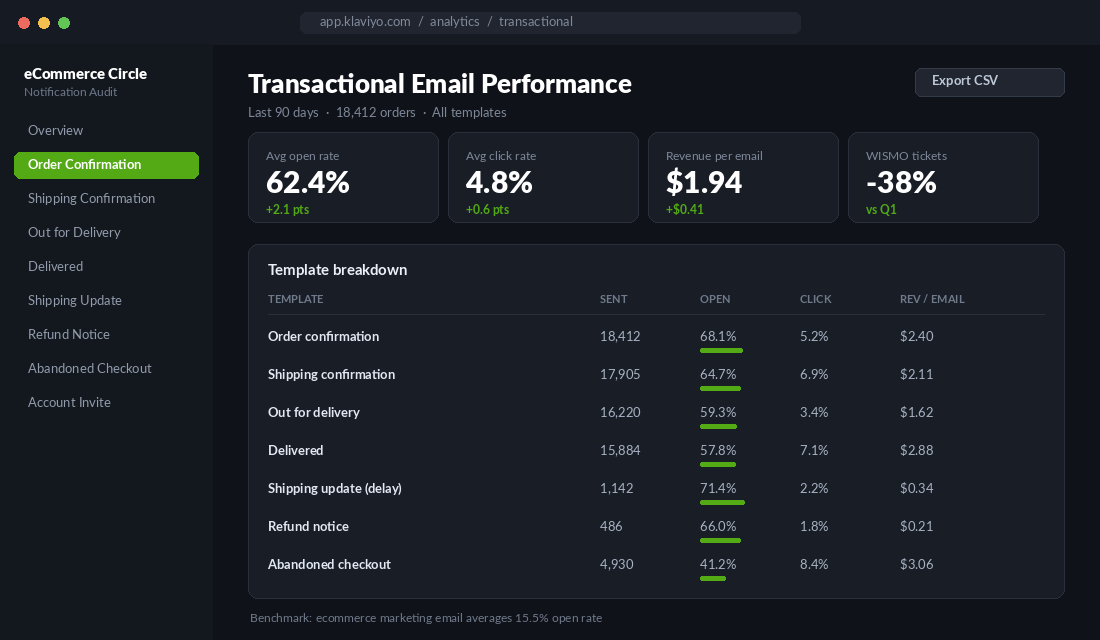
For most Aussie stores doing between $40k and $500k a month, it is still the default Shopify template. Grey background, a logo that got uploaded in 2023, a line-item table, and a sign-off that says “Thanks for shopping with us”. That email gets opened by roughly 68% of the people who receive it. Your best performing campaign this month probably got 24%.
So the single most-read piece of communication your brand sends is the one nobody on your team has touched. Meanwhile you are spending four hours a week arguing about subject lines for a Thursday newsletter that 15.5% of your list will open. That is the trade the whole industry keeps making, and it is backwards.
Your Highest-Opened Email Is One You Have Probably Never Read
Transactional emails sit in a category of their own. Order confirmations and shipping notifications routinely open at 60 to 70%, against an ecommerce marketing average of about 15.5%. Click-through on transactional sits near 4.8%, roughly double a standard campaign, and click-to-open often clears 30%.
The reason is not clever copy. It is intent. The customer just spent money and they want proof it worked. They are anxious, slightly excited, and actively looking for your email. No campaign you will ever write buys attention that cheaply.
There is a second reason this matters more than most founders think. A first-time buyer has roughly a 27% probability of ever placing a second order. Get them to that second order and the odds of a third jump to about 54%. The window where you influence that first number is almost entirely post-purchase, and your notification emails own that window. Not your newsletter. Not your retargeting. The eight automated emails Shopify is already sending on your behalf.
Here is the frame that changes how you treat these. Every notification email is a landing page that a highly qualified visitor has already agreed to open. You would never leave a landing page on the theme default. Stop leaving these on it.
Template 1: The Order Confirmation Is a Landing Page, Not a Receipt
The order confirmation has one job in the customer’s mind: confirm the money went somewhere real. Everything past that is yours to use.
Four things belong in it, in this order:
- The order number and what was bought. Non-negotiable. Keep it above the fold and readable on a 375px screen, because 70% or more of these are opened on a phone.
- A specific delivery expectation. Not “3 to 7 business days”. An actual date. Australia Post Parcel Post runs 2 to 6 business days depending on lodgement and destination, and Express Post is next business day only inside its network between capital cities. Do the maths once, hardcode the logic, and print a day and date.
- What happens next. One sentence describing the next email they will get and roughly when. This single line is the cheapest support-ticket deflection available to you.
- One piece of value that is not a discount. A care guide, a sizing note, a how-to-use video, a “here is what our team wishes everyone knew” link.
Notice what is not on that list. A discount code for the next order does not belong in the confirmation email. You just took their money. Offering 15% off ninety seconds later teaches them that waiting is rewarded, and it trains a discount habit into your best cohort. Put the offer in the delivered email instead, where it lands after the product has done its job.
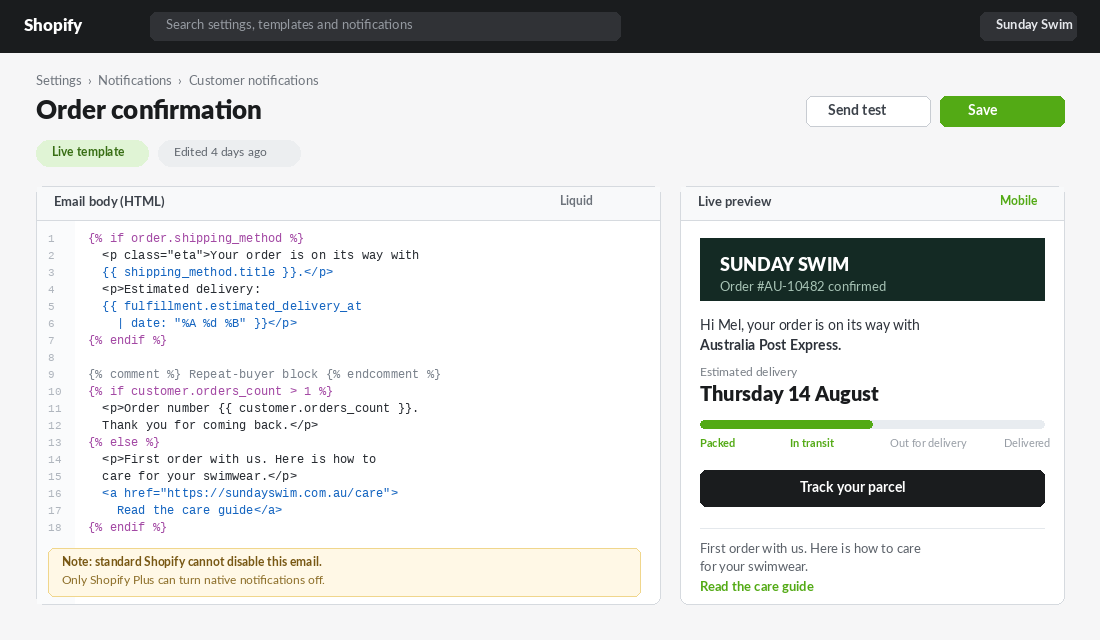
The other thing worth building here is a repeat-buyer split. Shopify exposes customer.orders_count in the notification templates, so you can show a first-time buyer an onboarding message and show a returning buyer something completely different. It is about ten lines of Liquid and it is the highest-return personalisation most stores are not running.
Templates 2 and 3: Shipping Confirmation and the 46-Hour Silent Gap
The shipping confirmation is the second-highest opened email you send, usually around 65%. It is also the one most stores hand entirely to their 3PL or shipping app, which means it goes out looking like it came from a logistics company rather than your brand.
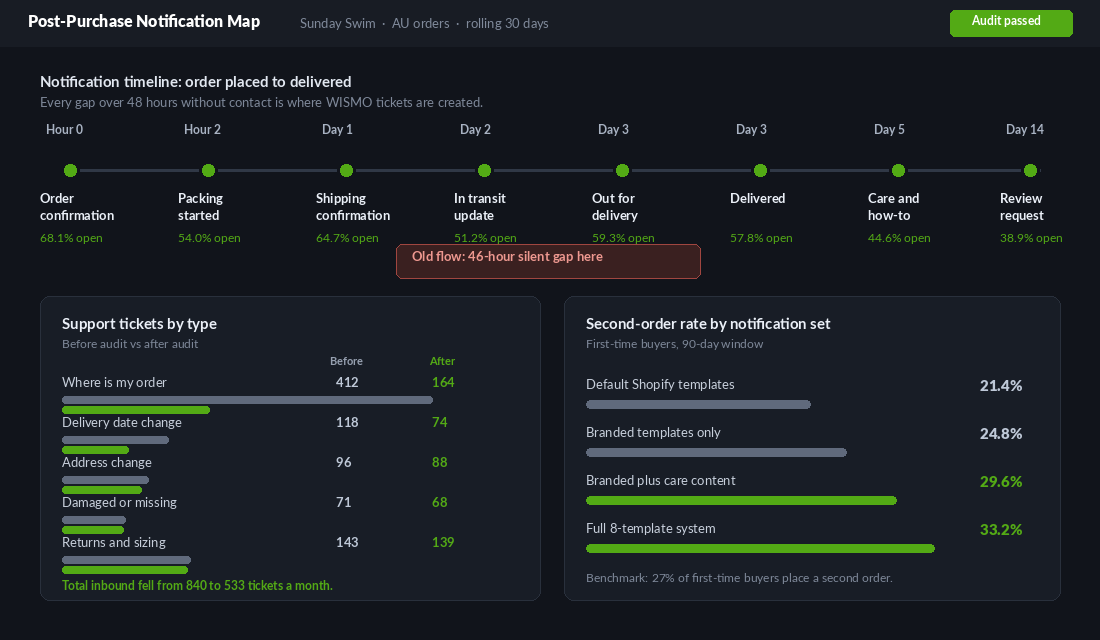
The bigger problem is what happens after it. A customer in Perth orders on Monday night, gets a shipping confirmation Tuesday afternoon, and then hears nothing until the parcel lands Friday. That is a gap of roughly 46 hours with zero contact, and it is the exact window where “where is my order” gets typed into your contact form.
WISMO enquiries are not a small annoyance. Across ecommerce they account for 25 to 40% of total inbound support volume, climbing past 50% in peak periods like BFCM, at a resolution cost commonly put between five and twenty two dollars a ticket. If you are fielding 800 tickets a month and 40% of them are people asking where a parcel is, you are paying real money to answer a question your own email system already knows the answer to.
The fix is an in-transit update sitting in the middle of that gap. Not a tracking-number dump. A short email that says: your parcel scanned in Melbourne last night, it is still on track for Thursday, here is the link. Shopify’s shipping update notification exists for exactly this and almost nobody customises it.
If you want the full picture on setting delivery expectations before the order is even placed, we went deep on that in the Shopify delivery promise playbook. The notification stack is the back half of that same system.
Templates 4 and 5: Out for Delivery and Delivered Are Your Two Best Sales Moments
Out for delivery is a pure anticipation email. The customer is going to check their front door today. Keep it short, make it feel like something good is about to happen, and use it to set up the unboxing. If your product needs any kind of preparation, first wash, charging, assembly, a size check before removing tags, this is where you say it.
The delivered notification is the one worth obsessing over. It arrives at the exact moment the customer has the product in their hands and their opinion of your brand is being formed. In our own template testing this consistently produces the highest revenue per email of the whole set, ahead of the order confirmation, because the buying anxiety is gone and the product is doing the persuading.
Three things go in the delivered email:
- A usage or care prompt. Help them get the outcome they bought the product for. This is the single biggest driver of a good first experience and it reduces returns.
- A low-friction way to flag a problem. “Not right? Reply to this email and Sam will sort it.” Catching a problem here instead of in a chargeback is worth more than any upsell.
- The complementary product, not the same product. Someone who just received a mattress does not want another mattress. They want the sheets. Match the recommendation to the stage they are at.
Koala is a useful Australian reference point here because their delivery promise is genuinely aggressive: free four-hour or same-day delivery in metro Sydney, Melbourne, Brisbane, Adelaide and Perth on weekday orders placed before 3pm, with regional deliveries running 1 to 15 business days. That spread is enormous. A brand operating with that kind of variance cannot send one generic “your order is on its way” email to everybody. The notification has to reflect which experience the customer is actually getting, or the promise breaks.
Most Aussie stores have a version of that same spread. Metro Sydney is not the Kimberley. If your templates ignore that, you are over-promising to half your customers and under-selling to the other half.
Templates 6, 7 and 8: The Exception Emails Most Stores Never Touch
These are the ones that only fire when something has gone sideways, which is precisely why they matter. A delay notification opens at over 70% because the customer is already worried. That is the highest-attention email in your entire account and it is almost always the ugliest.
- Shipping update (delay). Say what happened, say the new date, say what you are doing about it. Never write “we apologise for any inconvenience”. Write “your parcel is sitting in the Sydney facility and will now arrive Monday the 18th. If that does not work, reply and we will refund the shipping.”
- Refund and cancellation notice. A customer reading this has already decided something went wrong. A calm, human, fast confirmation is how you keep them eligible to buy again. Include the expected days for funds to appear, because that is the next question.
- Abandoned checkout. Technically a notification, practically a campaign. It opens around 41% and carries the highest revenue per email of the lot. Most stores leave Shopify’s default running and never test a second or third send.
Under Australian Consumer Law your obligations around delays, refunds and remedies are not optional, and the tone of these emails is what determines whether a customer accepts a reasonable outcome or escalates. Clear beats apologetic every time.
The Content Stack: What Actually Goes Inside Each Email
Once you accept these are landing pages, the question becomes what to put on them. Use a fixed stack so every template is built the same way and you are not reinventing the layout eight times.
- Block 1: Status. One line, large, unambiguous. “Your order is on its way.” The customer should get the answer without scrolling.
- Block 2: The specific. The date, the courier, the tracking link, the order number. Concrete details only.
- Block 3: Progress. A simple four-stage bar (packed, in transit, out for delivery, delivered) with the current stage highlighted. This one element removes a surprising volume of enquiries.
- Block 4: Value. Care guide, sizing help, styling content, a founder note. Rotate this by template so the set does not feel repetitive.
- Block 5: The out. “Something wrong? Reply to this email.” Use a real reply-to address, not noreply@.
- Block 6: Brand. Your actual identity. Type, colour, photography, voice.
On voice, Who Gives A Crap is the Australian brand most worth studying. Their reputation was built on carrying the same playful, slightly ridiculous tone through every single touchpoint rather than saving personality for the homepage and going corporate everywhere else. Their abandoned cart emails are cited constantly in email roundups for exactly that reason. The lesson is not to be funny. It is to be consistent. If your site sounds like a person and your order confirmation sounds like a bank, the customer notices.
Two more rules. Keep total email weight under about 100KB so Gmail does not clip it. And test on dark mode, because a logo saved as a black PNG on a transparent background disappears entirely for a large chunk of your list.
Building It: Shopify Native Versus Klaviyo
There is one technical fact that decides your architecture, and almost every store learns it the expensive way.
On standard Shopify you cannot turn off the native order confirmation email. Only Shopify Plus lets you disable it. So if you build a beautiful Klaviyo order confirmation flow on a standard plan and switch it on, your customer receives two emails. That looks amateur and it doubles your WISMO surface.
Which gives you two sane paths.
Path A: Standard Shopify, edit the templates in place
- Go to Settings, then Notifications, then Customer notifications. Duplicate the current HTML of every template into a text file first. This is your rollback.
- Open Order confirmation and edit the email body HTML. Shopify’s notification Liquid is close to theme Liquid but not identical. Use
{{ shipping_method.title }}, not{{ order.shipping_method.title }}. Check the Shopify notification variables reference before guessing. - Add your conditional blocks. Start with
{% if customer.orders_count > 1 %}for the repeat-buyer split, then layer in product-type conditions if you sell across very different categories. - Use Send test on every template, then open the test on an actual phone in both light and dark mode. The desktop preview lies.
- Repeat for shipping confirmation, out for delivery, delivered, shipping update, refund and cancellation.
- Leave abandoned checkout to Klaviyo. It is a marketing message, not a transactional one, and Klaviyo’s segmentation and multi-send logic is far better than the native single email.
Path B: Shopify Plus, move the set into Klaviyo
- Confirm your Klaviyo and Shopify integration is syncing the Placed Order, Fulfilled Order and Ordered Product metrics.
- Build the flow off the Placed Order trigger, with a zero-minute delay for the confirmation.
- Contact Klaviyo support and ask them to flag the messages as transactional. This is a required step. Transactional sends bypass marketing consent and Klaviyo will not enable it for you automatically.
- Only then disable the matching Shopify native notification.
- Send yourself ten test orders across different scenarios: single item, multi item, pre-order, discounted, express shipping, regional address. Bugs live in the edge cases.
Whichever path you take, the tracking page the emails link to matters as much as the emails themselves. If it dumps the customer on an Australia Post page with your branding nowhere in sight, you have handed the most-clicked moment of the journey to a logistics provider. We covered how to fix that in the Shopify order tracking page playbook.
The Numbers That Tell You It Is Working
Do not measure this on opens. Opens are already high and Apple Mail Privacy Protection has made them unreliable anyway. Measure four things.
- WISMO ticket share. Tag every inbound enquiry by type for four weeks before you start. If “where is my order” is above 30% of your volume, the notification set is the cheapest fix you have. Target getting it under 20%.
- Revenue per email, by template. Klaviyo reports this natively. It tells you which template is earning its place and which one is decoration.
- Second-order rate at 90 days. Take a cohort of first-time buyers from before the change and one from after. If your notification set is doing its job, this moves. Baseline is roughly 27%.
- Return rate on the products with care or sizing content. If the delivered email is teaching people how to use the product properly, returns fall. This shows up within one product cycle.
Give it a full 90 days before you judge it. These emails work on the tail, not the day.
The 8-Template Audit: Your Saturday Morning Checklist
Block two hours. Open your admin, place a real test order, and work through every template against these seven questions. Score each one out of seven and fix anything under five first.
- 1. Brand. Would a stranger know this came from you with the logo removed?
- 2. Specificity. Does it give an actual date rather than a range of business days?
- 3. Next step. Does it tell them what email comes next and roughly when?
- 4. Mobile. Does it read cleanly on a 375px screen in dark mode?
- 5. Value. Is there one non-discount reason to be glad they opened it?
- 6. Reply path. Can they reply to a human, and does anyone monitor that inbox?
- 7. Segmentation. Does a repeat buyer see something different from a first-time buyer?
Run it across all eight: order confirmation, shipping confirmation, out for delivery, delivered, shipping update, refund notice, cancellation, abandoned checkout. Fifty six data points, one spreadsheet, two hours. Most stores score somewhere in the low twenties on their first pass, and the gap between that and fifty is measured in support hours and second orders.
Why This Compounds
Look at the pieces together and the system becomes obvious.
A specific delivery date in the confirmation removes the reason to worry. An in-transit update in the silent gap removes the reason to email you. A care prompt in the delivered notification makes the product perform the way it was meant to, which lowers returns and raises the odds the customer tells someone. A complementary recommendation, sent after the product has already proved itself, converts at a rate no cold campaign can touch. Each of those nudges the same number: the 27% chance that a first-time buyer becomes a second-time buyer. Push that to 33% and you have not just added 6 points, you have moved a much bigger group into a cohort where the odds of a third order are 54%.
That is the compounding. Not the individual email. The fact that the same eight messages are sent to every single customer you will ever have, forever, with no additional media spend. You build it once and it runs on every order for the life of the business.
Which is a very different proposition from another Thursday newsletter. If you want the wider retention picture these emails plug into, the Shopify repeat purchase playbook is the companion piece.
Start with the delivered email. It is the shortest to write, it has the highest revenue per send, and you can have a better version live before lunch.
Deliverability and the Spam Act: The Part That Bites Australian Stores
There is a catch to everything above. The moment you start putting product recommendations and offers inside a transactional email, you are walking towards a line, and Australian stores need to know exactly where it sits.
Under the Spam Act 2003, a message is commercial electronic messaging if it advertises or promotes goods and services. Order confirmations are generally treated as having consent because the customer just bought from you. But the more the email tilts from confirming an order to selling the next one, the harder that position is to hold, and the fines for getting it wrong are not small.
The practical rule most Aussie operators land on: keep the transactional content dominant and above the fold, keep the promotional content to a single block near the bottom, and include your business name and a real contact address in every one of the eight templates. Put an unsubscribe link on anything that leans promotional. This is not legal advice, and if you are running a large list it is worth twenty minutes with your advisor, but that structure keeps you comfortably on the right side of the line.
The technical checks nobody runs on transactional email
Marketing emails get deliverability attention. Notification emails almost never do, which is how stores end up with order confirmations quietly landing in Gmail’s Promotions tab or the spam folder. Work through these:
- Authenticate the sending domain. SPF, DKIM and DMARC records need to exist and pass for whichever domain sends your notifications. Both Gmail and Yahoo now enforce this for bulk senders, and unauthenticated mail gets filtered rather than bounced, so you will never see an error.
- Send from a subdomain you control. Something like orders@yourbrand.com.au, not a generic address on a shared domain. Keep it separate from your marketing sending domain so a bad campaign cannot damage your order confirmation deliverability.
- Test dark mode. Somewhere around 40% of opens happen in dark mode, and a logo saved as a black PNG on a transparent background disappears completely. Check every template in Apple Mail and Gmail on a phone before you sign off.
- Check the plain-text fallback. Shopify generates one automatically and it is usually a mess of stray characters. Some corporate mail clients show only that version.
- Watch the spam complaint rate. Keep it under 0.1%. If adding promotional blocks pushes it above that, you have gone too far and it will start dragging your marketing deliverability down with it.
Run this once, properly, and it stays fixed. Skip it and the highest-opened emails you own will slowly stop arriving, which no dashboard in Shopify will ever tell you. If you want a second set of eyes on the whole post-purchase experience, our order tracking page playbook covers the on-site half of the same journey.
Inside eCommerce Circle, the post-purchase notification set is one of the core pillars we work on with every member, because it is the rare fix that costs nothing to run and touches every customer you have. If you want a second opinion on yours, let’s talk.