Someone lands on your store, ignores your hero banner, skips the nav you spent three weeks arguing about, and goes straight for the search bar. They know what they want. They are the closest thing to a guaranteed sale you will see all day.
What’s in This Article
Then they type doona cover, your catalogue calls it a quilt cover, and Shopify hands them a blank page.
That is not a small UX annoyance. Around 43% of shoppers head straight to the search bar when they land on a site, and searchers convert at roughly 4.6% against 2.8% for everyone else. They are your highest-intent traffic by a wide margin. Yet Baymard Institute research found 61% of ecommerce sites have major search usability problems, and roughly 81% of shoppers abandon a site after an unsuccessful search. Most Aussie founders have never opened their search report once.
This is the audit I run on every store that tells me conversion has flattened. It takes about half a day and it usually finds revenue that was already paid for.
Step 1: Turn On the Report That Tells You What People Actually Want
You cannot fix what you cannot see, and the default Shopify setup barely shows you anything. Before you touch a synonym or an app, get your search data flowing properly.
In GA4, search tracking is part of Enhanced Measurement, but it only fires if your search results URL uses a query parameter GA4 recognises. Shopify uses ?q= by default, which is not in GA4’s standard list. Go to Admin, then Data Streams, click your web stream, open Enhanced Measurement, click the cog next to Site Search, and add q to the query parameter field. From that point GA4 logs a view_search_results event with the search_term attached.
Shopify’s own Search & Discovery app also has an Analytics tab showing top searches and, more usefully, top searches with no results. Both sources matter. GA4 tells you what searchers did next. Search & Discovery tells you what your catalogue could not answer.
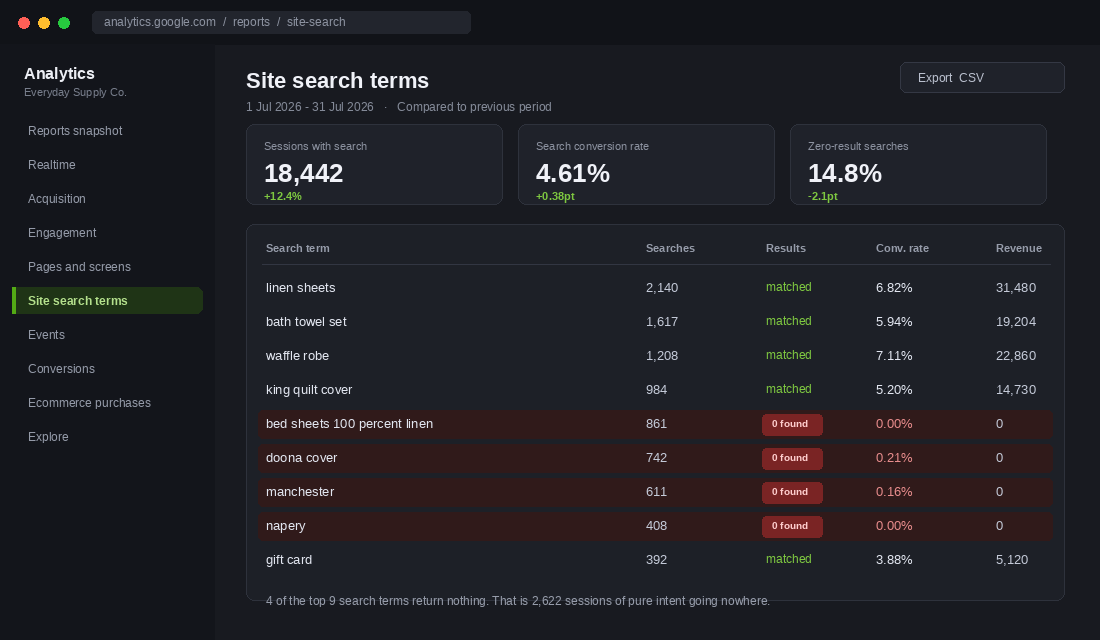
Give it 30 days of clean data before you draw conclusions. Then pull three lists: your top 50 queries by volume, every query returning zero results, and every query with an above-average exit rate. Those three lists are your entire work plan.
Step 2: Work the Zero-Result List Like a To-Do List
The industry average zero-result rate sits between 12% and 18%. Poorly maintained stores run 20 to 30%. Best-in-class ecommerce operations hold it under 2%. If you are sitting at 15%, roughly one in seven of your most motivated visitors is being told to go away.
Every zero-result query falls into one of four buckets, and each has a different fix. Sort them before you start solving.
- Language mismatch. You stock the product, you just call it something else. Doona versus quilt. Manchester versus bedding. Thongs versus flip flops. Fix with synonyms.
- Typos and near misses. Linen sheats, hoodie mens, adiddas. Fix with typo tolerance, which native Shopify search handles poorly and most paid apps handle well.
- Genuine demand gaps. People are searching for products you do not stock. This is free product research, not a search problem. Log it.
- Navigational queries. Sale, shipping, returns, gift card. People are trying to find a page, not a product. Fix by making sure those collections and pages are indexed and surfaced.
Rank the list by search volume, not by how interesting the query is. A term nobody searches is not worth a synonym group. In most Aussie stores I audit, the top ten zero-result queries account for more than half of all failed searches, so ten fixes clears the bulk of the problem.
If bucket three is bigger than you expected, that is a signal worth chasing properly. The same logic sits behind review mining: your customers keep telling you what they want, in their own words, and most stores never write it down.
Step 3: Teach Shopify the Words Your Customers Actually Use
Synonyms are the single highest-return fix in this whole audit, and they are free. Shopify’s Search & Discovery app ships with synonym groups built in, and almost nobody configures them.
From your Shopify admin, go to Apps, then Search & Discovery, then Search, then Synonyms. Click Add synonyms, type the terms that should be treated as equivalent, save. That is the entire process. Each group takes about 20 seconds.
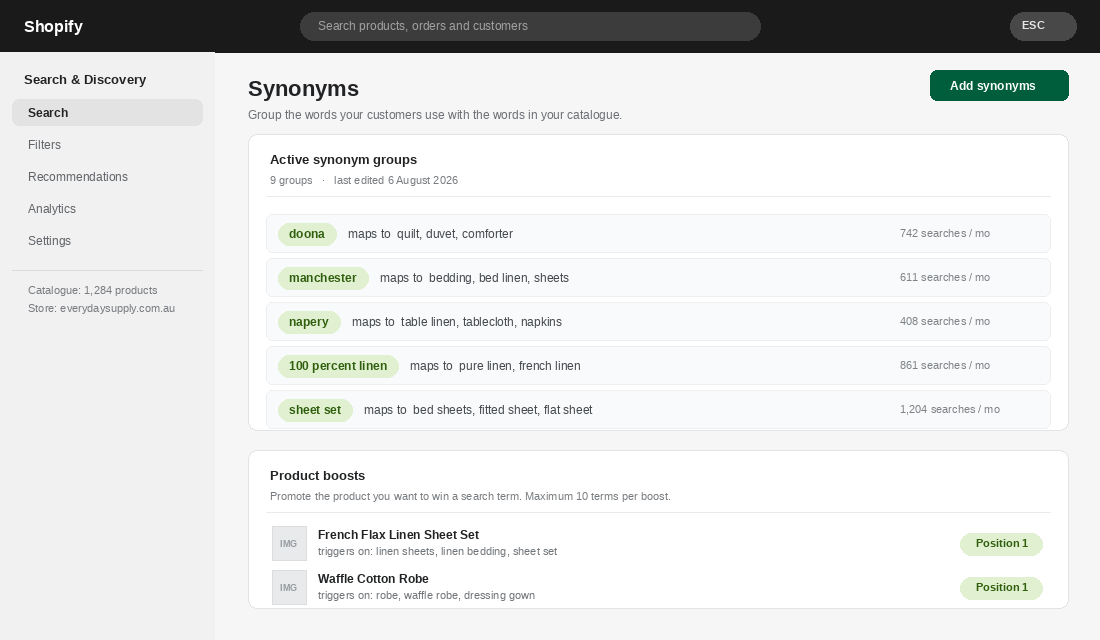
Three rules make synonym groups work properly.
- Map customer language to catalogue language, not the reverse. The query is the input you do not control. Your product titles are the input you do. Build every group starting from a real query in your zero-result report.
- Cover the Australian vocabulary explicitly. Global apps and imported product feeds are full of American terms. If your catalogue says comforter and your customer says doona, you have a problem no algorithm will solve for you. Same with singlet and tank top, jumper and sweater, esky and cooler, ute and pickup.
- Include your own brand and range names. If you have a product line called Everyday and people search every day, or a collection called The Coastal Edit that people search as coastal, those are synonym groups too.
Set a calendar reminder to review the zero-result report monthly. New products, new campaigns and seasonal demand all introduce new language. This is maintenance, not a one-off project.
Step 4: Boost the Products That Should Win the Query
Matching a query is only half the job. Ranking the results correctly is the other half, and default Shopify relevance is a blunt instrument that mostly weights title matches.
Product boosts, also in Search & Discovery, let you force a specific product to the top for up to ten search terms. Go to Search, then Product boosts, then Create product boost, select the product, add the terms, save.
Boost with intent, not ego. The products worth boosting are the ones that convert well, hold stock and lead somewhere. In practice that means three categories:
- Your best converting hero product for its category term. If linen sheets is your top query and one sheet set converts at double the range average, that product should hold position one.
- Your best entry product for broad, top-of-funnel queries. The first thing a customer buys shapes whether they ever come back, which is why the entry product test matters more than most founders assume.
- High-stock, high-margin lines you actually want to move, provided they genuinely answer the query. Boosting an irrelevant product to clear stock trains people to stop trusting your search.
One caveat worth stating plainly. If a boosted product goes out of stock, the boost keeps firing. Add a monthly check to your process or you will be sending your highest-intent traffic to a sold out page.
Step 5: Fix the Autocomplete Almost Nobody Configures
Autocomplete is not a convenience feature. It is the moment where you teach a shopper which words your store understands, before they have a chance to type the wrong one.
Baymard’s search research is blunt about what good autocomplete does: it steers people towards queries that will actually return products, teaches them your terminology, and stops typos before they happen. Most Shopify themes ship with a stripped back version that returns four product titles and nothing else.
What a properly built autocomplete panel shows:
- Product thumbnails with price and stock status. Visual recognition beats reading. This alone lifts click-through on the predictive panel noticeably.
- Suggested queries above the products. Scoped suggestions like linen sheets in king help people narrow before they land on a 200-product results page.
- Matching collections and pages. Someone typing shipping should see your shipping policy, not four unrelated products.
- A visible view-all link with the result count, so people know there is more behind the panel.
Test it on a phone before you sign off. More than 70% of Australian ecommerce traffic is mobile, and a predictive panel that covers the keyboard or needs two taps to dismiss is worse than no panel at all. Check that the search input is reachable in one tap from every template, not buried behind a hamburger menu.
Step 6: Rebuild the No-Results Page Into a Second Chance
You will never get zero-result searches to actual zero. New products, weird queries and genuine gaps guarantee some failures. So the question becomes what happens next.
Shopify’s default answer is a line of text that says no results were found. That page carries an exit rate above 80%. It is the single laziest page on most Australian Shopify stores and it is sitting directly in the path of your most motivated visitors.
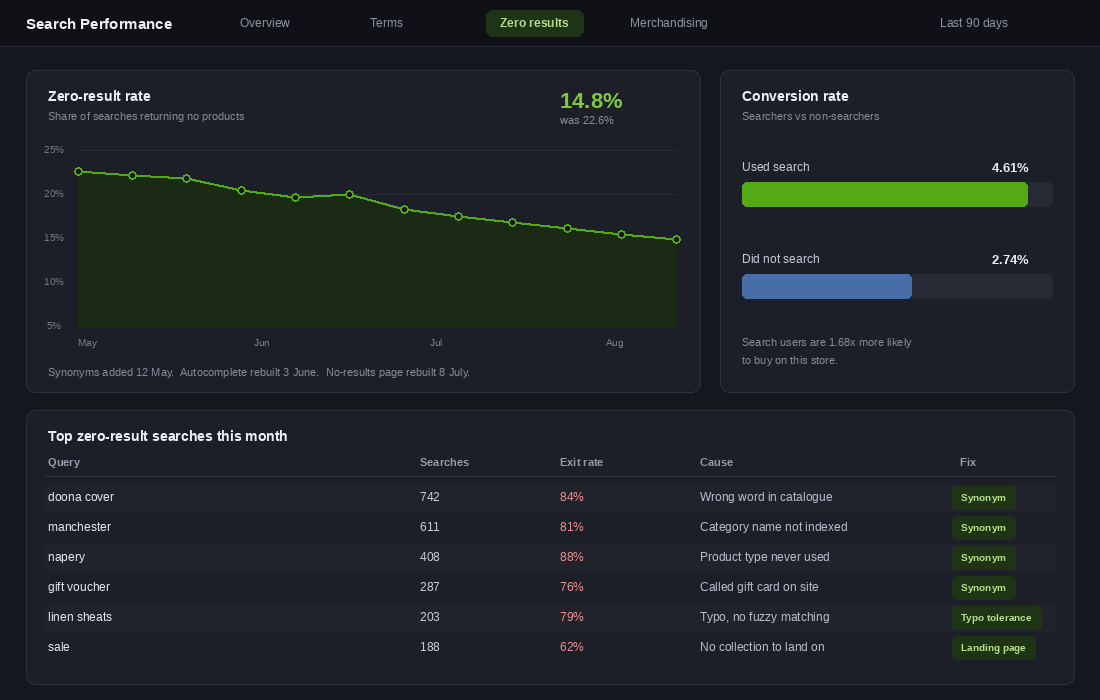
A no-results page that earns its place includes five things:
- The query, spelled back to them. “We could not find anything for napery” confirms the store heard them and lets them spot their own typo.
- Did-you-mean suggestions. Closest matching terms from your actual catalogue, not a generic apology.
- Your best sellers, merchandised. Six to eight products with images. Something is better than an empty page every single time.
- Popular collections as visual tiles. Give them a way back into browsing without hitting the back button.
- A human contact option. Live chat, a phone number, or a short form. For a considered purchase, a person who searched and failed is exactly who you want talking to your team.
Add an email capture only if the query looked like genuine demand you might stock later. “Tell us what you were after and we will let you know when we get it” converts a dead end into a lead and a product research note in one move.
When Free Search Stops Being Enough
Shopify’s native Search & Discovery app is genuinely good and it is free. Start there. It handles synonyms, filters, boosts and basic analytics, and for a catalogue under roughly 500 SKUs with straightforward products it is often all you need.
You have outgrown it when three things become true at once: your catalogue passes about a thousand SKUs, your customers search by attribute rather than product name, and your zero-result rate will not drop below 8% no matter how many synonyms you add. That last one usually means you need typo tolerance and semantic matching, which native search does not do.
The realistic upgrade path for an Australian store:
- Boost AI Search & Discovery. Free plan available, paid from around 29 USD a month. Strongest filtering and merchandising controls in the mid-market. The default choice for most stores between 1,000 and 10,000 SKUs.
- Searchanise. Roughly 20 to 250 USD a month depending on catalogue size. Fast, reliable typo tolerance and strong autocomplete. Powers more than 16,000 stores.
- Klevu. Enterprise pricing, commonly quoted from around 449 USD a month. Genuine semantic search. Only worth it when search is a primary revenue channel, not a feature.
Whatever you install, measure the same three numbers before and after: zero-result rate, search conversion rate, and revenue per search session. If an app cannot move all three inside 60 days, it is not paying for itself.
Why These Six Layers Compound
Taken alone, each of these fixes looks small. Nine synonym groups. A boost rule. A rebuilt error page. None of them feels like a growth initiative.
But they stack on the same traffic. Synonyms convert failed searches into results pages. Boosts make sure the right product sits at the top of that page. Autocomplete steers more people into successful queries before they even hit enter. The no-results page catches whatever still falls through. Each layer catches what the previous one missed, on visitors you have already paid to acquire.
Practitioners who track this properly report that pushing zero-result rates down towards best practice tends to lift sitewide revenue by 5 to 10%. Not search revenue. Sitewide.
The reason it lands harder than most conversion work is the quality of the traffic it touches. A homepage test optimises browsers. A search fix optimises people who typed the name of the thing they want. There is no warmer audience on your store.
And it works in the other direction too. Roughly 82% of shoppers say they avoid a site where they previously had a bad search experience. A broken search bar is not a neutral state. It actively costs you the second visit.
The Search Numbers Worth Putting on a Dashboard
Site search is one of the few areas of a Shopify store where the benchmarks are unusually clear, because the behaviour is so deliberate. Searchers convert at roughly two to three times the rate of non-searchers, and on many stores 10% to 15% of visitors use search but account for 30% or more of revenue.
Five numbers tell you whether yours is working:
- Search usage rate. Sessions with a search divided by total sessions. Under 5% usually means the search bar is hidden behind an icon on mobile, not that nobody wants it.
- Zero-result rate. Target under 10%. Anything above 15% and you are actively turning away buyers who told you exactly what they wanted.
- Search exit rate. The share of searches where the visitor leaves without clicking a result. This is the honest measure of whether your results are any good.
- Search conversion rate. Compare it directly against your site-wide rate. If searchers are not converting at least double, your results ranking is the problem, not your traffic.
- Top 20 queries by volume. Reviewed monthly. This list is the cheapest product research and merchandising brief you will ever get, and it costs nothing to produce.
You can build all five in GA4 using the site search view, or read them natively in Searchanise, Boost AI Search or Algolia if you are already running one. Set a calendar reminder for the first Monday of the month and give it fifteen minutes.
Choosing a Search App Without Overbuying
Shopify’s native search has improved, but it still struggles with synonyms, typos and multi-word queries. The question is not whether to upgrade, it is when — and plenty of Aussie founders buy an enterprise search platform to solve a problem that was really a product data problem.
- Under 300 SKUs, native search plus clean data. Fix your product titles, tags and descriptions first. At this catalogue size, most zero-result searches are caused by missing keywords in your product data, not by a weak search engine. Spending $100 a month here is buying your way around a job you still have to do.
- 300 to 2,000 SKUs, a mid-tier app. Searchanise, Boost AI Search and Fast Simon land around $30 to $150 AUD a month and give you synonyms, typo tolerance, filters and merchandising rules. This is where most growing Aussie stores should sit.
- Over 2,000 SKUs or heavy variant complexity, a serious platform. Algolia, Klevu or Nosto. Real money, real setup time, and worth it only when search is genuinely a primary navigation path for your customers.
Whatever tier you land on, three settings do most of the work and are usually left switched off: synonym mapping for the Australian terms your customers actually use (thongs, singlet, esky, jumper), typo tolerance at one or two characters, and a curated result for your top 20 queries so your best sellers are never buried behind an accessory.
Before you buy anything, run one test. Take your top 20 search queries and check what each one returns today. If the right product is not in the first three results, note whether that is because the engine is weak or because the product title does not contain the word the customer used. Nine times out of ten on a small catalogue it is the second, and the product naming playbook will do more for you than any app. If the products are named well and still not surfacing, that is when an upgrade earns its keep. The same discipline applies one level up, on your collection pages, where most of your non-searching traffic is trying to find the same things.
The 30-Minute Search Audit You Can Run Today
Before you plan a project, spend half an hour proving whether you have a problem. Open your own store on your phone and work through this.
- Search for your three best sellers using the words a customer would use, not your product titles. Do they appear in the top three results?
- Deliberately misspell one of them. Does anything come back?
- Search a category term like gifts or sale. Does it return a merchandised collection or a random product list?
- Search something you do not stock. What does that page offer you? Time how long it takes to find a way back into the store.
- Check GA4 for whether site search is even being tracked. If
view_search_resultsis not firing, you have been flying blind. - Open Search & Discovery Analytics and read the top ten zero-result queries out loud. Write down which of the four buckets each one belongs to.
- Count your synonym groups. If the answer is zero, you have found your afternoon.
If more than two of those seven come back badly, your search bar is quietly leaking revenue and has been for a while. It is also one of the few fixes that costs nothing but attention.
Search sits alongside the other question worth asking about your traffic, which is what the people who never buy were actually trying to do. That is the whole point of non-buyer research, and your search log is the cheapest version of it you already own.
Inside eCommerce Circle, site search and product discovery are part of the Platform work we run with every member. If you want a second opinion on yours, let’s talk.