You tidied up your collections. You renamed a few products because the old titles were embarrassing. You moved your shipping information from a page into a proper policy. All sensible decisions, all made on a Tuesday afternoon, all shipped without a second thought.
What’s in This Article
Three weeks later your organic traffic is down and you cannot work out why. Nothing broke. The store loads. Sales are still coming in, just fewer of them. What actually happened is that every one of those changes silently killed a URL, and every link pointing at those URLs (Google’s index, your email archive, an influencer’s story highlight from last spring, your own navigation menu) now lands on a page that says “page not found”.
This is the quietest revenue leak in ecommerce, because nothing looks broken from the admin. The numbers are unkind: research collated by SEO Site Checkup found that roughly 74% of visitors who hit a standard error page never come back. Not “bounce and browse again” but leave and never return. If you are running a store doing 100k a month with a healthy organic mix, a botched collection rename can cost you five figures before you notice the dip.
The good news is that this is completely preventable, and the fix is a system rather than a heroic effort. Here are the six layers we run with Aussie founders every time a store gets restructured.
Layer 1: Map every URL before you change a single thing
Most operators build their redirect list after the change goes live, working backwards from whatever errors show up. That is the expensive order to do it in, because by then Google has already crawled the dead URLs and started dropping them.
Build the map first. Before you rename anything, export a full list of your live URLs and decide where each one is going. You need four lists:
- Collections. Every /collections/ handle, including the seasonal ones you forgot about like /collections/sale-2025 and /collections/gift-guide.
- Products. Every /products/ handle. Handles are the part of the URL after /products/, and they do not change when you edit a product title unless you edit the handle field directly.
- Pages and policies. /pages/ URLs plus anything you plan to migrate into Shopify’s native /policies/ URLs.
- Blog articles. Both the blog handle and the article handle, because /blogs/news/care-guide and /blogs/journal/care-guide are different URLs.
Then sort that list by traffic, not alphabetically. Pull the last 12 months of landing page data out of Google Search Console and Google Analytics 4, and mark your top 50 organic entry URLs. Those 50 get mapped by hand and double checked. The long tail can be handled in bulk.
One rule that saves a lot of pain: every old URL must point to the closest live equivalent, not to the homepage. Dumping 300 dead product URLs onto your homepage tells Google those pages had no unique value, and it tells the customer who clicked a specific product link that you cannot be bothered. Map product to product, collection to collection.
Layer 2: Know exactly what Shopify redirects for you, and what it does not
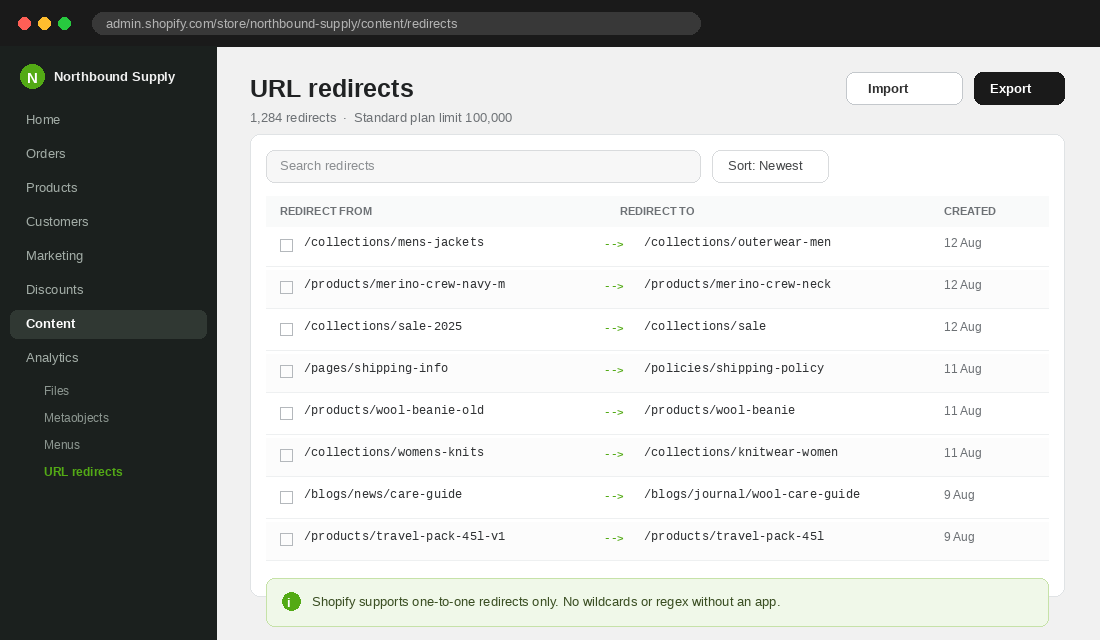
This is where founders get caught out, because Shopify handles some of this automatically and none of it consistently.
What you actually get natively:
- One to one redirects only. Shopify’s native redirect tool does not support wildcards or regex. You cannot write a single rule that moves everything under /collections/old-season/ to /collections/new-season/. Each URL needs its own row, or you need an app such as Ablestar Link Manager or Redirect Ninja that adds pattern matching on top.
- Generous volume limits. Standard Shopify plans allow up to 100,000 redirects, and Shopify Plus goes to 20,000,000. Volume is almost never your constraint. Discipline is.
- Automatic chain prevention. Shopify stops you creating a chain where A points to B and B points to C. That protects you from the worst case, but it does not stop chains forming across apps or through your theme.
- A hard gap on filtered collection URLs. You cannot create a redirect for tag filtered paths like /collections/knitwear/wool, because Shopify still treats that path as valid even when no products carry the tag. Those need handling in your navigation and your collection page structure instead.
The practical takeaway: assume Shopify will do nothing for you. Treat every URL change as a manual entry until proven otherwise. The three minutes it takes to add a redirect row while the change is fresh in your head is worth more than the three hours of forensic work later.
Layer 3: Import in batches, then verify the response codes
For anything over about 20 redirects, use the CSV import rather than typing rows into the admin. In Shopify, go to Content, then Menus, then URL redirects, then Import. Your file needs two columns, “Redirect from” and “Redirect to”, with paths starting from the slash and no domain.
Import in batches of roughly 1,000 rows. A single 8,000 row file that fails validation gives you almost nothing to work with. Eight smaller files tell you exactly which batch has the malformed paths.
Then, and this is the part almost everyone skips, verify that the redirects actually fire. Adding a row in the admin is not proof. Spot check 10 of your top 50 mapped URLs by loading them in a private browser window and confirming three things: you land on the intended page, the address bar shows the new URL, and you did not bounce through an intermediate page on the way.
Layer 4: Chase the internal links, not just the redirects
A redirect is a safety net. It is not a fix. If your navigation menu still points at /collections/mens-jackets and that URL now 301s to /collections/outerwear-men, every single visitor who uses your menu takes an unnecessary hop, and every crawl of your site burns budget following redirects instead of discovering products.
The tool for this is Screaming Frog SEO Spider. The free version crawls up to 500 URLs with no signup and no time limit, which is enough for most small catalogues. The paid licence is 279 dollars a year and removes the cap, which is worth it once you are past a few hundred SKUs.
Setting it up takes about five minutes:
- Download and install SEO Spider, then paste your store URL into the bar at the top and hit Start.
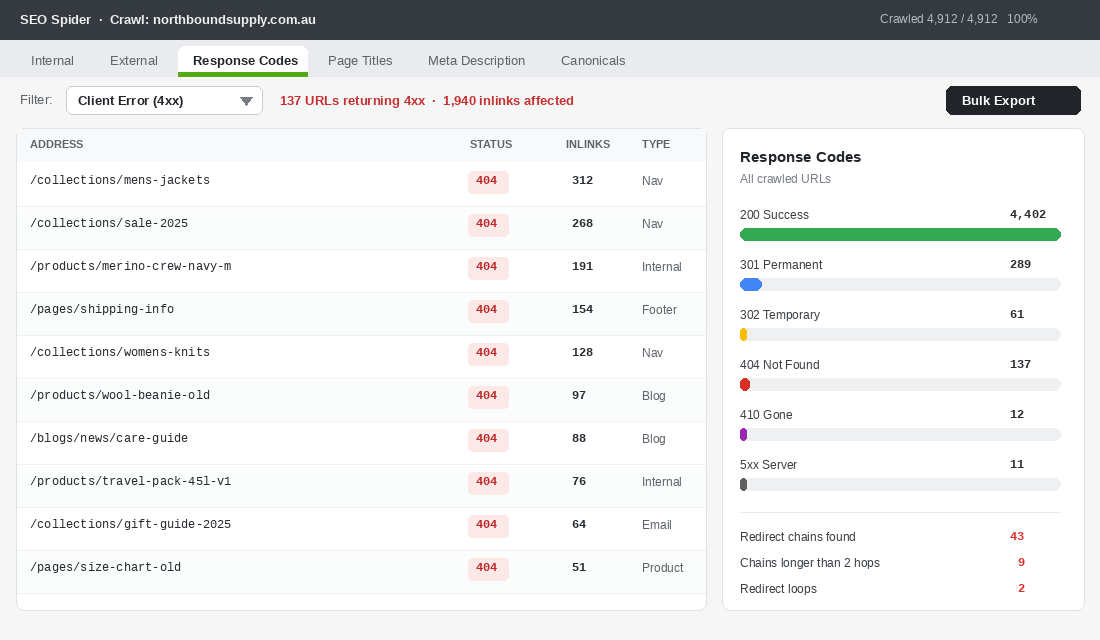
- When the crawl finishes, open the Response Codes tab and set the filter to Client Error (4xx). That is your live list of broken URLs.
- Click any row, then look at the Inlinks panel at the bottom. That tells you exactly which pages of your store are still linking to the dead URL.
- Use Bulk Export, then Response Codes, then Client Error (4xx) Inlinks, to pull the whole lot into a spreadsheet.
- Change the filter to Redirection (3xx) and run Reports, then Redirects, to find chains and loops.
Work the export in order of inlink count. The URL with 312 internal links pointing at it is almost always sitting in your main navigation, and one menu edit clears the lot. Your navigation structure is usually the biggest single source of stale internal links, followed by your footer, then old blog articles.
Do not forget the links that live outside your theme. Klaviyo flows, your Google Merchant Center feed, Meta catalogue product links, your Linktree, and the pinned posts on your Instagram all carry hardcoded URLs. A redirect saves them, but only until you delete it.
Layer 5: Collapse redirect chains before Google gives up
A chain is what happens when URL A redirects to B, and six months later B redirects to C. The customer gets there eventually. Crawlers are less patient.
Google’s documentation says Googlebot will follow up to 10 redirect hops before it flags a redirect error and drops the page from indexing. John Mueller has publicly advised keeping chains to fewer than five. The practical standard used by every technical SEO worth listening to is stricter than both: one hop, always. Point the original URL directly at the final destination and delete the middle step.
Chains matter more than they used to, because AI crawlers indexing your catalogue for shopping answers are generally less tolerant of multi hop paths than Googlebot is. If you want to be visible in AI search results, clean redirects are table stakes.
Two habits keep chains out of your store:
- Never redirect to a URL that is itself redirected. Before adding a row, load the destination and confirm it returns a 200 with no hop.
- Re-point, do not stack. When a destination moves again, edit the original redirect rows to point at the new final URL. Do not add a new redirect on top of the old one.
Run the chain report quarterly. It takes fifteen minutes and it is the difference between a redirect file that ages well and one that quietly rots. If you want the wider technical picture, this sits alongside the rest of your Shopify technical SEO audit.
Layer 6: Turn your 404 page into a recovery page
You will never get to zero. Old influencer links, mistyped URLs, scrapers and expired campaign paths mean some percentage of traffic always lands on a dead page. The question is what happens next.
Most Shopify themes ship a 404 template that says “The page you were looking for does not exist” with a link back to the homepage. That is a dead end dressed up as a page. Research from Cludo on error page optimisation found a well designed custom 404 reduces bounce rate by around 12%, which on a store with a few thousand error sessions a month is real money.
Four elements belong on the page, in this order:
- A plain apology in your brand voice. No error codes, no jargon. “That page has moved or sold out” is honest and human.
- A search bar, focused and prominent. Someone who landed here had specific intent. Give them the fastest possible path to what they wanted.
- Your top four collections as visual tiles. Not a text list. Images with names, exactly like a collection landing page.
- Best sellers with add to cart. Around a quarter of the people hitting your 404 are ready to buy something, and best sellers convert better than a homepage redirect ever will.
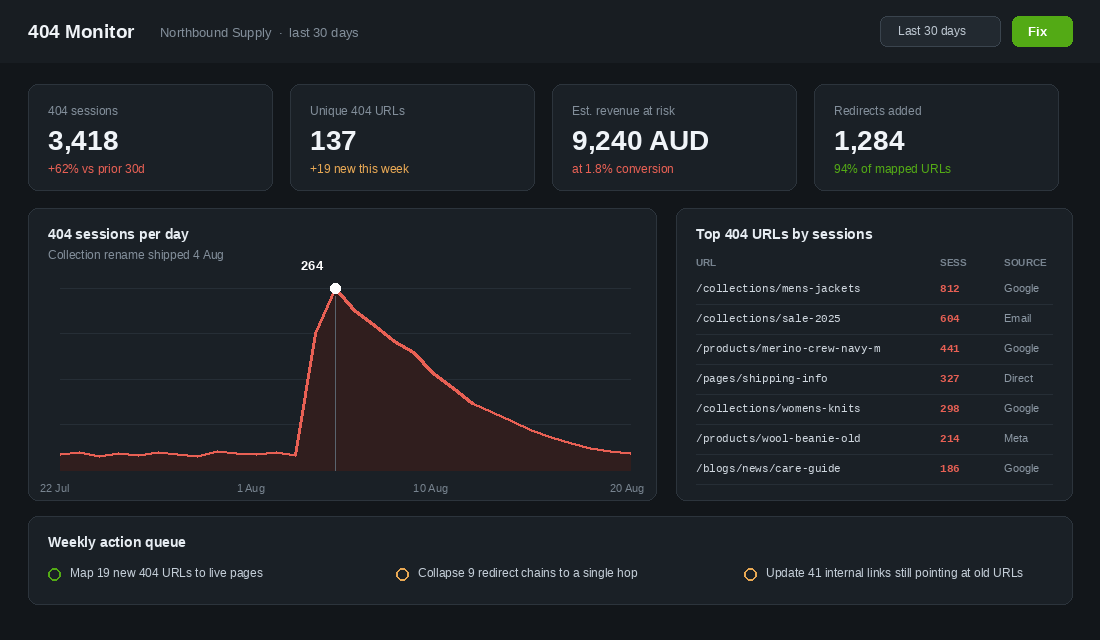
Then instrument it. In GA4, create an exploration filtered to page title containing “404” or “not found”, with landing page and session source as dimensions. That gives you the report in the dashboard above: which dead URLs are pulling real traffic, and where that traffic comes from. A dead URL still getting 800 sessions a month from Google is a redirect you need this week, not a line item for next quarter.
When a redirect is the wrong answer
Redirecting everything is its own mistake. If you discontinue a product permanently and there is no comparable replacement, a 301 to a loosely related item creates what Google treats as a soft 404. The customer arrives expecting the wool beanie they saw on Instagram and gets a cotton cap. That is a worse experience than an honest dead end, and Google will eventually stop trusting your redirects.
Use this test. Ask whether someone who wanted the old page would be satisfied landing on the new one. If the answer is a confident yes, redirect it. If it is “sort of”, you have three better options:
- Keep the product page live and mark it sold out. If it still earns organic traffic and you might restock, this is almost always the right call. Add a back in stock capture and the page becomes a list building asset instead of a dead link.
- Redirect to the parent collection. For a discontinued colourway or size where the range still exists, sending traffic to /collections/beanies is genuinely useful. That is a real answer to the visitor’s intent.
- Let it 404 deliberately. For a one off collaboration that will never return and earns no traffic, a clean 404 with a well built error page is the correct outcome. Google removes it from the index, you stop maintaining a redirect row forever, and your file stays lean.
The deciding number is organic sessions. Pull the last 90 days for the URL. Anything above roughly 20 sessions a month deserves a considered destination. Below that, deliberate 404 is fine and costs you almost nothing.
Redirects during a platform migration: the URL patterns that catch everyone
A collection rename kills a handful of URLs. A migration from WooCommerce, Magento or BigCommerce to Shopify kills all of them at once, because Shopify enforces its own URL structure and nothing from the old site survives unchanged. The same six layers apply, but the mapping in Layer 1 gets bigger and the traps get more specific.
- Path prefixes change for every content type. WooCommerce
/product/blue-jacket/becomes/products/blue-jacket,/product-category/jackets/becomes/collections/jackets, and Magento’s flat/blue-jacket.htmlneeds a full lookup table. Build the map with a VLOOKUP from old SKU or handle to new handle, not by hand. - Trailing slashes and capital letters. Shopify lowercases handles and drops trailing slashes. Old URLs like
/Product/Blue-Jacket/need their own redirect row, because the native tool matches exactly. Export the old site’s server logs or Search Console pages report so you catch the variants Google actually indexed, not the ones you think exist. - Query strings are ignored, which is usually fine. A redirect for
/product/blue-jacketalso catches/product/blue-jacket?utm_source=email. What it will not catch is old filter URLs like/shop?colour=blue, which should point to the matching collection or be left to 404 deliberately. - Image URLs move too. Every old product image link in Pinterest pins, Google Images and third-party blogs dies on migration. You cannot redirect them in Shopify, so make sure the new images carry the same descriptive filenames and alt text so Google Images re-associates them quickly.
Time the cutover for your quietest month, which for most Aussie DTC brands is late January to March, never inside the BFCM to Christmas window. Then watch two numbers daily for the first four weeks: the “Not found (404)” count in Search Console, which should fall every day after cutover, and organic sessions in GA4 against the same weeks last year. A properly redirected migration typically dips 5 to 15% for two to six weeks and recovers by week eight. A dip past 25% or one still deepening at week three means a batch of redirects never fired, and the Screaming Frog crawl from Layer 4 will find it in ten minutes.
The same discipline applies to a theme change. Switching themes does not alter product or collection URLs, but it very often changes page handles, blog handles and the paths in your navigation, and it can quietly reintroduce internal links to old URLs from a template the previous developer hardcoded. The theme deployment playbook covers the pre-launch checks, and a redirect crawl belongs on that list. It also pairs with the site speed playbook, because every unnecessary redirect hop adds 100 to 300ms before the page even starts to load.
Why the six layers compound
Any one of these on its own is a chore. Together they change the economics of changing your store.
The mapping (Layer 1) means the redirects exist before the traffic hits them, so the rankings never wobble in the first place. Industry consensus on properly executed 301s is that sites recover within a few weeks to a couple of months, and that is for stores that redirect after the fact. Redirect before, and there is nothing to recover from.
The internal link cleanup (Layer 4) then converts those redirects from a permanent crutch into a temporary safety net, which is what lets Layer 5 keep the file clean instead of ever growing. And Layer 6 catches everything the first five layers never could, and turns a portion of it back into orders.
The real payoff is confidence. Founders who do not trust their redirect process stop restructuring their store. They leave a bad collection architecture in place for two years because the last rename cost them traffic. Brands running large Shopify Plus catalogues in Australia, from Koala through to Who Gives A Crap, restructure regularly because the process is boring and safe. Yours should be too.
The 30 minute redirect audit
Block out half an hour this week and run this on your store. If you have never done it, expect to find between 40 and 200 broken URLs.
- Minutes 0 to 5. Open Google Search Console, go to Pages, and note the count under “Not found (404)”. Screenshot it so you have a baseline.
- Minutes 5 to 12. Run a Screaming Frog crawl. Filter Response Codes to Client Error (4xx). Export the list with inlinks.
- Minutes 12 to 18. Sort the export by inlink count, descending. Anything with more than 20 inlinks is in your navigation, footer or a template. Fix those links directly.
- Minutes 18 to 24. Take the remaining URLs, map each to the closest live page, and build a two column CSV. Import it under Content, then Menus, then URL redirects.
- Minutes 24 to 28. Run Reports, then Redirects, in Screaming Frog. Any chain longer than one hop gets re-pointed to the final destination.
- Minutes 28 to 30. Open your 404 page. If it does not have a search bar and four collection tiles, put it on this week’s list.
Then put a recurring 30 minute block in the calendar for the first Monday of each quarter, and add one line to your launch checklist: “Did this change alter any URL? If yes, redirect it before it ships.” That single question prevents more organic traffic loss than any content strategy you will run this year.
Inside eCommerce Circle, keeping your Platform clean so growth actually compounds is one of the core pillars we work on with every member. If you want a second opinion on your store’s URL structure, let’s talk.