Most Shopify founders treat Google Search Console as an SEO tool. They open it once a quarter, glance at total clicks, feel vaguely good or vaguely bad, and close the tab. That is like owning a customer survey with 10,000 responses and never reading past the first page.
What’s in This Article
Here is what they miss. Every query in that Performance report is a prospect telling you, in their own words, what they want to buy. Not what you think they want. Not what your Meta ad copy says they want. What they actually typed into Google at 9:40pm on a Tuesday with their credit card within reach.
Australians spent $82.6 billion online in 2025, up 14% year on year, and 24% of all retail spend now happens online according to the Australia Post eCommerce Report 2026. A meaningful slice of that demand starts as a Google search. Search Console is the only free tool that shows you your share of it, query by query, before a single dollar of ad spend is involved.
This playbook is the 5-step system we run with eCommerce Circle members to turn Search Console from a vanity dashboard into a demand-mining engine. It sits under the Prospects pillar, not Promotion, because the point is understanding who is looking for you and what they want. The ranking work comes later.
Step 1: Set Up Search Console Properly (Most Shopify Stores Get This Wrong)
Before you can mine anything, the data has to be clean. Roughly half the Shopify stores we audit have a Search Console setup that is either incomplete or actively misleading, usually because someone verified a single URL prefix years ago and never touched it again.
The setup that works:
- Create a Domain property, not a URL-prefix property. A Domain property covers www and non-www, http and https, and every subdomain in one view. A URL-prefix property only covers the exact prefix you typed, so if half your traffic lands on the non-www version you will never see it.
- Verify via DNS TXT record. In Search Console, choose Domain, copy the TXT record Google gives you, then go to your Shopify admin, Settings, Domains, click your primary domain, then DNS settings, and add the TXT record. If your domain is managed elsewhere (Crazy Domains, VentraIP, GoDaddy), add it there. Verification usually completes within an hour.
- Do not use the HTML tag method. It drops a meta tag into theme.liquid, and the next theme update or theme switch silently deletes it. Your property gets un-verified and you lose access to the data until someone notices.
- Submit your sitemap once. Shopify auto-generates it at yourdomain.com.au/sitemap.xml, with nested sitemaps for products, collections, pages and blog posts. Submit the index and Google handles the rest.
- Turn on the BigQuery bulk export if you are over about $100k a month. The Search Console interface only keeps 16 months of history and caps every report at 1,000 rows. The bulk export, available since February 2023, writes every row to BigQuery daily with no cap. It is free at typical store volumes and it means you will still have this year’s data in three years’ time.
One more thing while you are in there. Add your key team members as users with Full permission. The single most common reason a store loses Search Console access is that the only verified owner was a freelancer who moved on in 2023.
Step 2: Read the Performance Report Like a Customer Researcher, Not an SEO
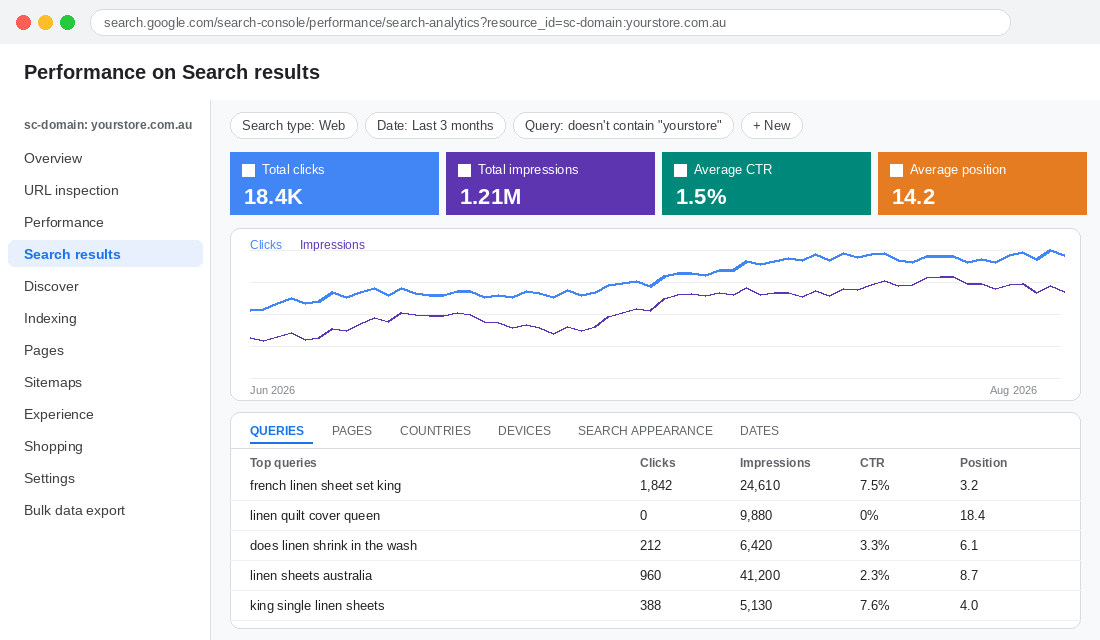
Open Performance, then Search results. Set the date range to the last 3 months and tick all four metrics: clicks, impressions, CTR and average position. Now switch to the Queries tab. This table is your research dataset.
An SEO reads it top down, looking at what already ranks. A customer researcher reads it differently. You are looking for language, intent and gaps. Three lenses:
Lens 1: The words they use versus the words you use
Filter queries by a core product term and read the modifiers. If you sell a linen bedding range and 40% of your impression volume comes from queries containing “French linen” while your collection page says “premium linen”, your prospects have just handed you your H1. The same goes for size language (“king single” versus “king”), colour names, and use cases (“for hot sleepers”) that you never thought to write on the page.
Lens 2: The questions before the purchase
Filter for queries starting with how, what, which, best, does, can, is. These are your prospects one step before buying. “Does merino shrink in the wash” is a person about to spend $180 on a jumper if someone answers them. Sixty-five percent of ecommerce keyword queries are long-tail phrases of three or more words, and almost all of them carry this kind of intent. Most Shopify stores answer none of them.
Lens 3: Non-brand versus brand
Add a filter: Query, Does not contain, your brand name (and its common misspellings). What remains is pure prospect demand from people who do not know you yet. Note the split. A healthy $1m a year Shopify brand we typically see has 60 to 75% of impressions from non-brand queries. If yours is 90% brand, your organic channel is a receipt for your paid channel, not a source of new prospects.
Export the non-brand query table to Google Sheets before you go any further. You will need it in Step 3.
Step 3: Run the Demand Gap Audit (Where the Money Is Hiding)
This is the step that pays for the whole exercise. You are looking for queries where Google already thinks you are relevant (you are getting impressions) but prospects are not choosing you (low CTR) or you are not close enough to be chosen (position 8 to 30).
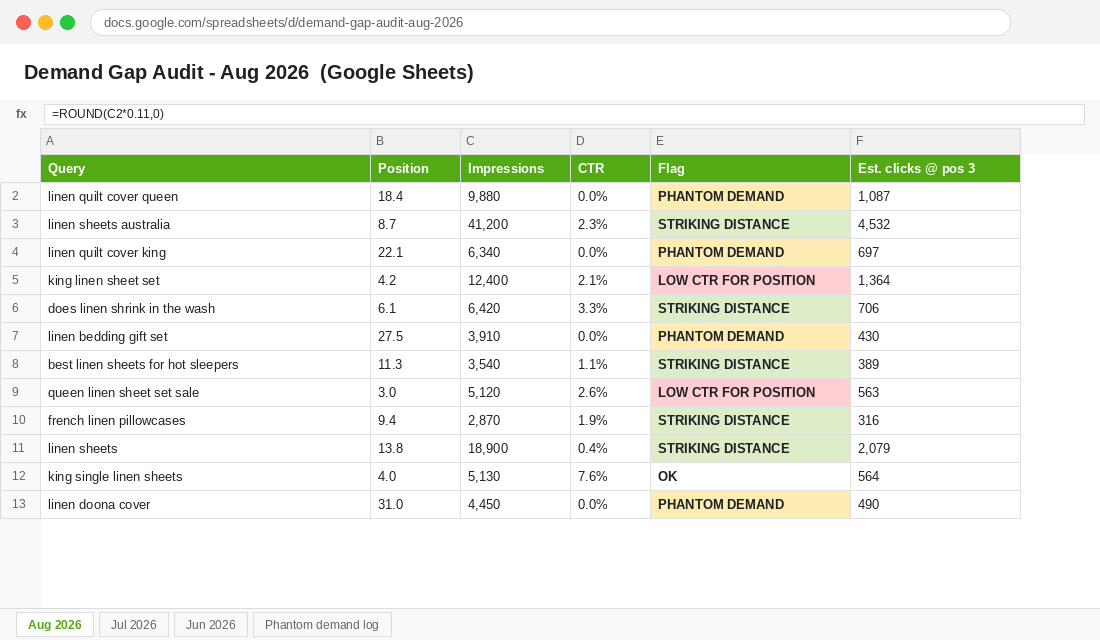
In your exported sheet, sort by impressions descending and add three flags:
- Striking distance. Average position between 5 and 15, impressions above 200 for the period. You are on page one or the top of page two. A single page rewrite, a better title tag, or an internal link from your homepage can move these into the top 3, which is where 68.7% of clicks go according to Backlinko’s analysis of 4 million search results. Position 1 alone averages a 27.6% CTR.
- Low CTR for position. Position 1 to 5 but CTR under 3%. Google is showing you and prospects are scrolling past. Nine times out of ten the title tag is your product name with no benefit, no price signal and no reason to click. Sometimes a competitor is sitting above you with a rich result (stars, price, stock). Fix the title, add product schema, re-check in 4 weeks.
- Phantom demand. Queries with impressions where you do not sell the thing. This is the gold. Impressions for “linen quilt cover queen” when you only sell sheets. Impressions for “gift set” when you have never bundled. Google is telling you it thinks you should have that product. Treat it as a validated product idea with a demand number attached.
Now add a fourth column: Estimated monthly clicks at position 3. Take the query’s monthly impressions and multiply by roughly 11%, which is a conservative blended CTR for position 3. That converts every row into a number your brain treats as revenue, and it makes prioritising the list a five-minute job instead of a debate.
One caveat that matters in 2026. The Ahrefs study of 300,000 keywords, comparing December 2023 to December 2025, found that AI Overviews reduce click-through for the top-ranking result by 58% on the queries where they appear. AI Overviews now show on about 14% of shopping queries, but on 83% of “best [product]” queries. So when you prioritise your list, weight transactional queries (product names, sizes, colours, “buy”) above informational ones. Impressions on “best merino jumper” are still valuable, but you will win fewer of those clicks than you would have two years ago. If you want to compete for the AI answer itself, our AEO playbook covers that.
Step 4: Turn Queries Into Products, Pages and Copy
A demand list is only useful if it changes what you build. Here is how each flag from Step 3 becomes an action on your Shopify store.
Phantom demand becomes a product decision
Take every phantom-demand query, group them by product type, and total the impressions. Then sanity check the number against the wider market using the approach in our market sizing playbook. If prospects are searching your domain-relevant terms for a quilt cover 2,400 times a month and you are already ranking on page one for sheets, that is not a hunch. It is a launch brief with a demand figure attached, and it costs you nothing more than a supplier email and a sample order to test.
Think about how Aussie brands like Bellroy or Frank Green expanded their ranges over the years: wallets into bags and phone cases, reusable cups into bottles and lunch boxes. Adjacent products that the same prospect was already searching for. Search Console gives you that adjacency map for your own category, for free, months before a competitor spots the same gap.
Striking distance becomes a page brief
For each striking-distance query, identify the URL Google is currently showing (switch to the Pages tab with the query filter applied). Then ask: does this page actually answer this query? Often Google is ranking your homepage or a blog post for a query that deserves a dedicated collection page. That is the moment to build one. Our collection page SEO playbook walks through the structure that wins category searches.
Question queries become on-page content and site search answers
Every how, does, can, which query becomes a line in a product page FAQ block or a short buying guide. Keep it on the product or collection page where it can convert, not buried in a blog. Then take the same questions and check them against your Shopify site search. If prospects Google “does merino shrink” they also type “shrink” into your search bar, and if that returns zero results you have a second leak. Our site search playbook covers how to fix that.
Language mismatches become copy edits
This is the cheapest win in the whole system. Rewrite product titles, collection H1s and meta titles to use the exact phrasing prospects use, in the order they use it. “French Linen Sheet Set – King” outperforms “The Luxe Sheet Collection” every time, because one of them matches what a prospect typed and the other one matches what a brand designer liked.
Step 5: Build the Monthly Demand Review (20 Minutes, Same Day Every Month)
Search Console data compounds if you look at it regularly and evaporates if you do not, because the interface only stores 16 months. Set a 20-minute recurring calendar block on the first Monday of each month and run this exact sequence:
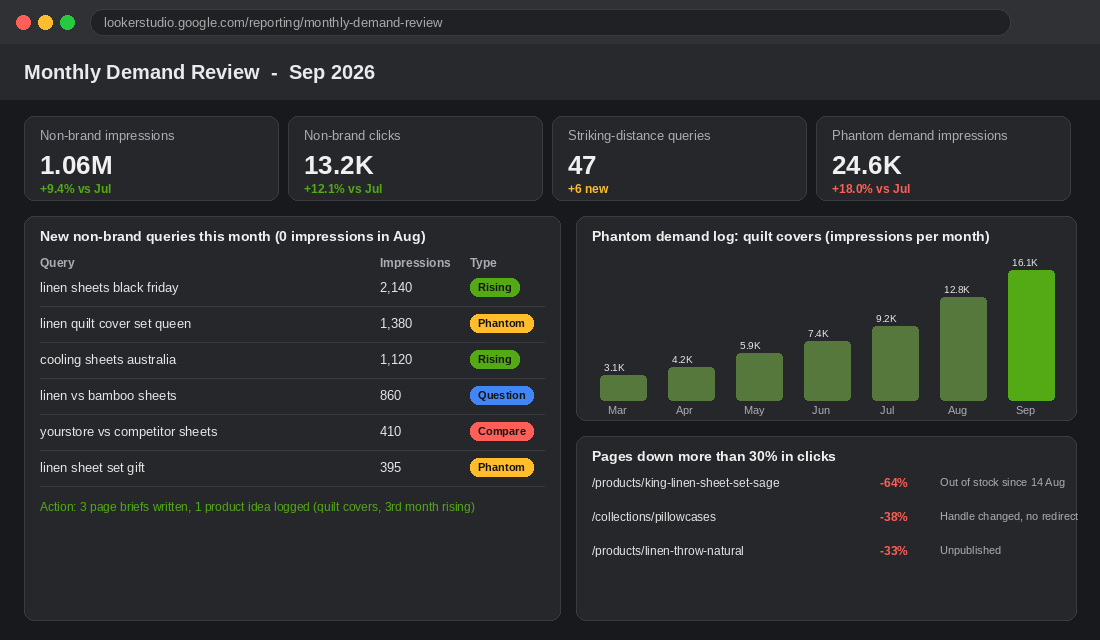
- Compare last 28 days to the previous 28 days on the Queries tab, non-brand filter applied. Sort by impression change. Rising queries are demand you should chase this month; falling queries are either seasonal or a ranking loss you need to diagnose.
- Pull new queries. Any query with impressions this month and none last month. These are the earliest signal you will ever get of a trend, a new use case or a competitor launch (people searching “[competitor] vs [you]”).
- Re-run the three flags from Step 3 on the fresh export. Move anything that has crossed into striking distance onto this month’s page brief list.
- Log the phantom demand total. One number per product idea, tracked month over month. When an idea hits three consecutive months of rising impressions, it goes into your range planning conversation.
- Check the Pages tab for any URL that lost more than 30% of clicks. Cross-reference with your Shopify admin. Nine times out of ten it is a product that went out of stock, was unpublished, or had its handle changed without a redirect.
If you are on the BigQuery export, build a Looker Studio dashboard once and the monthly review becomes a two-minute glance. If you are not, a Google Sheet with one tab per month and a simple pivot on query and impressions does the job at under $500k a month in revenue.
The Tool Stack: What to Use and How to Set It Up
You can run this entire playbook with free tools. Here is the stack, in the order to set it up.
Google Search Console (free)
The source of truth. Set it up per Step 1. Use the Queries tab with the regex filter option when you want to isolate patterns: for example the regex ^(how|does|can|which|what|best) pulls every question-style query in one filter. Use the Compare date mode for month-on-month changes.
Search Console to Google Sheets (free)
Install the official Search Analytics for Sheets add-on from the Google Workspace Marketplace. Sign in with the Google account that has Search Console access, choose your property, set the date range and group by Query and Page, then request the data. It pulls up to 25,000 rows per request via the API, which bypasses the 1,000-row cap in the interface. Schedule a monthly backup so you build history beyond 16 months.
BigQuery bulk export (free at typical store volumes)
In Search Console go to Settings, Bulk data export, and enter your Google Cloud project ID. You need a Google Cloud project with billing enabled, but the storage cost for a store doing under 100,000 sessions a month is usually well under $10 a month. The export begins the day you set it up and does not backfill, so set it up now, not when you need it.
Shopify Search & Discovery app (free)
Not a Search Console tool, but the companion to it. Once you have your question queries and language mismatches from Step 2, open Search & Discovery, add synonym groups so that “doona” finds “quilt” and “jumper” finds “sweater”, and check the Analytics tab for searches with no results. This is where your Google demand data and your on-site demand data meet.
How the 5 Steps Compound
Run in isolation, each step is a nice-to-have. Run together, they form a loop that gets stronger every month.
Clean setup (Step 1) gives you trustworthy data. Reading it as a researcher (Step 2) gives you prospect language, prospect questions and a true non-brand baseline. The demand gap audit (Step 3) converts that into a prioritised list with a click number attached. Turning queries into products and pages (Step 4) captures the demand, which generates more impressions and more queries, which feeds the next monthly review (Step 5).
Twelve months in, the brands who run this have three things their competitors do not. A product roadmap partly written by their prospects. Collection and product pages that use the exact language prospects use. And a demand history that shows them, in December, what people were searching for last February, so they order stock with data instead of memory.
Compare that with the typical approach: check total clicks, run a Meta campaign, guess at the next product. Search Console has been sitting there the whole time with the answers.
The Search Console Demand Checklist (Copy This)
Work through this once, then repeat the monthly items on the first Monday of each month.
One-time setup
- Domain property created and verified via DNS TXT record (not HTML tag)
- Sitemap index submitted
- At least two team members added with Full permission
- BigQuery bulk export enabled (if over about $100k a month)
- Search Analytics for Sheets add-on installed and connected
- Non-brand regex filter saved (brand name plus misspellings)
Monthly review (20 minutes)
- Export non-brand queries, last 28 days versus previous 28 days
- Flag striking distance (position 5 to 15, 200 plus impressions)
- Flag low CTR for position (top 5, under 3% CTR)
- Flag phantom demand (impressions for products you do not sell)
- Add estimated clicks at position 3 (impressions x 0.11) and sort
- Pull new queries with zero impressions last month
- Check Pages tab for any URL down more than 30% in clicks
- Write this month’s page briefs (max three) and one product idea note
- Add new synonyms and question answers to Shopify Search & Discovery
For the broader ranking work once you know what prospects want, our Shopify SEO playbook is the natural next read.
Inside eCommerce Circle, knowing exactly who is looking for you and what they want is one of the core pillars we work on with every member. If you want a second opinion on your Search Console data and what it is telling you, let’s talk.