Your conversion rate dropped from 2.1% to 1.5% and nothing changed. Same products, same offers, same ad accounts. You spent a fortnight tearing apart your product pages, rewriting your hero copy and second-guessing your pricing, and none of it moved the number back.
What’s in This Article
Here is the uncomfortable possibility most Aussie founders never test: your conversion rate did not drop. Your denominator got polluted. Bots now account for roughly 53% of all web traffic, and the malicious half of that sits at 40%, up from 37% the year before, according to the 2026 Bad Bot Report from Imperva. Ecommerce is one of the most heavily targeted sectors on the internet, because bots need to simulate shopping behaviour to scrape your prices, test stolen cards and hoard your inventory.
Every one of those sessions lands in the bottom of your conversion rate calculation. None of them will ever buy. So before you spend another dollar on a CRO agency, run the audit below. Most stores I look at are carrying somewhere between 15% and 30% automated traffic, and cleaning that up changes the number you have been optimising against for months.
What Bot Traffic Actually Costs You
Founders treat bot traffic as a nuisance. It is not. It is four separate taxes on the business, and they compound.
Tax one: you optimise against a lie. If 28% of your sessions are automated, your reported conversion rate is roughly 28% lower than your real one. You benchmark yourself against the platform average, decide you are underperforming, and start fixing things that were never broken. Meanwhile the genuine problem, whatever it is, stays buried.
Tax two: you pay for clicks that never had a wallet. Roughly 8.51% of all paid ad traffic is invalid, which means about one click in twelve does not come from a human with purchase intent. Globally that added up to 63 billion dollars of wasted ad spend last year, and it is forecast to hit 172 billion by 2028. On a store spending 40,000 dollars a month on Meta and Google, an 8% invalid rate is over 3,000 dollars a month buying nothing.
Tax three: your retargeting audiences fill with ghosts. Every bot session that fires a pixel gets added to your view-content and add-to-cart audiences. You then spend real money retargeting server farms in Virginia. Your lookalike seeds get diluted with behaviour that has no human signal in it at all, and your algorithm quietly learns the wrong thing.
Tax four: your store gets slower for the people who matter. Scrapers and crawlers hammer collection and product pages hundreds or thousands of times a day. During a launch or a sale, that automated load competes directly with real shoppers for server capacity and CDN cache. The founders who cop this hardest are the ones running big drops, which is exactly when you can least afford it.
None of these taxes show up as a line item. They show up as a conversion rate that will not budge and a media efficiency ratio that keeps drifting the wrong way.
Step 1: Run the Six-Signal Bot Check in Your Shopify Admin
Before you install anything, spend twenty minutes in your existing admin. Shopify publishes a specific list of bot indicators, and you can check all of them from reports you already have access to.
Work through these six signals in order. You are not looking for one smoking gun. You are looking for a pattern.
- Sessions by location. Go to Analytics, then Reports, then Sessions by location. Look for volume from known data centre cities: Ashburn in Virginia, Columbus in Ohio, Boardman in Oregon, Council Bluffs in Iowa, Dublin, Singapore. These are AWS and Google Cloud regions, not suburbs full of shoppers. If Ashburn is in your top ten and you sell only to Australia, you have found automated traffic.
- Sessions by device type. A sudden spike concentrated in one device category, particularly desktop, with no matching lift in orders, is a classic scraper fingerprint.
- Sessions by landing page. Bots often hit deep URLs directly rather than travelling through your funnel. If you see hundreds of sessions landing straight on obscure product handles or on URLs with odd query strings, that is not organic discovery.
- Search terms report. Check Analytics, then Reports, then Top online store searches. Long alphanumeric strings that look like request IDs, or queries written in code notation, mean something automated is probing your site search.
- Customer profiles. Look at recently created customers. Names that mix random letters and numbers, or hundreds of accounts created in a narrow window, point to automated account creation.
- Zero-dollar orders and checkout attempts. A volume of free orders you cannot explain, or repeated checkout attempts using similar customer details, is card testing. That is a fraud problem as much as an analytics one, and it needs its own response.
Write down what you find. You are building a baseline, and you will want it in a fortnight when you are checking whether the fixes worked.
A caveat worth internalising: your analytics being weird does not automatically mean bots. A free product you forgot was purchasable, a dodgy customer import app, hCaptcha getting switched off, or a genuine flash of publicity all produce identical-looking spikes. Rule out the boring explanations before you go hunting.
Step 2: Turn On Shopify’s Human or Bot Session Dimension
This is the single biggest win in the whole audit, and most Australian founders I speak to still do not know it exists.
Shopify now classifies every session on your online store as human or bot, and exposes it as a report dimension called Human or bot session. It works by scoring each individual event in a session, then classifying the session overall. The classification is deliberately conservative, because Shopify would rather miss a bot than label a real customer as one. A session with four bot-like events and two human ones still gets counted as human.
That conservatism matters for how you read the output. Whatever number Shopify shows you for bot sessions is a floor, not a ceiling.
How to set it up
- From your Shopify admin, go to Analytics, then Reports.
- Open the report you want to interrogate. Start with Sessions over time or Conversion rate over time.
- In the configuration panel, click the plus icon in the Dimensions menu.
- Select Human or bot session. Your report now splits into two rows.
- To see only real people, click the plus icon in the Filters menu, select Human or bot session, click Add value and choose Human. The filter should read: is Human.
- Save the filtered view so it becomes your default. Save a second view for bot sessions only, so you can watch the automated traffic as its own trend line.
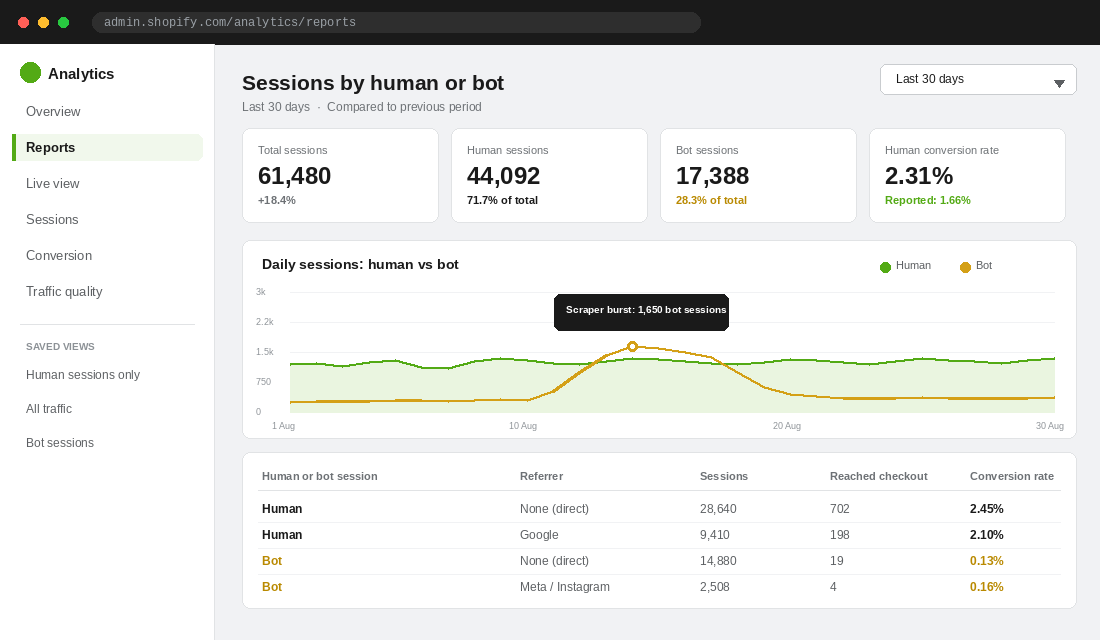
Then add a Referrer dimension on top. This is where it gets genuinely useful. You will usually find bot traffic concentrated in direct or in one or two specific referrers, and you can compare human conversion rate against bot conversion rate per channel. If humans from Google convert at 2.1% and bots from Google convert at 6%, that is not a normal crawler and it warrants a closer look.
Three limitations you must know about
- It is not retroactive. Bot classification only applies to data collected from 7 October 2025 onwards. You cannot go back and clean up last year’s numbers, so any year-on-year comparison you run needs a mental asterisk.
- It does not work on Headless or Hydrogen storefronts. If you have gone headless, this dimension is unavailable and you need to solve traffic quality at the edge instead.
- It only applies to sessions-related metrics. Order-level and product-level reporting is unaffected, which is fine, because orders were never the polluted number.
Step 3: Clean Up GA4 So Your Two Dashboards Agree
Shopify and GA4 filter bots differently, which is why they have never agreed on your session count. Once you have cleaned Shopify, you need to do the same work in GA4 or you will spend every Monday morning arguing with two dashboards.
GA4 applies its default bot and spider exclusion automatically at ingestion on every property, and there is no switch to flip. That filter catches known crawlers from the IAB list. It does not catch headless browsers, residential proxy traffic, or anything sophisticated. The useful work is in the filters that are off by default.
The four filters to configure
- Internal traffic. Go to Admin, then Data streams, select your stream, then Configure tag settings, then Define internal traffic. Add your office IP, your home IP, your VPN range and your agency’s IP. Give it a traffic_type value of internal. Then go to Admin, then Data filters, and activate the Internal Traffic filter.
- Developer traffic. In the same Data filters panel, switch on the developer traffic filter. This strips out sessions flagged with debug_mode, which is what fires while you or your theme developer are testing changes.
- Unwanted referrals. Add exclusions for known data centre and spam referrers. This stops referral spam inflating your acquisition reports.
- An engaged-sessions segment. In Explorations, build a segment that only counts sessions with at least one meaningful engagement event, such as view_item or add_to_cart. Bots that fire a pageview and vanish drop straight out.
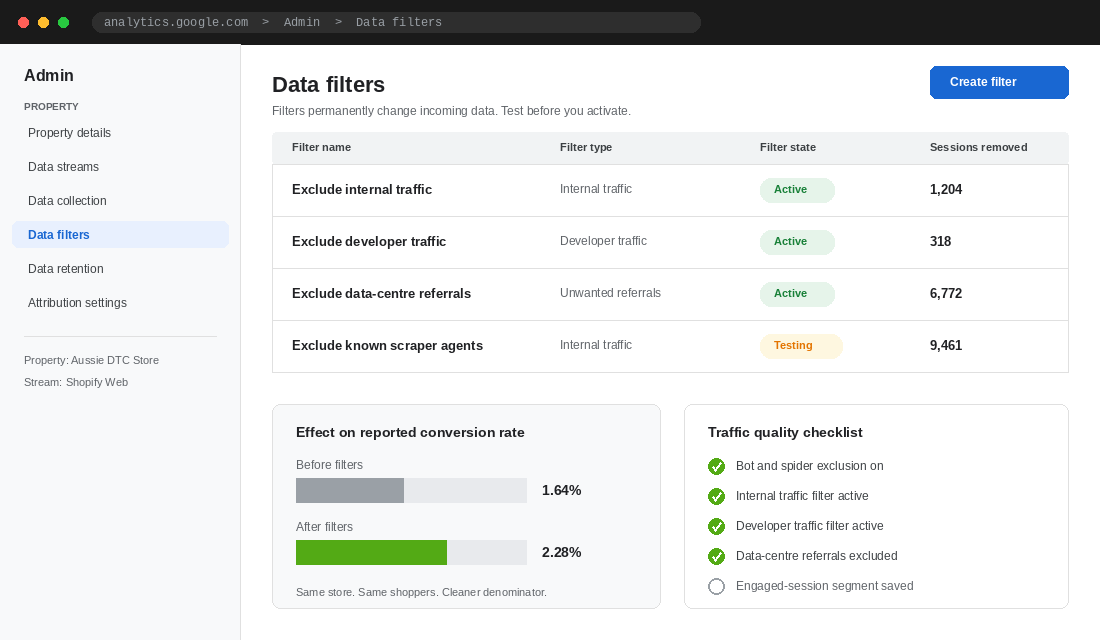
Two warnings. Data filters permanently change incoming data, so always run a new filter in Testing state before you set it to Active, and check what it would have removed. And filters can take 24 to 36 hours to fully apply, so validate with one controlled test rather than flipping settings back and forth for a week.
If your GA4 numbers were never trustworthy to begin with, fix the foundation first. Our guide to setting up GA4 on Shopify walks through the configuration that has to be right before any of this filtering means anything.
Step 4: Stop Paying for Clicks That Never Had a Wallet
Analytics hygiene fixes your reporting. It does not get your money back. Invalid traffic in paid media is a separate problem with a separate fix.
Start by proving the size of it. In your Shopify sessions report, filter to bot sessions and add the Referrer dimension. If a meaningful share of your bot traffic carries a Meta, Google or TikTok referrer, you are buying it. That is your number, and it is usually enough to justify twenty minutes of work.
What to do inside the ad platforms
- Google Ads IP exclusions. In Google Ads you can exclude up to 500 IP addresses per campaign. Pull the worst offending IPs from your server logs or your click fraud tool and exclude them. This is blunt but free.
- Placement exclusions on Display and Performance Max. Made-for-advertising sites and low quality apps are where a lot of invalid traffic lives. Review your placement report monthly and exclude aggressively. On Performance Max, use account-level negative placements and brand exclusions.
- Meta audience network. If your Meta campaigns show cheap clicks with terrible on-site behaviour, check whether Audience Network placements are carrying them. For most Aussie DTC brands, excluding Audience Network on cold prospecting improves click quality even though it raises reported CPC.
- Rebuild your custom audiences. Once bot traffic is filtered, your pixel-based audiences are still full of the old ghosts. Recreate view-content and add-to-cart audiences with a fresh lookback window so the algorithm reseeds on clean behaviour.
When a dedicated tool is worth it
If you are spending over 30,000 dollars a month on paid media, click fraud detection pays for itself quickly. TrafficGuard is the obvious one to look at, and it is an Australian story: founded in Perth in 2015 by Mathew Ratty, and now a subsidiary of ASX-listed Adveritas. It sits between the click and your landing page, scores traffic in real time, and blocks or reports invalid clicks before they burn budget. Alternatives worth quoting include ClickCease and Fraud Blocker.
Set expectations properly. These tools typically recover somewhere in the single-digit percentages of ad spend, not half your budget. On 40,000 dollars a month, recovering 6% is 2,400 dollars, which comfortably covers the subscription and then some. On 5,000 dollars a month, it does not. Do the maths before you buy.
Step 5: Block the Worst Offenders at the Edge
Filtering fixes your reporting. Blocking fixes your server load, your scraping problem and your card testing exposure. On Shopify you cannot install server-side software, so the only place you can intervene is your DNS layer.
Putting Cloudflare in front of your custom domain gives you a filter that runs before traffic ever reaches your theme.
The setup, in order
- Add your domain to Cloudflare and change your nameservers at your registrar to the two Cloudflare gives you.
- Recreate your Shopify DNS records: an A record for the apex pointing to Shopify’s storefront IP, and a CNAME for www pointing to shops.myshopify.com. Verify your domain still resolves correctly in Shopify admin before you go further.
- Go to Security, then Bots, and switch on Bot Fight Mode. It is free on every plan and challenges known automated traffic.
- In the same panel, enable the block on AI scrapers and crawlers if you do not want your catalogue and copy used as training data.
- Go to Security, then WAF, and turn on the free managed ruleset.
- Add rate limiting rules on the endpoints bots abuse most: your site search path and your cart add path. Twenty requests per minute on search and ten on cart add will not touch a real shopper and will stop a scraper cold.
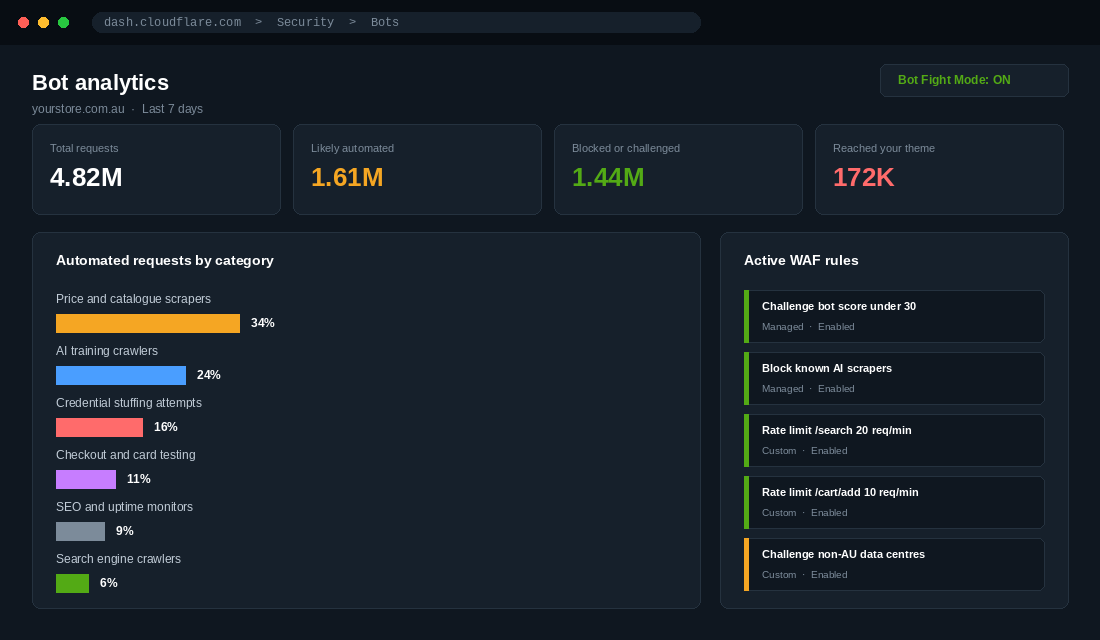
Do not block everything. Googlebot, Bingbot and the social preview crawlers are how you get indexed and how your links render properly when someone shares them. Blocking them to fix a conversion rate would be a spectacular own goal. Cloudflare’s managed rules already distinguish verified search crawlers from impostors, so keep the managed ruleset on and be surgical with your custom rules.
One limitation to be honest about: a determined attacker can bypass your custom domain entirely by hitting your yourstore.myshopify.com address directly, and your WAF never sees it. Edge filtering handles the bulk commodity traffic, which is most of the volume. It is not a complete perimeter.
While you are in there, check what all that automated load is doing to your load times. Our six-lever page speed audit covers the rest of the picture.
Step 6: Rebaseline Your Benchmarks and Your Targets
Here is the step almost everyone skips, and it is the one that changes decisions.
Once you have a clean human-only conversion rate, every target and benchmark you have been carrying is out of date. The platform-wide Shopify average sits around 1.4%, and for Australian stores the defensible band is roughly 1.5% to 2.5%, with anything above 3% genuinely strong. If your reported rate was 1.66% and your clean human rate is 2.31%, you were not below market. You were comfortably in it, and you spent three months solving a problem you did not have.
Rebaseline these four things:
- Your conversion rate target. Reset it against your human-only number and against the Australian benchmark band for your category, not the global average.
- Your CRO test results. Any split test you ran while bot traffic was fluctuating has noise baked into it. If a test came back inconclusive during a scraper burst, it deserves a rerun on clean data.
- Your channel efficiency. Recalculate cost per session and cost per acquisition using human sessions only. Channels shuffle in the rankings more often than founders expect, and a channel that looked expensive on clicks often looks fine on real humans.
- Your weekly scorecard. Swap the sessions metric on your dashboard for human sessions. If your team reviews a number every Monday, it needs to be the honest one.
Why This Compounds
Individually, each step is a tidy-up. Together they change the quality of every decision downstream, and that is where the return actually sits.
Clean sessions give you an honest conversion rate. An honest conversion rate gives you honest CRO test results, because your control and variant are both measured against real humans. Honest test results mean you ship the changes that worked and kill the ones that did not, instead of guessing. That is your testing programme going from theatre to a compounding asset.
Clean paid traffic gives you honest cost per acquisition per channel. Honest channel numbers mean you shift budget toward what actually works rather than toward whatever bought the most clicks. On a 40,000 dollar monthly media budget, moving 8% of spend from invalid clicks to working inventory is roughly 38,000 dollars of recovered budget over a year, without adding a cent to the topline spend.
Clean pixel data gives your algorithm a clean training signal. Meta and Google optimise toward whoever looks like the people already converting. Feed them ghosts and they will go find you more ghosts.
And blocking scrapers at the edge protects the launch you have been planning for three months, because your site stays fast when a thousand real people arrive at once.
This is the same pattern that runs through everything under Performance in the More Orders operating system. You cannot optimise what you cannot measure honestly, and most stores are measuring dishonestly without knowing it.
The Traffic Quality Audit: Your 12-Point Checklist
Block out two hours. Work top to bottom. Come back in a fortnight and check the trend line, not the day.
Diagnose (30 minutes)
- Check Sessions by location for data centre cities that have no business being in your top ten.
- Check Sessions by landing page for direct hits on deep URLs.
- Check your site search report for alphanumeric strings that look like request IDs.
- Check recent customer profiles for randomly formatted names created in bulk.
Measure (30 minutes)
- Add the Human or bot session dimension to your Sessions and Conversion rate reports.
- Save a human-only view and a bot-only view as defaults.
- Layer the Referrer dimension on top and record which channels carry the most automated traffic.
- Write down your reported conversion rate and your human-only conversion rate side by side. That gap is your correction factor.
Fix (60 minutes)
- Configure GA4 internal traffic, developer traffic and unwanted referral filters. Run each in Testing state first.
- Exclude the worst offending IPs and placements in Google Ads and review Meta placements.
- Put Cloudflare in front of your domain, switch on Bot Fight Mode and rate limit your search and cart add endpoints.
- Rebaseline your conversion rate target, your channel efficiency numbers and your weekly scorecard against human sessions only.
If the gap between your reported and human conversion rate is under 10%, you are in good shape and you can stop here. Between 10% and 25%, do the work and set a quarterly recheck. Above 25%, treat it as urgent, because every decision you have made this quarter was made on bad data.
And if your sessions are up while orders are flat and you want the wider diagnostic, work through our sales drop diagnostic next. Bot traffic is one cause of that pattern. It is not the only one.
Where This Fits
Bot traffic is not a security story for most stores. It is a measurement story. It quietly corrupts the one number your whole optimisation programme is anchored to, and it does it slowly enough that nobody notices the day it started.
The founders who get ahead here are not the ones with the biggest security stack. They are the ones who check their denominator once a quarter and refuse to make decisions on numbers they have not audited.
Inside eCommerce Circle, measurement integrity is one of the core pillars we work on with every member, because every other decision sits on top of it. If you want a second opinion on what your real conversion rate is, let’s talk.