There is a purple icon in the top bar of your Shopify admin that most Aussie founders have clicked once, asked something vague, got a mediocre answer, and never touched again. That was probably 2024. Sidekick in September 2026 is a different tool, and if you are still exporting CSVs to answer “what sold last week”, you are paying yourself to do a job Shopify now does for free.
What’s in This Article
The numbers say the shift has already happened. On Shopify’s Q1 2026 earnings call, the company reported weekly active shops using Sidekick were up 385% year on year, merchants built more than 12,000 custom apps with it in a single quarter, and nearly half of all Shopify Flow automations created that quarter were built through Sidekick rather than the visual builder. Meanwhile the ABS Business Characteristics Survey released in June 2026 found only around 11% of Australian small and micro businesses use AI at all. The gap between the two groups is where your competitive edge sits.
This is not a post about AI hype. It is a post about five specific admin jobs that eat a founder’s week, exactly how to hand each one to Sidekick, and where it will still let you down. If you run a Shopify store doing anywhere from $40k to $500k a month, this is 5 to 10 hours a week you can have back.
What Sidekick Actually Is Now (and Why the 2024 Version Does Not Count)
Sidekick launched to all merchants in January 2025 as a chat panel that could answer questions and fill in the odd form. Two Editions releases changed that. The Winter ’26 Edition in December 2025 added multi-step task execution, Sidekick Pulse (proactive recommendations on your admin Home), natural-language Flow building, theme editing, saved prompts called Skills, and the ability to generate custom admin apps. The Summer ’26 Edition on 17 June 2026 pushed it further: Sidekick now executes store tasks directly from a plain-English instruction, works with supported third-party apps like Klaviyo and Judge.me, and keeps working in the background on longer jobs while you get on with something else.
Four things matter for how you use it:
- It is free on every plan. Basic through Plus, no per-query cap, no upsell tier. The one gated feature is app generation, which needs Grow, Advanced or Plus and a desktop browser.
- It reads your live store data. Products, orders, customers, inventory, analytics. Ask ChatGPT what your repeat rate is and it guesses. Ask Sidekick and it queries.
- It cannot change anything without your click. Every edit is proposed, highlighted in purple, and waits for you to save. That is a feature, not a limitation.
- It respects staff permissions. Your VA sees what their role allows and nothing more. Shopify also states store data is not used to train foundation models or shared with other merchants.
Now the five jobs. Work through them in order; each one builds the habit for the next.
Job 1: Monday Numbers Without the Spreadsheet
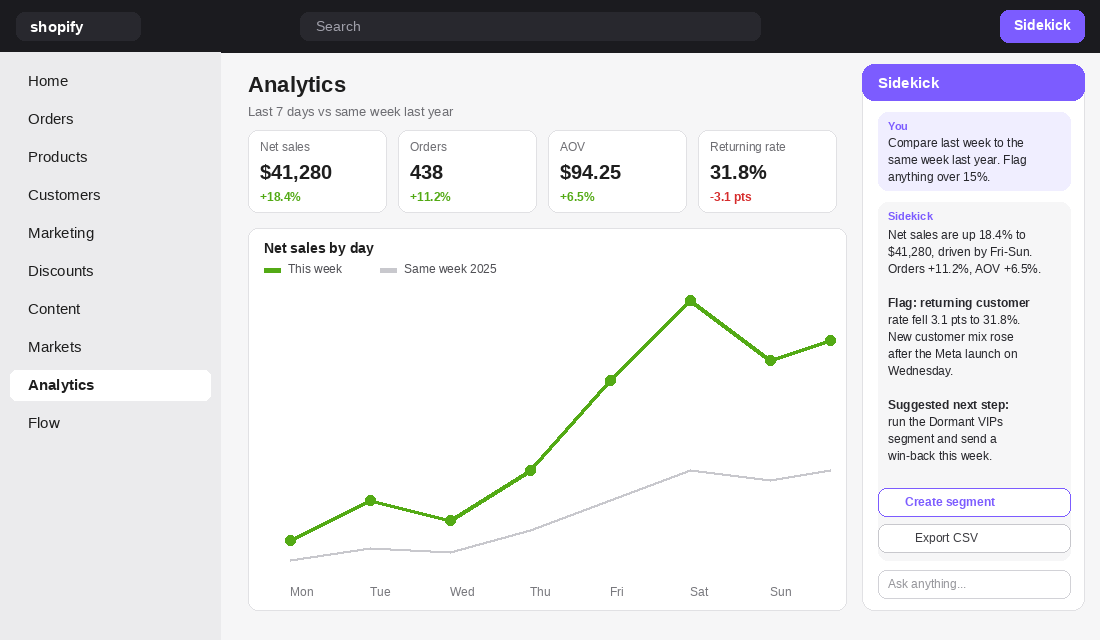
Most founders spend the first hour of Monday pulling reports. Sales by channel, top products, refund rate, where last week’s dip came from. Sidekick can write the ShopifyQL query, run it, chart it, and export it, all from one sentence. This is the job to start with because the payoff is immediate and the risk is zero: you are reading, not changing.
Prompts that work on a real Aussie store:
- “Compare last week to the same week last year: net sales, orders, AOV, returning customer rate. Flag anything that moved more than 15%.” This is your weekly pulse in one line.
- “Show sales, COGS, gross profit and discount amount for my top 50 products over the last 30 days, sorted by gross profit.” Most founders have never seen this table. It reorders your whole ad strategy.
- “Which products had the highest return rate in the last 90 days, and what were the return reasons?” Product detail page fixes come straight out of this.
- “Why did sales drop on Thursday?” Sidekick will check traffic by source, conversion, AOV and stock, then tell you which one moved. Sanity-check it, but it is usually right.
The precedent is not theoretical. Princess Polly, one of the biggest Shopify brands to come out of the Gold Coast, used Sidekick to analyse its 2024 Black Friday Cyber Monday performance before planning 2025: product-level results, which lines outperformed 3x, and where AOV headroom sat. Shopify’s own enterprise team reports the analysis took minutes rather than hours of report compilation.
German sock brand SNOCKS cut its reporting time by up to 98% and put four teams on self-serve data. US fashion group Maggy London cut reporting time 80% across six brands with a lean team.
You do not need a six-brand group to get the same result. You need to save the three prompts above as Skills (more on that below) and run them every Monday before you open a spreadsheet. If you want the deeper version of this, our ShopifyQL reports playbook covers the queries Sidekick is writing for you under the hood.
Job 2: Segments and Automations in Plain English
The second job is the one that quietly saves the most money. Customer segments and Shopify Flow workflows are where founders either pay a freelancer AUD 80 to 150 an hour, or never build them at all. Sidekick builds both from a description.
Segments first. Tell it: “Create a segment of Australian customers who have ordered twice or more, spent over $250 lifetime, and have not purchased in 60 days.” Sidekick writes the segment filter syntax, shows you the customer count, and saves it. That segment syncs to Klaviyo and becomes a win-back flow trigger in the same afternoon.
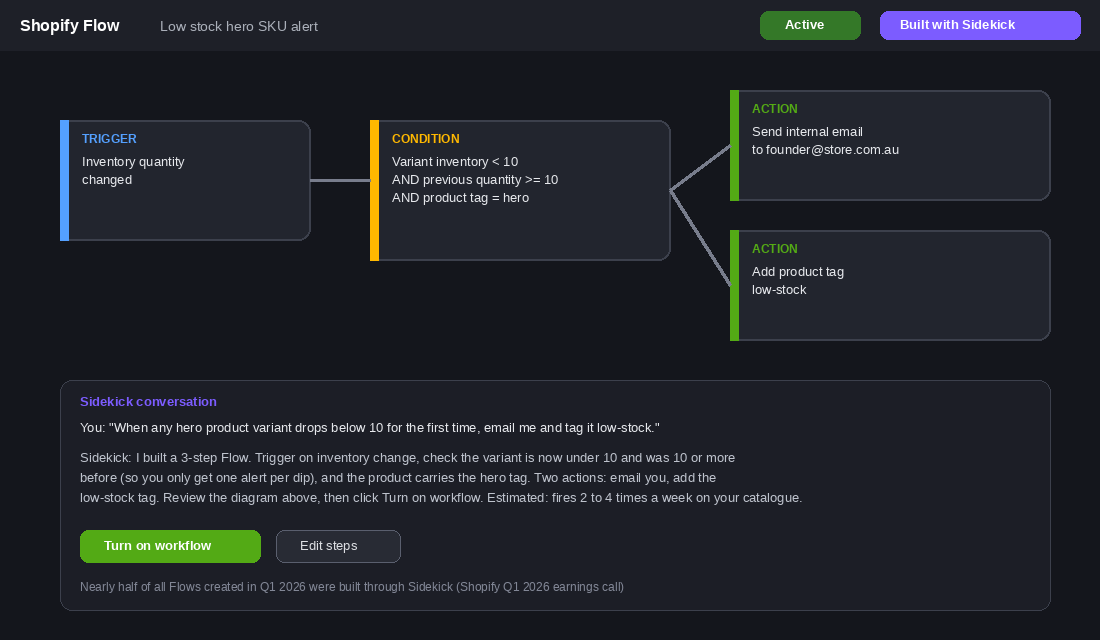
Flow next. Describe the automation the way you would to a staff member and Sidekick assembles the trigger, conditions and actions, then shows you the visual workflow to review before you turn it on. Automations worth building this week:
- “When any variant’s inventory drops below 10 for the first time, email me and tag the product low-stock.” Stockouts on a hero SKU cost Aussie brands 4 to 8% of annual revenue; this is the free early warning.
- “When an order over $300 is placed, tag the customer VIP and add an internal note to check for gift wrap.” Your top 10% of customers now get flagged the moment they appear.
- “If an order total is $0 and it was not a draft order, hold it and email me.” A Shopify Plus operations team built exactly this with Sidekick to catch discount abuse in real time instead of finding it in a monthly report.
- “When a customer’s fourth order is paid, add them to the referral segment and tag them advocate.” Referral asks land best after the fourth order, not the first.
Shopify said nearly half of all Flows built in Q1 2026 came through Sidekick. That is not because the visual builder got worse; it is because describing a workflow is faster than dragging one. If you have never opened Flow, read our Shopify Flow automation playbook first so you know what “good” looks like, then let Sidekick do the building.
Job 3: Catalogue Grunt Work (Products, Tags, Order Edits)
Every store carries a backlog of small catalogue jobs nobody wants: 40 products missing a compare-at price, a seasonal collection that needs tagging, an order where the customer emailed to add one more unit. Sidekick fills forms, edits orders and creates resources from instructions, and highlights every field it touched in purple so you can review before saving.
The trick that makes this useful is the @ mention. Type @ in the chat and reference a specific product, collection, order, customer, discount, segment, page or metafield. So instead of “update the sale collection” you write “Tag every product in @Winter Sale as clearance and set compare-at price to the current price and price to 30% below.” Sidekick navigates, proposes the bulk change, and waits.
Other high-frequency wins:
- Order edits. “Add 2 units of the black hoodie in L to order #4821, apply a 10% line discount, and turn off the customer notification.” Sidekick opens the order editor with the changes staged. You click Update order.
- Product creation from a reference. Paste a supplier spec sheet or upload a photo and say “Create this product with three sizes, $89 RRP, 450g weight, and write the description in the same tone as @Signature Tee.” It fills the whole form.
- Description refresh. “Rewrite the description on @Linen Shirt to lead with fit and fabric, keep it under 120 words, Australian spelling, no exclamation marks.” Shopify Magic now references your existing copy for tone, so it sounds like you rather than a template.
- Discount creation. “Create a 15% off code EOFYVIP for the VIP segment, one use per customer, expiring 30 June, excluding gift cards.” Done in one line, reviewable before it goes live.
One rule: never approve a bulk change without reading the count. If you asked for 38 products and Sidekick is about to change 412, something in your collection rules is wider than you thought. The purple highlight is there to be read, not skimmed.
Job 4: Theme Tweaks Without Booking a Developer
The change requests that clog a founder’s inbox are rarely big: make the button rounder, move the cart to the right, tighten the spacing on mobile, change the sale badge colour. Each one costs an hour of a developer’s time or an hour of you hunting through theme settings. Sidekick now handles these inside the theme editor.
The workflow that keeps you safe:
- Duplicate your live theme first. Sidekick applies changes to the theme you have open in the editor. It will work on an unpublished copy, so always give it one. You still have to click Save, but a copy means a wrong guess costs nothing.
- Use Target mode. Click the plus icon in the chat, choose Target, then click the actual button, section or field on screen. Now “make this 20% larger on mobile and use the brand green” refers to the exact element, not a description of one.
- Ask it to explain. Sidekick tells you why it changed a colour or a spacing value. Over a month you learn your own theme settings faster than any tutorial.
- Know the boundary. It edits settings on sections and blocks already on the page, plus global styles. It will not write custom Liquid, rebuild a section from scratch, or touch checkout. That still belongs to a developer, and our theme deployment playbook covers how to brief one properly.
Realistic scope for a $150k a month store: a founder can clear five to eight small theme requests a week this way, which is roughly AUD 400 to 800 of developer time you no longer buy, and more importantly a two-day wait you no longer have.
Job 5: Build the Internal Tool You Would Never Pay a Developer For
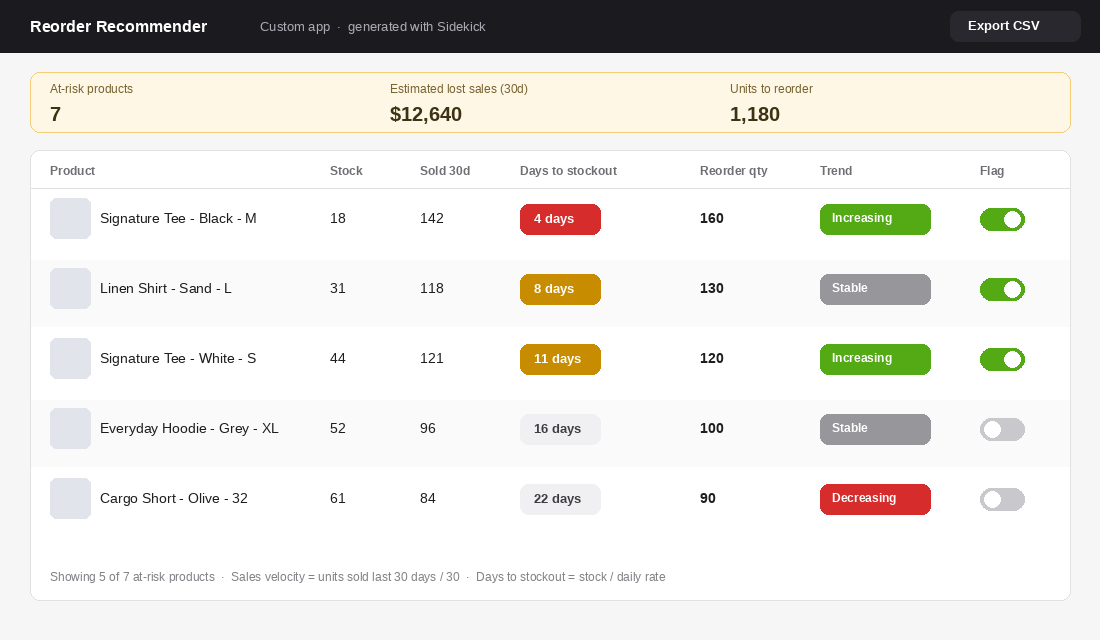
This is the feature that made 12,000 apps appear in one quarter. Describe an internal tool in plain language and Sidekick generates a working admin app: a screen with data, buttons and actions that reads and writes your orders, products, customers and discounts.
The reason this matters is economics. There are a dozen small tools every store would benefit from that never justify a AUD 3,000 to 8,000 build quote. Now they cost a 20-minute conversation. Examples merchants are shipping:
- Reorder recommender. “Build an app that lists products by days until stockout, using the last 30 days of sales, recommends a 30-day reorder quantity, and exports a CSV I can send to my supplier.” Every founder needs this; almost nobody has it.
- Returns eligibility checker. Search an order number, see instantly whether it is inside the return window and whether it has shipped. Dutch retailer Olivia & Kate built a returns workflow this way and avoided around 1,200 euros in development cost.
- Customer tier board. Gold, silver and bronze customers by order count, with one-click tag and discount buttons. Your VIP program now has a control panel.
- Discount code limit tracker. A Plus operations team built an app that watches how close they are to Shopify’s 20 million discount code cap, a limit no off-the-shelf app monitors and one that silently breaks promotions when hit.
The gates you need to know before you start: app generation is available on Grow, Advanced and Plus (not Basic), desktop only, rate-limited by hour and week, and staff need the App development permission. Generated apps live inside the admin and use Admin API data only; they cannot touch your storefront, checkout or anything outside Shopify. That last point is the one to remember: a Sidekick app can tell you what to reorder, but it cannot email your supplier or push a row into Google Sheets. For anything that crosses tools you still need Flow with a connector, or an integration platform.
Where Sidekick Still Lets You Down (the Guardrails)
Handing a job to Sidekick is like handing it to a sharp new hire who has read every Shopify help doc and never met a customer. Brilliant at the mechanics, blind to context. Five places to keep your hand on the wheel:
- It does not talk to customers. Sidekick is admin-only. Your storefront chat, support inbox and AI agent are separate decisions, and the guardrails for those are different. Do not confuse the two.
- Cross-app work is limited. It can now query supported apps like Klaviyo and Judge.me inside a conversation (it asks permission per chat), but it cannot orchestrate a workflow across your 3PL, accounting software and email platform. Shopify Flow connectors or a platform like MESA still do that.
- Its numbers are Shopify’s numbers. Sidekick reports what the admin sees. Shopify Analytics and GA4 routinely differ by 10 to 20% on sessions and attribution. Use Sidekick for orders, revenue, products and customers; use your tracking stack for channel attribution.
- Generic copy is still generic. The first draft of any description will read like every other AI draft unless you feed it a reference product, a tone instruction and a word limit. Brief it like a copywriter, not a search box.
- Money movement is real money. Sidekick can check your Shopify Balance and set up transfers to payees you have already added. It previews before executing, but this is one job worth leaving to your own hands, and one to lock down with staff permissions if a VA uses Sidekick.
None of these are reasons not to use it. They are reasons to use it for the five jobs above and not for the three it is bad at. The founders we see get burnt are the ones who ask it to “grow my store” and act on the answer, rather than asking it to “show me last week’s returns by reason” and acting on the data.
The Tool Setup: Turning Sidekick Into a System in Five Steps
Sidekick is already installed. The setup is about turning ad-hoc questions into a routine your team can run without you. Fifteen minutes, once.
- Step 1: Open it properly. Click the Sidekick icon in the top bar of your admin (or say “Hey Sidekick” in the Shopify mobile app). Switch to full-screen mode for anything more than a one-line question. Check Settings, Users and permissions so each staff member’s role matches what you want them to be able to ask.
- Step 2: Set the context once. Sidekick remembers past conversations and recent admin activity. Spend your first session telling it who you are: “We are an Australian DTC skincare brand, AUD pricing, our peak is October to December, our margin floor is 55%, always use Australian spelling.” It carries that forward.
- Step 3: Save your Monday prompts as Skills. Run each of the Job 1 prompts once, then save it as a Skill. Name them plainly: Weekly Pulse, Profit by Product, Returns by Reason. Share them with staff so the ops manager runs the same three reports you do.
- Step 4: Switch on Pulse and read it weekly. Sidekick Pulse sits on your admin Home and surfaces data-cited recommendations you did not ask for: a size selling out, a channel with high sessions and low revenue, a mobile cart-to-checkout gap. Treat it like a junior analyst’s weekly memo. Read, verify one number, act or dismiss.
- Step 5: Set an approval rule for your team. Write it down: staff can use Sidekick to read anything their role allows and to draft anything, but bulk edits, discounts and Flow activations get a second pair of eyes before Save. One line in your SOP prevents the 412-product mistake.
The Compound Effect: What Five Hours a Week Is Actually Worth
Merchant surveys put Sidekick and Shopify Magic time savings at 5 to 10 hours a week for solo operators and small teams, and that matches what we see. Take the conservative end and cost it.
A founder running a $150k a month store values their time at AUD 75 an hour at minimum (most would argue higher). Five hours a week is 260 hours a year, or about AUD 19,500 of founder time redirected from reports and tag edits to product, creative and customers. Add the developer time you stop buying for theme tweaks (call it AUD 400 a week, or AUD 20,000 a year) and the two or three internal tools you would otherwise never build (AUD 5,000 to 15,000 in quotes you never request). Then add the part that is hard to price: the Flow that catches a low-stock hero SKU three days earlier, or the Pulse insight that spots a mobile checkout gap before BFCM.
That is somewhere between AUD 45,000 and 55,000 a year of value from a tool that costs nothing, on a store where a 1% conversion lift is worth roughly AUD 18,000. The bigger point is what it does to the founder’s calendar. The AI or Hire test we run with members has changed in twelve months: the first three admin hires most founders make are now partly a Sidekick prompt.
Worked Example: One Founder’s First Four Weeks With Sidekick
Here is what the rollout looks like in practice. Imagine you run a Brisbane activewear store doing about 90,000 dollars a month, with one part-time VA and a freelance developer on call. Before Sidekick, your week had roughly six hours of admin you could name: Monday reporting, customer tagging, product edits and small theme requests.
- Week 1: reporting only. You save the three Monday prompts from Job 1 as Skills and run them instead of the spreadsheet. Time spent drops from about 70 minutes to 15. Nothing changes in the store, so there is no risk.
- Week 2: two Flows. You build the low-stock alert and the VIP tagging Flow from Job 2. Total build time is about 40 minutes, including review. The low-stock alert catches a hero legging size running out nine days before it would have.
- Week 3: hand catalogue work to the VA. Your VA now does product edits and order changes through Sidekick using the @ mention, inside their staff permissions. You review the purple highlights once a day instead of doing the edits yourself.
- Week 4: the first internal app. On a Grow plan, you build the reorder recommender from Job 5 in one 25-minute session. It replaces a supplier spreadsheet you used to update by hand every fortnight.
Track it honestly. Log your admin time for one week before you start and one week at the end of the month, using a simple timer like Toggl or a note on your phone. In this example the founder moves from about six hours of weekly admin to under two, and the VA’s hours shift from data entry to customer work.
The point is not that the AI does everything. It is that the jobs you used to delegate by writing long instructions now take one sentence. Before you hire for admin, run the AI or hire test, and when you do bring someone on, the delegation playbook and VA playbook show how to split the work between your team and Sidekick.
Four Mistakes That Waste the Free Assistant
- Asking strategy questions instead of data questions. “How do I increase sales?” returns generic advice. “Which products with over 50 orders in 90 days have a return rate above 10%?” returns a fix list. Ask for evidence, not opinions.
- Editing the live theme. Every Sidekick theme session should start with “duplicate theme”. The change is reversible; the panic of a broken homepage at 9pm is not worth it.
- Approving without reading the count. The purple highlight and the “about to change N items” line are your only gate. Read them every time, especially on bulk tag and price changes.
- Never saving a Skill. If you type the same prompt twice, save it. Founders who run three saved Skills every Monday get the time back. Founders who reinvent the prompt each week get a novelty.
Your Takeaway: The 10 Prompts to Save as Skills This Week
Copy these into Sidekick, adjust the numbers to your store, and save each one as a Skill. Together they cover the five jobs.
- Weekly Pulse: “Compare last week to the same week last year on net sales, orders, AOV and returning customer rate. Flag anything that moved more than 15%.”
- Profit by Product: “Show sales, COGS, gross profit and discounts for my top 50 products in the last 30 days, sorted by gross profit.”
- Returns by Reason: “List products with a return rate above 8% in the last 90 days with return reasons and units returned.”
- Dormant VIPs: “Create a segment of Australian customers with 2 or more orders, over $250 lifetime spend, and no purchase in 60 days.”
- Low Stock Alert: “Build a Flow that emails me and tags the product low-stock when any variant drops below 10 units for the first time.”
- Zero Dollar Guard: “Build a Flow that holds any non-draft order with a total of $0 and emails me.”
- Bundle Finder: “Show the 10 product pairs most often bought together in the last 12 months with frequency and revenue.”
- Description Refresh: “Rewrite the description on @[product] to lead with the main benefit, under 120 words, Australian spelling, tone matching @[reference product].”
- Reorder Recommender (Grow plan and above): “Build an app that lists products by days until stockout using the last 30 days of sales and recommends a 30-day reorder quantity, with CSV export.”
- Mobile Check: “Compare mobile and desktop cart-to-checkout rate for the last 30 days and show which product pages have the biggest gap.”
Run the first three every Monday. Build the two Flows once. The rest are there when you need them. If Sidekick does something surprising, that is data too: it usually means your store is set up differently from how you think it is.
Inside eCommerce Circle, getting founders off admin and back onto the work that actually moves revenue is one of the core pillars we work on with every member. If you want a second opinion on where your week is going, let’s talk.