Every January the same thing happens inside Aussie Shopify stores. The Christmas revenue lands, the team takes a breath, and then the inbox fills with messages that start with “I got this as a gift and…”
What’s in This Article
Most founders handle those messages one at a time, on the fly, with whatever their standard 30-day policy says. The recipient has no order number. The window technically closed on 2 January. The buyer gets an email saying their gift was returned and how much it cost. Somebody on your team refunds the full amount to the original card because it is the quickest way to make the ticket go away.
That is the expensive way to do it. The brands that handle gift returns well treat them as a separate system, built in October, with its own window, its own rules and its own flow. Done right, a gift return is not a refund at all. It is a new customer walking in the door with store credit in their hand. This playbook shows you how to build that system in five steps before the first gift order ships.
Why Gift Returns Break Your Normal Returns Policy
Your standard returns policy was written for one person: the buyer. They have the order number, the email confirmation, the card the money goes back to and a clear memory of what they paid.
A gift return involves two people, and the one doing the returning has none of that. Here is what goes wrong when you run gift returns through your everyday process:
- The window is misaligned. A gift bought on Black Friday is not opened until 25 December. On a 30-day policy, it is already out of window before the wrapping paper hits the bin.
- The recipient cannot prove purchase. No order number, no email, no postcode. Your team has to play detective, and every ticket takes three times longer.
- The refund goes to the wrong person. Refund to the original payment method and the money lands with the buyer, who now knows the gift missed and exactly what it cost. Awkward for them, and a lost sale for you.
- You lose the recipient. The person returning the gift is often a brand-new customer who has never bought from you. Process a cash refund and they leave without ever opening an account.
The size of this is not small. A Finder survey of 1,011 Australians found 21% regifted presents from the previous Christmas, worth around $1.3 billion, or roughly 4.5 million people passing on something they did not want. The average was $297 of regifted presents per person. Every one of those regifts is a return that never happened, which means a customer who never came back to the store that sold it.
In the US, the National Retail Federation’s 2025 Retail Returns Landscape report found retailers expect 17% of holiday sales to be returned, and 19.3% of online sales overall. Aussie shoppers are not that different. If you sold $200,000 over November and December, plan on something like $30,000 to $35,000 of it trying to come back in January.
The question is not whether those returns arrive. It is whether they arrive as refunds or as exchanges and credit.
Step 1: Set Your Holiday Returns Window Deliberately
The first decision is the window, and most stores get it wrong in one of two ways: they forget to extend it at all, or they announce “extended Christmas returns” in an email without ever defining the dates.
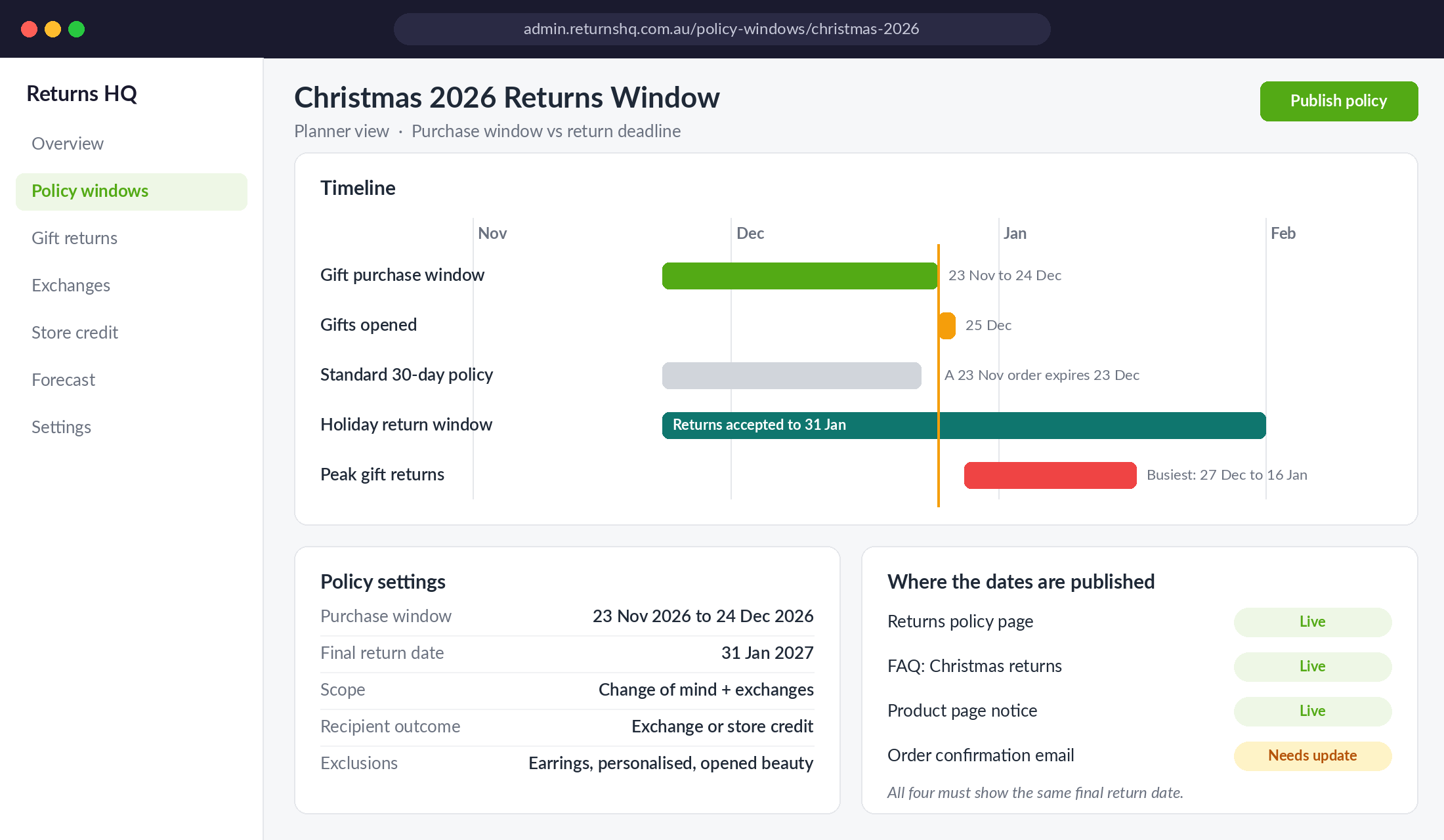
Look at how the big players write it. UNIQLO Australia extended its return and exchange period for purchases made between 18 November and 29 December 2025, with returns accepted until 31 January 2026. Michael Hill ran an even earlier start: purchases made between 27 October and 24 December 2025 could be returned or exchanged until 25 January 2026, subject to its usual change of mind terms. Both policies have three things in common: a defined purchase window, a single hard end date and the normal exclusions still in place.
Here is how to set yours:
- Start date: the first day of your gift-buying season. For most Aussie DTC brands that is the Monday of Black Friday week. If you run an early access or Click Frenzy campaign, start the window there instead.
- End date: 31 January is the market standard and the date shoppers expect. Going later rarely wins sales and drags returns into February when you want to be reading clean data.
- Scope: change of mind returns and exchanges only. Faulty items are covered by consumer guarantees regardless of any window you set.
- Exclusions: keep the same ones you use all year (earrings, underwear, personalised items, opened beauty). Michael Hill still excludes resized rings and engraved pieces during its holiday window.
One rule matters more than the dates. Under the Australian Consumer Law you are not required to offer change of mind returns at all. But as UNSW consumer law academic Katharine Kemp points out, if a business has a change of mind policy, it has to honour it, or it risks a misleading conduct problem. So whatever you publish on the announcement bar, the FAQ and the order confirmation email must match exactly. If marketing writes “return until February” in a campaign and your policy page says 31 January, you have just promised February.
Put the dates in four places: your returns policy page, your FAQ, the product page near the add to cart button during peak, and the order confirmation email. If you only put them in one, customers will not find them and your team will spend January explaining.
Step 2: Write Gift Return Rules That Protect Your Revenue
Once the window is set, write a short set of rules that apply only to gift returns. This is the part that turns a refund into retained revenue, and it is the part almost nobody writes down.
Use these as your starting rules:
- Recipients receive store credit or an exchange, never a cash refund. This is the single most important rule. It keeps the money in your business and keeps the price private. Loop, one of the most widely used returns platforms on Shopify, builds its gift returns flow this way by default: recipients can choose store credit or an exchange, and cannot request a refund to the original payment method.
- A refund to the original payment method requires the buyer. If the person who paid wants their money back, they can request it within the window like any other customer. The recipient cannot trigger it on their behalf.
- The buyer is not notified when a gift is returned. Check this in your notification settings and your returns app before December. Nothing kills a relationship like “Your order #4412 has been refunded” landing in the buyer’s inbox on Boxing Day.
- Credit is issued at the price paid, not the current price. If the item was 30% off during Black Friday, the credit is the discounted amount. Say so clearly so you are not arguing about it in January.
- Faulty is faulty, whoever is holding it. If the item has a problem, treat it under the consumer guarantees and offer the remedy the law requires. Kemp notes that store policies such as “no refunds on sale items” cannot override consumer guarantee rights for faulty goods.
Write these rules in plain English on a dedicated “Returning a gift?” section of your returns page. Two short paragraphs and a button. If you want a deeper look at turning refunds into exchanges across the whole year, the Shopify returns and exchanges playbook covers the full system. The gift rules sit on top of it.
Proof of purchase without a receipt
Recipients rarely have a receipt, and the law does not demand one. Proof of purchase can be a card statement, an order or reference number, a photo of the receipt or a record you can find in your own system. Make it easy: let your team look up the order by the buyer’s name, email or phone number, and accept a photo of a gift receipt or packing slip as enough.
Step 3: Put a Gift Receipt Inside Every Gift Order
The fastest way to fix the “I have no order number” problem is to make sure every gift leaves your warehouse with the return path already inside the box.
There are two layers to this, and you want both.
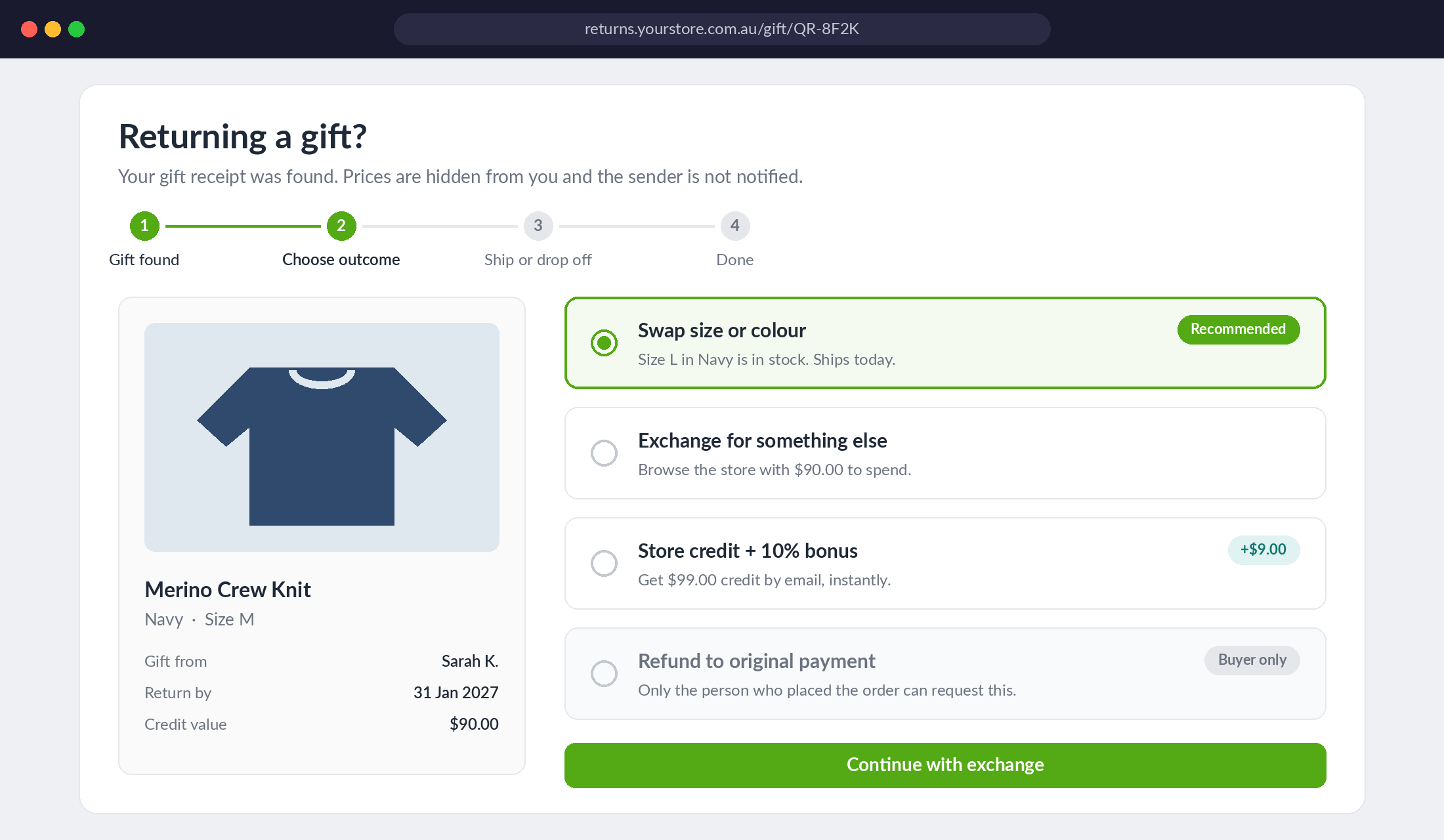
Layer one: a gift slip with no prices. Add an “Is this a gift?” checkbox to your cart or checkout. Then use Shopify’s Order Printer app with a conditional template that hides prices, discounts and totals when the order is flagged as a gift. Print it instead of the standard packing slip. Add one line at the bottom: “Want to swap this? Scan the code or visit yourstore.com.au/gift-return before 31 January.”
Layer two: a digital gift receipt. This is where a returns app earns its fee. Loop’s Gift Receipts feature adds a “Create gift receipt” button to your Shopify order confirmation email. The buyer clicks it, enters the recipient’s name, selects which items are gifts and gets a QR code they can text, email or print. When the recipient scans it, their order details are filled in automatically and they go straight into the returns flow.
Setting up Loop gift receipts (about 20 minutes)
Loop’s help centre documents the setup, and it is mostly copy and paste:
- In Shopify, go to Settings > Notifications > Order confirmation > Edit code.
- Find the line that opens the footer table and add Loop’s gift receipt snippet on a new line directly under it.
- In the Loop admin, go to Returns management > Policy settings > General and find the Gift Returns section.
- Copy your shop-specific gift receipt generator URL and paste it into the snippet, replacing the placeholder domain.
- Copy the gift receipt link from the same section and replace the rest of the URL in the snippet. Keep the closing apostrophe or the button will break.
- Save, then place a test order and generate a gift receipt from the confirmation email before you trust it in peak.
Two warnings from the same documentation. First, if you use Shopify’s native exchange function, Loop’s gift returns will not work, because native exchanges are created on the original order and the buyer can be notified. Pick one approach before November. Second, if you send notifications through Klaviyo, turn off Loop’s own “Gift return request received” email once your Klaviyo flow is live, or recipients get two emails.
If you are not on Loop, the principle still applies. Most of the major Shopify returns apps offer some version of gift returns. The test is simple: can a recipient start a return without the buyer’s email address, and does it default to credit or exchange? If the answer to either is no, keep looking.
This layer pairs naturally with the work in the gift buyer playbook, which covers capturing the recipient’s details at checkout. When you know who the gift is for, the gift receipt practically writes itself.
Step 4: Run Exchange First, Credit Second, Refund Last
The order of options your return portal shows matters more than almost any copy you write. Recipients pick the first reasonable option in front of them.
Set up the flow in this order:
- Exchange for a different size or colour. Show it first, with live stock levels. This is the cheapest outcome for you and the happiest for them. The gift still feels like a gift.
- Exchange for something else. Let them browse the full catalogue inside the portal, using the credit value as a budget.
- Store credit with a small bonus. Offer something like 10% extra if they take credit instead of waiting on an exchange. A $90 credit that becomes $99 costs you $9 in margin on a sale you would otherwise have lost entirely.
- Refund (buyer only). Available, clearly signposted, but only to the person who paid.
The reason this works comes down to what shoppers say they want. The NRF report found 76% of consumers are more likely to choose a return option that offers an instant refund or exchange, and 71% are less likely to shop with a retailer after a poor returns experience. Speed is the product. An instant exchange or instant credit beats a seven-day refund in the customer’s eyes, and it keeps the revenue in your business.
Store credit is where the long-term value sits. Loop issues store credit through Shopify’s gift card system, which means the recipient gets an email with a code and a reason to come back. If you want to go deeper on structuring credit so it actually gets spent, the store credit playbook walks through expiry, reminders and bonus mechanics.
Capture the recipient, not just the return
Every gift return is a chance to add a new customer to your list. Ask for their email to send the credit, add a tick box for marketing consent, and tag them in Shopify as gift-recipient-2026. Then send them a short welcome flow in February that has nothing to do with the return. Recipients who swap a gift for something they love are some of the warmest new customers you will get all year.
Step 5: Forecast and Staff the January Returns Wave
The final step is the one that saves your January. Gift returns are predictable, so plan for them like you plan for Black Friday.
Forecast the volume
Start with three numbers from last year: November and December revenue, the share of those orders flagged as gifts (or sent to a different shipping address than billing, which is a good proxy), and your return rate on those orders through to 31 January. If you have no history, use the NRF benchmark of 17% of holiday sales as a ceiling for planning and adjust down for low-return categories like consumables.
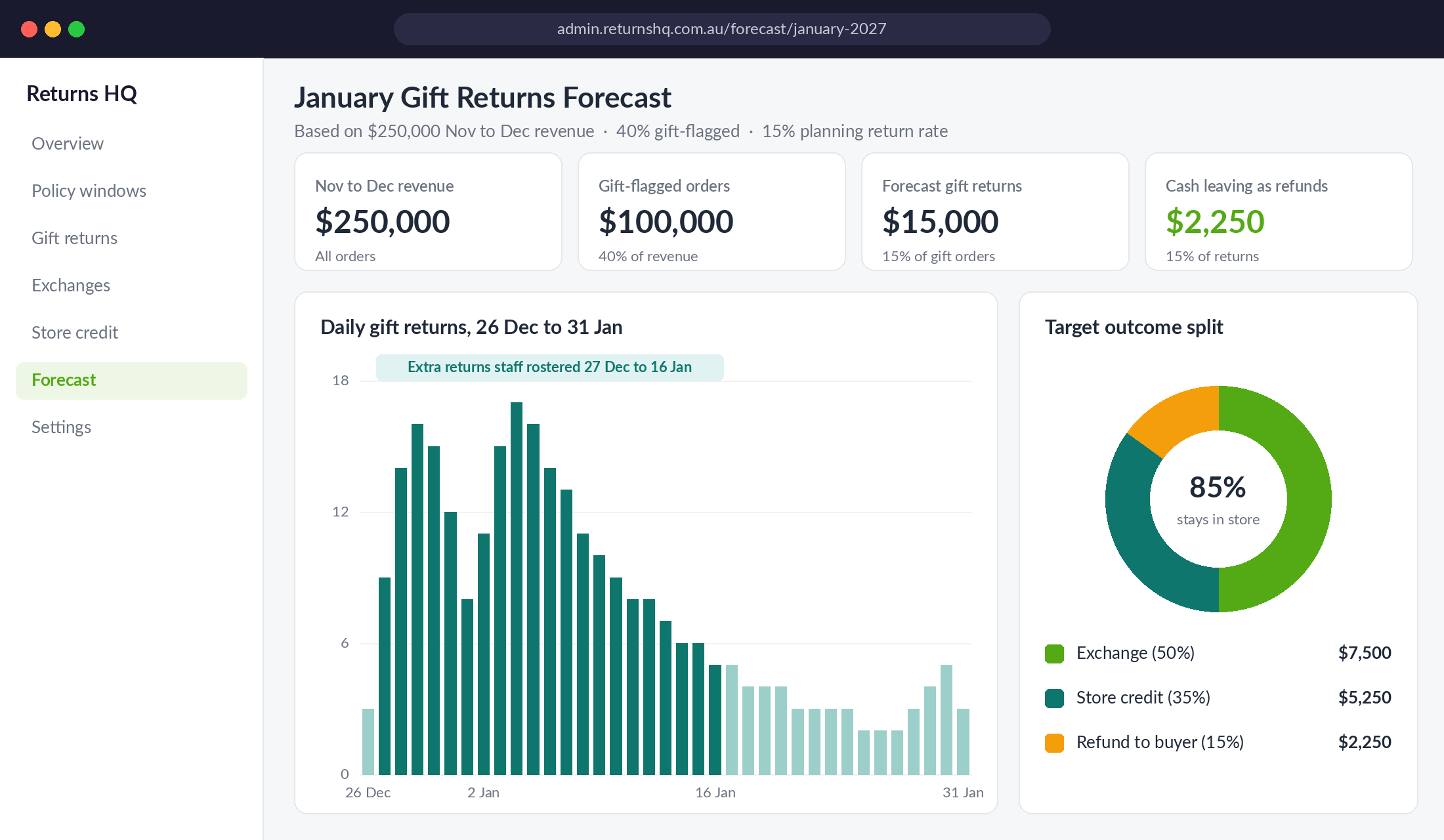
A simple worked example for a store doing $250,000 across November and December:
- Gift-flagged orders at 40% of revenue: $100,000
- Planning return rate of 15% on gift orders: $15,000 coming back
- Target split of 50% exchange, 35% credit, 15% refund: only $2,250 leaves the business as cash
- Without the system, if most of it goes back as refunds: you could hand back $12,000 or more
That gap is the whole case for building this in October.
Hold stock and cash for it
Keep a small exchange reserve of your top 20 sizes and colours aside in late December so exchanges can ship the day they are approved. Hold back enough cash to cover your forecast refunds rather than spending the whole December take on January stock. The Boxing Day playbook covers pricing the returns before you bank the revenue, which is the cash side of this same problem.
Watch for fraud without punishing real recipients
The NRF report found 9% of all returns are fraudulent, with empty boxes and decoy items among the most common tactics retailers report. Gift returns are an easy target because the person returning has no purchase history. Keep the defences light: credit or exchange only for recipients (which removes the cash incentive), inspect the item before issuing credit on anything above a set value, and flag any recipient name that appears on more than three gift returns.
Staff for the first two weeks of January
In the stores we work with, the bulk of gift returns land in the fortnight after Boxing Day. Roster an extra person for returns processing from 27 December to 16 January, write macros for the five most common gift return questions, and give your team the authority to approve an exchange without escalating it.
How the Five Steps Work Together
Each step on its own helps a little. Together they change what a gift return is.
The defined window (Step 1) means customers buy gifts with confidence in November, which lifts conversion during the busiest weeks of the year. The gift rules (Step 2) mean that confidence does not cost you cash in January. The gift receipt (Step 3) means the recipient can actually use those rules without your team doing detective work. The exchange-first flow (Step 4) turns most returns into a second sale and a new customer. And the forecast (Step 5) means you have the stock, the cash and the people ready when the wave arrives.
Skip any one and the system leaks. A great policy without a gift receipt still drowns your inbox. A gift receipt that defaults to refunds still sends cash out the door. A brilliant flow without a forecast still runs out of exchange stock on 3 January.
Build all five and January stops being the month you give money back. It becomes the month you meet thousands of new customers, each holding credit to spend in your store.
Your Gift Returns Checklist (Complete Before 1 November)
Run this list with your team and tick each item off before the first Black Friday order ships:
- Window: purchase start date, purchase end date and final return date written down and signed off.
- Published in four places: returns page, FAQ, product page during peak and order confirmation email, all with matching dates.
- Gift rules: recipient gets exchange or credit only, buyer-only refunds, credit at price paid, faulty items under consumer guarantees.
- Buyer notifications: confirmed that no refund or return email goes to the buyer when a recipient returns a gift.
- Gift checkbox: “Is this a gift?” added to cart or checkout and tagging orders correctly.
- Gift slip: Order Printer template that hides prices for gift orders, with the return URL and end date printed on it.
- Digital gift receipt: returns app gift receipt button live in the order confirmation email and tested with a real order.
- Portal order: same-item exchange, other-item exchange, bonus credit, then refund.
- Recipient capture: email collected, consent box added, gift-recipient tag applied, February welcome flow built.
- Forecast: expected return value, exchange reserve stock list and cash held back.
- Team: January roster, five gift return macros, approval limits agreed.
Copy and paste policy wording
Adapt this for your returns page:
“Buying a gift? Orders placed between [start date] and 24 December can be returned or exchanged until 31 January. If you received a gift from us, you can swap it for a different size, colour or product, or receive store credit for the price paid. Refunds to the original payment method are available to the person who placed the order. Faulty items are always covered under the Australian Consumer Law.”
Before you publish, have the wording checked against your full returns policy so the two never contradict each other. Small differences in wording are exactly where January disputes start.
Make January Your Second Acquisition Month
The founders who dread January are the ones still treating gift returns as a customer service problem. The ones who plan for them in October end up with lower refunds, faster tickets and a list full of new customers who found the brand through somebody else’s present.
Inside eCommerce Circle, protecting peak-season revenue is one of the core pillars we work on with every member. If you want to see exactly where your store is being capped, take the free More Orders Scorecard. It takes two minutes and shows you which of the 10 P’s to fix first.