Most Shopify founders find out about click fraud the wrong way. Sessions look healthy, ad spend is climbing, and orders are flat. So they buy the first click fraud app that ranks on Google, install it, and hope the problem goes away.
What’s in This Article
It usually doesn’t. An app can block junk clicks and still leave you wasting money on the wrong campaigns, the wrong placements and the wrong audience settings. The brands that get this right treat click fraud as one line in a wider traffic-quality routine, and they buy software only after they have proof they have a problem.
This guide shows you how to get that proof in under an hour, which Shopify click fraud apps are worth testing, what they cost in USD, and how to run a 7-day test that tells you whether the app pays for itself. If you want the bigger picture on bots first, read our 6-step bot traffic and click fraud audit and come back here to pick the tool.
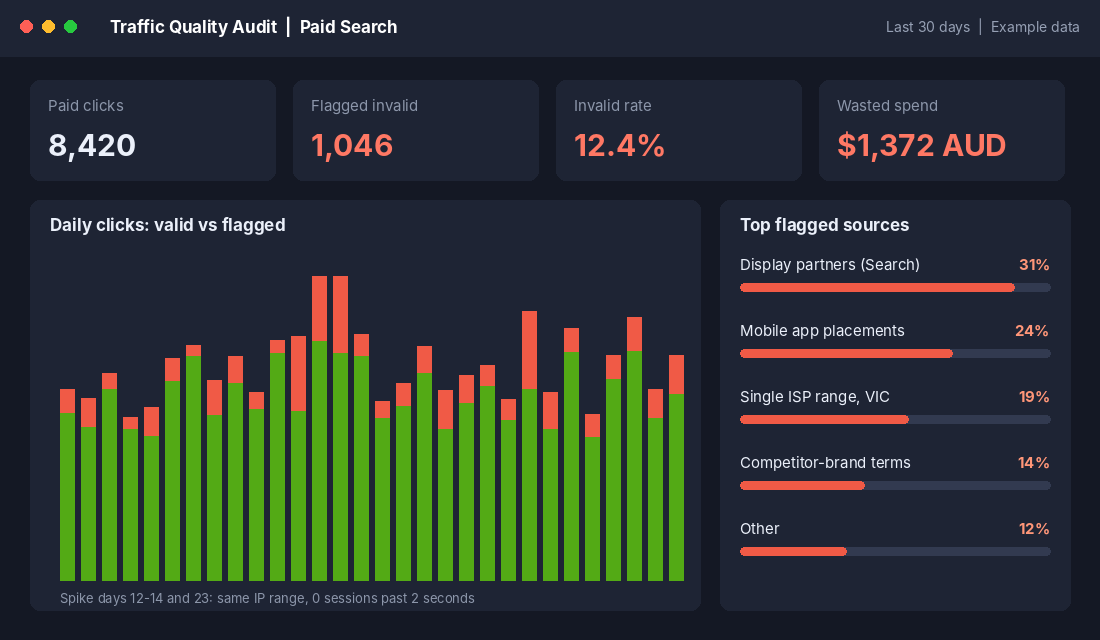
How Big Is Click Fraud on Shopify Stores, Really?
Be careful with the numbers you see online. Nearly every click fraud statistic comes from a company selling click fraud protection. That doesn’t make the figures false, but it does mean you should treat them as the top of the range, not your store’s reality.
Here is what the published data says, with the source of each claim:
- 11.5% of Google Ads spend is wasted on invalid traffic, according to Fraud Blocker’s own analysis. The same vendor also cites Juniper Research putting global ad spend losses at 22%.
- 21% of the monthly budget for a mid-sized ecommerce store goes to invalid traffic on average, according to TrafficGuard’s 2025 industry figures.
- 21.3% of onsite traffic was invalid (excluding search engine crawlers) in fraud0’s 2025 report, Unmasking the Shadows.
- 57% of holiday ecommerce traffic was bots, according to a Radware report covered by Nasdaq. Bot traffic is not the same as paid click fraud, but it shows how much junk hits stores at peak.
- You are not charged for what Google catches. Google says it filters invalid clicks out of billing, and if it spots more after you have been billed, it issues a credit on your next invoice.
Read those together and the honest takeaway is this: somewhere between a few percent and about a fifth of paid traffic can be junk, depending on your category, your campaign types and how much of your spend runs on display and app placements. Google already removes part of it. What you are paying for with a third-party app is the part Google doesn’t catch.
That is why your first job is measurement, not shopping.
Step 1: Prove You Have a Problem Before You Pay for an App
A click fraud app costs roughly USD $79 to $200 a month for small and mid-sized accounts. On a store spending AUD $3,000 a month on Google Ads, you need to recover about 3 to 5% of your spend just to break even. Here is how to find out whether that is realistic, using tools you already have.
Check engagement by campaign in GA4
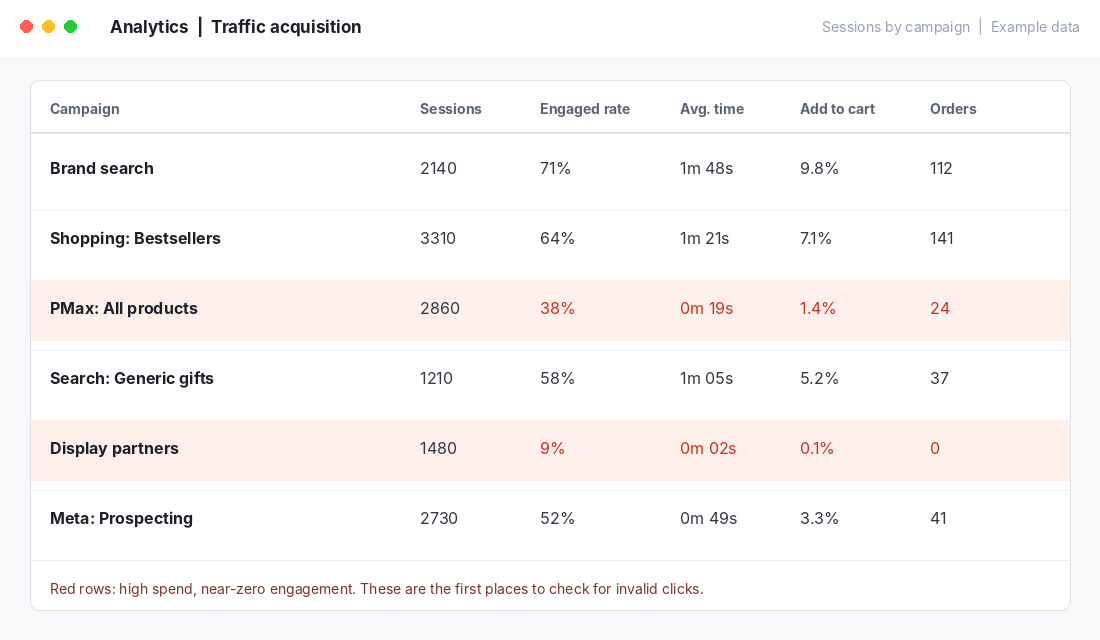
In GA4, open Reports, then Acquisition, then Traffic acquisition. Change the dimension to Session campaign and add engaged sessions rate, average engagement time and purchases. You are hunting for campaigns that spend real money and show almost no human behaviour.
- Engaged rate under 15% on a campaign that should be bringing in buyers.
- Average engagement time under 3 seconds with sessions in the hundreds or thousands.
- Zero add-to-carts across a few hundred clicks, while the rest of your campaigns convert normally.
Real shoppers bounce, but they don’t bounce at that scale in a pattern. If one campaign type sits far below your others on every behaviour metric, you have found your first suspect.
Look at where Google is sending your ads
In Google Ads, go to Campaigns, then Insights and reports, then Where ads showed. Look at Search partners, Display Network placements and app placements. These are where junk clicks collect, because publishers earn money per click and not every publisher is honest.
If you run Performance Max, you can’t switch off placements the way you can on Search, so turn on brand and placement exclusions where available, and compare the conversion rate against your Shopping campaigns. A large gap is a signal to investigate, not proof of fraud. Weak creative and wide audience signals cause the same pattern.
Look for patterns, not single clicks
Fraud shows up as clusters: dozens of clicks from the same IP range, the same device and browser profile, or a burst at 3am in a city you don’t ship to. Shopify’s own analytics won’t show you this, but your ad platform’s geographic report and your GA4 city and device breakdowns will. Fraud tools earn their fee on exactly this kind of pattern matching, which is hard to do by hand once spend grows.
The Real-World Proof That Wasted Ad Spend Hides in Plain Sight
If this feels like a small-business problem, look at what happened at the big end.
Uber. Uber’s former head of mobile marketing, Kevin Frisch, reviewed the company’s ad networks and found numbers that didn’t add up, including networks reporting more daily clicks than Uber had active users, and partners claiming credit for sign-ups that were already happening. Uber cut roughly two thirds of a budget of about USD $150 million, and user acquisition did not meaningfully fall. The lesson: when you stop paying for suspect traffic and nothing changes, that traffic was never working for you.
JPMorgan Chase. In 2017 Chase cut the number of websites showing its programmatic display ads from around 400,000 to about 5,000. Reported results were essentially the same, and the company said the clean-up was not hurting performance. Again, a huge portion of placements were doing nothing for the brand.
You don’t have Uber’s budget, but you can run the same test at your own scale: pause the most suspicious placement type for two weeks and watch your orders, not your clicks. If orders hold, you’ve just saved that money for free, before any app.
Your Options: Shopify Click Fraud Apps and Tools Compared
A note before the list: most dedicated click fraud tools are not Shopify apps. They work by installing a tracking snippet on your store (through the theme or Shopify’s custom pixel area) and connecting to your ad account. So when we say Shopify click fraud app, we mean a tool that works with Shopify, not necessarily one listed in the Shopify App Store. Always check the vendor site for the current setup instructions and pricing, because both change.
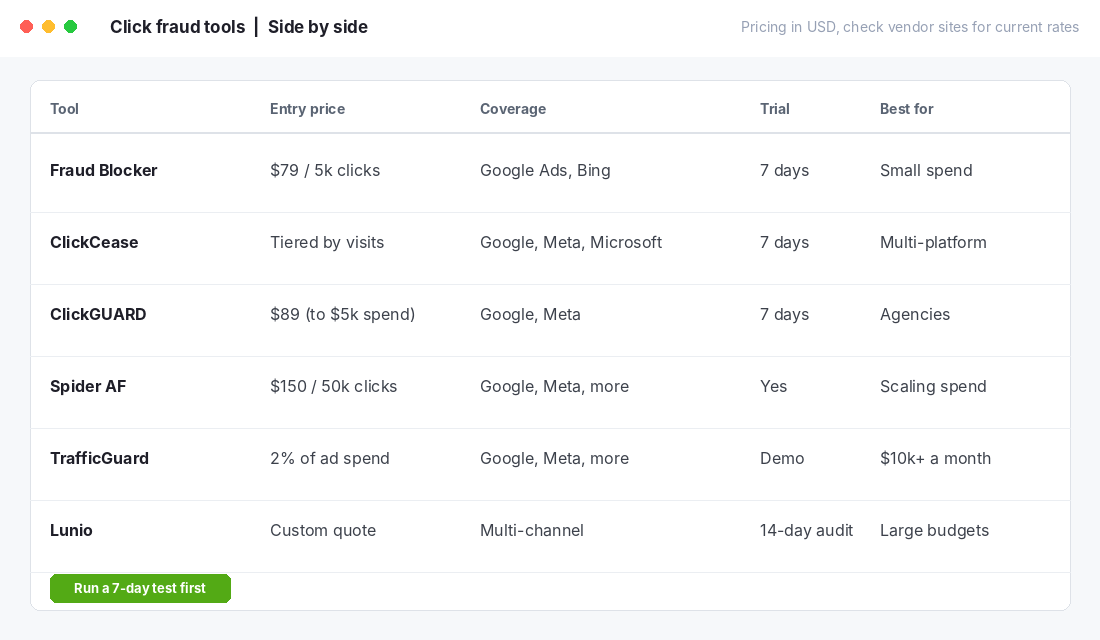
- Fraud Blocker. Listed at about USD $79 a month for up to 5,000 clicks and $99 for 10,000, with a 7-day trial. Covers Google Ads and Bing. Good fit for small spend. Remember this price list comes from Fraud Blocker’s own comparison, so confirm it on their site.
- ClickCease. Tiered by monthly visits and domains: the entry plan covers one domain and up to 5,000 monthly visits, and the page offers a 7-day trial. It covers Google, Meta and Microsoft ads, which matters if Meta is your biggest channel. Dollar prices were not visible on the pricing page when we checked, so get the quote.
- ClickGUARD. Roughly USD $89, $149 and $199 across three tiers, scaled to ad spend (the lowest tier is for accounts up to $5,000 a month in spend), with a 7-day trial. Popular with agencies because of its rule controls.
- Spider AF. About USD $150 a month for up to 50,000 clicks. Worth a look once your click volume is large.
- TrafficGuard. Priced at about 2% of ad spend rather than a flat fee. That means $10,000 a month in spend costs about $200 a month, so it is better suited to larger accounts.
- Lunio (which absorbed PPC Protect). Custom pricing and a 14-day free traffic audit. Aimed at larger budgets; request the audit before you sign anything.
Which one should you test? If you spend under AUD $5,000 a month and mostly run Google, start with Fraud Blocker or ClickCease. If Meta is half your spend, ClickCease’s multi-platform coverage matters more. If you are past about $10,000 a month, ask TrafficGuard or Lunio for a free audit first, because they show you the problem before you pay.
What Works, and What to Skip
What works
- IP and device blocking that syncs back to Google Ads. The tool adds suspect IPs to your exclusion list automatically. Google Ads caps IP exclusions at 500 per campaign, so check how the tool handles that limit.
- Session recordings or behaviour signals. Tools that show what a flagged visitor actually did give you evidence you can use if you contact Google.
- Reporting you can take to Google. Google lets you submit invalid activity concerns to its ad traffic quality team. A clean log of dates, IPs and behaviour makes your case far stronger than ‘my clicks seem odd’. Credits typically come back as account credit, not cash.
What to skip
- Any tool that promises to remove ‘up to 30%’ of your spend. If Google already filters part of the problem, the recoverable slice on your account is smaller than the headline number.
- Long annual contracts before a trial. Every tool above offers a trial or audit. Use it.
- Blocking whole countries or cities as a first move. You will cut real customers. Block by evidence, not by suspicion.
- Treating the app as your whole fraud plan. Click fraud wastes ad dollars. Card testing, chargebacks and fake orders are a different problem, covered in our guides to Shopify fraud prevention and chargeback fraud protection.
Seven Free Fixes to Make Before You Buy Any App
Most of the waste we find in Aussie Shopify ad accounts is not fraud at all. It is settings. Fix these first, and any click fraud app you test later has a cleaner account to work on.
- Turn off Search Partners on Search campaigns. Run it for two weeks and compare cost per order. If orders hold, leave it off.
- Set location targeting to people in your shipping zones. Choose ‘Presence’ rather than ‘Presence or interest’, so you stop paying for clicks from people outside Australia who can’t buy from you.
- Add negative keywords weekly. Free-product searches, job searches and competitor research clicks look like fraud in your reports but are really bad targeting.
- Use ad scheduling if you can’t handle 3am orders or support. If your best conversions come between 7am and 10pm AEST, cut the rest and watch what happens.
- Exclude low-quality app placements on Display and Performance Max where the controls allow it. Children’s game apps are a classic source of accidental clicks.
- Cap frequency on remarketing. Repeated impressions to the same small audience inflate clicks from people who have no intent to buy.
- Check your conversion tracking. If your purchase event misfires, every campaign looks bad and fraud looks worse. Our tracking pixel audit walks you through it.
Work through those seven and you will often recover more money than a click fraud tool saves, at no monthly cost. Then, with a clean account, a 7-day app test gives you a fair answer.
The 7-Day Test: Will the App Pay for Itself?
Run this before you commit. It takes about 20 minutes to set up and a few minutes a day to watch.
- Day 0: Record your baseline. Write down last 30 days of Google Ads spend, clicks, cost per click, conversion rate and ROAS. Screenshot your GA4 engaged rate for each campaign.
- Day 0: Install the tool in monitor mode. Most apps let you detect first and block later. Connect your Google Ads account and add the tracking snippet.
- Days 1 to 7: Check the flagged clicks daily. Note the percentage flagged, the sources and the estimated wasted spend. Open ten flagged sessions and confirm they look like bots, not curious shoppers.
- Day 7: Switch on blocking for confirmed patterns. Keep an eye on conversions for another week to make sure blocking didn’t touch real buyers.
- Day 14: Do the maths. Monthly saving = flagged spend you stopped paying for, plus any credits from Google. If saving is at least double the monthly fee, keep it. If not, cancel and put the fee into creative testing.
A simple rule: if the app flags less than 5% of your clicks, you probably don’t need it yet. Fix your campaign structure, placements and audiences first, and read our marginal ROAS playbook to find where the next dollar of spend is better used.
The Click Fraud Response Checklist
Copy this into your weekly ad review:
- Check GA4 engaged rate and engagement time by campaign.
- Review Where ads showed for Search partners, Display and app placements.
- Look for IP, device or time-of-day clusters in your ad platform reports.
- Export evidence (dates, IPs, behaviour) for anything suspicious.
- Submit an invalid activity enquiry to Google when the evidence is clear.
- Exclude bad placements and IP ranges, not whole regions.
- Compare orders before and after each change, not just clicks.
- Review the tool fee against recovered spend every month.
How Click Fraud Fits Into the Bigger System
Click fraud protection works best as a small part of a wider routine. Measurement tells you which traffic is real. Placement controls and exclusions reduce the junk before it costs you. A tool catches what slips through, and your fraud and chargeback defences handle what happens after checkout.
Skip any layer and the others have to work harder. If your tracking is messy, you can’t tell fraud from poor creative. If your campaigns are too broad, you buy junk even with a tool running. And if you buy the tool first, you pay a monthly fee to solve a problem you haven’t sized.
Get the order right and the maths gets simple. You know your baseline, you test one tool for 7 days, and you keep it only if the saving is clear. That is how a founder with a $3,000 monthly ad budget and a founder with a $30,000 budget both make a sound decision.
Inside eCommerce Circle, protecting your ad spend is one of the core pillars we work on with every member. If you want to see exactly where your store is being capped, take the free More Orders Scorecard. It takes two minutes and shows you which of the 10 P’s to fix first.