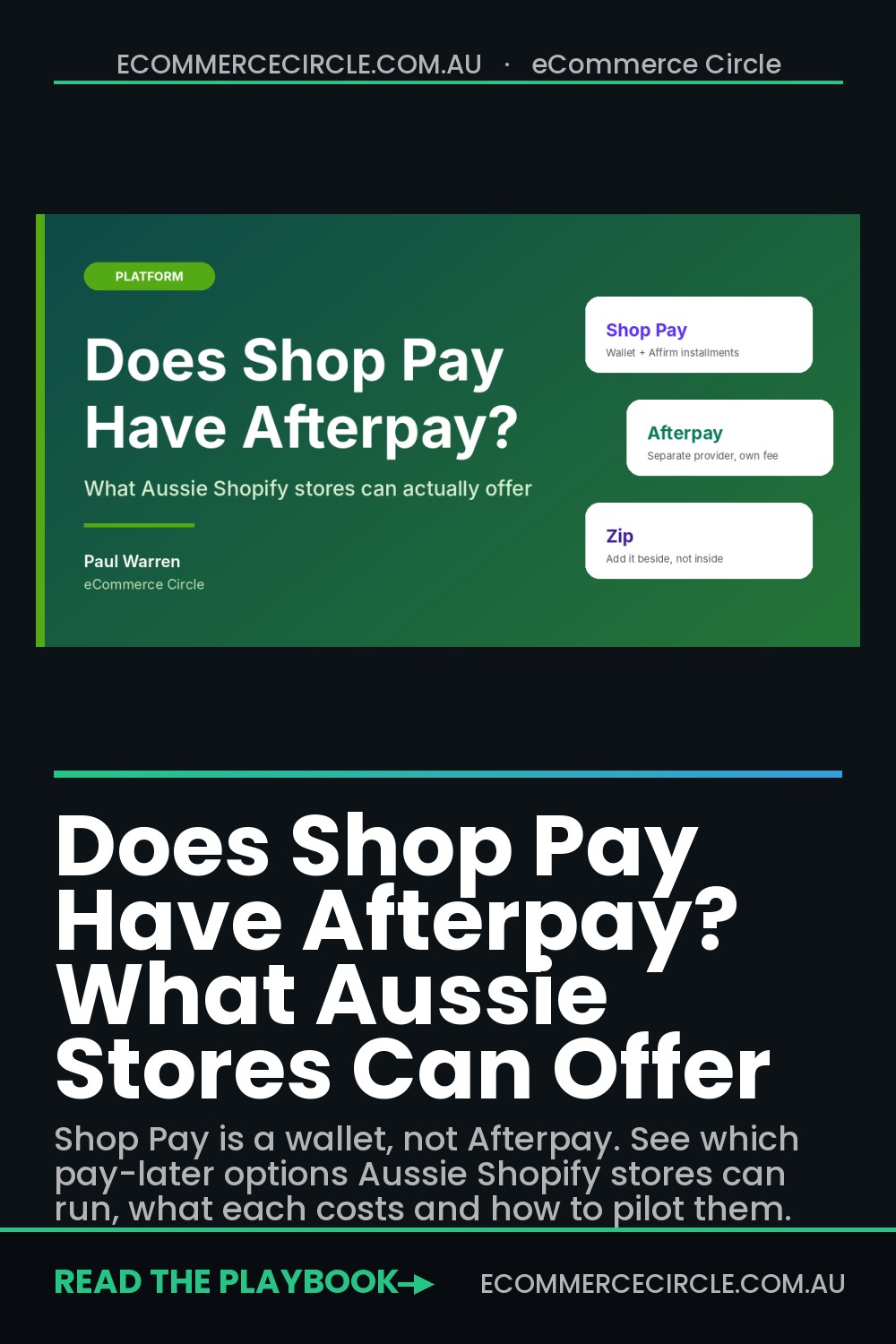
No, Shop Pay does not have Afterpay inside it. That one-line answer is what most store owners are searching for, and it is also where the confusion starts, because the answer you actually need is longer. Shop Pay is Shopify’s accelerated checkout wallet. Afterpay is a separate buy now pay later provider that you add to your store yourself, under your own agreement, with its own fee.
What’s in This Article
Here is the mistake I see Aussie founders make. They hear that Shopify launched Shop Pay Installments in Australia, assume it replaces Afterpay and Zip, and start planning to rip them out. Or the opposite: they assume Afterpay already shows up inside Shop Pay, so they never add it. Both assumptions cost real money. One quietly drops conversion on the orders that came through Afterpay. The other leaves you with a checkout that is missing the payment option your shoppers expect.
In this guide you get the plain answer on what Shop Pay is, what it is not, which pay-later options sit beside it, what each one costs you, and a simple four-week pilot to decide which ones deserve a place at your checkout. If you only need the Shop Pay Installments side of this, we covered it in detail in Shop Pay Installments Australia. This article is about the bigger question: the whole pay-later stack.
Shop Pay vs Afterpay: What Each One Actually Is
Three different things get called “Shop Pay” in conversation, and mixing them up is why so many articles contradict each other. Pull them apart first.
- Shop Pay (the wallet). A saved-details checkout. A returning shopper confirms with a code and their shipping and card details fill in automatically. It is a speed tool, not a credit product.
- Shop Pay Installments. A pay-over-time option that appears inside the Shop Pay flow. It is powered exclusively by Affirm, which returned to Australia through Shopify on 27 August 2026. Affirm makes a real-time decision on every purchase.
- Afterpay. A separate pay-later provider with its own shopper app, its own customer base and its own merchant agreement. It is not part of Shop Pay and it is not powered by Shopify.
So when someone asks “does Shop Pay have Afterpay,” the honest answer is: Shop Pay has its own pay-later product, and it is not Afterpay. You can run both at the same checkout, but you set each one up separately.
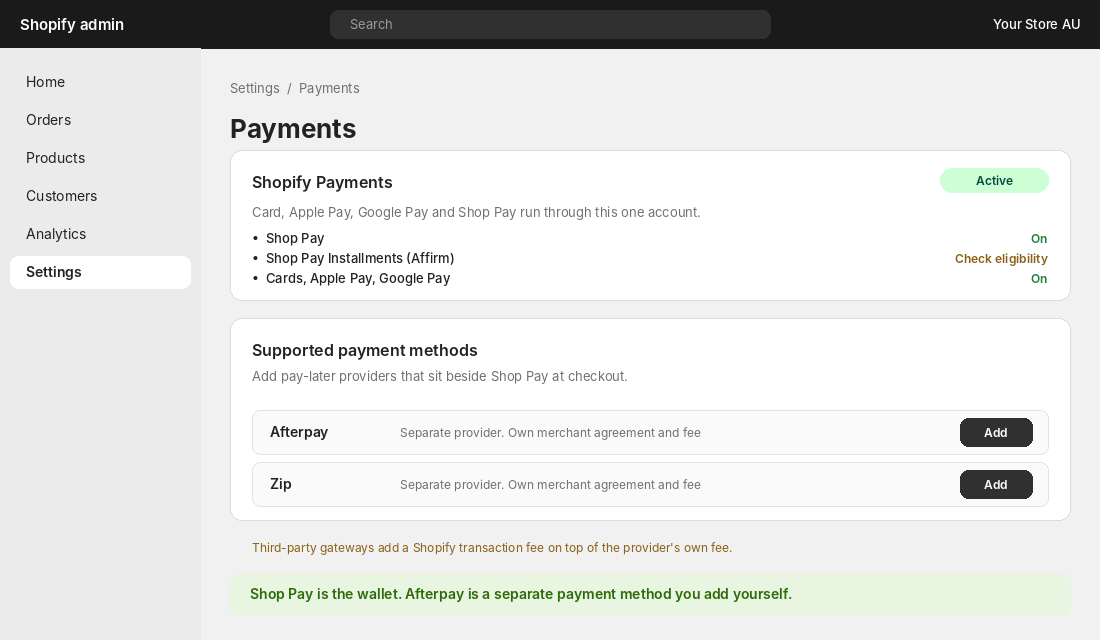
There is one detail in the Shopify docs that matters for your margin. Orders processed through Shopify Payments, Shop Pay and Shop Pay Installments are not charged third-party transaction fees. Shopify says that using a third-party provider alongside Shopify Payments does incur transaction fees. Check the current rate on your plan, because it sits on top of whatever the provider charges you. We unpack plan costs in our Shopify plan break-even maths.
Why Your Shoppers Still Expect Afterpay
Pay later is not a niche behaviour in Australia. Finder’s March 2026 survey found 41% of Australians had used a buy now pay later service in the previous six months. Usage peaked at 50% in October 2024, so it has cooled a little, but it is still roughly four in ten shoppers. By generation it splits sharply: 59% of Gen Y and 57% of Gen Z used BNPL, against 30% of Gen X and 15% of baby boomers.
That tells you who you are selling to. If your customer is under 40, a checkout without a familiar pay-later brand is a checkout with a gap in it. Afterpay’s own research (a Mastercard study from June 2022, quoted on its merchant site) says its customers spend 54% more overall and have an average order value 28% higher. Treat that as the provider’s number, not gospel, but it explains why Afterpay sits on most Aussie product pages. In its November 2023 brand tracking across Australia and New Zealand, 48% of customers said they would shop elsewhere if Afterpay were not available.
Two honest cautions before you add anything. Finder’s data puts the average BNPL debt at about $1,110 per user in March 2026, and the average late fee hit a record $119 in the first quarter of 2024. A third of users, 33%, said they could not manage their finances without BNPL. Your shoppers carry that risk, but it shows up in your business as refunds, chargebacks and returns when money gets tight. That is why the pilot later in this article tracks refunds, not just sales.
The Pay-Later Options You Can Run at an Aussie Checkout
Here is how the main options compare on the things that decide whether you keep the profit. Fee figures are ranges, not quotes, because most providers send you to your own agreement for the real rate.
| Option | Who runs it | Set up in | What it costs you | Watch out for |
|---|---|---|---|---|
| Shop Pay (wallet) | Shopify | Shopify Payments | Standard card rate | Not a credit product |
| Shop Pay Installments | Affirm | Shopify Payments settings, if eligible | Australian fee not published when we checked | Eligibility varies by store; check your admin |
| Afterpay | Afterpay | Payments page, separate account | Finder (Oct 2024): 30c fixed plus about 4 to 6% | Rate depends on your agreement |
| Zip | Zip | Payments page, separate account | Own agreement; rate not published | Overlaps with Afterpay for many shoppers |
A note on that Afterpay row. Afterpay’s own merchant page says merchants pay “a fixed fee, plus a percentage amount” and that it can differ for online and in-store sales, without printing the rate. Finder’s retailer guide, last updated in October 2024, puts it at 30 cents plus roughly 4 to 6% per sale and says the actual rate depends on your agreement. Ask for yours in writing before you sign anything.
The thing that surprises most founders is the fee gap versus a card. Here is the same $120 order across the main options, using an assumed 1.75% plus 30 cents for cards (check your own Shopify Payments rate) and the US reported 5.9% plus 30 cents for Installments as a warning range, since an Australian rate has not been published.
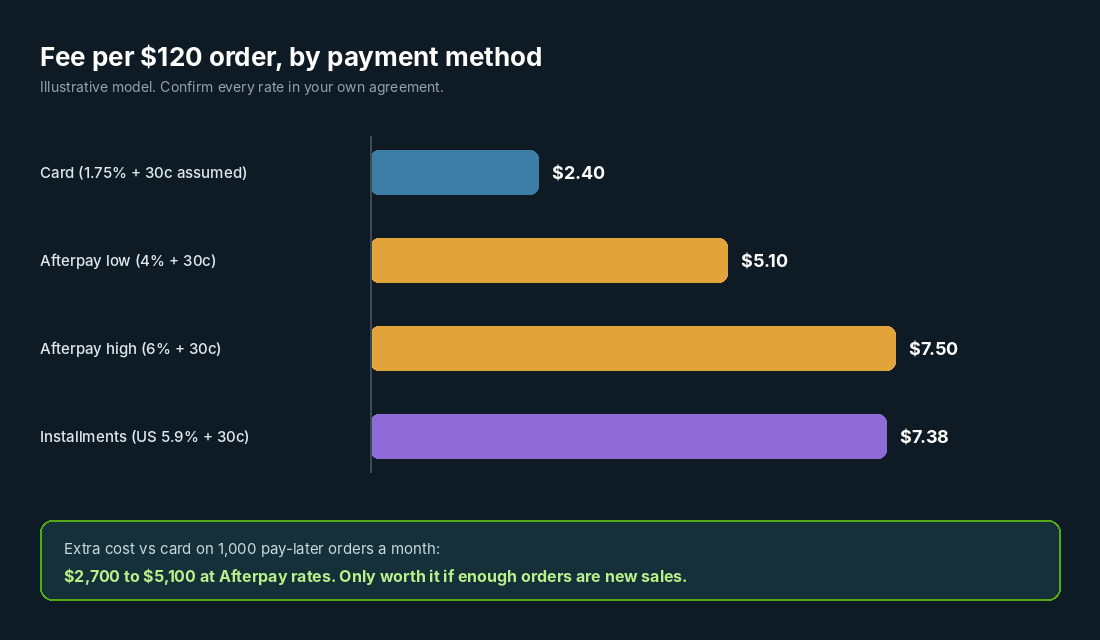
On that $120 order, a card costs about $2.40. Afterpay at 4% costs $5.10, and at 6% it costs $7.50. If 1,000 orders a month go through Afterpay instead of cards, you are paying an extra $2,700 to $5,100 a month for the privilege. That can be a bargain if those are orders you would not have won otherwise. It is a pure leak if the shopper would have paid by card anyway. Our BNPL margin test walks through the exact break-even calculation.
What Real Aussie Stores Actually Show Shoppers
The best way to see how pay-later options coexist is to look at what stores publish. Two Aussie Shopify stores make the point, and they pull in slightly different directions.
Culture Kings runs a dedicated Afterpay page. It describes four instalments over six weeks, interest free, with the first 25% due at purchase and credit checks applying. Its FAQ states that late fees never exceed 25% of the order total or $68 per order, whichever is lower. Shop Pay appears only as a logo in the footer. Zip is linked from the help menu with no detail. The message to the shopper is simple: Afterpay is the pay-later brand, and the page explains it in full.
Beginning Boutique also centres its pay-later page on Afterpay, but describes four fortnightly instalments over eight weeks, says there is no interest or added fees when you pay on time, and notes that late fees “generally start at $10 for missed payments on orders over $40.” It also tells shoppers that a store credit from a return does not cancel the Afterpay plan, so they must keep paying.
Look at the difference in those two descriptions of the same provider: six weeks versus eight. That is not me flagging an error. It is a warning that a hand-written payment page ages badly. Copy only what the provider currently publishes, and link to the provider’s terms instead of restating them. The Beginning Boutique return note is the one to steal, because it answers the question that drives pay-later refund tickets: “I returned it, why am I still being charged?”
How to Add Afterpay Beside Shop Pay (Step by Step)
If you decide Afterpay belongs at your checkout, set it up properly. Afterpay’s Shopify developer guide lists the requirements: your Shopify store address must be in Australia (or New Zealand, Canada or the US), and your store currency must match the Afterpay account region. For an Aussie store, that means AUD.
- Confirm your basics. In Shopify admin, go to Settings > General. Check your store address is in Australia and your store currency is AUD.
- Check payment capture. Under Settings > Payments, make sure capture is set to “Automatically at checkout” or “Automatically when order is fulfilled”. Manual capture needs Afterpay’s separate manual capture guide.
- Apply for an Afterpay merchant account. This is a separate agreement. Ask for your fee in writing, the settlement timing, and what happens to the fee on a refund.
- Add Afterpay from the Payments page. Install it and connect your merchant account, then keep test mode off and activate it. Place a small real order to confirm it appears.
- Add the messaging. Show the pay-later breakdown on product and cart pages so shoppers see it before checkout, not only at the payment step.
- Write one plain-English line on returns. Tell shoppers what happens to their payment plan when they return something.
For Shop Pay Installments, the path is different. Open Settings > Payments, click Manage under Shopify Payments, and look for Shop Pay Installments in the Shop Pay section. If it is not there, your store is not eligible yet. Do not force it, and do not plan campaigns around it until you can see the toggle.
Three Mistakes That Cost Aussie Stores Money
Mistake one: switching Afterpay off the day Installments appears. Shop Pay Installments is new, limited by eligibility rules and not available to every store. Afterpay has an existing base of shoppers who open the app first and browse stores second. Removing it to “simplify” can cost you those orders overnight. Add Installments beside Afterpay, measure for four weeks, and only then decide what to cut.
Mistake two: hiding the option until the last step. Shoppers decide whether a $160 jacket is affordable on the product page, not at payment. If the pay-later breakdown only shows at the final step, it rescues almost nobody. Put the instalment amount near the price, and again in the cart.
Mistake three: never checking the fee after sign-up. Fees are negotiated, and they drift. A store that signed up years ago at one rate may qualify for a better one now, particularly if pay later is a decent share of revenue. Diary a review every six months, and bring your last three months of pay-later volume to the conversation.
The Pay-Later Stack Decision Card
This is the framework I use with coaching members. It turns “should we add another pay-later option” into five yes or no questions. You need four yeses to add a provider, and you must answer the fifth honestly.
| # | Question | Yes means |
|---|---|---|
| 1 | Is your customer mostly under 40, or is AOV over $100? | Pay later is likely to matter |
| 2 | Is the provider’s all-in fee under your contribution margin gap? | You can afford the fee |
| 3 | Can you get the fee and refund terms in writing? | No hidden surprises |
| 4 | Does it add a different shopper, not just a different button? | It is incremental, not overlap |
| 5 | Can you stop it in 30 days if the numbers fail? | You have a stop-loss |
Question four is the one almost everyone skips. Afterpay and Zip share a large slice of shoppers, so adding a second provider often shifts orders from one to the other without lifting your total. If you cannot show that Zip brought in orders Afterpay did not, you are paying two fees for one customer.
Run a Four-Week Pilot With a Stop-Loss
Do not decide this from opinions, including mine. Run a four-week pilot and let the numbers vote. Before you start, record last month’s card-only baseline: AOV, conversion rate, refund rate and net margin after payment fees.
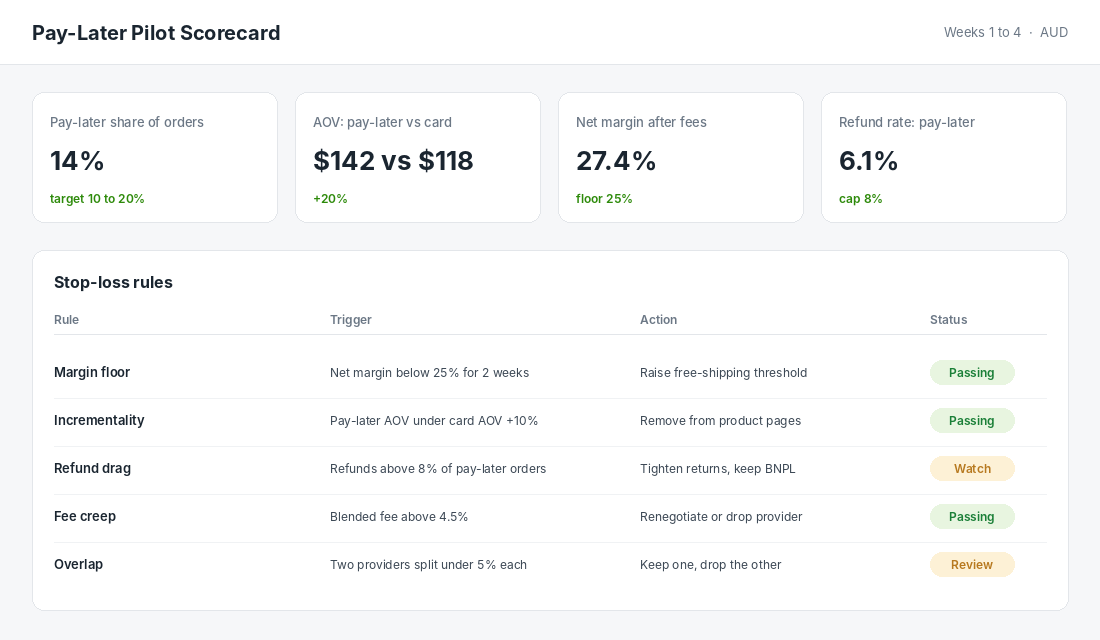
Track four numbers every week:
- Pay-later share of orders. Aim for roughly 10 to 20% as a sanity range. Under 5% usually means the option is not visible enough. Over 40% means you may be training shoppers to treat it as the default.
- AOV for pay-later orders versus card orders. If pay later is not at least 10% higher, the incrementality case is weak.
- Net margin after all payment fees. Set a floor before you start, for example 25%, and honour it.
- Refund rate on pay-later orders. Pick a cap, for example 8%, and watch it. Pay-later refund tickets are the hidden cost.
Then write your stop-loss rules in advance. If net margin falls below the floor for two weeks, raise your free-shipping threshold. If pay-later AOV is under card AOV plus 10%, take the messaging off product pages. If a second provider splits less than 5% of orders from the first, drop one. Writing the rules before you see the data stops you rationalising the result later.
One more lever. If your problem is margin, not conversion, try a lay-by style offer for higher-ticket items, which pushes the credit risk and fee profile onto your terms. Our lay-by playbook covers when that beats a third-party provider.
The Compound Effect: Wallet, Pay Later and Messaging Working Together
Here is the aha moment. Each piece does a different job. Shop Pay removes friction for returning shoppers, so the checkout is fast. A pay-later option removes the price hurdle for shoppers who would otherwise hesitate on a $150 basket. Clear messaging on product pages removes the surprise, so shoppers arrive at checkout already knowing they can split the cost. Clear return terms remove the support tickets afterwards.
Pull any one out and the others work harder for less. A pay-later button hidden at the payment step converts a fraction of what it could. A great pay-later offer with muddy return terms floods your inbox. A fast wallet with no pay-later option loses the under-40 shopper who wants to split the cost. Run the pieces as one system and watch the same traffic produce more orders at a steady margin.
Your Next Step
This week, do three things. Open Settings > Payments and write down exactly which pay-later options you have live. Ask your Afterpay or Zip rep for your fee and refund terms in writing. Then block out four weeks to run the pilot above with the stop-loss rules agreed first.
Inside eCommerce Circle, checkout and payment choices are part of the Platform pillar we work on with every member, alongside the profit maths that decides whether a fee is worth paying. If you want to see exactly where your store is being capped, take the free More Orders Scorecard. It takes two minutes and shows you which of the 10 P’s to fix first.