Most Shopify stores use AI to write product descriptions the same way: paste a product name into a chatbot, copy whatever comes back, hit publish. Twelve products later the store reads like every other store, three pages promise features the product does not have, and nobody on the team can say who approved the claims.
What’s in This Article
The stores getting value from it do the opposite. They treat AI as a fast first-draft writer that only knows what you tell it, then run every draft through a short edit and claims check before it goes live. The writing takes minutes. The thinking happens in the inputs and the edit.
This guide gives you the exact workflow: the fact sheet, a copy-and-paste prompt, the voice setup, the seven-point edit, and a rollout plan that keeps you on the right side of both Google and the Australian Consumer Law. If you want the copywriting structure itself, start with our 5-block product description framework. This article is about getting AI to write inside that structure without inventing things.
What AI Is Good At on a Product Page (and Where It Quietly Hurts You)
AI is good at three jobs: turning messy notes into clean sentences, producing several angles on the same product quickly, and keeping a consistent structure across hundreds of SKUs. That last one matters more than it sounds. Shopify itself points out that there are millions of products for sale without a description, and for a store with 400 SKUs and a blank description field, a decent draft beats a blank page every time.
It is bad at four things, and every one of them costs you money:
- Facts it does not have. Ask for a description of a merino beanie and it will happily invent a micron count, a weight and a care label. It sounds confident because it is built to predict plausible words, not to check them.
- Specific proof. Your 4.8-star average, your Melbourne workshop, the customer who wore it on a Hobart ferry. AI cannot write what you did not tell it.
- Your voice. Without samples, you get the same “Discover the perfect blend of comfort and style” opener every competitor has.
- Legal caution. It will write “eco-friendly”, “hypoallergenic” and “clinically proven” without a second thought.
The shopper still reads the description. Baymard Institute found in its product page testing that every single user relied on the product description at some point to decide whether a product suited them, and many called descriptions bland or boring. A bland AI draft is still a bland description. It is just a faster way to publish one.
The fix is not a better tool. It is a better input and a better edit.
Step 1: Build a Product Fact Sheet Before You Open Any AI Tool
This is the step most stores skip, and it is the one that decides whether the output is usable. A fact sheet is a single block of verified information about one product. The AI is only allowed to use what is in it.
Here is what goes in, for every product:
- Hard specs: materials, dimensions, weight, capacity, ingredients, certifications. Copy these from your supplier sheet or your own measuring, not from memory.
- Origin: where it is made, where it is designed, where it ships from. Be exact. “Made in Australia” and “Australian owned” are different claims.
- Buyer: one sentence on who buys it and what moment they are in. “Walking to the train in a cold Melbourne morning” is useful. “Fashion-conscious women” is not.
- Top objection: the question your customer service inbox gets most about this product. Pull it from your support tickets or reviews.
- Proof: review count and average, awards, repeat purchase rate, press mentions. Only things you can show.
- Care, shipping and returns: the practical lines buyers look for before they add to cart.
- Do not say list: claims you cannot substantiate or are not allowed to make.
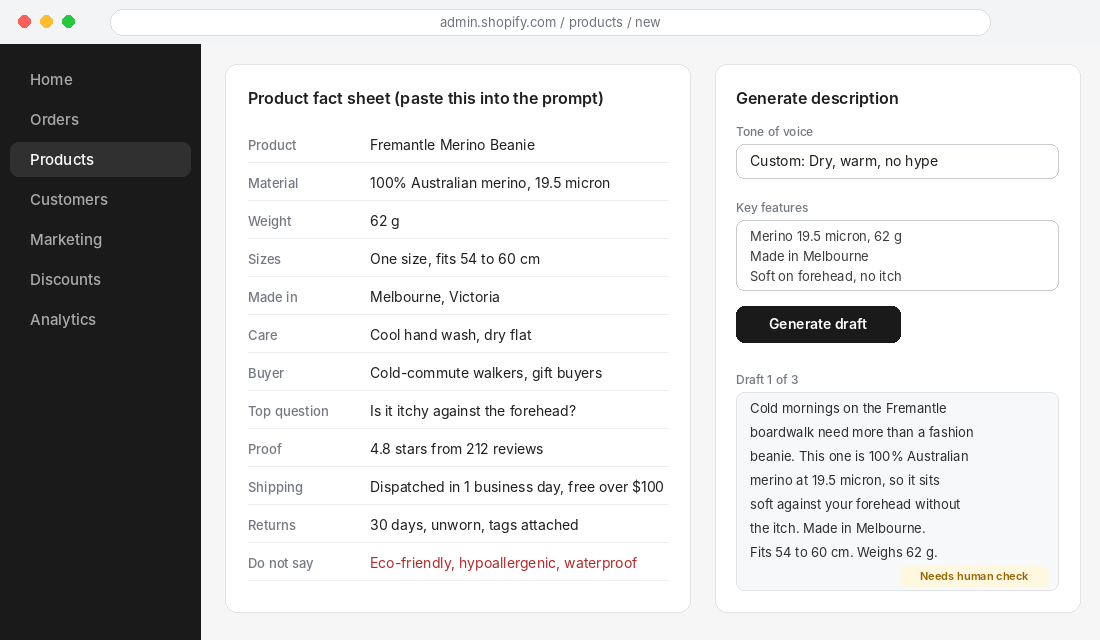
A good fact sheet takes ten to fifteen minutes per product the first time. After that you reuse the structure. If your supplier provides a spec PDF, paste it into a spreadsheet and keep one row per product so every future prompt starts from the same columns.
The “Do not say” line is the cheapest insurance in this whole process. We come back to why in step 4.
Step 2: Use a Prompt Built to Stop the AI Guessing
Most product description prompts fail because they ask for output instead of setting rules. “Write a compelling description for my beanie” gives the model maximum freedom, which is exactly what you do not want. This prompt does the opposite:
You are a copywriter for [BRAND], an Australian [CATEGORY] brand.
Write a product description for the product below.

FACTS (use only these. If a detail is not listed, do not mention it):
[PASTE FACT SHEET]

BUYER AND MOMENT:
[One sentence. Who they are and what they are doing when they find this.]

THEIR TOP QUESTION:
[The objection to answer in the copy.]

VOICE:
[3 adjectives, e.g. dry, warm, plain-spoken.]
Match the style of this sample, but do not copy its sentences:
[PASTE 100 WORDS OF YOUR BEST EXISTING COPY]

STRUCTURE:
1. Opening line, max 20 words, about the buyer's moment. No "discover", "introducing" or "perfect".
2. Three short paragraphs. Each makes one benefit claim and backs it with one fact from the list.
3. A spec list of 5 to 7 lines in the order: material, size, weight, care, origin, shipping, returns.

RULES:
- Australian English (colour, metre, organise).
- Never write these words or claims: [PASTE YOUR DO NOT SAY LIST].
- If a sentence needs a fact you were not given, write [NEED FACT] instead of guessing.
- Write 3 different openings so I can choose.
Three details make this prompt work.
The [NEED FACT] instruction. It turns a silent guess into a visible gap. When the draft comes back with a [NEED FACT] in the second paragraph, you know exactly which detail to go and check. This one line removes most of the invented specs.
One fact per benefit. Benefits without evidence are the reason most descriptions read like brochures. Forcing a fact behind every benefit gives the copy weight.
Three openings. The first line is the part buyers actually read on mobile. Generating three and picking one takes thirty seconds and consistently beats accepting the first thing the model offers.
Prompts like this work in Shopify Magic, ChatGPT, Claude or any other model. The tool matters far less than the rules you give it. If you want the same discipline for the rest of your admin work, our Shopify Sidekick guide covers which jobs are worth handing to Shopify’s built-in assistant.
Step 3: Teach It Your Voice With Real Samples
Voice is where AI copy most obviously gives itself away. The fix is samples, not adjectives. Telling a model to be “friendly and professional” produces the average of every friendly, professional brand it has ever read.
Build a voice file once and reuse it:
- Collect 5 to 10 pieces of your best writing. Product descriptions that converted, emails that got replies, About page copy, customer service responses you are proud of.
- Mark what makes them yours. Short sentences? Dry humour? Never uses exclamation marks? Always names the Australian place or weather?
- Write a ‘sounds like / never sounds like’ pair. “Sounds like: a mate who knows wool. Never sounds like: a luxury perfume ad.”
- Paste the best 100 words into every prompt as the style sample.
If you use Shopify Magic, set a custom tone in the generator rather than relying on the preset list. Shopify’s own page for the feature confirms you can pick a predefined tone or set your own, generate as many versions as you need and edit before publishing, and it is included in your plan with no extra charge. Some 2026 write-ups also describe a brand voice feature that learns from your existing content. If it is available on your account, feed it your strongest pages, not your average ones.
One caution. Do not give any model a competitor’s copy as the style sample. Beyond the ethics, near-identical text across stores is exactly the pattern Google’s quality systems are looking for.
Step 4: Run the Seven-Point Edit Before Anything Goes Live
Every draft gets the same review. It takes about five minutes per product once you are used to it, and it is the difference between AI as an asset and AI as a liability. Here is the checklist we use:
- Specs match the fact sheet. Check every number, measurement and material against your source. Not “looks right”. Match.
- No banned claims. Search the draft for your Do not say list. Also scan for “eco-friendly”, “sustainable”, “natural”, “hypoallergenic”, “clinically proven”, “best” and “#1”.
- Origin wording is exact. “Made in Australia”, “Australian made” and “designed in Australia” are not interchangeable. Use the one that is true.
- The opener is about the buyer, not the product. If it starts with “Introducing” or “Discover”, rewrite it.
- The top objection is answered. If the buyer’s biggest hesitation is not addressed in the first screen of copy, add a line.
- Shipping and returns are specific. “Dispatched in 1 business day, 30-day returns” beats “fast shipping and easy returns”.
- It is not a duplicate. Read it next to the description of your most similar product. If you could swap them without anyone noticing, add product-specific proof.
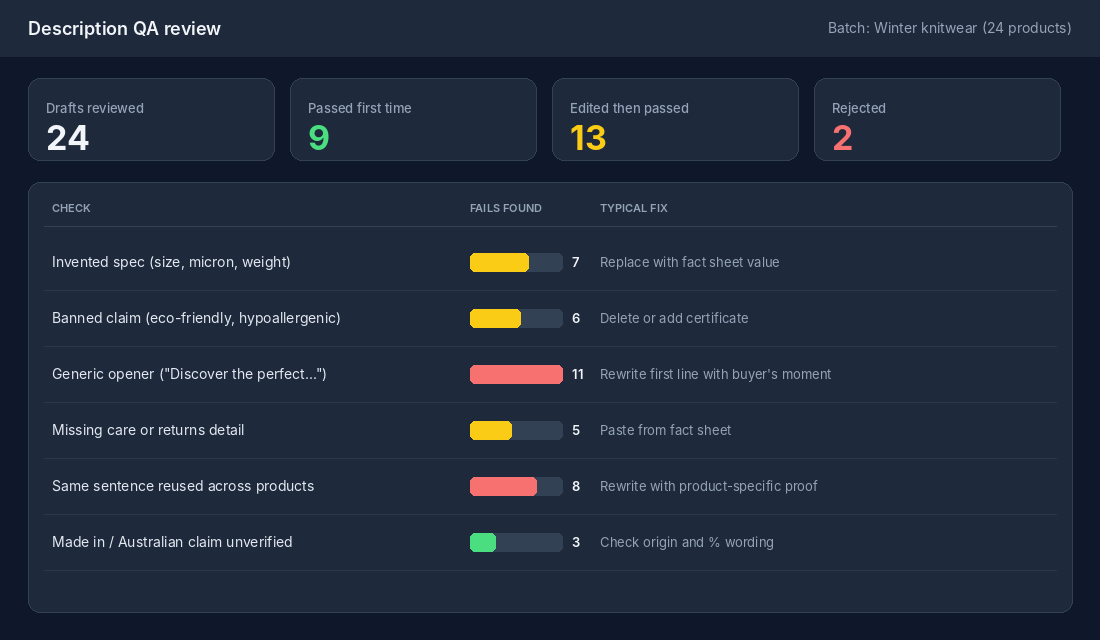
The review log above is the kind of tracking worth keeping for your first batch. Note which checks fail most often. If generic openers fail every time, your voice sample is too weak. If invented specs keep appearing, your prompt is missing the [NEED FACT] rule or your fact sheet has gaps.
Why the claims check is not optional in Australia
The ACCC is clear that any information you post online about your products must be accurate and truthful, and that covers descriptions, images, prices and delivery claims. It does not matter whether a person or a model wrote the sentence. You published it.
The consequences are real. For corporations, the maximum penalty for certain false or misleading representations is the greatest of $10 million, three times the benefit gained, or 10% of annual turnover. For individuals it is $500,000. Those numbers are aimed at large operators, but the principle applies to every store.
Two enforcement cases show how wrong descriptions get punished:
- Grays eCommerce Group. The ACCC took Federal Court action over car listings with wrong details about make, model and features, including incorrect manufacturing years and transmission types. At least 750 consumers bought a wrongly described car, and the ACCC sought a $10 million penalty after Grays admitted the conduct.
- BecexTech, Techrific and CatchDeal. These online retailers advertised refurbished phones and tablets with wording such as “New Sealed Box”. They gave the ACCC court-enforceable undertakings, including clarifying product status on their sites and offering redress to affected customers.
Neither case involved AI. Both involved descriptions that said something that was not true. An AI model produces that kind of error at volume if you let it. If you sell skincare, supplements or anything with a health angle, also check whether your claims fall under Therapeutic Goods rules. Our product compliance check walks through that audit.
This is also a returns problem. In Oberlo’s consumer survey on return reasons, 42% of shoppers who returned an item said it was not as expected. Every invented detail or inflated benefit in an AI draft feeds that number, and you pay for the freight both ways.
Step 5: Scale to the Whole Catalogue Without Looking Like a Content Farm
Once the process works on one product, the temptation is to batch-generate the entire catalogue in an afternoon. Slow down. Google’s guidance on generative AI is specific: using these tools to generate many pages without adding value for users may violate its scaled content abuse policy. Google also stresses fact-checking AI output before publishing, including titles and meta descriptions.
That is not a ban on AI. Google’s rater guidance says using generative AI does not by itself decide a page’s quality rating. What gets pages marked down is thin, near-identical, unedited content. A catalogue of 300 products with the same three-paragraph template and swapped nouns is that.
The rollout rules that keep you safe:
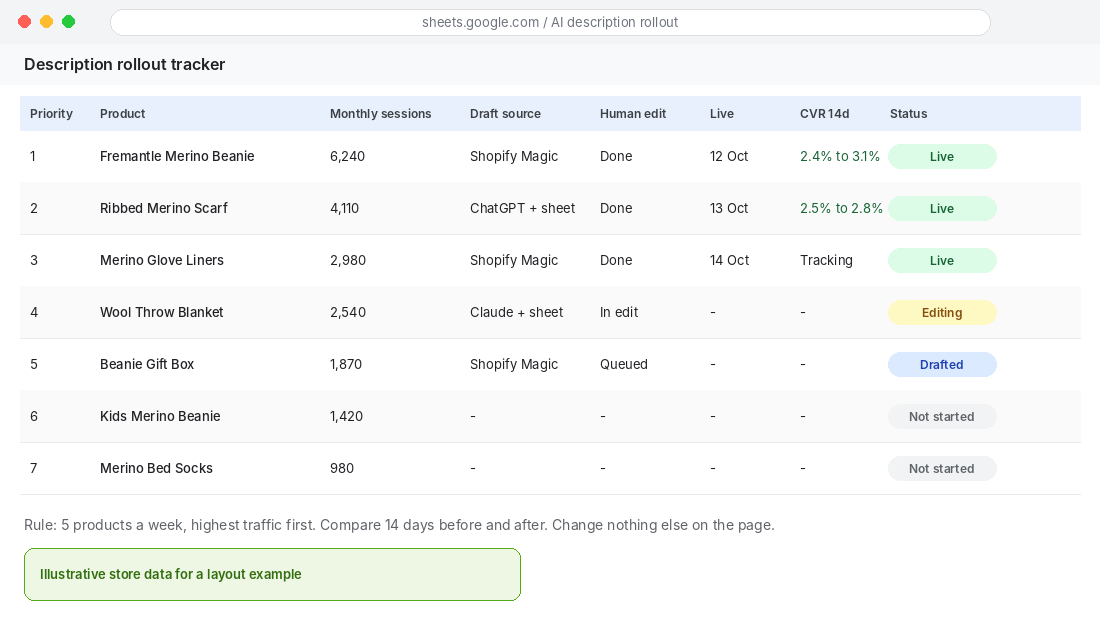
- Start with revenue, not volume. Rank products by monthly sessions and work from the top. Five great descriptions on your best sellers beat 100 mediocre ones.
- Five products a week. Draft, edit, publish, then measure. This keeps the human review honest.
- Different proof per product. Each description needs at least one fact that exists nowhere else on your site: a review quote, a measurement, an origin detail.
- Measure before and after. Compare 14 days of conversion rate for each product before and after the change, and change nothing else on the page during that window.
- Leave low-traffic products alone at first. A tidy two-line description with accurate specs is fine for a product that gets 40 visits a month.
If you sell through Google Shopping, one more rule applies. Google’s guidance points merchants to Merchant Center policies, which say AI-generated product data such as titles and descriptions must be specified separately and labeled as AI-generated. Check your feed settings and the current policy before you push AI-written descriptions into a feed. It is a quick check that avoids disapprovals.
The Tools: Shopify Magic, ChatGPT or Claude, and a Spreadsheet
You do not need a paid app to run this workflow. These three setups cover almost every store:
Option 1: Shopify Magic (best for one product at a time)
- In Shopify admin, go to Products and open a product (or add a new one).
- In the description field, use the AI generate option to open Magic.
- Enter the product name, your key features from the fact sheet and a custom tone.
- Generate several versions, pick the best, then run the seven-point edit.
- Paste your fact sheet in a note beside the page so you check specs as you edit.
Magic drafts from the keywords you give it, so your key features box is your prompt. Fill it with verified facts, not marketing words. One limit worth knowing: a 2026 comparison of Magic and Sidekick points out that Magic writes for human readers and does not populate metafields or write structured spec data for you, so that part stays manual.
Option 2: ChatGPT or Claude with a spreadsheet (best for batches)
- Export your products from Shopify as a CSV (Products, then Export).
- Add fact sheet columns next to each product: material, size, weight, buyer, top question, proof, do not say.
- Paste one row at a time into the prompt template above. Do not paste 50 rows and ask for 50 descriptions. Quality drops and checking becomes impossible.
- Paste the edited result into a new column, then import back through Shopify’s product CSV import, or paste directly into each product page.
- Log each product in your rollout tracker.
Option 3: Sidekick as the finder, not the writer
Use Sidekick to find the work: which products have empty or short descriptions, which best sellers have the lowest conversion rate. Then write the copy with the process above. Our AI or hire test is a useful filter for deciding which of these jobs stay with a tool and which belong with a person.
Write for the Shopper First, Then for the AI Shopping Agents
Product descriptions now have a second audience. Shopify reports that, since January 2025, AI-driven traffic to Shopify stores has grown 8x year over year, and orders from AI-powered searches 15x. The same source notes that AI shopping agents read structured data such as titles, descriptions, images, pricing and inventory, and that purchasing through those channels is currently limited to US buyers.
For an Australian store, that means two practical things today. First, plain specific descriptions help both humans and machines. “100% Australian merino, 19.5 micron, 62 g, fits 54 to 60 cm” is easy for anyone to parse. “Luxuriously soft premium knit” is not. Second, put attributes in structured fields where you can, not only in paragraph text. Our metafields guide shows how to do that without a developer.
Do not rewrite your whole catalogue for AI agents that cannot yet complete a purchase from Australia. Write good specific copy now, keep your data tidy, and you will be ready when access widens.
The Compound Effect: Fact Sheet, Prompt, Edit, Measure
Each step on its own is modest. Together they form a loop. The fact sheet stops invented details. The prompt forces proof behind every benefit. The voice sample stops the generic opener. The seven-point edit catches what slips through. The tracker tells you whether any of it moved conversion.
The loop also gets faster. By your fifth product you will have reusable fact sheet columns and a prompt that rarely needs changing. By your fiftieth, the review log will show you which check fails most, and you fix that at the source. That is how a store goes from “AI wrote this and we hope it is right” to “AI drafted this and we verified it”, and that difference is what shoppers, Google and the ACCC all end up judging.
Your AI Product Description Checklist
Save this and run it for every product:
- Fact sheet complete (specs, origin, buyer, top objection, proof, care, shipping, returns).
- Do not say list pasted into the prompt.
- Voice sample (100 words of your best copy) included.
- [NEED FACT] rule included so gaps are visible.
- Three openings generated and one chosen.
- Seven-point edit completed and logged.
- Origin and health claims checked against what you can prove.
- Description is different from your most similar product.
- Conversion rate recorded 14 days before and after.
- Highest-traffic products done first, five per week.
Frequently Asked Questions
Does Google penalise AI-written product descriptions?
Not for being AI-written. Google’s own guidance says generative AI can be useful, but warns against producing many pages without adding value, and says output must be fact-checked. Edited, accurate, product-specific descriptions are fine. Mass-produced near-duplicates are the risk.
Is Shopify Magic good enough on its own?
It is a solid starting draft when you feed it verified features and a custom tone. It will not check your claims, add your proof, or structure your data. Treat its output as step two of the process, not the finish line.
How long should an AI-assisted description be?
Long enough to answer the buyer’s top question and give the specs, short enough to scan on a phone. For most products that is a one-line opener, three short benefit paragraphs and a spec list. Complex or high-priced products can run longer.
Who is responsible if the AI writes something false?
You are. Under the Australian Consumer Law the business publishing the claim is accountable for it, regardless of who or what drafted it.
Inside eCommerce Circle, product copy is one of the core pillars we work on with every member, because it sits on the line between conversion and compliance. If you want to see exactly where your store is being capped, take the free More Orders Scorecard. It takes two minutes and shows you which of the 10 P’s to fix first.