Most Shopify stores add a review app, see a few stars appear under the product title, and call social proof done. Then they wonder why a product with 40 reviews still converts at 1.1%.
What’s in This Article
The problem is not the reviews. It is that reviews are one type of proof, placed in one spot, doing one job. Shoppers worry about different things at different points on the page: Is this real? Is it any good? Do people like me buy it? Will I get stung if it goes wrong? Each worry needs its own kind of proof, sitting right next to the moment the worry shows up.
This guide covers social proof for Shopify as a system: nine types, the exact spot each one belongs, the numbers worth benchmarking against, the Australian rules that keep you out of trouble, and a scorecard you can run on your own store this afternoon. If you only want the review collection side, our Shopify reviews guide goes deep on that. This piece is about the whole picture.
Why Social Proof Does More Work Than Your Product Photos
A shopper who lands on your product page cannot touch anything. They are judging a stranger’s claims about a product they have never held. Social proof is the cheapest way to borrow someone else’s confidence.
The most cited research comes from Northwestern’s Spiegel Research Center. Their analysis found that displaying reviews lifted conversion by up to 190% for lower-priced products and up to 380% for higher-priced products, and that the first five reviews on a product carry the biggest impact. Higher-priced items need at least five reviews to get the full effect, while cheaper items start moving the needle with two to four (Spiegel Research Center).
Two more numbers worth sitting with. Purchase likelihood tends to peak at a 4.2 to 4.5 star average, not 5.0, because a perfect score looks curated. And in a 2025 compilation of consumer surveys, 81% of shoppers said they would not buy from a brand again after suspecting its reviews were fake, while 56% would not buy at all if they doubted authenticity (figures reported via SHNO’s social proof statistics roundup, which cites AdamConnell and the Spiegel Center). Treat the compiled figures as directional rather than gospel, but the direction is consistent: more proof helps, and fake proof is poison.
Here is the stance I will take for the rest of this article. Most Aussie stores under-invest in proof placement and over-invest in proof collection. They chase review volume and then bury the reviews in a tab at the bottom of the page. Fix placement first, then volume.
The 9 Types of Social Proof (and the Worry Each One Solves)
Think of these as nine tools in a kit. You do not need all nine on day one, but you need to know which worry each tool answers so you stop reaching for the same one every time.
| # | Type | The worry it solves | Where it goes |
|---|---|---|---|
| 1 | Star rating and review count | Is this any good? | Directly under the product title |
| 2 | Photo and video reviews | Is this real, and what does it look like on a normal person? | Image gallery or just under the price |
| 3 | Pull quotes from named customers | Will this work for my situation? | Between price and add to cart |
| 4 | Press and “as featured in” | Has anyone credible vouched for this? | Mid-page strip and homepage |
| 5 | Best seller and top rated badges | Is this the safe choice in the range? | On the image and collection cards |
| 6 | Customer numbers | Are other people actually buying here? | Homepage, cart and email footer |
| 7 | UGC gallery from social | Do real people use this in real life? | Mid-page section and landing pages |
| 8 | Expert and award credentials | Does someone who knows this category approve? | Near the claim they support |
| 9 | Honest stock and sales signals | Is this popular, and do I need to move now? | Under the add to cart button |
Type 1 and 2: Ratings, Review Counts and Photo Reviews
Put the rating where the eye lands first
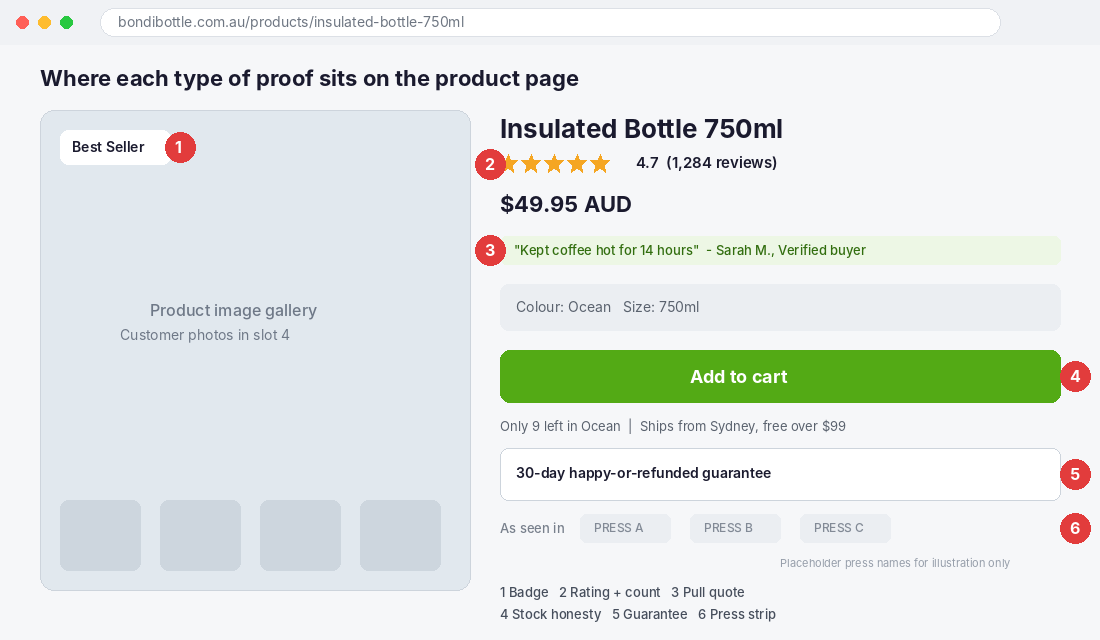
The star rating and the review count belong directly under the product title, above the price. Not in a tab. Not at the bottom. A shopper scanning your page checks the title, the price, and the rating within a second or two, so make that rating tappable and have it jump to the reviews section.
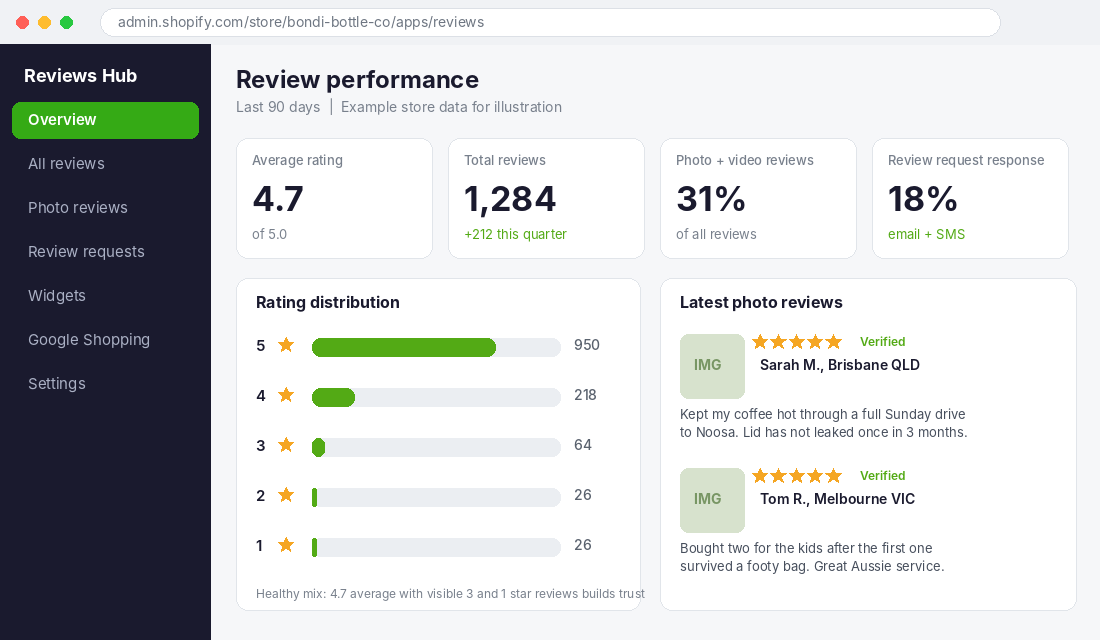
Always show the count next to the stars. The ACCC’s guidance on online reviews says businesses should show context for ratings, such as the total number of reviews behind a star rating (ACCC online reviews guidance). It is also better conversion practice: 4.7 from 1,284 reviews is a fact, while 4.7 on its own is a claim.
When I checked Gymshark’s homepage this week, product cards showed ratings as bare numbers such as 4.2 and 5, with no review counts and no customer photos on that page. It also runs “Top Rated” and “Most Loved” collections and links a Reviews Policy page from the navigation. Strong brand, thinner proof than you would expect. You can do better with a smaller catalogue by showing the count every time.
Photo and video reviews are the proof that looks real
A text review says the bottle keeps coffee hot. A photo of the bottle on a dashboard in a Brisbane summer says it is real. Photo reviews are the single best upgrade from a basic review setup, because they answer “what does this actually look like outside a studio?”
Wyzowl’s video marketing research, quoted in the SHNO roundup above, found 79% of consumers have watched a video testimonial to learn about a product. You do not need a production. A 15 second phone clip from a customer outranks a polished brand video for trust.
Aim for 25% to 30% of your reviews carrying a photo or video. If you are well below that, change your request email: ask for a photo explicitly in the subject line, and offer a small, disclosed thank-you for any honest review (more on the rules below).
Tool pick: Judge.me, set up in 20 minutes
If you do not have a review app, start with Judge.me. At the time of writing its Forever Free plan includes unlimited reviews with photo and video support, and a paid Awesome tier is listed from US$15 a month for extra widgets and syndication (Fudge’s review app comparison). Loox is built around photo reviews and lists a free plan up to 500 orders a month, with paid plans from US$49.99. Okendo and Yotpo suit larger catalogues. Prices change, so confirm on the Shopify App Store before you commit.
- Install the app from the Shopify App Store and import any existing reviews from your old app or a CSV.
- Set the request timing. Send the first email 7 to 14 days after delivery so the customer has actually used the product, and add an SMS nudge three days later if you run SMS.
- Ask for a photo in the first line of the request, and make the star rating one tap inside the email.
- Add the star rating block in the theme editor: Product template, App blocks, place it directly under the title.
- Add the review widget lower on the page with photo filters switched on, then test on mobile before publishing.
- Check the Google Shopping and SEO settings in the app so your star ratings can be eligible to show in search results.
Type 3: Pull Quotes That Answer the Real Objection
Reviews are a pool. Pull quotes are a hand-picked drop of that pool placed at the exact moment of doubt. This is the type that most stores skip, and it is the one you can add in ten minutes.
Open your reviews and search for the objection-handling lines: “I was worried about X, but…” “I almost did not buy because…” “Fits true to size” “Arrived in two days to Perth.” Put the best one between the price and the add to cart button, with a first name, suburb or state, and a verified buyer tag.
Choose the quote by product, not by flattery. A skincare product for sensitive skin needs “no reaction at all” in that spot. A $300 backpack needs “still looks new after a year of daily commutes.” If you do not know your customers’ top objections yet, our objection mapping guide shows you how to pull them out of support tickets and reviews.
Type 4 and 8: Press Logos and Expert Credentials
Borrowed authority works because the shopper has never heard of you but has heard of the publication. A strip of recognisable logos, with one real quote underneath, lifts trust on first visit and on cold traffic from Meta.
Rules that keep it honest and effective:
- Only list outlets that actually covered you. A guest mention in a gift guide counts. A paid placement you cannot link does not.
- Link the logos to the original article so a sceptic can verify.
- Put one pull quote from the coverage under the logos, not just the logos on their own.
- Credentials count too. Industry awards, dermatologist or physio approval, certifications and safety testing all belong near the claim they support.
Frank Green is a handy example. Its homepage shows a 2024 Good Design Award badge and a “Trusted by teams at” logo strip in its corporate gifting section. That is credentials plus customer logos doing two different jobs for two different buyers on one page. If your store sells to both consumers and businesses, split your proof the same way.
Not featured anywhere yet? Run a 30 day outreach push using the approach in our gift guide playbook, because gift guides are the quickest route to your first credible logo.
Type 5 and 9: Badges and Honest Scarcity
Badges tell a hesitating shopper which product is the safe pick. “Best Seller” and “Top Rated” on the product image and on collection cards cut the decision down to a glance. Glossier uses exactly that pattern, with “Best Seller” and “Top-rated” labels on its product cards, with no numbers needed.
The catch is that a badge must be earned by a rule you can state. Pick a rule such as “best seller means top 10% by units in the last 90 days” and let your theme or a tagging app apply it automatically. We cover the full approach, including how to avoid fake urgency, in the product badge playbook.
Honest stock signals follow the same rule. “Only 9 left in Ocean” works when 9 is the real inventory number pulled from Shopify. It backfires when it is a script that makes up numbers. This matters more in Australia than it used to, because the unfair trading practices reforms are targeting manipulative design, which our dark patterns audit walks through in detail.
Type 6: Customer Numbers That Do Not Sound Like Marketing
“12,000+ Aussie orders shipped” does something a review cannot: it tells a nervous first-time buyer that thousands of people have already taken the risk and the parcel arrived. It is especially strong for new brands from regional Australia that nobody has heard of yet.
- Use a number you can prove from your Shopify orders report. Update it quarterly.
- Be specific. “12,400 orders delivered across Australia” beats “thousands of happy customers.”
- Place it in three spots: the homepage hero, the cart drawer, and the footer of your post-purchase emails.
- Use a time frame if the lifetime figure is small: “1,900 orders in the last 12 months” is still a strong signal.
Type 7: UGC Galleries That Show Real Use
User generated content is the proof that does not look like proof. A gallery of customers using the product, pulled from Instagram and TikTok with permission, shows it in the wild. Review research shows the lift is real, and the SHNO roundup collects claims of 100%+ conversion lifts when visitors interact with UGC, but those come from vendor and agency sources, so use them as a reason to test, not a promise.
Where it goes: a mid-page section on the product page titled something plain such as “Seen in the wild,” and on paid landing pages where the visitor arrives cold. Always get written permission before using a customer’s photo. The UGC playbook has a permission template and the collection workflow.
The Rules: Keep Your Proof Legal in Australia
Social proof is only an asset while it is real. The ACCC’s online reviews guidance is blunt: it is against the law for a business to create fake or misleading reviews, or to arrange for others to do so. That covers reviews written by relatives, employees or paid people without disclosure, reviews from people who never used the product, and reviews edited after the fact.
Three practical rules follow from it:
- Never delete or hide genuine negative reviews. The ACCC says suppressing or editing them can mislead consumers. Reply to them publicly instead.
- Disclose incentives and offer them evenly. A discount or freebie for a review must go to every reviewer whatever the star rating, and the incentive should be clearly disclosed.
- Only show proof you can substantiate. If you say “12,000+ orders” or “as seen in”, keep the evidence on file.
The penalties are not theoretical. In an early ACCC case, the Federal Court ordered two solar businesses to pay combined penalties of $125,000, and one director a further $20,000 personally, after finding their video and written testimonials were not from genuine customers (SmartCompany). Later cases over manipulated online reviews have been larger, including a $3 million penalty against Meriton and $215,000 against Electrodry, as summarised by Maddocks. This is general information, not legal advice, so check with your solicitor if you are unsure.
The Social Proof Audit Template (Run It This Afternoon)
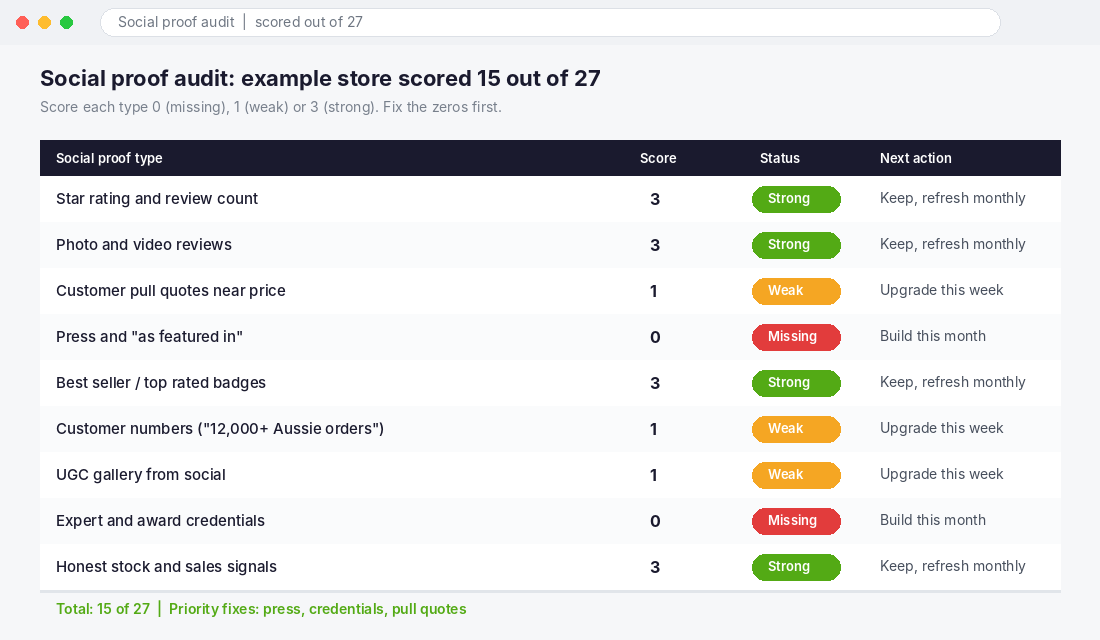
Here is the framework we use to audit a store. Open your top-selling product page on your phone, then score each type below.
- 3 points (strong): present, visible without scrolling or tapping, and specific.
- 1 point (weak): present but hidden in a tab, vague, or sitting in the wrong spot.
- 0 points (missing): not on the page at all.
| Score out of 27 | What it means | What to do next |
|---|---|---|
| 22 to 27 | Proof is carrying its weight | Test placement and photo review volume |
| 15 to 21 | Solid base, patchy placement | Fix every zero first, then upgrade the weak ones |
| Under 15 | Shoppers are doing the work alone | Start with ratings, photo reviews and one pull quote this week |
Prioritise like this: zeros on types 1, 2 and 3 first, because they sit closest to the buy button. Press and credentials come next. Customer numbers and badges are the quickest wins. UGC galleries take the longest, so start collecting now.
How the Nine Types Compound
Individually, each type is a small nudge. Stacked, they cover the whole decision path. The shopper lands from an ad and sees the customer count and press strip on the homepage (credibility). They open the product and see 4.7 stars with 1,284 reviews under the title (is it good). They check the photo reviews (is it real). They read the pull quote that answers their exact worry (will it work for me). They see the Best Seller badge and the honest stock line (is this the safe, popular pick). The guarantee sits under the button (what if I am wrong).
Remove any one and the shopper has an unanswered question. Unanswered questions become abandoned tabs. That is why stores that fix proof placement often see more movement than stores that spend the same effort on another round of ad creative. Use the benchmarks in our 2026 conversion rate benchmarks to see where your product pages sit, and our product page video framework to turn your best photo reviews into short clips.
Your 7 Day Rollout Plan
- Day 1: Run the audit on your top three products and write down every zero.
- Day 2: Install or configure your review app, set request timing to 7 to 14 days after delivery, and ask for photos.
- Day 3: Move the star rating and review count directly under the product title on mobile and desktop.
- Day 4: Add one pull quote per hero product between price and add to cart.
- Day 5: Add a badge rule and a proven customer number to your homepage and cart.
- Day 6: Pitch two outlets for coverage or request permission to feature three customer photos.
- Day 7: Re-score the audit and compare conversion on those products over the next four weeks.
Inside eCommerce Circle, social proof is one of the core levers we work on with every member, because it sits on the Product page where almost every sale is won or lost. If you want to see exactly where your store is being capped, take the free More Orders Scorecard. It takes two minutes and shows you which of the 10 P’s to fix first.