Most Shopify founders pick their first paid channel the same way they pick a gym: whatever their mate swears by. One person says Meta built their brand. Another says Google is the only channel that prints money. So you flip a coin, spend $3,000, and decide the channel “doesn’t work” when it doesn’t pay back in two weeks.
What’s in This Article
The real problem is not the channel. It is that Google and Meta do different jobs, and spending on the wrong job for your stage burns cash. Google finds people who are already looking for what you sell. Meta finds people who would buy if they saw it. Those are two different problems with two different price tags.
This guide gives you a decision rule, a budget split by revenue stage, the exact setup steps, and a 30-day test that settles the question with your own numbers. By the end you will know where your next dollar goes first, and when to add the second channel.
Google Ads vs Meta Ads: They Do Different Jobs
Start here, because everything else follows from it. Google captures demand that already exists. Meta creates demand that does not exist yet.
When someone types “merino wool dog jumper” into Google, they have a problem and a credit card. Your ad shows up at the exact moment they want to buy. The click costs more, but the buyer arrives ready.
When someone scrolls Instagram and sees your merino dog jumper, they were not shopping. They were killing time between meetings. Meta has to interrupt them, earn a second of attention, and convince them they want something they did not know they wanted. That is harder per person, but it reaches far more people and it can sell products nobody is searching for.
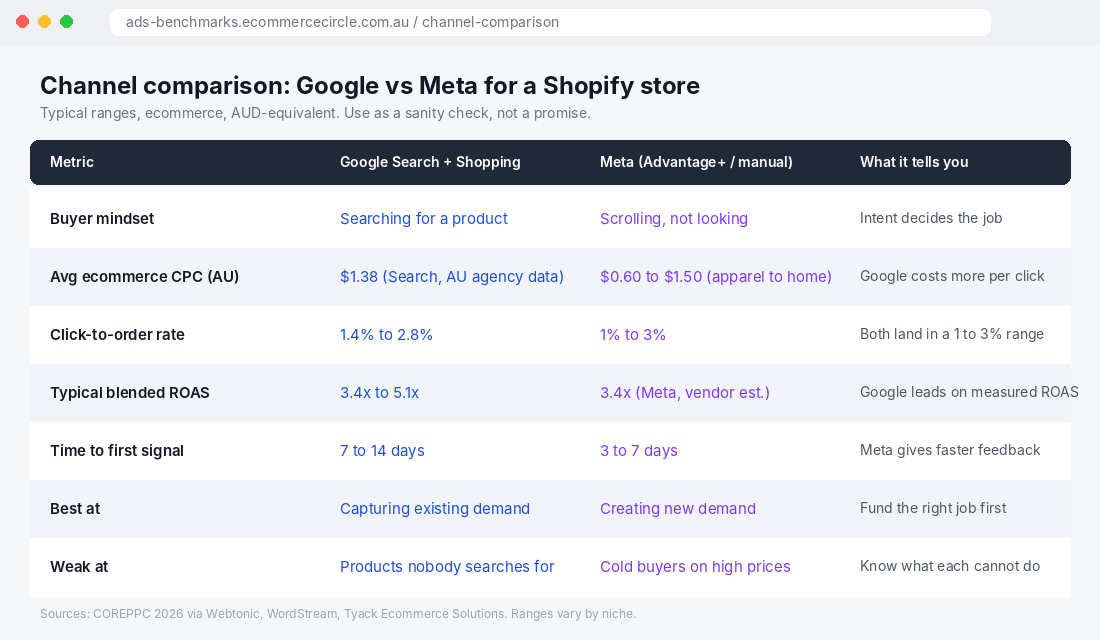
This is why the “which is better” question is the wrong one. Ask instead: does my product already have search demand, or do I need to create it?
- Strong search demand (replacement parts, everyday staples, branded products, anything with a clear category name): Google first.
- Weak or no search demand (new product types, impulse buys, visual products, gifts nobody thinks to search for): Meta first.
- Somewhere in between (most stores): start with whichever channel matches your current constraint, which we cover in the decision rule below.
One more thing worth knowing. Australians are heavy social shoppers. Australia Post’s 2025 eCommerce Report found that 82% of Australian households shopped online, spending $82.6 billion, and that 60% of shoppers use social media to find products, with one in two having bought something after seeing it there. Meta’s ad tools estimate around 17.7 million Facebook users and 15.2 million Instagram users in Australia (via DataReportal’s Digital 2026 report). The audience is there. The question is whether your product suits being discovered in a feed.
What the Numbers Say (and Why You Should Be Suspicious of Them)
Every benchmark you read online is an average of stores that are nothing like yours. Still, you need a starting range so you know when a campaign is broken versus when it is just early. Here is what the available data says, with the caveats attached.
Google Ads:
- Australian ecommerce and retail average cost per click of $1.38, based on client data from the Australian agency Websites That Sell.
- COREPPC’s 2026 benchmarks (published via Webtonic) put average CPC at $1.42 for Search, $0.68 for Shopping and $0.82 for Performance Max, with average ROAS of 3.4x for Search, 5.1x for Shopping and 4.8x for Performance Max. Those are US-leaning figures, so treat them as a ceiling for what is achievable, not a forecast.
- Branded search (people typing your store name) typically returns far more than non-branded search, with COREPPC reporting a median 8.2x for branded against 3.1x for non-branded. That gap matters, and we come back to it later.
Meta Ads:
- Industry CPC ranges for Meta run from roughly $0.50 to $1.20 for apparel to $1.00 to $2.50 for supplements, according to Top Growth Marketing’s 2026 ranges. Cheaper clicks, but a colder visitor.
- EMARKETER reported in 2024 that US Advantage+ Shopping campaigns delivered almost 22% higher ROAS than the average across all Meta ads.
- In a case study from Wheelhouse DMG, an Advantage+ Shopping setup produced 33% lower cost per purchase than business-as-usual campaigns for a horticultural tools retailer.
Notice what is missing: a clean, trustworthy “Google gets 4x, Meta gets 3x” number. Vendor and agency benchmarks disagree with each other, and platform-reported ROAS is inflated on both sides because Google and Meta each claim credit for the same sale. That is the exact problem we unpack in our guide on why MER replaces ROAS.
The takeaway is simple. Use benchmarks to spot disasters, not to pick winners. If your Google Shopping campaign is returning 1.2x after 30 days and 100 clicks per product, something is broken. If it returns 3.2x, you are in the normal range and the decision is about margin and volume, not the channel.
The 4-Question Decision Rule
Forget channel loyalty. Answer these four questions about your store and the answer falls out.
Question 1: Do people already search for what you sell?
Open Google Keyword Planner (free inside any Google Ads account) and search your product category and your top three products. If the category has a few hundred Australian searches a month or more, Google has demand to capture. If the numbers are tiny, you are selling something people do not know they want, and that is Meta’s territory.
Question 2: What is your gross margin after shipping?
Google clicks cost more and the buyer is warmer. Meta clicks are cheaper but you need more of them. If your margin is thin (under 40% after COGS and shipping), you cannot afford the wasted clicks that come with cold traffic. Start with Google, where the buyer arrives with intent. If your margin is healthy, you have room to pay for attention on Meta.
Question 3: Can you produce creative every week?
Meta runs on creative. Its delivery system rewards variety, which we cover in our piece on what Meta Andromeda means for ad creative. If you cannot produce at least four to six fresh images or videos a month, Meta will tire out your audience and your results will sag. Google Shopping runs largely on your product feed and photos, which you already have.
Question 4: Is your tracking trustworthy?
If your Meta pixel and Google conversion tag are not firing correctly, both channels optimise on bad data and both waste money. Fix this before you spend. Our enhanced conversions setup guide covers the Google side.
Now score yourself:
- Search demand + thin margin + limited creative time = Google first. Shopping and branded search, a tight feed, a modest budget.
- No search demand + healthy margin + creative capacity = Meta first. Advantage+ Shopping for prospecting, a few static and video creatives per week.
- Mixed answers = split, but lean toward whichever channel your weakest answer protects you from. If creative is your bottleneck, lean Google. If margin is your bottleneck, lean Google. If demand is your bottleneck, lean Meta.
How to Split Your Budget by Revenue Stage
Here is the part most guides skip. The right split changes as your store grows, because your customer list, your creative library and your brand search all grow with you.
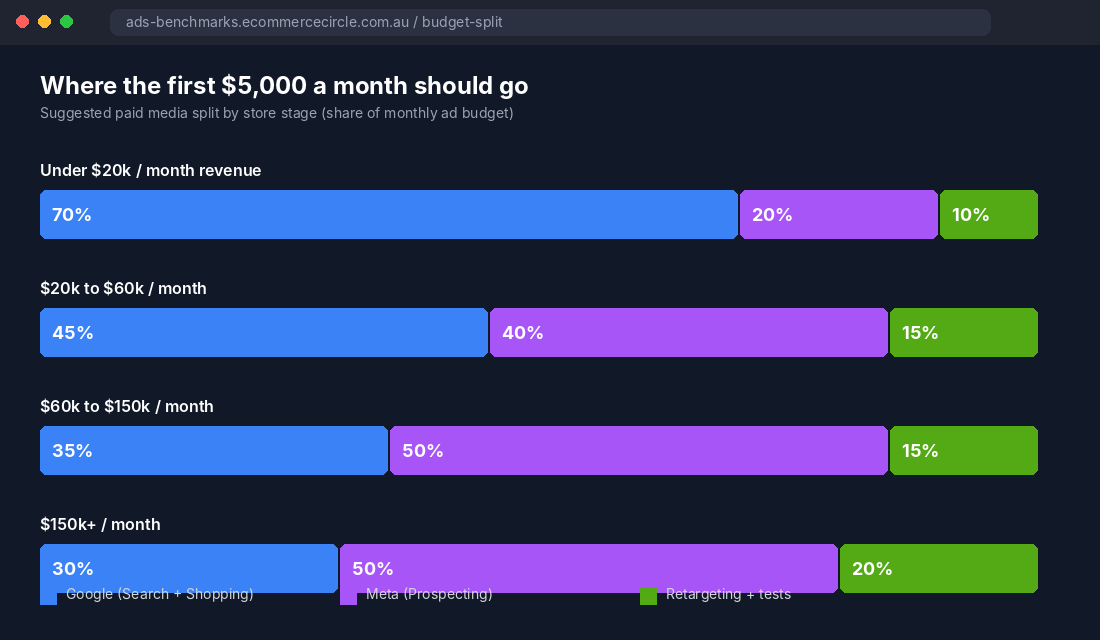
These are starting points from how we coach stores, not laws. Adjust them to your margins and your test results.
Under $20,000 a month in revenue: roughly 70% Google, 20% Meta, 10% retargeting and tests.
You do not have the creative volume or the audience data to feed Meta properly yet. Google Shopping and a small branded search campaign capture buyers who are already searching, and they teach you which products convert. Spend 20% on Meta to start collecting data and test creative without betting the month on it.
$20,000 to $60,000 a month: roughly 45% Google, 40% Meta, 15% retargeting and tests.
You have enough orders to feed Meta’s algorithm, and enough product reviews and photos to make creative. This is where Meta starts earning its place as a growth engine rather than an experiment.
$60,000 to $150,000 a month: roughly 35% Google, 50% Meta, 15% retargeting and tests.
Meta becomes your primary growth channel because it is the one that scales to new audiences. Google holds steady, protecting your branded searches (people who saw you on Meta and then Googled your name) and harvesting the demand Meta creates.
$150,000+ a month: roughly 30% Google, 50% Meta, 20% retargeting and tests, plus other channels like TikTok, YouTube and email earning their own line.
At this point you are managing a mix, not choosing a channel. If you are working out the total number first, our guides on Meta Ads budgets and Google Ads budgets for Shopify stores walk through the maths.
One rule across every stage: never put less than 10% into something you are testing. The channel that wins this year is not always the one that wins next year, and the only way to find out is to keep a small, controlled experiment running.
Setting Up Both Channels on Shopify (the Exact Steps)
You can run both channels natively from your Shopify admin. No agency required to get started.
Google: Shopping ads through the Google & YouTube app
- In Shopify admin, go to Settings > Apps and sales channels and add the Google & YouTube channel.
- Connect your Google account, then create or connect a Google Merchant Center account. Verify and claim your store URL.
- Sync your products. Check the Product feed diagnostics for errors. Missing GTINs, weak titles and poor images are the three most common reasons Shopping campaigns underperform.
- Create a Performance Max campaign from the app, or build a standard Shopping campaign in Google Ads if you want tighter control. Set a daily budget you can hold for at least 30 days.
- Add a separate branded search campaign with your store name as an exact-match keyword. It is cheap, it protects your name, and it is often your best-performing campaign.
- Set up conversion tracking and turn on enhanced conversions.
Feed quality matters more than most people expect. An agency case study from Endless Digital on an automotive parts Shopify store reported that feed optimisation alone (titles, images, GTINs, product categories) moved their Google ROAS from 2 to 3x up to 4 to 5x. That is a claim from the agency, but the mechanism is sound: Google matches your products to searches using your feed, so a better feed means better matching.
Meta: Advantage+ Shopping through the Facebook & Instagram channel
- Add the Facebook & Instagram sales channel in Shopify and connect your Meta Business account, Facebook page, pixel and catalogue.
- In the data sharing settings, choose the Maximum level so the pixel and Conversions API both send purchase data. Server-side events recover signals that browsers block.
- In Meta Ads Manager, create a Sales campaign and use Advantage+ Shopping (or Advantage+ sales campaign, depending on your account’s interface).
- Upload at least three to five distinct creatives: a product-in-use image, a short video, a user-generated review screenshot, and a straight product shot. Variety beats volume.
- Start with a budget that can generate at least 50 purchases a month in the account. Meta’s learning system needs conversions to stabilise.
- Exclude existing customers using a customer list or Shopify’s audience sync so your prospecting budget finds new buyers.
Then check both platforms inside your Shopify analytics and GA4, not only inside each ad tool. Each ad platform will happily take full credit for the same order.
What Real Stores Did (and the Lessons Inside)
Three examples, each with a different lesson. Where a result comes from an agency’s own case study, we say so.
The Plant Broker (Australian Shopify plant retailer): small Google budget, high intent. According to Tyack Ecommerce Solutions, who ran the account between April and December 2025, The Plant Broker spent roughly $728 a month on Google Ads using high-intent search campaigns and continuous negative keyword filtering. Cost per acquisition dropped 51%, from $15.86 in April to $7.72 in November, conversion rate lifted from 1.02% to 1.78%, and total Google Ads revenue reached $129,401. The agency reported a peak month of 28x ROAS ($21,798 revenue on $760 spend). One peak month is not a typical month, but the pattern is the lesson: a tiny budget aimed at buyers already searching can outperform a bigger budget aimed at browsers.
An automotive parts Shopify store (Endless Digital case study): both channels working as a system. The agency ran Performance Max for Google, split by market, alongside Advantage+ Shopping with broad targeting and dynamic retargeting on Meta. They reported blended ROAS above 10x and monthly revenue growing from around $5,000 to close to $40,000 over 22 months. The store’s spend split was not disclosed, so we cannot tell you the ratio. The lesson is structural: Google was fed by a well-built feed, Meta prospected broadly and retargeted from the catalogue, and each did the job it is built for.
A.M. Leonard (horticultural tools): why Meta’s automation can beat manual setups. Wheelhouse DMG found Advantage+ Shopping produced 33% lower cost per purchase than business-as-usual campaigns, and 44% lower when both used a product catalogue. The test period was not disclosed. The lesson: if you have a clean catalogue and good conversion data, let Meta’s automation prospect for you instead of hand-building audiences.
Notice none of these stores picked one channel forever. They matched the channel to the job, and they let the data move budget.
The 30-Day Channel Test (Copy This Template)
Opinions are cheap. A controlled test costs one month and gives you your own numbers. Run it like this.
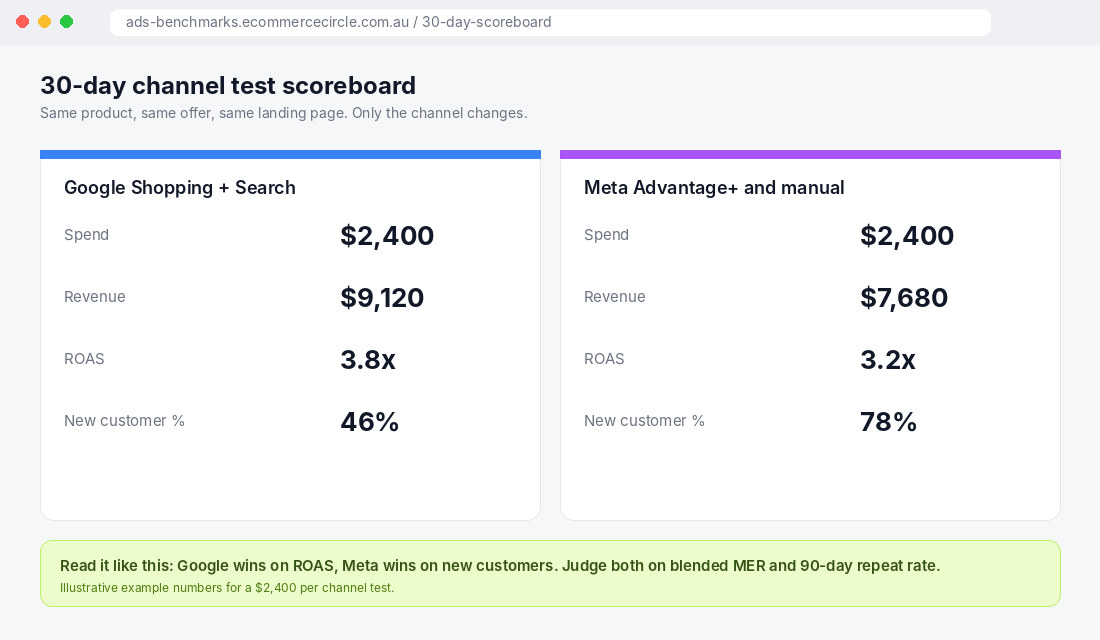
Step 1: Pick one hero product with good reviews, decent margin and a clear category name. Same product, same offer, same landing page on both channels. Change only the channel.
Step 2: Split the same budget evenly. If you can spare $2,400 for the test, put $1,200 on Google (Shopping or Performance Max) and $1,200 on Meta (Advantage+ Shopping). Hold the budgets steady for 30 days. Do not touch them in the first 10 days. Both systems are still learning.
Step 3: Keep a simple scoreboard. At the end of each week, record these five numbers for each channel:
- Spend
- Revenue (use Shopify’s order data, not the ad platform’s)
- Cost per purchase
- New customer percentage
- Contribution margin after COGS and shipping
Step 4: Read the result honestly. Google will often win on measured ROAS because it captures buyers who were already looking. Meta will often win on new customers because it reaches people who had never heard of you. Neither result is a failure. They answer different questions.
Step 5: Decide with the right metric. Use blended MER (total revenue divided by total ad spend) and 90-day repeat purchase rate, not each platform’s own ROAS. A channel with a weaker first-order ROAS but a higher share of new customers can be the better long-term investment, because those customers come back through email and organic.
Here is the decision table to finish the test:
- Google wins on ROAS by a wide margin and new-customer share is above 40%: shift 10 to 15% more budget to Google.
- Meta wins on new customers and its ROAS is within 25% of Google’s: shift budget to Meta and invest in more creative.
- Both are within 20% of each other: keep your current split and re-run the test on a second product.
- Both are below your break-even ROAS: stop. The problem is not the channel. Check your offer, your product page and your tracking before spending more.
The Compound Effect: How the Two Channels Feed Each Other
Here is the part that changes how you think about this. Google and Meta are not rivals. Together they form a loop.
Meta introduces your brand to someone who had never heard of you. They do not buy straight away. A few days later they search your store name or your product category on Google, and your branded search ad or Shopping listing catches them. Google reports that sale. Meta reports a view-through or no sale at all. Neither platform shows you the whole path.
This is why stores that cut Meta “because it doesn’t convert” often see their branded Google search volume and conversions drop a few weeks later. And it is why stores that cut Google to “save money” often watch their Meta costs rise, because Meta is now trying to close people who needed a search to finish the job.
Add retargeting and email on top, and the system compounds. Prospecting on Meta fills the top. Google captures the people who go looking. Retargeting and email convert the ones who hesitated. Each layer makes the others cheaper.
The practical upshot: judge the pair together. Track blended MER weekly. If total revenue per total ad dollar holds or improves as you shift budget, the move is working, whatever the individual dashboards say.
Where to Go From Here
If you do nothing else this week, do these three things: score your store on the 4-question decision rule, put your first $2,400 into the 30-day test, and fix your tracking before you spend a cent.
Inside eCommerce Circle, picking and balancing paid channels is one of the core pillars we work on with every member. If you want to see exactly where your store is being capped, take the free More Orders Scorecard. It takes two minutes and shows you which of the 10 P’s to fix first.