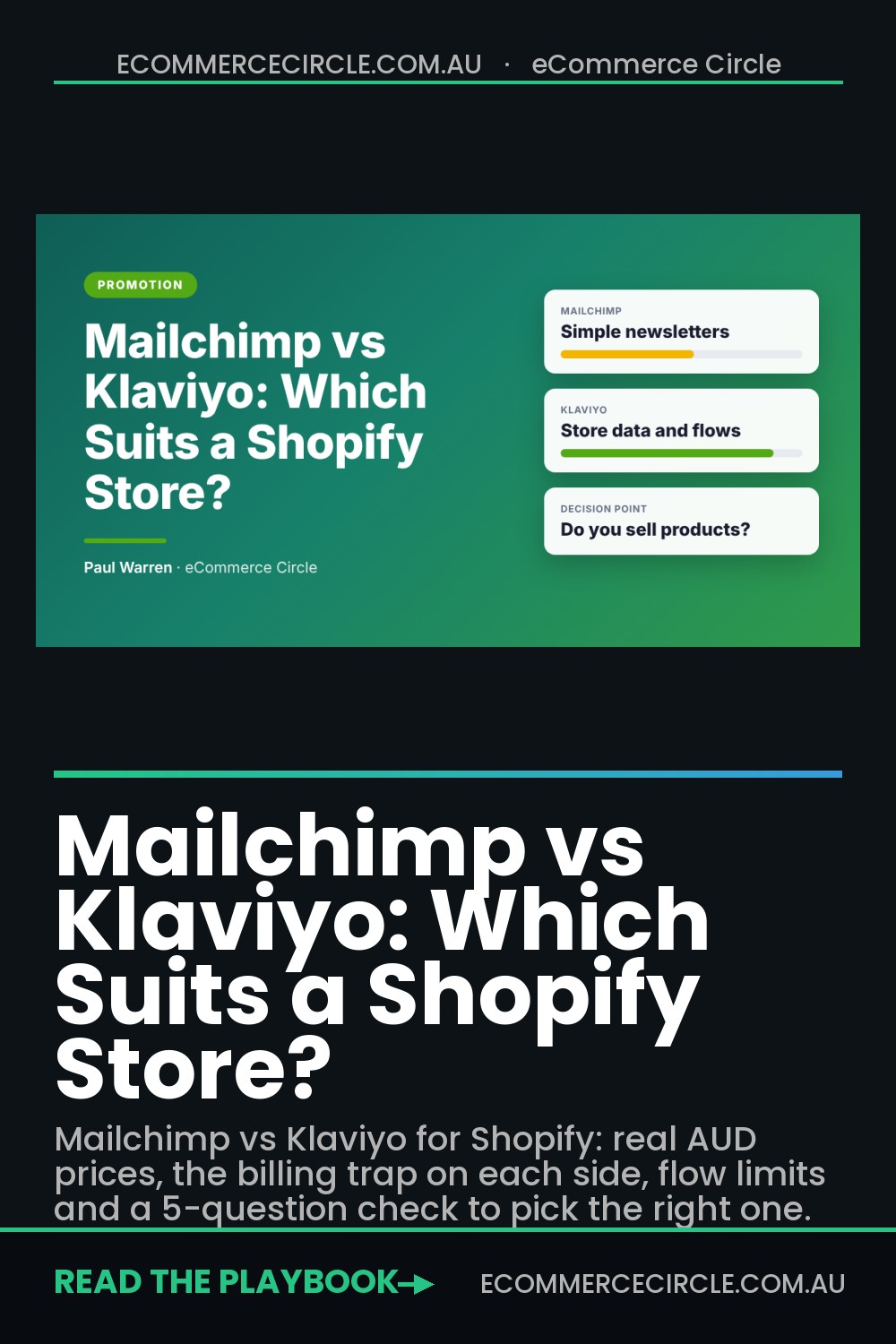
If you run a Shopify store and sell physical products, Klaviyo is the better pick in most cases, because it pulls in your full order and browsing data and includes automated flows on every plan. Mailchimp suits you if you mainly send newsletters, you are not selling much yet, or you have a big list and only want cheap broadcast emails.
Most store owners make this choice on the wrong number. They compare the monthly fee, see Mailchimp starting at US$13 and Klaviyo at US$20, and pick the cheaper one. Then they spend a year sending a newsletter every second Friday and wondering why email brings in 5% of revenue.
The stores that get email to 25% or 30% of revenue ask a different question: which platform lets me build the automated emails that sell while I sleep, using the data my store already has? This guide compares Mailchimp and Klaviyo on that question, with real prices in Australian dollars, the billing trap on each side, and a five-question check you can score in two minutes.
Mailchimp vs Klaviyo: The Quick Verdict
Here is the short version before the detail. Prices were checked on 14 November 2026 and converted at A$1 = US$0.678, so treat the AUD figures as close estimates, not quotes.
| Mailchimp | Klaviyo | |
|---|---|---|
| Best for | Newsletters, content businesses, service businesses, early-stage sellers | Product stores on Shopify that want automated, data-driven email and SMS |
| Free plan | 250 contacts, 500 sends a month, no automations, no scheduling | 250 active profiles, 500 sends a month, flows included |
| Paid plans start at | US$13 a month (Essentials), about A$19 | US$20 a month (Email), about A$29 |
| Automation | Capped on Essentials, up to 200 flows on Standard (US$20 and up) | Flows on every plan, including free |
| Who you are billed for | Subscribed, unsubscribed and non-subscribed contacts | Active profiles only. Unsubscribed and suppressed profiles are not billed |
| Shopify app rating | 4.8 from 1,571 reviews | 4.7 from 3,440 reviews |
| SMS in Australia | Paid add-on on Essentials or higher, no MMS | Built in, charged by credits |
The ratings come from the Mailchimp and Klaviyo listings in the Shopify App Store. Both apps are well liked. The rating will not make this decision for you. The way each tool handles your store data will.
- Pick Klaviyo if you sell products, you are on Shopify, and you want welcome, abandoned cart, browse and post-purchase emails running without you.
- Pick Mailchimp if email for you means a regular newsletter, your store is a side project with under 250 contacts, or you have a large list and no plans to build flows.
- Look at a third option if Klaviyo’s price worries you but you still want ecommerce flows. Our Klaviyo vs Omnisend comparison covers that choice.
What Each Platform Costs in Australian Dollars
Neither company publishes AUD pricing, so you pay in US dollars and your card does the conversion. That means your bill moves with the exchange rate. A 5% drop in the Aussie dollar is a 5% price rise you did not agree to.
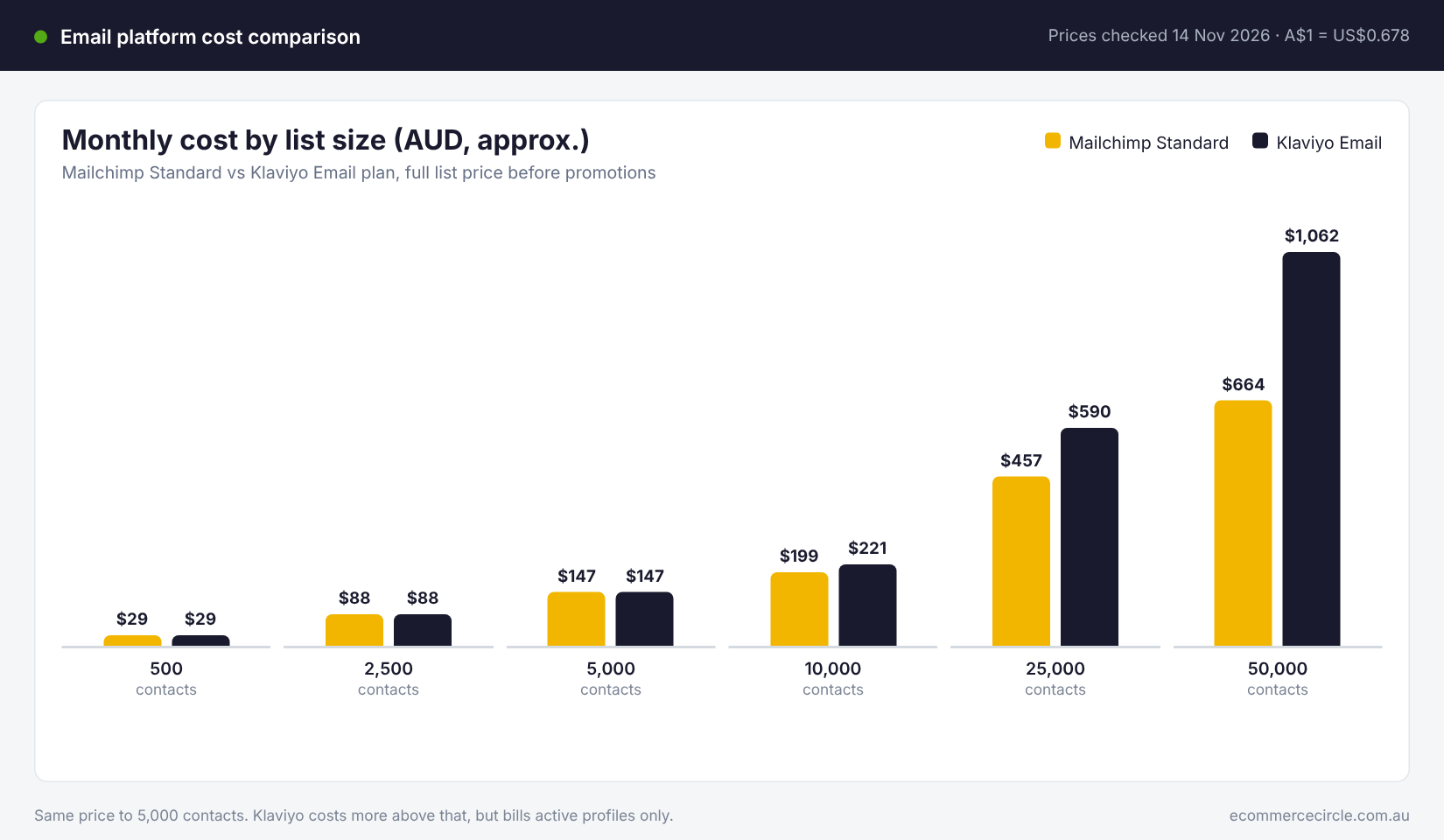
At full list price, the two are closer than most people expect:
| Contacts | Mailchimp Essentials | Mailchimp Standard | Klaviyo Email |
|---|---|---|---|
| 500 | US$13 (A$19) | US$20 (A$29) | US$20 (A$29) |
| 2,500 | US$45 (A$66) | US$60 (A$88) | US$60 (A$88) |
| 5,000 | US$75 (A$111) | US$100 (A$147) | US$100 (A$147) |
| 10,000 | US$110 (A$162) | US$135 (A$199) | US$150 (A$221) |
| 25,000 | US$270 (A$398) | US$310 (A$457) | US$400 (A$590) |
| 50,000 | US$385 (A$568) | US$450 (A$664) | US$720 (A$1,062) |
The Mailchimp starting prices come from the Mailchimp pricing page and the higher tiers from independent pricing breakdowns published in 2026. The Klaviyo figures come from the Klaviyo pricing page and our own Klaviyo pricing in Australia guide, which has every tier. Both vendors run first-year discounts, so check the live calculators before you budget.
Three things stand out.
- Up to 5,000 contacts, Mailchimp Standard and Klaviyo cost the same. US$20, US$60 and US$100. The “Klaviyo is expensive” line does not hold for a small store.
- Essentials is cheaper, but it is the wrong plan for a store. It saves you about A$37 a month at 5,000 contacts and caps your automation. More on that below.
- Above 10,000 contacts, Klaviyo costs noticeably more. At 50,000 contacts the gap is about A$400 a month. At that size the question becomes whether Klaviyo’s data earns the extra, and for a store with working flows it usually does.
Send limits differ slightly too. Mailchimp Standard allows 12 emails per contact per month and Essentials 10. Klaviyo allows 10. Unless you email your whole list more than twice a week, you will not hit either.
The Billing Trap on Each Side
The price list only tells you the cost per contact. What matters is how many contacts each platform decides to charge you for. This is where the two differ most, and where stores overpay without knowing.
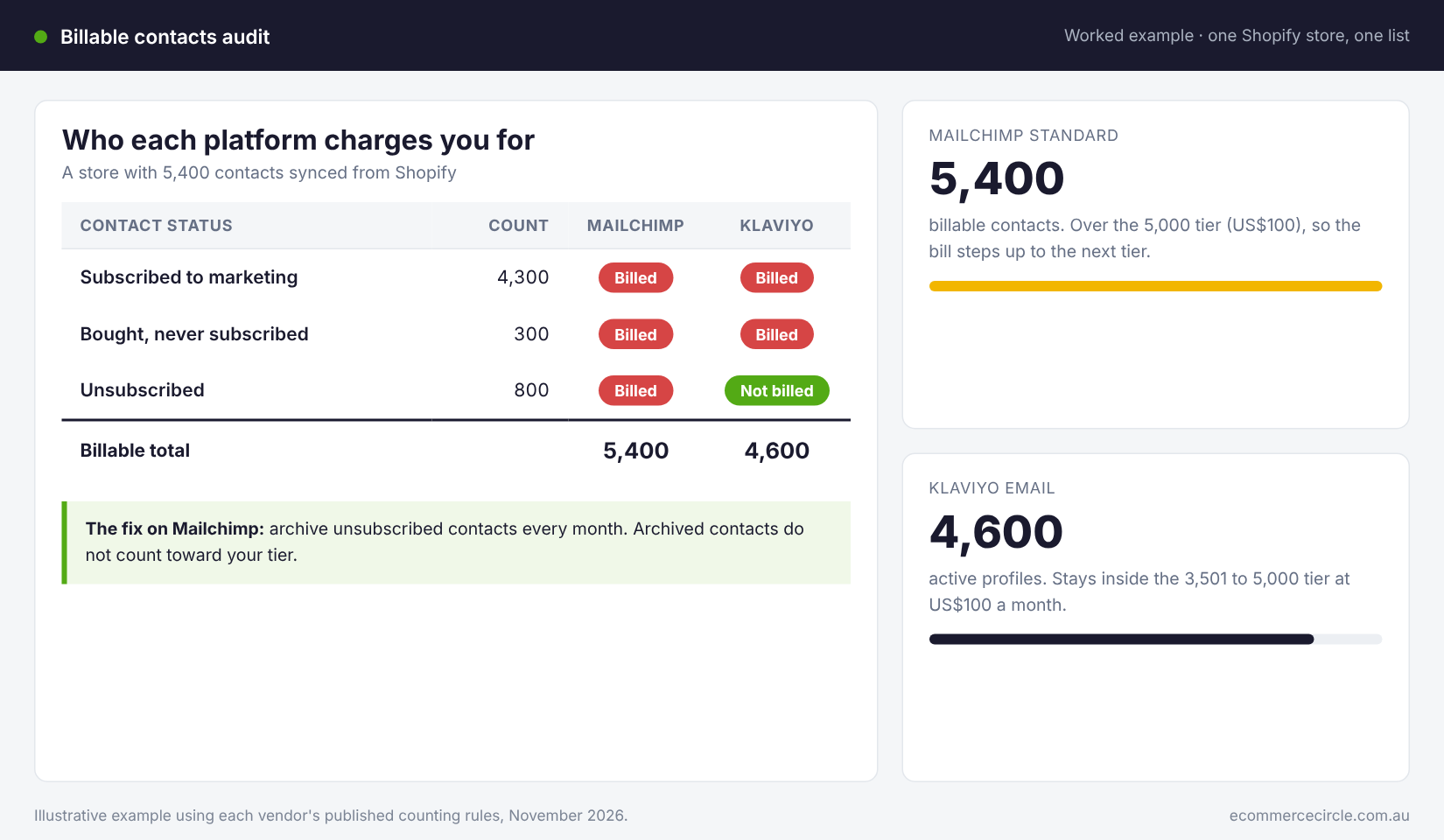
Mailchimp bills you for people who have unsubscribed
Mailchimp counts subscribed, unsubscribed and non-subscribed contacts toward your tier. Only archived, cleaned and deleted contacts drop off. Someone who opted out two years ago is still on your bill unless you archive them. Mailchimp also does not merge the same person across separate audiences, so one customer on two lists counts twice.
For a Shopify store this bites harder than for a blogger, because the integration syncs customers who bought but never ticked the marketing box. They land in Mailchimp as non-subscribed contacts and they count.
In the worked example above, a store with 4,300 subscribers is billed for 5,400 contacts on Mailchimp. That pushes it over the 5,000 tier. The same store on Klaviyo is billed for 4,600 and stays at US$100.
The fix: set a monthly reminder to archive unsubscribed contacts, and keep everything in one audience with tags instead of running several audiences.
Klaviyo moves you up a tier automatically
Klaviyo bills on active profiles, meaning anyone you could still market to. Unsubscribed and suppressed profiles are free. That is fairer, but it has its own catch. Customers who bought and never subscribed still count as active until you suppress them, and when your active count crosses a tier line, your plan steps up without asking. It does not always step back down on its own.
The fix: build a sunset segment of people who have not opened or clicked in 180 days, send them one last win-back email, then suppress the ones who stay silent. Do it every quarter. On most lists we see, 15 to 30% of profiles have not engaged in a year, and you are paying for all of them.
Shopify Integration: Where the Real Gap Is
Both platforms connect to Shopify through an official app. Mailchimp’s history here is bumpy. Its app was pulled from the Shopify App Store in 2019 after a dispute over customer data, and only returned in October 2021 when Mailchimp bought the ShopSync connector, as Modern Retail reported at the time. Klaviyo said around 10,000 former Mailchimp customers moved across during that two-year gap.
The current Mailchimp app is solid. It syncs customers, products and orders, and it can trigger emails from cart and checkout activity. For a simple store that covers the basics.
Klaviyo goes further in ways that matter once you start segmenting:
- Every event becomes a filter. Viewed product, added to cart, started checkout, placed order, fulfilled order, refunded order. You can build a segment or split a flow on any of them, combined with what was in the order and how much was spent.
- Predictive fields on each profile. Expected date of next order, predicted lifetime value and churn risk, once you have enough order history. These power the replenishment and win-back emails that bring customers back at the right time.
- Data flows both ways. Klaviyo can write back to Shopify and works with Shopify Markets for currency and language, which matters if you sell to New Zealand, the US or the UK.
- One profile per person. Email, SMS, reviews and on-site behaviour all sit on a single customer record, so your suppression and consent stay consistent across channels.
Mailchimp was built as a newsletter tool and had ecommerce added. Klaviyo was built on store data from the start. You feel that difference the first time you try to send “everyone who bought the starter kit more than 45 days ago and has not reordered”. In Klaviyo that is a two-minute segment. In Mailchimp it is a workaround.
Automation: Flows Are Where the Money Is
If you remember one number from this article, make it this one. In the Klaviyo 2026 benchmark data, drawn from more than 183,000 customers, automated flows made up 5.3% of emails sent and produced about 41% of email revenue. Flows averaged a 5.58% click rate against 1.69% for campaigns.
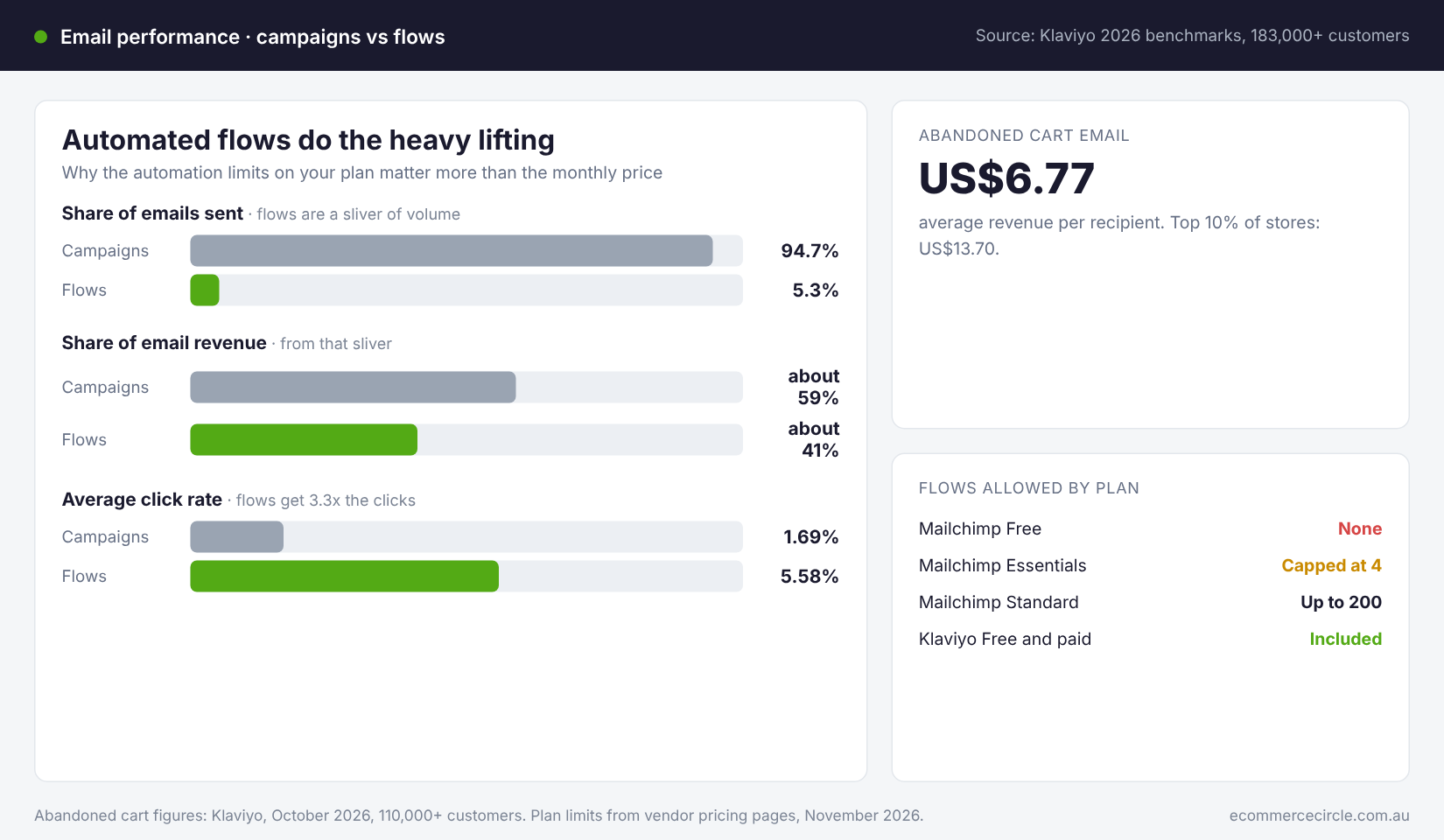
The abandoned cart flow alone averaged US$6.77 in revenue per recipient, with the top 10% of stores at US$13.70, according to the Klaviyo abandoned cart benchmarks from October 2026. No newsletter gets close to that per send.
So the plan limits on automation matter more than a few dollars a month:
- Mailchimp Free: no automations at all, and no scheduling. You can only send by hand.
- Mailchimp Essentials: automation is capped. Mailchimp’s own pricing page lists up to four flow steps, which is not enough for a proper welcome series plus a cart sequence.
- Mailchimp Standard: up to 200 flows, with conditional splits and send-time optimisation. This is the first Mailchimp plan a store should consider.
- Klaviyo: multi-step flows are included on every plan, free included, with a library of pre-built ecommerce flows you can switch on and edit.
That changes the price comparison. The fair match for Klaviyo is Mailchimp Standard, not Essentials. And at the list sizes most Aussie stores have, Standard and Klaviyo cost the same.
Whichever tool you choose, build the core flows before you do anything else: welcome, abandoned cart, browse abandonment, post-purchase and win-back. Our guide to the 9 Klaviyo flows every Shopify store needs lists them in build order. To see how your numbers compare once they are live, use our Australian email marketing benchmarks.
SMS, Reporting and Support
SMS for Australian senders
Klaviyo has SMS built into the same account, the same profiles and the same flows. You pay by credits, and an Australian text uses more credits than a US one, so cost it carefully before you send to your whole list.
Mailchimp offers SMS as a paid add-on on Essentials or higher, and Australia is a supported sending country. You apply for a sending number or branded sender ID, and MMS is limited to the US and Canada.
Either way, the consent rules are the same. Under the Spam Act you need consent, clear sender identification and a working opt-out on every marketing text and email. Our Spam Act guide for Shopify brands walks through what that means in practice.
Reporting
Both tools report opens, clicks and revenue. Klaviyo reports revenue per recipient for every flow email and campaign by default, and lets you compare against stores of a similar size and category. Mailchimp’s reporting is clear and friendly for campaigns, but comparative and predictive reports sit in the higher plans.
Remember that each platform’s attributed revenue is its own count. It will never match Shopify exactly. Use it to compare emails against each other, not as the final word on what email earned.
Support and ease of use
Mailchimp is easier to pick up on day one. Reviewers on G2 score it 4.4 out of 5 and rate ease of setup highly. Klaviyo scores 4.6 out of 5, and the same G2 comparison shows more reviewers calling Klaviyo expensive (69 mentions against 45).
On the free plans, Mailchimp gives you email support for 30 days and Klaviyo for 60. Paid Mailchimp plans include 24/7 email and chat support. If you are not technical and nobody on your team is, that ease counts for something. Expect a weekend to get comfortable with Klaviyo and an afternoon with Mailchimp.
Two Aussie Brands That Switched
Vendor case studies always show the wins, so read these as examples, not guarantees. They are useful because they show why stores move.
Koala Eco, the Australian natural cleaning brand, ran on Mailchimp before moving to Klaviyo. Its marketing team wanted better-looking branded emails and easier access to performance data. In the Klaviyo case study, the brand reported Klaviyo-attributed revenue up 20% year on year in Australia and 62% in the US, with campaign click rates in the Asia-Pacific region roughly four times higher.
Emu Ridge, a family-owned eucalyptus oil distillery on Kangaroo Island, had split its list across several free Mailchimp accounts to keep costs down. That made the setup hard for anyone else to run. After consolidating in Klaviyo, the business reported a 32.5 times return on its Klaviyo spend in 2022 and 66.7% year-on-year growth in Klaviyo-attributed revenue.
Look at what drove each move. Neither brand left because of the monthly fee. Koala Eco wanted data and design control. Emu Ridge had outgrown a free-plan workaround that was costing more in hassle than it saved in dollars. If you are juggling multiple free accounts or exporting spreadsheets to work out who bought what, you are in the same spot.
The 5-Question Platform Check
Answer each question and add up your points. It takes two minutes.
| Question | Score 0 | Score 1 | Score 2 |
|---|---|---|---|
| 1. What share of your revenue comes from physical products sold online? | Under 20% | 20 to 70% | Over 70% |
| 2. How many orders do you get a month? | Under 20 | 20 to 100 | Over 100 |
| 3. How many automated flows do you plan to run in the next 90 days? | None | One or two | Three or more |
| 4. Do you want to segment by what people bought, viewed or spent? | No | Sometimes | Yes, regularly |
| 5. Do you plan to add SMS within 12 months? | No | Maybe | Yes |
- 0 to 3 points: stay on or start with Mailchimp. You are sending newsletters, and Mailchimp does that well. Use Standard if you want any automation.
- 4 to 6 points: either will work, so decide on flows. If you will build at least three flows this quarter, choose Klaviyo. If not, stay put and revisit in six months.
- 7 to 10 points: move to Klaviyo. You have the order volume and the intent to use store data, and at under 5,000 contacts it costs the same as Mailchimp Standard.
Be honest on question three. A platform does not build flows for you. A store that scores 8 and never switches on a welcome series will get the same result from either tool, which is very little.
How to Move From Mailchimp to Klaviyo Without Losing Sales
If the check points you to Klaviyo, the switch takes a focused week. Do it in this order and pick a quiet week, not the fortnight before Black Friday.
- Create your Klaviyo account and install the Shopify app. Connect your store first so historical orders and customers start syncing. Leave Mailchimp running for now.
- Bring across your lists and your unsubscribes. Klaviyo has a Mailchimp integration that pulls in your audiences. Import your unsubscribed and cleaned contacts as suppressed profiles. Skipping this step means emailing people who opted out, which breaks the Spam Act and wrecks your sender reputation.
- Authenticate your sending domain. Set up a branded sending domain in Klaviyo and add the DNS records it gives you, then confirm SPF, DKIM and DMARC are passing. Our email deliverability guide explains each record.
- Rebuild your signup forms. Replace the Mailchimp popup and footer form with Klaviyo forms so new subscribers land in the right place from day one.
- Build flows before campaigns. Switch on welcome and abandoned cart first, then browse abandonment and post-purchase. Turn off the matching Mailchimp automation at the same moment each Klaviyo flow goes live, so nobody gets two cart emails.
- Warm up over two weeks. Send your first campaigns to people who opened or clicked in the last 30 days, then widen to 60 and 90 days. Starting with your most engaged subscribers tells inbox providers your new sending domain is trusted.
- Close out Mailchimp. Export your campaign reports for your records, cancel the paid plan at the end of the billing period and remove the Mailchimp app from Shopify.
Keep a simple checklist of those seven steps and tick them off with dates. The two that stores skip are suppression imports and the warm-up, and they are the two that cause the most damage.
Common Questions
Is Klaviyo better than Mailchimp for Shopify?
For a store selling products, yes in most cases. Klaviyo uses more of your Shopify data for segments and flows, and includes automation on every plan. Mailchimp is the better fit for newsletter-led businesses and very early stores.
Is Mailchimp cheaper than Klaviyo?
Mailchimp Essentials is cheaper at every list size. Mailchimp Standard, the plan with proper automation, costs the same as Klaviyo up to 5,000 contacts and less above that. Remember Mailchimp bills unsubscribed contacts unless you archive them.
Can I use Mailchimp with Shopify?
Yes. The official Mailchimp app has been back in the Shopify App Store since October 2021 and syncs customers, products and orders.
Is Klaviyo free?
Klaviyo has a free plan for up to 250 active profiles and 500 email sends a month, with flows included and email support for the first 60 days. Most stores outgrow it within a few months of trading.
When should I switch from Mailchimp to Klaviyo?
When you are getting regular orders and want automated emails based on what customers do. A good trigger is 20 or more orders a month, or the first time you cannot build a segment you need.
How the Pieces Fit Together
Treat the platform as the last decision, not the first.
Your list is the asset. Flows are how that asset earns money every day without you. Segments make your campaigns relevant enough that people keep opening. And clean billing, through archiving or suppression, stops you paying for contacts who will never buy.
Klaviyo makes the middle two easier for a product store, because the data is already there. Mailchimp makes the first step easier, because it is quick to learn. But a store on Mailchimp Standard with five working flows will out-earn a store on Klaviyo that only sends a monthly newsletter, every time.
So do the five-question check today. If you score 7 or more, book a week to migrate after the Christmas rush. If you score lower, stay where you are, upgrade to Standard if you need to, and build your welcome and abandoned cart flows this week. The flows are worth more than the logo on the login page.
Inside eCommerce Circle, Promotion is one of the 10 P’s we work through with every member, and email is usually the first channel we fix because it pays back fastest. If you want to see exactly where your store is being held back, take the free More Orders Scorecard. It takes two minutes and shows you which of the 10 P’s to fix first. Or if you would like help building your email system, start in Connect.