Every October the same thing happens. A founder sees Mecca, Lindt or Amazon drop their advent calendar, watches it sell out, and thinks “we should do one of those.” Then they look at the calendar, realise custom-printed boxes needed ordering in June, and shelve the idea for another year.
What’s in This Article
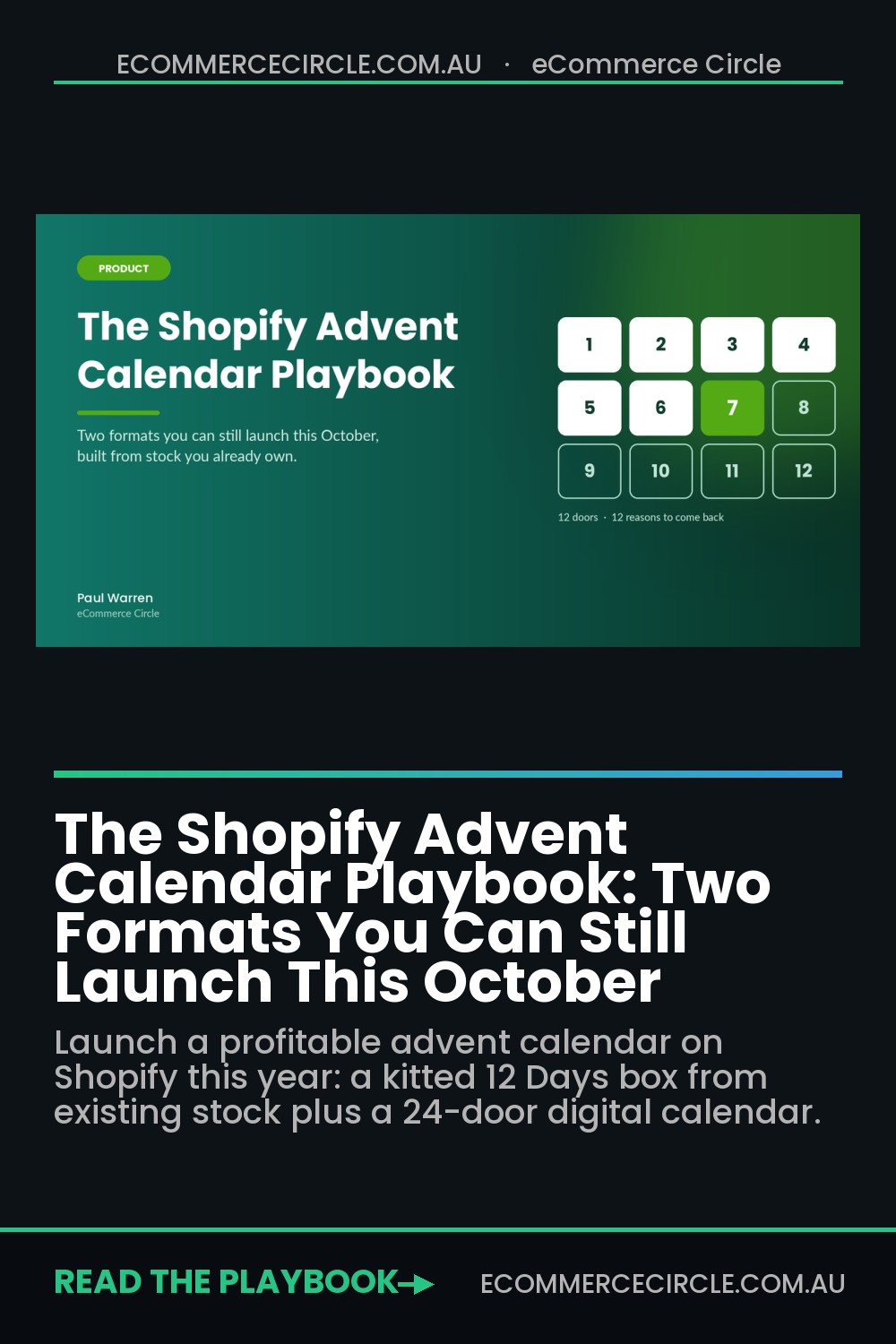
That’s the wrong conclusion. The big-brand 24-door calendar is only one format, and it’s the hardest one for a small Shopify store to pull off. There are two other formats you can still launch this month using stock you already own: a kitted “12 Days” box built from your existing range, and a digital daily-reveal calendar that lives on your site and gives shoppers a reason to come back every day in December.
And the upside is bigger than most people think. In Partnerize’s analysis of the UK 2025 beauty advent season, 49% of advent calendar revenue came from new customers, compared with just 35% for everything else those brands sold. An advent product isn’t just a Christmas SKU. It’s one of the best customer acquisition tools you’ll run all year. This playbook shows you how to build one without wrecking your margin or your fulfilment team.
Why Advent Calendars Are an Acquisition Play, Not a Novelty
Most founders treat an advent calendar as a gift item. The brands that win treat it as a sampling engine. Twelve or twenty-four small doses of your range, opened one per day, is the most effective product trial you can put in someone’s hands.
Look at the numbers coming out of the last season:
- Revenue up, search down. Partnerize tracked £4.1M in UK beauty advent revenue between September and November 2025, up 36% year on year, even though Google searches for “beauty advent calendar” fell 16%. Discovery moved to social.
- Social is the shop window. Half of the top 50 beauty products sold on TikTok over Black Friday were gift sets or advent calendars, and 35% of UK buyers named social media influence as their main reason for buying one.
- The category keeps growing. Industry estimates put the global advent calendar market (Market Intelo) at around US$1.3 billion in 2024, with forecasts of 5-7% annual growth through the next decade.
- Value perception drives the sale. Amazon Australia’s 2025 Beauty Advent Calendar sold for $100 while promoting more than $570 of product value, and ran as a pre-order from 3 to 23 October.
That last point matters for you. Shoppers don’t buy an advent calendar because it’s cheap. They buy it because the value gap feels obvious. Your job is to engineer that gap without giving away your margin, which is exactly what the next section covers.
There’s also an Australian-specific reason to care. Australia Post reported $82.6 billion in online spending for 2025, but the average basket has slipped to around $96 as cost-of-living pressure bites. An advent product lets you sell a higher-ticket item that still feels like good value, which is a rare combination heading into Christmas.
Pick Your Format: The Three Advent Models (and Which One Fits This Year)
Before you design anything, pick the right model for your timeline and range. Here’s how they compare:
| Format | Lead time | Best for | Main risk |
|---|---|---|---|
| Custom 24-door calendar | Months (custom print + freight) | Brands with 15+ sampleable SKUs and cash for a big buy | Dead stock on 26 December |
| Kitted “12 Days” box | 2-4 weeks | Beauty, food, pet, candles, stationery, accessories | Kitting labour eating margin |
| Digital daily-reveal calendar | 3-7 days | Any store, any category | Training customers to wait for deals |
If it’s October and you haven’t already ordered custom packaging, forget the 24-door calendar for 2026. Put it in your 2027 plan (more on that at the end) and choose between the other two. Many brands should run both: the box as a hero product in your gift lineup, and the digital calendar as a December traffic and retention driver.
A quick filter for the box: if you can’t name 12 products (or sample sizes) that a customer would genuinely enjoy discovering, don’t force it. A box padded with stickers and keyrings gets torn apart in TikTok unboxings, and that’s the opposite of what you want.
Build the Box: The 12 Days Kit From Stock You Already Own
The kitted box is the fastest physical format. You’re not manufacturing a new product. You’re curating existing SKUs into a new offer and packing them into a stock 12-door calendar box with a branded sleeve or sticker.
Here’s the build process we run with members:
- Pull your sampleable range. Export your product list and flag anything available in a mini, travel or sample size, plus any low-cost, high-perceived-value items (lip balms, tea sachets, pet treats, mini candles, enamel pins).
- Map the door sequence. Put a hero product behind door 1 (first impression), something surprising around door 6 (the mid-point lull), and your best full-size item behind door 12. The last door is what people film.
- Include 2-3 “gateway” products. These are the items you most want a new customer to reorder. Every door is a sample, but these are the ones you’ll follow up on in January.
- Source a stock calendar box. Australian packaging suppliers sell blank 12 and 24-door kraft or white calendar boxes. A custom sleeve or two-colour sticker turns it into your brand in days, not months.
- Price it on the 3x rule. Aim for a headline RRP value of roughly 2.5-3x the selling price, built from genuine current RRPs of what’s inside.
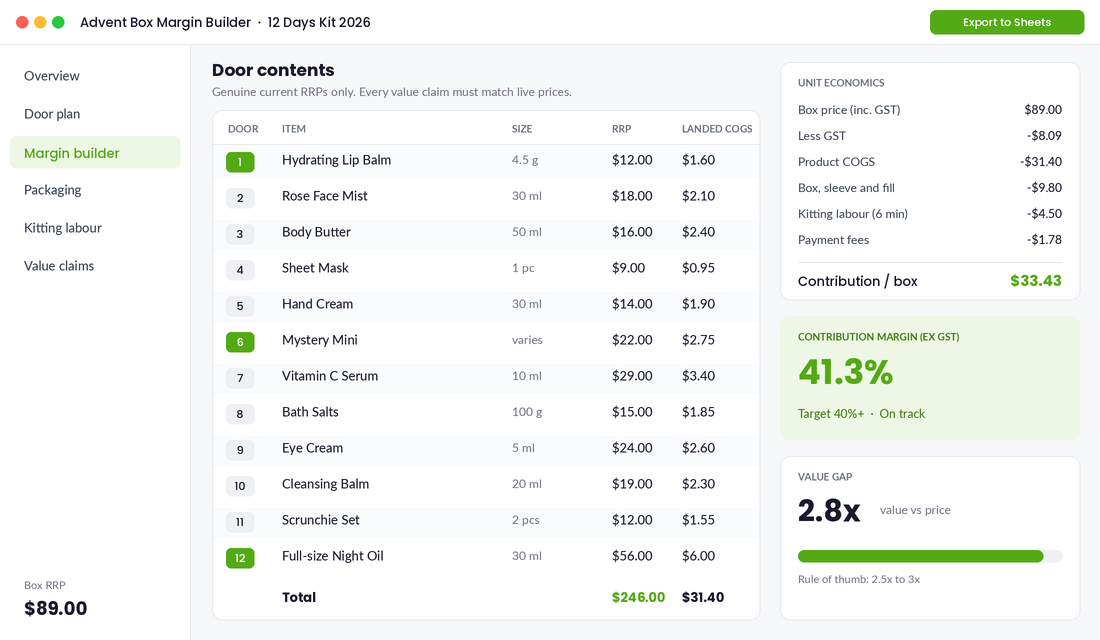
Now the margin maths. Kitting has costs most founders forget: the box, inserts, crinkle fill, and the labour to pack 12 items into 12 doors. Run the numbers per unit before you commit to a quantity:
- Product COGS: landed cost of all 12 items (use true landed cost, not supplier price. Our landed cost playbook walks through it).
- Packaging: calendar box, sleeve or sticker, door labels, fill.
- Kitting labour: time each box takes multiplied by your hourly rate or your 3PL’s kitting fee.
- Payment and shipping subsidy: processing fees plus any free-shipping cost you absorb.
Our target for a kitted box is a contribution margin of 40% or better. That’s lower than a typical single product, but it’s acceptable because roughly half the buyers are brand new and you’ll recover the difference on the second order.
One Australian compliance note. If you say “valued at $246” or “worth over $240”, that number must be built from prices you genuinely charge for those items. Inflated “value” claims fall under the Australian Consumer Law’s misleading pricing rules, and the ACCC watches gift-season claims closely. List the contents and their RRPs on the product page so the claim is transparent.
Set It Up in Shopify: Inventory, Bundles and the Product Page
The biggest operational mistake with a kitted box is selling it as a standalone SKU with its own stock count. Do that and you’ll sell 80 boxes while the underlying minis sell out individually, leaving you short on door 7 with 40 boxes still to pack.
Use Shopify’s free Shopify Bundles app instead. It creates a fixed bundle that draws down inventory from each component product, so your stock levels stay honest across the box and the individual SKUs.
Setup steps:
- Install Shopify Bundles from the Shopify App Store (it’s built by Shopify and free).
- Create a new fixed bundle, add your 12 component products and set the quantity of each to one.
- Set the bundle price, upload your box photography and write the product page.
- Ring-fence stock: if you’re kitting 150 boxes, reduce each component’s sellable inventory now so you can’t oversell the minis individually.
- Add the box packaging as a tracked inventory item too, so you know when you’re about to run out of physical boxes.
On the product page, show what’s behind every door, either as a grid of 12 images or a “spoiler” toggle for people who want the surprise. Shoppers buying an advent product as a gift want to know exactly what they’re giving. Add a clear “Order by” date tied to your shipping cutoffs. If you haven’t set those yet, our Christmas cutoff playbook covers how to calculate them by zone.
Finally, launch to your list first. Partnerize found brands are moving away from “notify me” pages and straight into exclusive pre-orders, with September alone contributing 21% of UK advent revenue. You’re launching later than that, so give your subscribers a 48-hour head start. Our early access list playbook shows how to build the VIP window.
Launch the Digital Calendar: 24 Doors That Bring Shoppers Back Daily
The digital calendar doesn’t sell a physical product. It’s a page on your store with 24 doors, one opening each day from 1 December, each revealing an offer, a gift, a piece of content or a giveaway. Its job is to turn December into 24 reasons to visit instead of one.
The fastest way to build one is Scaly – Advent & Deal Calendar, a Shopify app that costs around $10 a year with a free trial. It comes with ready-made templates and lets you put a product and an optional discount code behind each door.
Setup steps:
- Install the app and pick the advent template. Match fonts and colours to your theme.
- Set the timezone to Australia/Sydney or Melbourne so doors open at midnight local time, not US time.
- Load your 24 doors from your door plan (below), including any discount codes created in Shopify first.
- Add the calendar to a dedicated page, link it from your announcement bar and homepage hero.
- Gate it lightly: ask for an email to “save your calendar” so you can send a daily door reminder to people who opted in.
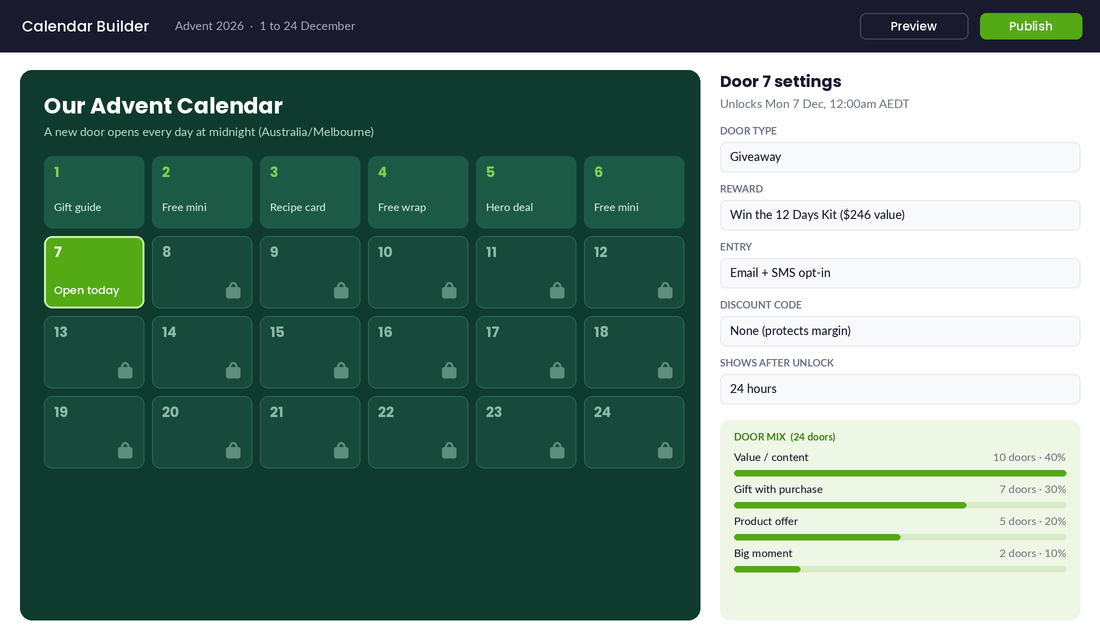
Now the part most brands get wrong: what goes behind the doors. Twenty-four days of 20% off store-wide trains your customers to never pay full price again, and it lands right after BFCM when your margins have already taken a beating. Use this mix instead:
- 40% value doors (no discount): gift guides, styling videos, recipes, “how we make it” content, free gift wrapping for the day.
- 30% gift-with-purchase doors: a free mini with orders over your AOV. This protects price and lifts basket size.
- 20% product-specific offers: one hero product at a sharp price for 24 hours only, ideally overstocked lines.
- 10% big doors: two or three moments people will talk about, like a giveaway of your full advent box or a mystery bundle.
The Australian twist: your last physical shipping date will hit well before 24 December. Plan the final week of doors around things that don’t need a courier: digital gift cards, click and collect, “free gift with your first January order”, and content. Our gift wrapping playbook has more ideas for low-cost value adds that work in that window.
Promote It Where Advent Buyers Actually Look
Remember the Partnerize finding: advent revenue grew 36% while Google search fell 16%. People find advent products on social and through creators, not by typing it into Google. Your promotion plan should reflect that.
- Unboxing content first. Film a full 12-door opening yourself before launch. It’s your hero ad creative, your product page video and your organic TikTok and Reels post in one.
- Seed 10-20 creators. Send the box to micro-creators in your niche with no brief except “open it on camera”. Advent unboxings are native social content, so you won’t need to push.
- Content partners over coupon sites. Partnerize found advent calendars made up 38% of revenue for content and influencer partners but only 9% for cashback partners. Pitch Australian gift guides and lifestyle editors now; most December gift round-ups get written in October and November.
- Email in three beats. VIP early access, public launch, then a “last chance before Christmas cutoff” send. For the digital calendar, send daily door emails only to people who opted in, not your whole list.
- Retarget door visitors. Anyone who opened three or more digital doors is warm. Build a Meta custom audience from calendar page visitors and show them the physical box.
Paid ads can work here, but keep them tight. Use the unboxing video as creative, target your existing customer lookalikes, and set a daily budget you’d be comfortable losing if the box doesn’t click. Kill it after 5-7 days if cost per purchase sits above your contribution margin per box.
Measure What Matters (Then Turn Openers Into January Customers)
Revenue on the box is the obvious number. It’s not the most important one. Because half your buyers are likely new, the real return shows up in January and February.
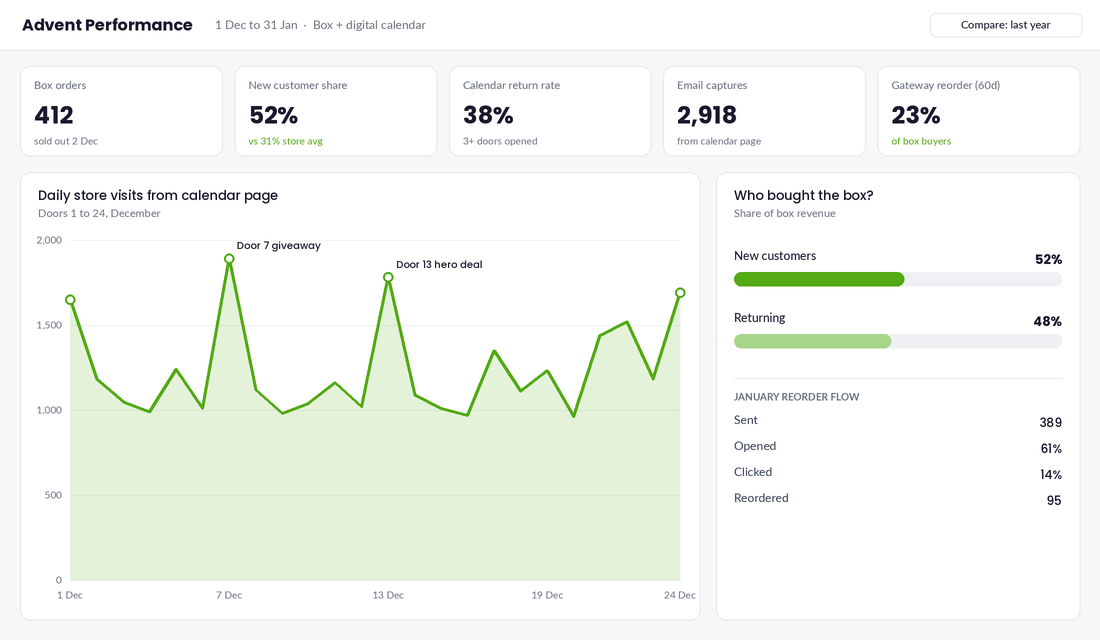
Track these five metrics through December and into the new year:
- New customer share of box orders. Tag box buyers in Shopify and compare first-time versus returning. If it’s well above your usual new-customer share, the box is doing its acquisition job.
- Contribution margin per box. Actual, not planned. Include the kitting hours you really spent.
- Digital calendar return-visit rate. What percentage of people who opened door 1 came back for three or more doors?
- Email and SMS captures from the calendar. Every opt-in is a December subscriber you can sell to in January.
- Gateway product reorder rate. Of box buyers, how many bought a full size of one of your gateway products within 60 days?
That last metric is where the money is. Build a Klaviyo flow triggered by box purchase that lands in early January: “Which door was your favourite?” with links to the full-size versions of every item inside. Add a modest returning-customer offer if you need to, but often the reminder alone does the job.
How It Compounds: From One Box to a Seasonal System
Here’s where it comes together. On its own, a box is a nice December SKU and a digital calendar is a fun page. Together, they form a loop:
- The box brings in new customers who sample 12 products.
- The digital calendar brings them (and everyone else) back to your site 5-10 times in December.
- The January flow converts sampling into full-size reorders.
- Your reorder data tells you which products to feature in next year’s 24-door calendar, which you now order in May with real data behind every door.
That’s the shift. Most brands treat advent as a one-off Christmas gamble. The brands that win treat it as an annual product line that gets smarter every year, with customer data deciding what goes behind each door.
Your Advent Calendar Checklist
Save this and work through it this week:
- ☐ Choose your format: kitted box, digital calendar or both
- ☐ List 12 sampleable SKUs and flag 2-3 gateway products
- ☐ Order stock calendar boxes and a branded sleeve or sticker
- ☐ Build the per-unit margin sheet (COGS, packaging, kitting, fees) and confirm 40%+ contribution margin
- ☐ Check every “valued at” claim against genuine current RRPs
- ☐ Create the bundle in Shopify Bundles and ring-fence component stock
- ☐ Write the product page with door-by-door contents and an “Order by” date
- ☐ Plan 24 digital doors using the 40/30/20/10 mix
- ☐ Load doors into your calendar app with Australian timezone settings
- ☐ Film your own unboxing and seed 10-20 creators
- ☐ Schedule VIP, launch and last-chance emails
- ☐ Build the January “favourite door” reorder flow in Klaviyo
- ☐ Put “order 24-door calendar packaging” in your May 2027 calendar
Start This Week, Not Next Year
You don’t need a Mecca-sized budget to run an advent play. You need 12 products people love, a box, a page with 24 doors, and a plan to turn December openers into January customers. The brands that start small this year are the ones with a sell-out 24-door calendar in 2027.
Inside eCommerce Circle, product strategy and seasonal planning are core pillars we work on with every member, because the right hero product at the right time can make your whole quarter. If you want to see exactly where your store is being capped, take the free More Orders Scorecard. It takes two minutes and shows you which of the 10 P’s to fix first.