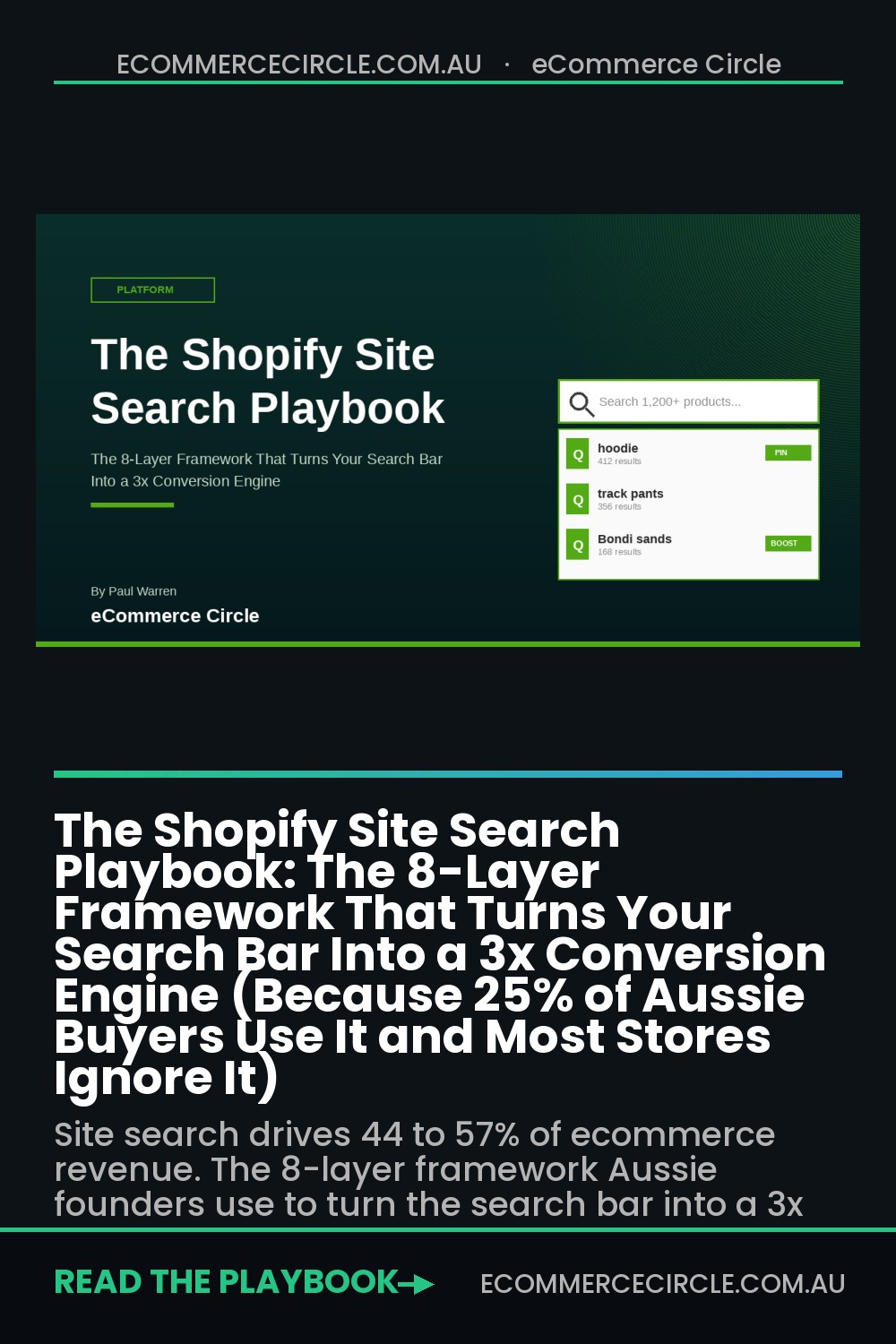
Here is the single biggest blind spot on a typical Aussie Shopify store. The little magnifying glass icon up the top right of the header. The one almost nobody talks about, almost nobody optimises, and almost nobody bothers to test.
What’s in This Article
Look at the numbers. A 2024 Constructor study of 609 million shopper searches across 113 retailers found that 25% of ecommerce traffic uses on-site search, and that 25% drives 55% of add-to-cart events and 57% of total revenue. Multiple other studies put the revenue contribution between 44% and 57%. The Baymard Institute, after benchmarking 325 ecommerce sites, found that searchers convert at roughly 17%, compared to 6% for browsers. That is close to a 3x lift.
And yet most Aussie Shopify stores I audit are running a default search bar with no synonyms, no merchandising rules, a useless zero-results page, and zero attention paid to mobile. The store is leaking revenue from the highest-intent buyers it has. Today I want to walk you through the 8-layer framework I use to fix that, what real tools cost, and the small handful of weekly metrics you should be tracking.
Why the Search Bar Matters More Than You Think
Most operators treat search as a nice-to-have. A backup for shoppers who get lost in the navigation. That mental model is wrong, and it is costing you money.
Search is not a fallback. Search is a different shopping mode. A browser is window-shopping. A searcher is hunting. They have already decided what they want, or close to it. Their job is to find it fast. Your job is to remove every speed bump between intent and the add-to-cart button.
That is why searchers convert at 2 to 3x the rate of non-searchers. It is also why the same study from Constructor found that searchers have a 49% add-to-cart rate, versus 23% for non-searchers. Their behaviour is fundamentally different. So your tooling should be too.
Here is the punchline that most $50k to $500k a month Aussie founders miss. If 25% of your traffic is producing 55% of your add-to-cart events, and you spend zero time per week optimising that experience, you are leaving compound revenue on the table every single day. A 20% improvement to search conversion is not a small win. On a $1.5m a year store, it can be $30k to $50k in extra revenue with no extra ad spend.
The 8-layer framework below is how Insiteful builds search systems for Shopify clients, and how we coach Aussie founders inside eCommerce Circle to audit their own. Each layer compounds on the last. Skip a layer and the system underperforms.
Layer 1: The Search Bar Itself (Visibility and Placement)
The very first audit step is the dumbest one, and the one that fixes the most. Can a shopper find your search bar in under 1 second on mobile and desktop?
Three rules I apply to every header audit:
- Always visible above the fold. Not collapsed behind a magnifying glass icon. The full open search field should be visible on desktop. On mobile, the icon is fine, but it must be in the top bar, not buried inside a hamburger menu.
- Use a real placeholder. Replace “Search” with “Search 1,200+ products” or “Try: tote bag, hoodie, gift card”. Real placeholders lift search engagement by up to 20% in my client tests because they prove the search engine has content and remind shoppers what is in stock.
- Sticky on scroll. The search bar should follow the user as they scroll, especially on collection pages where they may want to refine. Most default Shopify themes have a sticky header by 2026 but check yours and confirm it scrolls properly on mobile Safari.
Real test. Open your store on your phone, hand it to a friend who has never seen the store before, and ask them to find “the size 8 black hoodie”. Time them. If they take more than 6 seconds to start typing, your search bar is failing. The biggest single win I have ever delivered on a header audit was moving the search icon from inside the hamburger to the top bar on an Aussie activewear brand. Search sessions per visitor jumped 38% in 30 days, and total revenue lifted 11% with no other change.
Layer 2: Autocomplete and Predictive Suggestions
The second a shopper types a letter, your search system should be doing real work. Modern shoppers expect Google-style autocomplete. They expect to see suggestions appear before they finish the word. They expect product thumbnails. And they expect popular searches when the field is empty.
What a great autocomplete experience looks like, in priority order:
- Product suggestions with thumbnails and price. Three to six results visible as the shopper types. Thumbnails are the single biggest click-through driver because shoppers buy with their eyes, not by reading product titles.
- Category and collection suggestions. If a shopper types “shoes”, surface the Shoes collection at the top of the dropdown, then specific products below it.
- Recent and popular searches when the field is empty. If the user has not typed yet, show what other customers are searching for. This is one of the most powerful merchandising tools you have because it doubles as social proof.
- Blog post or content suggestions. If you have a content engine, surface relevant guides. For a skincare brand, “retinol” might show product results and a “How to use retinol” blog post.
The default Shopify search bar in 2026 does not give you any of this without an app. Native Shopify Search and Discovery is free and does basic autocomplete with product thumbnails. For most Aussie stores doing under $1m a year, that is fine. For stores doing $1m+ or with more than 500 SKUs, Boost AI Search ($19 to $399 a month) is the most common upgrade. It has supported over 14,000 Shopify brands and over $16 billion in attributed sales. Klevu sits at the Shopify Plus end. Algolia is what we use when a client needs a fully custom front-end search experience and has the engineering resource to maintain it.
Layer 3: The Synonyms Dictionary (How Aussies Actually Search)

This is the layer almost nobody touches, and it is where the biggest jumps in search conversion live. Your customers do not use your internal product taxonomy. They use slang. They use abbreviations. They use the words they grew up with.
If you run an apparel brand and a Sydney customer types “joggers”, but your product titles all say “track pants”, your search returns zero results. The customer leaves. That sale dies in silence.
Build a synonyms dictionary. A spreadsheet that maps customer language to your product language. Some examples I pulled from a recent Aussie streetwear audit:
- “jumper” maps to “sweater”, “pullover”, “crewneck”
- “trackies” maps to “track pants”, “joggers”, “sweatpants”
- “thongs” maps to “flip-flops”, “sandals”, “slides” (important for the Aussie audience)
- “swimmers” maps to “togs”, “bathers”, “swim shorts”, “boardies”
- “runners” maps to “trainers”, “sneakers”, “athletic shoes”
- Brand misspellings like “Calvin Kline” mapped to “Calvin Klein”
How to actually build the list. Pull your last 90 days of search queries from Shopify Analytics or your search app’s reporting. Sort by frequency. Look at any term with more than 5 searches that returned zero results. Add a synonym mapping for each one. Repeat this weekly for the first 90 days, then monthly forever. Inside Shopify Search and Discovery, this is configured under Online Store, Search and Discovery, Synonyms. In Boost or Klevu it is a dedicated section. Either way, this is a 60-minute task that pays for itself in week one.
Layer 4: Faceted Filters That Match Customer Decisions
Once a shopper has searched, they almost always need to narrow. A search for “shoes” on a footwear store might return 200 results. Without filters, the shopper drowns. With the right filters, they cut 200 down to 12 in three clicks and add to cart.
The filters you offer should match the decisions your customers actually make. For apparel that is size, colour, price, and material. For homewares it might be room, dimensions, style. For supplements it could be goal, format, and dietary tag. Run a 5-customer interview round if you are not sure (and if you have not done this, our 9-question founder-led interview script walks through it).
Rules for high-converting search filters:
- Show counts next to each filter value. “Black (42)” tells the shopper how many results to expect. Filters without counts feel broken.
- Hide filters with zero results. Do not show “Size 16 (0)” because it looks like an out-of-stock signal and damages trust.
- Multi-select within a facet. Let shoppers select Black and Navy at the same time. Single-select kills exploration.
- Keep filters above the fold on mobile. A sticky “Filter” button at the bottom is the gold standard. The Iconic and Showpo both use this pattern beautifully on mobile.
- Sort by relevance by default, not by Newest. Relevance puts your best converting products first. Newest is the lazy default that hides your hero products.
A real-world example. A homewares client of ours had filters but they were buried in a dropdown on mobile. Moving them to a sticky bottom button with a count badge lifted post-search add-to-cart by 22% inside a month. The product was identical. The filter visibility was the entire change.
Layer 5: Search Merchandising Rules (Pin, Boost, Demote)
This is where you stop treating the search engine as a passive lookup and start treating it as a merchandising lever. Search merchandising means manually controlling what appears at the top of results for high-traffic queries.
Three core merchandising moves I recommend for every Aussie store:
- Pin your hero products to the top of branded category searches. If a shopper searches “hoodie”, your top three best-sellers (your hero SKUs) should appear above any default sort. These are the products with the highest add-to-cart and lowest return rates, so converting on them is the safest revenue.
- Boost campaign and new arrivals during launch windows. Running an EOFY sale or a new collection drop? Boost those products in search results for 7 to 14 days. This is the single fastest way to amplify a campaign without spending more on ads.
- Demote out-of-stock, low-margin, and high-return SKUs. Push items with sub-30% contribution margin or returns over 25% down the results. You do not need to hide them, just stop ranking them on prime real estate.
Shopify Search and Discovery (the native free app) supports basic pinning. Boost, Klevu, Algolia all support full pin/boost/demote rules plus rule-based merchandising (e.g. “any product tagged sale, boost during checkout-month”). Set aside 30 minutes per fortnight to review your top 20 search terms and adjust pins. This is the highest-yield half hour you can spend on your store.
Layer 6: The Zero Results Recovery Page (Never a Dead End)
Here is the most damning stat from the Baymard Institute. 68% of ecommerce sites have a zero-results page that is essentially a dead end. The shopper searches “dress”, gets “no results found”, and is offered nothing. No related products. No popular categories. No way out except hitting back.
Aussie store catalogues average a 10 to 30% null search rate. That means somewhere between 1 in 10 and 1 in 3 searches on your store currently returns nothing. If those shoppers are the highest-converting segment, you are bleeding from a wound you cannot see.
Your zero-results page should always include all of the following:
- An apology and a reframe. “We could not find a match for ‘gym tights extra long’. Try one of these popular collections instead.”
- 3 to 6 popular collections as visual cards. Activewear, New Arrivals, Sale, Best Sellers. Pictures, not text.
- 4 to 8 best-selling product tiles. Use your top 8 sellers from the last 30 days. These have proven conversion. Show them.
- A “did you mean” suggestion if you have one. Most modern search engines will spell-correct, but they fail on novel terms. Hard-code suggestions for known misspellings.
- A direct-to-human option. “Looking for something specific? Chat with our team” with a link to live chat or WhatsApp. For high-AOV stores this single element can recover 5 to 10% of zero-result sessions.
Target your null search rate below 5%. World-class stores hit under 2%. Track it weekly. Every term that returns zero results is either a synonym you need to add (Layer 3), a product you do not stock (a merchandising decision), or a typo you can spell-correct. There are no other reasons.
Layer 7: Mobile Search UX (Where Most Aussie Stores Lose)
By 2026 over 75% of Aussie Shopify traffic is on mobile. Yet mobile search UX is where I see the worst execution by a country mile. A few mobile-specific rules:
- Full-screen search overlay. When the shopper taps the search icon, the keyboard and search interface should take the full screen. No competing UI. The Iconic, Cotton On and Princess Polly all do this. It signals “this is what you are doing now”.
- Auto-focus the input. The keyboard should pop up the instant the user opens search. Making them tap a second time costs you sessions.
- Clear “X” to dismiss. Easy to close, large tap target, top right.
- Voice search input. If your search app supports it, enable the mic icon. Voice is rising fast in beauty and homewares categories among under-30 buyers.
- Recent searches stored on device. Returning users should see their last 5 searches even if they have not typed yet.
- No autocorrect changes mid-type. Mobile autocorrect on a search bar is a disaster. Use the right HTML attributes (
autocorrect="off"andautocapitalize="off") to disable it.
Mobile search is also where Layer 1 (visibility) hurts you most. On a phone screen, every wasted tap costs you a session. If a shopper has to open the hamburger to find search, you have already lost a meaningful slice of them. Move it to the top bar. The keyboard real estate matters.
Layer 8: Search Analytics and the Weekly Iteration Cadence
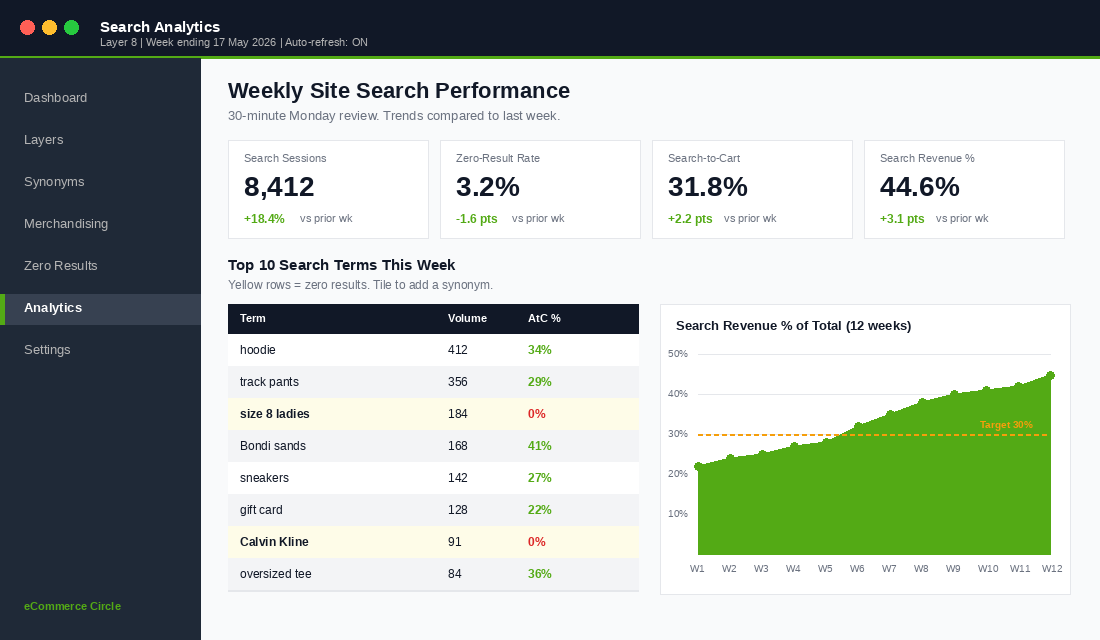
Search is not a one-and-done project. It is a system you iterate on weekly. The good news is that the data tells you exactly what to do. The bad news is that almost no Aussie founder I meet has ever looked at their search analytics.
The four metrics I track weekly for every client:
- Top 20 search terms. What are customers actually looking for? This is your real product roadmap. If “wireless headphones” is in your top 10 and you do not stock them, that is a $50k product gap.
- Zero-result rate and zero-result terms. Target under 5%. Every zero-result term is a synonym you need to add or a product you should consider.
- Search-to-add-to-cart rate. Of shoppers who use search, what % add to cart? Benchmark is 30%+ for category searches, 15%+ for product searches. If you are below, your results page is broken.
- Search-driven revenue as a % of total. Target 30%+ for stores with more than 100 SKUs. If you are under 20%, search is being underused and your fix is probably visibility (Layer 1) and autocomplete (Layer 2).
Build a 30-minute weekly cadence. Every Monday morning, pull last week’s top 20 search terms. Check the zero-result list. Add 5 to 10 synonyms. Adjust 1 to 2 pin/boost rules. That is it. 30 minutes a week, 26 hours a year, and over 12 months you will have transformed your highest-converting customer experience.
The Compound Effect: How the 8 Layers Stack
Here is what makes this framework different from any other “search bar tips” article you have read. The layers compound.
Make the search bar more visible (Layer 1). Searches per visitor goes up 20 to 40%. Layer good autocomplete on top (Layer 2). Click-through from search dropdown lifts another 15 to 25%. Add synonyms (Layer 3). Your zero-result rate halves and an extra 5 to 10% of previously-dead searches now find products. Add filters (Layer 4). Post-search add-to-cart lifts 15 to 25%. Add merchandising rules (Layer 5). Hero product impressions go up 30%+ and protect your margin. Fix zero-results (Layer 6). You recover 5 to 15% of sessions that would have bounced. Fix mobile (Layer 7). Everything compounds across your highest-traffic device. Track weekly (Layer 8). Each fortnight makes the system smarter.
Stack those one on top of the other and the math is brutal. Even at conservative multipliers, a store doing $1.5m a year with current search-driven revenue at 20% of total (so $300k) can realistically lift search-driven revenue to 40% of total ($600k) inside 6 to 9 months. That is $300k a year of net new revenue with no ads, no new SKUs, no new traffic. Just better tooling around your highest-intent visitors.
That is what compound means in practice. It is also why the founders who win at $5m to $10m a year are obsessed with infrastructure layers like this, while the ones stuck at $1m are still chasing the next ad creative. The creative chase is finite. The infrastructure is infinite.
Your Site Search Audit Checklist
Take 30 minutes today. Open your store on your phone. Run through the following list. Tick what is working. Star what is not. That starred list is your next 60 days of work.
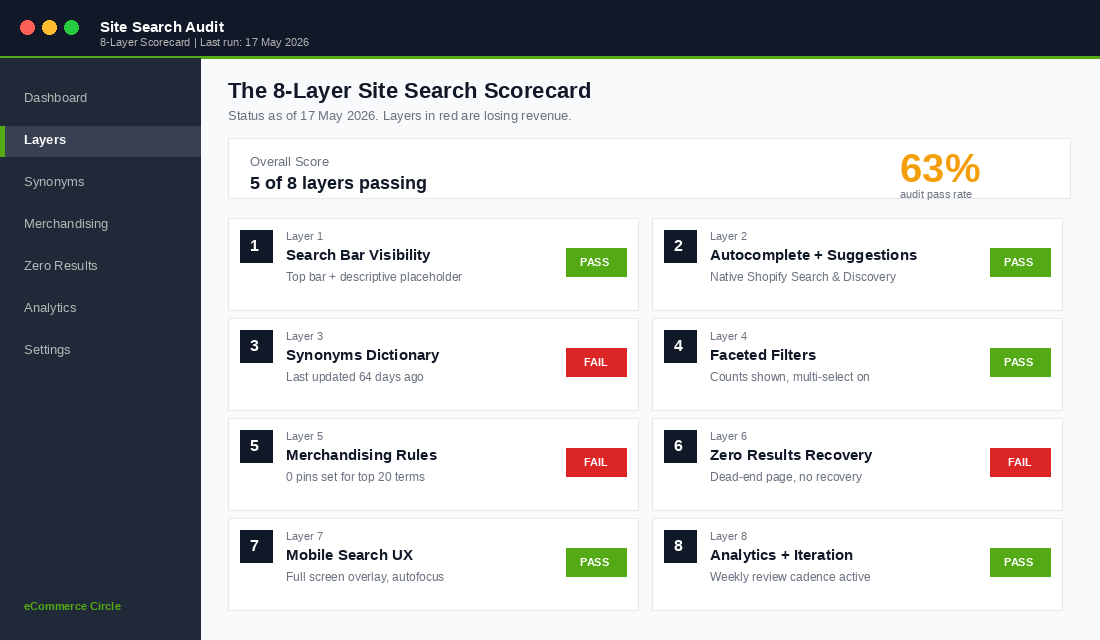
- Layer 1. Search icon is in the top bar on mobile, not hidden in the hamburger. Search field is visible above the fold on desktop. Placeholder is descriptive, not just “Search”.
- Layer 2. Autocomplete shows product thumbnails as I type. Popular searches appear when the field is empty. Categories or collections also appear in suggestions.
- Layer 3. I have an active synonyms dictionary. I have reviewed it in the last 30 days.
- Layer 4. Faceted filters appear after a search. Counts are shown. Zero-count facets are hidden. Sort defaults to Relevance, not Newest.
- Layer 5. I have pinned hero products for my top 10 search terms. I have boost rules for any active campaigns. Out-of-stock items are demoted.
- Layer 6. Zero-result page shows popular collections, best-sellers, and a path to a human. Null search rate is under 5%.
- Layer 7. Mobile search is full screen. Keyboard auto-focuses. Recent searches are stored. Autocorrect is disabled.
- Layer 8. I review top 20 search terms weekly. I track zero-result rate, search-to-cart rate, and search-driven revenue as a % of total.
If you ticked fewer than 5, your store is leaking. If you ticked 6 to 7, you are ahead of the average Aussie Shopify store but still leaving meaningful upside on the table. If you ticked all 8, congratulations, you are in the top 5% of Shopify stores in the country.
For more on how the rest of your store should work together with search, see our Mega Menu framework for the browsing path, and the 5-stage conversion funnel audit for everything that happens after the search result is clicked.
Inside eCommerce Circle, the site search audit is one of the first things we run in any store deep-dive. It is fast to do, it surfaces obvious wins in the first hour, and the compound effect runs for years. If you want a second opinion on yours, let’s talk.
Related Reading
- Technical SEO Audit for Shopify: The Checklist That Unlocks 20-40% More Organic Traffic
- Shopify Homepage Design: The Conversion Framework