Here is the most expensive number on your Shopify store, and most founders set it in about four seconds. The free shipping threshold. You picked a round figure that felt right, dropped “FREE SHIPPING OVER $X” into the announcement bar, and moved on. That four-second decision is quietly shaping your average order value, your margin, and how many carts you lose every single day.
What’s in This Article
The stakes are higher than they look. Across the industry, around 70% of carts get abandoned before checkout completes, and the number one reason is not price or trust. It is extra costs. In Baymard Institute research, 48% of shoppers walked because shipping, tax and fees pushed the total too high. Your threshold sits right on top of that wound.
Then there is the local reality. Australia Post lifted parcel prices by 4.95% from 1 July 2025, with a standard domestic parcel now starting at $9.70 before you have packed a single box. Shipping is not getting cheaper, and “just absorb it” is not a plan. This playbook is the five-step system we walk every member through to set a threshold that lifts AOV and protects the margin you actually keep.
Step 1: Start With Three Numbers, Not a Gut Feel
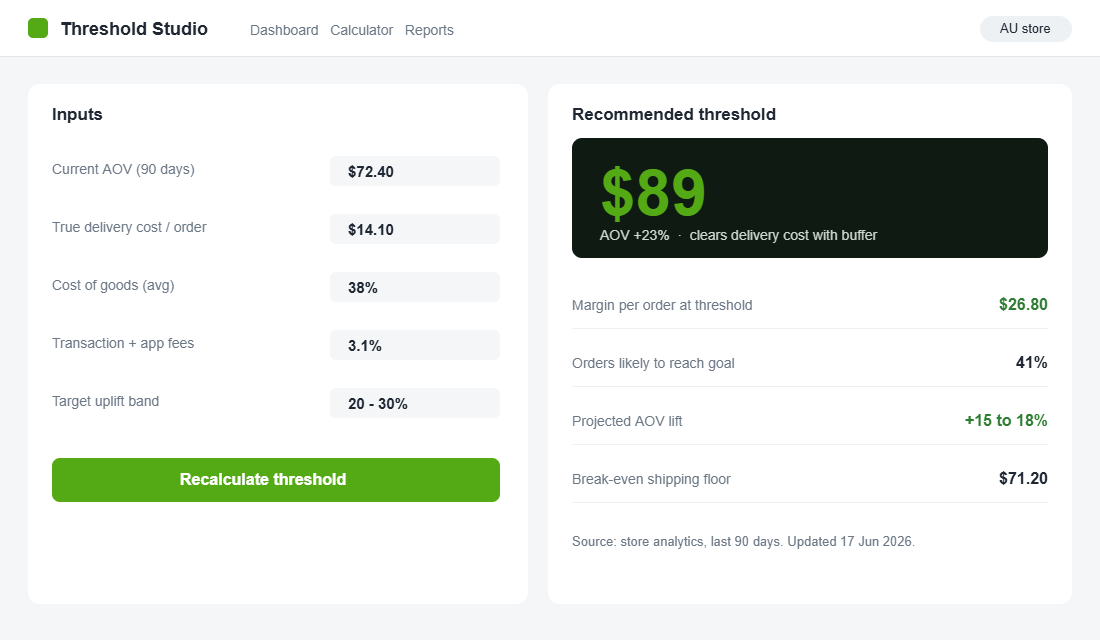
You cannot set a smart threshold until you know what you are working with. Most founders skip this part and guess. Pull three numbers before you touch a single setting.
- Your current AOV. Shopify Analytics, last 90 days. This is your anchor, and everything else keys off it.
- Your true delivery cost. Not the Australia Post sticker price. Add packaging, the pick-and-pack labour, and the slice of orders that trigger a “where is my order” email. For most Aussie stores that lands at $11 to $16 a parcel, not the $9.70 base.
- Your contribution per order. Revenue minus cost of goods minus transaction fees minus shipping. This is the dollar figure free shipping actually eats into.
Write these on a sticky note. If your AOV is $72 and your true delivery cost is $14, giving away shipping on a $55 order is not generosity. It is handing your margin to a customer who would have paid anyway. Step 1 just makes the invisible visible. If your underlying pricing is shaky, fix that first with the Shopify pricing strategy playbook before you layer shipping logic on top.
Step 2: Set the Threshold Above Your AOV, Never at It
This is where the maths earns its keep. A free shipping threshold only changes behaviour when it asks the customer to add something. Set it at or below your AOV and you are simply discounting your most common order. Set it too high and shoppers give up before they start.
The proven range is 20% to 30% above your current AOV. If you sit at $72, your threshold belt is roughly $86 to $94. Round it to a clean $89. For context, the median US free shipping threshold hit $64 in 2025, up from $52 in 2019, while the average shopper says they will spend about $43 to qualify. That gap is the tension you are managing: high enough to move the basket, low enough to feel winnable.
Why above and not at? Because the customer already heading for a $72 order needs a reason to reach. An $89 threshold gives that shopper a small, achievable goal. The $40 shopper reads it as out of reach and either pays for shipping or leaves, which is fine, because that order was never going to be profitable with free freight bolted on.
Step 3: Make the Gap Visible With a Progress Bar
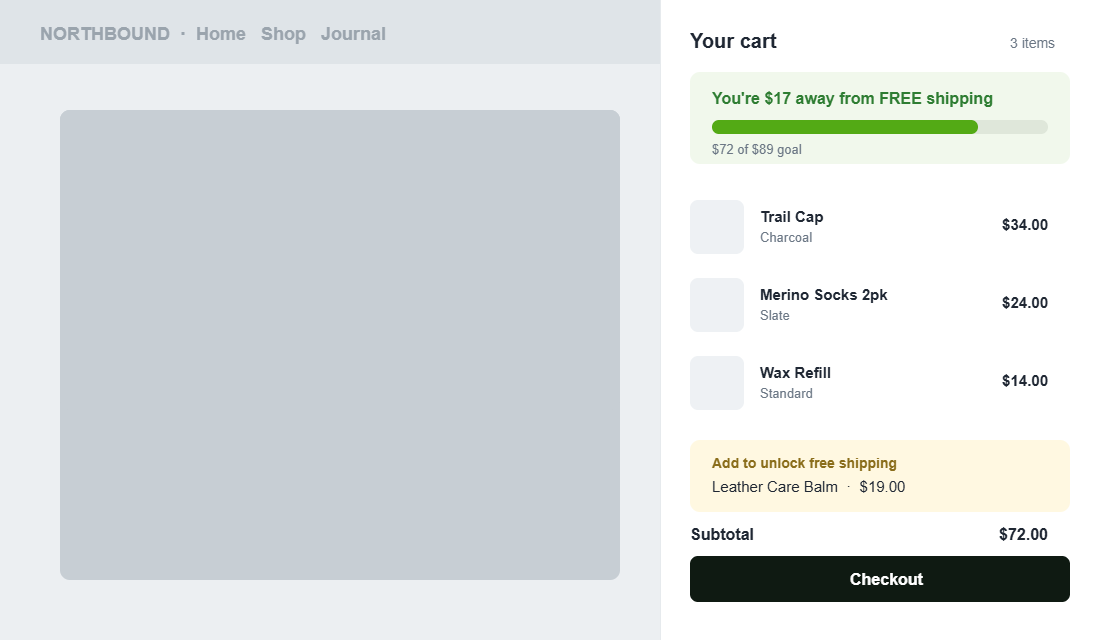
A threshold the customer cannot see does nothing. The lever is the progress bar: “You are $17 away from free shipping.” It turns an abstract rule into a goal the shopper can chase, and the data on this is strong. 58% of shoppers add items specifically to hit a free shipping threshold, and stores running a progressive bar report AOV lifts of 15% to 30%.
Tool to use: Hextom Free Shipping Bar. It is free to start, sits natively in your theme, and takes about ten minutes to configure. Setup steps:
- Install from the Shopify App Store and open the app from your admin.
- Create a new bar and choose the “Free Shipping Goal” type so it updates dynamically as the cart changes.
- Set your goal amount to the threshold from Step 2, for example $89, then write the copy: “Spend $X more for free shipping” plus a clear “You have unlocked free shipping” success state.
- Target Australia so the bar only shows to local visitors at your AUD threshold, and schedule it to run always-on.
- Add a cart-drawer version too. Apps like Upcart show the same progress meter inside the slide-out cart, which is exactly where the add-to-basket decision happens.
One bar in the header is good. The same bar repeated in the cart drawer, at the moment of decision, is where the AOV lift actually compounds.
Step 4: Protect the Margin You Are Giving Away
A higher AOV means nothing if every incremental order loses money. The goal is not vanity AOV, it is more contribution dollars per order. Guard that three ways.
- Never set the threshold below break-even. If free shipping costs you $14 and your contribution on a $60 order is $12, that order goes backwards. Your threshold has to clear your delivery cost plus a buffer.
- Curate the add-on, do not leave it to chance. Recommend specific products near the threshold (“add this $19 balm to unlock free shipping”), so the items closing the gap are the ones you most want to sell.
- Point shoppers at your fattest margins. Consumables, accessories and bundles carry better margins than your hero products. They make ideal gap-fillers because the extra dollar of basket is also your most profitable dollar.
A Sydney FMCG retailer worked with agency Swanky to raise its threshold from $30 to $50 and add a dynamic “spend $X more” banner. Overall AOV rose 32%, and the share of orders under $30 fell from 29% to 22.5%. The threshold did not lift every order equally. It re-sorted the basket distribution toward profitable orders, which is the entire point.
Step 5: Watch Margin per Order, Then Recalculate Every Quarter
Most founders set a threshold once and never look at it again. That is how a threshold quietly drifts out of date. Treat it as a living number.
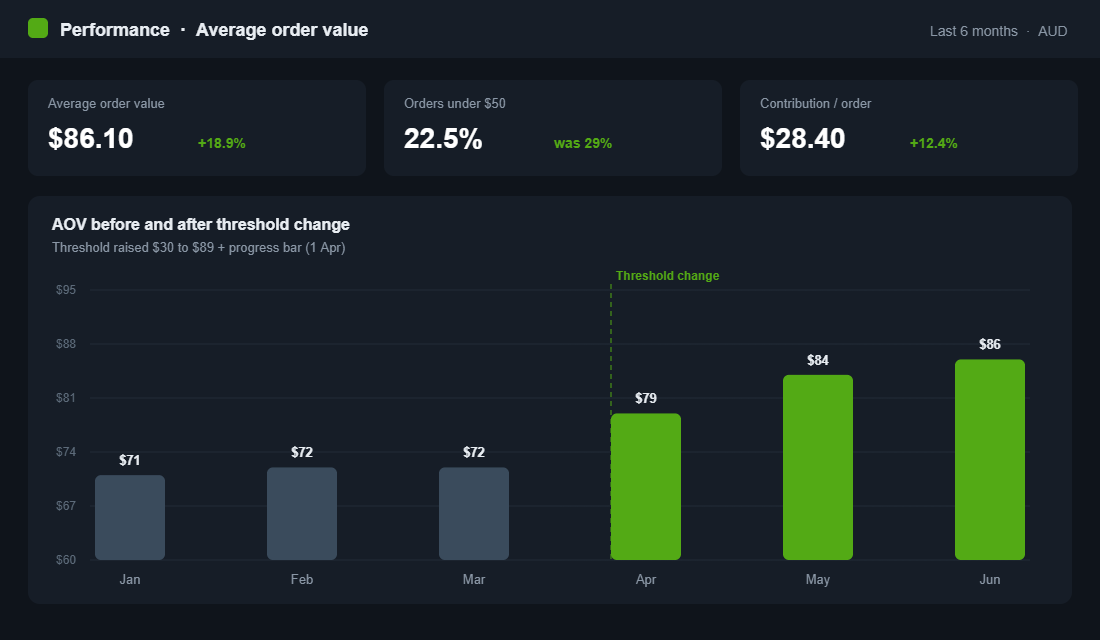
Watch the right metric. AOV ticking up is nice, but the real scoreboard is contribution per order. If AOV climbs 12% but you handed free shipping to a flood of borderline baskets, you can lift revenue and shrink profit at the same time. Track both numbers side by side, every month.
Then recalculate quarterly. Your AOV moves, your supplier costs move, and Australia Post moves once a year like clockwork. When your AOV rises, your threshold should rise with it. And keep it honest: if you advertise a threshold or a “limited time” free shipping push, it has to be real. The ACCC takes a dim view of misleading offers, the same way it does with the urgency and scarcity tactics that do not hold up.
The Compound Effect: Why This Touches Every Order
Here is how the five steps stack. Step 1 tells you the real cost you are protecting. Step 2 sets a threshold that pulls the basket up instead of subsidising it. Step 3 makes the gap visible so customers actually reach. Step 4 makes sure the orders you win are profitable. Step 5 keeps the whole thing tuned as your numbers shift.
Run together, a store moving from $72 AOV to $86 is not adding 19% revenue once. It is adding it to every order, every day, while losing fewer carts to bill shock at the checkout. Stack that on a solid repeat purchase engine and the same traffic, the same ad spend and the same product start producing materially more profit. That is the whole game: more margin from orders you were already getting.
Your Free Shipping Threshold Framework
Before you change a thing, run your store through this five-input check:
- Current AOV: your last 90 days from Shopify Analytics.
- True delivery cost: postage plus packaging plus labour plus support, per order.
- Threshold target: AOV plus 20% to 30%, rounded to a clean number.
- Break-even check: confirm your contribution at the threshold clears your delivery cost with room to spare.
- Visibility: a live progress bar in the announcement area and the cart drawer.
If you cannot answer all five with a real number, that is your first job this week. The threshold is one of the fastest profit levers on a Shopify store, and it is sitting in your settings right now, set to whatever number felt right the day you launched.
Inside eCommerce Circle, your free shipping threshold is one of the first Profit levers we pressure-test with every member, because it is quick to fix and it touches every order you take. If you want a second opinion on yours, let’s talk.