On 30 June 2026, Shopify Scripts stopped running. Not deprecated with a grace period. Switched off. Any store still relying on a published Script for tiered discounts, hidden payment methods or custom shipping logic watched that logic quietly disappear from checkout, usually without a single error message to warn them.
What’s in This Article
Most Aussie founders reading this never wrote a Script, because Scripts were a Shopify Plus feature. So it is tempting to file this under “not my problem”. That would be a mistake. The reason Shopify killed Scripts is the same reason this matters to a store doing $80k a month on the Advanced plan: Shopify Functions is now the layer that decides what your cart and checkout are allowed to do, and a large chunk of what you are paying apps for is already sitting in the platform.
Here is the number that should get your attention. The average Shopify store runs 6 to 10 apps that collectively add 2 to 3 seconds to page load, and every extra second of load time cuts conversion by roughly 7%. Meanwhile a store under $1m in revenue spends around $175 a month on apps, and stores in the $1m to $5m band routinely spend $1,000 to $3,500 a month. A meaningful slice of that spend is buying capability Shopify now ships natively.
This is the playbook we run with members before peak season. Six layers, in the order Shopify actually executes them, plus the audit that tells you which apps to cancel.
What Shopify Functions Actually Are (And What Your Plan Lets You Use)
A Function is a small piece of logic that runs on Shopify’s own servers, inside the cart and checkout, before the page renders. It is compiled to WebAssembly and executes in milliseconds. That is the important part. Unlike an app that injects JavaScript into your theme and adds another round trip to a third party server, a Function adds no scripts to your storefront and no network requests to your Lighthouse waterfall.
There are six Function types you will actually care about as an operator: product discount, order discount, shipping discount, cart transform, delivery customisation and payment customisation. There is a seventh, cart and checkout validation, which behaves differently enough that I treat it as its own layer below.
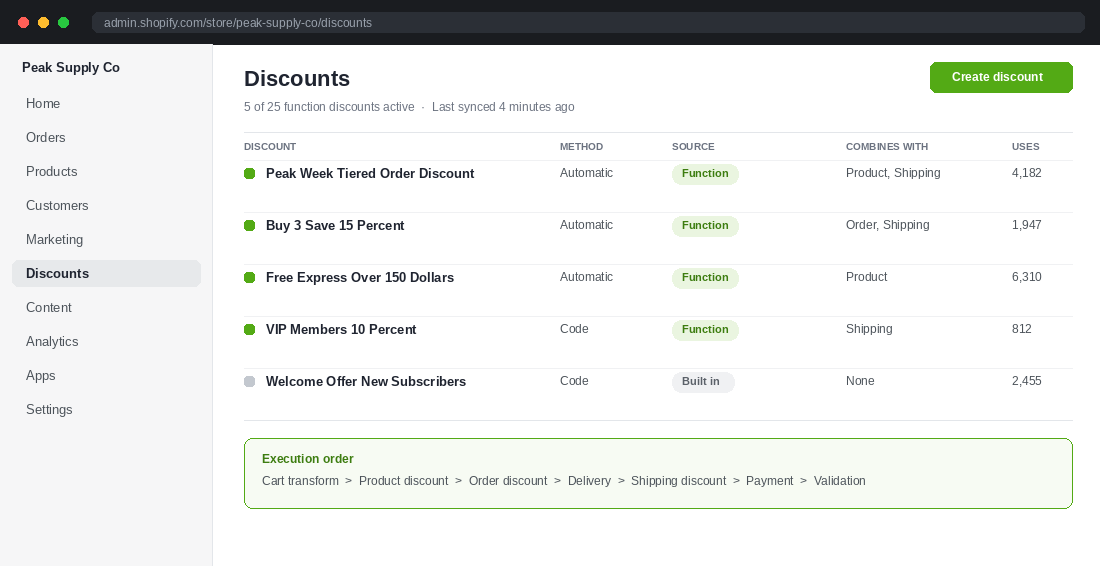
They run in a fixed order, and knowing that order stops most of the “why is my discount wrong” arguments before they start:
- Cart transform. Merges or expands line items, so bundles are resolved first.
- Product discount. Applied to individual line items.
- Order discount. Applied to the cart subtotal.
- Delivery customisation. Filters, renames and reorders shipping options.
- Shipping discount. Discounts the delivery options that survived step 4.
- Payment customisation. Filters, renames and reorders payment methods.
- Cart and checkout validation. The final gate that can block checkout entirely.
Now the part nobody explains clearly. Access depends on your plan, and it splits three ways.
- Any plan. You can install public apps from the Shopify App Store that are built on Functions. The Function runs natively even though the configuration lives in an app.
- Shopify Plus only. You can build and install custom apps containing Function APIs, which is how you get logic nobody else on the platform has.
- Shopify Plus only. Native delivery and payment method customisations configured directly in checkout settings, no app required.
So if you are not on Plus, the play is not “build a Function”. The play is “replace three JavaScript-heavy apps with one Function-based app that adds nothing to my storefront”. That alone is usually worth 0.5 to 1 second of load time.
Layer 1: Discount Functions, Where Your Whole Peak Offer Lives
Discounts are the layer most founders get wrong, and it costs real money at peak. Shopify merchants did a record 14.6 billion US dollars over Black Friday Cyber Monday weekend in 2025, up 27% year on year, with Australia sitting in the top group of selling countries alongside the US, UK, Germany and Canada. Sales peaked at 5.1 million US dollars per minute. More than 94,900 merchants had their single best selling day ever. That is not a weekend to discover your discount logic conflicts with itself.
Three hard limits you need written on the whiteboard before you plan a single offer:
- 25 active function discounts per store. That is the ceiling, and it includes every app-created discount. Stores that never clean up hit it mid-campaign.
- 5 product or order discount codes per order, plus one shipping code. A customer cannot stack more than that, no matter what your email says.
- One function processes one discount, but it can output savings across all three classes: product, order and shipping. Whether it stacks with anything else is decided by the combination settings on each discount, not by the function itself.
The practical failure mode looks like this. You set a sitewide 20% automatic order discount for peak. You also run a “buy 3 save 15%” product discount. You never set the combination rules, so the two refuse to co-exist, and Shopify silently applies whichever is worth more. Your bundle stops working the moment the sitewide offer goes live, and nobody notices until a customer emails.
Fix it by mapping combinations before you build anything. For each discount, write down its class (product, order or shipping) and the classes it is allowed to combine with. Then test the three carts that break things: single item, bundle plus sitewide, and bundle plus sitewide plus free shipping threshold.
The upside when you get this right is not theoretical. Topologie drove 2.5 million US dollars in order value running Buy X Get Y campaigns built on discount Functions. The mechanic is boring. The execution discipline is what produced the number.
If you are building your peak offer stack right now, read this alongside our peak offer architecture playbook, which covers the offer design side. This article covers the plumbing that has to hold it up.
Layer 2: Cart Transform, Bundles That Survive the Checkout
Cart transform is the most underused Function on the platform and the one with the clearest revenue case. It lets you merge several individual products into a single bundle line item at a bundle price, or expand one purchased SKU into its components for fulfilment.
Why this matters more than a theme-level bundle widget: the transformation happens server side, inside the cart, so it survives the trip to checkout. Theme-based bundle apps that fake the discount with a cart attribute or a draft order routinely fall apart on Shop Pay, on express checkout buttons, and on any flow that bypasses your cart page. Cart transform does not, because Shopify itself is doing the maths.
Two examples worth studying. Cove generated 4.4 million US dollars in bundle revenue running build-your-own-bundle offers on cart transform. Evry Jewels drove 465,000 US dollars in a single Black Friday period with a gift box builder on the same mechanic. Both are the same idea: let the customer assemble the bundle, let Shopify resolve it into one clean line item, let fulfilment see the components.
Where an Aussie operator should use it first:
- Starter kits. Three hero SKUs at a fixed kit price, presented as one line item so the perceived value stays intact at checkout.
- Build your own. Pick any 4, save 20%. This lifts average order value without training customers to wait for a sitewide sale.
- Component expansion. Sell a “summer set” as one SKU, expand it into three pickable items so your 3PL picks correctly and your inventory counts stay honest.
One warning. Cart transform runs first in the execution order, which means your discount functions see the transformed cart, not the original one. If your bundle already contains the saving, make sure your sitewide discount is not stacking on top of it. That is a 20% offer becoming a 36% offer, and at a 60% gross margin it is the difference between a profitable campaign and an expensive one.
Layer 3: Delivery Customisation, Stop Offering Shipping You Cannot Honour
This is the layer with the most obviously Australian use case, and it is the one I see ignored the most.
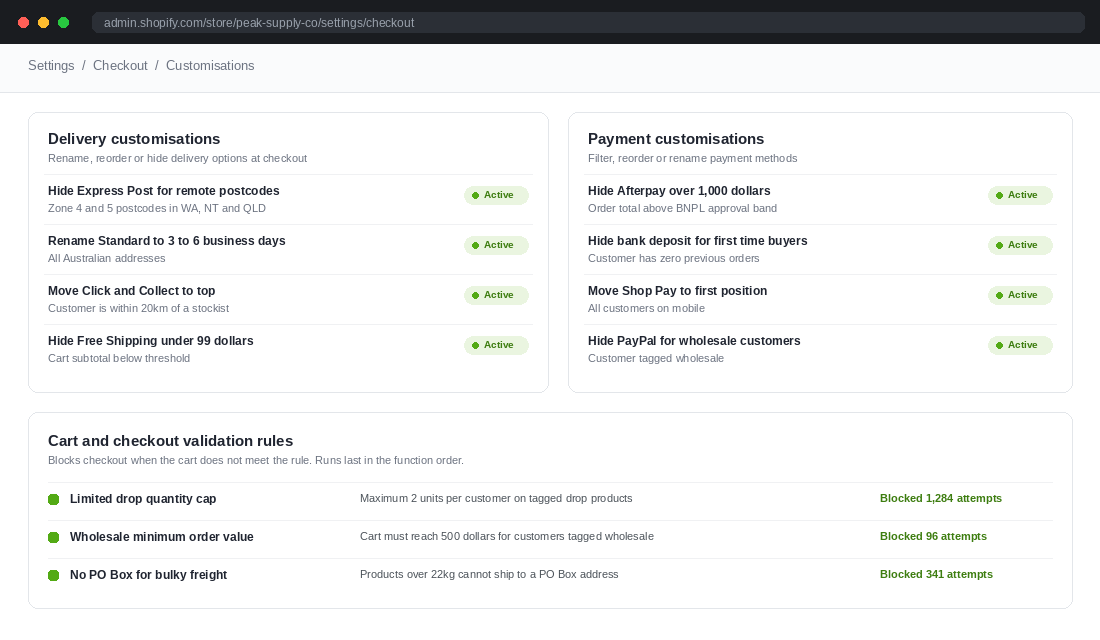
Australia is a hard shipping country. Express Post does not perform the same into remote WA, NT and far north QLD as it does across the Melbourne and Sydney metro. Bulky freight cannot go to a PO Box. Click and collect only makes sense if the customer is near a stockist. Yet most stores present one flat menu of shipping options to every customer, then absorb the support tickets and the refunds when a promise breaks.
Delivery customisation Functions do three things: hide options, rename options, and reorder options. Deceptively simple, and the payoff is bigger than it looks.
- Hide. Suppress Express Post for postcodes where the carrier does not actually deliver next day. You stop selling a promise you cannot keep.
- Rename. Change “Standard” to “3 to 6 business days”. Ambiguity at the shipping step is a conversion leak, and a rename costs nothing.
- Reorder. Push click and collect to the top when the customer is near a stockist, and watch your fulfilment cost per order fall.
Layer 4: Payment Customisation, Control Which Wallets Show Up
Payment customisation filters, hides, renames and reorders payment methods at checkout. Same three verbs as delivery, applied to the money.
The obvious Australian play is buy now pay later. Afterpay and Zip are close to table stakes for a consumer brand here, but they carry a merchant fee well above card rates, and they carry approval limits. Showing Afterpay on a $1,400 order is a poor experience when the customer will be declined, and it is expensive when they are not. A payment customisation that hides BNPL above a threshold protects both.
Other rules worth setting:
- Hide bank transfer or manual payment for first time customers. Keeps your fraud exposure and your unpaid order chase list down.
- Hide PayPal for wholesale customers if your B2B terms are invoice based. Nothing kills a wholesale relationship faster than a rep paying card fees on a $6,000 order.
- Reorder to put your cheapest method first. Payment method order influences selection. If Shop Pay converts better and costs you less than the alternative, it should not be third in the list.
Run the numbers before you touch anything. Take your last 90 days of orders, split by payment method, and calculate the fee as a percentage of revenue for each. Most Aussie stores find one method quietly eating 4 to 6% of the revenue it touches. That is your first rule.
Layer 5: Cart and Checkout Validation, The Rule That Says No
Validation is the last function to run, and it is the only one that can stop a checkout completely. It exists so a customer can only complete an order if the cart meets your rules.
The classic use case is a limited drop. If you release 400 units and a reseller buys 60 of them in one transaction, you have not sold out, you have transferred your brand equity to a marketplace listing at a markup. A validation rule that caps quantity per customer on tagged products fixes it in one setting.
Beyond drops, the rules that pay for themselves in Australia:
- Minimum order value for wholesale. Enforce your $500 or $1,000 floor at checkout instead of chasing it by email afterwards.
- No PO Box for bulky or dangerous goods. Block the address type that your carrier will reject anyway, before the order is paid for.
- Block incompatible line items. Chilled products and non-chilled products in one cart is a refund waiting to happen if you ship from separate facilities.
- Cap discount abuse. Stop a leaked code being used on a 40 unit order. Pair this with the tactics in our guide to stopping discount code leaks.
Write the customer-facing error message yourself. The default reads like a system fault, and a shopper who hits a wall with no explanation does not email you, they leave. “You can order up to 2 of this item while stock lasts” converts far better than a generic validation error.
Layer 6: The Replacement Audit, Which Apps You Can Actually Cancel
This is where the playbook turns into money. Block 90 minutes, open your Shopify billing page, and build a three column list: app name, monthly cost in AUD, and the native Function that could do the same job.
The categories that map almost one to one:
- Volume and tiered discount apps map to product or order discount Functions.
- Bundle builders map to cart transform.
- Hide payment method apps map to payment customisation.
- Shipping rate rule apps map to delivery customisation.
- Order limit and cart rule apps map to cart and checkout validation.
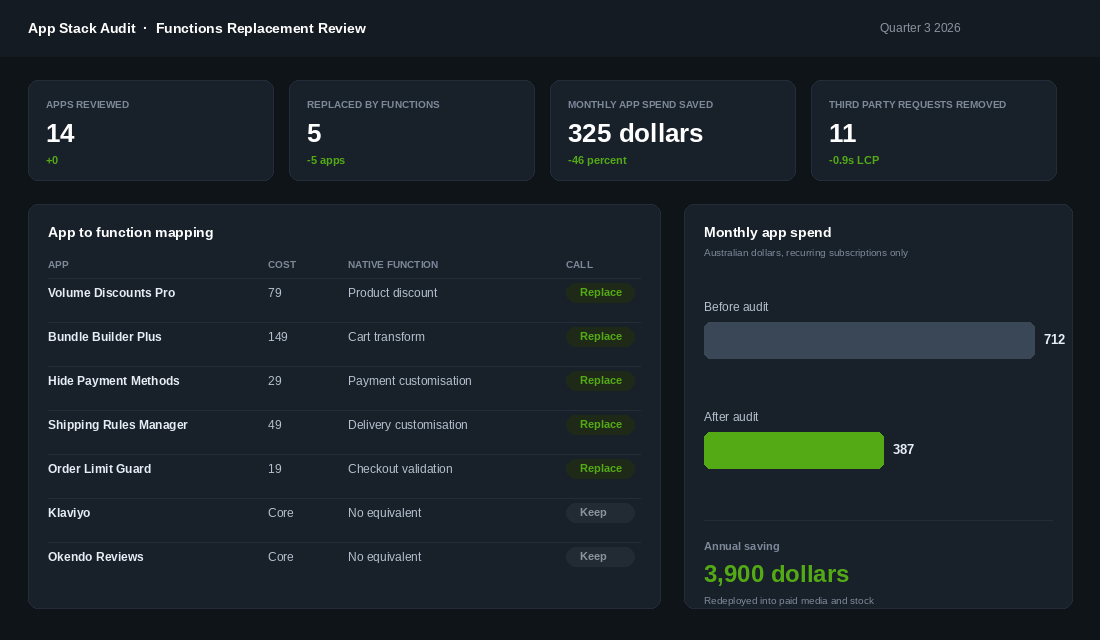
The saving is rarely the headline. Removing five apps that each inject a script is what moves your largest contentful paint, and mobile LCP is the metric that actually correlates with revenue on an Australian store where a large share of traffic arrives from Instagram on a mid-range phone over patchy 4G. If you have not run a full stack review yet, start with our Shopify app stack audit and layer this Functions mapping over the top.
How to actually make the switch without breaking peak:
- Duplicate your theme and work on the copy. Never test a checkout change on live.
- Install the replacement first, configure it, and leave the old app installed but disabled. Rollback should take 60 seconds, not a reinstall.
- Test the five carts that break things: single item, bundle, bundle plus code, remote postcode, and a cart above your free shipping threshold.
- Check express checkout paths. Shop Pay, Apple Pay and Google Pay skip the cart page. If your logic only works on the cart page, it is not working.
- Watch orders for 72 hours before you uninstall the old app and stop the subscription.
One reality check on timelines. Agencies running full Scripts to Functions migrations on Plus stores budget 8 to 14 weeks for 5 to 15 scripts, including scoping, build, QA on a development store and a monitored production cutover. Your app replacement job is far smaller than that, but it is not a Sunday afternoon. Give it a fortnight and do it before your peak code freeze, not during it.
The Compound Effect: Fewer Apps, Faster Store, Tighter Offers
Taken one at a time, each of these layers looks like a settings change. Together they change what your store is capable of at peak.
Start at the top. Cart transform lets you build bundles that raise average order value without a sitewide discount, so you protect gross margin going into November. Discount Functions with explicit combination rules mean those bundles do not accidentally stack with your peak offer, which protects the margin again. Delivery customisation stops you selling shipping promises you cannot keep, so your support queue stays small during the week your team can least afford it. Payment customisation quietly moves volume toward the methods that cost you less. Validation stops the two or three order types that generate most of your refunds.
Then there is the second order effect, which is speed. Five fewer apps means five fewer script tags, fewer render blocking requests, and a faster mobile experience. At a 7% conversion cost per second of load time, clawing back a second on a store doing $150k a month is worth more than every app subscription you cancelled combined.
Arbor Made lifted checkout conversion 16% running Functions-powered testing on their checkout. That is the kind of number you cannot buy with more ad spend. It comes from owning the layer where the transaction actually happens.
The founders who get this right are not more technical than you. They just treat checkout logic as an asset they own rather than a pile of app settings they inherited.
Your Shopify Functions Audit Checklist
Copy this into a doc and work through it before your peak code freeze. It takes about two hours end to end.
- Confirm nothing is still on Scripts. If you are on Plus and were running Scripts, check every discount, shipping and payment behaviour against a live test order. Scripts stopped executing on 30 June 2026.
- Count your active function discounts. The ceiling is 25 per store. Archive anything from a finished campaign.
- Document every discount’s class and combination rule. Product, order or shipping, and what it may stack with. No blanks.
- Test the stacking carts. Single item, bundle, bundle plus code, plus free shipping threshold. Confirm the final total matches what you intended.
- List your shipping options by postcode zone. Anything you cannot honour into remote WA, NT or far north QLD gets a hide rule.
- Rename vague delivery labels. Replace “Standard” and “Express” with real day ranges.
- Pull payment method fees for the last 90 days. Fee as a percentage of the revenue each method touches. Set a hide or reorder rule on the worst one.
- Set a BNPL ceiling. Hide Afterpay and Zip above the order value where approval rates fall away.
- Write your validation rules. Quantity caps on drops, wholesale minimums, PO Box restrictions, and a plain English error message for each.
- Map apps to Functions. Three columns: app, monthly cost in AUD, native equivalent. Anything with an equivalent goes on the replacement list.
- Verify express checkout. Test Shop Pay, Apple Pay and Google Pay separately. They skip the cart page.
- Set a rollback plan. Old app disabled, not uninstalled, for 72 hours after every change.
If you work through that list and find nothing to change, you are in the minority and your checkout is in better shape than most stores I look at. If you find four apps you can cancel and two discount rules that were never going to fire correctly on Black Friday, that is a very good use of a Tuesday.
The Rollout Plan: How to Ship Functions Without Breaking Checkout
Functions run inside checkout, which means a bad deploy does not throw a friendly error. It silently stops applying a discount, or blocks a shipping method, or lets an order through that should have been stopped. Treat every Function change like a checkout change, because that is exactly what it is.
Step one, know your limits before you design. Functions have a hard execution budget of around 5ms and roughly 64KB of memory, which is generous for discount logic and tight for anything that wants to loop over a 500-line cart. Discount Functions are capped in how many can run per order, so if you are stacking a welcome offer, a bundle discount and a loyalty tier, map the order of operations on paper first. Most “the discount did not apply” tickets trace back to two Functions competing, not to broken code.
Step two, build against a development store, never production. Spin up a dev store, install the Function there, and run the full matrix: guest checkout, logged-in customer, mobile wallet, discount code applied, gift card partial payment, and an international address. That is six scenarios and about 30 minutes. Skipping it is how brands discover on Black Friday that Apple Pay bypasses their delivery rule.
Step three, deploy behind a narrow condition first. Ship the Function scoped to a single collection or a single customer segment for 48 hours. Watch your checkout completion rate in Shopify Analytics against the prior week. A drop of more than 2 percentage points is your rollback signal, and you want that number agreed before you deploy, not debated after.
Step four, keep the old app installed but disabled for two weeks. Uninstalling immediately feels decisive and costs you the fastest rollback you have. Two weeks of overlap on a $79/month app is around $40 AUD, which is nothing against the cost of a broken peak weekend.
What to Log So You Can Debug It Later
- Function run logs in the Shopify admin. Under the app’s Function detail view you get inputs, outputs and errors for recent runs. Check them the morning after every deploy, not just when someone complains.
- Checkout completion rate, daily, for 14 days post-deploy. Your single best early warning.
- Discount application rate. Orders with a discount divided by total orders. If it moves sharply and you did not change the offer, a Function is misfiring.
- Support ticket tags. Add a “checkout” tag and count it weekly. A jump from 2 to 9 tickets is a signal well before it shows in revenue.
One more scheduling note. Do not ship Function changes inside your peak trading window. Lock them in before the freeze, which is exactly what the pre-peak code freeze is for. And if your Functions need product data to make decisions, get your metafields structured first, because a Function is only as smart as the data it can read.
Own the Layer Where the Money Changes Hands
Shopify has spent three years moving customisation out of your theme and out of third party scripts, and into a layer it runs itself. Killing Scripts was the last step. The stores that treated that as a compliance job did the bare minimum and moved on. The stores that treated it as an opportunity now have faster sites, cleaner offers and lower app bills heading into the biggest trading period of the year.
You do not need to be on Plus to start. You need two hours, your billing page, and the willingness to test a checkout properly before peak instead of during it.
Inside eCommerce Circle, checkout and platform architecture is one of the core pillars we work on with every member, and this audit is one of the first things we run before peak season. If you want a second opinion on yours, let’s talk.