On 3 June 2026, Shopify went down for roughly two hours. Storefronts, checkout, the admin and Retail POS all went at once. More than 3,000 reports hit Downdetector before 9am Eastern, and merchants around the world watched their live stores resolve to a page telling shoppers the store did not exist.
What’s in This Article
Here is the part that should bother you. Most affected founders did not find out from a monitor. They found out from a customer email, a mate texting “is your site broken?”, or by opening the admin an hour later and seeing a flat line where the orders should be.
That gap between the outage starting and you knowing about it is where the money goes. Industry estimates put downtime for a small business somewhere between 137 and 427 dollars per minute depending on how you count it. Even at the bottom of that range, a 90-minute outage you caught 60 minutes late is a four-figure hole. And that is before you count the ad spend that kept firing into a dead site.
The brands that came out of that Wednesday cleanly were not luckier. They had a monitor that did not depend on Shopify, a named person to pause paid traffic, three pre-written messages, and a recovery sequence they fired the moment service returned. Total prep time: about two hours, once.
This is that two hours, written down.
What an Hour of Downtime Actually Costs You
Most founders either panic about downtime or ignore it completely, and both reactions come from never having done the maths. So do it now, while nothing is broken, because you will not think clearly when it is.
Start with your baseline. Take your last 30 days of revenue, divide by 30, then by 24, then by 60. That is your average revenue per minute. A store doing 180,000 dollars a month sits at about 4.17 dollars a minute, or 250 dollars an hour.
Now apply a peak index. Most Aussie DTC stores do two to three times their hourly average between 7pm and 10pm, and far more during a launch or a sale. That same store loses closer to 750 dollars an hour if it goes dark on a Tuesday night. A two-hour outage in that window is 1,500 dollars in orders that simply never happen.
If that number feels smaller than you expected, good. The direct order loss is rarely the biggest line. These four are usually worse:
- Spend leakage. Meta, Google and TikTok do not know your site is down. They keep buying clicks and charging you for traffic that lands on an error. At 300 dollars a day in paid media, two hours of unattended delivery is 25 dollars of pure waste, and the algorithm learns from the terrible conversion signal you just fed it.
- Burnt campaigns. An EDM to 40,000 subscribers that lands during an outage is not delayed, it is gone. You cannot un-send it. You burn the send, the list fatigue and the campaign window in one hit.
- Customers who never come back. Roughly 80 percent of shoppers who hit a sluggish or broken site say they will not return. Cart abandonment already sits around 70 percent on a good day. An outage hands you a worse version of a problem you were already fighting.
- Your own hours. Four hours of founder time spent refreshing a status page and answering DMs is four hours not spent on the thing that actually grows the business.
Context matters here. Australians spent 82.6 billion dollars online in 2025, up 14 percent year on year and now 24 percent of all retail, with 9.8 million households shopping online and an average transaction of 96 dollars, according to the Australia Post eCommerce Report 2026. Shoppers are buying more often in smaller baskets. That means more sessions, more small purchase moments, and more of them lost every time your store blinks.
Phase 1: Detection (Stop Finding Out From a Customer DM)
The single highest-impact change in this entire playbook takes about fifteen minutes and costs nothing. Put a monitor outside your store that checks whether your store works.
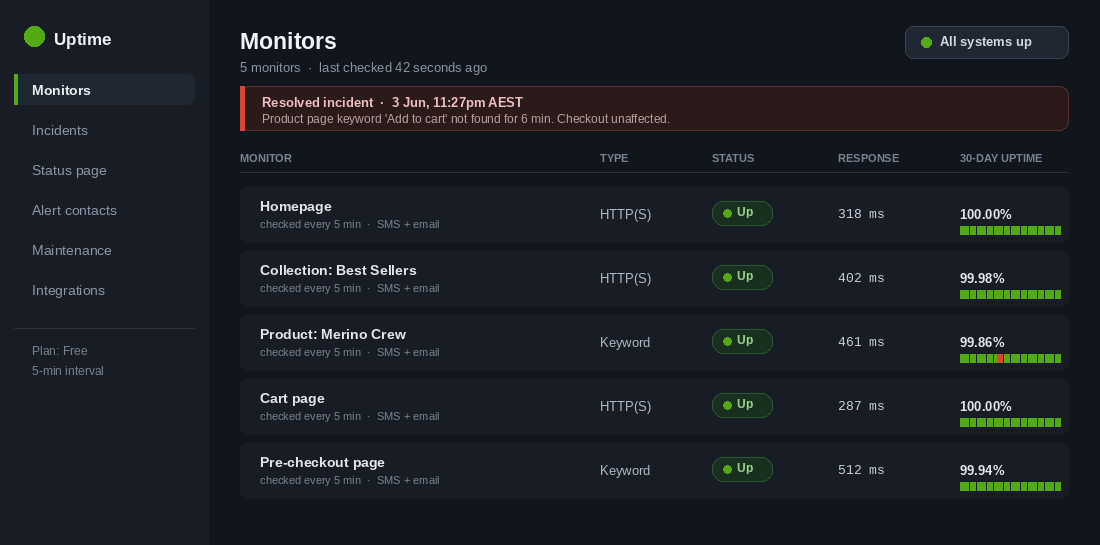
UptimeRobot’s free plan gives you 50 monitors on a five-minute check interval, keyword monitoring, one status page and three months of data retention. Better Stack’s free tier is tighter on monitor count at 10, but checks every 30 seconds, which matters if you run high-traffic launches. Either is fine. Having none is not.
Set up five monitors, not one:
- Homepage. The obvious one. Catches total outages.
- Your highest-traffic collection page. Catches template-level breakage that leaves the homepage looking fine.
- Your bestselling product page, with a keyword check. This is the important one. Do not just check for a 200 response. Check that the page contains the words “Add to cart”. A page that returns 200 while the buy button has vanished is the failure mode that costs the most and gets noticed the least.
- Your cart page. Catches broken cart drawers and app conflicts.
- A second keyword monitor on a checkout-adjacent page. You cannot easily monitor checkout itself, but you can monitor the last page before it.
Then fix the alerting, because email alone is useless at 9pm. Route alerts to SMS or a phone call, and route them to two people, not one. If you are the only person who gets the alert and you are at your kid’s swimming lesson, you do not have monitoring, you have a log file.
Finally, subscribe to the status pages of every service that can take you down: Shopify, your payment gateway, Klaviyo, your 3PL and your DNS or CDN provider. Worth knowing where you stand contractually too. Only Shopify Plus carries a documented 99.99 percent uptime SLA, which allows under 53 minutes of downtime a year. Basic, Grow and Advanced plans have no contractual uptime guarantee at all.
Target: time to detect under five minutes. Most stores are sitting at 45 to 90 minutes right now.
Phase 2: Triage (The Six-Check Ladder That Tells You Whose Problem It Is)
The alert fires. Before you touch anything, spend 90 seconds working out what kind of problem you have, because the response is completely different depending on the answer. Run these in order.
- 1. Is it just you? Load the store on mobile data with wifi off, in a private browsing window. A surprising share of “the site is down” panics turn out to be a local cache, a browser extension or an office network issue.
- 2. Is it Shopify? Check the Shopify Status page and Downdetector. If Shopify is down, you are not fixing this. Skip straight to Phase 3 and stop burning minutes on debugging.
- 3. Is it your domain, DNS or CDN? This layer breaks more often than people think. Cloudflare had a six hour and seven minute incident affecting Bring Your Own IP customers on 20 February 2026, and a global outage running past three hours in June 2026. If your domain does not resolve but the myshopify.com URL loads fine, the problem sits above Shopify.
- 4. Did anything change in the last 24 hours? App auto-updates and new app installs are the most common self-inflicted outage. Open your app list and sort by recently updated, then check your Shopify admin activity log for who did what.
- 5. Did anyone publish a theme? Shopify keeps your theme version history. If a change went live in the window, roll back to the last known-good version first and diagnose afterwards. Rolling back takes 30 seconds. Debugging Liquid takes an hour.
- 6. Is it total or partial? “Everything is down” and “checkout is dead but browsing works” are different incidents with different responses. Partial failures are more dangerous, because your monitoring, your team and your customers can all miss them.
Then give it a severity so everyone knows how hard to push. S1 means customers cannot buy. S2 means they can buy but something material is degraded, like search or one payment method. S3 is cosmetic. Only S1 justifies waking people up.
Phase 3: Contain the Bleed (The First Ten Minutes Are About Spend, Not Fixing)
This is where most founders lose money, because the instinct is to start fixing. If Shopify is down, you cannot fix it. If an app broke your theme, the fix takes as long as it takes. Either way, the meter is running on things you can control right now.
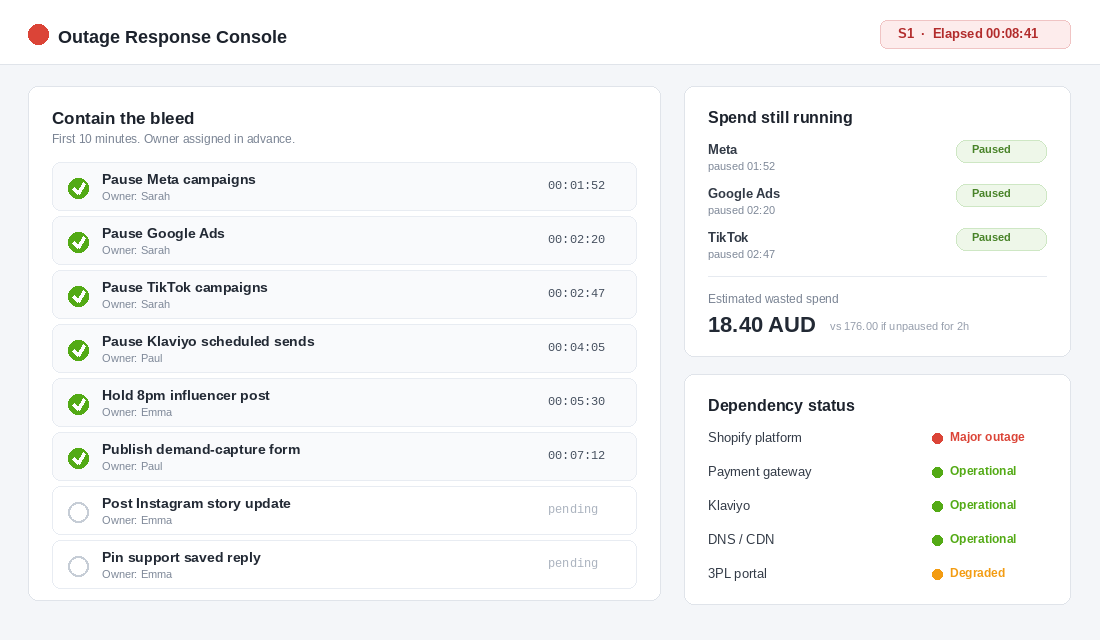
Work this list in order, and assign every line an owner by name before you ever need it:
- Pause paid traffic. Meta first, then Google, then TikTok. Pause at campaign level, not ad set, so nothing slips through. Whoever owns this needs the logins on their phone with two-factor already sorted. Fumbling a login reset mid-outage is a special kind of pain.
- Pause scheduled sends. Klaviyo campaigns queued for the next few hours, any SMS blast, any push notification. Pause flows that drive to product pages too if the outage looks long.
- Stop anything scheduled with a third party. An influencer posting at 8pm, an affiliate drop, a partner EDM. One message buys you a reschedule instead of a wasted placement.
- Put up a holding page if you can. If the failure is yours rather than Shopify’s, a simple maintenance page beats a broken store. If Shopify itself is down you have no storefront to work with, so your channels become Instagram, email and SMS.
- Capture the demand you can. This is the move almost nobody makes. Keep a one-page form on a host that is not your store, collecting an email address and a “tell me when you’re back” tickbox. Link it from your Instagram bio and stories. Traffic you already paid for is arriving regardless, so catch some of it.
The Optus outage on 8 November 2023 is the Australian reference point for why the owner-by-name rule matters. That event ran roughly twelve hours, hit more than 10 million people and 400,000 businesses, and left thousands of small operators unable to run EFTPOS. The businesses that coped were not the ones with better technology. They were the ones who already knew what to do without having to decide in the moment.
Phase 4: Communicate (Three Messages, Written Before You Need Them)
Silence during an outage reads as incompetence. A short, honest update reads as a brand that has its act together. The difference is about ten minutes of prep on a quiet afternoon.
Write these three now, save them in a note on your phone, and fill in the blanks on the day.
Message A, to customers (Instagram story plus a story highlight):
Heads up: our site is having issues right now and checkout isn’t working. We’re on it. Nothing you need to do. Drop your email at the link and we’ll message you the second we’re back, plus you’ll get first crack at the restock.
Message B, to your team (wherever you already talk):
S1 incident, started [time]. Cause: [Shopify / app / theme / unknown]. Paid traffic paused by [name]. Sends paused by [name]. Support replies from the saved template only, no ETAs. Next update at [time]. Nobody publishes theme changes.
Message C, to your list (only if the outage runs past an hour, or you had a campaign live):
We had a rough couple of hours. If you tried to order and couldn’t, that was us, not you. Everything’s working again, and the [offer] is extended until [time] so nobody misses out.
Three rules make these land. Never blame a vendor by name, because customers do not care whose fault it was. Never guess an ETA you cannot hit, because a missed ETA costs more trust than admitting you do not know yet. Always give a time for the next update, even when the update will be “still working on it”.
On support: point your team at one saved reply and forbid improvisation. Ten different explanations from five different people is how a two-hour outage becomes a week of screenshots on social.
Phase 5: Recover the Revenue (The Part Almost Every Founder Skips)
The store comes back, everyone exhales, and that is where it ends for most brands. That is a mistake, because a meaningful chunk of the money is still recoverable in the next 48 hours.
- Test before you trust. Place a real order with a real card before you turn anything back on. Recovery is often partial, and checkout is usually the last thing to come good. Refund it afterwards.
- Turn paid traffic back on in stages. Restart your best-performing campaign first, watch spend pacing and cost per click for fifteen minutes, then bring the rest back. Expect a day or two of odd performance while delivery re-learns.
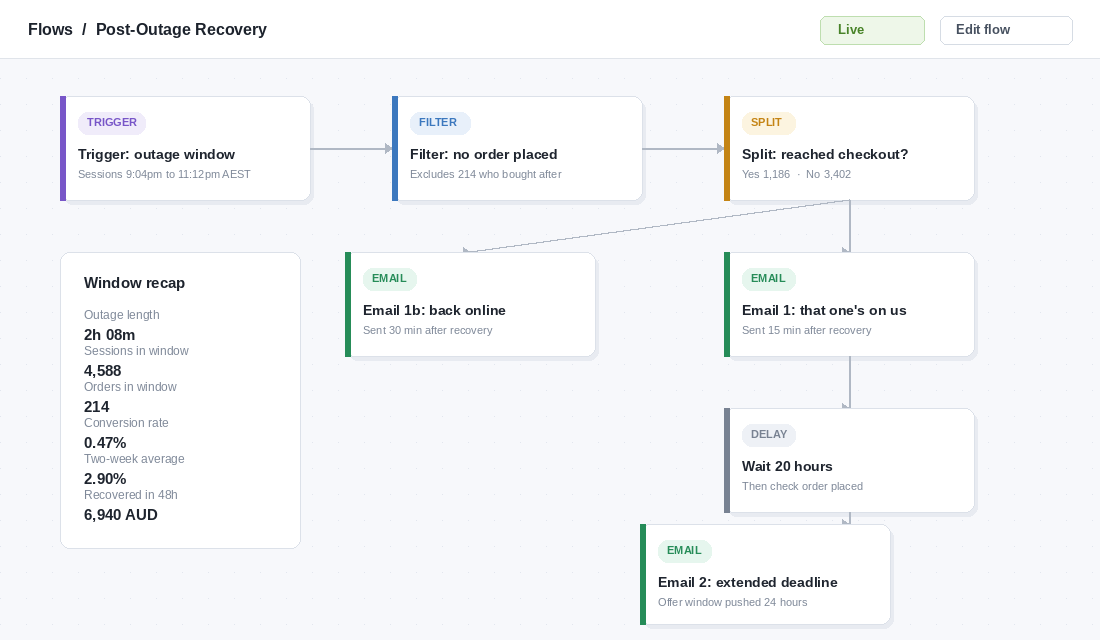
- Widen your abandoned checkout window. Anyone who hit an error mid-purchase is sitting in your data as an abandonment. Temporarily extend the flow window so people from the outage window get caught, and change the first email’s opening line to acknowledge what happened.
- Re-send the burnt campaign. New subject line, honest first sentence, same offer with a fresh deadline. Open rates on a genuine “that one’s on us” re-send routinely beat the original.
- Quantify it. Pull sessions and conversion rate for the outage window in Shopify Analytics and compare against the same window across the previous two weeks. Now you have a real number instead of a feeling, which is what makes the prevention work worth funding.
- Claim what you are owed. If you are on Plus and the platform breached the 99.99 percent SLA, service credits exist. Ask for them. If an app caused the outage, take it up with the developer and decide whether it stays installed.
The 30-Minute Post-Incident Review That Stops the Repeat
Book half an hour within 48 hours, while the detail is still fresh. You are not looking for someone to blame. You are looking for four numbers and one change.
The four numbers are your scoreboard, and they are the only honest way to tell whether you are getting better at this:
- Time to detect. Outage start to somebody knowing. Target under 5 minutes.
- Time to contain. Knowing to paid traffic paused. Target under 10 minutes.
- Time to communicate. Knowing to first customer-facing message. Target under 20 minutes.
- Time to recover. Service restored to ads back on and the recovery sequence live. Target under 60 minutes.
Then pick one change. Not eight. One. Teams that leave a review with a list of eight improvements ship none of them. Teams that leave with one ship it that week.
Write the incident up in three paragraphs and file it where your team already keeps process documentation. If you have not built that habit yet, the Shopify SOP playbook is the place to start. And if the outage involved customer data rather than just availability, that is a different and far more serious situation with legal obligations attached, which the data breach response playbook covers properly.
Your One-Page Outage Card
Copy this into a note, fill in the names and numbers, and put it somewhere you can reach from your phone in twenty seconds. Untested plans are decoration, so run a ten-minute drill once a quarter where you pretend the store is down and time yourself through it.
- Detect. Monitors live on homepage, collection, product page with an “Add to cart” keyword check, cart, and one pre-checkout page. Alerts by SMS to two people: ____ and ____.
- Triage (90 seconds). Mobile data test, Shopify Status, DNS and CDN status, apps changed in 24h, theme published in 24h, total or partial. Assign S1, S2 or S3.
- Contain (10 minutes). Paid traffic paused by ____. Sends paused by ____. Third-party posts held by ____. Demand-capture form live at ____.
- Communicate (20 minutes). Story posted, team message posted, support template pinned, next update time stated.
- Recover. Test order placed and refunded. Paid traffic restarted in stages. Abandoned checkout window widened. Burnt campaign re-sent. Window quantified in Analytics. SLA credit claimed if applicable.
- Review (within 48 hours). Four times logged. One change chosen. Incident written up and filed.
The Uptime Numbers Worth Knowing Before You Set a Target
Uptime gets quoted in nines, and the nines are meaningless until you convert them into minutes you can lose. Here is what each tier actually buys you across a year.
- 99% uptime is 3 days 15 hours of downtime a year, or about 7 hours a month. Unacceptable for anyone taking orders.
- 99.9% uptime is 8 hours 45 minutes a year, roughly 43 minutes a month. This is the realistic band for a Shopify store with a normal app stack.
- 99.99% uptime is 52 minutes a year. Shopify’s platform generally operates in this range, which is the point worth internalising: the platform is rarely your problem.
That last point matters more than the numbers. In our experience auditing incidents across member stores, the overwhelming majority of outages are not Shopify going down. They are a theme edit pushed without preview, an app update that broke a Liquid snippet, a payment gateway rejecting transactions while the storefront loads perfectly, or a DNS or certificate expiry nobody diarised. Your store looks fine and your revenue is at zero, which is exactly the failure mode that takes longest to notice.
Set your monitoring thresholds against those realities rather than against platform status. A checkout monitor that runs a synthetic transaction every 5 minutes catches a broken payment path in under 10 minutes. A homepage ping catches nothing, because the homepage was never down. If you run one paid monitoring tool, make it a transaction monitor: Checkly, Better Stack or Pingdom all do synthetic checkout journeys, and they cost roughly $20-50 AUD a month against an hourly revenue exposure that is usually many multiples of that.
Two benchmarks to hold yourself to once monitoring is live. Mean time to detect should be under 5 minutes, which is purely a tooling question and therefore entirely solvable. Mean time to acknowledge, meaning a human has seen the alert and started the triage ladder, should be under 15 minutes during trading hours. Most founders discover their real detection time is somewhere between 40 and 90 minutes because the first signal was a customer DM, and closing that gap is the single highest-return change in this entire playbook.
Track two numbers per incident in a simple log: minutes to detect and estimated revenue lost. Four incidents in, you will have a defensible business case for whatever tooling or process change you have been putting off, and a pattern showing whether your outages cluster around deploys, app updates or peak traffic. That log is also what turns your revenue reconciliation from guesswork into arithmetic when the month does not add up, and it feeds directly into the speed and stability work covered in our site speed playbook.
Why This Compounds
Any one of these phases on its own is worth doing. Together they change something bigger than your outage response.
Detection means you stop being the last person to know about your own business. Containment means a platform failure costs you orders instead of orders plus budget plus a campaign. Communication turns an outage into a moment where customers watch you handle pressure well, which is a surprisingly effective trust builder. Recovery claws back a slice of what the outage took. The review makes the next one cheaper than this one.
The deeper shift is that you stop treating uptime as luck. The same discipline shows up in how you handle a peak trading window, which is exactly why a pre-peak code freeze works: decide the rules while everything is calm, so nobody has to make good decisions under pressure.
Your store will go down. Not maybe. Shopify goes down, Cloudflare goes down, apps break themes, and payment gateways have bad afternoons. The only variable you control is whether it costs you two hours of revenue, or two hours of revenue plus wasted spend, a burnt campaign, a hundred angry DMs and a Saturday you will not get back.
Two hours of preparation. Once. Then a ten-minute drill every quarter.
Inside eCommerce Circle, building systems that hold when something breaks is one of the core pillars we work on with every member. If you want a second opinion on yours, let’s talk.