Your sales dashboard has a heartbeat, and most founders never notice it. Revenue jumps for two or three days, drifts for a week, then sags into a quiet patch where nothing you send seems to land. You blame the creative, the subject line or “the algorithm”. Then it jumps again.
What’s in This Article
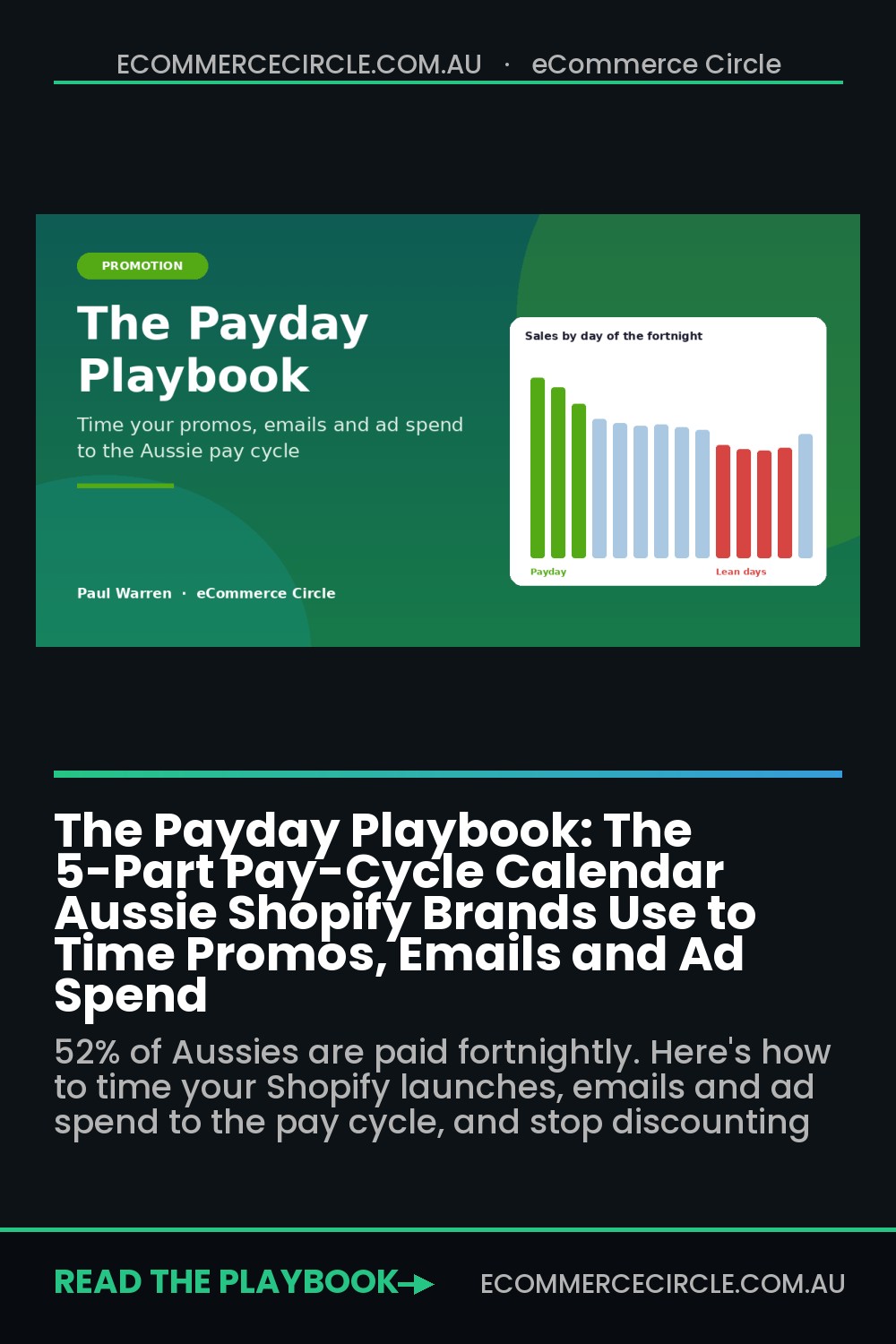
That rhythm is not random. It is your customers’ pay cycle. More than half of Australian employees are paid fortnightly, and when their wages land, their willingness to buy something they want (not just something they need) moves with it.
Most Aussie Shopify brands ignore this completely. They launch new products on whatever day the stock arrives, run discounts when sales feel soft, and spend the same ad budget every day of the fortnight. The brands that grow steadily do the opposite. They put their launches, their full-price pushes and their biggest ad days where the money is, and they use the lean days for value offers, content and list building.
This playbook walks you through the five-part Pay-Cycle Calendar we use with members to do exactly that. It takes one afternoon to set up and it costs nothing extra, because you are not adding spend. You are moving it to the days it works hardest. With Black Friday weekend landing in the lean days for a big chunk of shoppers this year, now is the time to set it up.
Why the Pay Cycle Matters More in 2026 Than Ever
Start with who your customers are and when they get paid. The ABS reports that 52% of Australian employees are paid fortnightly, 33% weekly and 12% monthly. Centrelink payments also run on a fortnightly rhythm. So for most of your buyers, money arrives in two-week pulses, not as a steady stream.
Research on those pulses is consistent. InMarket’s payday study found consumer spending jumps 33% on payday and stays elevated for a few days before settling. The spike is not just groceries and fuel. After the essentials are covered, discretionary categories like beauty see some of the biggest lifts. A study in the Journal of Consumer Research, based on income and spending data from more than 30,000 consumers, found that how often people are paid changes how much they spend and how wealthy they feel.
Now layer in 2026. CommBank’s latest Household Spending Insights shows spending rose just 0.1% in August, with essentials growing 4.8% year on year and discretionary spending easing to 3.3%. Household goods fell 0.3% in the month. Fuel is eating a bigger share of the wallet, and CBA is tipping another rate rise.
When budgets are this tight, the gap between payday and the lean days gets wider. Shoppers still buy, but they batch their “treat” purchases into the days right after their pay lands. Australia Post’s latest eCommerce Report backs this up from the other side: Australians spent $82.6 billion online in 2025, around 41% of households shop online at least fortnightly, and the average online transaction has fallen to about $96. People are buying more often, in smaller baskets, and timing matters more for every one of them.
If your promotions, emails and ads ignore that rhythm, you are paying full price to reach people on the days they are least able to buy.
Part 1: Find Your Store’s Pay-Cycle Fingerprint
Before you change anything, prove the pattern exists in your own data. Every store is different. A premium skincare brand selling to salaried professionals will look different from a kids’ clothing brand selling to families on mixed incomes.
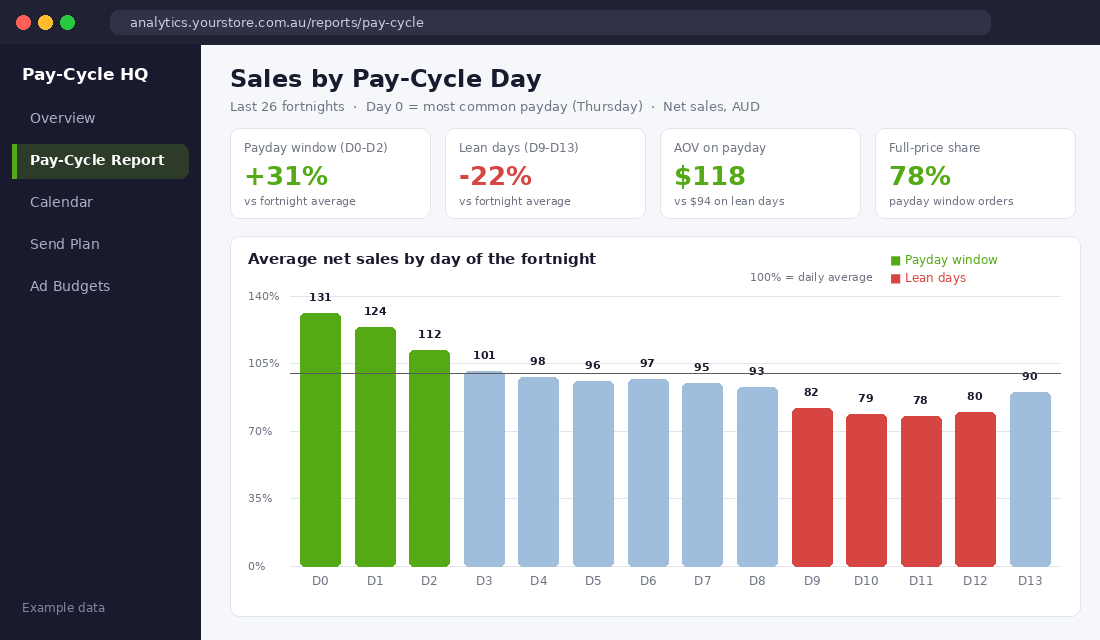
Here is how to find your fingerprint in about 45 minutes:
- Export daily sales. In Shopify admin, go to Analytics, then Reports, and open the sales over time report. Set the date range to the last 12 months, group by day, and export to CSV. You want net sales, orders and average order value for every day.
- Pick your anchor payday. In Australia, many employers pay fortnightly on a Wednesday or Thursday. Choose one recent Thursday as Day 0, then label every day in your spreadsheet D0 to D13, repeating every 14 days.
- Average each cycle day. Use a pivot table to average net sales, orders and AOV for D0, D1, D2 and so on. Express each day as a percentage of your overall daily average, so 100% is a normal day.
- Test the alternate fortnight. Half of fortnightly workers are paid on the “other” Thursday. Shift your anchor by seven days and repeat. The version with the bigger D0 to D2 spike is your dominant cycle.
- Check the monthly layer. Group the same data by day of the month. Look for lifts on the 15th and the last business day, which is when most monthly payers land.
Strip out sale periods and big launch days first, or they will drown the signal. If your payday window (D0 to D2) runs at least 15% above average and your lean days (roughly D9 to D13) sit 15% or more below, you have a pay-cycle business. Most consumer brands selling discretionary products do. If your products take weeks to decide on, pair this with our consideration window playbook, because a long decision cycle can stretch a purchase across two paydays.
Write down three numbers: your payday lift, your lean-day dip and the AOV difference between the two. Those three numbers drive everything that follows.
Part 2: Build Your Pay-Cycle Calendar
Once you know the shape, turn it into a calendar your whole team can see. This is a simple layer that sits on top of your existing marketing calendar, not a replacement for it.
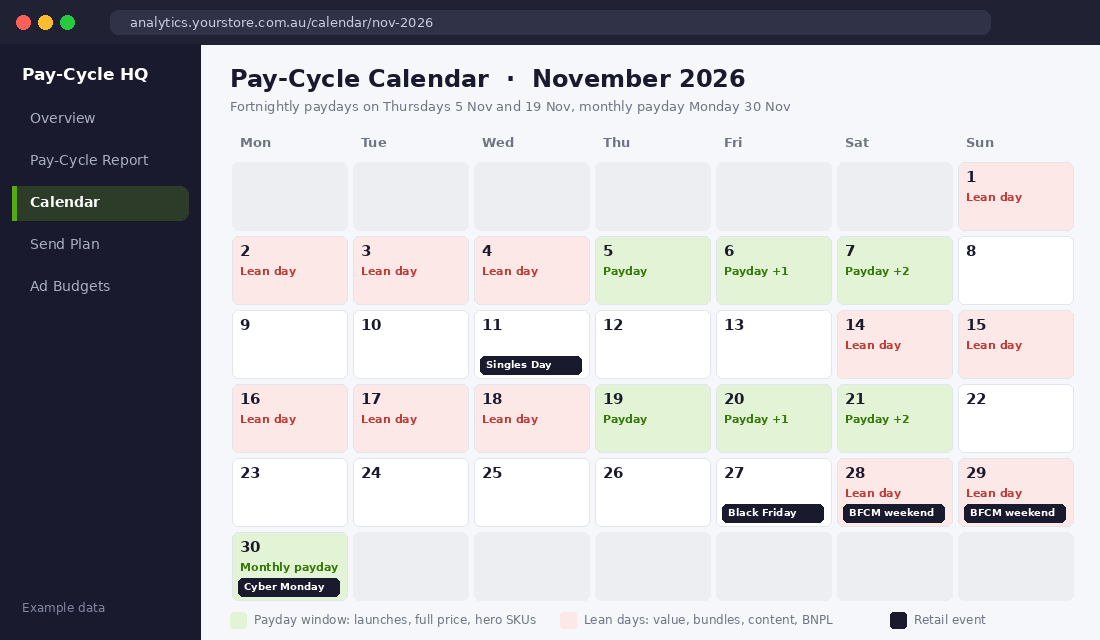
Split every fortnight into three windows:
- Payday window (D0 to D2). Wallets are full and shoppers are in “treat myself” mode. This is where your launches, hero products and full-price pushes belong.
- Mid-cycle (D3 to D8). Normal trading. Good for education, reviews, UGC and nurturing new subscribers.
- Lean days (D9 to D13). Money is tight and shoppers are more careful. This is where value offers, bundles, smaller entry products and buy now, pay later messaging earn their keep.
Then add the monthly paydays (the 15th and the last business day) and your retail events on top. That is where the calendar starts showing you things you would never see otherwise.
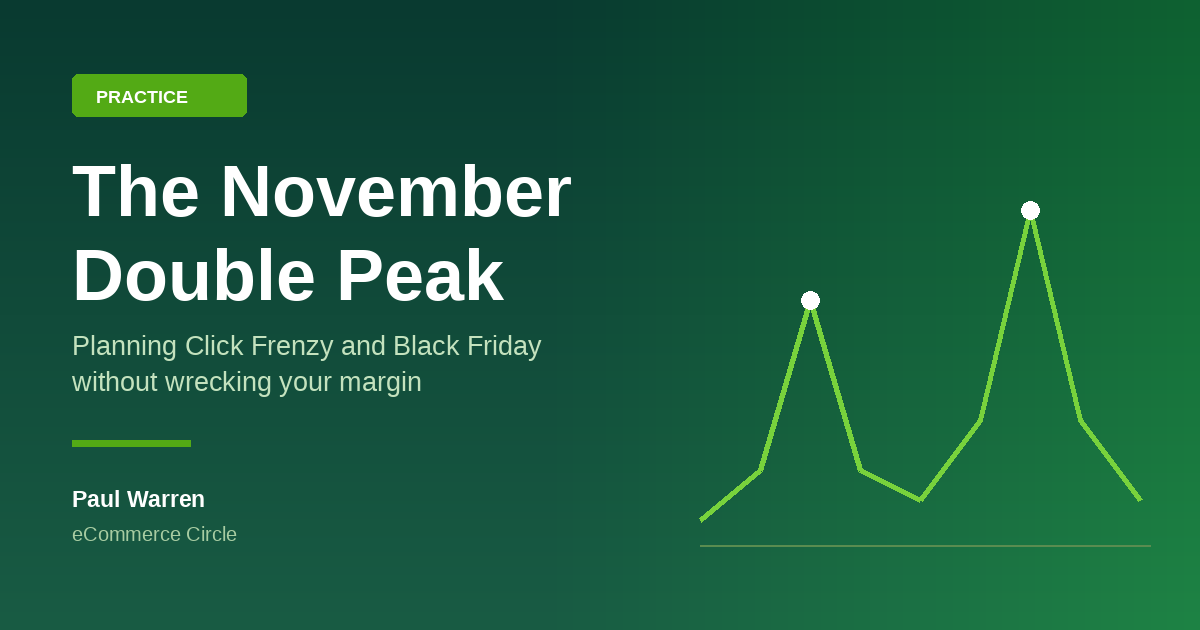
Take this year’s peak season. Black Friday is Friday 27 November and Cyber Monday is 30 November. For shoppers paid on the 5 and 19 November cycle, Black Friday weekend falls on Day 9 and Day 10, right at the start of their lean days. For shoppers on the alternate cycle, pay lands on Thursday 26 November, the day before Black Friday. And monthly-paid customers get paid on Monday 30 November, which is Cyber Monday itself.
That changes your plan. If your data shows your buyers skew to the 5 and 19 November cycle, your best early-access window is 19 to 21 November, not the week of Black Friday. If they skew to the alternate cycle, going hard from Thursday 26 November is exactly right. And if a big share of your buyers are salaried and paid monthly, hold something back for Cyber Monday.
Put the calendar in a shared Google Sheet or your project tool, colour code the three windows, and review it every month. It takes ten minutes once it is set up.
Part 3: Match the Offer to the Window
Here is the biggest mistake we see. A founder notices sales are soft in the lean days and reaches for a 20% off code. The discount does lift sales a little, but it trains customers to wait, it cuts margin on orders that would have happened anyway, and it does nothing about the real problem, which is that people are short of cash for a few days.
The fix is to change what you offer in each window, not just how much you discount.
In the payday window, go full price. Launch new products, restock bestsellers, and send your strongest hero-product story. In our example dashboard, 78% of payday orders were full price and AOV was $118, compared with $94 on lean days. If you have a gift with purchase or a free shipping threshold, set it just above your current payday AOV so it nudges baskets up rather than rewarding orders that were already coming.
In the mid-cycle, sell the reasons to buy rather than the offer. Reviews, how-to content, founder stories and UGC do the heavy lifting here, so your list is warm when the next payday lands.
In the lean days, lower the price of entry without cutting your margin:
- Minis, sample packs and entry products that let someone try you for $20 to $40.
- Bundles and sets priced as better value, which lift AOV without a sitewide discount.
- Buy now, pay later messaging. Afterpay’s four fortnightly instalments line up neatly with how most Australians are paid. Put the instalment amount on product pages and in lean-day emails, and check the fees against your margin first. Our BNPL playbook walks through that maths.
- Back-in-stock and wishlist reminders that capture intent now and convert it on the next payday.
If you do run a sale price, keep it honest. The ACCC takes a hard line on inflated “was” prices and fake urgency, so make sure your reference prices are real. Our guide to sale price compliance covers the rules.
Part 4: Time Your Emails and SMS to the Pay Cycle
Your email list is the cheapest channel you own, and it is also the easiest to time. Most brands send on a fixed weekly rhythm, say every Tuesday and Friday. Over a fortnight, that means some of your best campaigns land in the lean days purely by accident.
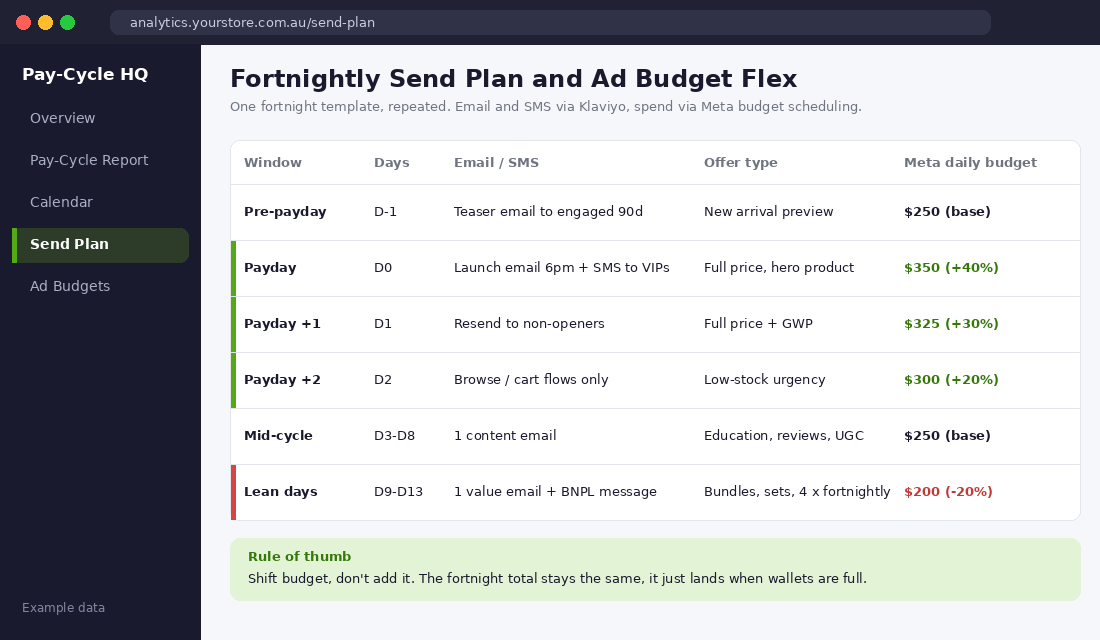
Here is a fortnightly send plan you can set up in Klaviyo (or Omnisend) this week:
- D-1 (the day before payday): A teaser to your engaged 90-day segment. New arrival preview, restock alert or “coming tomorrow”. This primes demand without asking for the sale yet.
- D0 (payday): Your main campaign. Send it in the evening, once wages have cleared and people are home, or use Klaviyo’s Smart Send Time if you have enough data. Add an SMS to your VIP segment for launches.
- D1: Resend to non-openers with a new subject line. It costs nothing and catches the people who were busy on payday night.
- D2: No campaign. Let your browse abandonment and abandoned cart flows do the work while intent is high.
- D3 to D8: One content email. Education, reviews or a customer story.
- D9 to D13: One value-focused email. Bundles, minis, instalment pricing, and a gentle “coming next week” to hold attention.
That is five sends a fortnight, which sits comfortably inside the tiers in our email frequency playbook. The difference is that your heaviest sends now land when your list can actually act on them.
Two practical tips. First, if your Part 1 analysis showed a split between the two fortnightly cycles, build two segments and send the payday campaign on each group’s payday. A simple split works fine to start: tag customers by which cycle their past orders cluster around, and refine it later. Second, keep your flows running every day. Welcome, abandoned cart and post-purchase flows respond to behaviour, not the calendar, and they should never be switched off in the lean days.
Part 5: Flex Your Ad Spend Without Adding Budget
This is where the pay cycle starts paying for itself. Most founders set a daily budget on Meta and leave it flat. But if your conversion rate on payday is 30% higher than on lean days, a flat budget means you are underfunding your best days and overfunding your worst.
The rule is simple: shift budget, don’t add it. Keep your fortnightly total the same, and move it toward the days that convert.
Here is how to set it up in Meta Ads Manager using budget scheduling:
- Work out your base budget. Take your current fortnightly spend and divide by 14. In our example, that is $250 a day.
- Open your main sales campaign. In the budget section, find the budget scheduling option (Meta lists it as scheduling budget increases for specific time periods).
- Add your payday window. Schedule an increase of 40% on D0, 30% on D1 and 20% on D2. Set the start and end times in Australian time so the increase covers the full day.
- Trim the lean days. Drop the base budget by about 20% for D9 to D13 using an automated rule or a scheduled edit. Do not pause campaigns completely, because turning them off and on disrupts learning.
- Repeat for the next two cycles, then review. Compare cost per purchase and ROAS by window. If payday ROAS is clearly stronger, push the flex further. If it barely moves, your customers may be less pay-sensitive than you thought, so pull it back.
Match your creative to the window too. Payday ads can lead with the hero product, the new arrival or the premium set. Lean-day ads work better with value framing: the starter kit, the bundle saving, or “4 fortnightly payments of $24.75”.
On Google, Performance Max and Shopping campaigns adjust bids automatically, so the lift is smaller. The biggest lever there is making sure your budget is not capped on payday. If you see “limited by budget” on D0 to D2, that is money left on the table.
Real Brands Already Selling to the Pay Cycle
This is not a theory. Some of the biggest retail moments in the region are built around when people get paid.
Shopee runs a monthly Payday Sale timed to the end of the month in its Southeast Asian markets, when most salaried workers there get paid. It is one of the platform’s recurring tentpoles precisely because conversion lifts when wallets are full.
Afterpay built its entire product around the Australian fortnight. Four payments, every two weeks, matching the way most Australians are paid. Its twice-yearly Afterpay Day has become one of the biggest online sales events in the country. If you are planning to take part, our Afterpay Day playbook has the full plan.
Payday Deals, an Australian online retailer founded in 2018, went a step further and put the pay cycle in its name, pairing bargain pricing with fortnightly instalment options.
You do not need to rename your brand. You just need to borrow the principle: be loudest when your customers can say yes.
Your Pay-Cycle Calendar Checklist
Use this checklist to set everything up in one afternoon. Tick each item off as you go.
Diagnose (60 minutes)
- Twelve months of daily sales exported from Shopify.
- Sale periods and launch days removed from the dataset.
- Days labelled D0 to D13 against both fortnightly cycles.
- Payday lift, lean-day dip and AOV gap written down.
- Monthly payday effect checked on the 15th and last business day.
Plan (45 minutes)
- Payday window, mid-cycle and lean days colour coded on a shared calendar for the next three months.
- Black Friday, Cyber Monday and Christmas cut-off dates mapped against your dominant cycle.
- Offer types assigned to each window: full price and launches, content, value and entry products.
- Lean-day bundles, minis or starter kits identified or built.
Execute (60 minutes)
- Fortnightly email and SMS send plan built in Klaviyo or Omnisend.
- VIP and engaged segments ready for payday sends.
- Meta budget scheduling set for D0 to D2, with a trim on D9 to D13.
- Lean-day and payday creative sets briefed.
- Review date booked after two full cycles.
Score yourself out of 14. Under 8 means your marketing is running on your calendar, not your customers’.
The Compound Effect: Right Offer, Right Day, Every Fortnight
Here is how the pieces work as a system. The fingerprint tells you when your customers can buy. The calendar puts that rhythm in front of everyone. The offer plan stops you discounting on days you don’t need to. The send plan puts your best emails in front of people when they can act. And the budget flex puts your ad dollars where they convert best.
Each part feeds the next. Full-price payday launches protect your margin, which gives you room to fund better lean-day bundles. Lean-day list building and content warm people up, so the next payday campaign converts harder. Better conversion on payday lowers your blended cost per purchase, which means the same ad budget buys more orders. Over a quarter, you are running the same spend and the same list, with more full-price sales and fewer panic discounts.
And in a year where CommBank is showing essentials crowding out discretionary spending, that discipline is what separates brands that hold their margin through peak season from the ones that give it away.
Inside eCommerce Circle, promotion timing is one of the core pillars we work on with every member, because the same campaign can succeed or flop depending on the day it lands. If you want to see exactly where your store is being capped, take the free More Orders Scorecard. It takes two minutes and shows you which of the 10 P’s to fix first.