It’s 9:14pm on a Thursday, three weeks out from Black Friday. You open Instagram to post tomorrow’s teaser and the app asks you to log in. Your password doesn’t work. Your email has been changed. By the time you’ve worked out what happened, someone else is running your account, DMing your followers about a “giveaway” and spending on your ad account with your card.
What’s in This Article
Most Aussie Shopify founders treat this as bad luck, something that happens to other brands. So they run their biggest selling season on a single Instagram login, one admin, SMS codes and a recovery email nobody has opened since 2019. Then they find out the hard way that Meta’s support queue is measured in weeks, not hours.
The brands that sail through do something different. They treat their social accounts like a bank account: locked down, with a second key holder, a written response plan and an owned audience that doesn’t vanish if the account does. It’s a few hours of work. And the cost of skipping it is real: the Australian Signals Directorate’s Annual Cyber Threat Report 2024-25 puts the average self-reported cost of cybercrime for a small business at $56,600 per report, up 14% on the year before.
This playbook walks you through the five layers that protect your Instagram, Facebook and TikTok accounts from hijacks and wrongful suspensions, plus the 72-hour runbook to follow if one gets through anyway.
Why Social Lockouts Are a Protection Problem, Not a Marketing Problem
Here’s what the Australian data says. When the Australian Small Business and Family Enterprise Ombudsman (ASBFEO) reported its digital platform caseload in October 2024, disputes had risen 86% year on year. 73% of those disputes involved Facebook and Instagram, and two-thirds of those cases were hacked accounts.
Then the problem shifted. In its September quarter 2025 report, the Ombudsman said digital platforms made up 20.9% of new actively managed cases, and that the cause of deactivations was moving from outside hackers to the platforms’ own “community standards” algorithms taking accounts down without apparent human oversight. By December 2025, the office had helped 482 small businesses in disputes with social media companies that year.
So you’re defending against two threats with the same outcome:
- The hijack. Someone phishes a login, swaps the email and phone, and locks you out. Often they then run scam ads or DM your followers.
- The false flag. An automated system decides your account broke a rule it didn’t break. You’re suspended, appeals take weeks, and your content and DMs are out of reach.
Either way, the result for your store is identical: your best organic channel, your customer service inbox and often your ad account go dark at the worst possible time. That’s why this sits under Protection in the 10 P’s, right next to the ad account ban playbook. It’s a business continuity risk, not a content problem.
Layer 1: Map Every Login That Can Post, Spend or Lock You Out
You can’t protect what you haven’t listed. Most founders think they have “an Instagram and a Facebook”. When we audit a typical seven-figure Aussie brand, the real number is closer to eight or nine assets, and at least a third of them hang off a single person’s phone.
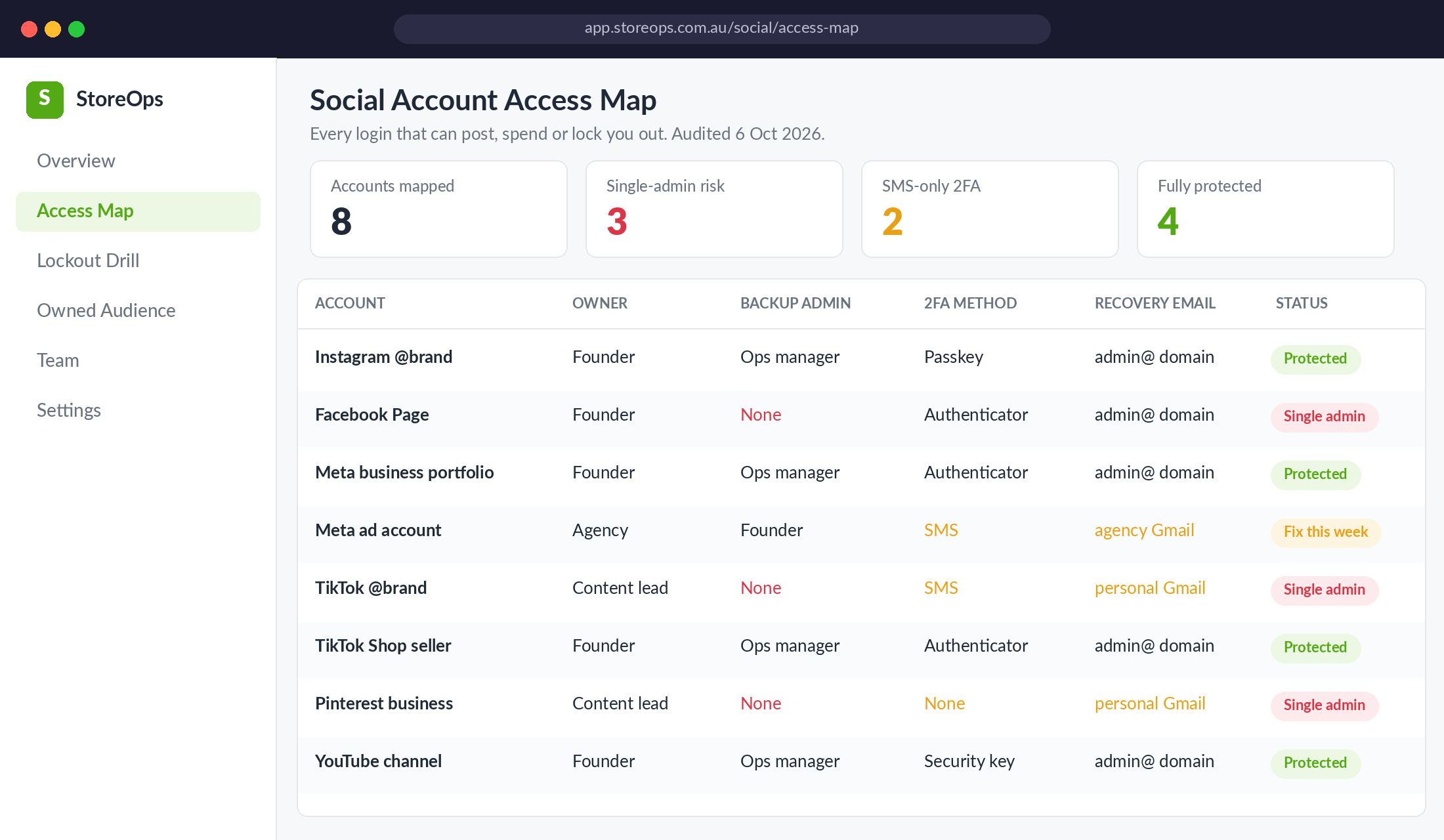
Build a one-page access map with these columns for every account:
- Account. Instagram profile, Facebook Page, Meta business portfolio, Meta ad account, TikTok profile, TikTok Shop seller account, Pinterest, YouTube.
- Owner. The person whose login controls it. If that’s a staffer, an ex-staffer or your agency, flag it.
- Backup admin. A second trusted person with full control. “None” is a red flag.
- 2FA method. Passkey, authenticator app, security key, SMS or nothing.
- Recovery email. Is it on your business domain (admin@yourbrand.com.au) or someone’s personal Gmail?
- Status. Protected, fix this week, or single admin.
Two rules come out of this exercise straight away. First, every account needs at least two people with full control, and ideally neither of them should be an agency. Second, every recovery email should sit on a mailbox your business owns, protected by its own strong 2FA. Your email inbox is the master key. If an attacker gets into it, they can reset everything else on this list.
If you’ve already locked down your Shopify admin using the admin lockdown playbook, use the same spreadsheet. Social accounts are just more rows.
Layer 2: Replace SMS Codes With Passkeys or an Authenticator App
Two-factor authentication is not optional anymore, but not all 2FA is equal. SMS codes can be intercepted through SIM swaps, and they’re easy to talk someone out of over a fake “Meta support” chat. An authenticator app (Google Authenticator, Microsoft Authenticator, 1Password) or a passkey is far harder to steal.
Meta has made this easier in 2026. In April it announced that Accounts Center is being upgraded to a single Meta Account over the next year, and that passkeys now work on Instagram as well as Facebook and Messenger. A passkey lets you log in with your fingerprint, face or device PIN, so there’s no password to phish in the first place.
Here’s the setup sequence we run with members. Block out 45 minutes:
- Meta Account / Accounts Center. Open Instagram or Facebook, go to Settings, then Accounts Center (or Meta Account), then Password and security. Run Security Checkup, add a passkey on your main phone, and switch two-factor to an authenticator app. Remove SMS as a method once the app is working.
- Save your recovery codes. Meta gives you backup codes when you turn on 2FA. Store them in your password manager and in a sealed envelope in the office safe. Not in your camera roll.
- Turn on login alerts for unrecognised devices, sent to the business admin inbox, not a personal one.
- Require 2FA across your business portfolio. In Meta Business Suite, go to Settings, then Business portfolio info, scroll to Business options, and set Two-factor authentication to Everyone (or at minimum Admins only). Meta’s Security Center shows who still hasn’t complied.
- TikTok and Pinterest. In each app’s Security settings, turn on 2-step verification with an authenticator app and check the list of logged-in devices. Log out anything you don’t recognise.
One warning from the field. A Melbourne gym owner featured by the ABC in April 2024 had 2FA switched on and still got hit a second time, because the attackers went through her personal Facebook profile to reach the business pages. Your personal profile is part of your business attack surface. Lock it down to the same standard.
Layer 3: Train the Team to Spot the Three Scripts Attackers Use
Most hijacks don’t involve clever hacking. They involve someone on your team typing a code into the wrong box. Brisbane artist Giles Kilham, also profiled by the ABC, lost his Instagram account after a hacker messaged him pretending to be someone he knew, whose account had already been compromised. He helped them, they changed his password, and they then DMed his 4,500 followers with scam links. He never got the handle back and had to rebuild from zero.
Brief everyone with access to your socials on the three scripts that show up again and again:
- “Can you help me get back in?” A DM from a friend, creator or customer asking you to forward a code that’s “accidentally” been sent to you. That code is the reset for your account. Never forward a code to anyone, ever.
- “Your page will be disabled in 24 hours.” A message or email styled as Meta, TikTok or “Brand Rights Protection” with a link to “appeal”. Real platform notices appear inside the app’s support inbox, not in DMs.
- “Collab or verification offer.” A brand deal or blue-tick offer that needs you to log in through their link. If you have to enter your password on someone else’s page, it’s phishing.
Even the platforms’ own tools can be gamed. In June 2026, TechCrunch reported that attackers hijacked Instagram accounts by asking Meta’s AI support assistant to add a new email address to a target’s account, then using the verification code it sent to reset the password. Meta said the issue was fixed. The lesson for you: assume any single control can fail, which is exactly why you stack five layers instead of trusting one.
Make this a 10-minute item in your BFCM team briefing. Put the three scripts on a single slide, and give people a rule they can’t misread: “If anyone asks for a code or a login, stop and message the founder.”
Layer 4: Write the 72-Hour Lockout Runbook Before You Need It
When you get locked out, you won’t think clearly. Adrenaline and panic make people click the first “recover your account” link they find, which is often another scam. A written runbook means anyone on your team can follow the same steps at 9pm on a Thursday.
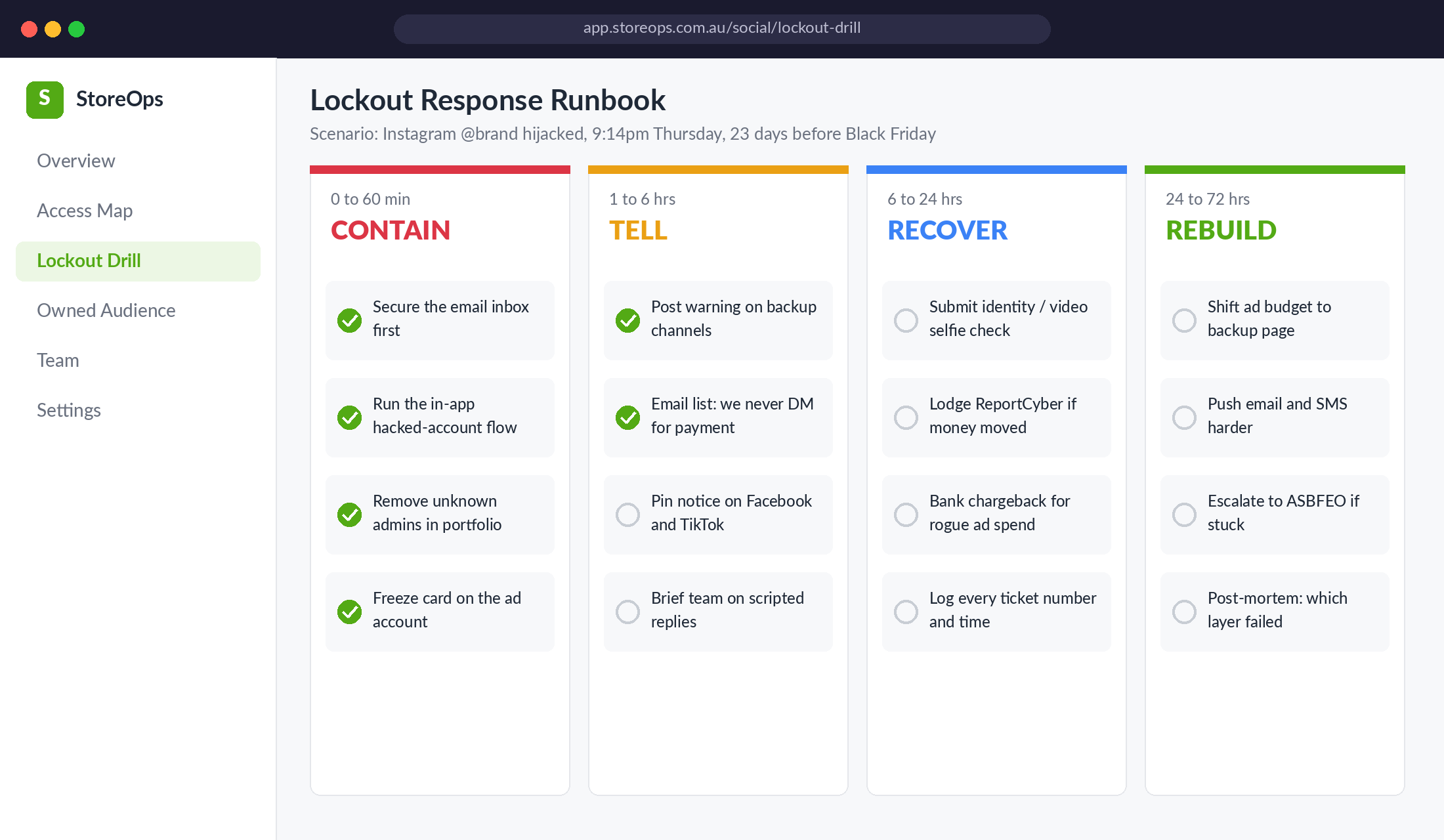
Split it into four phases:
Contain (first 60 minutes). Secure the email inbox linked to the account first, because that’s how the attacker is resetting everything. Then use the platform’s own in-app hacked-account flow (instagram.com/hacked and facebook.com/hacked are the official starting points). From your backup admin login, open the Meta business portfolio and remove any people or partners you don’t recognise. Freeze or cancel the card attached to your ad account so rogue spend stops. That ABC-profiled gym owner watched hackers set up a $20,000-per-day ad campaign on her account.
Tell (1 to 6 hours). Your customers will get scam DMs from your handle. Post a warning on your other channels, send a short email to your list (“We will never DM you asking for payment or codes”), and give your customer service team a scripted reply. Silence here costs trust you’ll need on Black Friday.
Recover (6 to 24 hours). Complete the identity check (often a video selfie or ID upload). If money moved, lodge a report through ReportCyber and call your bank about disputing the unauthorised ad charges. Log every ticket number, timestamp and response in one doc. You’ll need that paper trail.
Rebuild (24 to 72 hours). Move ad spend to a backup page or ad account if you have one. Push harder on email and SMS. If you’re still stuck after a few days and you’re a small business, contact the ASBFEO. It has a direct line to the platforms, and the Ombudsman told the ABC it can sometimes get an outcome within days. Then run a short post-mortem: which layer failed, and what changes this week.
Don’t expect a fast fix from the platform alone. The Melbourne gym owner spent nine months in back-and-forth with Meta. The Forbes Bakehouse in regional NSW was told its appeal against a wrongful Instagram suspension could take up to 180 days, and only got reinstated within 24 hours of the ABC contacting Meta. Your runbook is what keeps the business trading while the platform takes its time.
Layer 5: Build an Owned Audience That Survives Any Lockout
Layers 1 to 4 reduce the odds of a lockout. Layer 5 reduces the damage. The Forbes Bakehouse manager put it bluntly: “our entire business relies on those platforms for everything.” The ASBFEO made the same point in its quarterly report: when a business keeps all its customer contact details and photos on one platform, an account suspension can stop it trading for long periods, and some never recover that information.
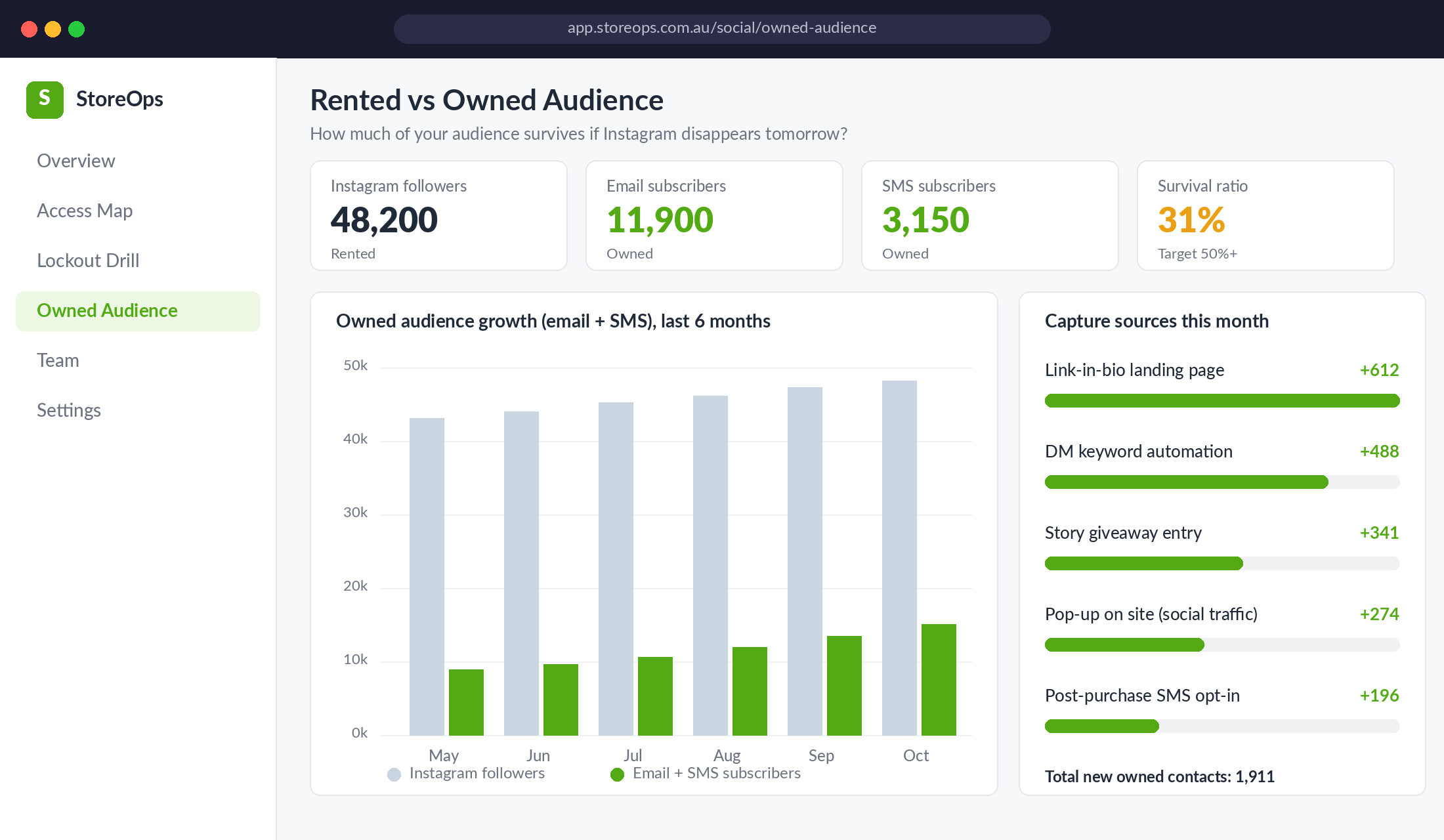
Track one number we call your survival ratio: email plus SMS subscribers divided by your largest social following. If you have 48,000 Instagram followers and 15,000 owned contacts, your survival ratio is about 31%. Aim for 50% or better before the peak season. To move it:
- Link-in-bio landing page with an offer. Not a list of links. A single page on your Shopify store with a clear reason to subscribe (early access, a guide, a first-order perk).
- DM keyword automation. “Comment GLOW to get the shade guide” flows that ask for an email before delivering. Our Instagram DM automation guide shows how to set this up.
- Story and post giveaways that collect email, not just follows and tags.
- Back up your own content. Every quarter, download your Instagram and Facebook data through Accounts Center’s “Download your information” tool, and keep your original product photos and videos in your own cloud storage.
- Export key DMs. Wholesale enquiries, creator contacts and VIP customers shouldn’t live only in an Instagram inbox. Move them to your CRM or a shared spreadsheet weekly.
This is the same principle behind our concentration risk audit: no single platform, supplier or channel should be able to shut your business down overnight.
The Compound Effect: How the Five Layers Work Together
Each layer on its own is a partial fix. Stacked together, they cover each other’s gaps:
- The access map means a backup admin exists to remove an attacker or keep posting while you recover.
- Passkeys and authenticator 2FA stop most credential theft before it starts.
- Team training closes the gap that 2FA can’t: someone voluntarily handing over a code.
- The runbook turns a panic night into a checklist, so rogue ad spend stops in minutes, not days.
- The owned audience means that even a 180-day suspension doesn’t stop you selling.
There’s good news on the platform side too. Meta says new account hacks on Facebook and Instagram fell by more than 30% globally in the year to December 2025. But “fewer hacks overall” means nothing if yours is the account that gets hit on the Tuesday before Black Friday. Your protection has to work regardless of what the platform does.
Your One-Page Social Account Lockout Checklist
Print this, or paste it into your BFCM project board. Aim to tick every box before 1 November.
- ☐ Access map built for every social, ad and shop account (owner, backup admin, 2FA, recovery email)
- ☐ Every account has at least two people with full control, and at least one is a business owner or director
- ☐ All recovery emails moved to a business-domain inbox with its own strong 2FA
- ☐ SMS 2FA replaced with passkeys or an authenticator app on Instagram, Facebook, TikTok and Pinterest
- ☐ Recovery codes stored in a password manager and offline
- ☐ Meta business portfolio set to require 2FA for everyone
- ☐ Founders’ personal Facebook and Instagram profiles locked down to the same standard
- ☐ Unknown devices, partners and old staff removed from every account
- ☐ Team briefed on the three phishing scripts and the “stop and message the founder” rule
- ☐ 72-hour runbook written, saved somewhere you can reach without social logins, and shared with the team
- ☐ Customer warning template and CS reply script drafted
- ☐ Ad account card can be frozen in minutes (know which card and which banking app)
- ☐ Survival ratio calculated and a plan in place to lift it toward 50%
- ☐ Quarterly data download and content backup booked in the calendar
Lock It Down While Things Are Quiet
The best time to do this is this week, while your accounts are still yours and the BFCM rush hasn’t started. A couple of hours now is cheap insurance against losing your best organic channel in the most valuable six weeks of the year.
Inside eCommerce Circle, Protection is one of the core pillars we work on with every member, because one bad night can wipe out a quarter of growth. If you want to see exactly where your store is being capped, take the free More Orders Scorecard. It takes two minutes and shows you which of the 10 P’s to fix first.