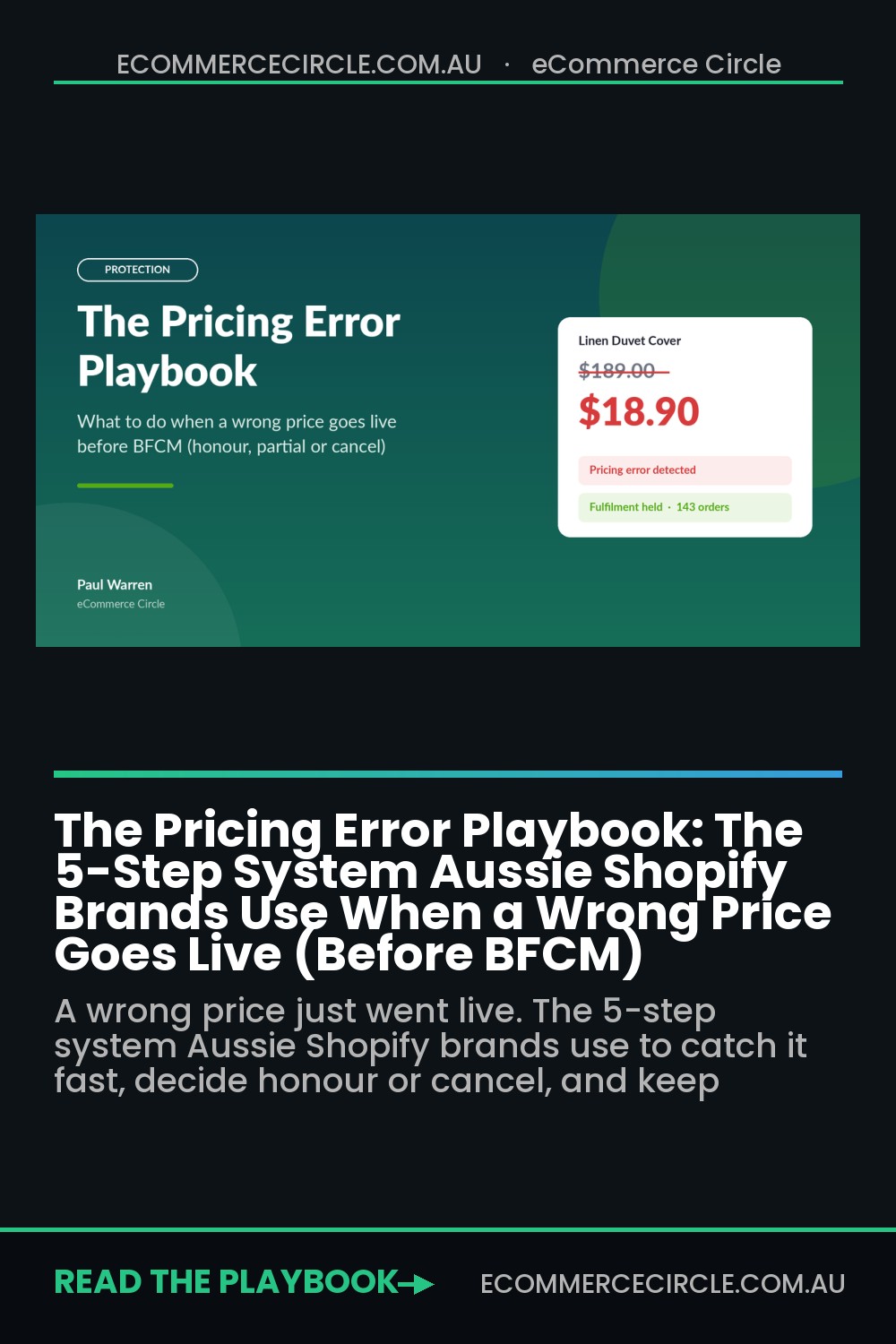
It is 9:14pm on the Thursday before Black Friday. Your phone buzzes with a Shopify order notification. Then another. Then forty more in ten minutes. For about thirty seconds you think your early access email finally landed. Then you open an order and see it: your $189 hero product sold for $18.90.
What’s in This Article
Most founders handle this moment badly. They panic, cancel everything in bulk, fire off a cold “technical error” email, and wake up to a 400-comment OzBargain thread calling them a scam. Or they freeze, ship the lot, and quietly eat five figures of margin they never budgeted for.
The brands that come out of a pricing error with their margin and their reputation intact do something different. They have a system written down before it happens: guardrails that stop most errors going live, tripwires that catch the rest within minutes, and a decision rule for the honour-or-cancel call that takes emotion out of it. With Australians tipped to spend a record $6.8 billion over the Black Friday to Cyber Monday weekend, according to the Australian Retailers Association and Roy Morgan, the next eight weeks are exactly when a wrong number does the most damage. This playbook is that system.
First, What the Law Actually Says About Pricing Errors (General Info, Not Legal Advice)
Before you build any process, you need to know where the lines sit. This is general information only. If you are dealing with a large or messy error, get advice from a consumer law specialist.
Here is the short version most founders never hear:
- A price on your website is generally an invitation, not a binding promise. Commercial law firm LegalVision summarises it this way: Australian businesses are generally not legally required to honour an incorrectly priced item, because a price display is typically an “invitation to treat”. Your store policy and terms matter a lot here.
- Two prices for the same item is a different story. The ACCC is clear that if more than one price is displayed for an item, even by mistake, the business must either sell at the lowest displayed price or stop selling the item until the price is corrected. The same rule applies when the checkout price does not match the price shown on the product page.
- Intent does not save you on misleading conduct. Misleading pricing can breach the Australian Consumer Law even if you truly believed the price was right. A one-off typo you fix fast is a mistake. A “sale” price that keeps “accidentally” reappearing is a pattern, and patterns are what regulators chase.
- Your terms do real work. When Qantas mistakenly sold first-class fares between Australia and the US at up to 85% off in 2024, its terms allowed it to rescind an offer where there is “an error or mistake that is reasonably obvious”. That clause is what gave it room to negotiate rather than simply comply.
The practical takeaway: you usually have the right to cancel an obvious error, but only if you act fast, act consistently, and never let two different prices sit live at once. Every step below is built around that. If you want the broader picture on what you can and cannot say about refunds, we covered it in detail in The Shopify Consumer Law Playbook.
Where Shopify Pricing Errors Actually Come From (It Is Rarely a Typo)
When we audit stores after a pricing incident, the cause is almost never someone fat-fingering a single product. It is a system that let one small mistake multiply across hundreds of SKUs or thousands of checkouts. These are the seven sources we see most:
- Bulk CSV imports. A spreadsheet that drops a decimal point, swaps the Price and Compare-at Price columns, or applies a formula to the wrong rows. One upload, 300 wrong prices.
- Discount stacking. An automatic sitewide discount set to combine with product discounts and a welcome code. Each one is sensible on its own. Together they can take 50% or more off.
- Codes with no guardrails. A “100OFF” code meant as $100 off orders over $400 that was saved as 100% off, or with no minimum spend.
- Currency and market pricing. Wrong price list on a Shopify Market, or a supplier price file in USD uploaded as AUD. In January 2019, OzBargain members believed exactly this had happened when Kogan prices dropped by around 30 to 40% across the site. Orders were cancelled and refunded, and many customers received a $10 voucher that expired within days.
- Scheduled sales that never end. A sale app or scheduled price change that fails to revert at midnight, so your BFCM price runs into December.
- Stale prices in feeds and ads. Google Shopping, Meta catalogue ads and email blocks that cache a price you already fixed. That is the “two prices” problem the ACCC warns about, created by your own marketing.
- Leaked wholesale or staff pricing. A B2B catalogue, staff discount or influencer code that ends up visible to retail customers or posted on a deal site.
Notice the pattern. Almost every one of these happens during a launch, a sale or a bulk change, which is exactly when you are busiest and least likely to be watching. That is why the fix is a system, not “be more careful”. Code stacking and leaks have their own playbook, too: The Discount Code Leak Defence Playbook covers the code side in depth.
Step 1: Prevent It With a 15-Minute Price Pre-Flight
Airlines do a pre-flight check every single time, even on routes they have flown a thousand times. Your price changes deserve the same discipline, especially any change that touches more than ten SKUs or any discount going live for a sale.
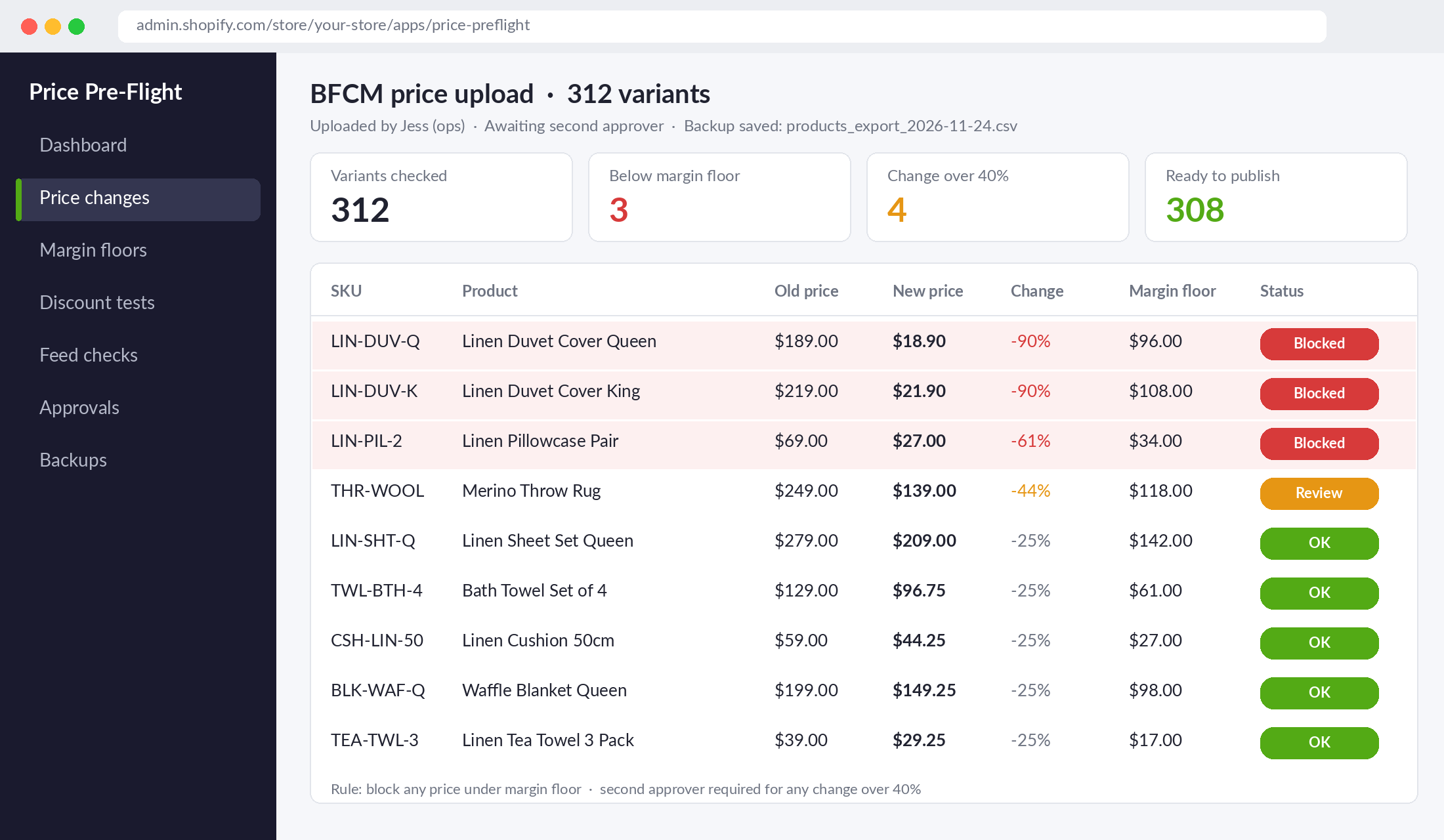
Here is the pre-flight we install with members. It takes about 15 minutes and it catches most errors before a customer ever sees them:
- Back up before you change anything. Export your products CSV from Shopify (Products, then Export) and save it with the date in the filename. If something goes wrong, you can restore every price in one import rather than editing by hand at midnight.
- Set a margin floor for every SKU. Add a simple column to your pricing sheet: the lowest price at which that product still makes a contribution after cost of goods, shipping and payment fees. Any new price under the floor gets flagged in red before upload.
- Run the “percent change” check. Compare old price to new price for every row. Anything that moves more than 40% in either direction needs a second set of eyes. Genuine BFCM discounts rarely go beyond that; decimal errors almost always do.
- Use the four-eyes rule. The person who builds the price change is never the person who approves it. In a two-person business, that is you and your VA or ops person.
- Test-buy every discount combination. Before a sale goes live, put a real cart through checkout with each code, the automatic discount, and every combination a customer could stack. Write down the final price. If any combination lands under your margin floor, fix the combination settings before launch.
- Check the cached places. After the change, check one product in your Google Merchant Center, one in your Meta catalogue, and the price shown in any scheduled email. They should all match the live store.
Step 2: Detect It in Minutes With Shopify Flow Tripwires
Prevention will not catch everything. The second layer is detection, and speed is everything. On a busy sale night, an error spotted at 9:20pm costs you dozens of orders. The same error spotted at 7am costs you hundreds, plus a deal-site thread that has been running all night.
Do not underestimate how fast word travels. OzBargain reported more than 2.5 million unique users in a single month (December 2023), and its daily newsletter goes to around 144,700 subscribers. A genuine price error posted there can be in front of tens of thousands of bargain hunters within an hour.
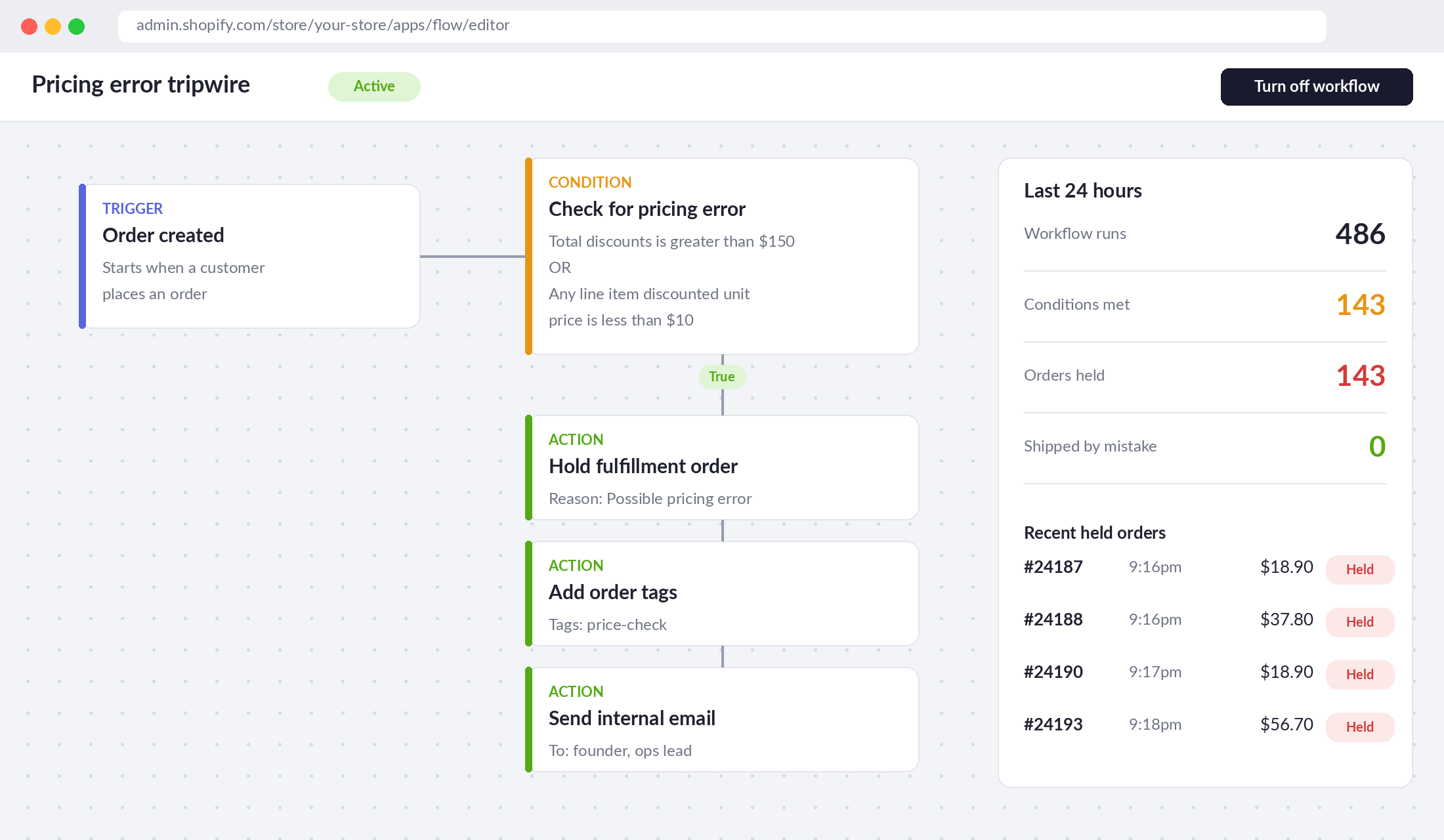
The tool to use is Shopify Flow, which is free and available on most Shopify plans. Its “Hold fulfillment order” action puts an order on hold so it is not fulfilled until you release it, and it works with the “Order created” trigger. Here is the tripwire we set up:
- In your Shopify admin, open the Flow app and click Create workflow.
- Choose the trigger Order created.
- Add a condition on the order’s total discounts amount. Set it to a dollar figure that no legitimate order in your store should reach. For a store with a $90 average order, $150 in discounts on one order is a strong signal.
- Add an OR condition on any line item’s discounted unit price being below a floor, for example under $10 for a store where nothing should sell that cheaply.
- If either condition is true, add three actions: Hold fulfillment order (reason: “Possible pricing error”), Add order tags (tag: price-check), and Send internal email to you and whoever runs ops.
- Turn the workflow on, then place a test order with a big discount code to prove it fires.
Shopify’s own Flow templates include a version that holds fulfilment when total order value is greater than $1,000, which is a good starting point to duplicate and adapt. The goal is not to block orders. It is to stop the warehouse shipping anything until a human has looked, because shipped stock is far harder to claw back than an unfulfilled order.
Two extra tripwires worth adding before BFCM:
- An order-velocity alert. If you get three times your normal hourly orders outside a planned send, something has happened. It might be a great piece of content. It might be a price error. Either way you want to know now.
- A deal-site alert. Set up an OzBargain deal alert and a Google Alert for your brand name plus “price error”. Free, five minutes, and often the first place you will hear about it.
Step 3: Contain It in the First 60 Minutes
The moment a tripwire fires, the clock starts. The founders who handle this well follow a fixed order of operations so they are not making it up at 9:30pm with their heart rate at 140. Print this and stick it on the wall next to your BFCM run sheet:
- Stop new orders at the wrong price (minutes 0 to 5). Fix the price, disable the code, or set the product to draft if you cannot work out the fix quickly. A product that is temporarily unavailable is far better than one still selling at a loss.
- Kill every other place the wrong price lives (minutes 5 to 15). Pause the affected Google Shopping and Meta catalogue ads, unschedule any email or SMS that features the price, and remove social posts showing it. This is how you avoid the ACCC’s “two prices displayed” problem.
- Freeze fulfilment (minutes 5 to 15). If your Flow tripwire did not catch every affected order, hold them manually. Call or message your 3PL directly; do not assume they will see a Shopify tag.
- Capture the evidence (minutes 15 to 30). Screenshot the wrong price, note the exact time it went live and the time it was fixed, and record the cause. If a customer or regulator ever asks, a clean timeline is your best protection.
- Pull the full order list (minutes 30 to 60). Filter your orders by the affected products or the discount code over the error window, then export them. You now know your exposure: number of orders, units, revenue at the wrong price, and revenue at the right price.
Notice what is not on this list: emailing customers. Do not send a single customer message until you have made the honour-or-cancel decision in Step 4. A hurried “we are looking into it” email followed by a cancellation the next day looks worse than one clear, warm message sent a few hours later.
Step 4: Decide Honour, Partial or Cancel With Maths, Not Panic
This is the call founders agonise over, and the airlines show you the full range. In 2018, Cathay Pacific honoured business-class seats worth around US$16,000 that it had accidentally sold for about US$675. British Airways, by contrast, refused to honour tickets sold for £1 instead of £200. Qantas took the middle path in 2024: roughly 300 customers who bought first-class fares at up to 85% off were rebooked into business class at no extra cost, or offered a full refund.
That middle path is the one most Aussie Shopify brands should study. It recognised an honest mistake, protected the business from an unsustainable loss, and still left customers better off than if the airline had simply cancelled.
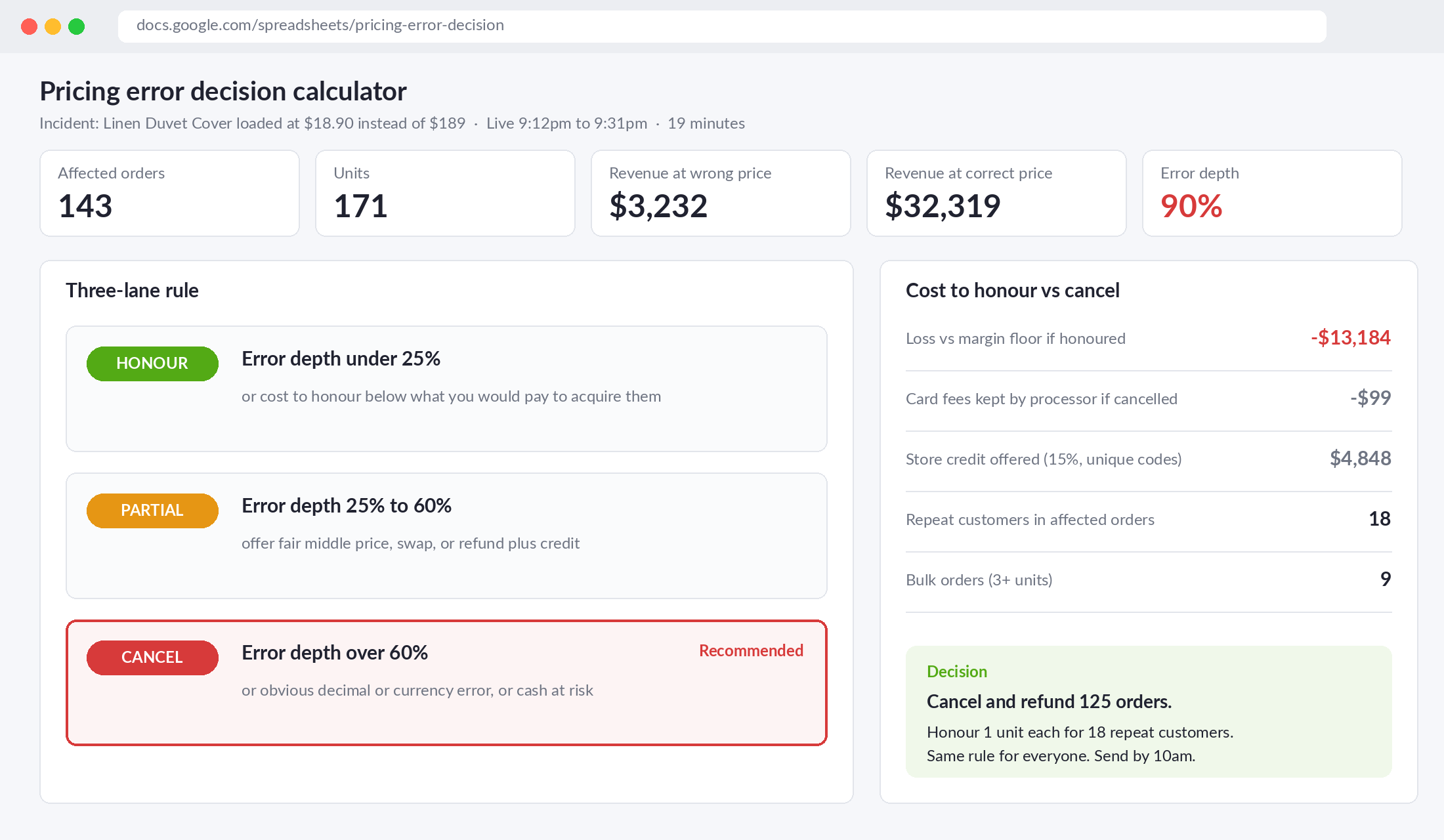
Here is the decision rule we use with members. Work out two numbers from your Step 3 export:
- Cost to honour: for each affected order, what you would lose against your normal contribution margin if you shipped it at the wrong price. Add them up.
- Error depth: how far below the correct price the error was, as a percentage.
Then apply the three-lane rule:
- Lane 1, Honour. Error depth under about 25%, or the total cost to honour is less than what you would happily spend acquiring that many customers. Ship them, say nothing dramatic, and treat it as a surprise acquisition campaign. Many of these buyers are new customers who now know your brand.
- Lane 2, Partial. Error depth between 25% and 60%, or the cost to honour would hurt but not threaten cash flow. Offer a choice: keep the order at a fair middle price (for example your genuine sale price), swap to a comparable product, or take a full refund plus a meaningful credit. This is the Qantas lane.
- Lane 3, Cancel. Error depth over 60%, an obvious decimal or currency mistake, or a cost to honour that puts your BFCM cash at risk. Cancel and refund promptly, with a real apology and a credit that is worth using.
Two refinements. First, treat your existing customers differently from bulk buyers. A loyal customer who bought one unit is very different from a new account that bought twelve. Honouring a single unit for your repeat buyers while cancelling bulk orders is a fair, defensible line, as long as you apply it consistently. Second, remember the hidden costs of cancelling. Shopify’s own help centre notes that credit card transaction fees are not returned to you when you issue a refund, so cancelling 300 orders still costs you the processing fee on every one of them.
Whatever lane you choose, the most important word is consistent. Honouring for the customer who complains loudest on social and cancelling for everyone else is how a pricing error turns into a reputation problem.
Step 5: Communicate and Recover So Customers Come Back
Your message to affected customers will be screenshotted. Write it assuming it will be posted in a public thread, because some of them will be. The Kogan example is a useful warning here: OzBargain members were less annoyed by the cancellation itself than by a $10 voucher with a minimum spend that expired almost immediately. A token gesture can land worse than no gesture at all.
A message structure that works:
- Own it in the first line. “We made a mistake with our pricing on Thursday night and we are sorry.” No “technical issues”, no passive voice.
- Say what happened in one sentence. “A sale price was loaded at $18.90 instead of $189.”
- Tell them exactly what happens next. Their options, the refund amount, and when it will land. Bank refunds commonly take several business days to appear, so say that upfront.
- Give a gesture that respects their time. A credit worth at least 10 to 15% of the order, with no minimum spend and an expiry of at least 60 days. Issue it as Shopify store credit or a unique code, never a shared code that can end up on a deal site.
- Give them a human. A real name and a reply-to address that a person monitors.
Then handle the Shopify mechanics carefully. Shopify’s cancellation guide flags a few traps worth knowing before you start:
- Bulk cancellation caps at 250 orders at a time. For a big error, work in batches.
- Bulk cancel can refund immediately without showing the refund prompt. If any orders were already refunded, that can trigger duplicate refunds. Cancel those ones individually.
- Partially fulfilled orders cannot be cancelled until you cancel the fulfilment. Another reason the fulfilment freeze in Step 3 matters.
- Turn off the default cancellation email if you are sending your own message, so customers do not get a cold system notice before your apology.
Fix Your Terms Before You Need Them
Everything above is easier if your website terms already set expectations. Ask your lawyer to review a clause covering three things:
- When the contract forms. Many stores state that an order is an offer, and the contract only forms when the order is accepted or dispatched. Make sure your order confirmation email wording matches this and does not say “Your purchase is complete and confirmed” if your terms say otherwise.
- Obvious errors. A plain-English statement that you may cancel and fully refund orders placed at an obviously incorrect price, similar to the clause Qantas relied on.
- Quantity limits on sale items. A per-customer limit on heavily discounted products reduces the bulk-buying exposure that makes errors so expensive.
One caution: terms are a safety net, not a licence. They do not override the ACCC’s rule on multiple displayed prices, and they do not make misleading pricing acceptable. They simply give you room to fix a genuine, obvious mistake fairly. If you also run a price match policy, make sure it excludes competitors’ obvious pricing errors. We showed how to word that in The Price Match Playbook.
The Compound Effect: Why This System Pays You Back All Year
Look at how the five steps work together. The pre-flight stops most errors from ever going live. The Flow tripwire shrinks the window for anything that slips through from hours to minutes. The 60-minute containment run sheet stops the error spreading into your ads, feeds and emails. The three-lane decision rule turns a gut call into a calculation. And the recovery message turns an embarrassing night into proof that you treat customers fairly.
There is a quieter benefit, too. A business with these guardrails moves faster. You can run more sales, test more offers and launch more products, because a mistake is now a manageable event rather than a catastrophe. With an average planned BFCM spend of $804 per person according to the ARA and Roy Morgan forecast, and around 6 million Australians expected to take part, confidence to move quickly in November is worth real money.
Your Pricing Error Response Card (Copy This Into Your BFCM Run Sheet)
Here is the whole system on one card. Fill in the blanks this week, before your sale calendar fills up.
- Prevent: Dated product CSV backup before every bulk change. Margin floor column on every SKU. Any price change over 40% gets a second approver. Every discount combination test-bought before launch.
- Detect: Shopify Flow on Order created. Hold fulfilment, tag “price-check” and email the team when total discounts exceed $____ or any unit price falls below $____. OzBargain deal alert and Google Alert set for the brand name.
- Contain (first 60 minutes): Fix or draft the product. Pause affected ads, feeds and scheduled emails. Freeze fulfilment and call the 3PL. Screenshot and timestamp everything. Export all affected orders.
- Decide: Calculate cost to honour and error depth. Under 25% depth: honour. 25 to 60%: partial offer. Over 60% or an obvious decimal or currency error: cancel and refund. Apply the same rule to everyone.
- Recover: Own it in line one. Explain in one sentence. State options and refund timing. Unique credit worth 10 to 15% with no minimum and at least 60 days to use it. A named human to reply to.
- Owner on the night: ____________ (name and mobile). Backup owner: ____________.
If you are building your BFCM plan right now, pair this card with The BFCM Target Maths so your targets and your safety net are set in the same sitting.
Protect the Price, Protect the Business
Pricing errors are not a sign of a sloppy business. They are a sign of a busy one. The difference between the brands that shrug them off and the brands that lose a month’s profit is simply whether the system existed before the phone started buzzing.
Inside eCommerce Circle, Protection is one of the core pillars we work through with every member, because the risks you plan for rarely hurt you. If you want to see exactly where your store is being capped, take the free More Orders Scorecard. It takes two minutes and shows you which of the 10 P’s to fix first.