Open your Google Ads account and find the search terms report. Most Shopify founders never look at it. It is the one report that shows you what people actually typed before they clicked your ad, and for most stores it is where the money quietly leaks out.
What’s in This Article
The numbers are not small. WordStream analysed 15,666 Google Ads accounts run through its free Performance Grader during 2025 (report updated February 2026) and found the average account wastes $1,127.54 a month. A quarter of the businesses in the sample had never added a single negative keyword. Accounts with at least one negative averaged a 13% conversion rate against 4.6% for accounts with none. Those accounts are self-selected, so treat the gap as a pointer rather than proof, but the direction is hard to argue with.
Here is where most advice goes wrong. Someone hands you a 500-word list to paste into your account and calls it a day. That is how you block your own buyers. A good negative keyword setup is a short list sorted by intent, a handful of match type rules, and a 15-minute weekly habit.
This guide gives you all three: a starter list for Australian Shopify stores broken into six intent buckets, the match type rules that stop you over-blocking, and the weekly routine we use to keep search spend clean. Copy the lists, adapt them to your catalogue, and you will have a cleaner account by the end of the day.
How Negative Keywords Actually Work (and the Trap That Costs You Sales)
A negative keyword tells Google not to show your ad when a search includes that word or phrase. Simple enough. The trap is that negatives behave differently from the keywords you bid on, and the difference catches almost everyone.
| Negative match type | Blocks your ad when | Example |
|---|---|---|
| Broad (default) | The search contains all the negative terms, in any order | free trial blocks “trial free tool”, but not “free shipping” |
| Phrase (type it as “free sample”) | The search contains the terms in that order, with other words allowed around them | “free sample” blocks “free sample running shoes” |
| Exact (type it as [free sample]) | The search is exactly that term and nothing else | [free sample] blocks only “free sample” |
Three rules fall out of that table, and they are worth tattooing on your monitor.
- Negatives do not match close variants. If you add the broad negative
flowers, you stop “red flowers” but “red flower” can still trigger your ad. Add singular, plural and common misspelling variants yourself where they matter. Casing is handled for you. - Broad negatives need every word present. Adding
free returns exchangeas a broad negative does not block searches containing only one of those words. If you want to block each word, add them as separate negatives. - Very long searches can slip through. Google Ads may still show your ad for a search longer than 16 words if the negative term appears after the 16th word. Rare for shoppers, common for voice and AI-style queries.
The Starter List: 6 Intent Buckets Every Aussie Shopify Store Should Check
Do not paste these in blind. Read the “check first” column, because every bucket has a store type that should leave certain words out. A craft kit brand wants “how to” traffic. A store selling training courses does not want “course” as a negative. The point of a starter list is that it is a starting point.
For context on why this matters in dollars: the average Australian ecommerce click costs around A$1.82 (Digital8, citing Google Ads Benchmark Reports 2025). Every 100 junk clicks is roughly A$182 gone. Leak A$1,000 a month at that click cost and you are paying for more than 540 junk clicks.
Bucket 1: Freebies and DIY
| Starter negatives | Match type | Check first |
|---|---|---|
| free sample, free download, free printable, free pdf, free template | Phrase | Do not add bare free if you offer free shipping. It will block “free shipping” buyers, which are often your best ones. |
| diy, do it yourself, homemade, tutorial, pattern, instructions | Phrase | Keep “how to” out of this list if you sell kits, tools or anything people research before buying. |
Bucket 2: Jobs, courses and careers
| Starter negatives | Match type | Check first |
|---|---|---|
| jobs, job, careers, salary, resume, internship, vacancy, work from home | Phrase | Safe for nearly every product store. Check “work from home” if you sell home office gear. |
| course, training, certification, degree, apprenticeship | Phrase | Skip these if you sell courses or training products. |
Bucket 3: Second hand and marketplaces
| Starter negatives | Match type | Check first |
|---|---|---|
| second hand, secondhand, used, pre owned, preloved, gumtree, facebook marketplace | Phrase | Fine unless you sell refurbished or resale stock. |
| ebay, temu, aliexpress, alibaba | Phrase | You are blocking shoppers who want that marketplace. If you also sell there, remove it. |
Why bother with marketplaces? Smarter Ecommerce’s Q1 2026 market observer (European data) put Amazon’s median Shopping impression share at 34% to 37%, Temu at about 20% to 21%, eBay at 17% to 18% and AliExpress at 15% to 19%. Those players are in your auctions, and shoppers typing a marketplace name are loyal to it. You will not win that click.
Bucket 4: Repair, parts and support
| Starter negatives | Match type | Check first |
|---|---|---|
| repair, repairs, spare parts, replacement part, manual, warranty claim, fix | Phrase | Keep “replacement” if you sell consumable refills. |
| phone number, customer service, login, contact us, track order | Phrase | These are usually existing customers of a brand. Handle them in your brand campaign and keep them out of non-brand. |
Bucket 5: Wrong location
| Starter negatives | Match type | Check first |
|---|---|---|
| uk, usa, canada, india, philippines (and any country you do not ship to) | Phrase | Better still, set the campaign location to Australia only, then add these as backup. |
| near me, stockist, store locations (online-only stores) | Phrase | Skip if you offer click and collect or sell through retail stockists. |
| nz, new zealand | Phrase | Only if you do not ship to New Zealand. Plenty of Aussie brands do. |
Bucket 6: Wholesale and research
| Starter negatives | Match type | Check first |
|---|---|---|
| wholesale, bulk, supplier, manufacturer, reseller, dropshipping, white label | Phrase | Keep these out of the list if you run a trade program. |
| meaning, definition, wiki, history of, pdf, reddit | Phrase | Informational searches rarely buy. “Reviews” is not on this list on purpose: people searching reviews are close to buying. |
That is a few dozen terms. Mature accounts grow well past that, but the extra ones come from your own search terms report, not from anyone else’s list. Start here, then let your data write the rest.
One more category sits outside the six: your own brand name. If you run a separate brand campaign, add your brand terms as phrase negatives to non-brand campaigns so the two do not fight over the same click. We cover that setup in the Brand Search Defence Playbook.
Build Five Shared Lists, Not One Giant List
The biggest structural mistake we see is negatives added campaign by campaign, one at a time, with no naming system. Six months later nobody knows what is blocked or why. Use shared lists instead.
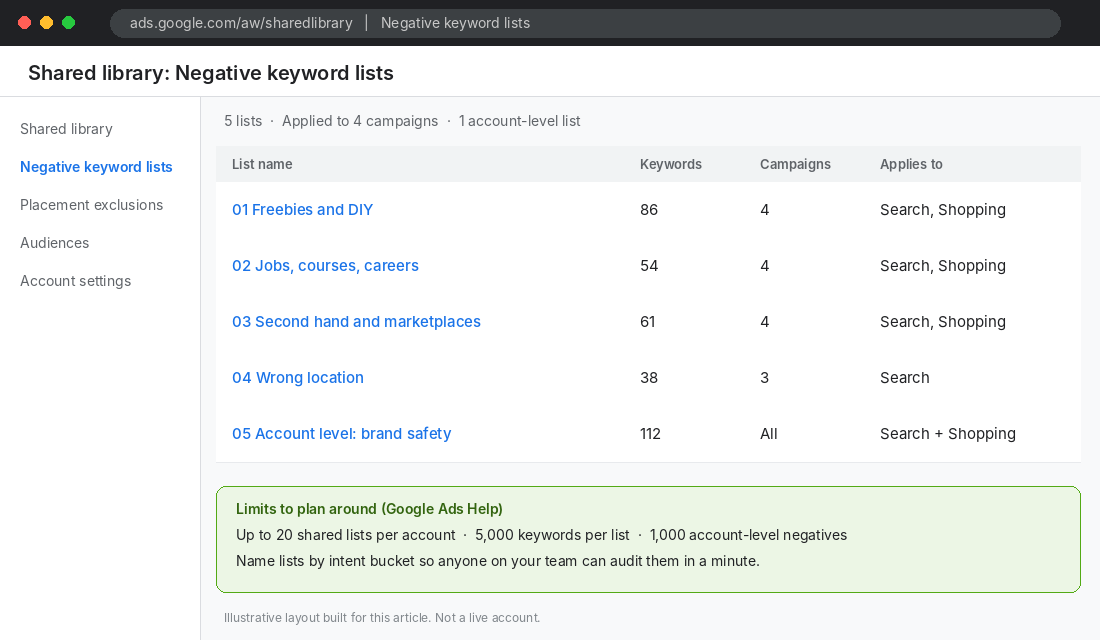
Google Ads lets you create up to 20 shared negative keyword lists per account, with up to 5,000 keywords in each. You can also keep one account-level list of up to 1,000 negatives that applies automatically across Search and Shopping. Apply a list to several campaigns at once, and when you add a keyword to the list it reaches every campaign using it.
Our default structure for a Shopify store:
- 01 Freebies and DIY (applied to all Search and Shopping campaigns)
- 02 Jobs, courses, careers (all campaigns)
- 03 Second hand and marketplaces (all campaigns)
- 04 Wrong location (any campaign not locked to Australia)
- 05 Account-level brand safety (competitor and sensitive terms you never want to appear next to)
Name them with a number and the intent, exactly like above. When a new team member or VA opens your account they can audit the lot in a minute, which matters if you are working towards the delegation we talk about in Google Ads vs Meta Ads for Shopify.
To add negatives in the Google Ads web interface, go to Tools, then Shared library, then Negative keyword lists, and create a list. Type phrase match terms inside quotation marks, like “free sample”, and exact match terms inside square brackets, like [free sample]. Terms with no punctuation are broad negatives.
The 15-Minute Weekly Search Terms Routine
A starter list stops the obvious waste. The weekly routine catches everything specific to your products, your season and your competitors. Block out 15 minutes on the same day every week. Here is the exact order.
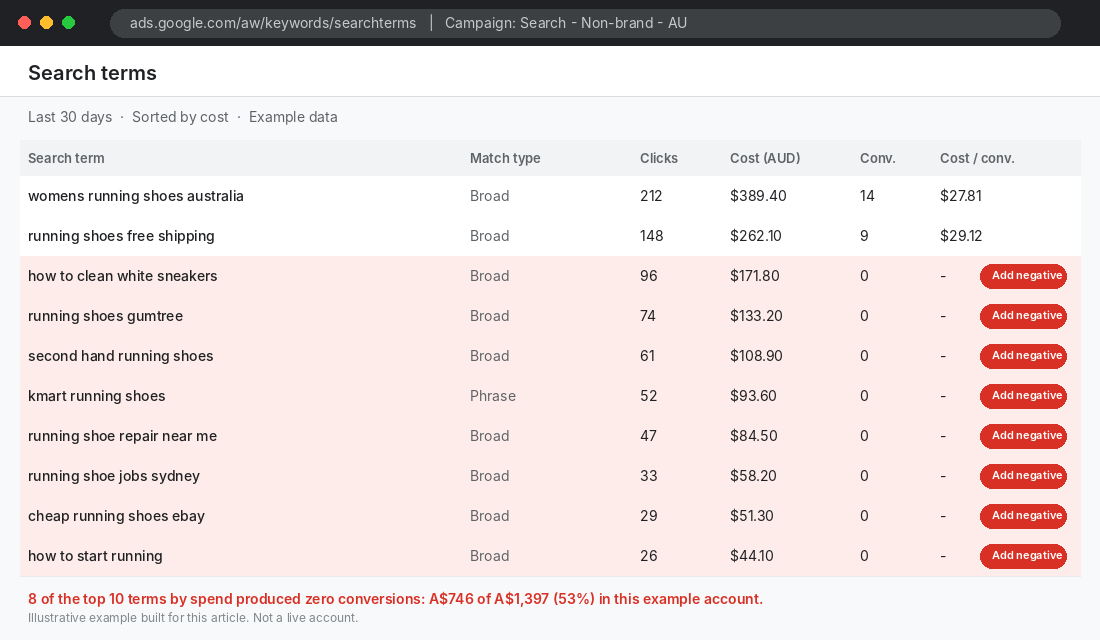
- Open Insights and reports, then Search terms. Set the date range to the last 7 days. For your first three or four sessions, use 14 days so you catch up on the backlog.
- Sort by cost, highest first. You are hunting for money, not curiosity. Ignore terms that spent under a dollar or two unless a pattern jumps out.
- Sort every high-cost term into one of three piles. Wrong intent (add as negative now), right intent and converting (add as an exact match keyword), right intent but no sales yet (leave alone and watch).
- Apply the click rule to the third pile. Optmyzr uses 20 or more clicks as its statistical significance threshold for acting on a search term. At an average A$1.82 click, that is about A$36 per term. Cheap enough to wait for real evidence.
- Pick the match type. Phrase for patterns (“second hand”), exact for one-off queries ([blue widget manual]), broad only for multi-word combinations where order does not matter.
- Add it to the right shared list, not a single campaign. If a term does not fit any list, that is a sign you need a new bucket.
- Log it. One row in a sheet: date, term, list, reason. When sales dip you will thank yourself.
Google’s January 2025 update also added a source column to Performance Max search terms insights, so you can see whether a query came from your search themes or from Google’s keywordless targeting. Check it in the same sitting if you run PMax.
Decision rule: should this term become a negative?
- Is the intent clearly wrong for your product (jobs, repairs, a competitor marketplace)? Yes: add now, whatever the click count.
- Is the intent ambiguous (price checks, comparisons, broad category terms)? Wait for 20 or more clicks and zero conversions.
- Has the term converted even once in the last 90 days? Do not block it. Lower your bid or move it to its own ad group instead.
- Does the negative contain words from one of your active keywords? Stop. You are about to block yourself.
How often should you check? Optmyzr’s guidance is weekly when a campaign launches, then every two to four weeks once it stabilises, with a monthly audit of the lists themselves. For a Shopify store spending a few thousand a month, weekly for the first month and fortnightly after that is a sensible rhythm. For a refresher on sizing that spend, see Google Ads Budget: How Much Should a Shopify Store Spend?.
Find the Leaks One Word at a Time: N-Gram Analysis
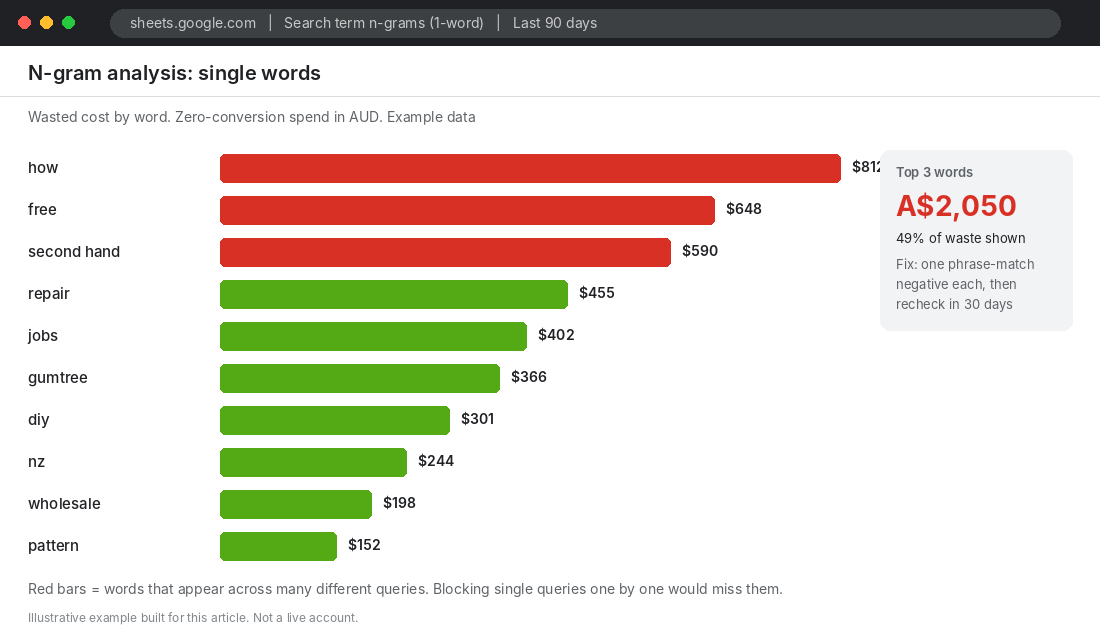
Here is the limit of the search terms report. Adding a negative from a single row blocks only that exact query. Change one word and the same bad traffic walks straight back in.
Doctor Ads analysed 31 accounts and $133M in managed spend (September 2024 to February 2025) and found generic words like free, how, code, pdf, generator and online each drained between $0.4M and $2.6M in zero-conversion spend, and showed up in 8 to 10 of every 10 verticals. That is one agency’s own dataset, so read it as a pattern, not a law. The same analysis found the size of an account’s negative list was almost unrelated to its waste (a correlation of -0.10). More negatives did not mean less waste. Better-targeted ones did.
The fix is n-gram analysis: instead of judging whole queries, you break them into single words and two-word phrases, then add up the cost and conversions for each fragment. A word that appears in 200 different queries and never converts is invisible in the search terms report but obvious in an n-gram view.
How to run an n-gram check in Google Sheets (free)
- Export 90 days of search terms from Google Ads (Search terms report, Download, Google Sheets). Put the query in column A, cost in column C and conversions in column D.
- In column B, add a helper that wraps each query in spaces:
=" "&A2&" ". Fill it down. - On a new tab, list every unique word with
=UNIQUE(FLATTEN(SPLIT(Sheet1!A2:A1000," ")))in cell A2. - Next to each word, total the cost:
=SUMIF(Sheet1!B:B,"* "&A2&" *",Sheet1!C:C), and the conversions with the same formula on column D. - Sort by cost and filter to rows with zero conversions. The top ten are your candidates.
- For each candidate word, search your own catalogue first. Only then add it as a phrase negative to the right list.
Shopping and Performance Max: What Negatives Can and Cannot Do
Most Shopify stores run a mix of Search, Shopping and Performance Max. Negatives work differently across them, and expectations need to match.
Standard Shopping and Search accept your shared lists and campaign-level negatives normally. This is where your six buckets do the most work. If your feed titles are loose, Shopping will match you to wide searches, and negatives are your first line of defence. Our Google Shopping product feed guide covers tightening titles so fewer junk queries match to begin with.
Performance Max is more limited. Campaign-level negative keywords started in beta at DMEXCO in 2024 and Google announced in January 2025 that they were rolling out to all advertisers. Retail advertisers with a product feed can also use brand exclusions, which until now applied to both Search and Shopping ads. Google said a change was coming to let you apply them to Search text ads only, with no date given, which would let branded Shopping traffic continue.
Do not expect account-level exclusions to transform PMax results. In a 2024 Optmyzr study of more than 7,000 Performance Max campaigns, accounts with account-level exclusions had a median CPA of $21.45 and ROAS of 425.28%. Accounts without them had a median CPA of $18.55 and ROAS of 423.44%. In other words, no meaningful difference. Use PMax exclusions for brand control and protecting your reputation, not as an ROAS lever. The structural fixes in our Performance Max playbook move the numbers more.
If click quality is the worry rather than relevance, that is a different problem. Bot clicks do not show up as search terms. Our guide to Shopify click fraud apps covers that side.
How Not to Block Your Own Buyers
Over-blocking is the quiet killer. It does not show up as waste in a report. It shows up as sales you never knew you lost.
Optmyzr’s write-up on negatives includes a case where Andrew Lolk’s team removed over-aggressive negatives from a client account and saw revenue climb by around five and a half to six times, with CPC rising alongside it. A higher CPC and far more revenue is a good trade. That account had been choking itself with “protection”. One poll in the same article found 77% of PPC professionals believed removing all negatives would hurt performance. Both things are true: you need negatives, and you can have too many of the wrong ones.
Andrew Lolk’s click-bucket analysis in the same piece found $136,000 of spend on low-ROAS search terms, mostly terms with 0 to 10 clicks. He estimated negatives could remove roughly 4% to 8% of spend. That is your realistic expectation. Negatives tidy the edges. They do not rescue a weak offer or a broken product page.
The simplest guardrails:
- Never block bare buying words. Cheap, best, buy, sale, online, delivery and reviews are all shopper language. If a search is bad, the problem is usually a second word in it.
- Keep brand terms out of generic negatives. One advertiser quoted by Optmyzr found phrase-match brand exclusions caught variations better than exact-match negatives, and suggested excluding suffixes like “app” or “tool” as phrase negatives. The lesson for stores is the same: be deliberate about brand terms and use phrase match so variations are covered.
- Read every list against your catalogue once a quarter. New product lines are the most common way a negative starts blocking sales. You launch “refurbished” and forget “second hand” is blocked.
- Watch conversion lag. A term with zero conversions in seven days may convert on day 14. Use a longer window for higher-priced products.
Scale changes the approach. In a case published in February 2025, agency OMD said it eliminated roughly 44,000 euros of wasted spend on Philips’ Amazon campaigns using Skai’s Search Term Analysis. With hundreds of campaigns across multiple countries, reviewing search term reports by hand every week had become too slow, so they automated the sorting. You are not Philips, and a 15-minute weekly review is enough for a store your size. But the principle holds: negatives work best when they run on a schedule, not when somebody remembers.
The Tool: Google Ads Editor (Free) for Bulk Negative Lists
Pasting dozens of terms into the web interface one match type at a time is slow. Google Ads Editor is a free desktop app that lets you load an account, make bulk edits and post them back. For negative lists, it is the quickest route.
- Download Google Ads Editor from Google’s Ads Editor page and sign in with the same login you use for your account.
- Add your account and choose Get recent changes so you are editing the live version.
- In the left menu, open Shared library and then Negative keyword lists. Create a list named “01 Freebies and DIY”.
- Use the multiple-changes paste option to add your terms in bulk. Put each term on its own line, wrapping phrase terms in quotation marks and exact terms in square brackets.
- Repeat for each list, then apply each list to the campaigns it belongs to.
- Review the Check changes panel, then click Post. Nothing goes live until you post.
Keep a copy of every list in a Google Sheet as your master. If you ever need to rebuild the account or hand it to an agency, you have a clean record of what you block and why.
The Compound Effect: Cleaner Traffic Makes Every Other Number Better
Each piece on its own looks small. Together they change how the whole account behaves.
Your six starter buckets stop the obvious leaks on day one. The shared lists make that protection permanent across every campaign. The weekly routine catches new waste before it compounds, and the n-gram pass finds the words no single row shows you. Brand separation keeps your brand and non-brand campaigns from fighting. Shopping and PMax controls protect the channels where you have less visibility.
The result is not just lower spend. When fewer of your clicks go to people who were never going to buy, your conversion rate rises, your cost per acquisition falls and your ROAS gets a lift without touching a single ad. That cleaner data also feeds Google’s bidding, which learns from your conversions. Fewer junk clicks means better signals. For deciding where to put the budget you free up, the maths in Google Search Ads for Shopify will help you reinvest it sensibly.
Copy This: The Negative Keyword Audit Checklist
Run this once now, then once a quarter.
- Lists: Five shared lists created and named by intent. Account-level brand safety list set up.
- Starter terms: All six buckets reviewed against your catalogue, with “check first” exceptions removed.
- Match types: Phrase used for patterns, exact for one-offs, broad only for multi-word combinations.
- Location: Campaigns locked to Australia (or your shipping zones) before relying on country negatives.
- Brand: Brand terms added as phrase negatives to non-brand campaigns, and a separate brand campaign running.
- Routine: Weekly 15-minute search terms review in the calendar, log sheet created.
- Rule: No negative added for an ambiguous term with fewer than 20 clicks and a conversion in the last 90 days.
- N-gram: 90-day word-level check done in the last quarter.
- PMax: Campaign-level negatives and brand exclusions reviewed, with search terms insights source column checked.
- Quarterly: Every list read against your current product range for conflicts.
Inside eCommerce Circle, keeping paid traffic clean is one of the core Promotion habits we work on with members, because every wasted click is margin you cannot get back. If you want to see exactly where your store is being capped, take the free More Orders Scorecard. It takes two minutes and shows you which of the 10 P’s to fix first.