Most Aussie store owners are using ChatGPT the way they used Google in 2005. They type a vague question, get a vague answer, and decide the tool is overrated. Then they close the tab and go back to answering support emails at 10pm.
What’s in This Article
The owners getting real hours back are doing something different. They hand over specific, repeatable jobs with clear instructions, and they keep the decisions for themselves. A Shopify survey of 513 Australian business owners found that 78% had used ChatGPT or another generative AI tool in the past year. The most common uses were marketing content (37%), product content (34%) and data analysis (33%). Using it is no longer the edge. Knowing which jobs to hand over is.
This guide gives you 12 jobs worth handing to ChatGPT in an ecommerce business, the prompt structure that makes the output usable, a scoring tool to decide what stays with a human, and the setup that stops you starting from a blank page every time.
Why Most Stores Get Weak Results From ChatGPT
There are three mistakes, and nearly every store makes at least two of them.
- No context. You ask for a product description without saying who buys the product, what you sell it for, or how your brand sounds. The answer is generic because the question was generic.
- Wrong jobs. You ask it to decide your pricing or your ad budget, which need your margins and your risk appetite. Then you ask it to do the boring repeatable work, like drafting a refund reply, only once a month.
- No review step. You paste the output straight into a customer email or a policy page. One invented shipping time or made-up statistic and you have a problem.
The fix is not a cleverer prompt. It is picking the right jobs, giving the tool your store’s context once, and building a review step into every output. The rest of this article shows you how.
It also helps to keep the scale in perspective. Klarna reported that its AI assistant handled about two-thirds of its customer service chats in the first month, around 2.3 million conversations, and cut resolution time from roughly 11 minutes to under 2 minutes, according to OpenAI’s Klarna case study. That is a huge operation with a dedicated build. Your store does not need that. It needs five or six well-chosen jobs running reliably.
The Hand-Over Test: Score a Job Before You Give It Away
Before you hand any job to ChatGPT, score it on four questions. Give each one 0 to 3 points. A total of 9 or more means hand it over with a review step. Under 6 means keep it with a human.
- Is it repeatable? Do you do this weekly or daily, in roughly the same shape? Repeatable jobs justify the setup time.
- Can you check the answer in under two minutes? Totals in a spreadsheet, a reply against your policy, a subject line against your brand. If checking takes as long as doing, you have saved nothing.
- Is a good first draft enough? If the output is a starting point you will edit, the tool is a great fit. If it must be perfect and final, it is not.
- Is the data safe to share? Customer names, emails, addresses and card details do not go into a chat. Anonymise first, or keep that job out.
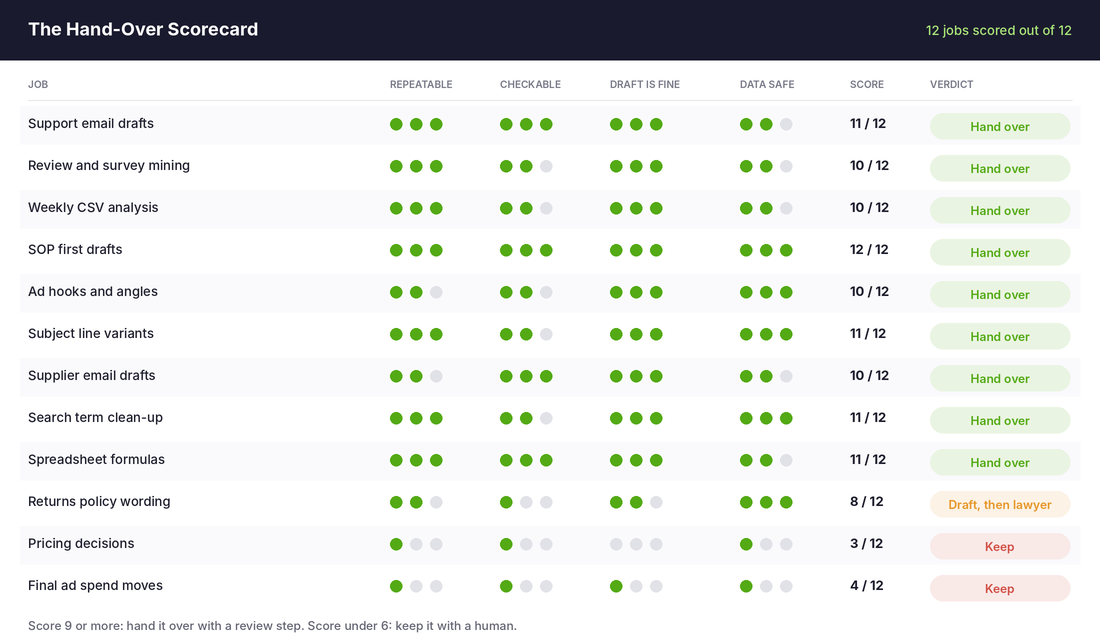
You will notice the pattern. The jobs that score high are the ones that produce drafts, summaries and first passes. The jobs that score low are the ones where the answer depends on your numbers, your risk tolerance or your legal obligations. That split is the whole strategy.
This is also how we think about deciding between AI and a hire. If a job scores high here, software can probably take it. If it scores low and the volume is growing, that is a person.
Set Up ChatGPT Once So You Never Start From Zero
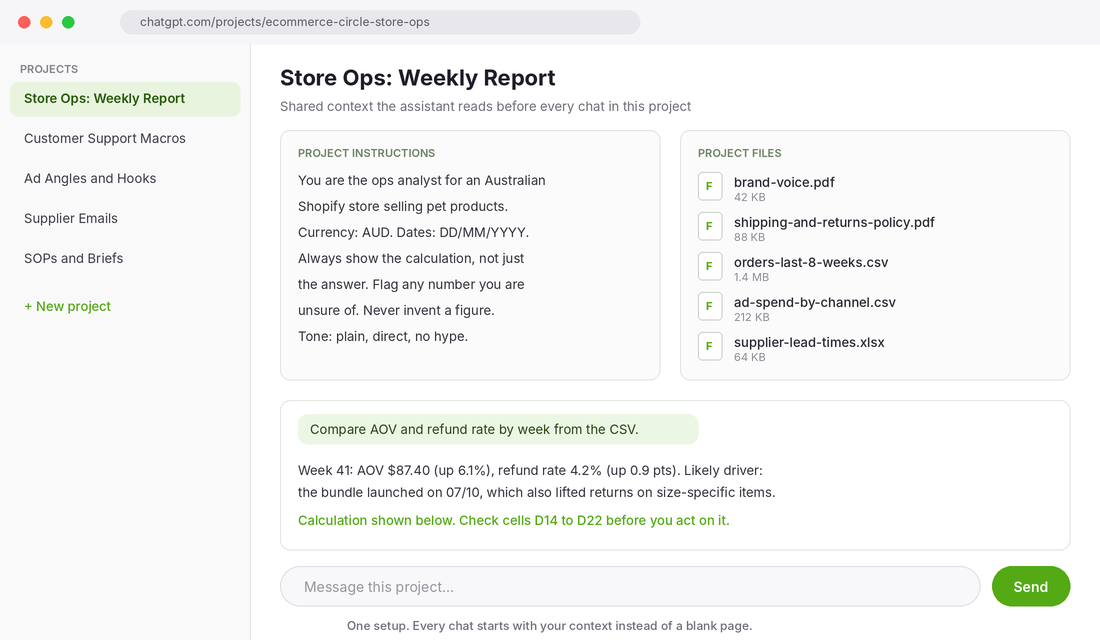
The single biggest upgrade is using a Project, not a fresh chat. A Project lets you save standing instructions and upload reference files, so every conversation inside it starts with your store’s context already loaded. Setup takes about 20 minutes.
Step by step: build your Store Ops project
- Create the project. In ChatGPT, open Projects from the sidebar and create a new one. Name it by job, not by brand. “Customer Support Macros” beats “My Store”.
- Write the instructions. State what you sell, who buys, your currency (AUD), your date format, your tone, and your rules. Include “never invent a figure” and “flag anything you are unsure of”. Those two lines catch most hallucinations before they reach you.
- Upload the reference files. Your brand voice notes, shipping and returns policy, FAQ, and sanitised exports such as orders and ad spend. Remove customer names, emails and addresses before uploading.
- Run one real job. Paste in last week’s tickets or a CSV and ask for the output you actually need. Edit the instructions until the first draft needs light edits only.
- Save your best prompts. Keep a short doc of the prompts that worked. Reuse them instead of reinventing them.
Check the current plan limits and your data settings inside ChatGPT before you upload anything. Plans, file limits and training controls change often, and you should confirm what applies to your account rather than assume.
The 5-Part Prompt That Fixes Most Bad Output
When a job does not fit a standing project, use this structure. It takes 60 seconds to write and removes most of the vague answers.
Copy and paste: the 5-part prompt
Role: You are the [support lead / ops analyst / copywriter] for an Australian Shopify store selling [product].
Context: Our customers are [who]. Our average order is $[X]. Our tone is [3 words]. Our policy is [paste it].
Task: [One specific job. One output.]
Format: [Table / 5 bullet points / email under 120 words / CSV].
Check: List any assumption you made and any figure you could not verify. If you are unsure, say so.
The last line is the most important one. It forces the tool to show you where it guessed, which tells you exactly where to look when you review.
12 Jobs Worth Handing Over (With Prompts That Work)
Each job below scores 9 or higher on the Hand-Over Test unless stated. For every one, the pattern is the same: you give the context, the tool gives the draft, you check and send.
1. Customer support reply drafts
Paste your returns and shipping policy once, then paste an anonymised customer message. Ask for a reply under 120 words that matches your tone and cites the right policy line. You edit and send. Most stores find this cuts 20 to 30 seconds off every ticket, which adds up fast at 50 tickets a day. If volume is high enough to need full automation, read our guide to the Shopify AI support agent first.
A caution from the data: in Gorgias research reported by Triple Whale, 54% of customers still prefer a human for order issues. Draft with AI, but let a person own anything involving a missing parcel or a refund dispute.
2. Review and survey mining
Export your last 200 reviews or post-purchase survey answers. Ask for the top 10 themes ranked by frequency, with three verbatim quotes per theme and the exact words customers use to describe the problem you solve. This is one of the highest-value jobs on the list because those phrases become ad hooks and product page headlines.
Prompt
Here are 200 customer reviews. Group them into themes. For each theme give the count, three verbatim quotes, and the exact phrases customers use. Then list the five objections that came up most. Flag anything you could not classify.
3. Product description first drafts
Give it the product specs, the buyer, and two example descriptions you love. Ask for three variations in your voice. Never publish unedited, and never let it invent specs. We cover this job in detail in AI Product Descriptions for Shopify.
4. Ad angles and hooks
Feed it your review themes and your best-selling product’s benefits. Ask for 20 hooks across five angles: problem, outcome, objection, social proof, and comparison. You still pick and produce, but you start from 20 options instead of a blank screen. For the full workflow and where it falls short, see AI Ad Creative for Shopify.
5. Email subject lines and flow drafts
Ask for 10 subject line variants per email, each under 45 characters, with a different angle each time. For flows, give it the goal, the offer and the segment, and ask for a three-email draft. Load the best variants into your email platform’s A/B test. The tool writes options. Your data picks the winner.
6. Weekly report analysis
Export orders and ad spend as CSVs, anonymise them, and ask for a week-over-week comparison of revenue, orders, AOV, refund rate and channel mix. Ask it to show the calculation and flag anything odd, like orders with blank fields.
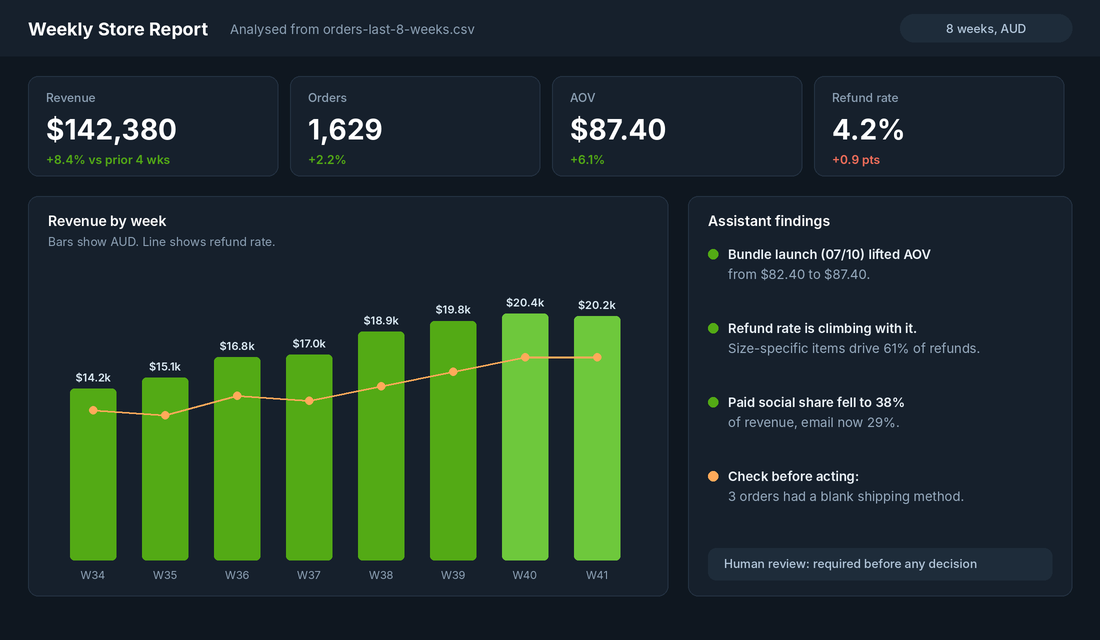
Treat the numbers as a draft. Spot-check two or three figures against Shopify Analytics every time. The point is to get the story in five minutes instead of an hour, not to stop looking at the source.
7. SOP first drafts
This is the safest job on the list because there is no external risk. Describe how you pack an order, process a return or onboard a supplier, either typed or from a voice note transcript. Ask for a numbered SOP with a checklist and a “common mistakes” section. Then walk through it once and fix what is wrong. A decent SOP in 15 minutes beats the perfect one you never write.
8. Supplier emails and negotiation prep
Give it your volumes, lead times and the problem, such as late deliveries or a price rise. Ask for a firm, polite email and three points to raise on a call. You decide the position. It handles the wording and the structure.
9. Search term and keyword clean-up
Export your Google Ads search terms report. Ask it to sort every term into buckets: buy intent, research intent, irrelevant, and competitor. Then ask for a negative keyword list from the irrelevant bucket. You review the list before it goes live. Our Google Ads negative keywords starter list shows what to expect.
10. Spreadsheet formulas and data clean-up
Describe what you need in plain English: “Column C has product titles with sizes at the end. Split the size into its own column.” Ask for the formula and a one-line explanation. It will also reformat messy Shopify exports and build margin calculators. Test every formula on five rows you can check by hand.
11. Policy drafting (draft only)
Returns, shipping and privacy pages can start as a draft, since the blank page is the hard part. This job scores 8, not 9, because the wording carries legal weight. Australian Consumer Law applies to your store regardless of what your policy says, so have a lawyer or a trusted adviser review anything before it goes live.
12. Job ads and VA task briefs
Describe the role, the hours, the tools and the outcomes. Ask for a job ad and a first-week task list. It is also useful for turning a messy brain-dump into a clear brief a virtual assistant can follow, which is half the battle when you hire your first VA.
Four Jobs to Keep With a Human
- Pricing decisions. The right price depends on your margin, your competitors and your cash position. ChatGPT knows none of that unless you provide it, and even then it cannot own the risk.
- Final ad spend moves. Let it analyse the report. You decide whether to scale or cut, because you know what stock you have and what cash you can carry.
- Anything with customer personal data. Names, emails, addresses and payment details stay out of the chat. Anonymise or skip the job.
- Facts and statistics you plan to publish. The tool can state a statistic confidently and be wrong. Check every number against its source before it appears on your site or in an ad.
A useful rule: if a wrong answer costs you money or trust, a human signs it off. If a wrong answer costs you two minutes of editing, hand it over.
The Compound Effect: One Context, Twelve Jobs
The jobs are not separate tricks. They feed each other. Review mining produces the phrases that sharpen your ad hooks. Those same phrases improve your product descriptions and subject lines. The weekly report tells you which product or channel to spend your time on. The SOPs make sure the work still gets done when you are not there.
When the context lives in a Project, every one of those outputs sounds like your store and respects your policies. That is the difference between a tool that saves you 20 minutes here and there and a system that gives you back a full day a week.
There is a market reason to build this now. Shopify’s own data, reported by Debutify, shows AI chatbot referrals to Shopify storefronts growing more than 8x year on year in the first quarter of 2026, and that most of those referrals come from ChatGPT. The same tools your customers use to find products are the ones you can use to run the business behind them. Our guide to AI search visibility covers that side of it.
The Practice section of the Scorecard looks at exactly this: whether your weekly routines, SOPs and reporting are built to run without you in the room.
Your First 30 Days: A Simple Rollout
- Week 1: Score your 10 most time-consuming jobs with the Hand-Over Test. Pick the top three.
- Week 2: Build one Project for the highest scorer. Run it on real work daily and tighten the instructions.
- Week 3: Add the second and third jobs. Write a one-page checklist for the review step on each.
- Week 4: Measure it. Track minutes saved per week and any errors caught. Keep what works and drop what does not.
Do not try all 12 at once. Three jobs running reliably is worth more than twelve half-built ones.
Where to Go From Here
Start with one job this week. Pick the highest score on your list, build the Project, and run it on real work for five days. You will know quickly whether it earns its place.
Inside eCommerce Circle, building simple weekly systems like this is one of the core habits we work on with members. If you want to see exactly where your store is being capped, take the free More Orders Scorecard. It takes two minutes and shows you which of the 10 P’s to fix first.