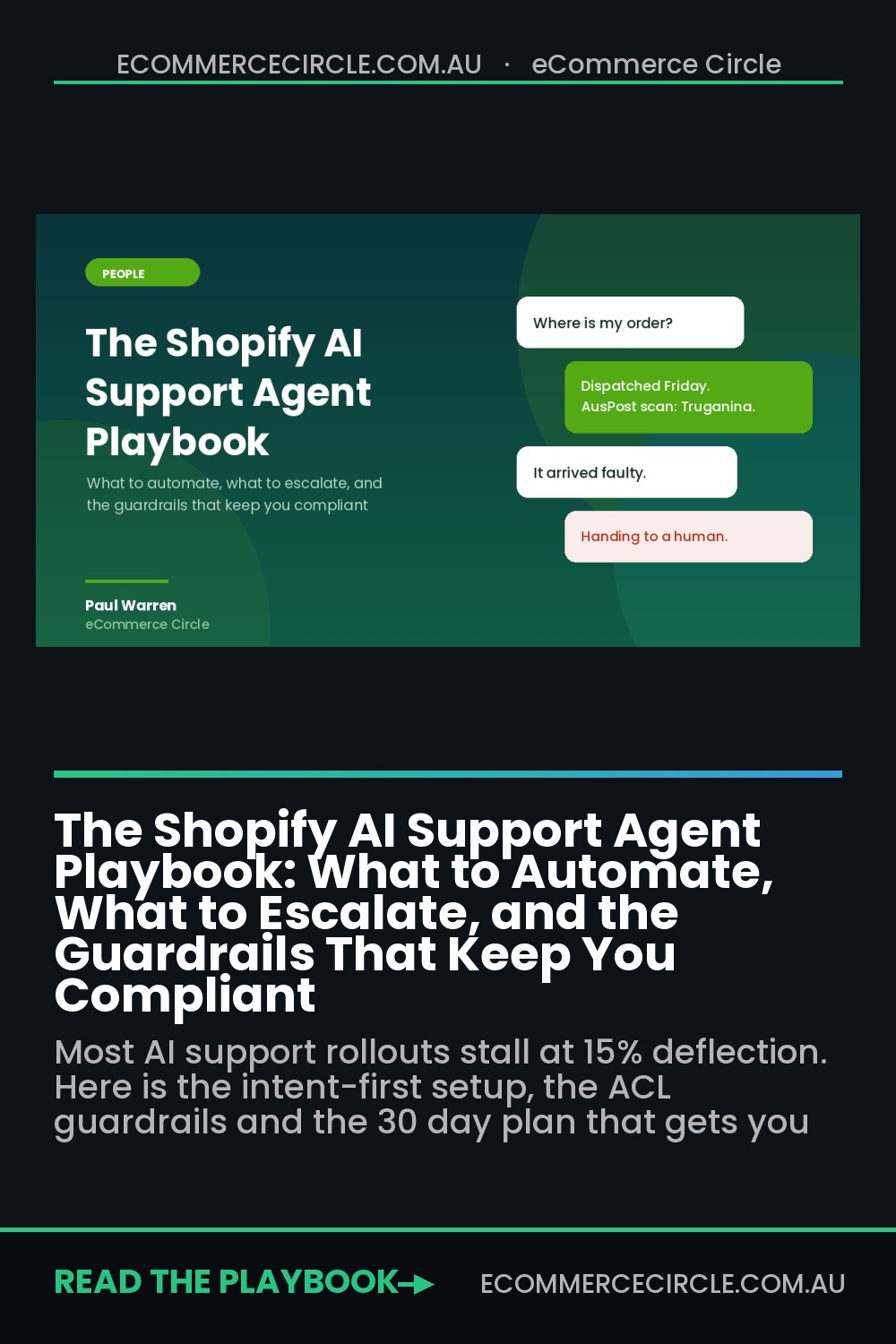
Your support inbox is not a cost centre. It is the most honest piece of research your store produces, and most Aussie founders are throwing it in the bin twice a day.
What’s in This Article
The usual sequence goes like this. You bolt an AI chatbot onto the site because a competitor did it. It answers roughly one ticket in eight. Someone on your team catches it telling a customer they are outside the returns window when they are not. Six weeks later it is switched off and nobody talks about it again.
The tool was not the problem. Across enterprise ecommerce programmes in 2026 the median tier-one deflection rate sits at 41.2%, and top-quartile performers reach 58.7%. Ecommerce leads every other industry on this because our highest-volume questions are structured and data-rich. A human-handled ecommerce ticket costs somewhere between AUD 9 and AUD 20 once you load wages, super, software and the manager who reviews it. An AI-resolved ticket costs closer to AUD 1. The brands hitting the top quartile did not buy a smarter model. They classified their tickets first, wrote the rules second, and measured the right number third.
Start With the Ticket Mix, Not the Tool
Before you look at a single vendor demo, export ninety days of tickets and tag every one of them by intent. Not by channel. Not by agent. By what the customer actually wanted.
You will find the same shape almost every time. “Where is my order” accounts for 25% to 40% of inbound volume for a typical ecommerce brand, and climbs to 50% to 60% during peak. Returns and exchanges usually sit second. Sizing, fit and product specifics come third. Between them, those three buckets are commonly 60% to 70% of everything landing in your inbox.
That distribution is the whole strategy. If two thirds of your volume is three repeatable questions with a data-backed answer sitting inside Shopify, you do not have a staffing problem. You have a routing problem.

Do the tagging manually for the first pass. Sit down with your support lead, pull 300 random tickets from the last quarter, and sort them into no more than twelve intent buckets. It takes an afternoon. Every helpdesk will offer to do this automatically, and the auto-tagging is decent, but you learn things doing it by hand that a dashboard will never surface. You notice that half your sizing questions come from one product line. You notice that a third of your “where is my order” tickets arrive within 48 hours of purchase, which means your dispatch expectation is set wrong on the product page, not on the tracking page.
Write the percentage next to each bucket. Multiply by your blended cost per ticket. Now you have a business case, and you know exactly which intents to point an agent at first.
The Three-Tier Routing Model: Automate, Assist, Escalate
Every intent bucket gets exactly one of three labels. This is the decision most brands skip, and it is the one that determines whether the whole thing works.
- Automate. The answer is deterministic and lives in a system the agent can read. Order status, tracking, dispatch timing, delivery estimates, discount code validity, shipping costs and thresholds, standard change-of-mind returns, address changes before dispatch. There is one correct answer and a machine can look it up faster than a person can.
- Assist. The agent drafts, a human sends. Sizing and fit advice, product comparisons, care instructions, gift recommendations, anything where judgment or brand tone materially changes the answer. This tier is underrated. AI-assisted support scores 82% customer satisfaction against 71% for fully automated handling, so for anything nuanced the hybrid beats the robot.
- Escalate. Never touched by automation. Faulty or unsafe products, injury claims, chargebacks, anything where a customer mentions consumer law or the ACCC, wholesale enquiries, a third contact on the same issue, and any refund above a dollar threshold you set. These go straight to a named human with a clock on them.
The escalate list is the one that protects you. Write it before you write anything else, and write it as a list of triggers rather than a vibe. “Angry customer” is not a trigger. “Customer uses the words faulty, broken, refund, ACCC, consumer law, lawyer, or Fair Trading” is a trigger.
One more rule. Start with two Automate intents, not twelve. Order status and discount code validity are the safest openers because both have a single source of truth and neither creates a legal exposure if the agent gets confused. Prove the pattern, then widen it.
The Setup That Actually Works: Guidance, Actions and Handover
Gorgias is the obvious starting point for most Shopify stores. It is Shopify’s Premier Partner for customer experience and it powers roughly 40% of the top 1,500 Shopify brands, which matters less for the branding and more for the depth of the order-data integration. Zendesk, Intercom Fin and Re:amaze all work. The configuration logic below applies to all of them.
Be clear-eyed about what you will get. Gorgias markets “up to 60%” instant resolution, and its own published case studies land between 26% and 56% depending on the brand. That spread is not about the software. It is about how well the six steps below get done.
- Connect the order data properly. The agent needs live read access to orders, fulfilments, tracking numbers and the customer record. If it can only read your help centre articles, it is a search box with a personality and it will cap out around 15% resolution.
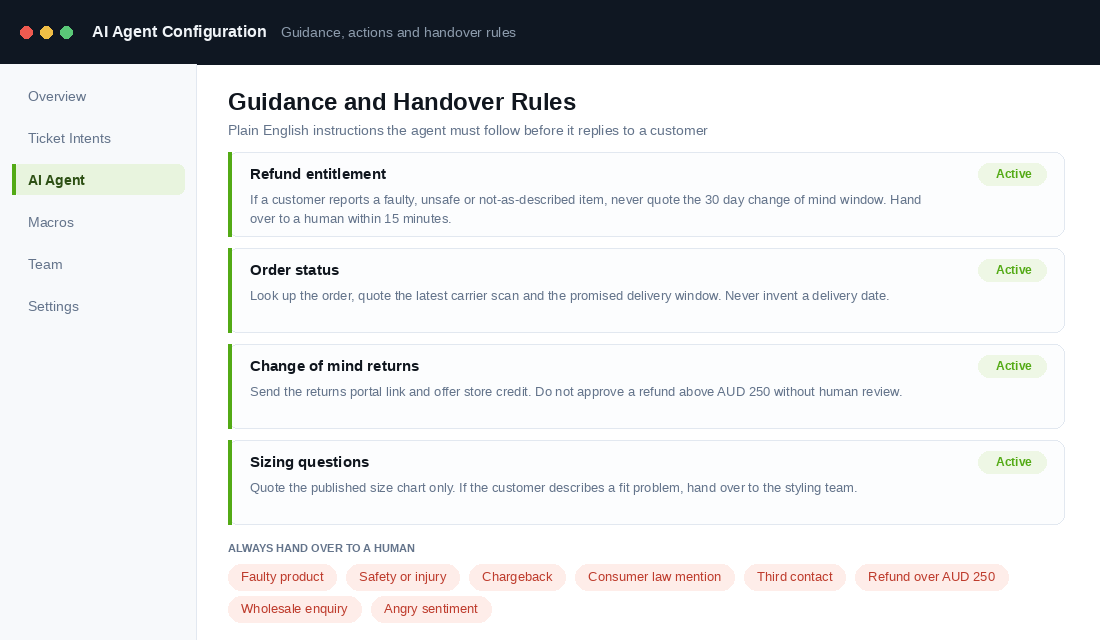
- Write Guidance in plain English. This is the instruction layer. One rule per scenario, written the way you would brief a new hire. “When a customer asks about a return past 30 days, politely decline the refund, offer store credit, and link the returns portal.” Aim for fifteen to twenty of these before you go live, one for each intent you are automating.
- Set the Actions the agent may take. Actions are the steps that change something: issuing a return label, cancelling an unfulfilled order, updating a shipping address, applying store credit. Turn on the minimum set. Every action you enable is a thing that can go wrong at 2am without a human in the loop.
- Configure Handover Topics. Load your escalate list here as explicit topics. Add a confidence threshold so the agent hands over when it is unsure rather than guessing, and add sentiment detection so a frustrated customer gets a person.
- Cap the financial authority. Pick a number, and AUD 250 is a sensible starting point for most stores. Any refund, credit or replacement above it requires human approval. This single setting is the difference between an automation project and an uncontrolled liability.
- Run it in draft mode for two weeks. The agent writes the reply, a human reads and sends. You will catch the hallucinated delivery dates, the wrong policy quotes and the tone problems before a customer ever sees them. Only flip to autonomous mode on an intent once you have seen fifty consecutive drafts you would have sent yourself.
Step six is the one founders want to skip because it feels like it defeats the purpose. It does not. Two weeks of supervised drafts is the cheapest quality assurance you will ever run, and it is where most of your Guidance rules actually get written.
The Australian Consumer Law Guardrails Nobody Configures
This is the section most overseas content on this topic gets wrong, and it is the one that can cost you real money.
Treasury’s final report on AI and the Australian Consumer Law, released in October 2025, found the existing framework fit for purpose. Translated: there is no separate AI carve-out coming. Your chatbot is treated as part of your business systems. If it makes a misleading representation to a customer, that is your misleading representation. The ACCC obtained penalties against a business for algorithm-driven misleading conduct back in 2022, so the precedent is not theoretical, and penalties under the ACL now reach into the tens of millions.
The specific failure mode to design against is the consumer guarantees one. Under the ACL, a customer with a faulty, unsafe or not-as-described product has rights that exist regardless of your stated returns window. If your agent has been trained on a policy page that says “returns accepted within 30 days” and a customer writes in on day 45 with a product that broke, the agent will very likely quote the policy and decline. That is a false representation about a consumer’s rights, and it is exactly the kind of thing the ACCC looks at.
Four guardrails to configure before you go live:
- Separate the two return paths in Guidance. Change of mind is your policy and your discretion. Faulty, unsafe or not-as-described is a consumer guarantee. Write two distinct rules and never let the agent apply the change-of-mind window to a fault claim.
- Ban the agent from denying an entitlement. The instruction is simple: the agent may explain policy, but may never tell a customer they have no right to a remedy. Any conversation heading that direction becomes a handover.
- Disclose that it is a bot. Not strictly mandated in every context, but implying a human is answering when one is not is the sort of representation you do not want to defend. A one-line greeting solves it.
- Log every automated conversation and keep it. If a dispute lands, the transcript is your evidence. Keep at least twelve months of them and make sure your team can pull a single conversation in under a minute.
Get a copy of your own configured Guidance in front of whoever handles your policies. It is a thirty minute review that prevents an expensive year. We covered the broader picture in our Shopify consumer law playbook, and everything in there now applies to your agent as well as your team.
Measure Resolution, Not Containment
Every vendor dashboard leads with containment rate: the percentage of conversations closed without a human touching them. It is the wrong headline number, because a customer who gives up and leaves counts as contained.
Track four numbers instead, and review them weekly.
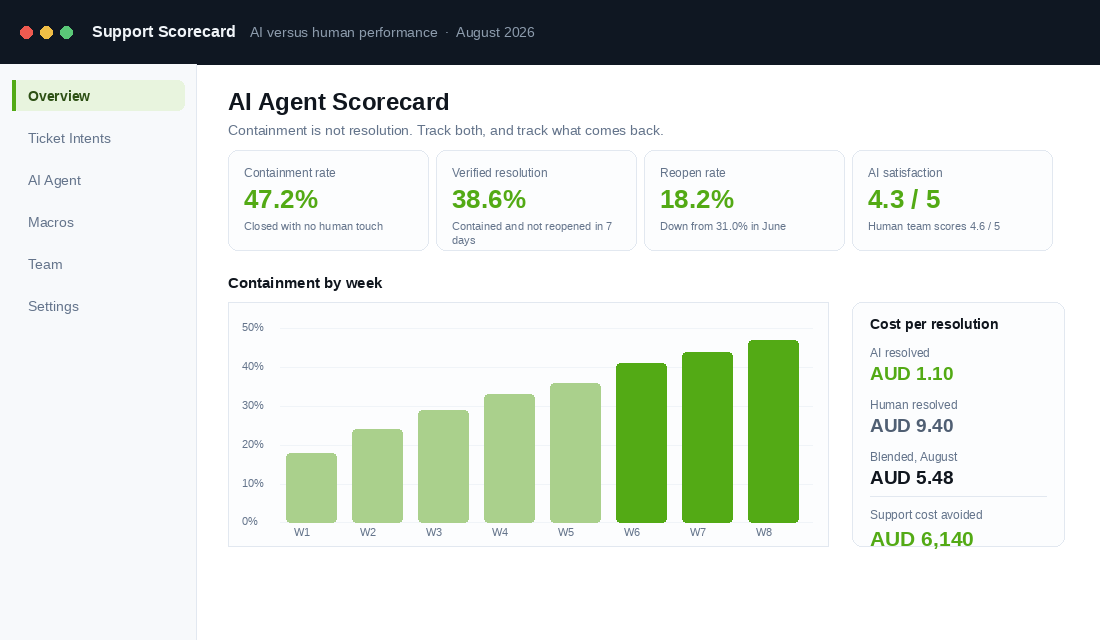
- Verified resolution rate. Contained, and the customer did not come back on the same issue within seven days. This is the only number that reflects reality. Expect it to be eight to ten points below your containment rate at the start.
- Reopen rate. The share of AI-closed tickets that get reopened. Anything above 20% means your Guidance is too thin or you have automated an intent that belongs in the Assist tier. Chase this down before you widen scope.
- Satisfaction, split by handler. Score AI-resolved and human-resolved conversations separately. A gap of a few tenths is normal and fine. A full point of difference means customers can tell, and they mind.
- Cost per resolution, blended. Total support cost including the AI subscription and per-resolution fees, divided by total resolved conversations. This is the number that tells you whether the project paid for itself, and it is the one your accountant will ask for.
Add one qualitative ritual. Once a week, read ten AI-handled conversations end to end. Not a sample of the flagged ones. Ten at random. You will find things no metric surfaces: the agent that is technically correct and completely charmless, the answer that is right but three paragraphs too long, the recurring question your product page should have answered.
Cut the Ticket Before It Exists
Automating a question is the second-best outcome. The best outcome is never receiving it.
This is where the intent analysis pays its second dividend. Roughly 96% of shoppers track their order when tracking is available, and 43% check it daily until the parcel lands. That behaviour is not impatience. It is uncertainty about a promise you made vaguely. Brands that add proactive shipping notifications see WISMO volume fall by as much as 65%, and best-in-class operations keep WISMO contacts below 4% of orders.
Three upstream fixes, ranked by return:
- Put a real dispatch promise on the product page. Not “fast shipping”. A dated statement: “Order before 2pm AEST today, dispatched from Melbourne tomorrow, delivered to Sydney metro Thursday.” Most WISMO tickets are created at checkout, not in transit.
- Send proactive updates at dispatch, at the first carrier scan, and on any exception. The exception message is the one that matters. A customer told their parcel is delayed is annoyed. A customer who discovers it themselves after four days of silence writes a bad review.
- Fix the product page fields your sizing tickets keep asking about. If eleven percent of your volume is fit questions, that is not a support problem. That is a missing measurement table, a missing model height and size worn, and a missing “runs small” note.
Our support deflection playbook goes deeper on the self-service side, and the macro library gives you the reply templates that become your Guidance rules almost word for word.
The 30 Day Rollout Plan
Here is the sequence, week by week. Print it, put a name against each line, and do not skip ahead.
- Week 1: Classify. Tag 300 tickets by intent. Build the percentage table. Calculate your blended cost per ticket. Label every intent Automate, Assist or Escalate. Write the escalate trigger list as literal words and phrases.
- Week 2: Configure. Connect order data. Write fifteen Guidance rules covering your top intents. Set the two ACL return paths. Enable the minimum viable set of Actions. Set your refund authority cap. Load handover topics and turn on sentiment detection.
- Week 3: Draft mode. Agent drafts, humans send, on every intent. Log every correction as a new Guidance rule. Read the corrections daily, not weekly. By day 21 you should be rewriting far less than you were on day 15.
- Week 4: Go live narrow. Flip two intents to autonomous, starting with order status and discount codes. Everything else stays in draft. Stand up the four-metric scorecard and set your weekly review in the calendar.
- Then: widen monthly. Add one intent to autonomous per month, only after the previous one has held a reopen rate under 20% for four straight weeks.
Sixty days in, a store handling 1,500 tickets a month at a blended AUD 9.40 should be resolving 35% to 45% autonomously. That is roughly AUD 4,000 to AUD 5,500 of support cost avoided each month, and more importantly it is your best two people freed up from copy-pasting tracking links.
Why This Compounds
Look at what actually happened across those four weeks. You did not just install software.
You built a taxonomy of what your customers are confused about, which is the highest-signal customer research most stores never do. You turned that into product page fixes that lift conversion before a single ticket is automated. You wrote down the policies that previously lived in one person’s head, which means your next hire onboards in days instead of weeks. You created a legal review of what your business tells customers about their rights. And then, almost as a by-product, you cut your cost per contact by 80% on half your volume.
The stores that treat this as a software purchase get 15% deflection and a scary transcript. The stores that treat it as an operations project get the 40% to 58% the benchmarks promise, plus a support function that stops scaling linearly with revenue. Shopify’s own data shows weekly active shops using Sidekick up 385% year on year and around 42% of merchants now using its AI features, so the tooling is no longer the differentiator. The rigour is.
Start with the 300 tickets. Everything else follows from what you find in them.
Worked Example: A $220K-a-Month Aussie Pet Supplies Brand Goes From 1,400 to 520 Human Tickets
Imagine you run a Sydney pet supplies store doing about $220K a month, with two support staff handling roughly 1,400 tickets a month in Gorgias. A 60-day tag audit shows the mix: 38% order status, 17% subscription changes, 12% product suitability questions, 9% returns, and the rest a long tail. The founder’s first instinct was to switch on the AI agent for everything. The audit said otherwise.
The rollout followed the three-tier model in this playbook. Order status and subscription skips went to full automation with Shopify and Recharge actions wired in. Product suitability went to assist mode, where the agent drafted and a human sent. Anything mentioning a sick animal, a refund over $150, or the words “consumer law” escalated straight to a person with the draft attached.
- Human-touched tickets fell from 1,400 to 520 a month within eight weeks, a 63% reduction, with 71% of automated tickets resolved on the first reply.
- First response time dropped from 3.2 hours to 4 minutes on automated tiers, and from 3.2 hours to 55 minutes on escalations, because the humans finally had room.
- CSAT on automated replies came in at 4.5 out of 5, against 4.6 for human replies. The gap that everyone feared did not materialise once the tone guide was loaded.
- Two ACL near-misses were caught in the first fortnight, where the agent would have offered store credit on a faulty item instead of the refund the customer was entitled to. Both were fixed with a guardrail rule, not by switching the agent off.
- One support staff member moved to retention, running proactive outreach on lapsed subscribers, and paid for the AI tooling four times over in the first quarter.
The founder’s summary was that the tool was the easy part. The hard part was writing down what a good answer looked like for each ticket type, which is exactly the work the FAQ page playbook forces you to do, and it pays twice: once on the site, once inside the agent.
Benchmarks and Tools for Each Stage of the Rollout
AI support is now a crowded shelf. The right pick depends less on features and more on your ticket volume and how much Shopify data the agent needs to act on. Use these ranges to judge both the tool and your own setup after 30 days.
- Under 300 tickets a month: Shopify Inbox with its built-in AI suggestions, or Gorgias Starter with automation rules. Expect 30 to 45% deflection on order status alone. Budget $0 to $150 a month.
- 300 to 2,000 tickets a month: Gorgias AI Agent, Zendesk AI or Richpanel, with Shopify actions enabled for order lookups, address changes and cancellations. Expect 50 to 65% of tickets automated and a first-response time under 5 minutes on that tier. Budget $300 to $1,200 a month.
- Over 2,000 tickets a month: add a dedicated escalation queue, a weekly review of every escalated ticket, and a written guardrail list that a human owns. Expect 60 to 70% automation; above 80% usually means escalation rules are too loose.
- Resolution rate on automated tickets: 65 to 80% resolved without a reopen inside 72 hours. Under 55% means the knowledge base is thin, not that the tool is bad.
- CSAT gap between automated and human replies: under 0.3 points on a 5-point scale. Wider than that, the tone guide or the handover rules need work.
Review the numbers at day 30, 60 and 90, and expect the deflection rate to rise as the knowledge base fills in from real tickets. Then take the top five questions the agent is answering every day and remove them from the inbox altogether with the fixes in the support deflection playbook. The best AI support agent is the one with less to do each month.
Inside eCommerce Circle, building a support function that scales without scaling headcount is one of the core pillars we work on with every member. If you want a second opinion on yours, let’s talk.