The best Christmas emails for a Shopify store are 12 sends across six weeks: two gift guides, four deadline emails built around Australia Post cut-off dates, two gift card sends, a Boxing Day send and a gift recipient welcome. Everything else is decoration. This guide gives you the dates, the segments and the copy for each one.
What’s in This Article
Most Aussie stores treat Christmas like a bigger Black Friday. They stretch the same discount emails over another month, hit the whole list every second day, and then wonder why December revenue lands flat and the unsubscribe rate doubles.
Christmas is a different buying mood. People are not hunting a deal, they are solving a problem: what do I buy, will it arrive, and can I stop thinking about this. The stores that win December answer those three questions in that order. Discounts come last.
Here is the full schedule for Christmas 2026, why each send exists, and how to build the audience so you are not burning your list. If you have already planned your Black Friday sends (start with our Black Friday email subject lines guide), this slots in straight after Cyber Monday on 30 November.
Why Christmas Email Is Not Black Friday With Tinsel
Black Friday is a sprint with one lever: price. Christmas is a six-week run with three: ideas, certainty and time. If your emails do not move at least one of those three, they are noise.
Two numbers explain why timing matters more than offers. In Omnisend’s BFCM 2024 data (24 November to 2 December), email campaigns averaged a 27.94% open rate, while automated emails averaged 45.43%. Automations also drove 30% of email orders from only 3% of sends in November 2024. Emails that arrive because of something the shopper did beat emails that arrive because of something your calendar said.
The second number is about last-minute behaviour. In Tinuiti research cited by Moosend, 34% of last-minute holiday shoppers buy gift cards and 27% choose sites with faster ordering and shipping. Those figures come from a mostly US sample, but the logic carries to Australia: late buyers care about delivery certainty and a fallback that arrives instantly.
That is the whole strategy. Give early shoppers ideas, give middle shoppers deadlines, give late shoppers a gift card. Then say thank you and sell the Boxing Day leftovers.
Step 1: Lock Your Order-By Dates Before You Write One Email
Every deadline email in this plan depends on one table. Build it first.
Australia Post published its 2026 Christmas dates on 8 October, as reported by SBS. Last sending dates for Parcel Post are 22 December within the same state or territory and 21 December interstate for most states. Tasmania is 16 to 21 December, Western Australia 14 to 18 December and the Northern Territory 14 to 17 December depending on the route. Express Post runs to 23 December in most places, 22 to 23 December for WA and 22 December for the NT. Counter lodgement closes at 2:30 pm.
Those are Australia Post’s dates for lodging, not your dates for ordering. You need a packing buffer, and you need to know that a parcel lodged on the last day is a parcel that arrives late if anything slips. Our rule: your order-by cut-off is the last sending date minus three days for Parcel Post, minus two for Express.
Then split by destination, because a single store-wide date is the most common Christmas mistake. If you ship 12 percent of orders to Perth, your ‘order by 18 December’ banner is wrong for those customers by at least a week. For the full shipping side of this, including carrier promises and your Shopify delivery settings, read our Christmas cut-off playbook.
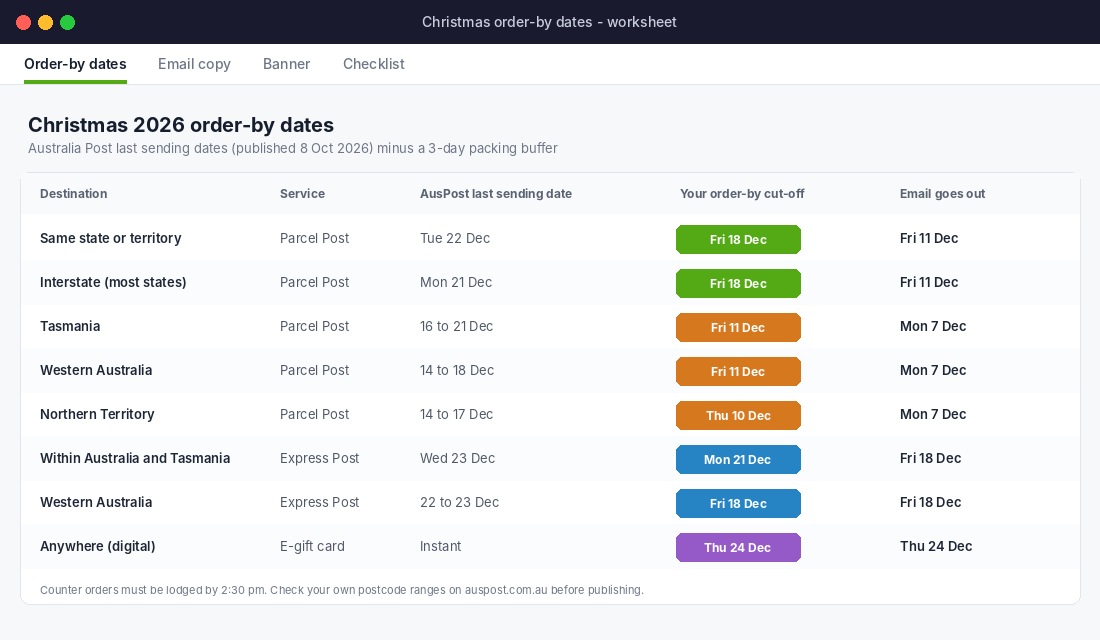
Put these dates in four places before any email goes out: your announcement bar, your cart page, your shipping policy and your email footer. Every email in this plan links back to them.
Step 2: Build the Audience So You Do Not Torch Your List
Christmas rewards frequency, but only up to the point where inboxes stop trusting you. The fix is not sending less. It is sending the heavy schedule to people who still read you and a lighter version to everyone else.
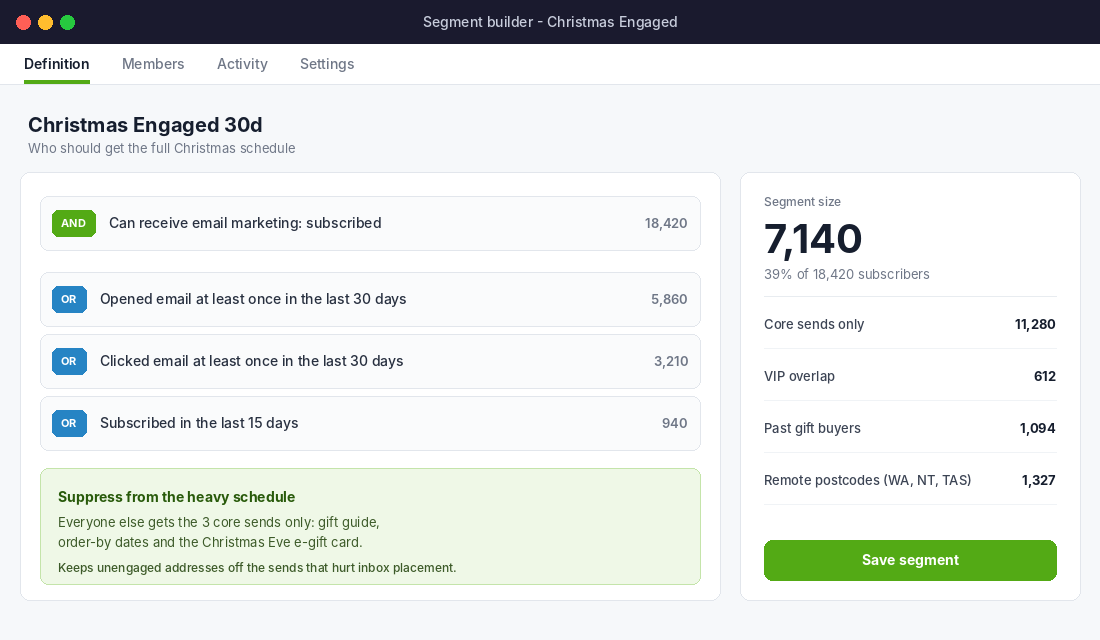
In Klaviyo, build an engaged segment following Klaviyo’s own definition. Name it ‘Christmas Engaged 30d’ and set it up like this:
- Condition 1 (AND): Can receive email marketing, because they subscribed.
- Condition 2 (OR): Opened an email at least once in the last 30 days.
- Condition 3 (OR): Clicked an email at least once in the last 30 days.
- Condition 4 (OR): Subscribed in the last 15 days, so brand-new people are not excluded for not having opened anything yet.
If you send less than weekly outside of promotions, stretch the window to 60 days. Open data is also less reliable since Apple Mail Privacy Protection started pre-loading images, so treat the click condition as the stronger signal.
Now decide who gets what:
- Engaged 30d (usually a minority of the list): all 12 sends.
- Everyone else: three core sends only: the gift guide, the order-by dates and the Christmas Eve e-gift card.
- VIPs and past gift buyers: an early access send first, and a recipient welcome after.
- Remote postcodes (WA, NT, TAS): their own deadline email a week earlier than everyone else.
If you want a proper framework for how often to send, our email frequency playbook covers the maths, and the same logic applies here: frequency follows engagement, never the calendar.
The 12 Christmas Sends, in Order
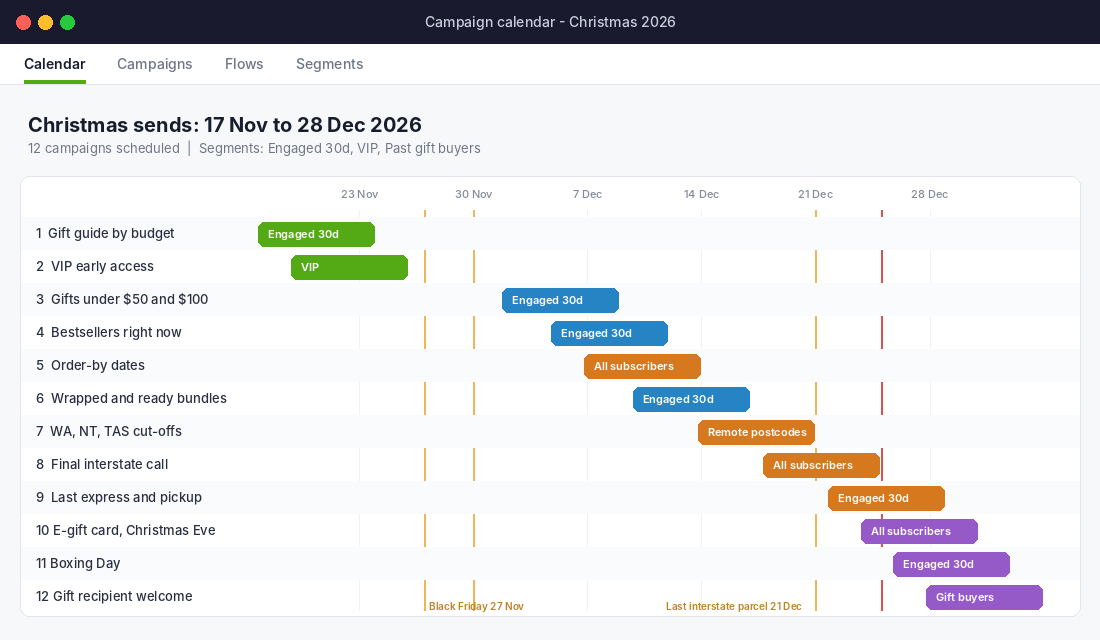
Dates below are for 2026. Christmas Day is a Friday, which pushes the last parcel dates to Monday 21 and Tuesday 22 December. If you read this in a different year, rebuild the dates from the Australia Post table in Step 1.
Send 1: The Gift Guide by Budget (Tue 17 November)
Do not send a product grid. Send a guide organised by the way people shop: by recipient (for her, for him, for the teacher, for the person who has everything) and by price (under $50, under $100, splurge). Include four to six products per section, each with a one-line reason it works as a gift.
Subject line: Christmas sorted: gifts for everyone, from $29. The price in the subject line pre-qualifies the click. Segment: Engaged 30d. If you want the on-site version of this idea, our gift guide playbook shows how to build the landing page it links to.
Send 2: VIP Early Access (Thu 19 November)
Send your best customers the Christmas range 48 hours before anyone else, with no discount. Early access is a status offer, not a price offer. It also protects your Black Friday margin, because VIPs who buy gifts now are buying at full price. Segment: top 10% by lifetime spend plus past gift buyers.
Send 3: Gifts Under $50 and $100 (Wed 2 December)
Once Cyber Monday is over, pick your top 10 products at each price point and send a pure price-point edit. This is where stockings, Secret Santa and teacher gifts get solved. Add ‘ships to arrive by 18 December’ to the preview text. Segment: Engaged 30d.
Send 4: What Everyone Else Is Buying (Sat 5 December)
Show your five bestsellers of the last 30 days with real review snippets and the number of units sold. Saturday morning works for gift browsing because people are at home, not at work. This is social proof doing the job of a discount.
Send 5: The Order-By Dates (Mon 7 December)
This is the most valuable email of the season and the one most stores skip. One clean table: destination, order-by date. Subject line: Order by 18 December and it arrives before Christmas. Segment: everyone. It repeats later, but this is the version that lands before panic starts.
Send 6: Wrapped and Ready Bundles (Thu 10 December)
Pre-built gift sets with gift wrap and a message card at checkout. The brand AWAY has run a version of this, announcing gift sets of its best sellers with complementary items and releasing a new set each day, according to GetResponse’s roundup of holiday campaigns. A bundle lifts average order value and removes the ‘what goes with it’ decision. Segment: Engaged 30d.
Send 7: WA, NT and Tasmania Deadline (Mon 14 December)
This email goes only to remote postcodes. Subject line: WA, NT and Tasmania: your Christmas order-by date is this week. Open with the date. Nothing else matters. Customers in these regions get let down by generic deadlines more than anyone and they remember brands that were precise.
Send 8: Final Interstate Call (Fri 18 December)
‘Three days left to order for Christmas delivery.’ Show your cut-off, the best last-minute sellers and a clear link to Express upgrade options. If your cut-off is Friday and Parcel Post goes to Monday 21 December, you have buffer. Tell them so. Segment: everyone.
Send 9: Last Express and Click-and-Collect (Tue 22 December)
Express Post lodgement runs to 23 December in most places. If you can pack on 22 December, you can sell on 22 December. Offer Express upgrades at checkout, click and collect if you have a physical pickup point, and a clear ‘order by 12 noon’ deadline. Segment: Engaged 30d plus anyone who viewed a product in the last 7 days.
Send 10: The Christmas Eve E-Gift Card (Thu 24 December, 8 am)
This is your safety net. The people who miss every deadline still need something to give. E-gift cards arrive in seconds. Subject line: Still need a gift? Send it in 30 seconds. Omnisend’s BFCM data showed Black Friday email orders peaking between 7 am and 12 pm, so send early morning. Segment: everyone, including the unengaged, because this is one of your three core sends.
A practical note: an e-gift card is also revenue you collect now and deliver in January. Tell recipients to use it on your Boxing Day or January sale, and you create a second wave of orders without a second advertising bill.
Send 11: Boxing Day (Sat 26 December)
Aussies shop on Boxing Day. Send one morning email with a time-limited offer or a clearance of leftover Christmas stock. Gift card redeemers are your best audience. Segment: Engaged 30d plus anyone who bought a gift card in the last 7 days. The brand Mahabis ran an ‘unboxing day’ email after Christmas encouraging recipients to treat themselves, per the same GetResponse roundup, which is the same idea with different words.
Send 12: Gift Recipient Welcome (Mon 28 December)
This one is an automated flow, not a campaign. When a gift buyer’s order includes a ‘this is a gift’ flag, ask for the recipient’s email at checkout or on the thank-you page and send them a short welcome: here is how to use it, here is how to exchange it, here is your small first-order offer. Our gift returns playbook covers the exchange policy side of this, which matters more than the offer.
Gift recipients are a new customer source that most stores never mail. If 15 percent of your December orders are gifts and you capture a third of the recipient emails, that is a list built from people who already like your product.
Real Examples: What Aussie and Global Brands Do
Who Gives A Crap launched early and made Christmas the product. The Melbourne brand released, in 2016, a limited edition ’12 Rolls of Christmas’ range, designed by twelve Australian artists, and put it on sale from 8 November. It was sold only in 48-roll packs through its own site, with half of profits going to WaterAid, as B&T reported. The lesson is not ‘make a Christmas toilet paper’. It is that a gift product with a story and an early launch date gives your emails something to talk about for six weeks.
PUMA sent a deadline email on Christmas morning. Per GetResponse, the subject line read ‘Order before 2pm EST for FREE overnight shipping.’ A US example with a US time zone, but the move is universal: on the final day, remove the delivery worry with a specific cut-off time and a specific shipping promise.
AWAY and Mahabis show the two ends of the season. AWAY used daily-release gift sets to keep December sends fresh. Mahabis wrote the post-Christmas ‘unboxing day’ email. You need both ends: an idea to start with and a reason to keep emailing after the presents are opened.
The Tool Setup: Klaviyo, Step by Step
You can run this plan in Klaviyo, Omnisend or Shopify Email. The steps below are Klaviyo because it is the platform most of the stores we coach use.
- Create the segment. Lists and Segments, Create Segment, then add the four conditions from Step 2. Name it ‘Christmas Engaged 30d’.
- Create a ‘Remote postcodes’ segment. Use the shipping postcode property: WA (6000 to 6999), NT (0800 to 0999) and Tasmania (7000 to 7999). Check these against your own customer data first.
- Build one template. Header, one hero image, one headline, one block of products, one deadline strip at the top with today’s order-by date. Clone it for each send.
- Schedule all 12 campaigns now. Draft them in November. Set them to send in the recipient’s time zone if your list spans WA. Review each one the week before.
- Turn on smart sending for the three-core-sends audience. That prevents someone getting two campaign emails inside 16 hours.
- Add a conditional deadline banner. Use dynamic content that shows the right order-by date by shipping region. If you cannot, split the audience instead.
- Set up the gift-recipient flow. Trigger on orders with a gift property, delay one day after delivery, then send the welcome.
Plan on about a day of work for the template and segments, then 20 minutes per send. A VA can handle most of this if you give them the schedule in the calendar above.
The Copy Template for Every Christmas Send
Use this skeleton for all twelve. It takes the guesswork out of writing and keeps every email answering the three Christmas questions.
- Subject line (35 to 45 characters): one concrete benefit or date. ‘Order by 18 December’ beats ‘Our Christmas sale’.
- Preview text: the delivery promise. ‘Ships to arrive before Christmas, Australia-wide.’
- Top strip: order-by date for the shopper’s region.
- Hero: one product or one gift scenario, not a collage.
- Headline: the answer to ‘what do I buy’, or ‘will it arrive’.
- Body (3 to 4 lines): who this is for, why it works, what happens if they wait.
- One button: ‘Shop gifts under $50’, not ‘Shop now’.
- Footer: returns policy, gift receipt, delivery dates, contact.
What to Track and What Good Looks Like
Do not judge Christmas emails on open rate. Apple’s privacy changes inflate it. Judge them on these:
- Revenue per recipient (RPR): track this per send, not per campaign. Compare each one with your Black Friday sends.
- Click-to-conversion rate: Omnisend’s BFCM 2024 campaign average was 8.22%. If your Christmas sends are well under half of that, the offer or the landing page is the problem.
- Unsubscribe rate per send: a spike above your normal level on any one email tells you which send to cut next year.
- Late-order cancellations and ‘where is my order’ tickets: if these rise, your deadline emails were unclear.
- Gift card redemption in January: your second December revenue wave.
After 28 December, spend an hour with the numbers and write down which three sends earned the most. Next year, you start with those and add from there. This is how a Christmas plan compounds, and it ties directly into the end-of-year review we cover in our 90-day growth sprint guide.
How the 12 Sends Work as One System
The ideas sends (1 to 4) fill the top of the funnel and give people a reason to come back. The deadline sends (5 to 9) convert them with certainty. The gift card send (10) catches everyone who missed the deadlines. The post-Christmas sends (11 and 12) start January’s revenue before January begins.
Pull one out and the rest weaken. Skip the order-by dates and your gift card send has to work twice as hard. Skip the segment and your last five sends hit unengaged inboxes, which damages the deliverability you need for January. Skip the recipient welcome and you waste your best new-customer source of the year.
That is the real difference between a store that survives Christmas and one that builds from it. If you are mapping out the whole peak season, our Black Friday Australia 2026 guide covers how this fits with the other November sends.
Your Christmas Email Checklist
- Order-by dates confirmed from the Australia Post table, with a 3-day buffer.
- Dates added to announcement bar, cart page, shipping policy and email footer.
- Christmas Engaged 30d segment built and a core-sends-only audience defined.
- Remote postcode segment (WA, NT, TAS) built and checked against real customer data.
- One master email template built and cloned for all 12 sends.
- All 12 campaigns drafted and scheduled by 8 November.
- E-gift cards live, tested and set up to deliver instantly.
- Gift recipient flow built and tested with a dummy order.
- Boxing Day offer and stock decided before 1 December.
- Tracking sheet ready: revenue per recipient, click-to-conversion, unsubscribes, support tickets.
Inside eCommerce Circle, email is one of the core pillars we work on with every member, because it is the cheapest revenue you can add before the end of the year. If you want to see exactly where your store is being capped, take the free More Orders Scorecard. It takes two minutes, costs nothing and shows you which of the 10 P’s to fix first.