The Meta ads learning phase is the period after you launch or significantly edit an ad set when Meta is still working out who to show your ads to. To exit it, an ad set needs about 50 optimisation events (usually purchases) within 7 days of its last significant edit. Most Aussie Shopify stores never get there, because they split a small budget across too many ad sets and then keep editing them.
What’s in This Article
Here is what that looks like in practice. You launch five ad sets at $30 a day each, check them on day two, pause the “losers”, swap a creative on another and bump a budget on a third. Every one of those moves can restart learning. You end up with an account that is permanently half-trained, a wall of Learning Limited labels and a CPA that swings by 40% from one day to the next.
Brands that scale on Meta do the opposite. They give fewer ad sets enough budget to buy 50 purchases a week, batch their edits, and leave the account alone while it learns. This guide shows you exactly how to work out the budget you need, restructure to hit it, and stop the habits that reset your progress.
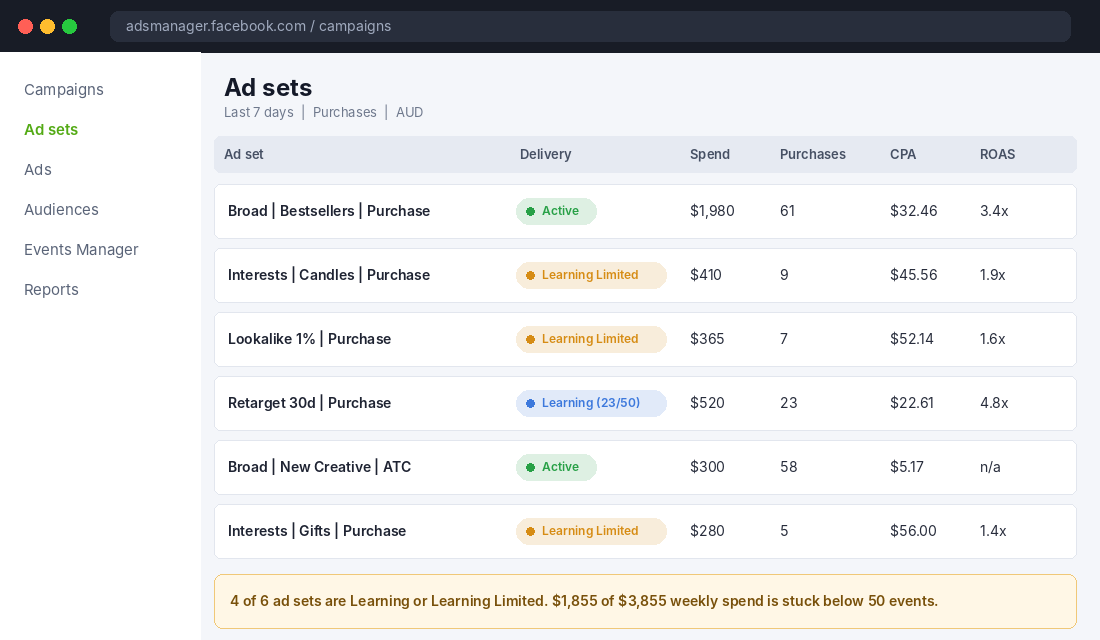
What the Meta Ads Learning Phase Actually Is
Meta describes the learning phase as the period when its delivery system “still has a lot to learn about an ad set”. It begins when you create a new ad or ad set, or make a significant edit to an existing one (Jon Loomer, quoting Meta’s documentation). During that period, Meta is testing who responds to your ad, on which placement, at what time of day.
That testing has a cost. Results are less stable and your cost per purchase is usually higher than it will be once delivery settles. Meta’s guidance, repeated across most agency write-ups, is that an ad set needs roughly 50 optimisation events in 7 days to leave learning. The count is per ad set, not per campaign.
A few things worth being clear about:
- It is not a penalty. The learning phase is just the cost of training the system. Every new ad set pays it once.
- The 50 is guidance, not a law. Meta calls it approximate and some accounts report different thresholds. Treat it as the target to plan your budget around.
- The event is whatever you optimise for. If your ad set optimises for purchases, you need around 50 purchases. If it optimises for Add to Cart, you need 50 Add to Carts.
- Learning Limited is the warning. It appears when an ad set is unlikely to reach 50 events and Meta expects unstable delivery. The ad set still runs, but you are paying for guesswork.
If you are brand new to the way Meta now picks winners, read our breakdown of how Meta’s Andromeda update changes creative and structure first. It explains why consolidated accounts are favoured now, which is the heart of this article.
Why Most Australian Shopify Stores Get Stuck in Learning Limited
In audits, we see the same four causes again and again. Fix these and most Learning Limited labels disappear on their own.
1. Too many ad sets for the budget
This is the big one. Five ad sets at 10 purchases a week each are all stuck. One ad set with 50 purchases exits cleanly. Same spend, completely different outcome. Fragmentation is the most common reason Aussie stores stay in learning, because founders copy the “one ad set per interest” structure from 2019 tutorials.
2. The target CPA is higher than the budget allows
Take your target CPA, multiply it by 50, and that is the minimum weekly budget for one ad set to exit learning. A $40 CPA means about $2,000 a week, or $286 a day. If you are spending $60 a day on that ad set, it will almost certainly sit in Learning Limited indefinitely. You can see the maths for common store types in the calculator below.
3. Optimising for a rare event
If you sell a $350 piece of furniture and get 8 purchases a week, no budget tweak will give you 50 purchase events. You need a higher-volume event with real signal, such as Initiate Checkout or Add to Cart, until your volume catches up.
4. Constant editing
Every significant edit restarts the clock. Change a targeting detail on Monday, swap a creative on Wednesday and shift the budget on Friday, and the ad set never gets seven clean days. This is not a Meta glitch. It is the account owner pressing reset.
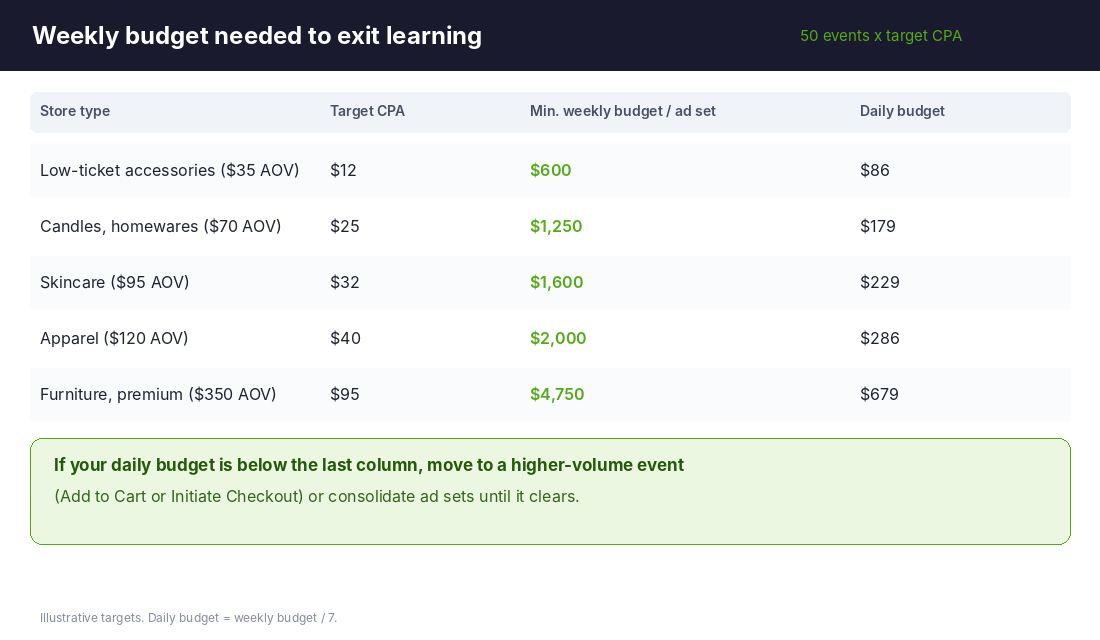
Step 1: Work Out Your Minimum Budget Per Ad Set
Before you touch the account structure, do the maths. It takes two minutes and it tells you how many ad sets you can afford.
- Find your real target CPA. Use your break-even CPA from your profit numbers, not the CPA Meta is currently reporting. If you don’t know it, our guide to how much to spend on Meta ads walks through the calculation.
- Multiply by 50. This gives you the weekly spend one ad set needs to buy 50 purchases at that CPA.
- Divide your total weekly Meta budget by that number. The answer, rounded down, is the number of ad sets you can run properly.
- Cap yourself at that number. If the answer is 2, you run 2 ad sets. Not 6.
Here is a worked example. An Australian skincare brand spends $4,500 a week on Meta with a $32 target CPA. Fifty purchases at $32 is $1,600 a week per ad set. $4,500 divided by $1,600 is 2.8, so the brand can properly fund two ad sets. If it is running seven, five of them are almost certainly Learning Limited.
The same logic explains why a small account spending $100 a day should be running one or two ad sets, not a testing matrix. Small budgets need concentration. Big budgets can afford breadth.
Step 2: Consolidate Your Structure to Pool Events
Once you know how many ad sets you can fund, collapse the rest. A simple consolidated structure for most Shopify stores looks like this:
- One prospecting campaign with broad targeting. Let creative do the targeting. This is where most of your budget goes.
- One retargeting ad set for site visitors, add-to-carts and past customers, sized to your actual audience volume.
- One small testing ad set for new creatives, kept separate so new ads don’t starve your proven winners.
This approach matches what Meta’s own Advantage+ tools do by default. They merge audiences and placements so optimisation events pool together instead of being spread thin. Jet Fuel Agency makes the same point in its 2026 guide, though it is the author’s view rather than published Meta data, so test it in your own account rather than taking it as fact.
If you want the full build, including naming conventions and how many ads per ad set, follow our Meta ads account structure guide. It pairs directly with this step.
Real-world proof that consolidation and automation pay off: Princess Polly told Mediaweek in May 2025 that Meta’s Reach Campaigns delivered 86% lower CPMs for it, alongside Advantage+ for budget, creative and placement. Salt Lab, an Australian brand, reported 300% year-on-year growth and doubled the size of its business using a mix of manual brand campaigns and Advantage+, and expanded into the US through Advantage+. Both are the brands’ own reports, so treat the numbers as indicative, but the pattern is clear. The brands winning on Meta are feeding the machine volume and signal, not slicing audiences into tiny pieces.
Step 3: Stop Resetting Learning With Edits You Don’t Need
Meta does not publish a neat “safe edits” list, so the practical approach is to sort edits into three buckets. The map below is the version we use with coaching members.
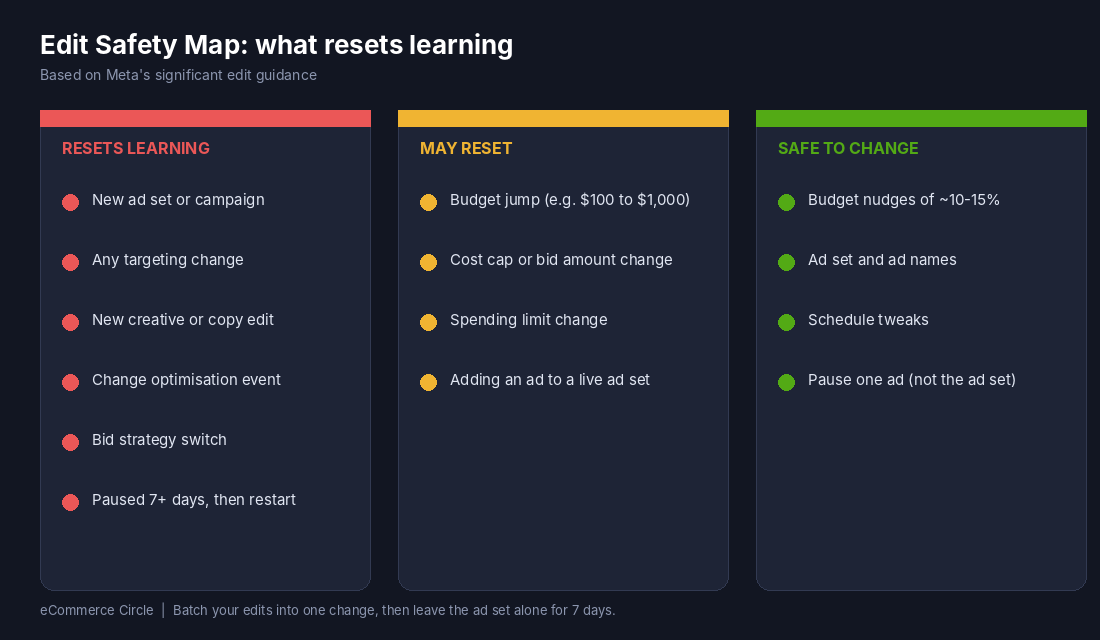
Edits that restart learning
- Creating a new ad set or campaign
- Any targeting change, even small age, location or exclusion tweaks
- Changing a creative or editing ad copy (even fixing a typo)
- Changing the optimisation event
- Switching to cost cap, bid cap or a different bid strategy
- Restarting an ad set that has been paused for 7 days or more
Edits that may restart learning
Budget changes are the grey area. Meta’s own example, as quoted by Jon Loomer, is that moving a budget from $100 to $101 is unlikely to trigger learning, while moving it from $100 to $1,000 might. Meta gives no exact threshold. Many agencies work to about 20%, though that figure comes from agency analysis, not from Meta.
Our rule: keep budget increases to 10 to 15% and no more than once every two to three days. It is slower than a one-hit doubling, but you avoid resetting the ad set and the slow scale usually beats the aggressive scale on CPA.
Edits that are generally safe
Renaming ad sets and ads, adjusting schedules and small budget nudges are generally low risk. Behaviour varies by account, so if an ad set is close to exiting learning, don’t touch it at all.
The discipline that matters most is batching. If you have three changes to make, make them together, once, and then leave the ad set alone for seven days. One reset is cheaper than three.
Step 4: Fix Your Signal So Meta Can Count the Events
Meta can only optimise on events it can see. If your tracking drops 20 to 30% of purchases, your ad set may genuinely have 50 purchases and still show 35 in the platform. That is how stores end up stuck in learning with a healthy business behind it.
Do this once, properly:
- Check the Meta channel in Shopify. In your Shopify admin go to Sales channels, then Facebook & Instagram, then Settings, and make sure data sharing is set to Maximum.
- Confirm Conversions API is active. In Meta Events Manager, open your dataset and check that Purchase events show “Browser and Server” as the connection method.
- Check the event match quality score. Aim for 6.0 or higher on Purchase. Low scores mean Meta can’t match enough purchases to people.
- Compare to Shopify. Over a seven day window, Meta purchases should be within roughly 10 to 20% of Shopify orders attributed to Meta. If they are far below that, fix tracking before touching structure.
If your numbers are wildly off, run through our Meta ads not converting checklist as well. It covers the tracking and landing page problems that make an account look like it is failing when it is just under-counted.
Tool to use: Meta Events Manager (free). Setup takes about 15 minutes. Open business.facebook.com/events_manager, pick your Shopify dataset, click Overview, and look at the Purchase event. Check the connection method, the event match quality and the “Last received” timestamp. Write down your numbers now so you can compare after any changes.
Step 5: Use a Higher-Funnel Event When Purchase Volume Is Too Low
If you cannot afford 50 purchases a week in a single ad set, you have two choices. Spend more, or move up the funnel.
Optimising for Add to Cart or Initiate Checkout gives Meta many more events to learn from. The trade-off is quality: Meta will find people who add to cart, not necessarily people who buy. It works well when your add-to-cart to purchase rate is steady and your product is a considered buy, because the extra volume gives the algorithm something to work with.
A simple rule of thumb:
- Under 20 purchases a week per ad set: optimise for Initiate Checkout or Add to Cart.
- 20 to 50 purchases a week: consolidate first. Try to get to 50 purchases before switching events.
- Over 50 purchases a week: optimise for purchase and keep the structure stable.
Check results by cost per purchase in Shopify and Meta, not by cost per Add to Cart. A higher-funnel event only works if it still brings in buyers. If purchase CPA gets worse after two weeks, switch back.
An Australian example worth knowing: Aussie Candle Supplies, a candle-making supplies store, reported 1,530 purchases in a month at a $2.87 cost per result through its agency’s full-funnel Meta setup, with catalogue ads in retargeting driving the largest share of purchases. Those figures are agency-reported and the cost per result there reflects the account’s own setup, so don’t treat $2.87 as a benchmark for your store. The useful lesson is the structure: separate prospecting and retargeting with plenty of event volume in each.
Step 6: Plan Around the November CPM Spike
Learning costs more in expensive months. Superads, using a dataset covering more than $3 billion of Facebook ad spend, puts the average Australian CPM at about $14.38 over its 2026 reporting window, with November 2025 peaking at $21.73 and May 2026 dipping to $9.63. Their page notes the date range is stated inconsistently, so treat the figures as indicative.
The takeaway for Black Friday is simple. A new ad set launched in the last week of November pays learning-phase prices on top of peak CPMs. Launch and warm up your main campaigns in October or early November, let them exit learning, and then scale with small budget steps. We cover the budget and timing side in detail in our Meta ads Black Friday plan.
Black Friday 2026 is on 27 November, which gives you roughly five weeks from today. That is enough time to run one clean learning cycle if you start this week.
The Learning Phase Recovery Checklist (Copy This)
Use this checklist for every ad set that shows Learning Limited. Work through it in order.
- Check the numbers. Weekly purchases, spend and CPA for the ad set over the last 7 days.
- Calculate the gap. Target CPA x 50 = required weekly budget. How far off are you?
- Merge before you spend more. If two ad sets target similar audiences, combine them into one.
- Raise the budget in steps of 10 to 15% every two to three days until you hit the required weekly figure, or merge instead.
- Check tracking. Maximum data sharing in Shopify, Conversions API active, event match quality 6.0 or higher.
- Consider a higher-funnel event if purchases are under 20 a week and you cannot lift the budget.
- Batch your edits into a single change, then leave the ad set alone for 7 days.
- Review on day 8, not day 2. Judge on cost per purchase and blended ROAS in Shopify, not on the delivery label.
One caution: Learning Limited is a warning, not a verdict. If an ad set is Learning Limited but profitable, it is fine to leave it. Don’t blow up a structure that works just to clear a label.
The Compound Effect: Why This Makes Everything Else Easier
Each of these steps feeds the next. Correct budgets mean fewer ad sets. Fewer ad sets mean pooled events. Pooled events mean faster exits from learning. Fewer edits mean the algorithm gets stable data to optimise on. Clean tracking means Meta sees the purchases that really happened.
The result is an account where results become predictable. That is what lets you scale with confidence, because you can add 15% budget and see the CPA hold, rather than watching it swing and wondering whether it is the ads, the audience or the algorithm. It also makes creative testing meaningful, because a test run in a stable account actually tells you something. For the creative side, see our Meta ads ROAS benchmarks so you know what “good” looks like for your category.
Most stores trying to fix Meta performance change their creative, then their audiences, then their offer. Almost none check whether the ad set ever got a fair chance to learn. Do this first.
Your Next Step
Open Ads Manager today, filter to the last 7 days and count how many ad sets have fewer than 50 purchases. If it is more than half, you have a structure problem, not a creative problem. Use the calculator, merge the ad sets, batch your edits and give the account two clean weeks.
Inside eCommerce Circle, Meta ads structure is one of the core Promotion pillars we work on with every member. If you want to see exactly where your store is being capped, take the free More Orders Scorecard. It takes two minutes and shows you which of the 10 P’s to fix first.