Most Shopify stores need five to seven AI tools, not fifteen, and the ones worth paying for are the ones that take a repeat job off your plate every week. The rest are subscriptions that sound clever in a demo and sit unused by February. This guide covers 15 tools that earn their keep, what each costs, who should skip it, and how to audit your stack so you stop paying for the ones that do not.
What’s in This Article
Here is the pattern we see inside coaching. A founder signs up for a writing app, a chatbot, an ad generator and an analytics assistant in the same month. Nobody owns any of them, nobody measures any of them, and the card keeps getting charged. The brands getting real value do the opposite. They pick one job, hand it to one tool, and track one number.
Adoption is already the norm, so this is no longer a question of whether to use AI. Salesforce’s State of Commerce report, run with the Australian Retailers Association, found 80% of Australian ecommerce organisations already use AI: 33% have fully implemented it and 47% are experimenting. A 2025 Shopify survey of 500 merchants found 75% use AI tools and 55% say it saves them time on repetitive tasks. The edge is not in having AI. It is in choosing the right jobs for it.
One note on prices before we start. Most of these tools bill in US dollars, so your real cost is the US price, the exchange rate and GST where it applies. Prices below were checked in October 2026 from vendor and third-party pages. Confirm at checkout before you commit.
The 15 tools at a glance
Use this as a map. Each one is covered in the section for its job further down.
| Tool | Job | Cost (checked Oct 2026) | Best for |
|---|---|---|---|
| Shopify Sidekick | Admin questions, drafts, theme tweaks | Included in Shopify plans | Every store |
| Shopify Flow | Automations drafted from a prompt | Included on Basic and above | Stores with repeat admin tasks |
| Shopify Magic | Product copy and image edits inside admin | Included | Stores with large catalogues |
| Klaviyo AI | Segments, flows, subject lines, send times | Built into Klaviyo plans | Stores with 1,000+ subscribers |
| Gorgias AI Agent | Answers support tickets | About US$0.85 to US$1.00 per automated interaction, plus plan | Stores with 300+ tickets a month |
| Shopify Inbox | Live chat with suggested replies | Free | Small stores |
| ChatGPT | Research, drafting, analysis | About US$20 a month for Plus before GST | Founders and marketers |
| Photoroom | Clean product images in bulk | Pro US$7.99, Max US$26.99 a month | Stores with weak photography |
| Canva | Ad and social design with built-in AI tools | Free plan available | Social and email creative |
| Runway | Short product video from images or prompts | Free plan available | Brands testing video ads |
| Surfer | On-page SEO briefs and scoring | Paid tiers | Stores with a blog |
| Triple Whale | Blended analytics and attribution | Free tier, paid tiers priced by vendor | Stores spending on ads |
| Microsoft Clarity | Session replays and heatmaps with AI summaries | Free | Every store |
| Prisync | Competitor price tracking | Paid, dynamic pricing is an add-on | Stores in price-led categories |
| Shopify Search & Discovery | Synonyms, boosts and related products | Free | Stores with 100+ products |
Before you buy anything: the three-question test
Run every tool through these three questions. If the answer to any one is “I am not sure”, do not buy yet.
- What is the job? Write it as a verb and an object. “Answer order-status tickets.” “Clean up supplier photos.” “Segment buyers by repeat likelihood.” “Help me write better” is not a job.
- What number moves? Pick one metric before you start: hours saved a week, tickets resolved without a human, revenue per email send, listing score. No metric means no way to cut it later.
- Who owns it? One named person checks the output weekly. Tools without an owner drift into low-quality output within a month, and nobody notices until a customer does.
That is the whole filter. It sounds basic, and it cuts most stacks by a third. Keep it in mind as you read the tool sections, because every recommendation below comes with its job and its metric.
Admin and operations: where AI pays back fastest
Start here. These tools are cheap or free, they sit inside Shopify, and the jobs are boring enough that mistakes are easy to spot.
1. Shopify Sidekick
Sidekick is the assistant built into your Shopify admin. It answers questions about your store data, drafts product descriptions, emails and blog outlines, and makes theme tweaks. A third-party guide published in April 2026 notes that what it can do expands with your plan, so check your own admin rather than assuming. Use it for the small jobs that eat a Tuesday: “show me orders with a discount code over 30% last week”, or “list products with no description”.
2. Shopify Flow, drafted by Sidekick
This is the single most useful combination for a small team. Shopify announced in December 2025 that Sidekick can create Flow workflows: you open Flow, click the Sidekick icon, describe the automation, and it builds the trigger, conditions and actions for you to test and turn on. Shopify says it works best for tagging customers and orders, email and Slack notifications, inventory alerts and scheduled automations. It is desktop only, needs manual activation, and is available on Basic and above.
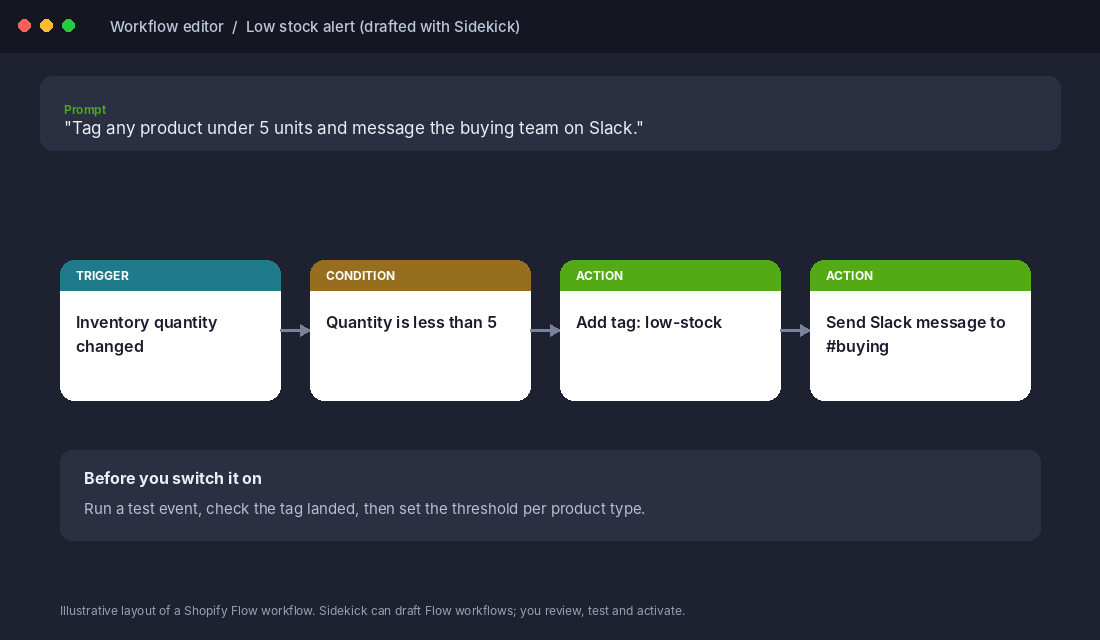
Setup in 10 minutes:
- Install Shopify Flow from the Shopify App Store if it is not already in your admin, then open it.
- Click the Sidekick icon and type one automation in plain English, for example: “Tag any product under 5 units as low-stock and message the buying team on Slack.”
- Review the trigger, condition and actions Sidekick builds. Change the threshold so it suits the product. Fast sellers need a higher number than slow ones.
- Run a test, confirm the tag lands and the Slack message arrives, then turn it on.
- Add a calendar reminder for four weeks out to check it is still firing and that nobody has muted the channel.
Workflows that need advanced Liquid or custom code may need manual edits, so start with the simple ones. Tagging VIP customers, flagging high-risk orders for review and low-stock alerts are the usual first three.
3. Shopify Magic
Magic is the AI writing and image editing inside the admin. It is handy for first-draft product copy across a big catalogue, but it has real limits. We covered where it works and where it fails in Shopify Magic: what the AI tools do and where they fail. The short version: use it for volume, then edit by hand for the products that earn most of your revenue.
Email and retention: let AI do the segmenting, not the thinking
4. Klaviyo AI
If you already pay for Klaviyo, you already own most of this. Its AI covers subject line and body drafts with built-in A/B testing, flows built from a plain-English description, audience segments from a one-sentence description, send time per subscriber, and predictions for each customer’s next order date, lifetime value and churn risk. It also has review sentiment analysis and a customer service agent that is priced separately. Klaviyo does not sell AI as a single add-on, and the free plan includes a small monthly allowance for its writing tool.
The mistake to avoid is asking it to write your entire flow. Let it build the segment (“customers who bought twice in 90 days and have not opened in 60”) and draft subject line options, then write the body copy yourself in your brand voice. Our guide to the nine Klaviyo flows every store needs shows which flows to build first.
Metric to track: revenue per recipient on AI-assisted sends versus your last three manual ones. If it is not higher after six sends, stop using it for that flow.
Customer support: the biggest hours-saved win
Support is where AI saves the most time because so many tickets are the same five questions. Where is my order. Can I change my address. What is your returns policy. A PissedConsumer 2025 survey of more than 40,000 consumers found 58% of online shoppers never get a response when they contact customer service. Fast answers are an edge, not a nicety.
5. Gorgias AI Agent
Gorgias charges for its AI Agent per automated interaction. A third-party breakdown updated in October 2026 lists plans from US$10 a month for 50 tickets up to US$750 a month for 5,000, with AI interactions from about US$1.00 on Starter down to US$0.85 on Advanced. Those are annualised US prices, and pay-monthly runs higher.
Two brands show what is realistic, and both figures are company-reported:
- Boody, the Australian bamboo apparel brand, reports its AI Agent automated 26% of all customer conversations, mainly repetitive post-purchase tickets. Sales generated through support rose 10%, and first response was 99.88% faster than human agents.
- Nude Project, a streetwear brand, reports 39% automation, a 32-second first response time and a 60% reduction in labour cost. Before the switch, its five-person CX team had an average daily backlog of 2,000 unanswered tickets.
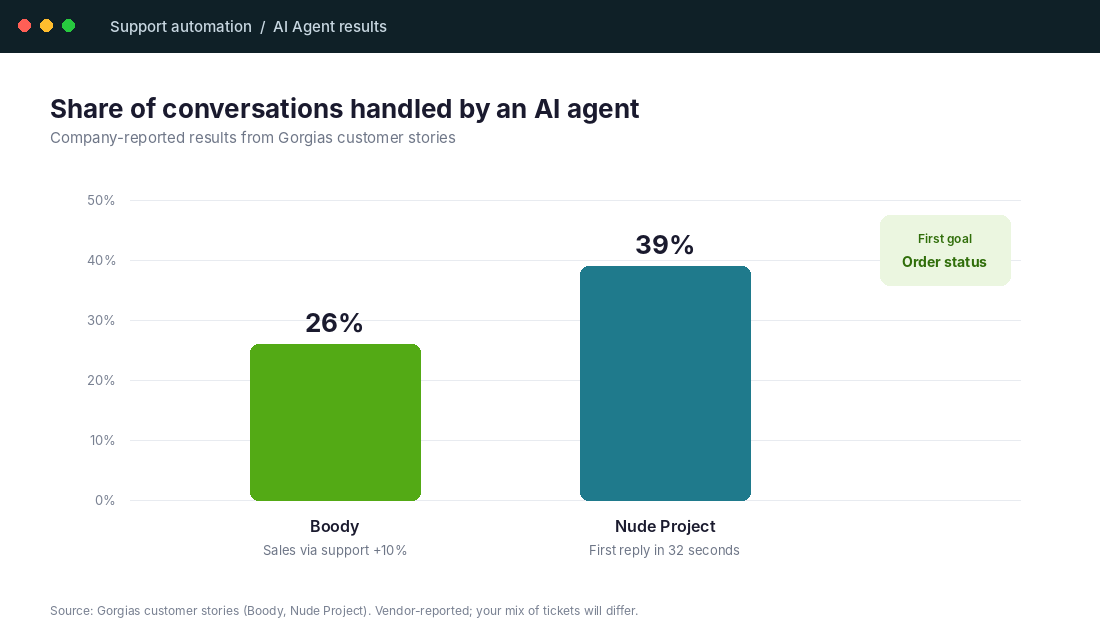
Notice what both are automating: repetitive questions, not complaints. Start with order status and shipping times, because the AI can pull the answer straight from your store data. Keep returns disputes, damaged goods and angry customers with a human.
Skip it if you get fewer than about 100 tickets a month. At that volume a saved reply library and a Shopify Magic draft will do the job for a fraction of the price.
6. Shopify Inbox
Inbox is Shopify’s free chat app, with AI-suggested replies and automated order-status updates, and Shopify says 70% of conversations are with shoppers actively making a purchase decision (its own figure, no separate study cited). For a store with a one-person support team, it is the right first step before you pay for a helpdesk.
Content and images: speed up the first draft, never the final one
7. ChatGPT
ChatGPT earns its US$20 a month when you give it specific jobs: summarising 200 reviews into themes, rewriting a supplier description in your voice, drafting FAQ answers, or checking a landing page for objections. We listed twelve jobs worth handing over in ChatGPT for ecommerce, and prompts that work for product pages in AI product descriptions for Shopify.
It also matters as a sales channel. In Omnisend’s July 2025 survey of 1,027 Australian consumers, 55% used AI assistants such as ChatGPT for shopping tasks, 40% preferred ChatGPT to a traditional search engine, and 84% still had concerns about AI in ecommerce. Shoppers are using it to find you, so how your products get listed in ChatGPT Shopping is worth an hour of your time.
8. Photoroom
Poor product images cost sales, and supplier photos are rarely good. Photoroom removes backgrounds and builds clean, consistent images in bulk. A review published in June 2026 and updated in July lists a free plan limited to 250 watermarked exports with no commercial use, Pro at US$7.99 a month with batch mode, and Max at US$26.99 with direct Shopify publishing. It has a native Shopify app that pulls your catalogue and shows a listing score per product.
Setup: install the Photoroom app from the Shopify App Store, sort the catalogue by listing score, fix your top 20 sellers first, and compare conversion on those pages 30 days before and after. Be honest about the limit: AI cleanup improves bad supplier photos, it does not replace real lifestyle shots of your product being used.
9. Canva
Canva has AI design and image tools built in, and for most small teams it covers email headers, social posts and ad variants. The real saving is resizing one concept into six formats. For a full workflow, see AI ad creative for Shopify: tools, workflow and limits.
10. Runway
Runway generates and edits short video from images or text prompts, and has a free plan. Use it to test video ad concepts cheaply before paying a creator. If a 6-second AI clip cannot beat your static image in a small test, a bigger production will not rescue the idea.
11. Surfer
Surfer scores and briefs on-page SEO from your target keywords. It is only worth paying for if you publish a blog or collection page content every month. If you publish twice a year, skip it and use a free keyword checker.
Analytics and CRO: ask better questions of the data you already have
12. Triple Whale
Triple Whale gives you blended analytics and attribution across ads, email and your store. It has a documented free tier with first and last-click attribution, a blended view and up to 10 users, with multi-touch attribution and more on paid tiers. Its AI assistant is built to surface insights faster, but paid pricing was not publicly quoted in the sources we could verify, so get a current quote from the vendor. It makes sense once you spend meaningfully on ads. Before then, a clean GA4 setup is enough.
13. Microsoft Clarity
Clarity is free, and it is the first CRO tool we would install on any store. It records sessions and builds heatmaps, with AI summaries of what visitors did. Step-by-step setup is in Microsoft Clarity for Shopify. Watch ten mobile sessions on your best-selling product page this week. You will find a problem you did not know about.
14. Prisync
Prisync tracks competitor prices and offers a dynamic pricing engine as an add-on. It earns its place in price-led categories like electronics, supplements and baby gear, where a competitor undercutting you by 5% moves sales. For a brand with a strong identity and its own product, matching competitor prices is usually the wrong move.
15. Shopify Search & Discovery
This free Shopify app lets you set search synonyms, boost products, customise filters and show related products. It is the dull fix that matters. Check your top search terms with zero results and add synonyms for them. “Hoodie” and “jumper” are the same product to an Australian shopper, and your search should know that.
What to skip
- Second writing apps. If you pay for ChatGPT and have Sidekick, a third description generator adds nothing.
- AI chatbots on stores with tiny ticket volume. Start with saved replies and Inbox.
- Full “AI store builders” and one-click product pages. They create generic pages that look like every other store, which is the opposite of what your brand needs.
- Anything with no owner and no metric. This is the rule that matters most.
McKinsey’s State of AI in 2025 found only 29% of companies under US$100 million in revenue had scaled AI, against nearly half of those over US$5 billion. Small brands do not lose because they lack tools. They lose because they spread thin across too many of them.
The compound effect: how the stack works as a system
Look at what the right five tools do together. Sidekick and Flow remove the admin. Klaviyo AI sends the right message to the right segment. An AI support agent answers the order-status questions. Photoroom lifts the pages those emails land on. Clarity shows you where visitors still get stuck. Each saves a few hours or a few percent, and together they free a founder to work on offers, suppliers and growth instead of tagging orders.
That is why we treat this as a Practice job in the 10 P’s, not a Platform one. The tools are the easy part. The weekly habit of auditing them is the work.
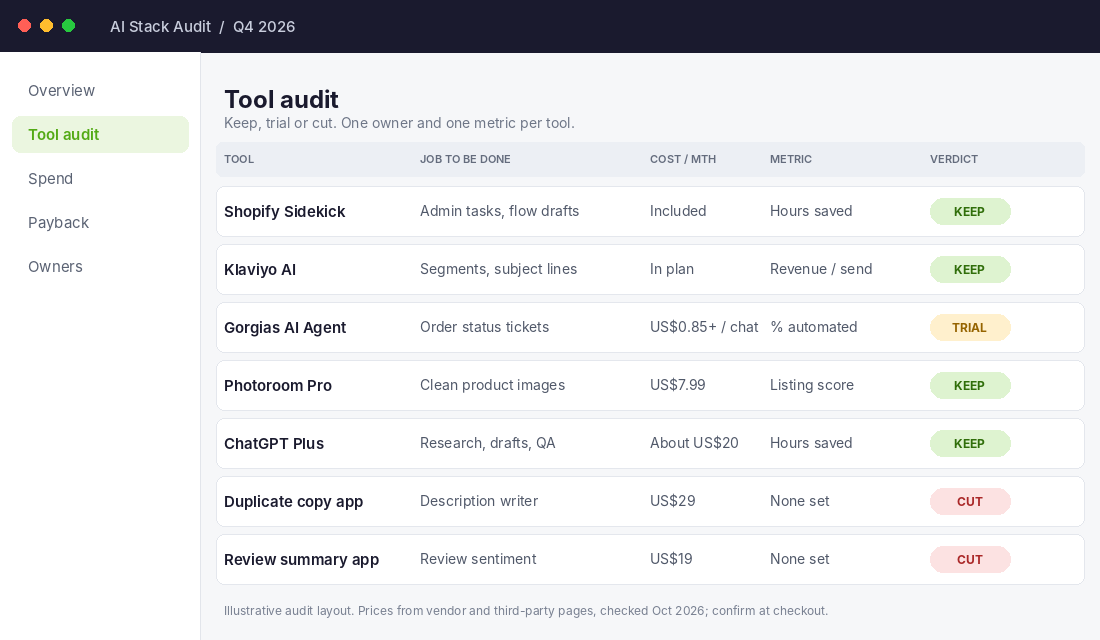
Template: your AI stack audit
Copy this into a spreadsheet. Fill it in once a quarter.
| Column | What to write |
|---|---|
| Tool | Name and plan |
| Job | Verb plus object, for example “answer order-status tickets” |
| Monthly cost | AUD, including GST and exchange rate |
| Owner | One named person |
| Metric | The single number it should move |
| Baseline | The number before the tool |
| Result at 30 and 90 days | The number after |
| Verdict | Keep, trial for another 30 days, or cut |
Be strict. If a tool has no baseline you cannot prove it works, and a tool you cannot prove works is a cost.
Your 30-day rollout
- Week 1: Install Clarity. Ask Sidekick to draft one Flow workflow (low stock alerts) and test it. Cancel any AI subscription you have not opened in 30 days.
- Week 2: Set up Klaviyo AI segments for repeat buyers and lapsed customers. Test AI subject lines on your next three campaigns. Check results against your baseline.
- Week 3: Pull your last 100 support tickets and tag them by type. If order-status questions are over 25%, trial an AI agent on those only. If not, set up Inbox and saved replies.
- Week 4: Run Photoroom on your top 20 products and set up search synonyms. Fill in the audit template and decide keep, trial or cut for every tool.
FAQ
What are the best AI tools for ecommerce?
For most Shopify stores, start with Sidekick and Flow, Klaviyo AI, an AI support option sized to your ticket volume, Photoroom for images, and Clarity for conversion. Add analytics and pricing tools once ad spend or competition justifies them.
Are AI tools worth it for a small store?
Yes, if each one has a job, a metric and an owner. The free and low-cost ones inside Shopify and Clarity are low risk. Paid agents and analytics suites need volume to pay back.
Will AI replace my customer service team?
Not for the difficult tickets. The brands above automate between a quarter and two fifths of conversations, mostly repeat questions, and keep humans for everything else.
Inside eCommerce Circle, building a lean, measured tool stack is one of the core habits we work on with every member. If you want to see exactly where your store is being capped, take the free More Orders Scorecard. It takes two minutes and shows you which of the 10 P’s to fix first.
Sources: Salesforce State of Commerce with the Australian Retailers Association; Shopify 2025 merchant survey (500 merchants); Omnisend and Cint Australian consumer survey, July 2025; McKinsey State of AI 2025; Gorgias customer stories (Boody, Nude Project); Shopify changelog, 11 December 2025; third-party pricing reviews for Gorgias, Photoroom and Klaviyo, checked October 2026.