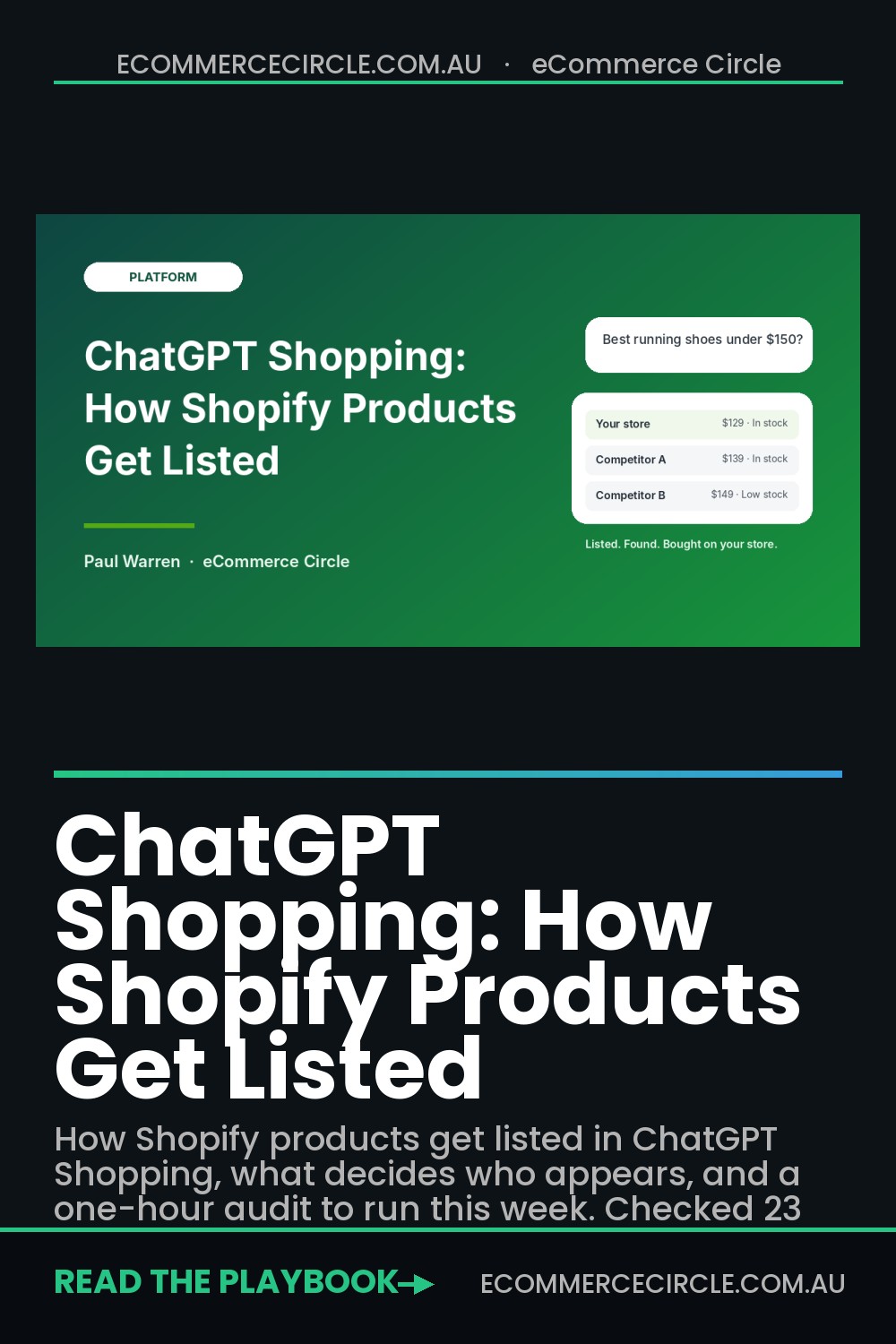
Your Shopify products are probably already inside ChatGPT, and you may not have done a thing to put them there. Whether they show up when a shopper asks “best running shoes under $150” is a separate question, and it comes down to data you control.
What’s in This Article
Most store owners ask the wrong thing here. They ask how to get Instant Checkout switched on. That feature is not where the opportunity sits any more. ChatGPT Shopping now works as a discovery channel: shoppers research and compare inside the chat, then buy on your store. If your product data is thin, your crawler access is broken or your prices look out of line, you lose the listing before the shopper ever reaches your checkout.
This guide covers what ChatGPT Shopping is today, how a Shopify product gets listed, what decides who appears, and a one-hour audit you can run this week. We checked the sources below on 23 October 2026, and we flag the one thing nobody has published clearly: Australian availability.
What ChatGPT Shopping Is Right Now (and What Changed)
ChatGPT Shopping launched in April 2025 as product results inside ChatGPT search. OpenAI added Instant Checkout and the Agentic Commerce Protocol in September 2025, then launched Shopping Research in November 2025. In March 2026 OpenAI scaled Instant Checkout back and said it was prioritising search and product discovery, with checkout moving to apps (Modern Retail, March 2026).
Here is what that means for you in plain terms:
- Discovery happens in ChatGPT. Shoppers ask a question, ChatGPT shows a product carousel and Shopping Research builds side-by-side buying guides.
- Purchase happens on your store. Shopify says buyers finish checkout on your online store, in ChatGPT’s in-app browser on mobile or a new tab on desktop. Orders land in your Shopify admin like any other channel.
- Results are not ads. OpenAI states that product results “are selected independently by ChatGPT and are not ads.” You cannot buy your way in through the organic carousel.
- You keep the customer. Because checkout runs on your store, you keep the email address, the data and the post-purchase relationship.
That last point matters more than it sounds. A marketplace owns the customer. A discovery channel that hands you the buyer is closer to Google Shopping than to Amazon. It deserves a place in your wider ChatGPT for ecommerce plan, but it does not need a rebuild of your store.
Why It Is Worth Your Time: The Numbers
AI referral traffic is still small for most stores. It is also growing fast and it buys. Here is what the published data says:
- 42% better conversion. Adobe’s March 2026 data showed AI referral traffic converting 42% better than non-AI traffic across 130-plus top North American retailers, up from 38% worse in March 2025 (reported by Digital Applied). Treat it as directional, because Adobe’s methodology is not public.
- Rapid growth. Adobe recorded AI referrals to US retail sites up 693% year on year across the 2025 holiday season, and up 393% in Q1 2026 (eLogic’s roundup of Adobe data).
- 900 million weekly users. OpenAI reported ChatGPT passing 900 million weekly active users in February 2026, double the year before. About 2% of queries involve shopping, according to an OpenAI economic research paper cited in the same roundup.
- Australians are already doing it. A Retail Safari and Swinburne CXI survey of 500 Australians (30 July to 3 August 2026) found 33% of Christmas gift shoppers plan to use AI tools, up from 16% in 2025. Among those, 82% plan to use ChatGPT (Retail Safari).
- Research is not checkout. A Manhattan Associates survey of 500 Australian consumers found 83% have used an AI assistant for shopping research, yet 84% would still visit a retailer’s website before buying even if AI answered every question (eCommerceNews Australia, 26 August 2026).
Read that last stat twice. Australian shoppers use AI to shortlist, then they go to your website to decide. Your site still closes the sale. AI only decides whether you make the shortlist.
One more Australian number for BFCM planning: Shopify’s 2026 Holiday Retail Report, covered by CFOtech Australia on 7 October 2026, found 62% of shoppers expect to use AI for at least one holiday shopping task and 15% discovered a brand through AI that they had not heard of before. For a smaller Aussie brand, that last figure is the prize.
How a Shopify Product Gets Listed in ChatGPT
There are three routes into ChatGPT Shopping. Shopify stores only need to think about the first.
Route 1: Shopify Catalog (the default for you)
OpenAI’s help centre says Shopify merchants’ “product data is already integrated into ChatGPT through Shopify Catalog” and that no additional work is required from individual merchants. Shopify calls the wider feature Agentic Storefronts. It is active by default for eligible stores, and Shopify does not publish a definition of eligible on the pages we checked.
Catalog syndicates your title, description, options, images, price and availability. Prices and inventory come straight from your Shopify product database, so there is no feed to maintain.
Route 2: A direct product feed
Non-Shopify merchants can apply for direct feed access at chatgpt.com/merchants. OpenAI currently opens this to approved partners. If you run Shopify, skip it unless you are running a custom headless build.
Route 3: Organic crawling
ChatGPT also reads the open web through a crawler called OAI-SearchBot. If it cannot reach your product pages, you are missing a second route to being recommended. This is the one that trips up stores with aggressive firewall settings.
Is this live for Australian stores? We could not find a published country list. Neither Shopify’s Agentic Storefronts page nor OpenAI’s shopping help page lists supported countries, and OpenAI says only that shopping is “available in ChatGPT on mobile and web.” The one thing we can confirm is that Instant Checkout was limited to the United States (and Etsy sellers), and that feature has been scaled back anyway. So do not take our word for it or anyone else’s. Open your own admin and check, as in the next section. Date checked: 23 October 2026.
Step 1: Check Your Agentic Admin in 10 Minutes
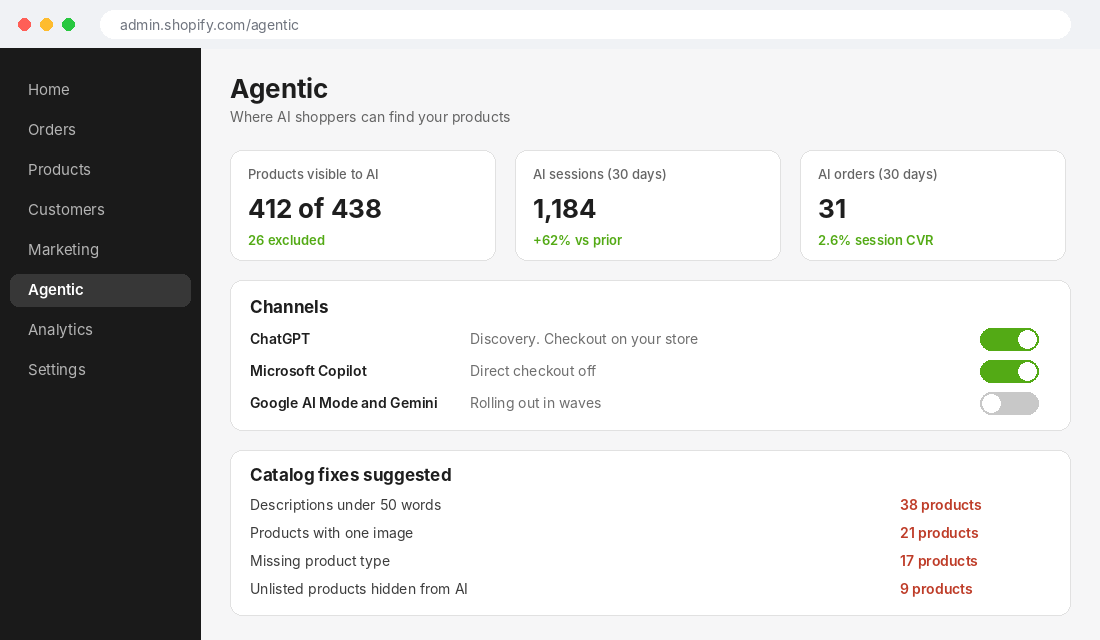
Reports from May 2026 say Shopify gave Agentic Storefronts its own admin page. Here is how to check where you stand:
- Open the Agentic page in your Shopify admin. Go to admin.shopify.com/agentic, or look under Sales channels, then Agentic. If it does not exist for your store, you are not yet in the rollout. Note the date and check again in two weeks.
- Check the Channels panel. You should see ChatGPT listed. For ChatGPT, buyers check out on your store. For Copilot, Google AI Mode and Gemini, and Meta, Shopify says buyers can use direct checkout without leaving the AI channel, but only if you have activated direct checkout.
- Check the Products panel. It shows which products AI channels can currently show and which are excluded. Unlisted products and products that exist only in a B2B catalog are excluded automatically.
- Read the Performance panel. It shows the queries you appear for in AI chats and suggestions for improving product data. Screenshot it as your baseline.
- Confirm attribution. Orders from AI channels appear in your admin with channel or referrer attribution. Make a note of the first one you see.
Setup tip: if you were not expecting this, check you have accepted the Shopify Agentic Storefronts Supplemental Terms of Service. Shopify lists it as a requirement for taking part.
Step 2: Fix the Product Data ChatGPT Actually Reads
OpenAI says a product appears in the carousel “when ChatGPT perceives it to be relevant to your intent.” Relevance is built from your product data. That makes this the highest-return hour you will spend.
Work through your top 20 products by revenue first, then the rest. Shopify’s Catalog uses these fields to understand what you sell:
| Field | What good looks like | Common Aussie mistake |
|---|---|---|
| Title | Brand, product type and key attribute in plain words. Under 70 characters. | Keyword-stuffed titles or internal SKU codes |
| Description | Specs, materials, fit, use cases and who it is for. Aim for 80 to 150 words of factual copy. | Two lines of brand story and no specs |
| Options | Size, colour and material filled in on every variant | Variants named “Option 1” or “Default” |
| Images | Four or more clear images including scale and in-use shots | One white-background shot |
| Product type and tags | Consistent naming used across the catalogue | Different spellings of the same category |
| Price and stock | Accurate, in AUD, synced automatically | Compare-at prices that never change |
If your specs sit in custom fields rather than the description, use Catalog Mapping in the Agentic admin to connect metafields and metaobjects to standard Catalog attributes. We cover the data layer in our guide to Shopify metafields.
Write descriptions that answer buying questions
ChatGPT matches products to questions, so write descriptions that answer the questions shoppers ask. A Shopping Research query is usually a constraint stack: “waterproof jacket, under $200, for Melbourne winters, packable.” Product pages that state those attributes in plain words get matched. Pages that rely on vibe copy do not.
For each hero product, list the five questions customers ask most, using your support inbox and reviews. Then make sure the description answers every one in a sentence. That is also how you win in Google’s AI Overviews, which is why this work stacks with our AI search visibility guide.
Also add Product schema if your theme does not output it fully. Our structured data guide shows the seven fixes that matter.
Step 3: Let the Crawlers In (The Check Most Stores Fail)
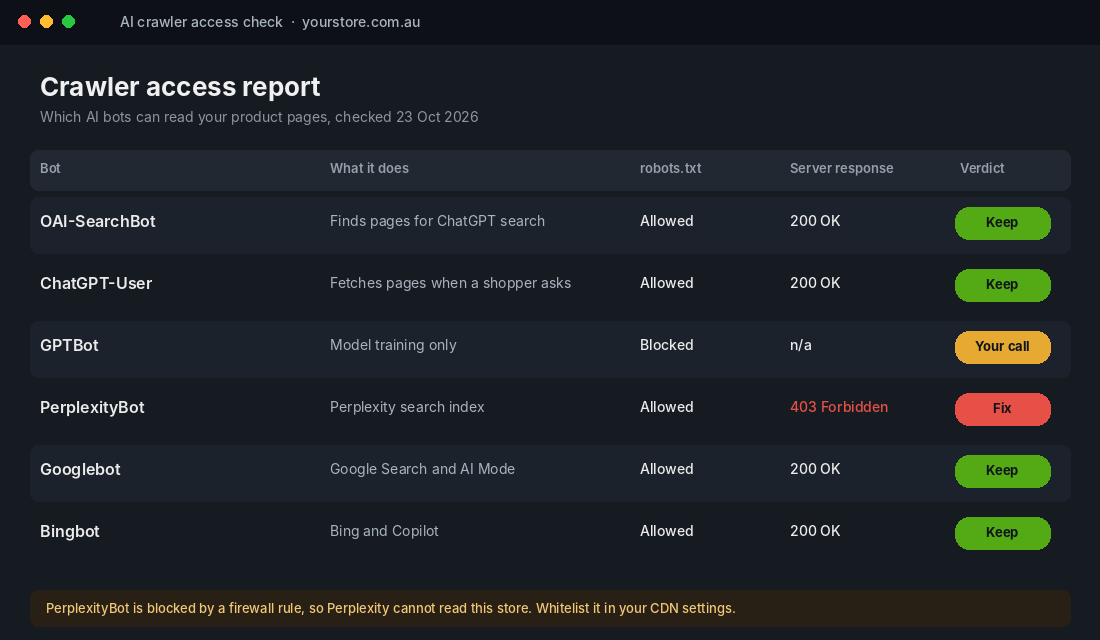
Most Shopify stores do not block OAI-SearchBot in robots.txt. The failure usually sits one layer up: a security app, a CDN rule or a firewall that returns a 403 to bots it does not recognise. You can look fine on paper and still be invisible.
Run this check:
- Visit yourstore.com.au/robots.txt and confirm there is no rule blocking OAI-SearchBot or ChatGPT-User.
- Check your security app or CDN settings for bot-blocking features. Cloudflare, for example, announced that from 15 September 2026 it blocks training and agent bots by default on new domains with ads, while search bots stay allowed (cited by scandiweb). Confirm what your own settings do.
- Ask your developer, or your host, to pull server logs and confirm OAI-SearchBot receives a 200 response on product pages.
- Decide on GPTBot separately. It handles model training, not search. Blocking it does not remove you from ChatGPT search results, so that choice is about content policy, not visibility.
Changes to robots.txt take about 24 hours to take effect, according to OpenAI as cited by Kleio. Do not panic if nothing moves overnight.
What Decides Who Appears (and Who Gets Skipped)
OpenAI is specific about merchant-level signals. It ranks merchants by availability, price and quality, and by whether they are the maker or primary seller of the item. It also says price matters more when the shopper states a budget, and that it works to highlight the lowest-priced option it is aware of on detail pages.
That gives you four levers:
- Availability. Out-of-stock products lose to in-stock ones. Keep inventory accurate and do not leave dead listings active.
- Price. If you sell a branded product other stores also sell, the cheapest in-stock offer can win. If you are the maker, you have a structural advantage because you are the primary seller. Lean into it with “made by us” language in the description.
- Quality. Reviews are listed among the signals that improve ranking. OpenAI also says it does not verify reviews. Make sure your reviews are publicly visible on the product page, not hidden behind a widget that does not render for crawlers.
- Freshness. OpenAI notes that price updates may lag behind merchant changes. Avoid daily price games. Stable, accurate pricing beats clever pricing.
A caution on all of this: OpenAI’s page says “not all available products will necessarily be shown.” Nobody outside OpenAI can promise you a position. Anyone selling you a guaranteed ChatGPT ranking is guessing.
Independent and niche brands have a better shot than you might think. Shopify’s 2026 Holiday Retail Report, again via CFOtech, found 80% of shoppers who almost always use AI chose independent or niche brands more often, versus 40% of those who do not use AI. The research notes this is a link, not proof of cause, but it points the right way for owner-operated Aussie brands.
Real Examples: Who Is Getting This Right
Kouboo (Shopify store, scandiweb case study). Scandiweb reports that Kouboo reached 53% visibility in ChatGPT and Perplexity for high-intent prompts and appeared in the top three recommendations alongside Amazon and Wayfair. This is the agency’s own case study, so treat it as self-reported. The reported driver was data work: richer attributes, clearer product copy and technical access.
Shopify merchants in Catalog. Shopify says its checkout powers 14% of US ecommerce and that every sale from agentic storefronts runs through Shopify Checkout. The practical takeaway is that a store with clean Catalog data, a fast checkout and accurate stock is positioned to take whatever AI traffic arrives, in whichever channel arrives first.
What the data says about shopper behaviour. Kleio reports that OpenAI measured 52% product accuracy on multi-constraint queries for Shopping versus 37% for ChatGPT Search. Product.ai found a repeatable factual conflict in 86% of buying questions. In other words, AI still gets product facts wrong. The brands that publish clear, specific, consistent facts give the model less room to guess.
We have not seen a published case study from an Australian Shopify brand with measured ChatGPT revenue. If someone claims one, ask for the analytics screenshot.
Step 4: Track What Arrives (Free Tool Setup)
You cannot manage what you cannot see. Here is a free setup using GA4 and Shopify’s own reporting.
Tool: GA4 AI referrals report
- In GA4, go to Reports, Acquisition, Traffic acquisition.
- Change the primary dimension to Session source / medium.
- Click the search bar and filter with a regex such as chatgpt|perplexity|copilot|gemini|claude.
- Save it as a custom report titled “AI referrals” so you can open it weekly.
- Add a secondary dimension of Landing page to see which products AI sends buyers to.
- In Shopify, open the Agentic page Performance panel and note sessions, orders and top queries.
Compare AI sessions to your store average conversion rate each week. If you have not cleaned up your base tracking, fix that first with our GA4 setup guide, because AI referrals frequently land in the wrong bucket when tracking is broken.
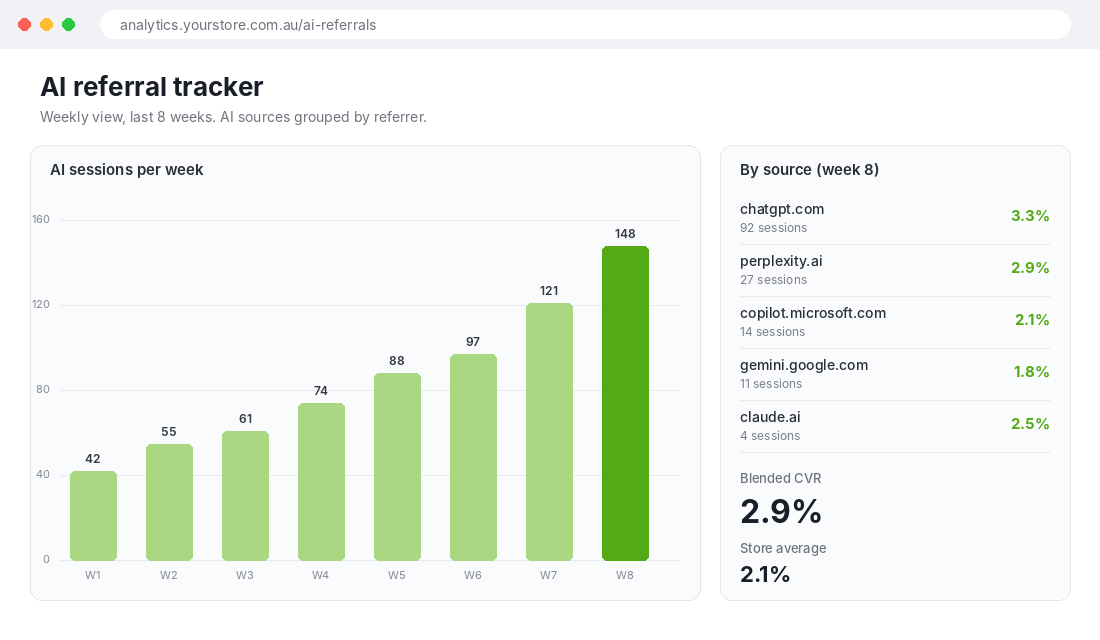
Keep a realistic expectation. For most Australian stores, AI referral sessions will be a small slice of traffic right now, so the sample is small and conversion rates will swing week to week. Look at the 8-week trend, not any one week.
The One-Hour ChatGPT Shopping Audit (Copy This)
Use this checklist to run the whole process in one sitting. Work through it top to bottom:
| Check | Where | Pass mark | Done |
|---|---|---|---|
| Agentic page exists in admin | admin.shopify.com/agentic | Page loads, ChatGPT channel on | [ ] |
| Terms accepted | Agentic admin | Supplemental terms accepted | [ ] |
| Products visible to AI | Agentic, Products panel | 90% or more of active products | [ ] |
| No hero products unlisted | Products, Status | Zero unlisted bestsellers | [ ] |
| Titles clean | Top 20 products | Brand, type, attribute, under 70 characters | [ ] |
| Descriptions factual | Top 20 products | 80 to 150 words with specs and use cases | [ ] |
| Variants named properly | Product options | No “Option 1” or “Default” | [ ] |
| Images | Top 20 products | Four or more per product | [ ] |
| Reviews visible | Product page, view source | Review text present in page HTML | [ ] |
| robots.txt | /robots.txt | OAI-SearchBot not blocked | [ ] |
| Server response | Host or CDN logs | OAI-SearchBot gets 200 on product pages | [ ] |
| GA4 AI report saved | GA4 Reports | Custom report exists, checked weekly | [ ] |
| Baseline recorded | Spreadsheet | Sessions, orders, top queries noted with date | [ ] |
Repeat the audit monthly and after any theme change, app install or security setting change. Those are the three events that most often break access without anyone noticing.
Mistakes We See Aussie Stores Make
- Chasing Instant Checkout. It is not the opportunity it was, and it was a US feature. Put the effort into product data instead.
- Blocking every AI bot out of fear. Blocking training is a legitimate choice. Blocking search crawlers removes you from the shortlist.
- Writing for keywords, not questions. ChatGPT answers conversational queries. Write descriptions that read like a good in-store salesperson’s answer.
- Ignoring maker status. If you make the product, say so clearly. OpenAI lists it as a ranking input.
- Expecting a flood. AI traffic is a modest and fast-growing slice for most stores. Treat it as a channel to build, not a switch to flip.
The Compound Effect: One Data Layer, Three Channels
Here is the part most owners miss. The work that gets you into ChatGPT Shopping is the same work that improves your Google rankings, your Google AI Overviews presence, your on-site conversion rate and your paid ads landing pages. Clean titles, factual descriptions, complete options, strong reviews, accurate stock and open crawler access are not an AI project. They are good ecommerce.
That is why we treat this under Platform, not as a standalone tactic. Your data layer feeds every channel. Fix it once and every channel that reads it gets better, including the ones that do not exist yet. Our agentic commerce guide goes deeper on where this is heading, and our view has not changed: prepare the foundations, do not bet the store on any single AI channel.
Inside eCommerce Circle, product data and platform readiness are core pillars we work on with every member. If you want to see exactly where your store is being capped, take the free More Orders Scorecard. It takes two minutes, costs nothing and shows you which of the 10 P’s to fix first.