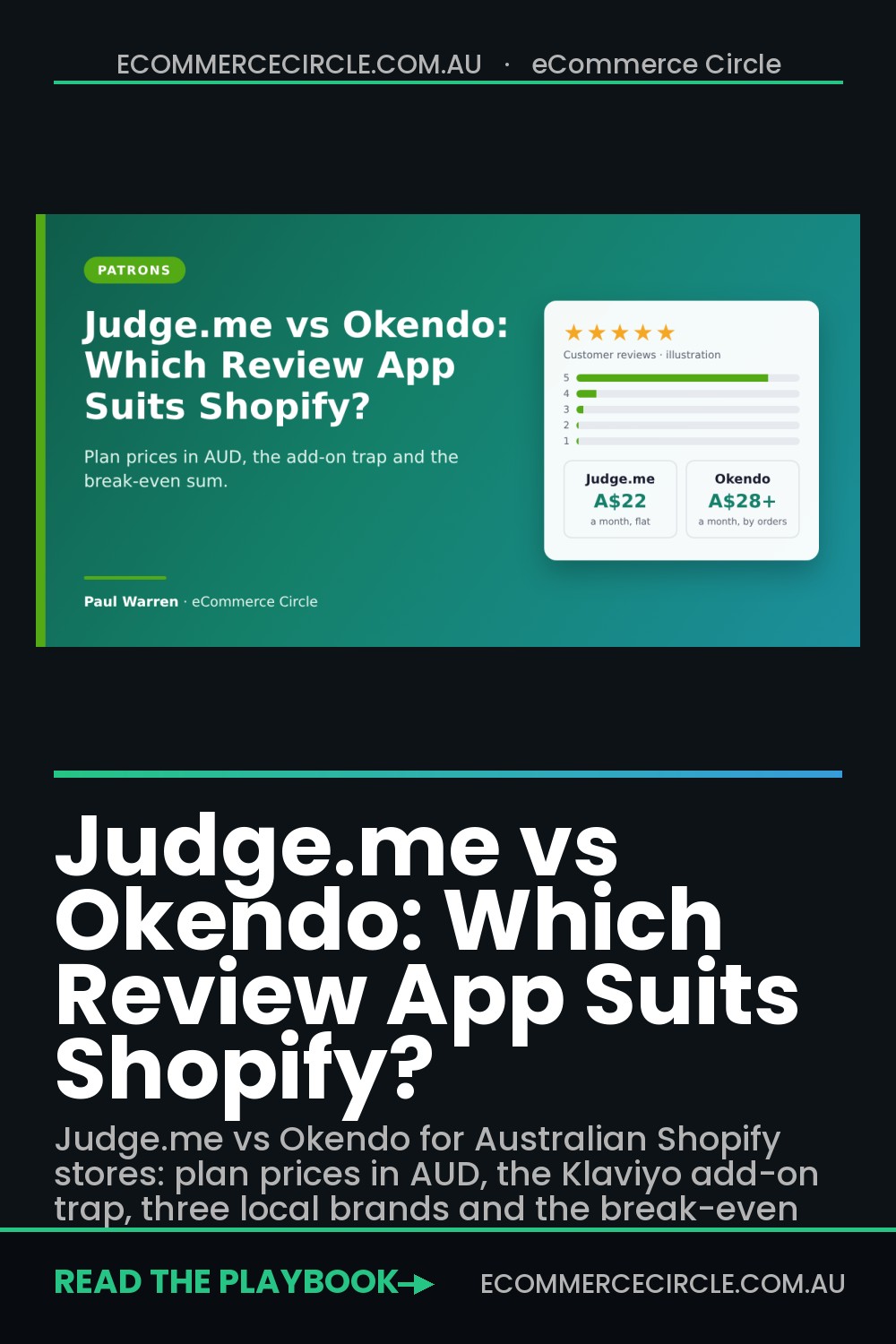
Judge.me suits most Shopify stores under about 1,500 orders a month, because it costs US$15 a month at any size and covers the features that lift conversion. Okendo suits brands past that point that want reviews, loyalty, quizzes and surveys on one customer record, and have someone on the team who will use the extra data. That is the short answer to Judge.me vs Okendo.
Most store owners choose a review app the wrong way. They install whatever a Facebook group recommended, leave the default email on, and never look at it again. Or they sit through a slick demo, sign up for the premium tool, and use a fraction of it.
The stores that get this right ask one question first: what will we do with the reviews once we have them? If the answer is “show stars on the product page and in Google”, the cheaper tool wins. If the answer is “segment customers by what they told us and feed that into email, ads and loyalty”, the dearer one can pay for itself many times over. This guide gives you both price lists in Australian dollars, the add-on trap nobody mentions, three Australian brands that chose differently, and the break-even sum to run before you commit. Prices were checked on 18 November 2026.
Judge.me vs Okendo: The Short Answer
The figures below come from the Judge.me listing and Okendo listing on the Shopify App Store, plus Judge.me’s pricing page and Okendo’s pricing page. Both apps bill in US dollars through your Shopify invoice. Conversions here use A$1 = US$0.674, the rate on 17 November 2026.
| Judge.me | Okendo | |
|---|---|---|
| What you pay for | A flat monthly fee | A plan sized by monthly orders |
| Free plan | Yes, unlimited reviews and review requests | Yes, up to 50 orders a month |
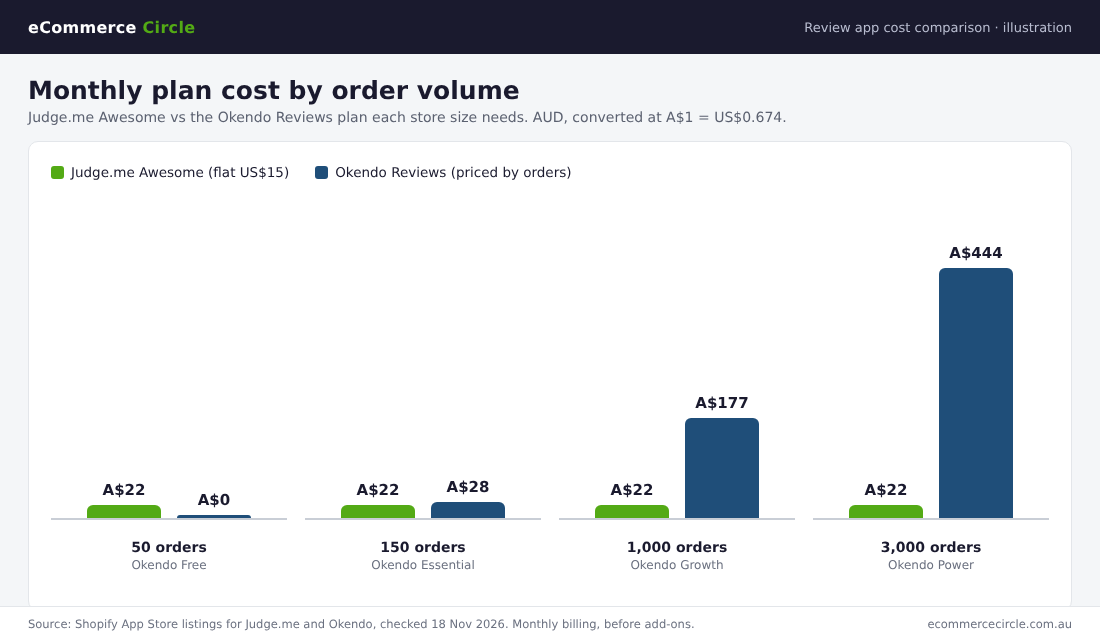
| Paid plans | One: Awesome at US$15 a month (about A$22) | Essential US$19 (about A$28), Growth US$119 (about A$177), Power US$299 (about A$444) |
| Order limits | None | 200, 1,500 and 3,500 orders a month, then custom pricing |
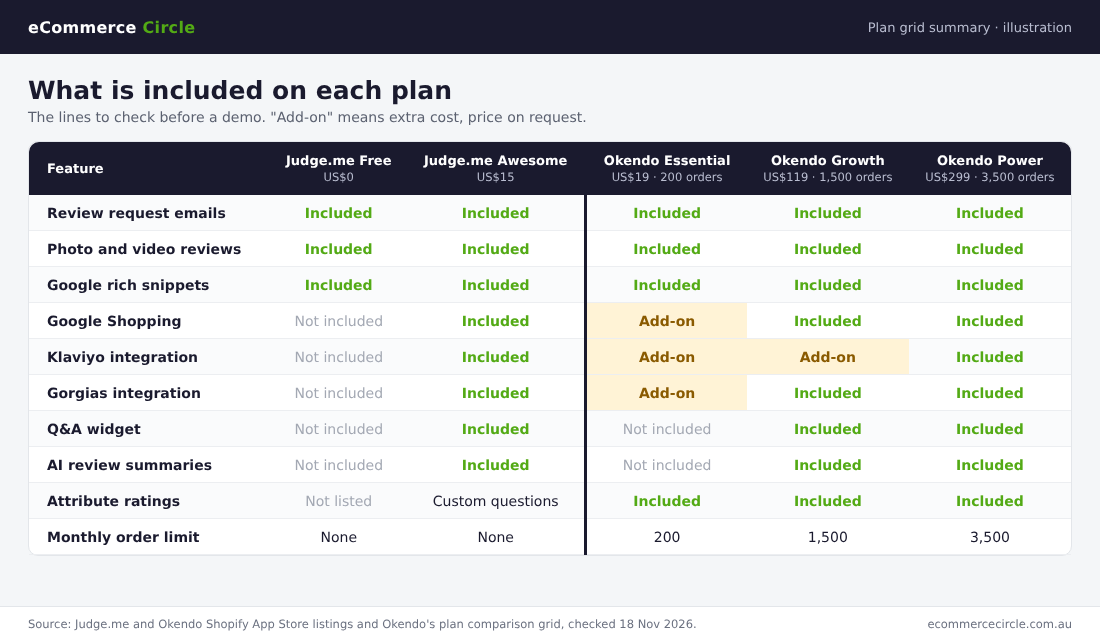
| Klaviyo integration | Included on the Awesome plan | Add-on on Essential and Growth, included from Power |
| Other products | Reviews only, plus a newer email tool | Loyalty, referrals, quizzes and surveys sold alongside |
| Shopify App Store rating | 5.0 from 50,298 reviews | 4.8 from 1,454 reviews |
| Best fit | Stores that want strong reviews at a fixed cost | Brands that want customer data across several tools |
One local note. Okendo was founded in Sydney, and its App Store listing still gives a George Street address. If you want support in your own time zone, that counts for something. Judge.me answers that with 24/7 chat on every plan, the free one included, and says its team replies in an average of 40 seconds.
What Each App Costs in Australian Dollars
This is where the two apps differ most, so take it slowly.
Judge.me has two plans and no meter. Forever Free gives you unlimited product and store reviews, unlimited photo and video reviews, the review widget and star rating badge, carousels, Google rich snippets and a reviews importer. Awesome costs US$15 a month and adds automatic reminders, coupons and referrals, Q&A, Google Shopping, Meta and TikTok Shop sync, AI replies and summaries, full widget and email customisation, and more than 130 integrations including Klaviyo and Gorgias. Judge.me’s pricing page puts it plainly: US$15 a month “is the most you can ever pay us”.
Okendo prices by order volume. The free plan covers 50 orders a month. Essential covers 200 orders for US$19. Growth covers 1,500 orders for US$119. Power covers 3,500 orders for US$299. Above 3,500 orders the plans are called Advanced and Enterprise, and you need to talk to sales for a price.
Here is what that looks like over a year at four store sizes. These are plan prices on monthly billing, converted at the rate above, before any add-ons.
| Monthly orders | Judge.me Awesome, per year | Okendo plan needed | Okendo, per year | Gap per year |
|---|---|---|---|---|
| 50 | A$267 (or A$0 on Free) | Free | A$0 | Nil on the free plans |
| 150 | A$267 | Essential | A$338 | A$71 |
| 1,000 | A$267 | Growth | A$2,119 | A$1,852 |
| 3,000 | A$267 | Power | A$5,323 | A$5,056 |
Okendo takes about 8% to 11% off if you pay yearly: US$204 for Essential, US$1,308 for Growth and US$3,288 for Power. That brings Growth down to about A$1,941 a year and Power to about A$4,878.
Two more things to know about Okendo’s meter:
- Hitting the limit. Okendo’s pricing FAQ says that when you pass your plan’s order limit you can upgrade or buy a one-off “top up” of order credits to keep sending review requests. Black Friday and Christmas are the months this bites, so check your peak month, not your average.
- Contracts. Okendo says single products such as Reviews can be bought month to month or on an annual term, while its bundles and full platform plans normally need an annual term. Read which one you are signing.
If you want the wider cost picture for your store, the same thinking applies to email. Our Klaviyo pricing guide shows how a per-contact meter creeps up the same way a per-order meter does.
The Add-On Trap: Check Integrations Before the Demo
Plan names tell you little. The plan grid tells you everything, and most founders never scroll that far.
On Okendo’s own comparison grid, checked on 18 November 2026, several things that sound standard are marked “Add-on” on the lower plans:
- Klaviyo is an add-on on Essential and Growth. It is included from Power, the US$299 plan.
- Google Shopping, Meta Shops, Gorgias and Zendesk are add-ons on Essential and included from Growth.
- AI review summaries and the Q&A widget start on Growth.
- Targeted review campaigns and advanced report filters start on Power.
- Google Seller Ratings is an add-on on every plan below Enterprise.
Okendo does not publish add-on prices, so ask for them in writing. To be fair, Okendo sends its own review request emails on every plan, and Omnisend and Shopify Flow are included from Essential. You do not need Klaviyo connected to collect reviews. You need it if you want review data inside your Klaviyo flows and segments, which is the main reason growing brands buy Okendo in the first place.
Judge.me has a trap of its own, and it sits on the free plan. Automatic reminders, coupons, Klaviyo and every other integration, Google Shopping and full customisation are all on the paid plan. A store on Forever Free that sends one request and no reminder is leaving reviews uncollected to save A$22 a month. That is a poor trade.
My take: if you choose Judge.me, pay for Awesome from day one. If you choose Okendo and you run Klaviyo, price it as Power or get the add-on quote before you compare anything else.
Features That Change Your Conversion Rate
Both apps do the basics well: automated requests, photo and video reviews, star ratings, carousels, rich snippets for Google, imports from other apps, and moderation. The gaps are in four places.
1. Attribute ratings
Okendo lets a reviewer rate specific things, such as fit, comfort or flavour, and tell you about themselves, such as skin type or height. Shoppers can then find reviews from people like them. Attribute ratings are on every Okendo plan, Essential included. Judge.me offers custom questions on its review form as well. Okendo’s pitch is that its attributes go further: shoppers can filter reviews by them, and the answers feed its surveys, quizzes and loyalty tools.
This matters most for products where “will it suit me?” is the real objection: apparel, skincare, supplements, mattresses, food and drink.
2. Display and design control
Judge.me gives you 16 widgets on Awesome and CSS access. They look clean and standard. Okendo sells finer styling control, and its App Store listing puts an advanced CSS editor on the Power plan. If your brand team is fussy about the product page, ask both vendors to show you a live store in your category.
3. Google and social reach
Judge.me includes Google rich snippets on the free plan and Google Shopping on Awesome. Okendo includes rich snippets on every plan and Google Shopping from Growth. Okendo’s FAQ says it is an official Google partner for Google Shopping and Google Seller Ratings. Both sync reviews to the Shop app.
4. What sits around the reviews
Judge.me does reviews and has recently added an email tool. Okendo sells loyalty (US$699 a month on its Power tier), quizzes (US$299), referrals (US$129) and surveys (US$129) on the same customer record, with bundles at about 30% less than buying each one separately. If you already pay for a loyalty app and a quiz app, add those bills up before you call Okendo expensive.
For how to use reviews once you have them, see our guide to social proof for Shopify, which covers the nine types and where each one goes on the page.
Three Australian Brands, Three Different Answers
These are vendor case studies, so read them as each company’s best foot forward. They are still useful, because they show why a brand picked one tool over the other.
Zea: built on Judge.me from the first sale
Zea sells kunzea oil products, made from a native Tasmanian plant most Australians had never heard of when Hayden Brass and his family started the brand in 2016. In Judge.me’s case study, Brass says: “We had a brand-new product and no credibility at first. We needed to show people it really worked.”
Zea has used Judge.me since launch. The case study reports more than 13,000 five-star verified reviews and a 4.9-star average, with review requests sent in the founder’s name. Those reviews are reused in product pages, welcome emails, cart recovery emails, ads and landing pages. Zea is now stocked in Woolworths and TerryWhite Chemmart and is expanding into the UK and Southeast Asia. A US$15 app did that job.
Naked Harvest: moved from Judge.me to Okendo
Naked Harvest, the Australian supplements brand, went the other way. According to Okendo’s case study (as listed on CaseStudies.com), the brand outgrew its Judge.me setup and wanted more from reviews and customer photos in a category where people think before they buy.
After a five-day migration, Naked Harvest ran review requests through Okendo’s Klaviyo integration with 10% off the next order as the reward. Okendo reports a 290% increase in reviews captured, with up to 150 reviews a day. Note what did the work there: the Klaviyo flow and the incentive, not the logo on the widget.
Sans Drinks: chose Okendo for attributes
Sans Drinks is an Australian online store for non-alcoholic drinks. Okendo’s case study says the brand moved from Yotpo and collected more than 3,300 reviews in under a year, six times what it had before.
The interesting part is the attribute. Sans asks each reviewer whether they are a drinker or a non-drinker. Marketing director Cat Rodie explains that a regular drinker wants to hear from other drinkers, and someone cutting back wants to hear from non-drinkers. That one question makes every review more useful to the next shopper.
The Break-Even Sum: When Okendo Pays for Itself
Here is the sum I would run before paying the gap. It is an illustration with round numbers, so swap in your own.
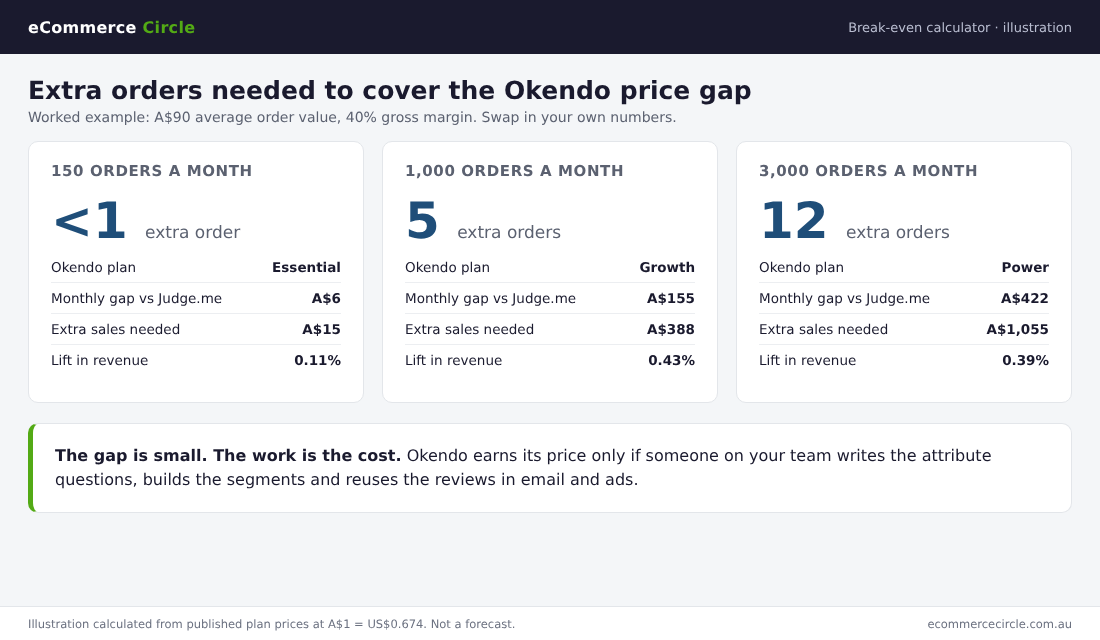
Take a store doing 1,000 orders a month at an A$90 average order value. That is A$90,000 a month in sales. Okendo Growth costs about A$177 a month and Judge.me Awesome about A$22, so the gap is A$155 a month.
At a 40% gross margin, you need about A$388 in extra sales to earn back A$155. That is five extra orders a month, or a 0.43% lift in revenue.
| Store size | Okendo plan | Monthly gap vs Judge.me | Extra sales needed at 40% margin | Extra orders at A$90 |
|---|---|---|---|---|
| 150 orders | Essential | A$6 | A$15 | Less than 1 |
| 1,000 orders | Growth | A$155 | A$388 | 5 |
| 3,000 orders | Power | A$422 | A$1,055 | 12 |
Twelve extra orders on 3,000 is a small ask. So the price gap is rarely the real question. The real question is whether your team will do the work that produces the lift: write the attribute questions, build the segments, put review content into flows and ads. If nobody owns that, you will pay Power prices for Judge.me results.
There is a second cost that is easy to miss, which is the reward. A 10% coupon on the next order can cost more than either app once you are collecting hundreds of reviews a month. Budget for it in your margin, and check how it stacks with your other offers.
Why Review Volume Matters More Than the App
Whichever app you choose, the goal is the same: more genuine reviews, on more products, seen in more places. The numbers behind that are strong.
- 84% of Australians say they trust online product reviews, and 29% trust them more than they did two years ago, according to an Omnisend survey of 1,089 Australian shoppers run by Cint in January 2026.
- 92% of shoppers say reviews and real customer photos are essential before they buy, in a Bazaarvoice survey of more than 2,500 shoppers across the US, EMEA and APAC, reported by eCommerceNews Australia in January 2026.
- 62% would trust an AI shopping tool more if it showed reviews and photos from verified buyers, from the same Bazaarvoice survey. As more shoppers start their search in an AI tool, verified reviews are part of what earns that trust.
- 56% of Australians who left a review did so because the seller asked, in a Capterra survey of 258 Australian online shoppers. It is an older study, from 2020, but the lesson holds: you have to ask.
- 76% preferred a product with 4 stars and 15 written reviews over one with 5 stars and 5 reviews, in the same Capterra survey. Volume beats a perfect score.
Read those last two together. The request email and the reminder do most of the work. Both apps send them. Only one of them charges you more as you send more.
Review Rules in Australia: What the ACCC Expects
Review apps make it easy to do things the Australian Consumer Law does not allow. The ACCC’s guidance on online reviews is short and worth ten minutes of your time. Three points apply to every Shopify store:
- Rewards must apply to every review. The ACCC says incentives must be offered whether the review is positive or negative, and must be clearly disclosed so shoppers know the review was incentivised. A “10% off for a 5-star review” email breaks that rule.
- Do not hide genuine negative reviews. Suppressing, editing or removing genuine negative reviews can mislead consumers. Use moderation for spam and abuse, not for 2-star feedback you dislike.
- No reviews from staff, family or people you paid, unless the connection is stated. And never write your own.
The penalties are real. The Federal Court ordered HealthEngine to pay A$2.9 million, in part for not publishing negative patient reviews and editing others, and Service Seeking to pay A$600,000 for letting businesses draft their own reviews. This is general information, not legal advice.
In practice: set auto-publish for all verified reviews, reply to the bad ones in public, and keep your incentive wording neutral. Our negative review guide covers what to write when a 1-star lands.
How to Set Up Judge.me on Shopify in an Afternoon
Judge.me is the right starting point for most stores, so here are the steps. Allow two to three hours.
- Install and choose Awesome. Add Judge.me from the Shopify App Store. The paid plan has a 15-day free trial.
- Add the widgets in your theme editor. Put the star rating badge under the product title and the review widget lower on the product page. Add star ratings to collection pages too. Judge.me’s support team will place widgets for you if your theme is fiddly.
- Import what you already have. Bring in reviews from your old app or a spreadsheet using the importer. Do this before you switch the old app off.
- Set the request timing. Send the request after delivery, not after fulfilment, and leave enough time for the customer to use the product. As a rule of thumb, 7 days after delivery suits consumables and apparel, and 14 to 21 days suits skincare, supplements and anything that needs time to show a result.
- Turn on the automatic reminder. One reminder about a week after the first request. This is the single setting most stores miss.
- Request reviews from past orders. Use the past orders tool to ask customers from the last 60 to 90 days. This fills empty product pages fast.
- Connect Klaviyo and Google. Turn on the Klaviyo integration so review events can trigger flows, and enable rich snippets and the Google Shopping feed.
- Add a neutral reward. If you offer a coupon, offer it for any review and say so in the email.
Okendo’s setup follows the same order, with two extra jobs: write your attribute questions before launch, and book the onboarding specialist that comes with Growth and above. For the emails that sit around the review request, see our list of the nine Klaviyo flows every store needs.
Switching between the two
Both vendors say they will help you migrate. Naked Harvest moved from Judge.me to Okendo in five days. Before you switch either way:
- Export every review, with photos, as a file you keep.
- Install the new widgets on an unpublished copy of your theme and check them on mobile.
- Check your star ratings still show in Google after the change. Use Google’s Rich Results Test on two or three product pages.
- Turn off the old app’s request emails the same day the new ones start, so customers are not asked twice.
The Review App Decision Checklist
Answer these seven questions. Count your answers.
| Question | Points to Judge.me | Points to Okendo |
|---|---|---|
| Monthly orders in your peak month | Under 1,500 | Over 1,500 |
| Do shoppers ask “will it suit me?” | Rarely | Often (fit, skin type, taste, size) |
| Who will work on reviews each week? | Nobody, it needs to run itself | A named marketer or retention lead |
| Do you want loyalty, quizzes or surveys from one vendor? | No, or you are happy with your current apps | Yes |
| Do you need Klaviyo data on a small budget? | Yes | No, Power or the add-on is affordable |
| How do you feel about a bill that grows with orders? | You want a fixed cost | You accept it for more capability |
| How fussy is your brand about widget design? | Clean and standard is fine | It must match the brand exactly |
Five or more answers in one column and you have your app. A split result means start on Judge.me Awesome, set a calendar reminder for six months, and review again when you pass 1,500 orders a month or hire a retention marketer. Moving later costs you about a week. Overpaying for a year costs more.
How the Pieces Work Together
A review app is a small line on your app bill and a big part of your store. Here is how the pieces connect.
The request and reminder bring in volume. Volume fills your product pages, which lifts conversion on traffic you already pay for. Stars in Google lift click-through on your organic and Shopping listings. The best reviews become ad creative and email content, which lowers what you spend on producing both. Customer photos feed your UGC library. And the low-star reviews tell you what to fix in the product, the page copy or the delivery promise.
None of that depends on which logo sits under the widget. It depends on asking every customer, at the right time, with one reminder, and then using what they tell you. Pick the app that fits your order volume and your team, set it up properly this week, and put your energy into the using.
Judge.me vs Okendo FAQ
Is Judge.me really free?
Yes. The Forever Free plan includes unlimited reviews, unlimited review requests, photo and video reviews and Google rich snippets. Automatic reminders, coupons, integrations and Google Shopping need the Awesome plan at US$15 a month, about A$22.
How much does Okendo cost in Australia?
Okendo bills in US dollars. Its free plan covers 50 orders a month. Essential is US$19 (about A$28) for 200 orders, Growth is US$119 (about A$177) for 1,500 orders and Power is US$299 (about A$444) for 3,500 orders. Above that, pricing is by quote.
Is Okendo an Australian company?
Okendo was founded in Sydney and its Shopify App Store listing gives a Sydney address. It now serves more than 18,000 Shopify brands worldwide, by its own count.
Does Okendo work with Klaviyo?
Yes, but check the plan. On Okendo’s plan grid the Klaviyo integration is an add-on on Essential and Growth and included from Power. Judge.me includes Klaviyo on its US$15 plan.
Can I move my reviews from Judge.me to Okendo, or back?
Yes. Both apps import reviews with photos, and both vendors offer migration help. Export a copy of your reviews first and test the new widgets on an unpublished theme.
Which is better for a new Shopify store?
Judge.me. A new store needs reviews on the page quickly at a fixed cost. Okendo’s free plan stops at 50 orders a month, and its strengths show up once you have the order volume and the team to use them.
Can I offer a discount in return for a review in Australia?
Yes, if the reward is offered for any review, positive or negative, and you clearly disclose that reviews were incentivised. That is the ACCC’s guidance.
Inside eCommerce Circle, Patrons is one of the 10 P’s we work through with every member, and reviews are usually the first retention system we tidy up. If you want to see exactly where your store is being held back, take the free More Orders Scorecard. It takes two minutes and shows you which of the 10 P’s to fix first. Or if you would like help building your review system, start in Connect.